



Writer: Laura Bernheim


Editor: Britain Simons


Reviewer: Lillian Castro

Key Takeaways
Our experts compared today’s top free VPS trials and money-back guarantees to help you find the best way to test premium hosting risk-free.
A virtual private server (VPS) strikes a balance between shared hosting and a dedicated server, offering both computational power and control while being affordable and convenient. However, the price of a premium VPS plan can be intimidating for site owners who are eager to try out a new project or application.
While a free VPS might not match the power of those from leading hosts, it can still offer a valuable introduction to server setup and management. VPS is more resource-intensive and expensive for hosts to maintain. Take advantage of the best free trial and guarantee introductory offers to find the best host for your business.
Beware of free hosting and scams. Companies often collect your contact information to sell to others, all while “processing your request.” Avoid scams by exploring our curated list of top VPS hosting deals, ranging from entirely free options to free trials and plans featuring generous money-back guarantees.
-
Navigate This Article:
Top 3: Free VPS Trials and Risk-Free Picks
Free VPS hosting sounds appealing, but the reality is that most free options come with serious trade-offs — limited resources, zero support, sketchy providers, and hidden risks to your personal data. Before you commit to a free plan, consider that some of the best VPS hosts in the business offer free trials or money-back guarantees that let you test premium hosting at no risk.
Here are our top picks of hosts we’d highly recommend for a free or risk-free VPS:
- Hostinger ($5.84/mo): Top-Rated VPS With a 30-Day Refund >>
- IONOS ($2.00/mo): Low-Cost VPS With a 30-Day Guarantee >>
- Kamatera ($4.00/mo): 30-Day Free Trial >>
For a deeper look at refund fine print, see our guide to the best VPS free trials and money-back guarantees.
1. Hostinger ($5.84/mo): Top-Rated VPS With a 30-Day Refund
Affordable doesn’t mean underpowered — Hostinger’s VPS plans come equipped with NVMe SSD storage, AMD EPYC processors, full root access, and Kodee AI to manage your server without needing the command line.
Every plan is backed by a 30-day money-back guarantee, so you can run a real project on it before you commit.
Hostinger.com

Monthly Starting Price $5.84
- Best overall value: The most complete AI-managed KVM VPS at this price
- AMD EPYC processors, NVMe SSD, and 1 Gbps network
- Kodee AI manages your server — no command line needed
- One-click deployment of 100+ apps including Docker and n8n
- Free weekly backups, DDoS protection, and full root access
- Get started on Hostinger now.


Sead Fadilpasic

| Setup Time | Disk Space | CPU | RAM |
|---|---|---|---|
| 6 minutes | 50 GB – 400 GB NVMe | 1 – 8 cores | 4 GB – 32 GB |
Hostinger VPS: Top Features
Management & Apps: Unmanaged, with no managed tier. Kodee AI handles server tasks from the web terminal, and you get full root access. More than 100 one-click apps are included, among them Docker, n8n, Claude Code, Codex CLI, and OpenClaw, plus a Docker Compose manager.
Hostinger has grown into one of the most popular hosting providers in the world, serving millions of customers across 150+ countries with a reputation for combining performance and value.
Site owners can deploy over 100 apps in one click, including Docker, WordPress, and n8n, and choose from multiple Linux distributions. With data centers across North America, Europe, Asia, and beyond, you can host close to your audience for consistently fast load times.
Hostinger VPS: Pros and Cons
This is built for first-time VPS users who want a full-powered server without needing the command line.
Pros
- Excellent uptime and consistent performance
- Beginner-friendly with no command line required
- Global data center coverage for low latency
- Free weekly backups
- 100+ one-click apps
- Kodee AI included at no extra cost
Cons
- No Windows OS option
- Support quality can vary depending on plan tier
Hostinger is the safest place to start if you want a real VPS without paying for a mistake. Deploy your stack, let Kodee handle the command line, and if it’s not the right fit, you have 30 days to walk away.
Trial Terms: 30-day money-back guarantee on VPS plans; no free trial; plans are billed upfront for the full term.
Read the full Hostinger Review >>
2. IONOS ($2.00/mo): Low-Cost VPS With a 30-Day Guarantee
IONOS‘s VPS hosting plan is as close to free as it gets. IONOS lets aspiring site developers try VPS hosting risk-free for 30 days thanks to a 30-day money-back guarantee. If you choose to stick around, its entry plan is one of the lowest-priced VPS options in the industry.
IONOS.com

Monthly Starting Price $2.00
- Lowest entry price for VPS: no hidden fees, unlimited traffic, from $2.00/mo
- NVMe SSD storage, 1 Gbps connection, and 99.99% uptime
- Full root access with Linux or Windows — deploy in minutes
- Personal consultant assigned to every account after signup
- 30-day money-back guarantee and award-winning support
- Get started on IONOS now.


Christina Lewis

| Setup Time | Disk Space | CPU | RAM |
|---|---|---|---|
| 6 minutes | 60 GB – 720 GB NVMe | 1 – 12 cores | 2 GB – 24 GB |
IONOS VPS: Top Features
- 1-click installs for n8n, Vaultwarden, Immich, and Open WebUI
- VM cloning, load balancers, and private networking
- Personal consultant plus 24/7 expert support
- Unlimited traffic on a 1 Gbps connection
Management & Apps: Unmanaged, with a personal consultant and 24/7 support, and full root access. 1-click installs cover n8n, OpenClaw, Vaultwarden, Immich, Open WebUI, and Hermes Agent.
Low cost doesn’t mean low quality. IONOS virtual servers come equipped with SSD storage, an above-average 99.99% uptime guarantee, root access, and unlimited traffic. The longtime web hosting veterans at IONOS offer a wide range of best-in-class services to more than 6.5 million customers worldwide.
Site owners can customize their virtual environments by adding the Plesk control panel (Plesk Obsidian is an $8/mo add-on for VPS) or ordering a Windows VPS+ plan (separate service). You have the flexibility to scale up to 12 vCores and 24 GB RAM, and can select a secure data center location in the U.S., U.K., or Europe.
IONOS VPS: Pros and Cons
This is built for budget-conscious developers who want a low-cost VPS with unlimited traffic and a person to call when something breaks.
Pros
- Multiple OS choices
- Plesk Obsidian control panel ($8/mo add-on)
- Fast NVMe storage
- DDoS protection
- 1 IPv6 and IPv4 address included
- Personal consultant on every account
Cons
- No free domain name
- Customer complaints about upselling
IONOS is the lowest-risk way to try a full VPS for very little money. Spin up a server, test your app under real traffic, and if it doesn’t fit, the 30-day guarantee covers you.
Trial Terms: 30-day money-back guarantee on VPS+ plans; no free trial; the entry rate is an introductory price for the first three months on a one-year term.
3. Kamatera ($4.00/mo): 30-Day Free Trial
Although we tend to be wary of free website hosting plans at the shared hosting level, low-cost cloud VPS hosting doesn’t get much better than Kamatera.
If you’re ready to switch to cloud hosting, you can take advantage of free VPS hosting on a virtual server tailored to your exact needs. Kamatera offers a wide array of choices for operating systems, control panels, storage setups, and other resources. It’s also the only host in our top three with a true free trial.
Kamatera.com

Monthly Starting Price $4.00
- Best for developers: Fully customizable cloud VPS — choose your exact CPU, RAM, and storage
- Intel Xeon Platinum/Cascade Lake CPUs & NVMe
- 20+ global data centers across 4 continents, with 99.95% uptime
- Hourly or monthly billing, only pay for what you use
- 30-day free trial with $100 credit — no commitment needed
- Get started on Kamatera now.


Surajdeep Singh

| Setup Time | Disk Space | CPU | RAM |
|---|---|---|---|
| 5 minutes | 20 GB – 4 TB NVMe | 1 – 32 cores | 1 GB – 128 GB |
Kamatera VPS: Top Features
- 30-day free trial on one custom server
- 100+ OS images and a pre-configured app marketplace
- Hourly billing by the minute after the trial
- 20+ data centers on four continents
Management & Apps: Unmanaged by default, with managed services available for OS and system configuration, and full root access. The pre-configured app marketplace includes Docker, Kubernetes, Dokku, Node.js, and NGINX.
With Kamatera’s VPS hosting solutions, you’ll have nearly limitless resources at your disposal. Website owners get essentially $100 worth of configurations for their free VPS plan, with no commitment and no hidden fees, though you’ll need a valid physical credit card to start.
Even better, each free VPS server hosting environment comes equipped with modern solid-state drives, a simple management console, and 24/7 support. Add in the capacity for free Windows VPS hosting, and Kamatera is full of rare finds when it comes to free web hosting.
Kamatera VPS: Pros and Cons
This is built for developers who want to test an exact server configuration before paying anything. Kamatera operates in data centers spread across four continents and promises an above-average 99.95% uptime guarantee.
Pros
- Pre-configured app marketplace
- Intel Xeon Platinum CPUs
- 24/7 technical support
- Customizable server configurations
- 1TB of free trial traffic
- Flexible pricing (monthly or hourly)
Cons
- Extra cost for daily backups
- Self-service can be difficult to navigate
Kamatera is the closest thing to a genuinely free VPS from a top-tier host. Build the server you’d actually run, test it for 30 days, and cancel before the trial ends if it’s not the right fit. After the trial, hourly billing means you only pay for what you run.
Trial Terms: 30-day free trial for new customers; one server configured up to $100; 1,000 GB of free traffic; valid physical credit card required, not charged if you stay within the limits; charges begin if you don’t cancel before the trial ends.
Read the full Kamatera Review >>
Next Batch: More Free Trials and Money-Back Guarantees
These hosts round out the risk-free options. The first two let you start for free or close to it, and the rest let you pay small, test for real, and get your money back if the server isn’t right.
- Cloudways ($6.60/mo): 3-Day Free Trial, No Credit Card >>
- InterServer ($3.00/mo): First Month for a Penny >>
- DreamHost ($10.00/mo): Managed VPS With a 30-Day Guarantee >>
- Bluehost ($4.69/mo): 30-Day Refund With Root Access >>
- GoDaddy ($8.99/mo): 30-Day Refund on Annual Plans >>
- Hostwinds ($4.99/mo): 72-Hour Prorated Refund >>
- AccuWebHosting ($6.33/mo): Free Windows VPS for a Month >>
4. Cloudways ($6.60/mo): 3-Day Free Trial, No Credit Card
Cloudways is unlike any other hosts on this list. How? Well, it offers VPS hosting with managed services. In other words, you receive all the customization and control of a virtual private server with the hands-off server management of shared hosting.
Cloudways.com

Monthly Starting Price $6.60
- Customizable alternative to traditional VPS hosting
- Choice of 5 popular cloud providers
- Scale server resources up and down as needed
- 24/7 monitoring and auto-healing servers
- Get 40% OFF first 4 months with promo code HOSTINGADVICE
- Get started on Cloudways now.


Jack Wallen

| Setup Time | Disk Space | CPU | RAM |
|---|---|---|---|
| 8 minutes | 25 GB SSD – 3840 GB SSD | 1 – 32 cores | 1 GB – 192 GB |
Cloudways VPS: Top Features
- 3-day free trial with no credit card
- Choice of five cloud providers, including AWS and Google Cloud
- Auto-healing servers and Cloudflare Enterprise CDN
- Free SSL, malware protection, and WordPress migration
Management & Apps: Fully managed: server updates, security, and monitoring are handled for you. There’s no root access. 1-click installs cover WordPress, WooCommerce, WordPress Multisite, Magento, Laravel, and custom PHP apps.
Its managed services aren’t the only feature that makes Cloudways unique. The hosting provider also allows users to choose from a selection of five major public cloud platforms, including AWS, DigitalOcean, and Google Cloud, to host their virtual servers.
If you want to spend less time managing technical aspects and more time building, Cloudways can be a great hosting partner for your needs. You don’t have to make your choice to commit right away, however.
Cloudways offers a hassle-free, 3-day trial without any strings attached. You won’t need to provide credit card details to start, though you may have to contact their verification team to complete your registration.
Cloudways VPS: Pros and Cons
This is built for site owners who want managed cloud hosting and a quick, card-free test drive before they commit.
Pros
- Strong CPU core performance
- Choice of major cloud provider
- Managed hosting services
- 24/7 support and monitoring
- No long-term contract
Cons
- Pricey compared to other hosts
- No domain registration available
- No root access on any plan
Three days isn’t long, so go in with a plan: migrate a copy of your site, run your checks, and decide. If you want someone else handling the server, Cloudways is one of the easiest managed options to try. Past the trial, auto-healing servers and 24/7 monitoring are what you’re really paying for.
Trial Terms: 3-day free trial; no credit card required; trial servers run on DigitalOcean; you may need to complete account verification before the trial starts.
Read the full Cloudways Review >>
5. InterServer ($3.00/mo): First Month for a Penny
InterServer doesn’t offer a free trial or money-back guarantee on VPS hosting, but it has the next best thing: a first month that costs a penny with our coupon code. After that, billing runs month to month, and you can cancel from your account at any time.
Its slice-based model keeps scaling simple. Each slice adds 2 GB RAM, 40 GB SSD, and 2 TB of transfer, and managed support kicks in automatically at 8 slices.
InterServer.net

Monthly Starting Price $3.00
- $0.01 for the first month using code HOSTINGADV
- Price locked for life, no renewal increases, ever
- Scale instantly — each slice adds 2 GB RAM, 40 GB SSD, and 2 TB transfer
- Linux or Windows with full root access, choice of data center
- 24/7 in-house support from an independently owned provider since 1999
- Get started on InterServer now.
Sead Fadilpasic
| Setup Time | Disk Space | CPU | RAM |
|---|---|---|---|
| 6 minutes | 40 GB – 1,280 GB SSD | 1 – 16 CPUs | 2 – 64 GB |
InterServer VPS: Top Features
- First month for a penny with code HOSTINGADV
- Slice-based scaling from 1 to 32 slices
- 75-template App Marketplace, including Docker and n8n
- Managed support included at 8+ slices
Management & Apps: Self-managed below 8 slices, with managed support included automatically at 8 or more, and root access at any size. The 75-template App Marketplace includes WordPress, Docker, n8n, OpenClaw, Supabase, Nextcloud, and Minecraft, plus Webuzo.
Root access comes standard at any size, and the App Marketplace deploys WordPress, Docker, n8n, Nextcloud, and Minecraft servers in a few clicks. Data centers are limited to New York City, Dallas, and Los Angeles.
InterServer VPS: Pros and Cons
This is built for developers who want a low-cost Linux server to test for a month without a long-term commitment.
Pros
- Near-free first month
- Month-to-month billing, cancel anytime
- Root access at every size
- Managed support included at 8 slices
- 75 one-click templates
Cons
- No trial or money-back guarantee
- U.S. data centers only
- Control panels and remote backups cost extra
InterServer is the cheapest way to run a real VPS for a month. There’s no refund window, so treat the penny month as your trial and cancel before the second bill if it’s not working. Stay, and the price lock means your rate never goes up at renewal.
Trial Terms: No free trial or money-back guarantee; first month $.01 with code HOSTINGADV; billed month to month; cancel anytime from your account.
Read the full InterServer Review >>
6. DreamHost ($10.00/mo): Managed VPS With a 30-Day Guarantee
DreamHost’s Managed VPS is the only fully managed plan here with a 30-day money-back guarantee. You get dedicated resources, automatic OS, security, PHP, and WordPress patching, daily backups, and a dedicated Customer Success Manager watching your server.
There’s one trade-off: Managed VPS doesn’t include root access. If you need it, DreamHost points you to its unmanaged VPS instead, which doesn’t carry the same refund guarantee.
DreamHost.com

Monthly Starting Price $10.00
- 30-Day Money-Back Guarantee (managed only)
- Auto-Boost RAM Protection for traffic spikes
- Proactive AI-powered error log analysis and alerts
- Unmetered bandwidth, no transfer caps or per-GB fees
- Unlimited domain email and free SSL
- Get started on DreamHost now.
Christina Lewis
| Setup Time | Disk Space | CPU | RAM |
|---|---|---|---|
| 6 minutes | 60 GB – 360 GB NVMe | 2 – 6 cores | 2 GB – 12 GB |
DreamHost VPS: Top Features
- 30-day money-back guarantee
- Auto-Boost RAM protection during traffic spikes
- Daily backups and automatic security patching
- Dedicated Customer Success Manager
Management & Apps: Fully managed, with automatic OS, security, PHP, and WordPress patching. There’s no root access, and you choose Apache or Nginx. DreamHost’s unmanaged VPS adds root access and one-click apps like n8n, GitLab, Supabase, and Nextcloud, but it has no refund guarantee.
Unmetered bandwidth, unlimited websites, and a free domain for the first year round out the plan, and AI-powered error log analysis flags problems before they take your site down.
DreamHost VPS: Pros and Cons
This is built for WordPress site owners and businesses who want a managed server and a full month to decide.
Pros
- 30-day money-back guarantee
- Fully managed with automatic patching
- Daily automated backups
- Auto-Boost RAM protection
- Unmetered bandwidth
Cons
- No root access
- Promo pricing requires a 3-year term
- Unmanaged VPS has no refund guarantee
DreamHost is the pick if you want to test a hands-off VPS with a real refund window. Just stick with the Managed VPS product, since the unmanaged line doesn’t carry the same guarantee.
Trial Terms: 30-day money-back guarantee on Managed VPS; no free trial; unmanaged VPS plans aren’t covered (monthly plans get no credit on cancellation, and yearly plans get prorated credit only).
Read the full DreamHost Review >>
7. Bluehost ($4.69/mo): 30-Day Refund With Root Access
Bluehost backs its VPS hosting with a 30-day money-back guarantee, and it’s one of the few hosts that keeps full root access on both its self-managed and managed plans. Every server runs on AMD EPYC processors, DDR5 RAM, and NVMe storage.
Claude Code comes pre-installed on every plan, and a 1-click library deploys n8n, WordPress, LAMP and LEMP stacks, and GitLab.
Bluehost.com

Monthly Starting Price $4.69
- Seamless migration from any Bluehost shared hosting plan
- Full root access (SSH), plus multi-server management
- AMD EPYC processors, DDR5 RAM, NVMe storage
- 1 dedicated IP address included (more available on request)
- cPanel available and WHM with root access
- Get started on Bluehost now.
Sead Fadilpasic
| Setup Time | Disk Space | CPU | RAM |
|---|---|---|---|
| 6 minutes | 50 GB – 450 GB NVMe | 1 – 8 cores | 2 GB – 16 GB DDR5 |
Bluehost VPS: Top Features
- 30-day money-back guarantee on VPS plans
- Root access on self-managed and managed tiers
- Claude Code pre-installed on every server
- 99.99% uptime guarantee
Management & Apps: Self-managed by default, with a Managed VPS tier available and root access on both. Claude Code comes pre-installed, and 1-click deploys cover n8n, OpenClaw, Hermes Agent, WordPress, LAMP/LEMP stacks, and GitLab.
Bandwidth is unmetered under a fair-use policy, and each plan includes DDoS protection and a dedicated IP. cPanel isn’t included on self-managed plans, but you can add it.
Bluehost VPS: Pros and Cons
This is built for developers who want a modern VPS with AI tooling built in and a full month to test it.
Pros
- 30-day money-back guarantee
- Root access on every tier
- AMD EPYC and DDR5 RAM
- Claude Code pre-installed
- Dedicated IP included
Cons
- cPanel costs extra on self-managed
- Promo pricing requires a 24-month term
- Domains and add-ons excluded from refunds
Bluehost gives you more to test in 30 days than most hosts: current hardware, root access, and AI tools ready on first login. If it isn’t the right fit, the guarantee covers your hosting fees.
Trial Terms: 30-day money-back guarantee on VPS hosting fees; no free trial; domain registrations and add-ons aren’t refundable.
Read the full Bluehost Review >>
8. GoDaddy ($8.99/mo): 30-Day Refund on Annual Plans
GoDaddy’s VPS plans fall under its standard hosting refund terms: 30 days on annual plans, or 48 hours on monthly ones. Every plan includes NVMe storage, unlimited traffic, root access, and 7 days of automated snapshot backups.
Read the fine print before you add anything else to the order. Refunds are voided once a service like a migration or expert support has been performed.
GoDaddy.com

Monthly Starting Price $8.99
- Designed to handle traffic with Linux or Windows
- Admin access via root access, cPanel, and Plesk
- High-speed NVMe and 99.9% uptime guarantee
- Unlimited bandwidth and lots of processing power
- Fully or semi-managed servers with optional control panel
- Get started on GoDaddy now.


Lynn Cadet

| Setup Time | Disk Space | CPU | RAM |
|---|---|---|---|
| 7 minutes | 40 GB – 200 GB NVMe | 1 – 4 cores | 2 – 16 GB |
GoDaddy VPS: Top Features
- 30-day refund on annual plans
- Unlimited traffic on NVMe storage
- 7 days of automated snapshot backups
- cPanel or Plesk available
Management & Apps: Self-managed by default, with Managed VPS sold as a separate product, and root access. One-click installs cover WordPress, Magento, OpenCart, and PrestaShop, with optional cPanel or Plesk and one-click OpenClaw.
Data centers span North America, Europe, and Asia-Pacific, and every plan includes DDoS protection, a dedicated IP, and a free SSL certificate for the first year.
GoDaddy VPS: Pros and Cons
This is built for site owners who already use GoDaddy for domains and want to test a VPS under the same account.
Pros
- 30-day refund on annual plans
- Unlimited traffic
- Automated snapshot backups
- 24/7 support
- One-click WordPress and eCommerce apps
Cons
- 48-hour refund on monthly plans
- Promo requires a 3-year term
- Refunds voided once services are performed
- No free trial
GoDaddy’s refund window depends on your billing term, so choose annual billing if you want a real test window. Keep migrations and paid support off the order until you’ve decided. After that, the draw is keeping your domains, SSL, and server under one account.
Trial Terms: 30-day refund on annual plans and 48 hours on monthly plans; voided once a service is performed, such as a migration or expert support; no free trial.
Read the full GoDaddy Review >>
9. Hostwinds ($4.99/mo): 72-Hour Prorated Refund
Hostwinds has the shortest refund window here: a prorated refund if you cancel through the client portal and request it within 72 hours of payment. In return, you get 10 unmanaged Linux plan sizes, root access on both managed and unmanaged tiers, and 99.9999% uptime.
Every server includes real-time monitoring that opens a support ticket automatically when something goes wrong, plus snapshots, custom ISOs, and an enterprise firewall.
Hostwinds.com

Monthly Starting Price $4.99
- Managed or unmanaged, in Windows or Linux
- Cloud hosting with hourly or monthly billing
- Instant upgrades without downtime
- FREE around-the-clock monitoring
- Automatic nightly backups available
- Get started on Hostwinds now.
Jack Wallen
| Setup Time | Disk Space | CPU | RAM |
|---|---|---|---|
| 6 minutes | 30 GB SSD – 750 GB SSD | 1 – 16 cores | 1 – 96 GB |
Hostwinds VPS: Top Features
- 72-hour prorated refund
- 10 unmanaged plan sizes with root access
- Monitoring that opens support tickets automatically
- 99.9999% uptime and an enterprise firewall
Management & Apps: Unmanaged or managed, with root access on both. There’s no app library to lean on: custom ISOs let you install your own OS image, and snapshots can deploy copies of a configured server.
Plans scale from 1 CPU and 1 GB RAM to 16 CPUs and 96 GB RAM, and instant upgrades move you to the next tier as traffic grows.
Hostwinds VPS: Pros and Cons
This is built for developers who want a high-uptime server and a quick sanity check before committing.
Pros
- Root access on every tier
- Instant scalability with 10 plan sizes
- Auto-ticketing monitoring
- Custom ISOs
Cons
- 72-hour refund window
- Must cancel before requesting a refund
- Hourly-billed products aren’t refundable
- Crypto payments aren’t refundable
Seventy-two hours is enough to deploy, benchmark, and confirm your stack works, but not much more. Have your test plan ready before you pay. Once you’re in, the 99.9999% uptime and monitoring (that opens tickets for you) are the reason to stay.
Trial Terms: Prorated refund within 72 hours of payment; cancel through the client portal first; not refundable: software licenses, domains, SSL, IP addresses, hourly-billed products, and crypto payments.
Read the full Hostwinds Review >>
10. AccuWebHosting ($6.33/mo): Free Windows VPS for a Month
AccuWebHosting is the Windows pick on this list. Its VPS plans run licensed Windows Server, not Linux, and it’s one of the few hosts that lets you try one for free: a full month on a 1 GB Windows VPS with Remote Desktop access and no credit card required.
Every paid Windows plan is covered by a 7-day money-back guarantee, and a separate 180-day Windows Eval plan covers development, demos, and short-term projects on a larger server. If your stack is Linux-based, the hosts above are a better fit.
AccuWebHosting.com

Monthly Starting Price $6.33
- Performant Windows VPS with SSDs available
- Choice of Windows Server 2019, 2022, or 2025
- 99.9% uptime guarantee with Windows VPS
- Full admin access and FREE backups
- Option to get a FREE VPS for 1 month!
- Get started on Accuwebhosting now.
Jack Wallen
| Setup Time | Disk Space | CPU | RAM |
|---|---|---|---|
| 6 minutes | 40 GB – 200 GB SSD | 1 – 4 cores | 1 GB – 16 GB |
AccuWebHosting Windows VPS: Top Features
- Free Windows VPS for a month, no credit card
- Licensed Windows Server included on every plan
- Full RDP access from Windows, macOS, Linux, iOS, and Android
- Free SolidCP, MSSQL Express, and MailEnable
Management & Apps: Unmanaged, with 24/7 infrastructure support included and fully managed support available as an add-on. You get full administrator access over RDP. The Windows stack covers IIS, ASP.NET, .NET Core, PHP, MySQL, and phpMyAdmin. SolidCP, MSSQL Express, and MailEnable are free, and Plesk and SmarterMail are add-ons.
The Windows stack is ready to run. IIS, ASP.NET, and .NET Core are supported out of the box, SQL Server Express and MailEnable are free, and the SolidCP control panel costs nothing extra. Every plan gets guaranteed dedicated resources on at least a 1 Gbps port, across 17 data center locations in North America, Europe, Africa, and Asia-Pacific.
It’s also a common choice for traders running MT4 and MT5, and support is fast. AccuWebHosting lists average live chat response times of under seven minutes, with 23+ years in the hosting business behind it.
AccuWebHosting Windows VPS: Pros and Cons
This is built for developers, traders, and small businesses that need a real Windows server to test before paying.
Pros
- Free Windows month, no credit card
- Licensed Windows Server included
- 180-day Windows Eval plan
- Free SolidCP and MSSQL Express
- 17 global data centers
Cons
- Windows only (no Linux option here)
- Free plan limited to 1 GB RAM
- Short 7-day refund window on paid plans
- More than 2 RDP users requires paid licenses
If your project runs on Windows, this is the easiest free start on the list. Use the free month to confirm your app runs, then move to a standard plan or the Eval plan depending on how long you need.
Trial Terms: 1 month free Windows VPS, then $14.97/mo; no credit card required; 1 GB RAM, 1 vCPU, 40 GB SSD, 500 GB bandwidth; Windows Server 2019; 7-day money-back guarantee on paid Windows plans.
Read the full AccuWeb Review >>
Alternate Free VPS Hosting: Proceed With Caution
If you’ve weighed the options and still want a genuinely free VPS, there are a handful of legitimate options available. Just know what you’re signing up for: limited resources, no customer support, and varying degrees of reliability.
We’ve vetted the options below to filter out the worst offenders, but free hosting will always carry more risk than a paid plan. Both come from major clouds, which makes them safer than most free hosts. Neither is built for a site or app you actually care about:
Oracle Cloud Always Free: Biggest Free Server, Biggest Catches >>
Google Cloud Free Tier: A Tiny Server With Strict Rules >>
Editor’s note: This section used to feature x10Hosting, GigaRocket, and InstaFree. When we rechecked them for this update, x10Hosting’s free plan turned out to be shared hosting rather than a VPS, GigaRocket had dropped its free VPS entirely, and we couldn’t confirm InstaFree still offers one. Even Oracle halved its free server in June 2026 without an announcement. Free plans change or disappear without warning, which is why the hosts above, with trials and guarantees you can count on, are the safer bet.
Oracle Cloud Always Free: Biggest Free Server, Biggest Catches
Oracle’s Always Free tier is the most generous permanent free VPS from a major cloud: an Arm server with up to 2 OCPUs and 12 GB of RAM, two small AMD instances, and 200 GB of block storage. On paper, that beats many paid entry plans.
In practice, it’s a gamble. Oracle halved the Arm allowance in June 2026 with no announcement, free Arm capacity is often unavailable in busy regions, and your home region is locked at signup. You’ll need a credit card to verify your account, and support is limited to documentation and community forums.
Pros
- Up to 2 OCPUs and 12 GB RAM free
- 200 GB block storage
- No expiration date
Cons
- Limits cut without notice in 2026
- Arm capacity often unavailable
- Home region locked at signup
- Credit card required to verify
- No customer support
- Steep learning curve
Free Terms: Arm allowance of 1,500 OCPU hours and 9,000 GB hours per month (2 OCPUs and 12 GB RAM), plus two AMD micro instances and 200 GB of block storage; credit card verification required; usage beyond the limits is billed on pay-as-you-go accounts.
Management & Apps: Unmanaged, with no support. You install, secure, and patch everything yourself.
Google Cloud Free Tier: A Tiny Server With Strict Rules
Google Cloud’s always-free tier includes one e2-micro VM per month with 2 shared vCPUs, 1 GB of RAM, and a 30 GB standard disk. New accounts also get a separate $300 credit for 90 days to test bigger servers.
It’s small, and the rules are strict. The free VM only counts in three U.S. regions, outbound data is capped at 1 GB a month from North America, and extras like a static IP can add charges. Set a budget alert before you deploy anything.
Pros
- Permanent free e2-micro VM
- $300 credit for 90 days
- Google-grade infrastructure
Cons
- Only 1 GB RAM
- Free only in three U.S. regions
- 1 GB monthly egress cap
- Extras like static IPs trigger charges
- No support on the free tier
Free Terms: One e2-micro instance per month in us-west1, us-central1, or us-east1; 30 GB standard persistent disk; 1 GB of monthly egress from North America; separate $300 credit valid for 90 days; usage outside these limits is billed.
Management & Apps: Unmanaged, with no support on the free tier. You install, secure, and patch everything yourself.
If either of these sounds like more hassle than it’s worth, that’s the point. A trial from Kamatera or a 30-day guarantee from Hostinger or IONOS costs little or nothing and comes with a real server and real support.
Free VPS vs. Free Trial vs. Money-Back Guarantee
Most “free VPS” offers fall into one of three buckets, and they work very differently:
- Always-free cloud tiers
- Time-limited free trials
- Money-back guarantees
Always-free tiers never expire, but they’re capped hard. You get a small server, no support, and a bill the moment you cross a limit. There’s always a catch with “free.”
Free trials are more legitimate and give you a full-size server for a set window. Kamatera’s runs 30 days with a card on file, and Cloudways’ runs three days without one.
Money-back guarantees are the most common. You pay upfront and request a refund within the window, usually 30 days, if the host isn’t right. If you get your money back, it’s basically free.
How free VPS offers compare
| Always-Free Tier | Free Trial | Money-Back Guarantee | |
|---|---|---|---|
| Upfront cost | $0 | $0 | Full plan price |
| How long it lasts | Ongoing, with monthly limits | 3 to 30 days | 72 hours to 30 days |
| Credit card | Usually required to verify | Varies by host | Required at purchase |
| Server size | 1 GB RAM (Google) to 12 GB (Oracle) | Full-size configurations | Full plan resources |
| Support | Documentation and forums only | Full support | Full support |
| When it ends | Billed only for overages | Converts to paid unless canceled | Keep the plan or get a refund |
| Best for | Learning and hobby projects | Testing a real build | Committing with a safety net |
| On this list | Oracle Cloud, Google Cloud | Kamatera, Cloudways, AccuWebHosting (Windows) | Hostinger, IONOS, DreamHost, Bluehost, GoDaddy, Hostwinds, AccuWebHosting |
Managed or unmanaged VPS:
Most free and trial VPS plans are unmanaged. You get root access and handle updates, security, and backups yourself. Managed plans hand those jobs to the host, usually in exchange for less control. If you’re new to servers, a managed host like Cloudways, or a VPS with built-in help like Hostinger’s Kodee AI or IONOS’s personal consultant, will save you the most time long after the trial ends.
One-click apps: Instead of building a stack by hand, you can deploy WordPress, Docker, n8n, and other tools in a few clicks on most hosts here.
Management and one-click apps by host
| Host | Management | Root Access | One-Click Apps |
|---|---|---|---|
| Hostinger | Unmanaged, with Kodee AI | Yes | 100+, including Docker, n8n, and Claude Code |
| IONOS | Unmanaged, with a personal consultant | Yes | n8n, OpenClaw, Vaultwarden, Immich |
| Kamatera | Unmanaged; managed services available | Yes | Docker, Kubernetes, Dokku, Node.js |
| Cloudways | Fully managed | No | WordPress, WooCommerce, Magento, Laravel |
| InterServer | Self-managed; managed at 8+ slices | Yes | 75 templates, including WordPress and n8n |
| DreamHost (Managed VPS) | Fully managed | No | WordPress-focused tooling |
| Bluehost | Self-managed or managed | Yes, on both | Claude Code, n8n, WordPress, GitLab |
| GoDaddy | Self-managed; Managed VPS separate | Yes | WordPress, Magento, OpenCart, PrestaShop |
| Hostwinds | Unmanaged or managed | Yes, on both | Custom ISOs instead of an app library |
| AccuWebHosting (Windows) | Unmanaged; managed add-on | Full administrator access | IIS, ASP.NET, MSSQL Express, MailEnable, SolidCP |
| Oracle Cloud | Unmanaged, no support | Yes | Install your own |
| Google Cloud | Unmanaged, no support | Yes | Install your own |
Comparison Table: Free VPS Options
Every option on this list lets you try a VPS for little or nothing, so compare the details that decide whether you’ll actually pay: how long you get, whether a card is required, and what happens when the free period ends.
- Developers testing a specific build should start with the length and credit card columns.
- Business owners should look hardest at the refund terms, since that decides what you get back if the server isn’t right.
| Host | Starting Price | Free Offer | Length | Credit Card Required? | When It Ends |
|---|---|---|---|---|---|
| Hostinger | $5.84/mo | Money-back guarantee | 30 days | Yes | Plan continues |
| IONOS | $2.00/mo | Money-back guarantee | 30 days | Yes | Plan continues after 3-month intro rate |
| Kamatera | $4.00/mo | Free trial | 30 days | Yes (physical card) | Billed for usage unless canceled |
| Cloudways | $6.60/mo | Free trial | 3 days | No | Add payment to keep your server |
| InterServer | $3.00/mo | $.01 first month | 1 month | Yes | Month to month; cancel anytime |
| DreamHost | $10.00/mo | Money-back guarantee | 30 days | Yes | Plan continues |
| Bluehost | $4.69/mo | Money-back guarantee | 30 days | Yes | Plan continues |
| GoDaddy | $8.99/mo | Refund window | 30 days annual / 48 hours monthly | Yes | Plan continues |
| Hostwinds | $4.99/mo | Prorated refund | 72 hours | Yes | Plan continues |
| AccuWebHosting (Windows) | $6.33/mo | Free Windows VPS + money-back guarantee | 1 month free; 7-day refund on paid plans | No (free month) | Moves to $14.97/mo unless canceled |
| Oracle Cloud | Free | Always-free tier | Ongoing | Yes (verification) | Overages billed on paid accounts |
| Google Cloud | Free | Always-free tier + $300 credit | Ongoing (credit: 90 days) | Billing account required | Overages billed |
For most readers, Hostinger, IONOS, and Kamatera are the strongest places to start. Hostinger and IONOS give you 30 days to test a paid plan with a refund if it’s wrong, and Kamatera lets you build a custom server and run it free for a month.
If you don’t want to hand over a card, Cloudways’ trial starts without one, and AccuWebHosting’s free month does too if you need Windows. The always-free cloud tiers work for learning and side projects, but their limits, lack of support, and surprise charges make them a poor home for anything that matters.
Free VPS Features Compared
A free period is only useful if the server is worth keeping. Each host here has something the others don’t, from Kamatera’s fully custom trial builds to Hostinger’s Kodee AI and InterServer’s penny first month.
Match the host to how you’ll use the free window.
- Developers testing a build should look at configurability and one-click apps
- Business owners should focus on managed support and what’s included after the trial
| Host | Standout Feature | Top Specs | Also Worth Getting Excited About |
|---|---|---|---|
| Hostinger | Kodee AI assistant that manages your server without the command line | Up to 8 vCPUs, 32 GB RAM, and 400 GB NVMe; AMD EPYC; 1 Gbps network | 100+ one-click apps, including Docker, n8n, and Claude Code; free weekly backups; free domain for a year |
| IONOS | Personal consultant assigned to every account | Up to 12 vCores, 24 GB RAM, and 720 GB NVMe; unlimited traffic on 1 Gbps; Dell servers | 1-click n8n, Vaultwarden, and Immich; VM cloning and load balancers; 31 data centers on renewable energy |
| Kamatera | 30-day free trial on a fully custom server | Up to 32 cores, 128 GB RAM, and 4 TB NVMe; per-minute hourly billing; 20+ data centers | 100+ OS images; four server types; Docker, Kubernetes, and Node.js marketplace apps |
| Cloudways | Card-free trial on managed cloud hosting | 25 GB to 3,840 GB SSD and up to 192 GB RAM across five cloud providers | Auto-healing servers; Cloudflare Enterprise CDN; free SSL and malware protection |
| InterServer | Penny first month on slice-based scaling | Up to 16 cores, 64 GB RAM, 1,280 GB SSD, and 64 TB transfer; 10 Gbps port | 75-template App Marketplace; managed support at 8 slices; root access at any size |
| DreamHost | Fully managed VPS with a 30-day refund | Up to 6 cores, 12 GB RAM, and 360 GB NVMe; unmetered bandwidth | Auto-Boost RAM protection; AI error log analysis; dedicated Customer Success Manager |
| Bluehost | Claude Code pre-installed on every VPS | Up to 8 vCPUs, 16 GB DDR5 RAM, and 450 GB NVMe; AMD EPYC | Root access on managed plans; 1-click n8n and GitLab; 99.99% uptime guarantee |
| GoDaddy | VPS under the same account as your domains | Up to 4 vCPUs, 16 GB RAM, and 200 GB NVMe; unlimited traffic | 7 days of automated snapshots; cPanel or Plesk; free SSL for the first year |
| Hostwinds | Monitoring that opens support tickets for you | Up to 16 CPUs, 96 GB RAM, and 750 GB SSD; 1 Gbps ports; 99.9999% uptime | 10 plan sizes; custom ISOs; snapshots and load balancers |
| AccuWebHosting (Windows) | Free month of licensed Windows VPS | Up to 4 vCPUs, 16 GB RAM, and 200 GB SSD; 1 Gbps port; Hyper-V or Xen | 180-day Windows Eval plan; free SolidCP, MSSQL Express, and MailEnable; 17 locations |
| Oracle Cloud | Largest permanent free VM from a major cloud | 2 OCPUs and 12 GB RAM (Arm); 200 GB block storage | Two AMD micro VMs; no expiration date |
| Google Cloud | Permanent free e2-micro plus a $300 credit | 2 shared vCPUs, 1 GB RAM, and a 30 GB disk | Google infrastructure; 90-day credit for bigger tests |
If you want the most to work with during a free period, Kamatera and Hostinger stand out. Kamatera lets you build any configuration and run it for 30 days, and Hostinger’s Kodee AI and one-click apps get a server doing real work in minutes.
IONOS is the pick for hands-on help, with a personal consultant on every account. If you’d rather not manage a server at all, Cloudways and DreamHost are the easiest fully managed options to try.
FAQ: Free VPS Hosting
Still deciding whether free is worth it? Here’s everything else worth knowing, grouped by what you’re actually trying to figure out.
The Basics: Free VPS Hosting
- What Is VPS Hosting? >>
- How Does Free VPS Hosting Work? >>
- Is Free VPS Hosting Safe? >>
- Who Should (and Shouldn’t) Use Free VPS Hosting? >>
- What Are the Disadvantages of Free VPS Hosting? >>
Trials, Guarantees & Choosing a Host
- What’s the Difference Between a Free Trial and a Money-Back Guarantee? >>
- Which Host Has the Best Free VPS Trial? >>
- Can I Get a Free VPS From AWS, Google, or Oracle? >>
- What Happens When My Free Trial Ends? >>
- How Do I Choose the Best Free VPS Option? >>
Utilize Your VPS Hosting
- Should I Choose a Managed or Unmanaged Free VPS? >>
- Which Free VPS Options Include One-Click Apps? >>
- Can I Host a Website on a Free VPS? >>
- Is Port 25 Open on a Free VPS? >>
- How Do I Optimize a Virtual Private Server? >>
The Basics: Free VPS Hosting
Before you sign up for anything free, it helps to know what a VPS actually is, how free offers work, and where the risks hide. Start here if you’re new to virtual servers or just weighing whether free is worth it.

What Is VPS Hosting?
VPS hosting, also called a virtual private server, is a type of web hosting setup where you get isolated resources on a shared physical server. A special software called a hypervisor splits the server up into slices, giving you isolated resources that offer more power and security than shared hosting.
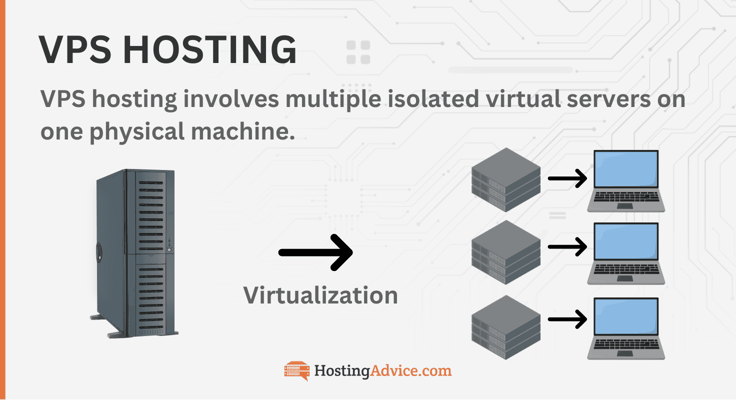
One of the greatest perks of a VPS is its cost. You get power comparable to a dedicated server, but for roughly $3 to $20 a month.
How Does Free VPS Hosting Work?
Every website needs a web host to provide online space for visitors to access the site. When you buy a hosting plan, you’re essentially paying a service to store your site’s files on its servers and make them accessible to internet users.
Free VPS hosting means the web host gives you a virtual private server at no cost. But here’s the catch: the free allowance covers only a small, fixed amount of bandwidth, storage, and CPU. Most free VPS hosting plans have limits on these resources, so if you exceed them, upgrading to a paid plan becomes necessary.
Free VPS offers come in three forms, and the one you pick decides what you’re risking:
- Money-back guarantees (Hostinger, IONOS, Bluehost, DreamHost): missing the refund window
- Always-free tiers (Oracle Cloud, Google Cloud): charges if you go past the limits
- Free trials (Kamatera, Cloudways): auto-billing if you forget to cancel
Hosts give away servers to win customers, not out of charity. That’s why reputable ones ask for a card or offer a refund window, while free VPS sites with no paid business behind them tend to make their money from your data instead.
Is Free VPS Hosting Safe?
It depends on who’s giving it away. Free tiers from major clouds like Oracle and Google are legitimate, though limited. Smaller free VPS sites are riskier: some collect your personal data, some oversell tiny servers, and some disappear with little warning, taking your files with them. We’ve omitted them.
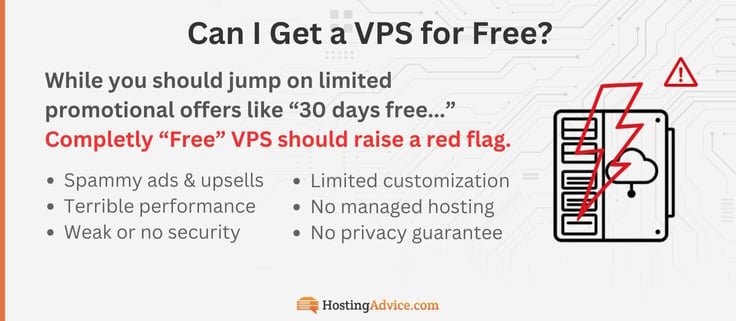
Red flags to watch for:
- No company address, terms of service, or refund policy
- Forum-post or referral requirements to keep your server
- No root or SSH access, which usually means it’s shared hosting
- Requests for personal details unrelated to hosting
The safest free options come from paid businesses with a reputation to protect. A trial from Kamatera or Cloudways, or a money-back guarantee from Hostinger or IONOS, gives you a real server with real support and a clear exit if it’s not right.
Who Should (and Shouldn’t) Use Free VPS Hosting?
Free VPS hosting presents a great path for:
- new project experimentation
- small sites that don’t require a ton of resources
- aspiring developers who simply want to learn about server administration
The main perks of free VPS hosting are the freedom from contracts or vendor lock-ins, the ability to experiment with a limited set of server resources, and, of course, the fact that it costs you nothing.

As you can see, free VPS hosting plans typically come with just 1 CPU core and a small amount of storage. Site owners are typically restricted to free and open-source Linux distributions instead of commercial Windows Server licenses.
Your free VPS server will almost assuredly be of the unmanaged variety, meaning you’re entirely in control of configuration, security, backups, updates, patches, and other server maintenance.
This can be treacherous for those looking for a forex VPS solution for algorithm-based currency trading. If you need a reliable and fast solution, seek out a managed VPS hosting plan.
| If you’re a… | Start with |
|---|---|
| Student learning Linux | Oracle Cloud or Google Cloud |
| Developer prototyping an app | Kamatera |
| Site owner moving off shared hosting | Hostinger or IONOS |
| WordPress owner who wants hands-off hosting | Cloudways or DreamHost |
| Windows or .NET developer | AccuWebHosting |
Keep online stores, client sites, and mail servers off free hosting entirely.
What Are the Disadvantages of Free VPS Hosting?
The major downside of free VPS hosting is that exceeding the resource limits often results in extra charges. This can actually turn out to be more costly than a regular paid hosting plan, particularly if you require substantial resources. Additionally, sharing the server with other users might affect your site’s performance.
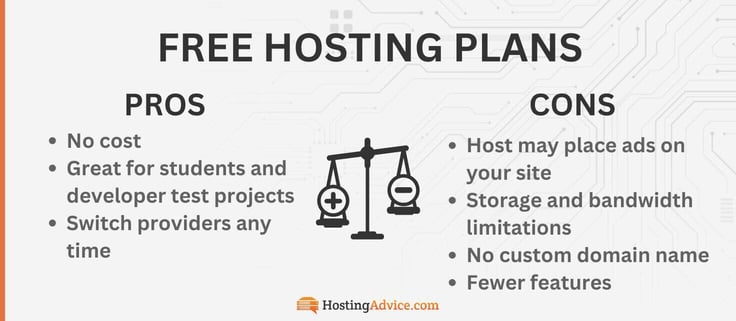
Free VPS customers may not have as much control over the server as one would with a paid plan. Without an included control panel — another expense a free VPS hosting provider typically can’t afford — admins must rely on root access and their knowledge of the command line. This is especially troublesome for those coming from a shared hosting account packed with all those user-friendly features.
Hidden costs to watch for:
- Non-refundable add-ons: Bluehost domains, GoDaddy services, and Hostwinds licenses
- Overage charges: Google (egress over 1 GB, static IPs) and Oracle pay-as-you-go accounts
- Promo rates that jump: IONOS (three-month intro), Hostinger, and DreamHost
Free cloud tiers add one more risk: surprise bills. Google charges for anything beyond its free limits, and Oracle does the same on pay-as-you-go accounts, so an extra static IP, a bigger disk, or a traffic spike can turn a free server into a paid one.
Trials, Guarantees & Choosing a Host
Free trials and money-back guarantees both let you test a real server, but the fine print decides what you’ll actually pay. These answers compare the offers above so you can pick the one that fits how you want to test.

What’s the Difference Between a Free Trial and a Money-Back Guarantee?
A free trial gives you a server before you pay. Kamatera’s runs 30 days on a server configured up to $100 with a card on file, and Cloudways’ runs three days with no card at all. If you don’t cancel, most trials convert to a paid plan.

A money-back guarantee works in reverse: you pay upfront, then request a refund within the window if the host isn’t right.
The windows vary more than you’d expect:
| Host | Refund window | Watch out for |
|---|---|---|
| Hostinger, IONOS, Bluehost | 30 days | Bluehost doesn’t refund domains or add-ons |
| DreamHost | 30 days | Managed VPS only |
| GoDaddy | 30 days annual, 48 hours monthly | Voided once a service is performed |
| AccuWebHosting | 7 days | Windows plans |
| Hostwinds | 72 hours, prorated | Licenses and domains excluded |
For the fine print host by host, see our guide to the best VPS free trials and money-back guarantees.
Which Host Has the Best Free VPS Trial?
Kamatera has the most generous free trial from a major host: 30 days on one server configured up to $100, with 1,000 GB of free traffic. You’ll need a valid physical credit card, but you won’t be charged if you stay within the limits.
- AccuWebHosting: 1 month, Windows only (no card)
- Kamatera: 30 days, up to $100 in resources (physical card required)
- Cloudways: 3 days on a managed server (no card)
- InterServer: 1 month for $.01 (card required)
Kamatera is the only trial that lets you test the exact server you’d pay for. If you’d rather not add a card, Cloudways is the pick. Where a card is required, expect prepaid and virtual cards to be rejected more often.

Can I Get a Free VPS From AWS, Google, or Oracle?
Yes, but only Google and Oracle offer one that never expires. AWS replaced its 12-month free tier for new accounts created on or after July 15, 2025. New customers now get $100 in credits at signup and can earn up to $100 more, and the free plan ends after six months or when the credits run out, whichever comes first:
| Cloud | Free offer | Always-free VM? | What you pay past the free limits |
|---|---|---|---|
| AWS | $100 credit, plus up to $100 more, for 6 months | No | About $7.59/mo for a t3.micro once credits run out, plus storage and $0.09/GB for data transfer over 100 GB |
| Google Cloud | One e2-micro, plus a $300 credit for 90 days | Yes, 1 GB RAM | $0.12/GB for egress past 1 GB, about $3.65/mo for a static IP, and standard rates outside the three free regions |
| Oracle Cloud | Arm and AMD micro VMs | Yes, up to 12 GB RAM | $0.01 per OCPU-hour and $0.0015 per GB-hour past the free Arm allowance; the first 10 TB of egress is free |
Both always-free options come with the catches covered above. Going back to Oracle’s old 4 OCPU, 24 GB size now adds about $28/mo. The real trade-off is predictability. Cloud free tiers are bill by the hour and the gigabyte, so a busy month or a forgotten static IP can cost more than a paid VPS.
For example, sending 50 GB of traffic from Google’s free e2-micro adds about $6 in egress alone, more than IONOS’s entire entry plan with unlimited traffic. Say your free Google blog suddenly gets a flood of visitors in one weekend. That traffic could cost you about $60, while a plan from Hostinger or IONOS already covers it in the price you pay each month.
- Oracle: A1 $0.01/OCPU-hr and $0.0015/GB-hr; 10 TB egress free. The ~$28 figure is 2 extra OCPUs plus 12 GB extra RAM over 730 hours. Cloud pricing changes often, so recheck at each refresh.
- AWS: t3.micro $0.0104/hr in us-east-1; first 100 GB out free, then $0.09/GB.
- Google: premium egress $0.12/GB (first TB); in-use static IP $0.005/hr.
Hosts like Hostinger, IONOS, and InterServer charge a flat monthly rate with bandwidth included, plus support when something breaks. The downside is that you pay from day one, or after a trial, and you can’t spin up dozens of servers on demand the way a cloud can. Kamatera’s hourly billing comes closest.
What Happens When My Free Trial Ends?
It depends on the offer. Kamatera starts billing for any server you keep running, Cloudways asks you to add payment to keep your server, and AccuWebHosting’s free Windows month moves to its regular rate. Money-back guarantees simply expire, and your plan continues.
To avoid a surprise bill, put the end date on your calendar and cancel a day or two early. Skip paid add-ons during the test, and on cloud tiers, set a budget alert and stay inside the free limits. If you’re moving on, back up your data and migrate while the free server is still running, since trial files are usually deleted with the server.
How Do I Choose the Best Free VPS Option?
Run through these five questions before you sign up for anything free:
- How long do you need to test? Three days (Cloudways) is enough for a quick check. Thirty days (Kamatera, Hostinger, IONOS) lets you run a real project.
- Are you willing to add a credit card? Cloudways starts without one, and so does AccuWebHosting’s free Windows month. Kamatera and the free cloud tiers require one.
- Do you want one-click apps? Hostinger, InterServer, IONOS, and Bluehost deploy tools like Docker and n8n in a few clicks. The free cloud tiers leave setup to you.
- Do you want the server managed for you? Cloudways and DreamHost’s Managed VPS handle updates and security. The rest are mostly self-managed.
- Would you keep it after the free period? Check the renewal rate, management options, and data center locations. The best trial is wasted on a host you’d outgrow.
| If you need… | Start with |
|---|---|
| A full-powered VPS with a 30-day refund | Hostinger |
| A low-cost VPS with a personal consultant | IONOS |
| A free custom server for 30 days | Kamatera |
| A free managed trial with no credit card | Cloudways |
| A month of VPS for a penny | InterServer |
| A managed VPS with a refund window | DreamHost |
| AI tools and root access on a new VPS | Bluehost |
| A VPS under your existing domain account | GoDaddy |
| A quick sanity check before committing | Hostwinds |
| A free Windows server | AccuWebHosting |
Utilize Your VPS Hosting
Once your server is running, the real work starts. Here’s how to set it up, what you can run on it, and how to get the most out of a small free server.

Should I Choose a Managed or Unmanaged Free VPS?
The real question is what you’d rather spend: time or money. Unmanaged plans are cheaper and give you full root access, but every update, security patch, backup, and late-night fix is on you. Managed plans cost more because the host does that work, and some, like Cloudways and DreamHost’s Managed VPS, give up root access to do it.
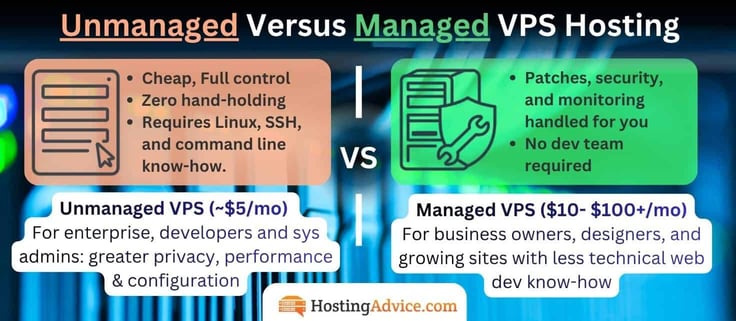
The price gap varies a lot by host. Bluehost’s managed tier starts around $49.99/mo against $4.69/mo self-managed, while Hostwinds keeps the jump to about $7.14/mo from $4.99/mo. If the site earns money, or your time is worth more than the difference, managed usually pays for itself the first time something breaks.
| Level | What you’re paying for | Hosts on this list | Best for |
|---|---|---|---|
| Unmanaged | The lowest price and full control; you handle everything | Kamatera, InterServer (under 8 slices), GoDaddy, free cloud tiers | Developers and sysadmins |
| Unmanaged with built-in help | Root access plus a safety net | Hostinger (Kodee AI), IONOS (personal consultant) | First-time VPS users |
| Managed, root kept | The host handles upkeep; you keep control | Bluehost and Hostwinds managed tiers, InterServer at 8+ slices | Growing businesses with some technical skill |
| Managed, no root | Fully hands-off | Cloudways, DreamHost Managed VPS | Site owners who never want to touch the server |
A quick rule: if you already know what a firewall rule is, start unmanaged. If you don’t, and you’re new to servers, a managed host like Cloudways, or a VPS with built-in help like Hostinger’s Kodee AI or IONOS’s personal consultant, will save you the most time long after the trial ends.
Testing unmanaged during a free window is low-risk. What matters is who you want handling the server once you’re paying.
Which Free VPS Options Include One-Click Apps?
Most of the hosts above do. One-click apps save hours of setup, and they’re how a VPS earns its keep beyond the trial: self-hosted tools like n8n or Immich can replace subscriptions you’d otherwise pay for.

Top 5 Hosts with Standout one-click apps:
- Hostinger: 100+, including Docker, n8n, Claude Code, and OpenClaw
- InterServer: 75 templates, including WordPress, Supabase, and Minecraft
- IONOS: n8n, OpenClaw, Vaultwarden, and Immich
- Bluehost: Claude Code pre-installed, plus n8n and GitLab
- Cloudways: WordPress, WooCommerce, Magento, and Laravel
The always-free cloud tiers leave setup to you, but if you go with a trusted host like our top five, you’ll get an easy one-click install.
Can I Host a Website on a Free VPS?
Yes, if the site is small. A static site or a lightly visited WordPress blog with caching runs fine on 1 GB of RAM, which is what Google’s free e2-micro gives you. You’ll set up the domain, SSL certificate, and backups yourself, with no one to call if it goes down.

If the site matters to your business, test it on Hostinger or IONOS instead. The 30-day guarantee gives you a real server with support and a way out.
Is Port 25 Open on a Free VPS?
Usually not. Google Cloud blocks outbound port 25 to external destinations, Oracle blocks it on accounts created after June 23, 2021 (you can request an exemption), and AWS restricts it by default. Spammers target free servers, so providers close that door first.

To send email from a free server, use an authenticated relay on port 587, such as Oracle’s Email Delivery service or a third-party SMTP provider.
How Do I Optimize a Virtual Private Server?
After securing your VPS hosting plan, you might be eager to make the most of it. Here are some handy tips to help you dive right in.
- Ensure your website is optimized: You can optimize your site for faster loading by using image optimization techniques and removing unused or outdated third-party tools, such as old WordPress plugins. You can also use caching tools and remove redundant code.
- Perform regular maintenance and updates: Keep your software updated to prevent performance and security issues. Your ongoing server maintenance plan should include regular security audits and malware protection.
- Have a backup and disaster recovery strategy: Performing regular backups ensures your data is safe in case of a natural disaster or DDoS attack.
- Monitor your VPS: You should use server monitoring tools to track the health of your system. Monitoring tools can track your resource usage and alert you of potential issues.
If you’re new to VPS management, consider opting for a managed VPS hosting plan. Although these plans are slightly more expensive, they include professional, hands-on server management to make your experience much easier.
On a small free server, every megabyte counts. Use a lightweight stack like Nginx, add a swap file so a 1 GB server doesn’t crash under load, and lock it down with SSH keys and a firewall, since no one else is watching it.
Final Thoughts: Prioritize Value in a VPS Hosting Free Trial
While free or temporary services can be a great starting point for first-time VPS users or exciting new projects, relying on free VPS hosting for the long haul isn’t advisable.
If you’re still deciding, narrow it to three:
- Choose Hostinger if you want a full-powered VPS with Kodee AI and a full 30 days to get your money back.
- Pick IONOS if you want the lowest-risk budget option, with unlimited traffic and a personal consultant on your account.
- Get Kamatera if you want to build a custom server and run it free for 30 days.
Instead of getting caught in the free VPS hosting trap, it’s smarter to choose a dependable web host with affordable plans. This modest investment can be rewarding in the long run, often including benefits like a free domain, automatic backups, and improved security.
Check out our favorite VPS hosts and our collection of hosting deals and coupons to find the provider that meets your technical and budgetary needs.