

Writer: Surajdeep Singh


Editor: Lillian Castro


Reviewer: Christina Lewis

The average online customer has an attention span of a mere eight seconds. This means that your website must capture attention faster than it takes someone to tie a shoelace. While businesses constantly innovate to entice consumers, that may not matter if they have a slow website.
Speed impacts the purchasing decisions of more than 70% of online shoppers. A slow website is a culmination of several factors, including substandard code, heavy, unoptimized media files (including images), and inefficient web hosting.
When you choose a top-notch web hosting plan, it can tackle many of your issues by ensuring fast, secure, and reliable website performance. Keep reading to find out about the best hosting providers for boosting your website speed.
-
Navigate This Article:
Best Shared Hosting for Website Speed
Shared hosting is the most basic type of web hosting offered by nearly all prominent providers. It works by sharing server resources among multiple websites. This makes shared hosting the most affordable option available.
1. InMotionHosting.com

Monthly Starting Price $4.59
- NVMe SSD storage with up to 20x faster load times on all plans
- One-click installs for WordPress and 400+ apps, free migration
- Free SSL, free domain, and unmetered bandwidth included
- Independently owned since 2001 — not part of any hosting conglomerate
- 90-day money-back guarantee and 24/7 human support
- Get started on InMotion Hosting now.


Dave McQuilling

| Money Back Guarantee | Disk Space | Domain Name | Setup Time |
|---|---|---|---|
| 90 days | 100 GB SSD – Unlimited SSD/NVMe | Select Plans | 5 minutes |
InMotion Hosting is another shared hosting provider with excellent server speed and performance. The developer-friendly web host has two datacenters in the US, and it recently established a European datacenter in Amsterdam, Netherlands. This makes InMotion Hosting a good option for users in the US and Europe.
We recommend its Core plan for SMBs as a cost-effective and feature-packed shared hosting choice. The Launch plan is higher-priced but even quicker due to its unlimited NVMe SSDs and UltraStack-powered hosting.
2. Hosting.com

Monthly Starting Price $3.99
- LiteSpeed servers with NVMe SSD storage and free Cloudflare CDN included
- Built-in WAF, malware scanning, and DDoS protection
- Automated daily backups with 30-day restore and free SSL
- Free expert site migration — in-house team handles everything
- 24/7/365 in-house support via live chat, phone, and tickets
- Get started on hosting.com now.


Christina Lewis
| Money Back Guarantee | Disk Space | Domain Name | Setup Time |
|---|---|---|---|
| 30 days | 15 GB NVMe SSD | FREE (1 year) | 4 minutes |
Hosting.com is one the most trustworthy web hosts around — and it is fast. The provider offers the quickest shared hosting plans in the world, thanks to its Turbo Servers and other performance-oriented optimizations. The web host’s STARTUP plan is a good shared hosting option for beginners.
If you’re not on a tight budget, we suggest going for the TURBO BOOST plan. As the name implies, it features Turbo Servers for lightning-fast website performance.
3. Hostinger.com

Monthly Starting Price $2.69
- Best overall value: The most complete shared hosting plan at this price point
- AI builds your site in minutes — no technical skills needed
- Free domain, free SSL, and weekly backups on all plans
- Managed WordPress with AI agent and free email marketing
- 30-day money-back guarantee with 24/7 expert support
- Get started on Hostinger now.


Sead Fadilpasic

| Money Back Guarantee | Disk Space | Domain Name | Setup Time |
|---|---|---|---|
| 30 days | 20 GB SSD | FREE (1 year) | 3 minutes |
Hostinger should be one of your first picks for shared hosting due to its dependable, budget-friendly, and feature-rich plans. It also happens to be one of the quickest web hosts in the business, with datacenters in the US, Brazil, Europe, and Asia. Hostinger offers four shared hosting plans, of which the Single plan is all you need to build a basic website.
The Business and Cloud Startup plans offer increased performance and NVMe SSDs. Hostinger has amazing deals and discounts during certain times of the year, so keep an eye out.
Best Cloud Hosting for Website Speed
When it comes to cloud hosting, your website is hosted on a network of interconnected servers, known as the cloud, instead of a single physical server. This type of hosting offers a highly adaptable and secure cloud infrastructure for your business.
4. Kamatera.com

Monthly Starting Price $4.00
- Best for developers and devops teams needing full control
- Deploy in 60 seconds across 20 global data centers
- Fully customizable: 1–32 cores, 1–128 GB RAM, NVMe SSD
- Hourly or monthly billing — scale up or down anytime
- 99.95% uptime with built-in firewall and load balancing
- 30-day free trial, no charge if canceled
- Get started on Kamatera now.


Surajdeep Singh
| Setup Time | Disk Space | CPU | RAM |
|---|---|---|---|
| 5 minutes | 20 GB NVMe – 4 TB NVMe | 1 – 32 cores | 1 GB – 128 GB |
Kamatera is a cloud hosting stalwart renowned for its developer support. Its enterprise-grade cloud infrastructure offers great flexibility. Kamatera is also one of the fastest cloud hosting providers with datacenters in the US, Europe, and Asia. You can select and create your own server for cloud hosting from its provided options.
You can self-provision and self-configure your cloud server through Kamatera’s simple management portal.
5. IONOS.com

Monthly Starting Price $5.76
- Start with $200 in credit for your first month
- Intel Xeon processors, Linux or Windows, full root access
- Scale instances up or down with no downtime
- By-the-minute billing — only pay for what you use
- 99.99% uptime, ISO 27001-certified data centers
- Get started on IONOS now.
Christina Lewis
| Setup Time | Disk Space | CPU | RAM |
|---|---|---|---|
| 6 minutes | 10 GB NVMe – 720 GB NVMe | 1 – 24 cores | 512 MB – 48 GB |
IONOS is a leader in cheap hosting and one of our favorite web hosts. It perfectly blends affordability with functionality and is among the fastest web hosting providers in the business. IONOS’s cloud hosting setup provides uncompromising performance. You can build a custom cloud hosting environment with drag-and-drop components in just a few clicks.
If you’re having trouble locating the IONOS cloud hosting page, here’s a quick guide: start by clicking on Products, then navigate to vServer, and finally Cloud Servers. You can also check out a few VPS hosting options under vServer if you’re interested.
6. Cloudways.com

Monthly Starting Price $6.60
- Choose from AWS, Google Cloud, DigitalOcean, Vultr, or Linode
- Auto-healing servers with automated backups and free SSL
- 60+ global data center locations
- Pay-as-you-go — no contracts, cancel anytime
- 3-day free trial, no credit card required
- Get started on Cloudways now.


Jack Wallen

| Setup Time | Disk Space | CPU | RAM |
|---|---|---|---|
| 8 minutes | 20 GB SSD – 4 TB SSD | 1 – 96 cores | 1 GB – 384 GB |
Cloudways provides fast and reliable managed cloud hosting services. It is probably the most flexible cloud web host in the business, as it offers DigitalOcean, Amazon Web Services (AWS), and Google Cloud datacenter plan options. It also includes plenty of features in each plan.
Additionally, you can reap the benefits of effortless website migration, SSH and SFTP access, team management provisions, and optional add-ons, including WordPress capabilities and email hosting.
Best VPS Hosting for Website Speed
VPS hosting, or virtual private server hosting, provides users with virtualized server resources on a shared physical server. Users get dedicated server space and resources, offering more control than a shared hosting plan.
7. Kamatera.com
Monthly Starting Price $4.00
- Best for developers: Fully customizable cloud VPS — choose your exact CPU, RAM, and storage
- Intel Ice Lake processors and NVMe SSD with 99.95% uptime
- 24 global data centers across 4 continents
- Hourly or monthly billing, only pay for what you use
- 30-day free trial with $100 credit — no commitment needed
- Get started on Kamatera now.
Surajdeep Singh
| Setup Time | Disk Space | CPU | RAM |
|---|---|---|---|
| 5 minutes | 20 GB NVMe – 4 TB NVMe | 1 – 32 cores | 1 GB – 128 GB |
Kamatera’s virtual private cloud (VPC) is an isolated, secure, and highly flexible private cloud environment. You can create a VPC almost instantly and build exclusive cloud infrastructure for your business.
Kamatera’s VPC is ideal for organizations with significant security requirements, providing reliability, resilience, enhanced data privacy, and energy efficiency. Just choose your server type and resources, then sign up for the service.
8. ScalaHosting.com

Monthly Starting Price $12.71
- Fully managed VPS with cloud performance
- FREE site migration executed by experts
- NVMe SSD storage and unmetered bandwidth
- Anytime unconditional money-back guarantee
- HostingAdvice readers get 73% off the first term
- Get started on ScalaHosting now.


Laura Bernheim

| Setup Time | Disk Space | CPU | RAM |
|---|---|---|---|
| 6 minutes | 50 GB SSD – 200 GB SSD | 2 – 12 cores | 4 GB – 24 GB |
ScalaHosting has datacenters in the US and Europe and is a quick and economical web hosting provider. It leverages exceptional cloud infrastructure to offer leading performance and security. ScalaHosting’s managed cloud VPS plans offer effortless flexibility. The Build 1 plan offers all the features you need to manage website hosting with ease.
ScalaHosting also provides an option to build a custom cloud VPS and offers better speed and performance-oriented features than most VPS hosting providers. ScalaHosting should be among your top picks for VPS hosting if you are looking for faster website load time.
9. Hosting.com
Monthly Starting Price $2.99
- Fully cloud-based infrastructure — always on latest hardware
- AMD EPYC CPUs, NVMe SSD, and LiteSpeed caching
- Automated daily backups with 30-day restore history
- Free website migration handled by in-house engineers
- 24/7/365 phone, chat, and ticket support
- Get started on hosting.com now.
Christina Lewis
| Setup Time | Disk Space | CPU | RAM |
|---|---|---|---|
| 7 minutes | 20 GB NVMe – 450 GB NVMe | 1 – 10 cores | 1 GB – 32 GB |
Hosting.com offers fast and affordable, managed and unmanaged VPS plans. Managed VPS hosting is a better option for beginners. But if you are a seasoned pro and want full root access, hosting.com’s unmanaged VPS plans are worth considering. The Runway 1 plan is a good starting point.
Hosting.com offers three (fairly expensive) SUPERSONIC plans that leverage Turbo Servers and include NMVe SSDs. These plans are up to 20 times faster than the Runway 1 plan.
10. InMotionHosting.com
Monthly Starting Price $14.99
- HostingAdvice readers get 44% off the first term
- FREE site migrations and 2 hours of Launch Assist
- 2 – 3 dedicated IP address options
- SSH and DDoS protection included
- Highly available servers with real-time redundancy
- Get started on InMotion now.
Dave McQuilling
| Setup Time | Disk Space | CPU | RAM |
|---|---|---|---|
| 6 minutes | 50 GB SSD – 460 GB SSD | 2 – 16 cores | 4 GB – 32 GB |
InMotion Hosting’s VPS hosting plans are a fascinating option for budding businesses and developers that prioritize reliability and performance. That said, these plans can be expensive. The VPS 4GB RAM plan is the most reasonable of the plans for personal use or small business needs.
Fully managed website transfers and a 99.99% uptime guarantee are some great extras. The pricier plans come with NVMe SSDs and unlimited bandwidth. If budget isn’t a major concern for you, take a look at these options.
Best Dedicated Hosting for Website Speed
Dedicated hosting involves leasing an entire server to a client and giving them complete control, including choice of software, hardware, operating system (OS), and setup. It is the most flexible, secure, and expensive hosting type.
11. IONOS.com
Monthly Starting Price $41.00
- Best for teams wanting enterprise dedicated hardware at affordable prices
- AMD EPYC, Ryzen, and Intel Xeon — GPU servers also available
- Unlimited bandwidth, RAID included, up to 80 TB storage
- 99.995% server availability across 6 global data centers
- Every plan includes a dedicated personal consultant
- Get started on IONOS now.
Christina Lewis
| Setup Time | Disk Space | CPU | RAM |
|---|---|---|---|
| 7 minutes | 480 GB SSD – 4 TB SATA HDD | 4 – 32 cores | 16 GB – 256 GB |
IONOS’s dedicated server hosting plans are among the best on the market, offering efficient performance through innovation. Enjoy the benefits of dedicated enterprise hardware and leading security technologies. IONOS offers three server options: AMD servers, Intel servers, and storage servers. For your convenience, we detail the Intel server option.
Other worthwhile features include unlimited traffic, optional shared storage, a reset option, strong security provisions, and a host of email capabilities. If you want multiple processing cores, IONOS also offers AMD servers.
12. InMotionHosting.com
Monthly Starting Price $35.00
- Best for businesses needing enterprise hardware with managed support
- Bare-metal or fully managed dedicated servers from $35/mo
- Intel Xeon to AMD EPYC, up to 16 cores and 192 GB DDR5 RAM
- Monarx security & 500 GB backup storage with Premier Care
- 24/7 Advanced Product Support from senior sysadmins
- 99.99% uptime SLA, up to 10 Gbps unmetered bandwidth
- Get started on InMotion now.
Dave McQuilling
| Setup Time | Disk Space | CPU | RAM |
|---|---|---|---|
| 7 minutes | 960 GB SSD – 7.68 TB NVMe | 4 – 16 cores | 16 GB – 192 GB DDR5 |
InMotion Hosting’s fully managed and affordable dedicated servers are powered by cPanel. The web host offers four dedicated hosting plans, and all are super fast. We recommend the Aspire plan for SMBs and mid-sized organizations.
It should be noted that InMotion Hosting’s bare metal hosting plans are cheaper than its plans managed with cPanel. Bare metal plans do not include cPanel licenses.
13. InterServer.net

Monthly Starting Price $78.00
- Privately owned datacenters in NYC, Dallas, and Los Angeles
- AMD EPYC, Ryzen, and Intel Xeon — 80+ configs available
- IPMI access, zero setup fees, and unmetered 1 Gbps
- InterShield w/ ML firewall, DDoS protection, malware cleanup
- Price-lock guarantee — rates never increase at renewal
- Get started on InterServer now.
Sead Fadilpasic
| Setup Time | Disk Space | CPU | RAM |
|---|---|---|---|
| 8 minutes | 250 GB SSD – 80 TB HDD | 4 – 56 cores | 15 GB – 256 GB |
InterServer is a premium web host with two datacenters in the US. The web host is a good option for experienced developers looking for a feature-packed dedicated server hosting plan. InterServer offers ultra-fast website speeds, and its network is route-optimized. That means its servers are never overloaded.
InterServer also offers three control panel options: cPanel, Plesk, and DirectAdmin. You can contact the InterServer sales department if you want a custom dedicated server solution, with provisions for SAN/NAS, hardware firewalls, and load balancing available.
What Is Web Hosting?
If you want to publish a website online, you need a web hosting plan. Think of your website as a house. Your website’s address (the protocol and domain name) is akin to a house address. The land upon which you build that house is made available by a web host.
A web host makes your website’s content accessible on the web by renting out physical server space to store the website’s data. It also provides the technologies and resources necessary for quick, secure, and dependable website operation. While you build a website, you need a web host to bring it to an online audience.
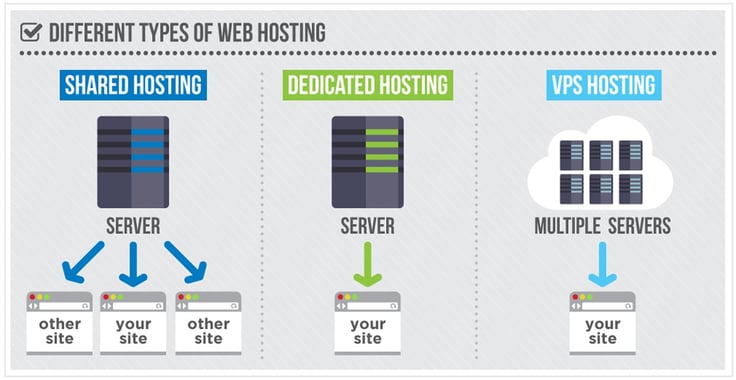
You have a variety of hosting types at your fingertips. For example, if you want to build a WordPress website, we recommend buying a managed WordPress hosting plan from Bluehost. It is the best web hosting service for WordPress (and a WordPress partner) and also the fastest WordPress hosting provider.
Some other popular web hosting types include shared hosting, VPS hosting, dedicated server hosting, and cloud hosting.
What Makes a Web Host Fast?
Fast web hosts use premium, well-maintained servers with powerful hardware components, including SSDs, ample RAM, and powerful processors for fast data access. A fast web hosting company offers rapid server response time, a minimum uptime guarantee of 99.9%, a CDN integration, a variety of caching techniques, and static file and image optimization techniques.
The proximity of the web hosting server, for example, plays an important role in website speed. If a great distance exists between the server and your location, data takes longer to travel. That increases latency and decreases the speed of your website.
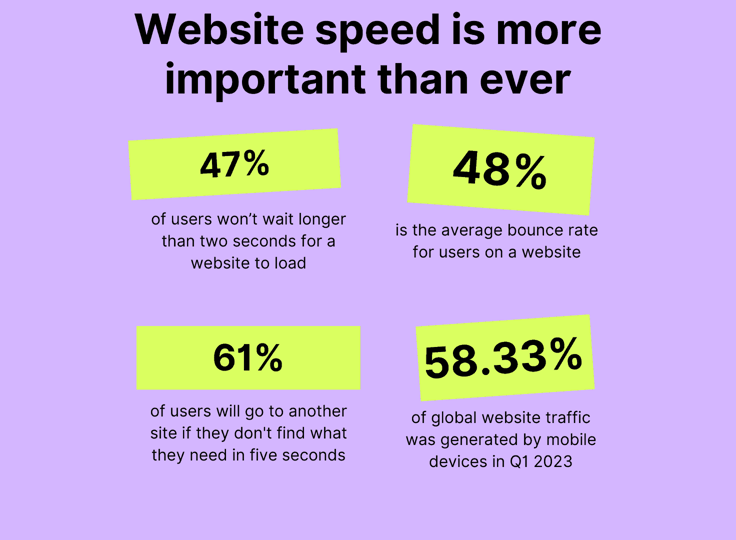
Another factor is uptime, which determines the reliability of a web server. This metric expresses the amount of time a server is online. The industry-standard uptime for a web server is 99.9%. Ideally, the closer this figure is to 100%, the better. If your web server is offline for even a few minutes, it could be disastrous, as customers cannot access your website. First impressions online, especially negative ones, may be everlasting.
Does Your Web Host Affect Site Speed?
Simply put, a bad web host can lead to a slow website. A good web host provides many provisions to speed up your website. Let’s explore how a CDN, caching mechanisms, and image and static file optimization can speed up a website. A CDN improves website performance by caching content at the network edge.
Some web hosting plans include CDN integrations such as Cloudflare, while others offer custom CDNs. The best web hosting services provide pre-configured website caching mechanisms. Website caching is a procedure that stores a copy of static file content in a cache for quicker access and is implemented on both the client side and server side.
Large, unoptimized mages are one of the biggest culprits of slow websites. A web host that offers image optimization techniques significantly speeds up a website. That means the web host plays a crucial role in determining a website’s speed.
What Is a Good Speed for a Hosting Server?
You must use the 30- to 45-day trial period (or possibly more) that most web hosts effectively. In addition to testing all important hosting features, you should perform benchmark tests, including one to determine the hosting server’s speed. Users feel most at home when a webpage loads in one second or less. Anything around this mark (one to two seconds) is a good speed for a hosting server.
Thankfully, several third-party tools are available for website speed testing, and we recommend Pingdom. The results appear on your screen shortly after you run a website speed test. The ones that truly matter are time-to-first-byte (TTFB) and network latency. TTFB shows the responsiveness of your hosting server. Essentially, it is the amount of time it takes for the first bytes of data to appear on a client’s browser upon initiating a request.

You should also factor in other performance optimization tips. For example, some website speed testing tools break down the distribution of webpage components, showing you how long each takes to load. If one or more components clog up the website loading process, you can address them.
What Server Type Is Best for Speed?
You should select a server type according to your website requirements. The larger your website, the more resources you need. Shared hosting plans, for example, share server resources with other websites and could be a solid option for people with few website needs.
While shared hosting servers are cheap and reliable, both VPS hosting and dedicated hosting servers are faster and more dependable. VPS hosting and dedicated hosting plans are better suited to those with medium to large website needs. A VPS hosting plan offers better overall uptime and cybersecurity than a shared plan.
A dedicated hosting plan is the cream of the crop for website speed. Cloud hosting is another speedy hosting type, providing solid uptime, dependability, and flexibility. It is more expensive than shared hosting but cheaper than VPS hosting and dedicated server hosting.
How Fast Should My Website Load?
Every second counts when it comes to website load time. On average, a webpage takes 2.5 seconds to load on a desktop and 8.6 seconds to load on a smartphone. Your website should load faster than those averages on both device types. The longer your website takes to load, the higher the bounce rate you will experience.
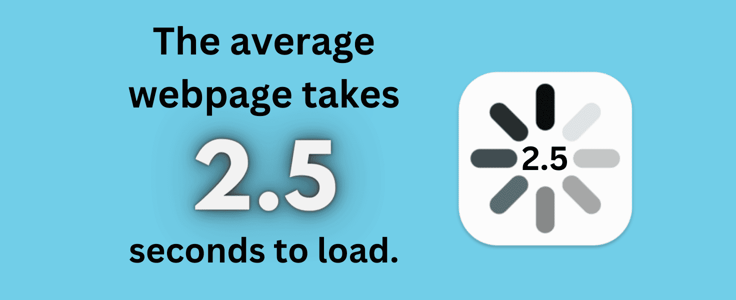
A high bounce rate tells search engines that visitors aren’t finding your content useful, which can lead to a significant drop in your Google Search ranking. To avoid this, it’s smart to choose a fast web hosting plan. A quick web host ensures your desktop site loads in less than two seconds, keeping users engaged with the resources they need.
It will also provide mobile browsing optimization provisions. For example, hosting.com, IONOS, and Bluehost offer desktop website load times of less than 1.5 seconds. A one-second delay in website load time can reduce conversions significantly, so do not take it lightly.
How Can I Make My Website Faster?
For starters, you should purchase a performance-optimized web hosting plan. The web host plays an instrumental role in your website’s performance and management. If you already have a hosting plan, check your website’s speed by using a tool like Pingdom, GTmetrix, or Google PageSpeed Insights.
Analyze the test results and implement the list of suggestions to improve your website’s speed. For example, you may learn that one or more website elements are hindering speed. In that case, you should take all necessary action to restore normality.
Other tips to reduce your website’s loading speed include:
- Compress and optimize media files
- Reduce redirects
- Cache webpages
- Enable browser caching
- Use asynchronous and deferred loading for CSS and JavaScript files
- Minimize CSS, JavaScript, and HTML files
- Use a CDN
- Remove unnecessary plugins
If you follow these suggestions and tips, your website will function quickly in no time.
The Fastest Web Hosts
Hosting.com is hands down the fastest web host. With a webpage loading speed of just 0.295 seconds, it is hard to top. The hosting provider achieves that feat through its stellar, optimized software and hardware resources. IONOS is another solid option with a website load time of just 1.23 seconds. It offers the perfect combination of speed and value.
InMotion Hosting, Hostinger, Cloudways, and ScalaHosting are all speedy in their own ways, ranking among the top web hosting companies for speed. Regardless of your business type or size, a fast website is essential. You can’t have a swift website without a fast web host, so it’s something you shouldn’t overlook.
Quick hosting boosts user experience, enhances search engine rankings, reduces downtime, ensures reliability, and improves security. So, choose the right hosting type to meet your needs and invest in a strong hosting plan as soon as you can.
HostingAdvice.com is a free online resource that offers valuable content and comparison services to users. To keep this resource 100% free, we receive compensation from many of the offers listed on the site. Along with key review factors, this compensation may impact how and where products appear across the site (including, for example, the order in which they appear). HostingAdvice.com does not include the entire universe of available offers. Editorial opinions expressed on the site are strictly our own and are not provided, endorsed, or approved by advertisers.
Our site is committed to publishing independent, accurate content guided by strict editorial guidelines. Before articles and reviews are published on our site, they undergo a thorough review process performed by a team of independent editors and subject-matter experts to ensure the content’s accuracy, timeliness, and impartiality. Our editorial team is separate and independent of our site’s advertisers, and the opinions they express on our site are their own. To read more about our team members and their editorial backgrounds, please visit our site’s About page.