
Writer: Jordan Sprogis


Editor: Lillian Castro


Reviewer: Christina Lewis

Low-code site building solutions claim to make web design without coding easy for citizen developers building Software-as-a-Service (Saas) applications. However, these solutions require advanced knowledge in APIs, database management, and datacenter configuration to use effectively. It is easier to publish with a no-code website builder, but first, designers must understand the differences between the many professional options in the marketplace.
The Gutenberg editor for WordPress is one of the most popular ways to do no-code web design without any requirements to write HTML, CSS, JavaScript, or PHP. Many users prefer the WYSIWYG features of the Classic Editor for user experience. In most instances, WordPress is the most advanced and cheapest no-code website builder to rely on over the long run.
Install a free open-source theme for WordPress to take advantage of the core functionality of the CMS. Integrate a site builder solution like Elementor, Divi, or BoldGrid into UX design workflows to create complex landing pages and eCommerce stores without any requirement to code. Your coding knowledge should not limit website creation or professional website building anymore.
Keep reading for our top web hosting choices for no-code design solutions.
1. Wix — Suite of No-Code Web Development Tools for Businesses
The Wix site builder is based on ADI (Artificial Design Intelligence) which allows the platform to automate web tasks to create new themes for any type of project. Alternatively, publishers can use the Wix Editor with drag-and-drop tool options to arrange assets with a custom theme.
Wix.com

Monthly Starting Price $17.00
- Trusted by 250 million websites across 190 countries
- 2,000+ designer-made templates for every industry
- Built-in eCommerce, scheduling, blogging, and events
- Built-in SEO tools, email marketing, and Google/Facebook ads
- 99.99% uptime on multi-cloud hosting with enterprise security
- Get started on Wix now.


Lynn Cadet

| Money Back Guarantee | Disk Space | Domain Name | Setup Time |
|---|---|---|---|
| 14 days | 2 GB – Unlimited | FREE (1 year) | 4 minutes |
The Wix platform includes free TLS/SSL encryption for enterprise-grade security. As a NASDAQ-listed company, its platform experts are often more reliable for security testing than open-source add-ons in the WordPress community. Each Wix account can also run an email campaign. Wix supports the graphic design requirements of art galleries and photographers.
2. IONOS — Advanced Cloud Platform for CMS Web Hosting
IONOS offers a no-code website builder plan for $1 that will support a single domain name. Web publishers benefit from taking advantage of its hosting plans and cloud computing resources to run an open-source CMS website with a WYSIWYG editor for no-code support.
IONOS.com

Monthly Starting Price $1.00
- No coding skills necessary with MyWebsite Creator
- Free domain name or transfer your existing site
- FREE social media and marketing widgets
- Pro templates with pre-filled text and images
- Multilingual support and tools for SEO
- Get started on IONOS now.


Christina Lewis
| Money Back Guarantee | Disk Space | Domain Name | Setup Time |
|---|---|---|---|
| 30 days | 10 GB – Unlimited | FREE (1 year) | 5 minutes |
A web hosting plan at IONOS will allow developers to install WordPress, Drupal, Joomla, and other no-code options on superior hardware that will scale as your website grows. Whatever your needs, IONOS is a smart choice for no-code website design.
3. Hostinger — Budget cPanel Accounts for Multi-Domain Publishers
Hostinger has a proprietary AI Site Builder with a free domain and hosting plans that can support up to 100 websites. Unlimited bandwidth and free SSL certificates for each site make this a powerful option for multi-domain publishers who can also access hPanel resources.
Hostinger.com

Monthly Starting Price $2.69
- Best website builder: The most complete AI-powered builder at this price point.
- Describe your site to AI and go live in minutes
- 300+ designer-made templates with drag-and-drop
- Built-in eCommerce with 0% fees and 100+ payment methods
- Built-in SEO, email marketing, and AI logo maker included
- Free domain for 1 year + 14-day free trial to start
- Get started on Hostinger now.


Sead Fadilpasic

| Money Back Guarantee | Disk Space | Domain Name | Setup Time |
|---|---|---|---|
| 30 days | 20 GB SSD – 100 GB NVMe SSD | FREE (1 year) | 3 minutes |
The Hostinger AI Site Builder has drag-and-drop functionality, pre-designed themes, customizable templates, ChatGTP integration, and supportive tools for an eCommerce store. What’s more, Hostinger is one of the most user-friendly hosts on the market, making it easy to get started. Remember to keep building over time to advance your domain presence with new content.
4. HostGator — Build a New Website in Less than 5 Minutes
HostGator has a site builder solution that allows business owners, bloggers, and designers to get their websites published in minutes rather than weeks. There are more than 150 pre-designed template options, as well as a free domain, SSL certificates, and payment processing tools included in the offer. HostGator includes a large suite of developer add-ons.
HostGator.com

Monthly Starting Price $2.29
- Drag-and-drop design with the Gator™ site builder
- Hundreds of mobile-friendly templates
- FREE hosting, domain name, and SSL certificate
- Easily add a blog, store, and social media
- Analytics portal helps gauge site performance
- Get started on HostGator now.
Lynn Cadet
| Money Back Guarantee | Disk Space | Domain Name | Setup Time |
|---|---|---|---|
| 30 days | 10 GB SSD – 40 GB SSD | FREE (1 year) | 4 minutes |
HostGator is also one of the most reliable cPanel web hosting companies. The choice between its site builder and the many open-source script options provided by Softaculous gives developers multiple no-code solutions to choose from when using the HostGator platform.
5. Bluehost — Best WordPress Hosting Platform for eCommerce
Bluehost has been the #1 recommended hosting solution in WordPress for more than 15 years. You can run WordPress sites with Gutenberg, the Classic Editor, or any of the third-party plug-in solutions, including BoldGrid, Elementor, or Divi. The hosting packages are optimized for WordPress performance.
Bluehost.com

Monthly Starting Price $3.79
- AI-powered setup gets your WordPress site live in minutes
- 200+ themes with built-in eCommerce and WooCommerce
- WordPress.org recommended host since 2005
- Pro services to design, build, and market your site
- 24/7 expert support via live chat, phone, and email
- Get started on Bluehost now.
Sead Fadilpasic
| Money Back Guarantee | Disk Space | Domain Name | Setup Time |
|---|---|---|---|
| 30 days | 10 GB SSD – 100 GB SSD | FREE (1 year) | 5 minutes |
If you want a cheap cPanel account for web publishing and industry-leading WordPress hosting, choose Bluehost. The platform is designed for the requirements of small businesses, making it the perfect solution for entrepreneurs building an online presence.
6. SiteGround — Managed WordPress with Integrated Caching
SiteGround has engineered its web servers for managed WordPress hosting and WooCommerce store support. The company offers plans that scale with business growth and deliver a managed WordPress platform that competes with Bluehost, HostGator, & WP Engine.
SiteGround.com

Monthly Starting Price $10.00
- AI-powered drag-and-drop builder with 6M+ free stock images
- Professional templates with built-in SEO and analytics
- Native eCommerce with 0% platform fees
- Daily backups, advanced security, and ultrafast hosting
- 14-day free trial, no credit card required
- Get started on SiteGround now.
Lynn Cadet
| Money Back Guarantee | Disk Space | Domain Name | Setup Time |
|---|---|---|---|
| N/A | 10 GB – 100 GB | New or Transfer | 5 minutes |
SiteGround does not offer cPanel hosting. Instead, it offers a proprietary control panel called Site Tools for easy plan management. The company also specializes in datacenter engineering with caching to make WordPress websites run faster in production with security and uptime.
7. BoldGrid — 100+ Professional Themes for WordPress Sites
BoldGrid has become one of the most popular no-code site builder solutions for WordPress. It is commonly found on managed WordPress plans pre-installed. The plugin competes with Elementor, Divi, Beaver Builder, and other third-party solutions. What’s most impressive is that BoldGrid includes more than 100 professional-grade themes designed for common use-cases.
BoldGrid.com

Monthly Starting Price $3.29
- Fotolia and Flickr image databases
- Pre-built and customizable content with GridBlocks
- Responsive themes with tablet and mobile editing
- Generates clean, efficient, and compliant HTML
- SEO, gallery, and forms plugins
- Get started on BoldGrid now.


Laura Bernheim

| Money Back Guarantee | Disk Space | Domain Name | Setup Time |
|---|---|---|---|
| 90 days | 90 GB SSD – Unlimited SD | FREE (1 year) | 5 minutes |
BoldGrid does not provide any hosting support, but companies that include it for free on their plans are saving publishers the $5 monthly subscription fee charged for independent licenses. We recommend pairing BoldGrid with InMotion Hosting to unlock the platform’s full potential.
8. Network Solutions — DIY Builder Leads the Industry in AI Innovation
Network Solutions recently acquired Web.com’s AI-powered site builder, bringing customers tons of user-friendly features to help them build websites with zero coding required. You can choose from one of three plans, each with more features than the last.
NetworkSolutions.com

Monthly Starting Price $4.99
- AI builds your website in as little as 6 minutes
- 1 free hour of expert design support included
- Free domain, SSL, and professional email for 3 months
- Built-in email marketing and social media scheduling
- World’s first domain registrar, established in 1979
- Get started on Network Solutions now.
Christina Lewis
| Money Back Guarantee | Disk Space | Domain Name | Setup Time |
|---|---|---|---|
| N/A | Unlimited | FREE (1 year) | 6 minutes |
Every feature in Network Solutions’ website builder is there to help you build a site quickly and easily. The AI tools can help you build your site, create a logo, and choose a domain name. As you upgrade, you also get access to secure checkout and the ability to sell on social platforms like Facebook and Instagram. If you’re looking for something powerful and easy to use, Network Solutions is a smart choice.
What Is a No-Code Site Builder?
A no-code site builder solution will usually provide a WYSIWYG editor for assembling web pages. It tends to be as simple to use as a word processor, such as the Classic WordPress editor. Gutenberg adopts a block solution to make adding widgets, menus, and other automated content to a WordPress website easy through integration with millions of third-party plugins.
A no-code solution like WordPress can expand to support custom PHP, JavaScript, CSS, and HTML code for advanced use. In contrast, low-code solutions usually require a minimal knowledge of programming to assemble microservice applications with APIs or GraphQL.
No-code solutions, including Wix, Weebly, BoldGrid, Divi, and Elementor, use a template system where the GUI elements (menus, blocks, images, and ads) have placements based on professional design templates that are pre-coded with the theme. Web publishers can use the templates with their own content and avoid programming language hassles with no code.
Can You Design a Website Without HTML?
If they’re in WordPress, users do not need to manually write HTML to publish websites. Whether you choose the Classic Editor or Gutenberg, the CMS will automatically generate the required code. JAMstack solutions pack HTML into JavaScript where you could run an app with just one file on a custom website or mobile app, but most LAMP and Windows servers require HTML for HTTP.
The best way to design a website without writing the HTML manually is to use a site builder like Weebly or Wix and a page template system based on the type of site you need to publish.

Plugins such as 10Web for WordPress use AI to convert any page design into a new theme without any coding. Divi makes it simple to publish a beautiful website. No-code solutions also deliver SEO tool options for custom domain use that are superior to Yoast and JetPack.
With open-source CMS scripts like WordPress, Drupal, and Joomla, you can install free or paid themes, then use a WYSIWYG editor script that generates the HTML code automatically for simple website page construction. CMS sites support images, text, links, menus, blocks, and other design elements with prebuilt website template options. Use no-code tools to give your website a professional look and save money on the costs of contracting a design team.
Which Is the Easiest Site Builder to Use?
Because of the need to install, program, and maintain a complex administration system, site builder frameworks tend to be easier to use than a Content Management System (CMS).
When compared head-to-head, Wix is the easiest website builder, although it has limited features for building web applications or mobile apps. Weebly is also a great web design tool for a responsive website. WordPress is the cheapest option with the most flexibility for designers.
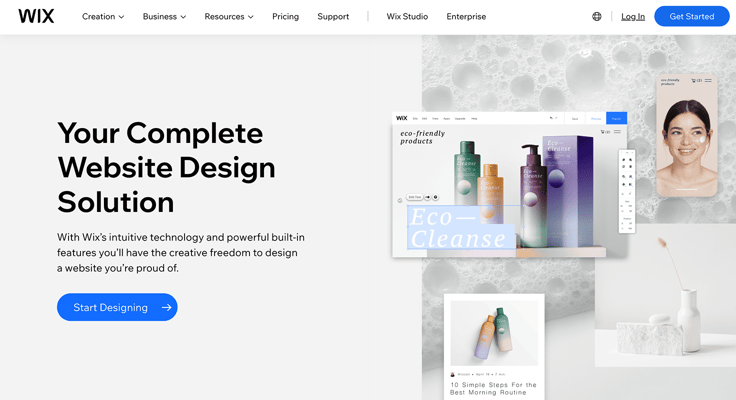
Wix has thousands of free themes that can be used as a customizable template to begin the design of a website. You can change the colors, images, buttons, menus, and blocks on every webpage to dial in the exact design you want.
The Wix platform includes free SEO tools, Core Web Vitals (CWV) reports, and enterprise-grade platform security. Wix artificial intelligence (AI) will help anyone generate logos, site names, and web app designs with the same skill as a professional web designer. But without the high cost of boutique services.
Can I Design and Build a Website for Free?
Free websites are best for building demo sites where the main users are the development team. A web developer can look for free options for web hosting, but many are likely to encounter services with outdated hardware, HDD storage facilities, lack of support for version control, and substandard security. In most cases, you get what you pay for in website hosting plans.
Site builders Weebly, Wix, and WordPress offer free hosting options with a subdomain. GoDaddy, Google, and Tumblr will also allow for free site building with useful templates. The disadvantages of a subdomain account are minimal for a hobby, nonprofit, or support sites.
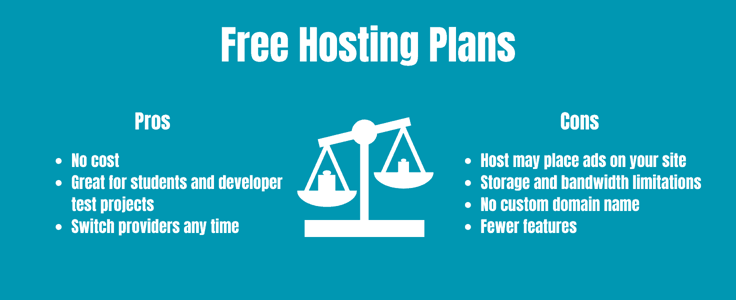
Adobe XD is currently free to use through GitHub, but it requires expert programming language and coding experience. Stick with a free account for hobby, niche, and nonprofit websites.
WordPress.com is the best of the free options for most users, as it is operated and developed by Automattic, the company that builds the CMS core. Weebly and Wix are the top free site builder options with subdomain limitations.
All of these free plans can be upgraded anytime with a custom domain and other professional web development features. Google Analytics support is provided on all accounts. In each instance, your site will be locked into the vendor you choose.
Use Site Builders With Templates for No-Code Solutions
No-code solutions such as Wix, Weebly, and Shopify provide unique website-building platform capabilities to millions of users with proprietary site builders. Designers can use prebuilt templates and AI-optimized themes for different common use cases in web publishing.
These platforms offer SEO tools that can outperform WordPress options with pre-installed data analytics. Such solutions are easier to use than low-code solutions like Webflow, FireBase, or Hasura.
- BoldGrid, Elementor, Divi, and 10Web are no-code design solutions for WordPress that greatly expand the theme display options available for publishers. The open-source WordPress CMS has a massive collection of ecosystem software (Plugins, Themes, & Widgets) available that can be installed in “one click” to add other new feature sets for your community or online store.
- Wix, Weebly, and Network Solutions are the best independent no-code site builder options. You can manage free sites to demo the platform features, then choose from theme designs that are produced by AI scripts. These solutions anticipate and deliver the best GUI experience to website browsers and eCommerce store shoppers with SEO tools, platform analytics, and social media integration. In many instances, these platforms are more secure than other options.
- SiteGround and Bluehost provide the best pre-installed performance runtime environments on their managed WordPress plans. Choose the solution with the best datacenter engineering, hardware specifications, and SSD storage for top performance speeds for your web application. For multisite publishing, managed WordPress plans are cheaper overall than Weebly & Wix. No-code site builders have fewer features than cPanel but are easier to use.
Ultimately, the no-code platform you choose should be simple and affordable, and make web design without coding a pleasant experience. Good luck and happy designing!