

Writer: Andrew Wandola


Editor: Britain Simons


Reviewer: Lillian Castro

Key Takeaways
Our experts compared today’s cheapest VPS providers to help you find the best balance of price, resources, and flexibility for your needs.
-
InterServer ($3.00/mo) price locked for life with 450+ supported scripts and apps.
-
Kamatera ($4.00/mo) auto-scaling cloud VPS across 24 global data centers.
-
IONOS ($4.00/mo) lowest entry price with a 30-day money-back guarantee.
Whether you’re a developer, small business, or first-time site owner, VPS hosting has become increasingly important. Individuals and businesses opt for VPS hosting because it provides greater stability, privacy, and control at a fraction of the cost of a dedicated server.
Commercial use of Virtual Private Server (VPS) hosting started to gain momentum in the early 2000s, with VMware’s ESX Server launched in 2001 and Xen in 2003. But the idea of server virtualization was introduced four decades earlier, in the 1960s, with IBM’s CP-40, when the internet was in its infancy.
VPS server hosting came into the picture because developers and system administrators wanted more control over their hosting environments. They couldn’t get that with shared hosting, which means that VPS hosting is often geared toward self-managed options.
We’re here to delve deeper into some of the most affordable, industry-standard VPS providers that still deliver top-notch service. Looking to compare Managed VPS? Head over HERE.
-
Navigate This Article:
1. InterServer: Best for OS Flexibility, Plans Starting at $3.00/Month
Standard VPS hosting is great if you just want to plug in a website or web application and move on with your other projects. Let’s say you’re a web developer working on a project that requires more control, stability, and privacy. In that case, any good VPS should provide the perfect hosting environment.
Other times, you may want something more specific. For example, a VPS that supports WordPress hosting or one that only runs Windows applications and platforms. That’s where InterServer VPS comes in.
InterServer.net

Monthly Starting Price $3.00
- $0.01 for the first month using code HOSTINGADV
- Price locked for life, no renewal increases, ever
- Scale instantly by adding slices — each adds 1 CPU, 2 GB RAM, 40 GB SSD
- Linux or Windows with full root access, choice of data center
- 24/7 in-house support from an independently owned provider since 1999
- Get started on InterServer now.


Sead Fadilpasic

| Setup Time | Disk Space | CPU | RAM |
|---|---|---|---|
| 6 minutes | 40 GB SSD – 1280 GB SSD | 1 – 16 CPUs | 2 – 64 GB |
With InterServer, you have so many different VPS environments to choose from. From Windows to Linux, CentOS to Ubuntu, WordPress to Webuzo, and cPanel to DirectAdmin, InterServer brings variety to your project.
In fact, this host supports more than 450+ scripts and applications, making it incredibly developer-friendly. You can even use it to build online gaming servers.
Let’s go over the Interserver VPS Pros and Cons:
Pros
- Price-locked for life, no renewal surprises
- Granular slice scaling — add CPU, RAM, SSD incrementally
- 450+ supported scripts and apps
- Linux and Windows with full root access
- Servers capped at 50% capacity for consistent uptime
- Managed support at 8+ slices
Cons
- Dated, unintuitive dashboard
- No money-back guarantee on VPS
- No built-in terminal — SSH only
- Support inaccessible from within the client dashboard
Read the full InterServer review >>
2. Hostinger: Best for Beginners, Plans Starting at $5.84/Month
Web hosting companies are now harnessing the power of AI across many areas. Some, like GoDaddy, use AI to provide better domain name suggestions. At Hostinger, AI plays a different role: It helps you build your website and manage your VPS environment a lot easier.
Hostinger offers a built-in AI assistant to help you create content, design websites, troubleshoot problems, and more on its KVM VPS environment. All Hostinger VPS hosting packages come with Kodee, the AI assistant.
Hostinger.com

Monthly Starting Price $5.84
- Best overall value: The most complete AI-managed KVM VPS at this price
- AMD EPYC processors, NVMe SSD, and 1 Gbps network
- Kodee AI manages your server — no command line needed
- One-click deployment of 100+ apps including Docker and n8n
- Free weekly backups, DDoS protection, and full root access
- Get started on Hostinger now.
Sead Fadilpasic
| Setup Time | Disk Space | CPU | RAM |
|---|---|---|---|
| 6 minutes | 50 GB NVMe – 400 GB NVMe | 1 – 8 cores | 4 GB – 32 GB |
The hardware and resources are truly impressive. Hostinger focused on network infrastructure, including LiteSpeed web servers and a built-in CDN, to improve loading speed to 1 Gbps, providing you with significantly faster, more stable performance.
It includes NVMe storage for a performance boost, multiple CPU cores (between one and eight) for faster processing speeds, weekly backups, a generous memory package (four gigabytes to 32 gigabytes), and full root access. Perfect to build a web app.
VPS users also get API access, allowing them to interact with their Hostinger accounts programmatically.
Let’s go over the Hostinger VPS Pros and Cons:
Pros
- Most beginner-friendly VPS at this price point — no CLI required
- Kodee AI assistant handles server management (all plans)
- One-click deployment of 100+ apps including Docker and n8n
- hPanel simplifies management — One-click OS switching
- GUI-based firewall management
- Free weekly backups and DDoS protection included
Cons
- Self-managed — updates and patches are your responsibility
- AI customer support inconsistent outside VPS topics
- Less control than unmanaged competitors
- No phone or email support — chat only
Read the full Hostinger Review >>
3. Kamatera: Best for Auto-Scaling, Plans Starting at $4.00/Month
Kamatera offers VPS hosting with a twist. Rather than storing your website or files on a single server (like a standard VPS), Kamatera uses cloud-based servers.
The main distinction lies in the setup. Traditional VPS relies on a single server, which generally works well. But picture this: your marketing efforts take off, and suddenly your site traffic skyrockets. That’s when Kamatera’s exceptional scalability comes to the rescue.
Kamatera.com

Monthly Starting Price $4.00
- Best for developers: Fully customizable cloud VPS — choose your exact CPU, RAM, and storage
- Intel Xeon Platinum/Cascade Lake CPUs & NVMe SSD
- 20+ global data centers across 4 continents, with 99.95% uptime
- Hourly or monthly billing, only pay for what you use
- 30-day free trial with $100 credit — no commitment needed
- Get started on Kamatera now.


Surajdeep Singh

| Setup Time | Disk Space | CPU | RAM |
|---|---|---|---|
| 5 minutes | 20 GB NVMe – 4 TB NVMe | 1 – 32 cores | 1 GB – 128 GB |
If your website experiences a sudden surge in traffic, you’ll need to upgrade your hosting hardware, often with just a click. Ideally, you want a web server that can automatically adjust its hardware and resources as needed. You can even do an OpenClaw cloud server configuration to build your own AI Agent!
That’s what cloud hosting does. You don’t need to click buttons to upgrade your resources. The server automatically knows when it’s time to scale up or down. It works similarly to an elastic material, hence the term “server elasticity.” That’s exactly what Kamatera offers — at affordable rates.
Let’s go over the Kamatera VPS Pros and Cons:
Pros
- Phone, email, and live chat support 24/7
- Hourly or monthly billing — pay only for what you use
- Fully customizable CPU, RAM, and storage
- 24 global data centers across 4 continents
- Instant resource scaling with a few clicks
- 99.95% uptime guarantee
Cons
- CLI knowledge required — not beginner-friendly
- No free domain, SSL, or website builder
- No predefined control panel templates
- Server and website managed from separate dashboards
Read the full Kamatera Review >>
4. Liquid Web: Best for Managed VPS, Plans Starting at $5.00/Month
Even if you understand the benefits of VPS hosting, you also need to know how to make it work for your project. That’s an important question Liquid Web answers with three different VPS hosting packages: fully managed VPS, core VPS-managed, and unmanaged VPS hosting.
The fully managed VPS hosting plan is exactly what it sounds like. You take care of your project as the VPS host focuses on server management. The fully managed plan is like hiring a personal driver (VPS experts) to drive you around as you take care of business (your website). Because you’re basically hiring the driver for a full-time role, you pay more than you would for a part-time driver.
LiquidWeb.com

Monthly Starting Price $5.00
- Third-party tested faster than Rackspace, DigitalOcean, and Amazon
- Choice of managed or self-managed VPS with full root access
- cPanel, Plesk, or InterWorx control panel included
- DDoS protection, dedicated IP, and 100% uptime guarantee
- Trusted by 600,000+ customers including FedEx and Red Bull
- Get started on Liquid Web now.


Christina Lewis

| Setup Time | Disk Space | CPU | RAM |
|---|---|---|---|
| 7 minutes | 30 GB SSD – 440 GB SSD | 1 – 6 cores | 1 GB – 16 GB |
The Core VPS-managed option is the middle ground. The host manages certain aspects of the server as you focus on your web project. Sticking with the car example, it’s like hiring a mechanic for major repairs, but you have responsibility for minor maintenance such as oil changes, ensuring the tags are up-to-date, and replacing windshield wipers. Of course, since the individual works on your car part-time, you won’t pay the same rate you would for a full-time role.
The unmanaged VPS plan is for those who don’t need any help managing their server. You are in charge of everything, from complex hardware repairs to simple fixes. But that doesn’t mean you’re alone. You can always reach out to the web host if you need help troubleshooting certain issues. This approach gives you total control of your server, a perfect option for tech-savvy users — including web developers.
Let’s go over the Liquid Web VPS Pros and Cons:
Pros
- Choice of self-, semi-, or fully managed VPS
- cPanel, Plesk, or InterWorx included
- Full root access and dedicated IP on all plans
- 100% uptime guarantee
- DDoS protection included
- One-click scalability without contract restrictions
- Trusted by 600,000+ customers including FedEx and Red Bull
Cons
- Higher price point than most VPS competitors
- Backups cost extra (not included by default)
- Fewer global data center locations than competitors
- Dashboard has a learning curve — not beginner-friendly
- Support occasionally upsells security products
Read the full Liquid Web Review >>
5. IONOS: Best for Cost Savings, Plans Starting at $4.00/Month
VPS hosting plans at IONOS are so cheap they seem similar to shared server prices. When I find a hosting provider that’s this affordable, the first thing I do is determine if the deal is too good to be true.
I found that the hosting plans at IONOS are cheap because the company divides its servers into smaller units. Take, for example, the base cheap Linux VPS hosting plan. It has one virtual CPU core, one gigabyte of memory, and 10 gigabytes of storage.
IONOS.com

Monthly Starting Price $4.00
- Lowest entry price for VPS: no hidden fees, unlimited traffic, from $4.00/mo
- NVMe SSD storage, 1 Gbps connection, and 99.99% uptime
- Full root access with Linux or Windows — deploy in minutes
- Personal consultant assigned to every account after signup
- 30-day money-back guarantee and award-winning support
- Get started on IONOS now.
Christina Lewis
| Setup Time | Disk Space | CPU | RAM |
|---|---|---|---|
| 6 minutes | 120 GB – 720 GB NVMe | 2 – 12 cores | 4 GB – 24 GB |
The base cheap Linux VPS plan at IONOS has similar resources to a shared server, not a VPS. Most VPS plans tend to have more powerful hardware. But what most people forget is that privacy, stability, and control are the key characteristics of a good VPS. The hardware aspect is secondary to these. That’s because we all want a stable network, but our storage needs may be wildly different.
By splitting the hardware into smaller sections, IONOS offers more budget-friendly VPS hosting. With this service, you enjoy nearly the same hardware specifications as a shared hosting plan, but with enhanced control and privacy.
Let’s go over the IONOS VPS Pros and Cons:
Pros
- Lowest entry price — starts at $2/mo, no hidden fees
- Free Plesk license included (S plan and up)
- NVMe SSD, 1 Gbps connection, unlimited traffic
- 99.99% uptime and 30-day money-back guarantee
- Personal consultant assigned to every account
Cons
- Entry XS plan very limited (1 vCPU, 1GB RAM, 10GB storage)
- Backups cost extra
- No managed support option
- No built-in terminal — SSH only
Read the full IONOS Hosting Review >>
6. Hosting.com: Best for High-Performance Workloads, Plans Starting at $8.99/Month
Before we go further, note that in the context of web hosting, the phrase “cheap” is more about the value you’ll get versus the amount you’ll pay for it. For example, Hosting.com doesn’t seem cheap when compared to IONOS. But that’s not how you decide what’s best for you.
Hosting.com offers more powerful hardware than IONOS, which is why it costs more. For example, the base VPS plan has up to 16 gigabytes of memory. That’s 16 times more space than what the IONOS base plan offers. By any standard, Hosting.com offers cheap web hosting, but even more so given the amount of resources you receive in return.
Hosting.com

Monthly Starting Price $8.99
- AMD EPYC processors and NVMe SSD storage on all plans
- Full root access — install tools, containers, and custom stacks
- Choice of Ubuntu, Debian, or AlmaLinux with optional cPanel
- 10 global data centers with free CDN and 99.9% uptime SLA
- 24/7/365 in-house support — no outsourcing, no bots
- Get started on hosting.com now.
Christina Lewis
| Setup Time | Disk Space | CPU | RAM |
|---|---|---|---|
| 7 minutes | 80 GB – 640 GB NVMe | 2 – 16 cores | 4 GB – 32 GB |
Pricing aside, Hosting.com is the self-proclaimed king of speed. Its Turbo-boosted servers, coupled with the powerful hardware, make this host incredibly fast.
A resource-heavy project would do especially well in this environment. Think of a video streaming platform, which uses lots of memory and storage while demanding serious processing power. That kind of workload is a strong fit for Hosting.com.
Let’s go over the Hosting.com VPS Pros and Cons:
Pros
- Turbo servers deliver exceptional performance, resource-heavy projects
- Cleanest dashboard of any host tested
- 24/7 support with immediate response times
- AMD EPYC processors and NVMe SSD on all plans
- Managed and unmanaged VPS options
- 10 global data centers with free CDN
- 50% off with annual billing
Cons
- Higher renewal pricing than most competitors
- No root access on managed plans
- No out-of-the-box dedicated servers
- Domain registration Pricier than competitors
Read the full Hosting.com Review >>
7. InMotion Hosting: Best for eCommerce, Plans Starting at $7/Month
InMotion Hosting should be the top choice for projects that require more resources and better hosting infrastructure. Like Hosting.com, InMotion has powerful hardware, which also justifies the price. You’ll notice its standard VPS package costs almost twice as much as you would spend with other hosts.
But remember, don’t just look at the price; look at what you’re getting for that price instead. Take InMotion’s base VPS plan as an example; it offers four CPU cores, four gigabytes of memory, 90 gigabytes of SSD VPS storage, two dedicated IPs, and free SSL certificates. That’s a powerful server, perfect for an application or website that requires fast data retrieval, such as an eCommerce business.
InMotionHosting.com

Monthly Starting Price $7
- HostingAdvice readers get 74% off the first term
- FREE site migrations and 2 hours of Launch Assist
- 2 – 3 dedicated IP address options
- SSH and DDoS protection included
- Highly available servers with real-time redundancy
- Get started on InMotion now.


Dave McQuilling

| Setup Time | Disk Space | CPU | RAM |
|---|---|---|---|
| 6 minutes | 30 GB – 540 GB SSD (or NVMe) | 2 – 16 cores | 1 GB – 32 GB |
In the world of business, first impressions are everything. You should have a server that processes information quickly and returns it to the user. No potential client wants to wait more than three seconds to view your products or services.
That’s not just a random number; it’s actually backed by research. Remember, you’re not the only one with an online store. You compete with drop shippers, small local businesses, and even industry giants like Amazon and eBay. How fast your website processes data, and the quality of your products or services, will influence buyer actions. An InMotion Hosting VPS server brings plenty of computing power to your project.
Let’s go over the InMotion VPS Pros and Cons:
Pros
- Free site migrations and 2 hours of Launch Assist
- 2-3 dedicated IPs included
- NVMe SSD storage with real-time redundancy
- SSH and DDoS protection included
- cPanel available with optimized configurations
- Strong phone and chat support with WordPress experts
Cons
- Higher price than most VPS competitors
- cPanel costs extra on VPS plans
- Phone support not 24/7, with long wait times
- Only 3 data center locations (US East, US West, EU)
Read the full InMotion Review >>
8. AccuWeb Hosting: Best for Windows & Linux, Plans Starting at $6.33/Month
We talked about cloud hosting earlier with Kamatera’s VPS plans. AccuWebHosting is also a cloud VPS hosting provider, but it is slightly different from Kamatera.
For starters, AccuWebHosting offers both Windows and Linux-based servers. That means server compatibility issues should be the least of your worries.
AccuWebHosting.com

Monthly Starting Price $6.33
- Windows Server 2019, 2022 & 2025 — fully licensed on all plans
- SSD storage, guaranteed resources, and 1 Gbps port included
- Free daily backups and RDP access on every plan
- 16+ global locations — deploy close to your users
- 24/7/365 live support and 99.9% uptime guarantee
- Get started on AccuWebHosting.


Jack Wallen

| Setup Time | Disk Space | CPU | RAM |
|---|---|---|---|
| 6 minutes | 40 GB – 200 GB SSD | 1 – 4 cores | 1 GB – 16 GB |
Some of AccuWebHosting’s cloud services derive from the three most powerful cloud hosting providers by market share — Amazon Web Services, Google Cloud Platform, and Microsoft Azure. You’ll spend a little more for these servers because the companies have invested in state-of-the-art hosting infrastructure. And Google spent more than $85 billion in capital expenditures into its global AI cloud infrastructure in 2025, with an additional $35.7 billion in the first quarter of 2026.
Each AccuWebHosting VPS package comes with a 99.9% uptime guarantee, regular security audits, free weekly backups, full SSH access, support for unlimited websites and business email accounts, fully redundant hardware, and free SSL certificates. You get plenty of value for your money with AccuWeb.
Let’s go over the AccuWeb Hosting VPS Pros and Cons:
Pros
- Windows and Linux VPS options with fully licensed Windows Server
- Free daily backups and RDP access on every plan
- 16+ global data center locations
- Optional cloud infrastructure via AWS, GCP, and Azure
- Free SSL, SSH access, and redundant hardware included
- 99.9% uptime guarantee
Cons
- Windows VPS requires strong Windows Server knowledge
- Customer support ranked poorly in testing
- No real-time chat on budget plans
- DNS issues reported with limited support resolution
Read the full AccuWeb Review >>
9. Cloudways: Best for Agencies, Plans Starting at $6.60/Month
Cloudways, a Newfold Digital company since 2024 (previously DigitalOcean), works similarly to InterServer and AccuWeb Hosting. This company partners with the big three: AWS, GCP, and DigitalOcean, to bring you some of the best VPS hosting services. You can also find offerings for VULTR View Data Centers and Linode.
The pricing depends on what you put on your plate. One important note is that hosting plans under DigitalOcean cost less than those provided by AWS and Google Cloud, but for all offerings, you can Save 40% for the first four months with the link below.
Cloudways.com

Monthly Starting Price $6.60
- Customizable alternative to traditional VPS hosting
- Choice of 5 popular cloud providers
- Scale server resources up and down as needed
- 24/7 monitoring and auto-healing servers
- Get 40% OFF first 4 months with promo code HOSTINGADVICE
- Get started on Cloudways now.
Jack Wallen
| Setup Time | Disk Space | CPU | RAM |
|---|---|---|---|
| 8 minutes | 25 GB SSD – 3840 GB SSD | 1 – 32 cores | 1 GB – 192 GB |
Ultimately, you are the biggest beneficiary of the Cloudways partnership with industry bigwigs. First, you get variety, an underrated aspect of web hosting. If you don’t find your preferred server at DigitalOcean, AWS, or Google Cloud may have it.
Also, all cloud VPS plans at Cloudways come with free SSL certificates, dedicated firewalls, staging environments, automated backups, regular security patching, 24/7 server monitoring, and full SSH and SFTP access. That makes this VPS an excellent choice for agencies or organizations of all sizes.
Let’s go over the Cloudways VPS Pros and Cons:
Pros
- Choice of 5 cloud providers (AWS, GCP, DigitalOcean, Vultr, Linode)
- Easiest deployment experience tested — live in under 15 minutes
- Auto-healing servers with 24/7 monitoring
- Free SSL, dedicated firewall, and automated backups included
- Staging environments and security patching built in
- All managed from one centralized dashboard
Cons
- Cost increases as site demand grows — easy to overspend
- No traditional cPanel — custom dashboard only
- Autonomous (fully managed) plans start at $35/mo
- No dedicated hosting option
Read the full Cloudways Review >>
Comparison Table — Cheapest VPS Providers
Here’s a comparison chart of the VPS offers reviewed above:
| Provider | Starting Price | Best For |
|---|---|---|
| IONOS | $4.00/mo | Absolute lowest entry price |
| InterServer | $3.00/mo | Developer flexibility & OS variety |
| Kamatera | $4.00/mo | Auto-scaling cloud VPS |
| Hostinger | $5.84/mo | AI-assisted server management |
| Liquid Web | $5.00/mo | Managed VPS with full support tiers |
| Cloudways | $6.60/mo | Multi-cloud provider choice |
| AccuWeb Hosting | $6.33/mo | Windows + Linux cloud VPS |
| Hosting.com | $8.99/mo | Resource-heavy, high-speed projects |
| InMotion Hosting | $7/mo | eCommerce & data-intensive sites |
Beyond price, developer flexibility looks very different from a managed hosting option, where support is essentially what you’re paying for.
If you’re a small business owner, solo entrepreneur, or developer building a site with room to grow, choosing a provider that truly fits your needs can save you more over time. Focusing only on the lowest price can create security gaps if you don’t have managed hosting or a dedicated dev team keeping your site maintained.
What you need to know…
VPS Hosting Q&A
You may still have questions and we have answers!
- What Is VPS Hosting? >>
- What Is the Average Price for a VPS? >>
- Can I Get a VPS for Free? >>
- What Features Should I Look for? >>
- Is a Virtual Private Server Worth It? >>
- What’s the Difference: Managed vs Unmanaged VPS? >>
What Is VPS Hosting?
The key phrase here is “virtual private.” This means the server lives in a virtual environment that’s also private.
Virtual private server hosting (VPS) is a private, scalable slice of a larger server — you get dedicated resources without paying for the whole machine. a hosting environment made up of virtual servers.
The hosting company uses virtualization technology, such as VMware’s vSphere, to partition these servers into mini servers to suit your hardware requirements.
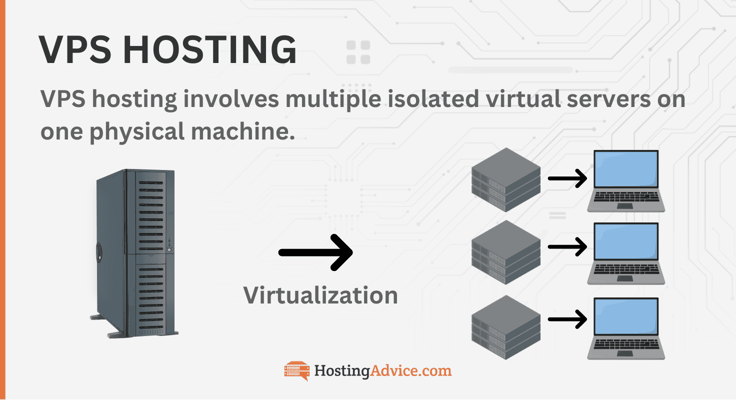
One simple way to grasp virtual private server hosting is by picturing a pizza. Instead of buying the entire pie, you can get just a slice. This lets you enjoy a personal meal without others nibbling on your food—and you save some cash too.
That’s how a VPS works. Rather than offering the entire server to you, the host slices it up into smaller portions. Now, that doesn’t mean you’re limited to just one slice. You might choose to have two slices instead. This is a common choice for larger organizations needing more resources.
That’s why a VPS is highly scalable, which is just a fancy way of saying you can have more than one slice. The private aspect of a VPS comes in the sense that you own that slice of pizza. You won’t share it with anyone else as you would in a shared hosting environment.
What Is the Average Price for a VPS?
VPS pricing is driven by allocated resources and hardware, rather than the hosting type itself. It can range from a few dollars to hundreds per month. IONOS has monthly plans that cost less than $4.00. This base VPS hosting plan gives you 10 gigabytes of NVMe storage. Compare that to Hosting.com, the base shared hosting plan has 100 gigabytes of SSD storage.
Due mainly to resources and configuration, IONOS has VPS hosting plans that cost less than some shared hosting. But, as you add on more CPU, RAM, and Disk Space, the price can scale to $22/mo (for VPS plans – other options available). That’s because it all boils down to the resources and hardware specific to your company’s needs.
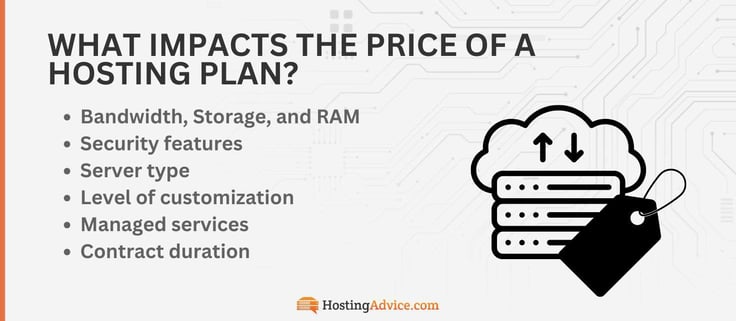
Some VPS plans may cost hundreds of dollars monthly, but those are usually housed on high-performance servers. You may need that type of power for a popular, resource-intensive project, but base VPS options are more affordable than ever, with enough hardware resources for the average user, thanks to cloud hosting.
Cloud VPS providers such as Kamatera offer pay-as-you-go pricing. This means you’ll enjoy the privacy of a VPS but only pay for the server resources you consume during the billing period. And with a price-lock guarantee, you won’t have to worry about paying more than you budget for.
Can I Get a VPS for Free?
It boils down to this: when you see “Free,” it’s usually only for a limited time trial of a full hosting plan (e.g., 30 days), a free tier like Google Compute Engine that is limited by hours (with costs accruing after limits are reached), or it may be a competitive new hosting service — that you may not want to trust with your credit card details.
Maintaining a VPS costs a lot of money and requires tons of resources. That’s why good VPS providers such as Kamatera and Cloudways will give you a free trial rather than promise a completely free hosting environment.
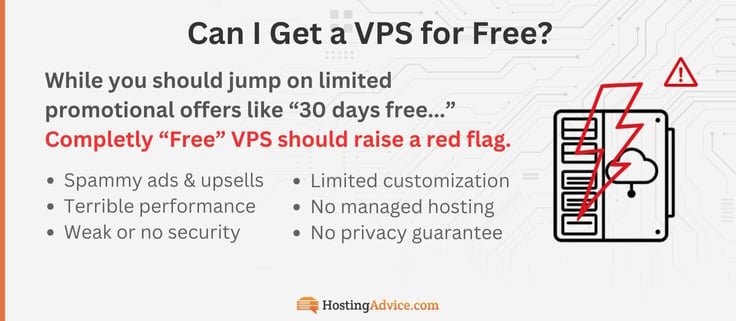
If you’re tempted by an unfamiliar offer promising 100% free hosting, you could run into a few unpleasant surprises.
Here are several reasons it’s smart to steer clear of free hosting services:
- Spammy ads and upsells
- Terrible and unreliable performance
- Weak or no security
- Unreliable uptime
- Limited customization and no managed hosting
- No privacy guarantee
This Reddit thread is a good example of why you shouldn’t trust any host that claims to offer free servers with no strings attached. There are well-documented cases of so-called free hosts randomly deleting servers without warning, which tells you there’s nothing private (exposed hosting servers) or reliable about such environments.
Alternatively, opt for a VPS with a money-back guarantee. Hostinger, for example, will give you a 30-day money-back guarantee. That means if you don’t like the service, you can request your money back within 30 days of signing up.
Another option is to find a VPS with ultra-low starting prices. IONOS and Kamatera are my top picks.
What Features Should I Look for In a VPS Hosting Plan?
Although a VPS host may be worth it, your choices will determine whether you’ve made the right investment.
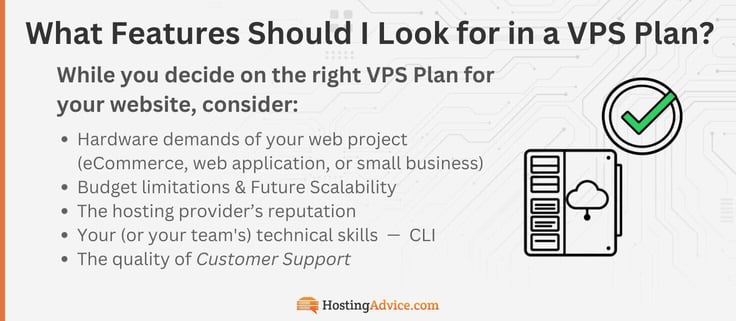
When looking for a good VPS plan, consider:
- Hardware demands of your web project (eCommerce store, a web application, or a small business website): This will also determine the kind of hardware and resources you need. For example, if the project requires a lot of data handling, you need a VPS with a good amount of storage, decent memory, and multiple CPU cores for faster processing.
- Budget limitations and future scalability: The amount of money you’re willing to spend on a VPS. Most VPS providers offer cheaper plans if you sign long-term contracts, usually between one and three years. It’s best to scale as you go.
- The hosting provider’s reputation: You don’t have to think twice about the options included here. We’ve only included the most reliable and competitive options. Just remember, opt for VPS companies with good ratings in the market.
- Your (or your team’s) technical skills: If you need help managing the server, a managed VPS plan should be a great fit for security, updates, and a drag-and-drop website builder. Unmanaged plans work best for individuals with some technical background, such as web developers, reseller hosting providers, and system administrators.
- The quality of customer support: You may need some help further down the line — knowing where and how to get it is important. We often go over customer support in our more in-depth reviews. We’re also here to help answer your questions with our new smart hosting tool, HostHelper™.
Of course, these are not the only factors to consider when finding the best VPS hosting provider. But they should help point you in the right direction.
Is a Virtual Private Server Worth It?
Absolutely. With a VPS, you get better network stability, more customization, stronger privacy, and easier scalability. That’s because your server hardware isn’t shared with other users on the network.
Imagine sharing an apartment with your friends (shared hosting). Yes, it’s cheaper because you also share the bills and utilities. But you shouldn’t expect total privacy.
You share the same kitchen, bathroom, balcony, and other common areas. Also, depending on the number of rooms available, you may even share a bedroom.
Think of a VPS like renting a cozy mother-in-law suite. You get your own bathroom, mini-kitchen, closet, and more. It’s your private space, giving you more control and comfort.
Years ago, a VPS host was quite expensive. Part of the reason was that the service was only associated with powerful hardware. Today, companies including Kamatera and IONOS offer incredibly affordable VPS hosting packages that make it well worth the investment. As I noted earlier, some VPS plans are even cheaper than what you pay for shared hosting.
Would you rather pay extra to get a sense of privacy? Also, would you invest in a scalable and stable server if you had the opportunity?
If your answer is, “Yes, of course I would,” then a VPS is well worth it.
What’s the Difference Between Managed and Unmanaged VPS?
The core difference between managed and unmanaged VPS comes down to server management, control, and customization.
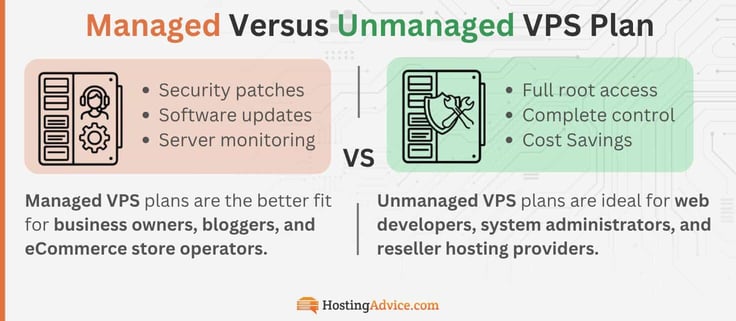
With a managed VPS, your hosting provider handles the technical heavy lifting: security patches, software updates, server monitoring, and troubleshooting.
With an unmanaged VPS, that responsibility falls entirely on you or your team. Think of it like owning a car: managed hosting is like leasing one with a full-service maintenance plan, while unmanaged is like buying a used car and handling all the repairs yourself.
Managed VPS plans are the better fit for business owners, bloggers, and eCommerce store operators who want the power of a VPS without needing to know their way around a Linux command line. Providers like Cloudways specialize in managed VPS environments, handling the backend so you can focus on running your site. The tradeoff is cost — managed plans are typically more expensive than their unmanaged counterparts.
Unmanaged VPS plans, on the other hand, are ideal for web developers, system administrators, and reseller hosting providers who want full root access and complete control over their server environment. You can configure the server exactly how you need it, install custom software, and optimize performance to your specifications. If you’re tech-savvy, you gain total freedom and flexibility for the lowest price.
So which one is right for you? It largely depends on your technical background and budget. If you’re comfortable in a server environment and want maximum control, go unmanaged. If you’d rather leave server management to the experts and focus on your project, or you have a dedicated team, a managed VPS is well worth the extra cost.
Either way, both options offer the privacy, stability, and scalability that make a VPS worth it in the first place.
Stability, Control, and Privacy Are Worth Investing In
When you choose a virtual private server, you gain stability, control, and privacy. These benefits are not something you’ll find in a shared hosting environment.
A virtual private server is perfect for people who want to customize their server environment. Experienced site owners, IT administrators, and developers can benefit from everything a VPS offers.
If that sounds like you, don’t hesitate to check out this full breakdown VPS hosting guide. It should teach you everything you need to know about VPS hosting, including how to choose a host.
HostingAdvice.com is a free online resource that offers valuable content and comparison services to users. To keep this resource 100% free, we receive compensation from many of the offers listed on the site. Along with key review factors, this compensation may impact how and where products appear across the site (including, for example, the order in which they appear). HostingAdvice.com does not include the entire universe of available offers. Editorial opinions expressed on the site are strictly our own and are not provided, endorsed, or approved by advertisers.
Our site is committed to publishing independent, accurate content guided by strict editorial guidelines. Before articles and reviews are published on our site, they undergo a thorough review process performed by a team of independent editors and subject-matter experts to ensure the content’s accuracy, timeliness, and impartiality. Our editorial team is separate and independent of our site’s advertisers, and the opinions they express on our site are their own. To read more about our team members and their editorial backgrounds, please visit our site’s About page.