

Writer: Surajdeep Singh


Editor: Lillian Castro


Reviewer: Christina Lewis

Have you ever accidentally sent an email to the wrong address? We all make typos, and sometimes these mistakes can cause bigger issues than we expect. I’ve encountered several instances where emails bounced back due to an incorrect recipient address. Although my bounced emails weren’t a huge problem, a high email bounce rate can really hurt a business.
According to a HubSpot study, the average hard bounce rate is lowest for the media industry at 0.3% and highest for the electronics industry at 0.9%. The industry standard is 2% or lower. If your email bounce rate exceeds 2%, you need help with your email list hygiene and should consider setting up a catch-all email address.
A catch-all email address receives all emails that are addressed to an invalid email address for a domain. As long as you have typed the correct domain name, your email will not be hard-bounced. Here are the best catch-all email address hosts for businesses.
1. Hosting.com
Hosting.com is one of the best catch-all email address hosts available today. You must purchase a Professional or Pro Plus email hosting plan to use the catch-all email address feature. The cheaper Professional email hosting plan offers guaranteed email uptime, POP, IMAP, and SSL support, 200 emails per hour, advanced security protection, and catch-all email.
Hosting.com

Monthly Starting Price $2.99
- Powered by Titan — appointment booking, email campaigns, and read receipts built in
- AI Smart Write drafts and refines emails in your tone and style
- Advanced anti-spam, anti-virus, and phishing protection — 100% delivery guaranteed
- Outlook, Apple Mail, iOS, Android, & all major clients supported
- Free email migration and 24/7/365 in-house support
- Get started on hosting.com now.


Christina Lewis
| Money Back Guarantee | Disk Space | Domain Name | Setup Time |
|---|---|---|---|
| 30 days | 10 GB – 100 GB | FREE (1 year) | 4 minutes |
You can set up a catch-all email address for your domain from the hosting.com Customer Portal. To configure a catch-all address, perform the following steps:
- Click on Catch-all email.
- Click on Enable catch-all mailbox.
- Enter the catch-all email address.
- Click on Set this email as catch-all.
The catch-all email address is now active. If you need help setting up your catch-all email address, you can reach out to the hosting.com Guru Crew Support team. They are available around the clock and offer exceptional customer support.
2. Hostinger
Hostinger’s email hosting plans are both cheap and reliable. The Business Starter email plan is ideal for small and mid-sized businesses. It includes cloud-based infrastructure, a 99.9% uptime guarantee, substantial disk and email storage space, 5000 emails per day, 50 email aliases, 10 email forwarding rules, advanced security features such as anti-spam and antivirus checks, and a catch-all email address.
Hostinger.com

Monthly Starting Price $0.39
- Best overall value: The most complete AI-powered business email at the lowest price
- With Standard, Kodee AI writes, replies, and summarizes emails in your tone and voice
- Smart inbox auto-organizes priority emails and urgent replies
- Spam and virus filters block 99.9% of malicious emails
- Works with Outlook, Apple Mail, Gmail, and all major email apps
- Get started on Hostinger now.


Sead Fadilpasic

| Money Back Guarantee | Disk Space | Domain Name | Setup Time |
|---|---|---|---|
| 30 days | 5 GB SSD – 50 GB SSD | FREE (1 year) | 3 minutes |
Follow these steps to set up a catch-all email for Hostinger:
- Click on the Emails section.
- Click on the Manage option.
- Select the Forwarders option on the left sidebar.
- Click on Create catch-all.
- A pop-up will appear on your screen. Select the catch-all mailbox to forward emails to and click on Create.
- Log into the destination mailbox and click on the verification link to confirm your choice.
Setting up a catch-all email for the Hostinger Business Starter plan is not as straightforward as hosting.com’s customer portal. Nevertheless, Hostinger is among the market’s best catch-all email address hosts.
3. IONOS
IONOS is an email hosting provider that offers solutions tailored to your needs. The email hosting solution’s Mail Basic 1 plan is among the cheapest in the industry and has several impressive features. As a Mail Basic 1 user, you can enjoy the benefits of ad-free email, a spam filter, Webmail, 24/7 expert support, a mailbox capacity of approximately 10,000 emails, and a catch-all email.
IONOS.com

Monthly Starting Price $1.10
- Business email with a personal consultant — unique to IONOS
- Choice of IONOS mail, Microsoft 365, or Google Workspace
- Free domain included, completely ad-free, no data selling
- AI email assistant for writing, scheduling, and smart replies
- Spam filter, virus protection, and 24/7 award-winning support
- Get started on IONOS now.
Christina Lewis
| Money Back Guarantee | Disk Space | Domain Name | Setup Time |
|---|---|---|---|
| 30 days | 2 GB – 50 GB | FREE (1 year) | 4 minutes |
Log in at IONOS to conveniently set up a catch-all email address.
- Once logged in, click Add email account.
- Enter your catch-all email address like this: *@yourdomain.com.
- Enter a password.
- Click Add.
If you need help setting up your catch-all email address account, feel free to contact the IONOS support team.
4. ScalaHosting
ScalaHosting offers four reasonably-priced business email hosting plans. As advertised on the ScalaHosting website, the email hosting provider is top-rated on TrustPilot.
The cheapest business email hosting account plan on ScalaHosting, the StartUp plan, offers standard inbox deliverability and security, substantial email storage, 10 email accounts, SMTP, IMAP, and POP3 support, advanced SPAM protection, daily offsite backups, and catch-all email. Other features include SSL certificates and free, streamlined migration with no downtime experienced.
ScalaHosting.com

Monthly Starting Price $4.95
- Professional business email with FREE custom domain included
- Ample email storage from 50 to 150 GB
- Spam protection and daily backups
- Compatibility with POP3, IMAP, and SMTP
- Up to unlimited emails with the cloud email plan
- Get started on ScalaHosting now.


Laura Bernheim

| Money Back Guarantee | Disk Space | Domain Name | Setup Time |
|---|---|---|---|
| Anytime | 50 GB – Unlimited GB | FREE (1 year) | 6 minutes |
You can easily set up a ScalaHosting catch-all email address in SPanel by performing these steps:
- Log into the user interface and click on Email Accounts.
- Enter a new catch-all email address and set a password. Click on Create Email to proceed.
- Go back to the home page and click on Default Address.
- Select the correct domain name from the options on your screen, click Forward to Email Address, and enter the forwarding catch-all email address in the field.
- Click on Change Address to finalize your changes.
If we consider ScalaHosting’s all-around email hosting package, it is one of the best catch-all email address hosts.
5. SiteGround
The final catch-all email address host on our list is SiteGround. SiteGround is a premium web hosting provider. However, the web hosting service does not offer a dedicated email hosting plan. Each SiteGround hosting plan (under Web Hosting, Managed WordPress Hosting, WooCommerce Hosting, Cloud Hosting, and Reseller Hosting) includes unlimited email addresses for your domain.
SiteGround.com

Monthly Starting Price $2.99
- Free unlimited business email included with all hosting plans
- AI security blocks 99.99% of spam, viruses, and phishing
- Access via webmail, Outlook, Apple Mail, Gmail, and mobile
- Built on Google Cloud with 99.9% uptime and free CDN across 170+ locations
- 4.9/5 Trustpilot rating with 98% customer satisfaction
- Get started on SiteGround now.


Lynn Cadet

| Money Back Guarantee | Disk Space | Domain Name | Setup Time |
|---|---|---|---|
| 30 days | 10 GB SSD – 100 GB Google Cloud SSD | FREE (1 Year) | 6 minutes |
Setting up a SiteGround catch-all email address is fairly simple.
- Log in to Site Tools and click Email.
- Select Forwarders and click Manage Rules.
- Open the hamburger menu and select DEFAULT record.
- Once there, click Forward and enter your catch-all email address.
If you are looking for a web hosting provider with reasonable email hosting features, SiteGround is your best bet.
What Is a Catch-All Email Address?
A catch-all email address is a regular email address that ensures all emails addressed to the wrong recipient for a domain are received. This prevents the loss of important email messages. Of course, if the catch-all address account’s inbox is full or the email is too large, a soft email bounce may occur. It should be noted that the sender must type the right domain name for a catch-all email address to receive the message.
For example, let’s say you have three specific addresses for xyz.com: webmaster@xyz.com, sales@xyz.com, and info@xyz.com. You can set up info@xyz.com (or either of the other email addresses) as your catch-all email address. An email sent to home@xyz.com or any other invalid email address will be received by info@xyz.com.
What Should I Name My Catch-All Email?
As detailed in the above section, you could set up an existing email address as your catch-all email account. No naming restrictions exist if you want to create a new catch-all email account. That said, you should always name a business email address professionally.
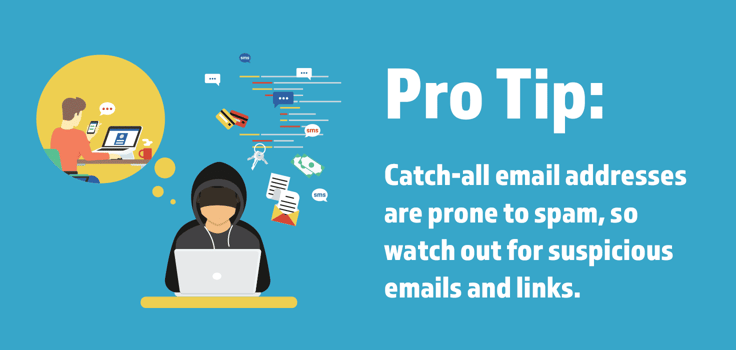
Please keep in mind that a catch-all email address can be redirected to a single email address only. Keep the login details of this email address handy, and check your inbox regularly. Never click on emails and links within emails that seem spammy to avoid phishing attempts.
Is a Catch-All Email a Good Idea?
Also known as a wildcard email address, yes, a catch-all email account is a good idea. That said, sometimes the cons outweigh the pros.
Here are the pros and cons of catch-all email aliases:
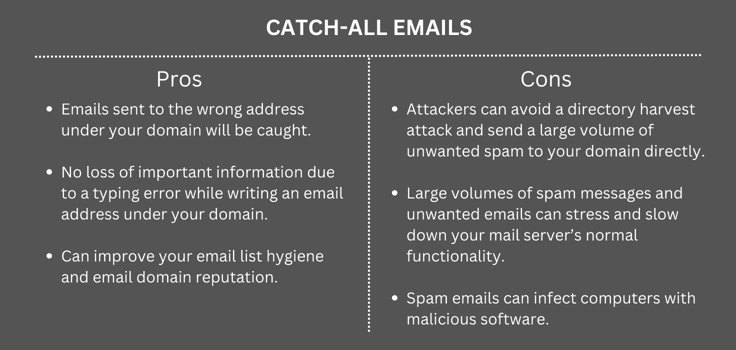
Catch-all email addresses are a valuable business tool when used correctly. But of course, you must take the time to manage the account well and avoid falling for phishing attempts.
What Features Do I Need for Email Hosting?
Here are the features you need for email hosting:
- A custom domain
- Robust security features to protect against spammers and malicious actors
- Sufficient mailbox storage
- Integrated team features such as chat and conferencing.
- Bonus productivity and everyday integration tools
- Flexible sending limits
- Catch-all email address support
- Good customer support
89% of businesses use email as their primary source for gaining leads. If you want to make an impact online, a good email hosting solution is an important initial investment. The best email hosting providers on the market today offer the listed features and much more.
Choosing a Catch-All Email Address Host
Setting up a catch-all email address is a smart move, but it’s important to take steps to protect yourself from spammers and unwanted emails. Each of the five catch-all email hosts we listed has its own appeal. You should choose the email hosting provider that suits your needs best.
In our opinion, hosting.com, Hostinger, and ScalaHosting are the best catch-all email address hosts. If you are looking for a web hosting provider with email hosting capabilities, SiteGround is an attractive proposition. Conduct detailed research and make sure you read customer reviews that explore the pros and cons of these products before purchasing one.