

Writer: Jordan Sprogis


Editor: Lillian Castro


Reviewer: Christina Lewis

Imagine this: During the COVID-19 pandemic, you decided to take up a new hobby. Crocheting became your passion, and soon, friends and family were asking for custom pieces. This sparked an idea: What if you could sell your creations on your own online store?
Fast forward a few years, and you’re shocked by how far your eCommerce store has come. But many of your customers have experienced page load issues and can’t play tutorials or post on the forum when there’s high traffic. So you begin looking for a solution and come across multisite hosting.
With multisite hosting, you can effortlessly create and manage multiple websites without needing separate hosting accounts. It’s particularly helpful if you run a business with various departments, a franchise with multiple locations, or if you host client websites as a web developer.
Whether you’re expanding your business or serving clients, WordPress multisite hosting empowers you to manage multiple websites and brands effectively. That’s why we have compiled a list of the best WordPress hosting for multiple sites so you don’t have to. So sit back, relax, and find the perfect multihosting provider.
-
Navigate This Article:
1. Hostinger: Best Overall
Hostinger knows that simple is the name of the game, which is why it’s our choice as the best web hosting service overall.
These WordPress plans are perfect for those seeking straightforward solutions, 24/7 support, and an intuitive interface. Hostinger also offers automatic WordPress setup and migration, so you can relax and let the process unfold smoothly.
Hostinger.com

Monthly Starting Price $2.69
- Best overall value: The most complete managed WordPress hosting at this price
- Kodee AI Agent manages your WordPress site via simple chat
- LiteSpeed servers boost site speed by up to 40%
- WAF, malware scanner, DDoS protection, and auto-updates
- Free migrations — 85% completed in under 5 minutes
- Get started on Hostinger now.


Sead Fadilpasic

| Money Back Guarantee | Disk Space | Domain Name | Setup Time |
|---|---|---|---|
| 30 days | 20 GB SSD – 100 GB NVMe | FREE (1 year) | 4 minutes |
Website builders need assistance and convenience, which Hostinger brings to the table. It provides step-by-step video walk-throughs and guides, an expansive knowledge base with tutorials, and 24/7 support from the best web hosting pros.
Hostinger’s multisite basic plan lets you build up to 100 websites with unlimited bandwidth, storage, weekly backups, and a free domain and SSL. It also has a custom drag-and-drop website builder with the option to choose from designer-made templates or start from scratch with no coding skills required.
2. InMotion Hosting: Fastest WordPress Hosting
InMotion Hosting is our top pick for speed: Its WordPress multisite plans are backed by NVMe SSDs for greater performance. NVMe SSDs are faster than standard SATA SSDs, which are commonly used, so you know you’re getting the best tech in the market today.
The Core plan allows up to two websites, but for a few more dollars a month, you can upgrade to unlimited websites.
InMotionHosting.com

Monthly Starting Price $5.09
- UltraStack NVMe hosting makes WordPress up to 40x faster
- Automatic WordPress updates, free SSL, and malware scans
- Free domain, free cPanel, and free expert migration on all plans
- BoldGrid drag-and-drop WordPress builder with free themes
- 90-day money-back guarantee and 24/7 award-winning human support
- Get started on InMotion now.


Dave McQuilling

| Money Back Guarantee | Disk Space | Domain Name | Setup Time |
|---|---|---|---|
| 90 days | 100 – 300 GB NVMe SSD | FREE (1 year) | 5 minutes |
InMotion Hosting guarantees that all plans can make your WordPress site up to 40x faster than hosting from WordPress alone. And in addition to NVMe storage, all plans come with unlimited bandwidth and automatic caching.
If you’re not familiar with the cutting-edge beauty of NVMe SSDs, it’s time to learn. NVMe SSD storage revolutionizes data access for faster loading times and a better user experience. Compared to SATA SSDs, NVME consistently outperforms in speed and reliability and can be up to 10x faster than SATA, making it the superior choice for performance.
InMotion Hosting’s speed features are noteworthy. Unlimited bandwidth ensures your WordPress site can handle heavy traffic without downtime, providing users with optimal responsiveness.
The W3 Total Cache plugin stores frequently accessed data, minimizing the need to fetch it from the server repeatedly so that you consistently get faster loading times.
InMotion Hosting’s plans are slightly more expensive than other WordPress hosting providers focusing on speed. Still, they’re well worth the cost.
This forward-thinking company prioritizes speed in addition to customer service, security, and its employees’ work-life balance — so you know you’re working with people who are just as passionate as you are.
3. Bluehost: Most Affordable Shared WordPress Hosting
Bluehost takes the win for being the most affordable shared WordPress hosting provider. It offers incredible long-term discounts without compromising security and other necessary features.
Bluehost also provides affordable introductory rates, making it perfect for beginners and those on a budget.
Bluehost.com

Monthly Starting Price $1.99
- Best for WordPress: WordPress.org’s longest-running recommended host since 2005
- 0.35s average load time — independently verified by WPShout
- AI builds your complete WordPress site in under 60 seconds
- Yoast SEO, NVMe SSD, WAF, and daily malware scans
- 24/7 WordPress experts — under 2-minute average response
- Get started on Bluehost now.
Sead Fadilpasic
| Money Back Guarantee | Disk Space | Domain Name | Setup Time |
|---|---|---|---|
| 30 days | 10 – 100 GB NVMe SSD | FREE (1 year) | 7 minutes |
Nothing says “affordable” like “free”! Bluehost offers numerous free features for its multisite plans, including free CDN, free domain for a year, free dedicated IP (for the Pro plan), access to custom themes, automatic WordPress installation, and automatic updates.
All plans include resource protection, a $150 credit for Google Ads, a domain manager, SSL certificates, and your Google Business Profile.
Starting with the second-tier plan, Choice Plus, you can get unlimited websites and even more features if you upgrade to the Online Store and Pro plans for a few dollars more per month.
4. Cloudways: Best Cloud WordPress Hosting
Cloudways brings a premium cloud-based hosting experience to WordPress users everywhere. The best part is you can choose from three popular cloud hosting behemoths: Google Cloud Platform, Amazon Web Services, and DigitalOcean.
The DigitalOcean plans start at just $6.60 per month, giving you enterprise-level cloud support for shared hosting prices.
Cloudways.com

Monthly Starting Price $6.60
- Exclusive 40% off for 4 months for HostingAdvice readers
- Managed WordPress Hosting on DigitalOcean, AWS, GCP, Vultr, or Akamai
- AI Copilot for instant troubleshooting and server insights
- Free unlimited WordPress migrations via Cloudways plugin
- Pay-as-you-go — no contracts, scale up or down anytime
- Get started on Cloudways now.


Jack Wallen

| Money Back Guarantee | Disk Space | Domain Name | Setup Time |
|---|---|---|---|
| 3-day FREE trial | 20 GB SSD – 4 TB SSD | New or Transfer | 8 minutes |
Signing up for Cloudways means more than getting premium service for a low price — the folks at Cloudways are committed to quality and user-friendliness. My personal favorite feature is its easy WordPress site migration tool. Migrating a WordPress site can be a pain, but Cloudways makes it simple with its plugin.
If that’s not enough to entice you, you should know it also offers a three-day free trial to let you test drive its plans risk-free.
5. WP Engine: Best Premium WordPress Hosting
WP Engine is the top choice for premium WordPress hosting with exceptional features, including expert WordPress support, advanced security measures, daily backups, easy-to-use one-click installs, and tons of customization options so your site looks unlike any other on the web.
In short, there’s a reason WP Engine is our choice for premium WordPress hosting: It has a lot to offer.
WPEngine.com

Monthly Starting Price $27.00
- 0% OFF your first payment for our readers
- FREE Genesis Framework & StudioPress themes
- Fast, scalable, and secure WordPress
- FREE SSL certificate and CDN ready
- Upgrade for geotargeting and edge security
- Get started on WP Engine now.


Lynn Cadet

| Money Back Guarantee | Disk Space | Domain Name | Setup Time |
|---|---|---|---|
| 60 days | 10 GB – 50 GB | New or Transfer | 6 minutes |
Premium WordPress hosting is a step above what WordPress typically offers. With extra features, hosting providers like WP Engine create optimized hosting environments specifically designed for WordPress to enhance speed, security, and reliability.
WP Engine has various hosting plans, advanced security features to block cyber attacks, round-the-clock customer support, and access to more than three dozen premium WordPress themes.
And if you’re looking for a little more reassurance, WP Engine is trusted by well-known brands like Instacart, Tiffany & Co., Petco, Sleep Number, and Yelp.
6. SiteGround: Best for Business
SiteGround is a prime choice for businesses seeking flexibility, security, and user-friendly website management.
SiteGround has two multisite WordPress packages that start with plenty of storage space and unmetered bandwidth, the ability to handle around 100,000 to 400,000 monthly visitors, and many other features that maintain uptime and efficiency on your eCommerce site.
SiteGround.com

Monthly Starting Price $2.99
- Best for performance: WordPress sites average 78% faster speeds after migrating to SiteGround
- Free AI agent manages your WordPress site via simple chat
- Smart WAF, AI bot protection & geo-distributed backups
- Free staging, WP-CLI, SSH, Git, and one-click migrations
- 4.9/5 Trustpilot — 98% customer satisfaction for 10+ years
- Get started on SiteGround now.
Lynn Cadet
| Money Back Guarantee | Disk Space | Domain Name | Setup Time |
|---|---|---|---|
| 30 days | 10 GB SSD – 100 GB Google Cloud SSD | FREE (1 Year) | 6 minutes |
When it comes to business and eCommerce websites, flexibility is crucial. At any moment, you can experience high traffic spikes and realize the need for scalability as your business grows. SiteGround offers unmetered data transfer on all plans, allowing companies to handle traffic without costing you extra money.
SiteGround plans also prioritize security by getting automatic WordPress updates, custom firewall rules, and an all-in-one security plugin. In addition to these features, SiteGround is constantly working on innovative solutions that help block millions of security threats for its users daily.
For those who prefer an easy-to-use website builder, SiteGround partners with Weebly to make your website creation completely painless.
7. Liquid Web: Best Managed WordPress Hosting
Liquid Web stands out from other managed WordPress hosting providers thanks to its exceptional features.
Managed hosting is all about convenience and letting the host handle the nitty-gritty backend details — and Liquid Web does that and more. Aside from the basics, like server and security configuration, Liquid Web has several built-in automated features.
LiquidWeb.com

Monthly Starting Price $5.00
- Hassle-free managed hosting and Heroic Support®
- 1-click staging and backup restores
- Automatic backups and updates to WP and plugins
- Hardened security and lightning-fast SSD speed
- 100% uptime and 17% off first year
- Get started on Liquid Web now.


Christina Lewis
| Money Back Guarantee | Disk Space | Domain Name | Setup Time |
|---|---|---|---|
| 30 days | 15 GB – 800 GB | New or Transfer | 5 minutes |
While Liquid Web’s multiple-site plans may be slightly more expensive than other providers, its managed services and bonus benefits give you more than your money’s worth.
Liquid Web provides automatic WordPress core and plugin updates, reducing the risk of compatibility issues or security vulnerabilities caused by outdated plugins. It also offers image compression and lazy loading, so you don’t have to adjust file sizes manually.
Liquid Web’s container add-ons and plugin performance monitor contribute to website optimization by providing container-based infrastructure for enhanced stability and scalability, which ensures that your website performs at its best.
Starting with its Launch plan, you have the flexibility to host a range of one to 250 websites and reap more than a dozen benefits that aren’t standard in many other managed hosting plans.
Other Best WordPress Hosting Plans for Multiple Sites
These hosts are worthy of an honorable mention for consistently providing excellent solutions for multisite users. So if the WordPress hosting providers on our list haven’t piqued your interest yet, check out these great alternatives below.
8. Rocket.net
Rocket.net offers incredible performance no matter where your visitors are, showing faster TTFB speed results than other major players in the hosting industry.
Rocket.net also provides free Malware protection, SSL, CDN, WAF, and attentive 24/7 live support via chat, email, or phone — with the playful warning, “Don’t be surprised if the CEO jumps in to help.”
9. WebHostFace
WebHostFace deserves a shoutout because this hosting service does its best to go the extra mile. WebHostFace has gained traction for its shared WordPress hosting and rock-bottom prices without compromising hosting basics.
Each plan has a free domain, SSL, DNS setup, antivirus security, eco-friendly hosting, and free website transfer, and you can host up to five websites with its Ultima plan. (Its CEO also came from SiteGround, so this team knows what they’re talking about.)
Rocket.net, WebHostFace, and Cloudways are hosting providers that excel in different aspects, such as performance, affordability, specialized offerings, and environmental consciousness.
Whether you prioritize speed, extra features, attentive customer support, or eco-friendly hosting, these providers offer reliable solutions for any and all of your hosting needs.
Comparison of the Top WordPress Hosting Providers
The top WordPress hosting providers support anywhere from 30 to unlimited websites per hosting plan starting for as little as a few dollars per month. You can use the table below to compare top hosts:
| Host | Price | Number of Sites |
| Hostinger | $2.69 | 100 |
| InMotion Hosting | $5.09 | Unlimited |
| Bluehost | $1.99 | 50 |
| Cloudways | $6.60 | Unlimited |
| WP Engine | $27.00 | 30 |
| SiteGround | $2.99 | Unlimited |
If you want an unlimited number of sites, InMotion, Cloudways, and SiteGround should be your top picks.
Who Uses WordPress?
WordPress is a versatile platform people use for various industries, interests, and markets, from personal blogs to brick-and-mortar landing pages to enterprise websites.
Thanks to its user-friendly interface and customizable options, WordPress has become incredibly popular since its founding in 2003. In fact, WordPress powers 43% of all sites on the web.
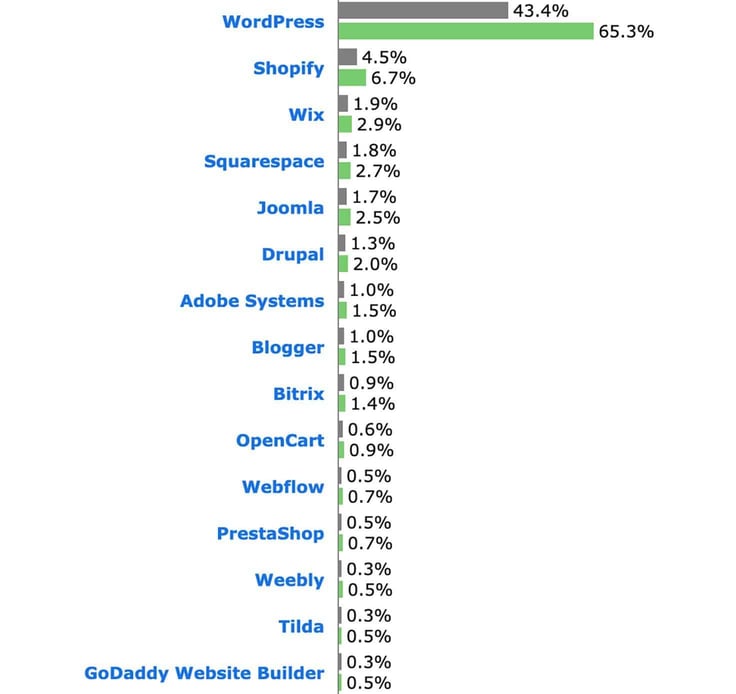
While it started as a blogging tool, WordPress has grown into a powerful website builder and content management system (CMS), serving as the foundation for a variety of websites that are created by:
- Bloggers
- Small businesses
- Nonprofits
- Freelancers
- Store owners
- Affiliate marketers
- Writers
- Artists
- Musicians
- Consultants
- Entrepreneurs
- Software agencies
But WordPress hasn’t strayed too far from its roots: WordPress remains the platform of choice for bloggers, with 97% of blogs powered by the hosting giant. This is interesting because blogs are becoming less popular and only make up 6% of WordPress users.
Among its most frequent use is running eCommerce stores. Some 28% of all eCommerce sites use WordPress thanks to its robust eCommerce plugin, WooCommerce, and other integrations that help business owners customize their stores and customer shopping experience.
The popularity of WordPress is even more apparent with the extensive list of high-profile websites that use it. Companies, including Sony, Disney, Microsoft, CNN, Spotify, and Time Magazine, have embraced WordPress for their online presence. Even The White House uses WordPress!
With its user base continuously growing — 63% of users choose WordPress as their CMS for website management — WordPress has unsurprisingly established itself as a dominant content management system.
What Is WordPress Hosting?
WordPress is a content management system (CMS) that allows users to create, manage, and publish content, including websites and eCommerce stores. It’s a straightforward platform so that even the most inexperienced website builder can create one within a few minutes.
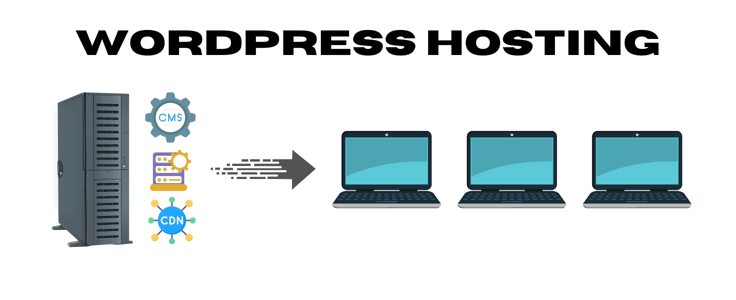
WordPress hosting, on the other hand, refers to hosting packages with features that optimize your WordPress site. Users can either download the CMS software directly from WordPress.org and purchase a separate hosting plan or buy a plan that comes with a one-click installation.
Which WordPress Hosting Features Do I Need?
Unless you’re a seasoned WordPress user, you may not know the key features to look out for when developing your parent site and subsites. Prioritizing the right features can enhance your WordPress experience and make managing your websites effortless. Here are a few that you should always keep an eye out for:
- Premium WordPress plugins and themes: Look for a hosting provider that offers access to a library of premium WordPress plugins and themes, like plugins for SEO optimization, security, and caching. Premium themes also provide professionally designed templates and can give your websites an even more professional look.
- Automatic WordPress installation: A hosting provider that offers automatic WordPress installation can save you a lot of time and effort. With a few clicks, you can have WordPress up and running on your website without manual installation.
- Support for multiple WordPress sites: This one may seem obvious, but it’s worth double-checking when you find a provider you like. Make sure your hosting provider supports multiple sites within a single account to easily manage your websites from one central location (your dashboard!).
- Live customer support: No matter your level of expertise, a hosting provider that provides round-the-clock customer support is a must-have. Not only does having technical support give you instant assistance when you run into issues or have questions, but live support shows that the provider prioritizes customer service.
When choosing the perfect WordPress hosting plan for your website, make a list of what you think you need most. Say, for instance, you want a hands-off experience where you don’t have to worry about setting everything up yourself. In that case, make a note to look for managed WordPress hosting plans. Or, if your website has a lot of multimedia, you’ll want to look for plans with higher or unmetered bandwidth. Making a clear list of your website’s needs makes finding hosting solutions that fit the bill.
What Is the Difference Between Unmanaged and Managed WordPress Hosting?
While shopping around for web hosting providers for your websites, you probably came across the terms “managed hosting” and “unmanaged hosting” a few times. These two options vary in the level of control, support, and technical expertise required — so let’s break them down.
Unmanaged Hosting
Unmanaged hosting lets website creators play with the server’s infrastructure so they have complete control over their sites’ configurations. Creators are responsible for managing all aspects of their website, including server setup, software updates, security, backups, and troubleshooting.
That said, unmanaged hosting is typically ideal for those with a lot of technical expertise and are interested in backend development, or those who haven’t found a managed plan they liked.
Those who go the unmanaged hosting route typically prefer VPS hosting because it’s a great middle ground between shared and dedicated hosting in terms of price and flexibility. Unmanaged VPS hosting means you’re sharing resources with others on a virtual private server.
Still, it gives you more control over the server’s configurations, ultimately allowing you to scale more accordingly and use resources with fewer limitations.
See 2026’s best unmanaged VPS hosting providers >>
Managed Hosting
Managed hosting provides a hands-off approach and lets website creators focus on developing their website rather than setting up the server, software, and security. Instead, the hosting provider manages all the aspects of managing the site.
Many providers also offer features like built-in caching, CDNs, and optimized performance tools, making this option ideal for those who prefer to stay away from server management.
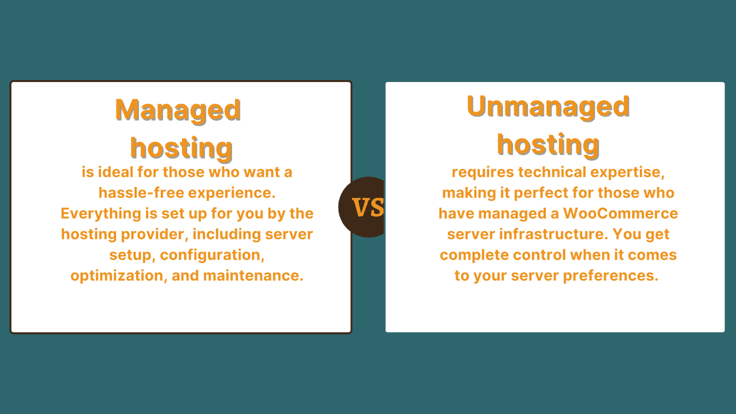
Those interested in managed hosting typically choose between shared, VPS, and dedicated hosting depending on their preferences and resource needs. For example, you may prefer that your provider sets up your server configurations, but if you want control over your resources, you may choose to work from a dedicated server.
See 2026’s best managed hosting providers >>
Do I Need Shared, VPS, or Dedicated Hosting for WordPress?
Whether you’re embarking on a new journey or expanding a current site, you have a few options to choose from when selecting your server type. The features and capabilities of the server you choose will directly impact how your website performs.
WordPress supports shared, VPS, and dedicated hosting options, all of which have different levels of control, performance, resources, and varying monthly costs. Here’s what you need to know about all three.
Shared hosting is when a physical server hosts multiple websites simultaneously to share resources, including CPU, memory, and storage. Shared hosting is one of the cheapest options out there, and combined with its shared platform, it’s a perfect option for personal websites and small websites with moderate traffic.
But scalability can be tricky with shared hosting since resources are shared, so you may need to switch to VPS or dedicated hosting if you consistently see slow speeds.
See 2026’s best shared hosting plans >>
VPS (virtual private server) hosting is where a single physical server is divided into multiple virtual servers that operate independently and have their own resources. Many prefer VPS hosting because it offers more flexibility and control than shared hosting.
After all, you can customize server settings, install software, and configure it according to your preferences. VPS hosting is a happy medium between shared and dedicated hosting because it’s got a somewhat averaged price point with plenty of customizable features.
See 2026’s best VPS hosting plans >>
Dedicated hosting gives your website (or websites) an entire physical server with its own resources that are not shared or divided. This offers the highest control, performance, and security level, making it ideal for high-traffic websites, resource-intensive apps, or those who prefer the utmost performance and security.
Of course, it comes as no surprise that dedicated hosting is the most expensive option of the three.
See 2026’s best dedicated server hosting plans >>
If you’re unsure which type of web hosting suits you, consider how much website traffic you get, your monthly budget, foreseeable scalability needs, and how much control you want.
Shared hosting is ideal for basic websites just starting, while VPS is an excellent combination of affordability and customization. Dedicated hosting is the most powerful — and expensive — option, but it gives you the most customization and is ideal for larger businesses and enterprises.
Why Do I Need WordPress Hosting for Multiple Sites?
Hosting multiple websites on WordPress lets you create a network of subdomains and subdirectories. Businesses may choose to go with the multisite approach for several reasons:
- Target different geographical areas
- Showcase other lines of products
- Separate franchise or branch locations
- Conduct experimental testing (i.e., which website version appeals to their visitors the most)
Take Coca-Cola, for example. This company has several brand websites under the parent Coca-Cola Company. Some of its websites are Diet Coke, Sprite, and Fanta. Instead of creating websites from scratch for each product, Coca-Cola uses the multisite approach and keeps everything within the “family.”
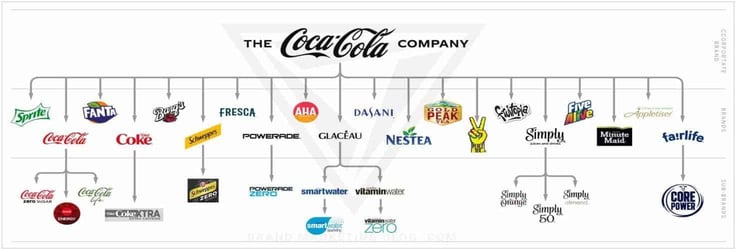
Plus, hosting for multiple sites is a great way to streamline management so it’s easier than ever to update, install WordPress plugins, and perform essential maintenance, like backups, malware scans, and testing website speed.
Building multiple websites under one WordPress host provider is also cost-effective. Instead of paying different hosting providers for full-priced plans, you get more bang for your buck when you combine your websites into one plan.
For example, look at Bluehost’s plans: For one website, you can pay a few dollars a month, but for just a couple of dollars more, you can create unlimited websites.
Multiple sites also help streamline resource management and scalability. As your business grows and you need more websites, you’ll want to ensure that your hosting provider optimizes resource allocation for consistent site performance and seamless scalability.
What Should I Look for in a WordPress Hosting Provider for Multiple Sites?
The key to successfully establishing multiple sites is your web hosting provider. No matter the industry, the service, or the product, your websites must meet the criteria visitors are always looking for:
- easy navigation
- responsiveness
- engaging content
Some 94% of consumers say a website must be easy to navigate for optimal user-friendliness. Web hosts may provide intuitive website builders and CMSs designed for WordPress. This may include drag-and-drop interfaces, customizable templates, and user-friendly dashboards to easily organize your website’s navigation and pages.
Responsiveness is also vital: A one-second delay can reduce customer satisfaction by a whopping 16%. A reliable web hosting provider can handle this aspect with optimized server configurations, a robust infrastructure, and advanced caching mechanisms.
Look for hosting providers with SSDs, content delivery networks (CDNs), and server-side caching to ensure fast loading times regardless of how much traffic you’re getting.
While producing engaging and informative content is your responsibility, web hosting providers can still support your content.
For example, storage space and bandwidth that can accommodate multimedia content like videos, images, and interactive elements are crucial features you should consider — especially since multimedia content has been proven to increase engagement, attract search engines, and increase brand awareness.
If your host can support a variety of content correctly, then your users won’t see any downtime or delays.
A bonus feature you should always consider is the type of customer support a web hosting provider offers. If you have a question or are experiencing an error, you want to know your provider is there to help solve the problem.
This may mean you prefer access to customer support via live chat without speaking to a robot, or perhaps you’d prefer a 24/7 phone line that you can call anytime. Whatever your preference, find a hosting provider with a responsive and knowledgeable support team to help you troubleshoot issues and keep your site running as smoothly as possible.
See 2026’s top web hosting providers with the best customer support >>
Is There a Limit to the Number of Sites I Can Host with WordPress?
You can build as many subsites as you’d like on WordPress, although the actual limit depends on which hosting provider you choose and the kinds of resources and hosting plan features it provides.
For example, SiteGround has plans allowing unlimited website creation starting at 20GB of storage space. But in reality, this is insufficient to host a large amount of website traffic, and you can experience performance issues such as slow loading times and resource constraints.
The maximum number of websites you can host depends on the hosting provider’s infrastructure, server capabilities, and resource allocation. So if you want to host several websites or expect relatively high traffic level volumes, you may want to consider a hosting provider that offers a dedicated server and scalable resources.
How Do Pricing Plans Work for WordPress Hosting with Multiple Sites?
Pricing plans for hosting for multiple sites can vary by provider and package. Each provider offers different features, resources, and limitations within their plans, which affect the pricing.
The hosting provider will always include the cost of hosting multiple sites with your chosen plan. So if you purchase a WordPress hosting plan to support your five subsites, you can build and manage them under that plan without concerns about the payment structure.

This is as long as you stay within that plan’s resources — otherwise, you may need to purchase extra features. For example, WP Engine has a custom plan where you can add storage and bandwidth preferences. You can also choose a premade plan and pay an extra fee if you want to add another site.
Which Is the Best WordPress Hosting Provider?
Finding the best WordPress hosting provider is a personal journey that looks different for everybody: The features and tools you’re looking for may not be what another user expects from their provider.
The best web hosting provider for your website will come from the types of tools you need — so, for example, if you want a simple, all-in-one, easy-to-use solution, Hostinger is a great beginner option.
Or if you are looking for cutting-edge technology and speeds, InMotion Hosting can provide you with up to 10x faster speeds with NVMe than other SSDs.
Take the time to evaluate your needs, conduct research, read reviews, and compare the offerings of different providers to make an informed decision that sets you up for success and ensures a seamless hosting experience for your WordPress site!
Unleash the Power of Multiple Sites With a WordPress Hosting Provider
If you struggle with managing multiple hosting accounts or need a better solution to manage your growing eCommerce site, WordPress multisite hosting may be your solution.
With support for multiple sites under one plan, you can create separate websites for your online store, blog, and community forum. The possibilities are truly endless.
And now that you’ve got a handful of top-tier WordPress hosting options at your disposal, you can finally approach your search with confidence.
HostingAdvice.com is a free online resource that offers valuable content and comparison services to users. To keep this resource 100% free, we receive compensation from many of the offers listed on the site. Along with key review factors, this compensation may impact how and where products appear across the site (including, for example, the order in which they appear). HostingAdvice.com does not include the entire universe of available offers. Editorial opinions expressed on the site are strictly our own and are not provided, endorsed, or approved by advertisers.
Our site is committed to publishing independent, accurate content guided by strict editorial guidelines. Before articles and reviews are published on our site, they undergo a thorough review process performed by a team of independent editors and subject-matter experts to ensure the content’s accuracy, timeliness, and impartiality. Our editorial team is separate and independent of our site’s advertisers, and the opinions they express on our site are their own. To read more about our team members and their editorial backgrounds, please visit our site’s About page.