

Writer: Laura Bernheim


Editor: Britain Simons


Reviewer: Lillian Castro

Key Takeaways
We compared today’s leading managed VPS providers to help you find the best balance of performance, support, pricing, and scalability for your needs.
-
ScalaHosting delivers the best balance of management, performance, and value, making it our top overall choice for most VPS users.
-
Liquid Web is our top pick for businesses that need premium managed VPS hosting, offering exceptional support, enterprise-grade infrastructure, and room to scale.
The best managed VPS hosting plan is like Spiderman’s famous saying, “With great power comes great responsibility.” Switching to a virtual private server boosts your online business with better computing resources, more control, security, and enhanced stability. However, VPS servers typically require familiarity with Linux server administration or command line management.
Thankfully, managed VPS server hosting means you don’t have to have a dedicated dev team and worry about “managing” the technical aspects. You can focus on running your business. Your web host will handle all daily updates, optimizations, and security tasks once you build your site. I recommend opening two windows to compare options side by side. Then, make a checklist of top “must-haves.”
Here’s our list of hosts that will help you work more efficiently without compromising your online operations. Decide which Managed VPS Feature is most important to you: Unlimited Bandwidth, Cheap Enterprise-Grade, Linux, AI Managed, Enterprise, Fastest, Cloud, cPanel, Windows, WordPress, White-Label, VPS for Beginners, Small Business, Avoid Fees, or Fully Licensed Windows Servers.
-
Navigate This Article:
Top 3 Managed VPS Providers
The “Top 3” have different budgets, different use cases, and one shared standard: exceptional managed VPS. If you only have time to evaluate three options, make it these.
Top 3 Managed VPS
1. ScalaHosting (Unlimited Bandwidth) >>
2. Liquid Web (Cheap Enterprise-Grade Sites) >>
3. Kamatera (Linux) >>
These providers consistently rise to the top because they nail the fundamentals:
- Transparent pricing
- Genuinely robust managed support
- Hardware that doesn’t cut corners
ScalaHosting wins on value and beginner accessibility with unmetered bandwidth that won’t punish you for growing. Plus, a free CTO consultation as you plan, build, and optimize site infrastructure. Liquid Web dominates on enterprise-grade reliability with a 100% uptime guarantee and Heroic Support — if you need help, they will pick up the phone.
Kamatera hands developers the keys — up to 32 cores and 128 GB RAM. Ideal for teams that need extensive customization.
1. ScalaHosting: Best Managed VPS with Unlimited Bandwidth
ScalaHosting is a standout in the managed VPS world for its transparency, especially since it promises not to oversell server capacity. We love recommending this host to beginners or those new to VPS because they offer a free consultation call with the Scala CTO for anyone interested. We put ScalaHosting VPS services to the test in our expert review.
ScalaHosting.com

Monthly Starting Price $14.95
- Fully managed VPS with cloud performance
- Choice of Scala, AWS, or DigitalOcean datacenters
- Enjoy 100% SSD storage and unmetered bandwidth
- Custom full-service SPanel administration portal
- HostingAdvice readers get 53% off the first term
- Get started on ScalaHosting now.


Laura Bernheim
| Setup Time | Disk Space | CPU | RAM |
|---|---|---|---|
| 6 minutes | 50 GB SSD – 200 GB SSD | 2 – 12 cores | 4 GB – 24 GB |
All ScalaHosting plans come with:
- #1 Ranked 24/7/365 Live Support
- Free, no downtime site migration
- Unconditional Money-back Guarantee (prorated)
- Unmetered Bandwidth – No throttling
- 98.9% Customer satisfaction
- Quick and effortless migration by industry experts
- Lightning-Fast NVMe disk space (CPU up to 3.6 GHz)
- CDN integration & Free SSL
- Exclusive access to SShield
- Automatic app updates and security patches
ScalaHosting is one of the few providers on this list to offer unlimited bandwidth on all its VPS plans, making it a top choice for sites with high traffic demands. Additionally, this host provides a free SSL certificate, 50 GB SSD - 200 GB SSD storage, daily disaster recovery backups, and a suite of proprietary tools for web hosting account management (SPanel) and security (SShield).
With SPanel, you avoid cPanel licensing fees! You can use Softaculous to install hundreds of available applications, including WordPress and Nextcloud. In our full review, we ran into an issue with a temporary domain, but it was quickly resolved by a real person through live chat!
ScalaHosting — Feature Highlights
Pros
- Bandwidth: Unmetered
- Free consultation with Scala CTO
- Automatic Offsite Backups
- Choice of AWS, DigitalOcean, or Scala datacenters
Cons
- Fewer datacenter regions than hyperscale competitors
- SPanel learning curve for cPanel-native users
- Higher renewal rates after introductory term
Read the full ScalaHosting.com review >>
Liquid Web: Cheap Enterprise-Grade Reliability
Backed by around-the-clock assistance from the “Most Helpful Humans in Hosting,” Liquid Web seemingly holds universal appeal and respect.
Nuanced server configurations and attention to detail lead the way with Liquid Web, which concentrates on complex cloud, VPS, and dedicated environments. As you can see below, Liquid Web gets high marks for its attention to uptime and hardware.
Note: The deal lands on “Unmanaged VPS.” To choose from “Managed VPS” options, you must select the Managed VPS option at the top, just above the offer.
LiquidWeb.com

Monthly Starting Price $36.00
- Fully managed VPS — OS updates, patches, and monitoring
- Verified faster than Rackspace, DigitalOcean, and AWS
- Choice of InterWorx, cPanel, or Plesk with Linux or Windows
- 100% uptime guarantee with DDoS protection & dedicated IP
- Trusted by 600,000+ customers including FedEx and Red Bull
- Get started on Liquid Web now.


Christina Lewis

| Setup Time | Disk Space | CPU | RAM |
|---|---|---|---|
| 7 minutes | 30 GB SSD – 440 GB SSD | 1 – 6 cores | 1 GB – 16 GB |
All Liquid Web plans come with:
- InterWorx, cPanel, & Plesk (available for upgrade)
- Root access & SSH
- The operating system (OS) of your choice
- Daily backups are standard
- OS updates and patches done for you
- Fast provisioning & Robust API
- Unmetered inbound
- DDoS protection & Dedicated IP
The company proudly highlights its industry-leading Net Promoter Score, which reflects how often customers would recommend the company to others — a score that surpasses Rackspace, Bluehost, and many others.
As the first provider on this list to offer fully managed Windows VPS plans, Liquid Web is well equipped to meet your specific needs, with guarantees of 100% network and power uptime. You’ll pay more for cPanel, which has Softaculous to install WordPress, but we’ve covered how to use command line to work around this paywall.
You can choose from Interworx, cPanel, and Plesk for your control panel for a small fee, or otherwise enjoy hands-free hosting that includes configuration for a content delivery network, firewall, and DDoS protection.
Liquid Web — Feature Highlights
Pros
- Bandwidth: 1 TB - 7 TB
- 100% network and power uptime guarantee
- Fully managed Windows or Linux VPS
- Industry-leading Net Promoter Score
- Heroic 24/7 Support (phone, chat & email)
Cons
- Control panel (cPanel, Plesk, Interworx) costs extra
- Unmanaged is cheap, but managed raises the cost
- May require command line (CLI) and Linux know-how
Read the full Liquid Web review >>
3. Kamatera: Best for Linux VPS Power Users
An increasingly popular provider of self-managed and managed virtual servers, Kamatera gives customers ultimate configuration control straight out of the gate.
Spin up a default Ubuntu server in seconds, or take a few extra clicks to customize your ideal combination of processing power, RAM, and SSD storage allowances, bandwidth expectations, control panel add-ons, and, of course, your choice of operating system. RockyLinux, AlmaLinux, CentOS, and Ubuntu servers are featured on the Kamatera VPS menu.
Note: To configure “Managed” VPS, you must select Customized → Advanced Configuration → then check Fully Managed Service during checkout.
Kamatera.com

Monthly Starting Price $54.00
- Fully customizable cloud VPS with optional managed service
- Intel Xeon Platinum/Cascade Lake processors & NVMe SSD
- Best for Linux power users and developers
- Hourly or monthly billing, only pay for what you use
- 30-day free trial with $100 credit — no commitment needed
- Get started on Kamatera now.


Surajdeep Singh

| Setup Time | Disk Space | CPU | RAM |
|---|---|---|---|
| 5 minutes | 20 GB NVMe – 4 TB NVMe | 1 – 32 cores | 1 GB – 128 GB |
All Kamatera plans come with:
- 30-day free trial
- 100% satisfaction — Cancel at any time
- 24/7Tech Support Specialists
- Simple Management Console and API
- No upfront costs, no commitment (flat fee or per usage)
- Global data centers (America, Europe, Asia and the Middle East)
- Scalable: load balancers, firewalls, private networks, etc.
- Run any Windows & Linux operating system edition (100+ OS images)
- 99.95% up-time guaranteed (No single point of failure)
- Pre-configured Apps: Windows, Ubuntu, Kubernetes, WordPress, Python, cPanel, MySQL, etc.
With an optional daily backup service and a fully managed service upgrade, Kamatera is a fantastically reliable, flexible, and feature-rich choice for your Linux VPS hosting needs.
Kamatera has quickly become a favorite recommendation of ours due to its straightforward yet powerful user experience. The base VPS starts at $4.00/mo, with the fully managed service add-on running a fixed $50/mo regardless of how much you scale — bringing the managed total Base Managed VPS to $54/mo.
Kamatera — Feature Highlights
Pros
- Bandwidth: 5 TB/mo at 10 Gbit/second
- Unlimited Scale Up and Scale Out
- Servers deploy in under 60 seconds
- 40+ Linux distributions available
- 1–32 cores and up to 128 GB RAM
- 30-day free trial, 24/7 tech support
Cons
- Managed services costs extra (+$50.00), not default
- Interface can feel sparse (vs cPanel)
- Support quality varies at lower tiers
Read the full Kamatera Review >>
Next 4: Best Niche VPS — for Specific Business Needs
This group earns its place for site owners with specific, non-negotiable requirements — whether you value green energy, enterprise stability, fast NVMe speed, or cloud flexibility.
Next 4: Best Niche VPS
4. Hostinger (AI Managed) >>
5. InterServer (Enterprise) >>
6. Hosting.com (Fastest) >>
7. Cloudways (Cloud) >>
Hostinger is paving the way for affordable AI-managed VPS hosting. InterServer’s price-lock guarantee removes renewal anxiety, so you can focus on actually building your business.
Hosting.com’s AMD EPYC-powered NVMe speed that keeps impatient visitors from clicking away, or go with Cloudways. It has the flexibility to deploy across five cloud providers with unlimited sites per server. Pick the one that solves your priority needs.
4. Hostinger: Best AI-Managed VPS for Budget Builders
Hostinger has quietly become one of the most talked-about names in VPS hosting — and for good reason. While most hosts are still catching up on basic managed features, Hostinger shipped an AI assistant called Kodee directly into the server terminal.
You can troubleshoot configurations, manage Docker containers, and execute commands in plain English without opening a single documentation tab. They’re diving fully into AI optimization as a built-in tool. That’s a genuine shift in how VPS management works, and I’m sure the market will follow their lead. It dramatically cuts the cost of “human-managed” VPS plans.
Hostinger.com

Monthly Starting Price $5.84
- Best overall value: The most complete AI-managed KVM VPS at this price
- AMD EPYC processors, NVMe SSD, and 1 Gbps network
- Kodee AI manages your server — no command line needed
- One-click deployment of 100+ apps including Docker and n8n
- Free weekly backups, DDoS protection, and full root access
- Get started on Hostinger now.


Sead Fadilpasic

| Setup Time | Disk Space | CPU | RAM |
|---|---|---|---|
| 6 minutes | 50 GB NVMe – 400 GB NVMe | 1 – 8 cores | 4 GB – 32 GB |
All Hostinger plans come with:
- AI Web terminal with Kodee (MCP-powered, free, no setup)
- AMD EPYC processors + NVMe SSD storage
- Free weekly backups + manual snapshots
- Managed firewall + Wanguard DDoS protection
- Full root access + 1 Gbps network speed
- One-click deployment: Docker, n8n, WordPress, cPanel, and 100+ apps
- Free domain for 1 year
- Public API + Hostinger MCP server integration
- Data centers across North America, Europe, Asia, and South America
- 30-day money-back guarantee
Hostinger’s four KVM plans scale cleanly from solo projects to serious production environments — 4 GB RAM entry-level all the way to 32 GB RAM with 400 GB NVMe storage and 32 TB bandwidth. What makes the base offer hard to pass up is that they’re not gatekeeping anything important behind a higher tier.
Every plan ships with the same AMD EPYC hardware, the same Kodee AI integration, and the same free weekly backups.
For developers building AI apps, automation workflows, or high-traffic sites who want real server control without a real human “managed” bill, Hostinger lands in a category of one. Trusted by 5 million users and recommended by our experts and editorial team, it’s earned its place here. We’ve tested them all.
Hostinger — Feature Highlights
Pros
- Bandwidth: 4 TB – 32 TB across plans
- Kodee AI built into the terminal — manage your server in plain English
- AMD EPYC + NVMe SSD on every plan (no upsell required)
- One-click deployment for 100+ apps including Docker and n8n
- Best Value Entry price of $5.84/mo (for this hardware stack)
Cons
- Kodee assists “managed” feel, but doesn’t replace sysadmin (more self-managed with AI support)
- No cPanel included by default — available as a paid add-on
- Weekly backups included, but daily backups require manual snapshots
Read the full Hostinger Review >>
5. InterServer: Best Price-Locked Stability for Enterprise
For more than 20 years, InterServer has taken an impressive approach to provide affordable, high-powered hosting services backed by hands-on support.
The team owns and operates its own datacenter, meaning talented and experienced system administrators and engineers are mere feet away from your VPS environment. In fact, the company’s two Founders still respond to support tickets and repair hardware each day. There may be a few more fees, but InterServer’s in-house expertise is absolutely top rate.
InterServer.net

Monthly Starting Price $24.00
- $0.01 for the first month using code HOSTINGADV
- Price locked for life, no renewal increases, ever
- Scale instantly by adding slices — each adds 1 CPU, 2 GB RAM, 30 GB SSD
- Linux or Windows with full root access, choice of data center
- 24/7 in-house support from an independently owned provider since 1999
- Get started on InterServer now.
Sead Fadilpasic
| Setup Time | Disk Space | CPU | RAM |
|---|---|---|---|
| 6 minutes | 30 GB SSD – 480 GB SSD | 1 – 16 CPUs | 2 – 32 GB |
All InterServer plans come with:
- Choose: Linux VPS, Storage VPS or Windows VPS
- Resource scaling: 1 to 32 slices
- Managed support included on 8+ slices
- Top Scaling — Up to 16 cores, 1280 GB SSD & 64TB Transfer
- Root access: Linux VPS or admin Windows VPS
- KVM VPS & Hyper-V virtualization (workload isolation)
- Static public IP addresses & DNS
- 10Gbps shared port
- Control panels: CLI, Webuzo, DirectAdmin, cPanel, or Plesk
- Locations: New York City, Dallas, or Los Angeles
InterServer’s managed services kick in once you purchase a package with 8 or more slices (CPUs). In addition to supporting all hardware issues, including parts and labor, InterServer will troubleshoot and repair any issues with your web server, mail server, DNS, SQL server, and FTP server.
Customers will see automatic security updates, multiple firewalls, brute-force protection, and access controls. We appreciate the full root access and inclusion of the Webuzo control panel, but you’ll pay an extra fee for cPanel.
InterServer’s technicians thoroughly inspect every part of your stack for potential performance boosts. Whether you’re switching to a LiteSpeed or NGINX web server or tweaking MySQL, PHP, or your operating system, they’ve got you covered.
InterServer — Feature Highlights
Pros
- Bandwidth: 1 – 16 TB
- Price locked for life — no renewal increases, ever
- Real people help via support
- Managed includes: cover web, mail, DNS, SQL, and FTP servers
- Scale instantly by adding slices (skip migrating)
Cons
- Managed (vs unmanaged) only kicks in at 8+ slices
- cPanel costs extra; Webuzo included by default
- Datacenter locations limited (vs cloud hosts)
Read the full InterServer Review >>
6. Hosting.com: Fastest Managed VPS Hosting
Particularly appealing to developers and those seeking multi-core environments, hosting.com starts all of its managed VPS hosting customers with at least four virtualized processors, full root access, and ample high-powered computing resources.
Customers will have complete control over their fully managed VPS, enjoying the best of both worlds.
Hosting.com

Monthly Starting Price $28.75
- 100% fully managed — OS patching, security, backups, and monitoring included
- AMD EPYC CPUs with NVMe SSD on all plans
- CloudLinux isolation and Monarx real-time malware scanning
- cPanel/WHM, unlimited websites, and multi-version PHP
- Daily backups, 99.99% uptime, and 24/7/365 in-house support
- Get started on hosting.com now.
Christina Lewis
| Setup Time | Disk Space | CPU | RAM |
|---|---|---|---|
| 7 minutes | 100 GB – 2000 GB NVMe | 2 – 64 cores | 4 GB – 256 GB |
All Hosting.com plans come with:
- 100% fully managed Linux servers with cPanel
- Everything included to run your website(s)
- WHM: Manage multiple client accounts
- 99.99% uptime Guarantee
- 20x Faster — AMD EPYC CPUs with NVMe SSD (every plan)
- 10 high-performance datacentres
- cPanel Included: manage websites, email & files
- Unlimited websites, emails & LiteSpeed webserver (LiteMage)
- All major PHP versions, NodeJS & Free SSL
- Straightforward pricing: servers scale with RAM
Combined with free cPanel and the upgraded Turbo Boost option (which promises 20-times faster page loads), hosting.com is a fantastic option for those who understand the importance of speed in web hosting.
The company’s HostGuard solution for managed support includes immediate and automatic notifications of any network or hardware issues, along with optional priority support that moves your inquiries to the front of the queue.
Even better, hosting.com not only talks about speed, but also acts on it by fixing issues before they become noticeable to you.
Hosting.com — Feature Highlights
Pros
- Included: LiteSpeed, CloudLinux, Monarx, Softaculous
- Bandwidth: 0.5 TB - 8 TB
- 100% fully managed — OS patching, backups, and monitoring all included
- Real-time malware scanning via Monarx
- 24/7/365 in-house support
Cons
- Higher starting price than others
- “Turbo Boost” speed upgrade costs extra (not needed)
- Limited base CPU & RAM, (but everything you need included)
Read the full Hosting.com Review >>
7. Cloudways: Best Managed VPS for Multi-Site Agencies
Providing hassle-free access to the world’s top cloud hosting providers, Cloudways gives customers limitless scalability and global resources.
Many affordable cloud VPS hosts, such as Digital Ocean, Amazon Web Services, Google Cloud, and Linode, are notoriously hard to set up, deploy, maintain, and secure. Cloudways offers tailored environments on each platform — fully managed by the company’s easily accessible team of hosting experts.
Learn more about the unique collaboration by clicking on our in-depth review:
Cloudways.com

Monthly Starting Price $6.60
- Exclusive 40% OFF Managed VPS
- Managed hosting on DigitalOcean, AWS, GCP, Vultr, or Linode
- AI Copilot for instant server troubleshooting and insights
- Auto-healing servers, dedicated firewalls, and free SSL
- 1-click staging, server cloning, and Git integration
- Best flexibility for agencies and developers — cancel anytime
- Get started on Cloudways now! Save 40%


Jack Wallen

| Setup Time | Disk Space | CPU | RAM |
|---|---|---|---|
| 8 minutes | 20 GB SSD – 4 TB SSD | 1 – 96 cores | 1 GB – 384 GB |
All Cloudways plans come with:
- 24/7/365 Support
- Team Management
- Automated Backups & Auto Healing
- Regular Security Patching
- Free SSL Certificates, SSH and SFTP Access
- Dedicated Firewalls
- Free Migration & Staging Environment
- Cloudflare Add-on
- HTTP/2 Enabled Servers
- Unlimited Application Installation
You can see how Cloudways provides exceptional scalability and computing power, making it ideal for large-scale projects with high traffic.
Three levels of continuous managed support ensure a smooth hosting experience, with tech experts ready to help via live chat whenever you need it.
The premium support package offers the quickest response times and connects you with a dedicated account manager, a private Slack channel, and direct phone support.
Cloudways — Feature Highlights
Pros
- Bandwidth: 1-20 TB
- Host unlimited sites per server — perfect for agencies
- No renewal price hikes (pay-as-you-go model)
- Choice of five cloud providers including AWS and Google Cloud
- AI Copilot for instant server troubleshooting
Cons
- Entry price is geared toward unmanaged VPS
- No phone support on base plans
- Setup requires more technical know-how
Read the full Cloudways Review >>
Final 8: Solid Industry-Standard Options
You’ve likely already heard of these providers for good reason. They’re known for advanced server configuration, uptime guarantees, WordPress, and tempting intro offers.
Final 8: Solid Industry-Standard Options
8. InMotion Hosting (cPanel) >>
9. Hostwinds (Windows) >>
10. Bluehost (WordPress) >>
11. SiteGround (Security + White-label) >>
12. HostGator (VPS Beginners) >>
13. GoDaddy (Small Business) >>
14. DreamHost (Avoid Fees) >>
15. AccuWebHosting (Global Fully Licensed Windows Servers) >>
InMotion’s free Launch Assist gets your server configured before you’ve finished your first cup of coffee. Hostwinds is focused on its 99.9999% uptime guarantee — no lost revenue from a down server. Bluehost is the go-to for simple, seamless 1-click WordPress install and an easy upgrade path. SiteGround’s proactive application-level security handles threats fast, giving you peace of mind.
HostGator, GoDaddy, DreamHost, and AccuWeb round out the list, offering unlimited bandwidth, no overage fees, and global server reach across 16+ data center locations. If you’re upgrading from shared hosting for the first time or simply want a host that has seen everything the internet can throw at a server, this group is where most site owners land — and stay.
8. InMotion Hosting: Best Easy Setup For Managed VPS
Although managed hosting means trusting the web hosting experts with the tedious technology chores, you’ll still want to control some of the settings yourself.
Control panels offer a simpler, graphical way to navigate your hosting environment without having to venture into the intimidating depths of the command line interface. InMotion Hosting brilliantly pairs luxurious managed services with innovative technologies and the ultra-popular cPanel and WHM interfaces.
InMotionHosting.com

Monthly Starting Price $13.99
- Fully managed VPS built on UltraStack with NVMe SSD
- Free Launch Assist — expert migrations, config & optimization
- Monarx security, DDoS protection, and automated backups
- PCI-compliant with 99.99% uptime and triple redundancy
- 90-day money-back guarantee and 24/7 human support
- Get started on InMotion Hosting now.


Dave McQuilling

| Setup Time | Disk Space | CPU | RAM |
|---|---|---|---|
| 6 minutes | 160 GB – 460 GB NVMe | 4–16 vCPU cores | 8 GB – 32 GB |
All InMotion plans come with:
- 24/7 Expert Human Support
- Launch Assist Onboarding & Setup (Save $199)
- Unlimited Bandwidth (8 vCPU & up)
- Full Root Access
- 2-10 Dedicated IPs
- Fast NVMe SSD Storage & 1 Gbps Network
- 99.99% Uptime Guaranteed
- Global Data Centers
- Free Site Migration
- DDoS Protection – Always On
InMotion optimizes its VPS setup for speed using solid-state drives combined with a unique mix of CentOS and NGINX configurations, and 5 TB – Unlimited bandwidth, delivering performance that can be up to 10 times faster than competitors.
We particularly love InMotion managed services for Launch Assist, which entails two hours of one-on-one time with a Tier 3 system administrator that can be used for site migrations, security setup, hardware configurations, or a multitude of other tasks.
InMotion — Feature Highlights
Pros
- Bandwidth: 5 TB – Unlimited
- Free Launch Assist — two hours with a Tier 3 sys. admin at signup
- NVMe SSD storage across all plans
- 90-day money-back guarantee (beats most)
- PCI-compliant with triple redundancy
Cons
- Higher renewal pricing after introductory term
- UltraStack configuration geared toward Linux
Read the full InMotion Review >>
9. Hostwinds: Best Managed Windows VPS Hosting
Another fantastic option for site owners looking for massive room to grow and incredibly flexible resources, Hostwinds is a fresh and forward-thinking hosting provider brimming with modern technology and a dedication to customer support.
You can find all the Windows-powered VPS server environments: Windows Server 2012, 2016, 2019, and 2022. You’ll also find pre-built configurations for many of the internet’s most popular platforms. By clicking on our review of Hostwinds below, you can learn more about the company’s satisfaction guarantee and emphasis on customer service.
Hostwinds.com

Monthly Starting Price $22.99
- Managed or unmanaged virtual servers available in Windows
- Cloud hosting with hourly or monthly billing
- Instant upgrades without downtime
- FREE around-the-clock monitoring
- Automatic nightly backups available
- Get started on Hostwinds now.
Jack Wallen
| Setup Time | Disk Space | CPU | RAM |
|---|---|---|---|
| 6 minutes | 30 GB SSD – 750 GB SSD | 1 – 16 cores | 1 – 96 GB |
All Hostwinds plans come with:
- Top Windows VPS Hosting
- Remote Desktop (RDP) & Virtual Network Computing (VNC) access
- 99.9999% Uptime
- Free Website Transfer
- Friendliness Guarantee, team of Windows specialists
- Enterprise Firewall & Redundant Network
- Snapshots: real-time/ nightly backups (Windows shadow copy)
- Real-time Server Monitoring + automatic support ticket
- Instant Scalability & 1 Gbps Ports
- Windows VPS licenses are provided by Hostwinds
With nightly backups, real-time server monitoring, and enterprise-grade hardware, Hostwinds guarantees an incredibly rare 99.9999% uptime guarantee, meaning only about half a second of potential downtime each week.
Otherwise, the company’s managed hosting services include diagnosing loading problems, package installations, virus scans, and the configuration of DNS and firewall solutions.
Hostwinds — Feature Highlights
Pros
- Bandwidth: 1 – 9 TB
- 99.9999% uptime guarantee — best on this list
- Managed & unmanaged options for Linux and Windows
- Hourly billing available for flexible projects
- Geared towards Windows OS
Cons
- Windows plans cost more than Linux equivalents
- Fewer pre-built one-click apps
- Interface feels utilitarian, less intuitive
Read the full Hostwinds Review >>
10. Bluehost: Best VPS Hosting to Scale WordPress
One of the many things we praise about WordPress is how the massive open-source community attracts involvement from across the board: individual developers just starting out, all the way to global web hosting leaders. We love Bluehost for shared hosting, and a huge benefit here is the ability to seamlessly transition your cheap shared hosting plan to a fully secure managed VPS.
Bluehost is one such company taking a leading role in code contributions, WordCamp sponsorships, and other commitments, earning the platform’s seal of approval.
Bluehost.com

Monthly Starting Price $49.99
- Select “View Managed” to see Managed VPS Plans
- Seamless migration from any Bluehost shared hosting plan
- 30 day money back guarantee
- Unmetered bandwidth & Fast NVMe SSD
- cPanel and WHM with root access
- Get started on Bluehost now.
Sead Fadilpasic
| Setup Time | Disk Space | CPU | RAM |
|---|---|---|---|
| 6 minutes | 100GB – 450GB NVMe | 2 – 8 vCPU | 4 GB – 16 GB DDR5 |
All Bluehost plans come with:
- 30-day Money-Back Guarantee
- Free Site Migration Tool & backups
- 2 dedicated IPs
- Unmetered Bandwidth – No throttling
- 24/7 support + SiteLock security
- Free Staging environment, SSH and SFTP access
- Lightning Fast NVMe storage & vCPU
- CDN add on & Free SSL
- HTTP/2 enabled servers (less latency)
- Powered by AMD EPYC chips with superior DDR5 RAM
In addition to well-appointed VPS plans that are already expertly configured for high-performance managed WordPress hosting, Bluehost revamped its managed hosting offering, WP Pro.
The service provides an all-in-one marketing center and dashboard geared for integrating SEO, email marketing, and social media with the already impressive WordPress experience. As part of managed WordPress hosting, customers will get to speak with a trained WordPress expert who will help them pick the right themes and plugins that match their specific needs.
Bluehost — Feature Highlights
Pros
- Strong WordPress ecosystem
- Unmetered bandwidth (all VPS plans)
- Seamless upgrade path from “shared hosting” — no migration required
- Included: cPanel & 2 dedicated IPs
Cons
- Less suited for non-WordPress: e.g., Linux
- Entry managed VPS price has risen significantly — now $49.99/mo
- Only 2 vCPU/ 4 GB RAM base
Read the full Bluehost Review >>
11. SiteGround: Best for Secure White-label
Behind custom-built software solutions and innovative technologies, SiteGround is already one of our favorites for offering the best web hosting support.
By overstaffing its shifts and evaluating each employee’s efficiency and helpfulness, SiteGround ensures near-instant responses to phone calls and chats, with email tickets addressed in 10 minutes or less.
SiteGround.com

Monthly Starting Price $100.00
- Fully managed cloud hosting with ultra-fast performance and scalability
- FREE SiteGround CDN and daily backups
- SuperCacher, Git, and 1-click CMS installs
- Site Tools, SSH access, and private DNS setup
- Dedicated IP address and iptables firewall
- Get started on SiteGround now.


Lynn Cadet

| Setup Time | Disk Space | CPU | RAM |
|---|---|---|---|
| 6 minutes | 40 GB SSD – 160 GB SSD | 4 – 16 cores | 8 GB – 20 GB |
All SiteGround plans come with:
- 5 TB of Data Transfer + Daily Backups
- White-label Site Tools (for clients)
- WordPress: Autoinstall, Updates & Site Migration
- 24/7 Priority support
- Automated Scaling enabled — Traffic Spikes
- Free SSL, Email & CDN
- Dedicated IP & Resources
- Staging + Git + WP-CLI (and SSH)
- NGINX Direct Delivery & Dynamic Caching
- Smart, constantly updated WAF (Firewall)
When it comes to managed hosting, SiteGround goes a step further than many others in helping investigate application-related issues and questions. The company actively implements software updates and patches as soon as they become available, while also safeguarding your environment against attacks, spam, and unwanted resource consumption by malicious bots.
There should be no surprise that SiteGround appears on the list; our only knock is that we wish the company’s prices were a bit more in line with those of competitors. However, we’re confident the company will make the investment worth every penny for each customer who chooses to invest.
SiteGround — Feature Highlights
Pros
- White-label access + Collaborators have their own client area & tools
- Custom-built cloud platform — not a typical VPS network
- Proactively implements software updates (before issues arise)
- Near-instant support response times (for phone, chat & email)
Cons
- Higher entry price than most
- Storage ceiling tops out at 160 GB — lower than others
- Cloud-only architecture (means no traditional VPS option)
Read the full SiteGround Review >>
12. HostGator: Best for VPS Beginners
As one of the most recognizable brands in the web hosting industry, HostGator is a natural fit for affordable managed VPS hosting services.
Since HostGator’s plans aren’t as packed with features as some others we mention, they’re an excellent entry point for site owners who are cautiously stepping into the VPS hosting arena.
As your website grows, whether in terms of traffic or complexity, additional resources can be added in just a few clicks of the mouse.
HostGator.com

Monthly Starting Price $49.99
- Custom server configurations and award-winning support
- Choice of Linux or Windows operating system
- Unlimited MySQL databases with phpMyAdmin
- Full root access and cPanel/WHM control
- Backed by an industry-leading reputation
- Get started on HostGator now.
Lynn Cadet
| Setup Time | Disk Space | CPU | RAM |
|---|---|---|---|
| 7 minutes | 100 GB – 450 GB NVMe | 2 – 8 vCPU | 4 GB – 16 GB DDR5 |
All HostGator plans come with:
- Unmetered Bandwidth
- Dedicated IP with Root access
- Operating System: AlmaLinux 9
- Softaculous script installer
- Automated Scaling enabled — Traffic Spikes
- Free SSL, Unlimited Email & MySQL
- Centralized DDoS Protection + Fully redundant network
- Manual & scheduled backups
- Multiple bandwidth providers: AboveNet, AT&T, Comcast, Global crossing, Level (3), NTT
- 24/7/365 support + Server monitoring and remediation
Customers who choose to add cPanel to their account get HostGator’s fully managed support, meaning the company will give best-effort assistance with just about any issue or configuration request you may have.
The company is ready to help you gain PCI compliance, automate tasks, and diagnose slow servers, as well as troubleshoot firewalls, script configurations, and website errors.
HostGator — Feature Highlights
Pros
- Recognizable & trusted brand with decades of experience
- Full root access and cPanel/WHM included
- Unlimited MySQL databases with phpMyAdmin
- Easy scale resource upgrades as your site grows
Cons
- Fully managed support only available on cPanel plans
- Fewer premium features than similarly priced competitors
- Plans are light on resources relative to current market standards
Read the full HostGator Review >>
13. GoDaddy: Best for Small Business Owners
Known as one of the most recognizable hosting companies in the world, GoDaddy helps more than 19 million customers grow their online presence.
Initially recognized as the go-to domain name registrar, the company has significantly broadened its offerings over the years, now providing an impressively versatile portfolio of premium web hosting services.
The company is geared toward serving small business owners, whether they operate an online store or just need an informational landing spot for potential customers.
GoDaddy.com

Monthly Starting Price $98.99
- Select “Managed VPS” for a dedicated team of experts
- Designed to handle traffic with Linux or Windows
- Admin access via root access, cPanel, and Plesk
- High-speed SSDs and 99.9% uptime guarantee
- Unlimited bandwidth with optional control panel
- Get started on GoDaddy now.
Lynn Cadet
| Setup Time | Disk Space | CPU | RAM |
|---|---|---|---|
| 7 minutes | 40 GB SSD – 200 GB SSD | 1 – 4 cores | 2 – 16 GB |
All GoDaddy plans come with:
- Unlimited traffic
- NVMe SSDs Get up to 3X speed
- DDoS protection + Free SSL (for 1st year)
- 24/7 network monitoring + Dedicated team of experts to manage your server
- Unlimited hosting
- cPanel/WHM + Installatron (optional)
- Root access Retain full control
- Linux (+ Windows compatible at 2vCPU)
- Global data centers
- 24/7 support
As you can see, GoDaddy’s plans come with the fewest resources and the least amount of scalability. What you get, however, illustrates that good things really do come in small packages.
The company’s managed VPS plans come with options for root access or cPanel, and they include automated backups, software updates, and uptime monitoring, offering you well-rounded support.
For first-time VPS customers seeking modest environments and plenty of guidance, GoDaddy has spent over two decades mastering the art of large-scale customer support.
GoDaddy — Feature Highlights
Pros
- Unmetered bandwidth on all plans
- Over two decades of large-scale customer support experience
- Fully and semi-managed options available
- Root access or cPanel — your choice
Cons
- Lowest resource ceiling on this list — tops at 4 cores & 16 GB RAM
- Managed quality: more guidance than hands-on administration
- Upsell-heavy checkout experience
Read the full GoDaddy Review >>
14. DreamHost: Best to Avoid Overage Fees
As an industry veteran and vocal proponent of open web platforms, DreamHost has grown from a college dorm room to hosting more than 1.5 million websites and nearly 1 million WordPress installations.
DreamHost provides root access and a custom-built control panel that puts relevant information and insights right at your fingertips; upgrading memory and storage resources, for instance, takes less than 10 seconds.
Don’t hesitate to read over our review below to learn more:
DreamHost.com

Monthly Starting Price $10.00
- Free “Handcrafted Starter Website” made for you
- Custom web-based control panel
- Unlimited MySQL databases, email & SSL
- Remixer AI site builder (30 days Free)
- High-performance NVMe SSD drives
- Get started on DreamHost now.
Christina Lewis
| Setup Time | Disk Space | CPU | RAM |
|---|---|---|---|
| 6 minutes | 60 GB – 360 GB NVMe | 2 – 6 cores | 2 GB – 12 GB |
All DreamHost plans come with:
- Unmetered bandwidth
- Unlimited Websites, Free SSL & Free Domain (1 year)
- Daily Automated Backups
- Unlimited Email @ your domain
- Build with Remixer AI (30 Days Free)
- Free Handcrafted Starter Website — real humans, no templates
- AI Business Tools: Planner, Advisor & Content Creator
- Traffic Analytics & AI Error Log Analyzer
- WordPress: Migration, Install, Updates & WP-CLI/ SSH
- 30 Day Money Back Guarantee
Interestingly, this company doesn’t monitor traffic rates or bandwidth usage and is among those hosts that provide scalable CPU resources. Being unlocked from pesky overage fees is great, but business owners may prefer more transparency about DreamHost’s capacities if scalability is a concern.
Overall, we’ve found DreamHost to be one of our top hosting providers, especially for its focus on user experience and commitment to open-source development.
DreamHost — Feature Highlights
Pros
- Unlimited bandwidth with no overage fees — ever
- Custom control panel: upgrades within seconds
- 5 years of security updates (via Ubuntu Long Term Support)
- Strong open-source commitment & developer-friendly environment
Cons
- RAM tops out at 12 GB — still plenty for most resource-intensive applications
- No traditional cPanel — custom panel has a learning curve
Read the full DreamHost Review >>
15. AccuWebHosting: Global Fully Licensed Windows Servers
With seemingly endless options available, AccuWebHosting enables customers to craft exactly the managed VPS hosting experience they desire.
The company’s VPS hosting plans come in Windows or Linux flavors, with multiple versions of the operating systems to choose from.
Note: Steps to configure “Managed” VPS +$12.96/mo ($155.52/yr) at checkout:
- You must select Add To Cart → Select Server Location & Select Billing Cycle
- Then click Order Now
- On the checkout page, scroll down to the Managed Service dropdown → select Fully Managed VPS [monthly or yearly price].
AccuWebHosting.com

Monthly Starting Price $6.33
- “Managed” VPS +$12.96/mo ($155.52/yr) at checkout
- SSD storage, guaranteed resources, and 1 Gbps port included
- Free daily backups and RDP access on every plan
- Windows Server 2019, 2022 & 2025 — fully licensed on all plans
- 24/7/365 live support and 99.9% uptime guarantee
- Get started on AccuWebHosting
Jack Wallen
| Setup Time | Disk Space | CPU | RAM |
|---|---|---|---|
| 6 minutes | 40 GB – 200 GB SSD | 1 – 4 cores | 1 GB – 16 GB |
All AccuWeb Hosting plans come with:
- 500 GB – 2.5 TB Bandwidth
- Preconfigured Windows VPS: SQL Server & databases, Trading platforms, Business applications, etc.
- Complimentary & Daily Backups
- Remote Desktop Access
- 24/7 Live Support
- Windows Access: Full RDP, Admin, Cross-platform access (Windows, macOS, Linux, Android, iOS)
- MSSQL Express (Free) + MySQL & phpMyAdmin
- Security Windows Firewall + ClamWin Antivirus (On request)
- VPS management panel: SolidCP (Free), Plesk (Add-on)
- Windows App Stack: Windows Server 2025, 2022, 2019 options
You can also choose whether you’d like your VPS environment to be placed on traditional, cloud-based, or SSD-powered infrastructure — all for incredibly affordable rates.
For AccuWebHosting’s base VPS hosting plans, the company uses a nimble storage area network (SAN) that delivers speeds comparable to solid-state drives, with added flexibility and stability.
Self-managed support is enabled by default, but those interested in more help can upgrade to a very reasonably priced, fully managed support package that includes proactive server monitoring and management, installation of third-party applications, and 2 hours of admin time per month.
AccuWeb Hosting — Feature Highlights
Pros
- Up to 2.5 TB bandwidth
- Windows App: IIS, ASP.NET, .NET Core, PHP support
- 16+ global datacenter locations — widest reach
- Free daily backups and RDP access included
Cons
- Self-managed by default — fully managed support is a paid upgrade
- Smaller brand profile, less established
- Base plans use SAN storage rather than dedicated NVMe
Read the full AccuWeb Hosting Review >>
Comparison Table: The Right Managed VPS for You
You may still be scratching your head on which is best for your endeavor. Here’s a quick reference guide to every provider on our list. Whether you’re comparing starting prices, hunting for a specific operating system, considering future scalability, or looking for a specific feature like top security, this table will make it simple.
We’ve highlighted the top features for your company. Take a look!
| Provider | Starting Price | Best For | OS & Uptime |
|---|---|---|---|
| ScalaHosting | $14.95/mo | Beginners & growing sites: Unmetered bandwidth, free SPanel, daily backups | Linux (99.9%) |
| Liquid Web | $36.00/mo | Enterprise & ecommerce: 100% uptime guarantee, Heroic Support, fully managed Windows | Linux, Windows (100%) |
| Kamatera | $54.00/mo | Developers & tech teams: 40+ Linux distros, 30-day free trial, deploy in 60 seconds | Linux, Windows, FreeBSD (99.95%) |
| Hostinger | $5.84/mo | Budget builders & developers: Kodee AI terminal, AMD EPYC + NVMe SSD, one-click deployment for 100+ apps. | Linux (99.9%) |
| InterServer | $24.00/mo | Budget-focused businesses: Price-lock guarantee, scalable slices, in-house datacenter | Linux, Windows (99.9%) |
| Hosting.com | $28.75/mo | Speed-driven site owners: AMD EPYC CPUs, NVMe storage, real-time malware scanning | Linux (99.99%) |
| Cloudways | $6.60/mo | Agencies & developers: Unlimited sites per server, 5 cloud providers, no renewal hikes | Linux (99.99%) |
| InMotion Hosting | $13.99/mo | SMBs launching fast: Free Launch Assist, NVMe SSD, 90-day money-back guarantee | Linux (99.99%) |
| Hostwinds | $22.99/mo | Windows users & uptime obsessives: 99.9999% uptime, nightly backups, hourly billing | Linux, Windows (99.9999%) |
| Bluehost | $49.99/mo | Scaling WordPress sites: Unmetered bandwidth, 2 dedicated IPs, seamless shared upgrade path | Linux (99.9%) |
| SiteGround | $100.00/mo | Security-first businesses: Proactive updates, application-level support, custom cloud platform | Linux (99.9%) |
| HostGator | $49.99/mo | First-time VPS buyers: Unlimited MySQL databases, easy resource upgrades, trusted brand | Linux, Windows (99.9%) |
| GoDaddy | $98.99/mo | Small business owners: Unmetered bandwidth, semi or fully managed options, 20+ years support experience | Linux, Windows (99.9%) |
| DreamHost | $10.00/mo | Developer & open-source fans: No overage fees, Ubuntu LTS security, unlimited bandwidth | Linux (99.9%) |
| AccuWebHosting | $6.33/mo +$12.96/mo ($155.52/yr) for Managed | Global teams on a budget: 16+ datacenter locations, Windows Server 2025, free daily backups | Linux, Windows (99.9%) |
The FAQ below covers what managed VPS hosting actually means, what you’re paying for, and how to match your site’s needs to the right level of management — so you can return to the list above with a clearer picture.
Top Questions: Managed VPS Hosting FAQ
You may still have questions, and we have answers. Jump to…
- What is Managed VPS Hosting vs Unmanaged? >>
- What Are the Benefits of VPS Hosting? >>
- Is a Managed VPS Hosting Service Worth the Expense? >>
- Is VPS Better Than Shared Web Hosting? >>
- Can I Upgrade from Shared Hosting to a Managed VPS Later? >>
- How Much Does VPS Hosting Cost? >>
- What Affects the Cost of Managed VPS Hosting? >>
- Can I Get Managed VPS Hosting for Free? >>
What is Managed VPS Hosting vs Unmanaged?
Not sure which level is right for you? The comparison table above maps every provider to a management style. Now that we’ve highlighted the best hosting options out there, let’s break down “managed VPS hosting” to make sure we’re all on the same page. First off, managed hosting means that some or all IT tasks are taken care of for you.
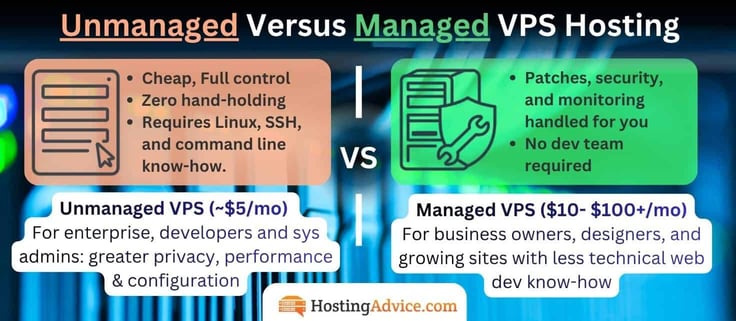
What that means specifically, however, can vary from one web host to the next. For some, the basic server maintenance and security updates are all that are covered, while other providers will help customers optimize their performance settings and help troubleshoot issues with third-party software programs.
With managed VPS hosting, your provider handles server maintenance, security patches, updates, and monitoring.
VPS, which stands for virtual private server, is the middle point on the web hosting spectrum between shared and dedicated servers. As you may imagine, VPS hosting blends the two extremes. Customers share a physical server but receive dedicated computing resources through a process called virtualization. Because of the separated environments, site owners have far more nuanced control over how their virtual machine is configured.
Opting for unmanaged VPS hosting isn’t a decision to take lightly — it’s a commitment to becoming your own system administrator. You’ll need working knowledge of Linux command line navigation, SSH (secure shell) access, and basic shell scripting just to get started. Backend developers and experienced site owners typically have no problem taking on the extra responsibility to save money.
From there, expect to handle your own software installations, web server configuration (Apache or NGINX), database management (MySQL or MariaDB), firewall rules, and SSL certificate setup. That’s where unmanaged VPS hosting gives more root control. Security patching is entirely on you — miss an update, and you’re the one dealing with damage control.
Unmanaged VPS gives you full root access and lower pricing — but every configuration decision is yours to make. When something breaks at 2am, and it will, there’s no support ticket to save you. You can’t depend on hosts for security updates and patching.
However, designers, small business owners, and those without tech experience often prefer to pass those chores along to the system administrators and experts employed by a VPS hosting provider. That, in a nutshell, is managed virtual private server hosting.
If terms like “sudo,” “cron jobs,” “iptables,” and “LAMP stack” feel comfortable rather than threatening, an unmanaged VPS is a genuinely excellent way to get enterprise-grade hardware at a fraction of the managed price. If that list made your eyes glaze over, managed hosting isn’t an upsell — it’s an absolute necessity until you have a dedicated “Dev Team.”
What Are the Benefits of VPS Hosting?
A virtual private server combines many of the benefits of dedicated hosting, such as enhanced security, privacy, and resources, without the high cost.

Some more specific benefits of VPS over shared hosting include:
- Full root access: Control of the server’s maintenance and operating system.
- Greater privacy: Using virtualization technology, which separates your VPS instance from others on the same physical hardware.
- Better performance: An upgrade from shared hosting thanks to isolated resources.
- Greater reliability and uptime: Entry-level shared hosting plans may not be as reliable.
- Budget-friendly pricing: Unmanaged VPS can be cheap, but even some managed plans have competitive pricing. Some entry-level virtual private servers cost the same as premium shared hosting plans.
If even two of those five apply to your situation, you’ve outgrown shared hosting. The question is just which managed VPS meets your needs.
Is a Managed VPS Hosting Service Worth the Expense?
While the price tag is higher on managed VPS hosting, it comes with perks that yield a significant return on investment.
The most obvious benefit is the peace of mind that your site is being monitored and maintained by experienced and extremely capable server technicians. With an unmanaged VPS, you’re on your own to triage, troubleshoot, and resolve any issues, which can cost hundreds if not thousands of dollars, depending on the business and length of downtime or time spent working on the bug.
With a managed VPS hosting provider, you’re protected by service-level agreements (SLAs) that ensure you get your money’s worth.
Here’s the honest short Pros & Cons:
Pros
- Server experts handle updates, patches, and security
- SLAs protect you if something goes wrong
- Faster issue resolution than unmanaged troubleshooting
- Frees your team to focus on the business, not the infrastructure
- You don’t need to be an expert coder and web developer
Cons
- Costs more than unmanaged VPS — sometimes significantly
- Less direct control over low-level server configuration
- Quality of “managed” support varies widely by provider
- Can create dependency on the host for routine tasks
Additionally, because the provider will be taking care of software patches and updates, you can focus your attention elsewhere. This is especially helpful for small business owners, who probably don’t have the time to deal with server maintenance, as well as those who are less technically inclined and prefer not to mess around with code.
Finally, managed VPS hosting providers tend to offer enhanced services and support, which can be extremely helpful for those with little to no web hosting experience.
For example, when you sign up for InMotion Hosting’s managed virtual private server package, you’ll get not only 24/7/365 customer support but also a free website migration service and SSL certificate. Liquid Web, as another example, will even manage your DNS, email, and Firewall settings for you.
Additionally, many managed VPS hosting providers will give customers a free CDN to help speed up their site, as well as free backups and free malware detection and removal.
In short, yes, a managed VPS hosting service is worth the expense. Just remember to prioritize your specific needs, and figure out what type of support and services you need to determine the best VPS host for your upcoming project.
Is VPS Better Than Shared Web Hosting?
Evaluating hosting plans covers a ton of features and components, ranging from performance needs and security requirements to budget demands, tech expertise, and the ability to scale. Comparing VPS versus shared web hosting plans unveils some clear differences, but determining which service is better depends on each site owner’s specific goals.
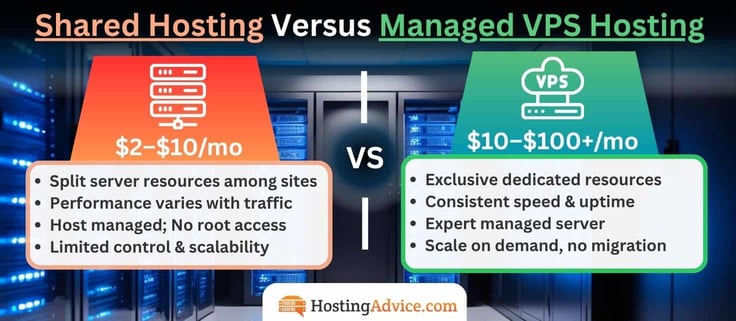
Typically, VPS hosting offers more storage and computing power, along with high bandwidth or data transfer levels. With greater control over the software systems serving your site, you can often gain more advantages in performance and security. The ability to scale to larger resources significantly enhances the value of VPS plans and expands what you can achieve online.
| Features | Shared Hosting | Managed VPS |
|---|---|---|
| Resources | Shared with other sites | Dedicated to your account |
| Performance | Variable | Consistent |
| Security | Basic | Enhanced isolation |
| Root Control | Limited | Root access available |
| Management (Updates) | Fully handled by host | Handled by host (managed) |
| Scalability | Limited | On-demand upgrades |
| Price | $2–$10/mo | $10–$100+/mo |
| Best for | New sites, low traffic | Growing sites, higher stakes |
However, these configurations require more effort to maintain and a greater level of technical understanding. You’ll either need robust managed services and an extremely helpful host (which is why we’re here), or you’ll need to quickly enhance your command line skills. Managing a VPS environment also means taking charge of scaling your resources, securing your data, and optimizing page load times.
Shared hosting wins on simplicity and price every time. Cheap web hosting plans that come with all the bells and whistles can be found for less than $5 per month, while VPS plans usually cost an average of $35/mo, with some cheap options under $10, and other enterprise options breaking $100. When your site starts costing you money through downtime or slow load times, upgrade to a VPS.
Can I Upgrade from Shared Hosting to a Managed VPS Later?
Yes — and most providers on this list make that transition seamless. Hosts like Bluehost and InMotion Hosting are specifically built to grow with you, offering direct upgrade paths from shared to VPS without a full migration. You keep your files, your site, and your sanity.
The more important question is knowing when to make the move. The clearest signal is performance degradation — if your pages are loading slowly during traffic spikes. It may mean your shared hosting plan is hitting its ceiling.
Other red flags include hitting storage or bandwidth limits regularly, needing software or server configurations that your shared host won’t allow, or running an eCommerce store where downtime directly costs you revenue. At that point, you’re basically opting for more control to protect what you’ve already built.

The transition itself is less painful than most people expect. Providers like ScalaHosting and InMotion Hosting offer free site migration handled by their own technical staff, meaning you don’t need to touch a single config file. Cloudways lets you clone an existing environment and test it before cutting over.
Bluehost users on shared plans can upgrade directly from the same account dashboard — no new account migration, data loss, or downtime window to schedule around.
The short version: don’t wait until something breaks. If your site is generating real traffic or real revenue, Managed VPS is a necessary performance, server isolation, and security upgrade. The best time to make the move is before you need to.
How Much Does VPS Hosting Cost?
As illustrated by some of the VPS hosting plan options we’ve highlighted, prices can vary significantly depending on the amount of VPS server resources and level of management. Managed VPS hosting is inherently costlier than an unmanaged VPS plan.
The most affordable VPS plans we recommend come in around $2 – $10 per month for unmanaged VPS. That tends to require you to have basic Linux, coding, and command line experience. Free VPS hosting plans exist, but they are either trials, metered (with overage costs), or not worth the headache. Managed gets you the benefits of VPS without needing a development team.
The moment you opt for managed, the average jumps to ~$34/mo. Take the starting rates for best managed VPS and unmanaged hosting for the same providers:
- Hosting.com Managed VPS plans start at $28.75 per month. Compare to Unmanaged at $9.99/mo.
- Bluehost Managed VPS plans start at $49.99 per month. Compare to Unmanaged at $2.09/mo.
- InMotion Managed VPS plans start at $13.99 per month. Compare to Unmanaged at $7/mo.
- Liquid Web Managed VPS plans start at $36.00 per month. Compare to Unmanaged at $5.00/mo.
| Provider | Unmanaged VPS | Managed VPS | Monthly Difference |
|---|---|---|---|
| Hosting.com | $9.99/mo | $28.75/mo | +$18.75 |
| Bluehost | $2.09/mo | $49.99/mo | +$47.90 |
| InMotion | $7/mo | $13.99/mo | +$6.99 |
| Liquid Web | $5.00/mo | $36.00/mo | +$31.00 |
The jump looks steep for some like Bluehost, but its unmanaged entry tier is one of the most stripped-down on the market — the managed price reflects a fundamentally different product.
What Affects the Cost of Managed VPS Hosting?
As you explore building a top-tier managed VPS plan, you’ll notice costs scale like building a custom computer; every component you add to the spec sheet adds to the bill, and the relationship is fairly linear once you understand what’s driving the price. Premium managed environments with higher CPU, RAM, and support tiers can reach $100 per month or more.

Let’s take Hosting.com as an example:
Its entry-level Managed cPanel plan starts at $28.75/mo for 2 CPU cores, 4GB of RAM, and 100GB of NVMe storage, but jump to the top-tier 256GB plan and you’re paying $916.25/mo for 64 cores, 256GB of RAM, and 2TB of storage. RAM tends to be the biggest price driver since it directly determines how many sites, databases, and active users a server can comfortably handle.
Be mindful of additional expenses that increase the cost of your VPS or server management. CPU cores scale for raw processing power under heavy traffic spikes. Storage adds to the cost more gradually, based on how much content, media, email, and backup data you’re storing. The control panel, meanwhile, is usually a flat addition rather than a scaling one.
Here’s how Hosting.com‘s plans scale:
| VPS Plan | Price | CPU Cores | RAM | NVMe Storage |
|---|---|---|---|---|
| Managed cPanel 4GB | $28.75/mo | 2 cores | 4 GB | 100 GB |
| Managed cPanel 8GB | $45.42/mo | 4 cores | 8 GB | 150 GB |
| Managed cPanel 16GB | $70.42/mo | 8 cores | 16 GB | 300 GB |
| Managed cPanel 32GB | $116.25/mo | 16 cores | 32 GB | 400 GB |
| Managed cPanel 64GB | $207.92/mo | 24 cores | 64 GB | 800 GB |
| Managed cPanel 128GB | $457.92/mo | 32 cores | 128 GB | 1.2 TB |
| Managed cPanel 160GB | $582.92/mo | 48 cores | 160 GB | 1.4 TB |
| Managed cPanel 256GB | $916.25/mo | 64 cores | 256 GB | 2 TB |
Note: all prices reflect the 1-year term rate. Renewal pricing is approximately double, worth factoring into your total cost of ownership before committing to a tier.
The takeaway: price your VPS the way you’d price a custom build. Decide what your site actually needs to run well, then spec components to match instead of overpaying for headroom you’ll never use. Ensure the price aligns with the value you expect from the web host.
While all managed hosting providers handle basic server maintenance like security updates and OS patches, you can often opt for additional services like automated backups, proactive monitoring, cPanel licenses, and extra SysAdmin support.
Can I Get Managed VPS Hosting for Free?
To put it simply: if you see a free VPS hosting plan, run! Sure, there are a few free web hosts out there that do an alright job for small sites, but they certainly don’t offer virtual private servers.
VPS plans are somewhat pricey to operate because they are a step above shared hosting. Once you factor in the costs to manage the server, a web host would never make any money if it gave away services for free. That’s how we know if you come across a “Completely Free” VPS, it’s probably a scam.
The one exception is a free trial. Some web hosts, like Kamatera, offer a 30-day free trial (with a $100 credit) — no commitment needed for new customers. I can’t recommend those enough!
Don’t Sweat the Tech Stuff: Managed Services at Any Level of Hosting
The best managed VPS hosting plans are like the perfect bowl of porridge from “Goldilocks and the Three Bears,”just the right fit, wonderfully satisfying, and incredibly comforting.
However, if the nitty-gritty technical details of configuring and running a virtual private server intimidate you, site owners can find superb hosting options with similar managed services that offer total peace of mind. Shared hosting plans come with some basic services built in, while cloud and dedicated server packages offer similar control and flexibility to VPS hosting.
Because dedicated servers represent such a significant investment (if you don’t sign up with one of our recommended cheap dedicated hosting providers), you’ll want to make sure the experts have fine-tuned your machine to peak performance. Popular cloud providers, such as Amazon Web Services, Microsoft Azure, and Google Cloud Platform, feature impressive scalability and technology but are known for lacking customer support.
All in all, don’t pretend to know what you’re doing with web security and server management if you really don’t. By paying for the expertise of managed services, you can protect the data of your business and its customers and spend your time building and marketing new products — unlocking the widest path to growth and success.
Be sure to check out our HostHelper™ personalized hosting tool to answer any of your questions, and follow us on social media for hot tips you won’t find anywhere else!
HostingAdvice.com is a free online resource that offers valuable content and comparison services to users. To keep this resource 100% free, we receive compensation from many of the offers listed on the site. Along with key review factors, this compensation may impact how and where products appear across the site (including, for example, the order in which they appear). HostingAdvice.com does not include the entire universe of available offers. Editorial opinions expressed on the site are strictly our own and are not provided, endorsed, or approved by advertisers.
Our site is committed to publishing independent, accurate content guided by strict editorial guidelines. Before articles and reviews are published on our site, they undergo a thorough review process performed by a team of independent editors and subject-matter experts to ensure the content’s accuracy, timeliness, and impartiality. Our editorial team is separate and independent of our site’s advertisers, and the opinions they express on our site are their own. To read more about our team members and their editorial backgrounds, please visit our site’s About page.