
Writer: Laura Bernheim


Editor: Lillian Castro


Reviewer: Cristian Lopez

Learning how to set up web hosting is easier than you might think — even for first-time site owners. At the beginning, all the stress is placed on finding the right-sized services for your site, often relying on the tried-and-true real estate analogy: Shared hosting is like renting an apartment, VPS is akin to owning a condo, and dedicated servers are equivalent to owning your own home. It’s a common comparison, and one I’ve even used before to explain managed services.
Despite my preference to relate hosting to pizza, clothing alterations, and the search for true love, your website needs somewhere to reside. We’re here to help you find a happy hosting home.
After putting so much emphasis on finding just the right hosting provider, it’s natural to relax a bit after signing up for a new plan. Selecting a host, however, is just the first step to getting your website online. Whether you’re starting from scratch or looking to move sites from a previous hosting provider, we’ve outlined the steps to hosting happiness below.
1. Choose a Web Host
Simply put, you can’t set up something you don’t yet have. Identifying your best web hosting option can be tricky, given the wide variety of services, sales, and companies in the market. Just as a debt-strapped recent college grad probably shouldn’t move straight into a mansion, a well-to-do family of eight wouldn’t be happy in a cramped studio apartment.
Consider us your real estate agent and view your hosting provider as the properties that balance your budget with location, layouts, and upgraded features. At this stage, we’re just identifying the neighborhood or subdivision you want to target. Most new customers will be quite happy with shared hosting, while others might be outgrowing their shared services and are ready to jump up to VPS, cloud, or dedicated plans. If you already run a website, keep an eye out for a host that offers free transfers or migration. You’ll be able to skip a lot of these steps.
Shared Hosting
A great place to start your search, shared hosting is an affordable, user-friendly way to get small and medium sites online quickly. Shared hosts divvy up server resources to hundreds, sometimes thousands, of customers, making these the easiest plans to set up and manage. Customers can focus on their account without worrying about the technical details of server management.
Narrow down the pool of prospective providers by targeting a few features that are specifically important to you or the goals of your online project. That might mean high-performance solid-state drives, unlimited bandwidth, or spam filters for your email accounts. Other differentiators include eCommerce offerings and free domain options, along with perks like advertising credits, a website builder, and upgraded hardware. Here are some of the top shared hosts we recommend:
Hostinger.com

Monthly Starting Price $2.69
- Best overall value: The most complete shared hosting plan at this price point
- AI builds your site in minutes — no technical skills needed
- Free domain, free SSL, and weekly backups on all plans
- Managed WordPress with AI agent and free email marketing
- 30-day money-back guarantee with 24/7 expert support
- Get started on Hostinger now.


Sead Fadilpasic

| Money Back Guarantee | Disk Space | Domain Name | Setup Time |
|---|---|---|---|
| 30 days | 20 GB SSD | FREE (1 year) | 3 minutes |
SiteGround.com

Monthly Starting Price $2.99
- Best for security: AI blocks 99.99% of malicious traffic automatically
- Free CDN across 170+ locations, daily backups, and free SSL
- Unlimited traffic, free email, and free site migration included
- 4.9/5 Trustpilot rating with 98% customer satisfaction
- 24/7 in-house expert support via live chat, phone, and tickets
- Get started on SiteGround now.


Lynn Cadet

| Money Back Guarantee | Disk Space | Domain Name | Setup Time |
|---|---|---|---|
| 30 days | 10 GB SSD - 100 GB Google Cloud SSD | FREE (1 Year) | 6 minutes |
GreenGeeks.com

Monthly Starting Price $2.95
- 300% renewable energy match; the web's leading green host
- LiteSpeed servers with daily backups and free CDN on all plans
- Free SSL, DDoS protection, and AI-powered firewall included
- 1-click installs for WordPress, Joomla, Drupal, and 150+ apps
- 99.9% uptime with 24/7 support via phone, chat, and email
- Get started on GreenGeeks now.


Dave McQuilling

| Money Back Guarantee | Disk Space | Domain Name | Setup Time |
|---|---|---|---|
| 30 days | 25 GB SSD | FREE (1 year) | 4 minutes |
See all the best shared hosts »
VPS Hosting
A virtual private server, or VPS, is best suited for high-traffic sites and applications performing complex tasks. Physical servers are virtualized and split among fewer customers, leaving more power and performance for each website. Customers have direct access to their VPS and often are responsible for installing and maintaining software and security solutions.
VPS plans can be more complicated for beginners to set up, but many hosts offer various tiers of expanded support — also called managed services — that will help users stay on top of security, backups, and operating system updates. Keep scrolling for a list of our favorite VPS hosts.
Hostinger.com
Monthly Starting Price $5.84
- Best overall value: The most complete AI-managed KVM VPS at this price
- AMD EPYC processors, NVMe SSD, and 1 Gbps network
- Kodee AI manages your server — no command line needed
- One-click deployment of 100+ apps including Docker and n8n
- Free weekly backups, DDoS protection, and full root access
- Get started on Hostinger now.
Sead Fadilpasic
| Setup Time | Disk Space | CPU | RAM |
|---|---|---|---|
| 6 minutes | 50 GB - 400 GB NVMe | 1 - 8 cores | 4 GB - 32 GB |
IONOS.com

Monthly Starting Price $4.00
- Lowest entry price for VPS: no hidden fees, unlimited traffic, from $4.00/mo
- NVMe SSD storage, 1 Gbps connection, and 99.99% uptime
- Full root access with Linux or Windows — deploy in minutes
- Personal consultant assigned to every account after signup
- 30-day money-back guarantee and award-winning support
- Get started on IONOS now.


Christina Lewis

| Setup Time | Disk Space | CPU | RAM |
|---|---|---|---|
| 6 minutes | 120 GB - 720 GB NVMe | 2 - 12 cores | 4 GB - 24 GB |
Kamatera.com

Monthly Starting Price $4.00
- Best for developers: Fully customizable cloud VPS — choose your exact CPU, RAM, and storage
- Intel Xeon Platinum/Cascade Lake CPUs & NVMe SSD
- 20+ global data centers across 4 continents, with 99.95% uptime
- Hourly or monthly billing, only pay for what you use
- 30-day free trial with $100 credit — no commitment needed
- Get started on Kamatera now.


Surajdeep Singh

| Setup Time | Disk Space | CPU | RAM |
|---|---|---|---|
| 5 minutes | 20 GB – 4 TB NVMe | 1 - 32 cores | 1 GB - 128 GB |
Dedicated Server Hosting
Customers who opt for a dedicated server typically see very high levels of traffic, store massive amounts of data, and have a critical need for performance, security, and reliability. The most expensive hosting option, dedicated servers are also the fastest and most powerful hosting configuration. Users have ultimate control over how to set up their dedicated hosting, but with great power comes great responsibility.
Because customers get total and complete control over an entire server, dedicated hosting plans aren’t really suited for rookies. Again, less experienced site owners can (and should) rely heavily on managed services, but the price tag can become astronomical for premium white-glove treatment. Our top dedicated server hosting providers, however, all excel at maintaining name-brand, performant hardware with hands-on technical support teams.
InMotionHosting.com

Monthly Starting Price $35.00
- Best for businesses needing enterprise hardware with managed support
- Bare-metal or fully managed dedicated servers from $35/mo
- Intel Xeon to AMD EPYC, up to 16 cores and 192 GB DDR5 RAM
- Monarx security & 500 GB backup storage with Premier Care
- 24/7 Advanced Product Support from senior sysadmins
- 99.99% uptime SLA, up to 10 Gbps unmetered bandwidth
- Get started on InMotion now.
Dave McQuilling
| Setup Time | Disk Space | CPU | RAM |
|---|---|---|---|
| 7 minutes | 960 GB SSD – 7.68 TB NVMe | 4 - 16 cores | 16 GB – 192 GB DDR5 |
LiquidWeb.com

Monthly Starting Price $55.50
- Best for mission-critical sites needing fully managed dedicated hardware
- Save up to 50% for 2 months with this HostingAdvice offer
- Fully managed or self-managed — Linux or Windows
- PCI-ready environments with 99.99% uptime SLA
- cPanel, Plesk, or InterWorx — 24/7 Heroic Support® included
- Get started on Liquid Web now.
Christina Lewis
| Setup Time | Disk Space | CPU | RAM |
|---|---|---|---|
| 8 minutes | 383 GB SSD – 3.2 TB SSD | 4 - 32 cores | 12 GB - 192 GB |
IONOS.com
Monthly Starting Price $41.00
- Best for teams wanting enterprise dedicated hardware at affordable prices
- AMD EPYC, Ryzen, and Intel Xeon — GPU servers also available
- Unlimited bandwidth, RAID included, up to 80 TB storage
- 99.995% server availability across 6 global data centers
- Every plan includes a dedicated personal consultant
- Get started on IONOS now.
Christina Lewis
| Setup Time | Disk Space | CPU | RAM |
|---|---|---|---|
| 7 minutes | 480 GB SSD - 4 TB SATA HDD | 4 - 32 cores | 16 GB - 256 GB |
See all the best dedicated servers »
2. Register a Domain Name
Once you find the perfect place or property, you’ll need a way for people to find you. Because you can’t select your home’s address, we’ll compare this stage to finding the specific apartment, condo, house, or floor plan in the complex, neighborhood, or subdivision you’ve chosen as your favorite. The idyllic house number and street name might already be occupied by someone else, but you can usually find something close nearby without stooping to streets that are hard to pronounce or remember.
Most hosting companies — but not all — allow you to reserve and register a domain name, with many even including the service for free. The hosts, acting as registrars, work with the global managers of domain registries to secure the name of your site. A few hosts, however, avoid this step and simply prefer to focus on storing your files and making them readily available to site visitors. You can register a domain with any registrar and house your information separately. While we recommend keeping everything under the same roof for simplicity, you can register a domain and host your files separately.
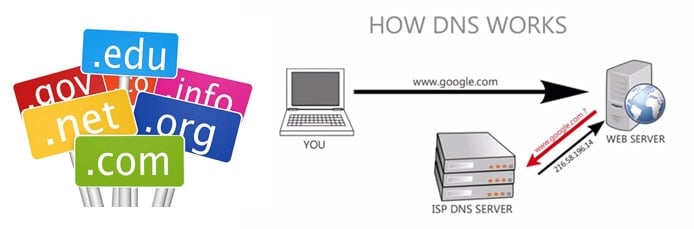
A domain name is like using your new home’s mailing address instead of the longitude and latitude coordinates. Computers can’t communicate using domain names and find each other using IP addresses. The Domain Name System, or DNS, acts as the translation service that connects IP addresses to domain names. Hosts use DNS servers or nameservers to connect your website to the worldwide system.
As your brand or website’s address, the domain name you choose is supremely important. SEO experts at Moz outline eight rules for a strong domain name. To have the greatest effect, domains should be brandable, pronounceable, short, clear of trademarks, and intuitive. When needed, a domain name should use broad keywords or rely on creative modifications.
Hostinger.com
Monthly Starting Price $2.69
- Best overall value: The most complete domain + hosting bundle at this price
- .com domains from $0.01 for the first year
- 300+ domain extensions with an AI domain name generator
- Free WHOIS privacy protection included with every domain
- ICANN-accredited registrar with 7 million domains registered
- Free domain included with most hosting plans
- Get started on Hostinger now.
Sead Fadilpasic
| Money Back Guarantee | Disk Space | Domain Name | Setup Time |
|---|---|---|---|
| 30 days | 20 GB SSD | FREE (1 year) | 3 minutes |
GoDaddy.com

Monthly Starting Price $5.99
- World's largest domain registrar, trusted by 20M+ customers around the world
- Web hosting with a free domain, SSL, and email included
- NVMe storage, unmetered bandwidth, and 99.9% uptime
- Automatic daily backups and free website migration included
- Award-winning 24/7 support via phone and chat
- Get started on GoDaddy now.
Lynn Cadet
| Money Back Guarantee | Disk Space | Domain Name | Setup Time |
|---|---|---|---|
| 30 days | 25 GB - 100 GB | FREE (1 year) | 4 minutes |
SiteGround.com
Monthly Starting Price $2.99
- Best for security: AI blocks 99.99% of malicious traffic
- Web hosting built on Google Cloud with free domain included
- Free SSL, CDN across 170+ locations, and daily backups
- 4.9/5 Trustpilot rating with 98% customer satisfaction
- 24/7 in-house expert support via live chat, phone, and tickets
- Get started on SiteGround now.
Lynn Cadet
| Money Back Guarantee | Disk Space | Domain Name | Setup Time |
|---|---|---|---|
| 30 days | 10 GB SSD - 100 GB Google Cloud SSD | FREE (1 Year) | 6 minutes |
See all the best domain hosts »
3. Choose a Website Design Route
Now, we’re in that stage of finally having a new place to live — but all your stuff is still in boxes. To make a house a home, you might want to hire an interior decorator or a landscaping crew. Naturally, you want your space to look and feel like your brand or personality and take advantage of the files, pictures, and trinkets you own.
Website builders and content management systems blend the expertise of others while still allowing you to exude your own personal flair. Designing and coding a website from scratch, however, will likely appeal to developers and do-it-yourself-ers. If you already have a site design you’re happy with, skip ahead to learn how to seamlessly migrate it to your new hosting plan.
A. Design By Website Builder
The red-hot market for site building platforms provides a bevy of options for site owners who want a custom look without the long days of slaving away over a code and a keyboard.
Website builders offer bloggers, entrepreneurs, developers, and hobbyists a chance to create a stunning and professional website in minutes, with services typically focused on usability and mobile-friendly designs. Buyer beware: Several hosts include a building platform for free with new plans, but others can only be had by using the site builder’s hosting services.
Hostinger.com
Monthly Starting Price $2.69
- Best website builder: The most complete AI-powered builder at this price point.
- Describe your site to AI and go live in minutes
- 300+ designer-made templates with drag-and-drop
- Built-in eCommerce with 0% fees and 100+ payment methods
- Built-in SEO, email marketing, and AI logo maker included
- Free domain for 1 year + 14-day free trial to start
- Get started on Hostinger now.
Sead Fadilpasic
| Money Back Guarantee | Disk Space | Domain Name | Setup Time |
|---|---|---|---|
| 30 days | 20 GB SSD - 100 GB NVMe SSD | FREE (1 year) | 3 minutes |
B. Design By Content Management System
You’d be hard-pressed to find a web host that doesn’t offer a one-click WordPress installation. The world’s most popular content management system can be tough for beginners to learn, but WordPress is a free, open-source solution seemingly without limits.
For nervous beginners, try signing up with our top WordPress hosting provider, InMotion Hosting, which blends the best of both worlds with its proprietary, one-of-a-kind WordPress website builder, called BoldGrid.
WordPress.org

Monthly Starting Price $2.62
- FREE software with 1-click install
- Trusted by millions of site owners
- 1,000s of drag-and-drop themes
- #1 blogging platform
- Huge online community
- Get started on WordPress with InMotion Hosting.


Alexandra Anderson

| Money Back Guarantee | Disk Space | Domain Name | Setup Time |
|---|---|---|---|
| 90 days | 100 GB SSD - Unlimited SSD | FREE (1 year) | 5 minutes |
C. Design From Scratch
With the right tools and lots of patience, you can craft a website from thin air. Coding a website from scratch can be a worthwhile endeavor for those not under a time crunch to get their site online. Learning web design and programming languages empowers site owners to create exactly the look and user experience they desire — and further tweak and expand your website as you acquire more skills.
Still unsure which route to take? Whether you want to learn how to code or are still checking out your design options, our helpful guide to site builders, CMSes, and coding provides a greater level of detail on the perks and downfalls of each choice.
Additional Steps If You’re Migrating From Another Host
If this isn’t your first hosting home, you’ll have the option to hire movers to box up and transfer your belongings from your old place. Many of our favorite hosts offer free website and domain migrations. Of course, you can elect to move things yourself with relatively little experience, but why bother? The hands-free transfers usually incur little to no downtime — and exactly zero headaches for you.
Transfer Files and Databases Using FTP and phpMyAdmin
Load up the moving truck by downloading all your website files through FTP, or file transfer protocol. You can either use your old host’s file transfer tool found in cPanel installations or configure a free FTP program of your choosing. Unsurprisingly, you’ll then connect to your new host’s server through FTP and upload all the files to your new storage space.

For simple, static sites, that’s all for this step. Most sites with dynamic content, such as blogs, have databases that will have to migrate, as well. Database management can be done using phpMyAdmin, which is found in your host’s cPanel platform. Export the relevant databases from your old host and sign into phpMyAdmin on your new host. You’ll need to create new databases and usernames before importing the information.
Alternatively, you can minimize downtime by downloading and restoring backups using cPanel, so long as the web-based control panel is used by both hosting providers. You’ll want to collect compressed backup files for your website, subdomains, and databases. Once the files have been uploaded to your new server, you’ll have to enter username and password information associated with each MySQL database in the cPanel tool.
Point Your Domain Toward Your New Host’s Nameservers
Once your files and databases have been moved, all that remains is telling the internet that your domain should now look for a different server to load and display content. This is akin to alerting the Post Office of your new address and signing up for mail forwarding. Moving a domain name to your new hosting plan is completely optional. Hosts will give you instructions on how to initiate that process, or it is perfectly fine to host domains separately from your website files.
Regardless of where your domain resides, log into that account management interface, and replace the domain nameservers with the updated information from your new host. Changes to the DNS records will take up to 24 hours to take effect, but both the new and old websites will function properly in the interim.
Once Your Website is Set Up, You Can Focus On Content & Customers
Even though we enjoy comparing two hosting options to seeking medical attention, the tried-and-true real estate comparison is the best route for explaining how to set up web hosting services. Regardless of the new hosting plan or server configuration you ultimately select, price, support, storage, and performance are all important features to consider when shopping for a hosting plan. Those components never go out of style, whether you’re looking for somewhere to house a blog or your growing online store.
Naturally, once you’re done moving into the starter home of your dreams, all that remains is throwing the housewarming party. Take advantage of the SEO tools and advertising credits many hosts offer to grow your audience and show off your new digs.