

Writer: Andrew Wandola


Editor: Britain Simons


Reviewer: Lillian Castro

Key Takeaways
We compared today’s leading website and email hosting providers to help you find the best balance of price, support, AI integration, and features for your needs.
-
Hostinger is our top choice for professional website email hosting for small businesses.
-
Hosting.com is the best option for more email storage marketing campaigns.
The phrase “don’t put all your eggs in one basket” doesn’t quite hold true for website and email hosting. Bundling both will save you money and unlock better features. Using separate providers for each can be a source of frustration. Avoid jumping from host to host for better pricing or features, and narrow down exactly what your business needs (without overpaying).
If you don’t want to migrate your website, but you do want a better email host, it is possible to use separate providers for email and hosting. We’ve also included those options. If you’re anything like me and tend to forget things, managing your website and emails through two different providers can feel overwhelming, so it’s best to buy bundled (email + hosting) if you’re building a new website.
These all-inclusive web hosting providers offer bundled perks such as unlimited email, AI integration, and additional storage. These services often prove to be more convenient, efficient, and cost-effective. It’s time to take your business to new heights with professional email! We’ve reviewed the 8 top industry-standard email (and website) hosting services available in 2026 with standout features.
-
Navigate This Article:
1. Hostinger: Best for Multi-Site Email
Plans Starting at $0.39/Month
Hostinger is the solid go-to option for established and growing businesses, with 20+ years in the game. While the idea of unlimited email accounts excites some people, others find it daunting. After working with numerous web design clients over the years, each with distinct needs, I’ve learned this firsthand.
Some clients I’ve worked with have their websites and emails hosted at Hostinger. At first, I didn’t know why Hostinger was popular, but now I do. Hostinger keeps its services competitive with integrated AI, website builders, and automation.
Choosing Business Email or Bundled Hosting
For context, most of the clients I work with are small business owners. I’ve been designing websites for more than a decade now, and I haven’t met a single small business owner who needs more than 15 email accounts. If you already have your website hosted on another provider, you can still take advantage of Hostinger’s email offerings.
Let’s take a look at their base offer for Business Email:
Hostinger.com

Monthly Starting Price $0.39
- Best overall value: The most complete AI-powered business email at the lowest price
- With Standard, Kodee AI writes, replies, and summarizes emails in your tone and voice
- Smart inbox auto-organizes priority emails and urgent replies
- Spam and virus filters block 99.9% of malicious emails
- Works with Outlook, Apple Mail, Gmail, and all major email apps
- Get started on Hostinger now.


Sead Fadilpasic

| Money Back Guarantee | Disk Space | Domain Name | Setup Time |
|---|---|---|---|
| 30 days | 5 GB SSD – 50 GB SSD | FREE (1 year) | 3 minutes |
Small businesses might find they need more email accounts as they grow and expand with multiple locations. However, it’s still uncommon for small companies to need a vast number of email accounts.
With the base bundled offer (email + site hosting), Hostinger includes 3 websites with 2 mailboxes per site. When you bundle, mail is included in the package deal (it’s usually more than enough). Unless you’re a large business or agency, you’re unlikely to use all these email accounts, but you can opt for up to 100 websites with up to 10 free mailboxes per website.
The bundled offer from Hostinger may be too good to pass up:
Bundled Hostinger (Website Hosting + Email)
That’s one reason I find Hostinger to be quite practical; it breaks down its hosting packages into smaller segments, which allows you to choose only what you need. For instance, aside from free email accounts, you can host 1 to 300 websites with this host, depending on your chosen plan.
The bottom line is that Hostinger is perfect if you want to host multiple websites under one plan and enjoy free (though not unlimited) emails. However, if you’re seeking simplicity, like just one email account and website for your online portfolio, the Single plan from Hostinger is the way to go.
Hostinger Email Highlights
- Spam, virus, phishing protection
- Access email on any app or device
- Track all mailbox activity with audit logs
- Keep data safe with end-to-end encryption
- Fast, clean, and easy-to-use webmail
- Set auto-replies for when you’re away
See our full review of Hostinger >>
2. Hosting.com: Best for Small Business
Plans Starting at $2.99/Month
Hosting.com is one of the fastest web hosts I know. Speed aside, I haven’t encountered many web hosts with the same degree of generosity as Hosting.com. From powerful Solid-State Drive storage and advanced security features to multiple server locations and free SSL certificates, hosting.com has it all.
And the best part is that it offers all these features — and many more — all for free. Speaking of freebies, hosting.com allows you to create unlimited free email accounts when you host your website with them.
Choosing Business Email or Bundled Hosting
What I love the most about this package is that it is not restricted to a particular hosting plan or type of hosting. You get one email, but Unlimited plus-addressing for professional and branded email, like [info]@yourdomain. Plus, Smart Write (AI responses), rich webmail, calendar, and contacts. The deal gets sweeter when you bundle.
Hosting.com has invested heavily in Titan and integrated Titan AI, its email platform. Their anti-spam tools are top-notch, and you’ll love the ease of scheduling and reminders.
Let’s take a look at their base offer for Business Email:
Hosting.com

Monthly Starting Price $2.99
- Powered by Titan — appointment booking, email campaigns, and read receipts built in
- AI Smart Write drafts and refines emails in your tone and style
- Advanced anti-spam, anti-virus, and phishing protection — 100% delivery guaranteed
- Outlook, Apple Mail, iOS, Android, & all major clients supported
- Free email migration and 24/7/365 in-house support
- Get started on hosting.com now.


Christina Lewis

| Money Back Guarantee | Disk Space | Domain Name | Setup Time |
|---|---|---|---|
| 30 days | 10 GB – 100 GB | FREE (1 year) | 4 minutes |
Now on to bundled plans. Whether you choose a shared hosting plan, dedicated hosting, VPS hosting, or anything in between, hosting.com throws in free unlimited email accounts in the package — Yes. Unlimited mail space!
Tell me this bundle isn’t a sweet deal from Hosting.com:
Bundled Hosting.com (Website Hosting + Email)
So instead of paying for email hosting elsewhere and hosting your website with hosting.com, you’ll get both email and web hosting services all under one roof. You’ll love AI Smart Write, unlimited mail space, MariaDB databases, bandwidth, and separate inboxes for your small business.
There are similar “Unlimited” offers in the world of web hosting, but they really went all out with this offer: database, bandwidth, Titan, & mail space. In fact, it’s part of the generosity I’ve been talking about at Hosting.com. Many other web hosts I’ve used offer free email hosting, but you’ll need to choose a more expensive hosting plan to get the same perks.
Hosting.com Email Highlights
- Professional and branded email @yourdomain
- Titan: email campaigns, tracking, designer and appointments
- Bundled: Unlimited MariaDB databases, bandwidth u0026 mail space
- Rich Webmail, Calendar, Contacts, and apps for iOS and Android
- Anti-Spam, Anti-Virus, and Ad-free
- 24/7 year round in-house support
- Smart Write (AI Responses)
- Free migration
See our full review of hosting.com >>
3. IONOS: Best for Security & Sensitive Data
Plans Starting at $1.10/Month
IONOS offers a mix of affordability and top-end security thanks to features such as the HiDrive Cloud Storage and MyDefender, all working together to protect your data. This host gives you the kind of security you need if your website deals with sensitive information and you need a business email that prioritizes security.
Choosing Business Email or Bundled Hosting
If collaboration and teamwork matter to you, IONOS checks the right boxes. You can connect the email host with tools like Microsoft Office 365 and Google Workspace to help your team work more efficiently. That’s a big plus for today’s remote workforce.
Let’s take a look at their base offer for Business Email:
IONOS.com

Monthly Starting Price $1.10
- Business email with a personal consultant — unique to IONOS
- Choice of IONOS mail, Microsoft 365, or Google Workspace
- Free domain included, completely ad-free, no data selling
- AI email assistant for writing, scheduling, and smart replies
- Spam filter, virus protection, and 24/7 award-winning support
- Get started on IONOS now.
Christina Lewis
| Money Back Guarantee | Disk Space | Domain Name | Setup Time |
|---|---|---|---|
| 30 days | 2 GB – 50 GB | FREE (1 year) | 4 minutes |
Every IONOS email hosting option includes full IMAP (Internet Message Access Protocol) support and webmail access. This is ideal to keep everything synchronized — to get your email everywhere.
Combine this with a free domain for the first year in a bundled plan, and you get 10 gigabytes of storage space, a free SSL certificate, and you have an irresistible hosting package. If you’re not satisfied, IONOS offers a no-questions-asked refund if you cancel within 30 days of signing up.
This IONOS bundle is for businesses that prioritize security:
Bundled IONOS (Website Hosting + Email)
Tired of getting those annoying spam emails? You won’t have to worry about that with IONOS, at least for the most part. This host features a state-of-the-art filtering system that keeps spam out of your inbox and ensures that you only receive emails that matter to you.
IONOS Email Highlights
- Highest security standards
- Personalized email addresses
- Access your emails from anywhere
- Full IMAP (Internet Message Access Protocol)
- Completely Ad-free
- Spam filter and virus protection
See our full review of IONOS >>
4. DreamHost: Best for Ease of Use
Plans Starting at $1.67/Month
DreamHost doesn’t try to overcomplicate things. I could picture an old timer saying, “Why fix it if it ain’t broke?” For anyone from bloggers to solopreneurs, to high-traffic eCommerce sites. Every plan, from base-level Web Hosting & Business Email, all the way up to its VPS and dedicated server tiers, includes email accounts.
Choosing Business Email or Bundled Hosting
On the email side, DreamHost’s standalone hosting costs $1.67 per mailbox per month, with each mailbox including a generous 25GB of storage — notably more than IONOS at its base level and competitive with InMotion.
IMAP support keeps your inbox synced across all devices, the webmail interface is clean and ad-free, and built-in spam, virus, and phishing protection is standard.
Let’s take a look at their base offer for Business Email:
DreamHost.com

Monthly Starting Price $1.67
- 25 GB storage per mailbox with ad-free webmail included
- Works with any domain even if hosted or registered elsewhere
- Advanced spam, virus, and phishing filters that auto-adapt to new threats
- Full IMAP sync across desktop, mobile, tablet, and smartwatch
- 100% uptime guarantee and 24/7 in-house support
- Get started on DreamHost now.
Christina Lewis
| Money Back Guarantee | Disk Space | Domain Name | Setup Time |
|---|---|---|---|
| 30 days | 25 GB per mailbox | FREE (1 year) | 4 minutes |
Worth noting: Users on “VPS Business” or “DreamPress 1” plans get Unlimited email included at no extra cost, while everyone else benefits from flexible per-mailbox pricing that scales for your growing business.
For WordPress users, “DreamPress 1” includes managed WordPress, unlimited email accounts, a free domain, and free SSL certificates out of the box. If you have little tech know-how, this is perfect. DreamHost handles updates and security, so you can focus on running the business. For professional domain-based email without the technical headaches, DreamPress is a compelling all-in-one solution.
This DreamHost bundle includes an easy-to-use Control Panel, AI builds, and monitoring:
Bundled DreamHost (Website Hosting + Email)
What really sets DreamHost apart from most hosts reviewed here is its Custom Control Panel dashboard. Your email and site management tools all live in one clean, central place — no jumping between panels, linking accounts, or dealing with setup mistakes. Even the traffic analytics tab is thoughtfully designed, with monitoring tools that rival Google’s.
DreamHost takes the overall site management experience seriously, not just the specs list, so it’s intuitive and reliable. Pair that with unmetered bandwidth and strong AI features, and you have a winner!
DreamHost Email Highlights
See our full review of DreamHost >>
5. InMotion Hosting: Best for Scalable Email
Plans Starting at $1.50/Month
With some good planning, you can get the most out of the website and email hosting services offered by InMotion Hosting. Let’s say you own a small business or want to showcase your portfolio; InMotion Hosting has different shared hosting packages you can choose from, each with unique features compatible with your goals.
For example, instead of having the option to create unlimited websites, which you probably don’t need right now, you can start slow with its Launch plan (shared hosting), which lets you create unlimited email addresses and host two websites.
Choosing Business Email or Bundled Hosting
InMotion prioritizes seamless collaboration tools, intuitive features, and robust security. Email marketing campaigns can leverage shared calendars, contact management, and full encryption.
The upgrade to Enterprise is reasonable, with access to tools such as tracking, analytics, signature designer, templates, and full AI integration (writing tools and email summaries). If you go bundled with Launch, Power, or Pro, unlimited email is included.
Let’s take a look at their base offer for Business Email:
InMotionHosting.com

Monthly Starting Price $1.50
- FREE Calendar & Contacts & Anti-Spam/ Anti-Virus
- Custom Logo + Color Theme (upgrade)
- Unlimited Read Receipts & Email Templates (upgrade)
- Data Encryption w/Business Auto-Reply
- Business-class hardware and eCommerce-ready
- 10 – 100 GB SSD storage + One-Click Import
- Get started on InMotion now.


Dave McQuilling

| Money Back Guarantee | Disk Space | Domain Name | Setup Time |
|---|---|---|---|
| 90 days | 10 GB | Select Plans | 5 minutes |
As your needs grow and your empire expands, you can always scale up to a full hosting plan using their site migration tool. The best part is that, whatever plan you choose when you scale, the bundled Launch plan includes unlimited cPanel email accounts with 5-20 GB of storage.
WordPress and cPanel are industry standards, so you can’t go wrong. If that’s still lacking, upgrade to “Professional Email” with Titan.
Take advantage of InMotion’s free email, real human support, and cPanel when you bundle:
Bundled InMotion (Website Hosting + Email)
InMotion Hosting is budget-friendly by default, but you can save even more when you sign up for one of its long-term contracts. Currently, it offers one to three-year contracts, but no month-to-month options for its shared hosting plans.
In addition, let’s say you want to make some extra money with reseller hosting as a side hustle. InMotion Hosting comes with reseller-ready features and, above all, unlimited cPanel email accounts. So, whether you want to offer your clients email accounts for free or charge them a small fee, that’s entirely up to you.
But it can get confusing, since they offer “Free email” and separately “Professional Email” with a 30-day/free trial (via Titan).
InMotion Email Highlights
| Feature | cPanel Email (Free) | Professional Email (30-Day Trial) |
|---|---|---|
| Hosting | Hosted on your cPanel server — Access via Roundcube | Microsoft 365 or Titan Cloud-based, premium servers |
| Storage Limits | Shares space with your website (5-20 GB storage) | Dedicated storage (up to 100 GB per inbox) |
| Features | Standard Webmail, cPanel management, IMAP/POP3 (basic spam filters) | Advanced security, data encryption, read receipts, and send-later scheduling |
| Apps & Mobile | Browser-only or via generic third-party apps (e.g., Outlook) | Dedicated mobile app and seamless desktop client integration – Microsoft 365/Outlook app |
| Cost | Free “Unlimited Accounts” — included with hosting, permanently | Free trial for 30 days, then paid subscription |
- Free Unlimited cPanel Email Accounts (5 GB – 20GB storage)
- Free 30 day trial of Titan u0022Professional Emailu0022
- Seamless Collaboration Tools u0026 Business Auto-Reply
- Advanced Anti-Spam u0026 Anti-Virus
- Calendar u0026 Contacts
- Data Encryption, Intuitive Features and Robust Security
- (Upgrade) AI Writing Tools u0026 Email Summary
- 24/7 Custom Email @ Your Domain
See our full review of InMotion >>
6. HostGator: Best for Mobile-Friendly Email
Plans Starting at $1.99/Month
You can trust HostGator to be part of any conversation about dependable web hosting companies. The web host has a generous welcome package that allows you to save money and get the most out of your web hosting plan.
Choosing Business Email or Bundled Hosting
HostGator is unique in that, after a free trial, the Pro Email is billed separately. Having this setup may give you more freedom to manage your email needs separately, but all plans come with Creative Mail email marketing.
And here’s another nice touch: you can check every email account on your phone with IMAP support, which still isn’t standard with every web host. If you’re constantly on the move and don’t want important messages slipping by, HostGator is a strong pick for hosting both your email and website.
Let’s take a look at their base offer for Business Email:
HostGator.com

Monthly Starting Price $1.99
- (Plus) Unlimited email templates, groups and read receipts
- FREE calendar, contacts and vacation responder
- Webmail access via Horde and Roundcube
- FREE SpamAssassin and Anti-virus
- (Ultra) AI summary, writing assistant + Invoice, designer & Titan Drive
- Get started on HostGator now.


Lynn Cadet

| Money Back Guarantee | Disk Space | Domain Name | Setup Time |
|---|---|---|---|
| 30 days | 10 GB SSD – 100 GB SSD | FREE (1 year) | 4 minutes |
Speaking of websites, HostGator includes a free domain for a year when you sign up for the first time. And that’s not the only perk you’ll receive; this host proudly offers an abundance of freebies when you choose a website hosting plan. Their SSD storage may be lower than that of other competitors, but if your site is not media-heavy, the offer is well-rounded.
Take, for example, its Hatchling plan that falls under shared hosting. It is designed to get you on your feet in the web hosting world and can host one website with unlimited email addresses.
HostGator is less “Bundled” and more solid hosting + business email free trial:
Bundled HostGator (Website Hosting + Email)
You’ll find so many great features at HostGator, all available for free. I’m talking about unmetered bandwidth, domain registration, SSL certificates, and even Google Ad credits (for Baby and Business plans).
HostGator Email Highlights
- Calendar, Contacts u0026 Vacation responder
- Advanced Anti-Spam u0026 Anti-Virus
- Data Encryption
- (Plus) Titan drive, Turbo search, Alias u0026 Priority Inbox
- 24/7 Support
- (Ultra) AI features, Invoice u0026 Link tracking
See our full review of HostGator >>
7. SiteGround: Best Unlimited Email
Plans Starting at $2.99/Month
My admiration for SiteGround knows no bounds. This web host is different from other web hosts in almost every aspect. Its basic plan (shared hosting) can host one website and unlimited email addresses. If that’s too basic for you, there’s always the option to upgrade. Whatever you choose from there will come with unlimited websites and emails.
Choosing Business Email or Bundled Hosting
The choice is easy for SiteGround between email and bundled — there isn’t one.
Note: While complimentary unlimited email hosting is included with all plans, SiteGround does not provide dedicated IP addresses for emails. That means if you don’t host your site on SiteGround, there’s no standalone email service to consider.
But there’s a good reason SiteGround deserves a favored place on this list. I’ve always loved its simplicity, and I know I’m not the only one who thinks so. SiteGround feels like a breath of fresh air in this industry with its sleek yet simple design.
Let’s take a look at their bundled offer for hosting with business email included:
SiteGround.com

Monthly Starting Price $2.99
- Free unlimited business email included with all hosting plans
- AI security blocks 99.99% of spam, viruses, and phishing
- Access via webmail, Outlook, Apple Mail, Gmail, and mobile
- Built on Google Cloud with 99.9% uptime and free CDN across 170+ locations
- 4.9/5 Trustpilot rating with 98% customer satisfaction
- Get started on SiteGround now.
Lynn Cadet
| Money Back Guarantee | Disk Space | Domain Name | Setup Time |
|---|---|---|---|
| 30 days | 10 GB SSD – 100 GB Google Cloud SSD | FREE (1 Year) | 6 minutes |
I’ll give you an example of its webmail (the platform you use to access your emails). It is simple and neat. The same applies to its control panel. I’ve used SiteGround for three years now, and not once have I ever needed to contact support for help navigating its control panel. Everything looks orderly, which I greatly appreciate, especially with my background in web design.
For SiteGround, GrowBig is full of “Unlimited” perks and freebies!
But no web host is perfect, not even SiteGround, my personal favorite. It is a little bit more expensive, but you won’t realize it until after your contract renews. So if you’re on a budget, consider leaning toward Bluehost or HostGator.
On a positive note, SiteGround really earns its price tag. It’s not one of those web hosts that’s costly without reason. You’ll benefit from features like unmetered traffic, free SSL certificates, unlimited emails, databases, and managed WordPress services.
It also comes with out-of-the-box caching, and the ability to add collaborators, plus free migration for your email or website.
SiteGround Bundled-Only Highlights
- (GrowBig) Unlimited websites u0026 traffic
- Free unlimited email accounts
- Fast Google storage 10-100 GB
- Free domain u0026 site migrations
- Built on Google Cloud with 99.9% uptime
- Free SSL, CDN u0026 backups
- Real support, real humans 24/7
- AI WordPress Agent, content generation u0026 free AI credits (tokens)
See our full review of SiteGround >>
8. Bluehost: Best Free Email for WordPress
Plans Starting at $1.67/Month
Don’t rule out Bluehost in the world of web hosting. This legendary web host never runs out of good things to offer.
Choosing Business Email or Bundled Hosting
To get started, you get to take advantage of optimized mobile apps (iOS & Android), a built-in calendar/ contacts, and Multi-account support (such as [sales]@domainname.com and [info]@domainname.com) to personalize your mailboxes, using your domain. If you decide to upgrade, you’ll get unlimited email templates, contact groups, and a 1 GB Titan drive.
You’d be hard-pressed to find the Business Email (only) option on their landing page. But their bundle (hosting + email) is definitely worth a look!
Note: Looking for Professional Email (only)? If the landing page is not “Business Email”, simply click Hosting in the top menu, and the very last option is Business Email (under the Email & Productivity sub-menu). Click that to find the offer below.
Bluehost Bundled (Email + Hosting) is the way to go for a simple, no-hassle option:
Bluehost.com

Monthly Starting Price $1.99
- Beginner-friendly setup with free domain for the first year
- AI-powered site setup with 1-click WordPress install
- Free CDN, malware scanning, WAF, and DDoS protection
- Weekly backups + 99.99% uptime SLA
- WordPress.org recommended host since 2005
- Get started on Bluehost now.
Sead Fadilpasic
| Money Back Guarantee | Disk Space | Domain Name | Setup Time |
|---|---|---|---|
| 30 days | 10 GB NVMe SSD | FREE (1 year) | 5 minutes |
If you’re looking to host just one website, I’d suggest Bluehost. Unlike hosting.com, which offers unlimited emails and websites, Bluehost’s shared hosting plan allows you to host a single site. But don’t worry, you can still create email accounts using your hosting storage, or upgrade to “Professional Email” for dedicated cloud storage.
Secondly, Bluehost comes to the rescue if you’re on a budget but are looking for a great web host. It’s one of those web hosting companies that doesn’t compromise the quality of hosting services despite being affordable. Its cPanel is easy to use and makes plugins a breeze.
What does this mean for your website? It’s simple: You’ll have a web host that’s fully compatible with WordPress, which means fewer technical problems and better performance. In fact, Bluehost is one of the best providers of managed WordPress hosting services.
At least 41.9% of websites on the internet run on WordPress, so there is a chance you may also want to go down this path with your website. If so, you’ll be glad to discover that Bluehost is one of the few web hosting companies officially endorsed by WordPress.
Since Bluehost is actively pushing its bundled option, let’s review the included email perks.
Similar to InMotion, it can get confusing because they offer “Free email” and, separately, “Professional Email” with a 30-day/free trial (via Titan).
Bluehost Bundled Email Highlights
| Feature | cPanel Email Accounts (Free) | Professional Email (30-Day Trial) |
|---|---|---|
| Deliverability ⚠️ Most overlooked feature | Tied to shared server IP — if another site on your server gets blacklisted, your emails get flagged as spam too | Dedicated email infrastructure. It has built-in reputation management for reliable inbox delivery (avoid landing in spam) |
| Storage Capacity | Shared with your main hosting disk space (typically 5–15 GB depending on plan) | Dedicated cloud storage (25–100 GB) per mailbox (doesn’t eat into your website SSD) |
| Interface & Access | Basic webmail clients — Roundcube or Horde | Dedicated & intuitive Titan inbox platform + mobile apps |
| Productivity Tools | Bare minimum — spam and basic filters managed directly via cPanel. Minor security vulnerabilities. | Built-in shared calendars, email templates, read receipts, and send-later scheduling with robust security and spam filtering. |
| Cost | 100% free — included permanently with your web hosting plan | Free for the first 30 days (1 mailbox), then $1.99 – $10.99/mo depending on the tier (10 GB – 100 GB) |
Now, the free option is more than enough for most businesses to start out. If you outgrow it, you do have the option of upgrading to “Professional Email” using the “IMAP email import” tool in the Titan control panel from Roundcube. Either way, you can take advantage of the Host’s WordPress integration, plugins, AI features, and security protection.
- Email Hosting shares Hosting Storage
- AI-Powered WordPress Website Builder
- Upgrade to separate u0022Professional Emailu0022 starting at $1.99
- Install WordPress in one click
- WordPress Endorsed u0026 Optimized
- Free domain (1st year), SSL u0026 CDN
- 24/7 chat support
- Malware u0026 DDoS protection + Weekly backups
See our full review of Bluehost >>
Comparison Table — 8 Best Providers
Here’s a comparison chart of the Email offers reviewed above:
| Provider | Starting Price (Email Only) | Email Accounts (Bundled Hosting) | Email Storage Per Mailbox | Best For |
|---|---|---|---|---|
| Hostinger | $0.39/month | 2–10 mailboxes per site (1-yr free trial) upgradeable | 1 GB (free trial); 10–50 GB (paid plans) | Budget users hosting multiple sites who want an AI-powered email with a low-cost upgrade path |
| Hosting.com | $2.99/month | Unlimited (all plan types) — permanent | 10 GB – 100 GB | Anyone who wants unlimited email permanently across every hosting tier without conditions |
| IONOS | $1.10/month | 1 email + 2 GB inbox (Upgrade to 25 accounts), depending on plan | 2 GB per mailbox (upgrade to 10–50 GB at $1–$5/mo) | Individuals and small teams who prioritize security and low entry cost |
| DreamHost | $1.67/mailbox/month (standalone); Unlimited is included on DreamPress/VPS | 20 mailboxes (Launch — 3-mo trial) – Or – Unlimited on DreamPress/VPS | 25 GB per mailbox – Or – Unlimited (permanent with upgrade $14.99/mo) | Freelancers and growing businesses who want generous per-mailbox storage with a clear path to unlimited |
| InMotion Hosting | $1.50/month | Unlimited cPanel email Adresses — storage limits – Or – Professional Email features (30-day trial) | Shared hosting SSD (free cPanel email) limited to 5–20 GB per inbox | Small businesses wanting a limited free custom email, with an optional Professional Email upgrade for advanced features |
| HostGator | $1.99/month (Pro Email is a fully separate service) | Pro Email (1-month free trial, then $2.99/mo) | 10 GB – 100 GB SSD | Users who want solid bundled hosting with the option to trial professional email before committing |
| SiteGround | $2.99/month (Bundled ONLY) | Unlimited — permanent | 10 GB – 100 GB Google Cloud SSD | Users who want ease of use with managed WordPress and a permanently bundled unlimited email |
| Bluehost | $1.67/month | Free cPanel email permanent (Basic shares SSD) – Or – Professional Email (30-day trial) | Shared with hosting SSD (5–15 GB) – Or – 25–100 GB+ on Professional Email | WordPress site owners who want a free permanent email option with a clear upgrade path to Professional Email |
Beyond price, the number of accounts and storage per account should factor into your decision. But let’s break it down even more. What you need to know…
Cheapest Hosting Providers Ranked
Each provider ranked here has been independently tested and reviewed by the HostingAdvice.com editorial team and expert contributors. You can explore our full hands-on reviews for a deeper breakdown of performance, pricing, and real-world experience.
Cheap may not have all the frills, but it may be perfect for your needs right now:
- IONOS — $1.10/mo (cheapest overall)
- Hostinger — $0.39/mo (cheapest base email)
- Hosting.com — $2.99/mo (bundled: unlimited email)
- DreamHost — $1.67/mailbox/mo (ad-free webmail)
- HostGator — $1.99/mo (separate email)
- InMotion — $1.50/mo (easy to upgrade)
- SiteGround (bundled only) — $2.99/mo (bundled: unlimited)
- Bluehost — $1.67/mo (bundled: free cPanel email)
IONOS takes the crown again here for being the most affordable website and email host overall, but Hostinger takes second place with $0.39/mo email. DreamHost’s ad-free base offer is limited, but compelling for the cheap price tag. Remember, you can always upgrade later!
Hosting.com, InMotion, and HostGator follow closely behind, in no particular order. InMotion and Bluehost have free cPanel unlimited email, so they are all worth considering if you’re planning to create many email accounts. Also, HostGator is cheap, but not free when bundled.
Remember that SiteGround and Hosting.com offer unlimited email accounts. On the flip side, IONOS — one of the cheapest — offers a single email account with 2GB of storage on its Essential (base) plan. It’s great for personal use or small businesses. However, it’ll fill up fast, and you’ll need to upgrade as you grow. That will raise the cost by $1-$5 for up to 25 accounts (10-50 GB), or use its Google Workspace or Exchange integrations.
Entry-level accounts offer dedicated email hosting plans at a bargain, but you sacrifice more resources, security, and features.
9 Key Factors — Features Checklist
Choosing the right website and email hosting provider doesn’t have to be overwhelming. Work through these nine factors in order, and you’ll have a clear answer before you’ve finished the list.
Screenshot this checklist to help you decide ✓

- Number of Email Accounts (Plus-Addressing) >>
- Storage Space >>
- 99.9% Uptime Guarantee >>
- Bandwidth >>
- Functionality & Security (Managed WordPress) >>
- Scalability and Growth >>
- Bundled Value: “Free Trial” vs “Included” >>
- Customer Support >>
- AI Email Tools + Value-Adding Extras >>
Which is most important to you?
1. Add “@yourdomain” Accounts (Plus-Addressing)
How many personalized email accounts are you planning to create for your business and employees, and did you decide on bundled? First, jot down exactly what you need.
Will you need addresses for just yourself, a small team, or an entire organization? Some common local-part options before the “@” symbol are: contact, sales, help, admin, and accounts.
Think of it this way — do you need:
- support@[yourdomain].com
- info@[yourdomain].com
- John@[yourdomain].com
Addresses for yourself, departments, and employees? The account requirements can be broken down into “Base Account” offers and custom “Alias Flexibility.” Alias is only email forwarding and not separate user accounts with the same domain.
| Provider | Base Accounts (Permanent vs Trial) | User Account Flexibility (Plus-Addressing, aka Custom Prefix & Alias Forwarding) |
|---|---|---|
| Hostinger | 2–10 mailboxes (bundled, 1-yr trial); 1/mailbox standalone | 50 aliases (Business Starter+) e.g. name+filter@yourdomain.com |
| Hosting.com | 10 accounts + unlimited mail space (permanent) | Unlimited plus-addressing — ideal for inbox filtering and branded routing |
| IONOS | 1 accounts; 2 GB/mailbox (included, upgradeable) | Plan-dependent aliases; catch-all address routes any prefix to one inbox |
| DreamHost | 20 mailboxes (Launch, 3-mo trial); Upgrade for Free Unlimited email (DreamPress — permanent) | Yes — Auto-adapt spam filters per prefix. Works with any domain, even if hosted elsewhere; Unlimited email @ your domain |
| InMotion Hosting | Unlimited accounts — free cPanel email (permanent), limited by SSD Website Storage; Professional Email on 30-day trial | SPAM Safe™ filtering per address; unlimited custom prefixes via cPanel (e.g. support@, sales@, firstname@) |
| HostGator | Unlimited accounts, limited by 10 GB – 100 GB Storage; unmetered storage (1-mo free trial on Pro Email, then $2.99/mo); 1.67/mo for email only | Alias routing available on Plus plan+ (e.g. name+tag@yourdomain.com); Priority Inbox per prefix |
| SiteGround | Unlimited accounts & aliases (permanent), limited by 10 GB – 100 GB Google Storage | Unlimited custom prefixes on all plans; catch-all routing; collaborator access per mailbox |
| Bluehost | Free cPanel email permanent (Basic shares SSD); unlimited on higher tiers / Professional Email (30-day trial) | Role-based prefixes (sales@, info@, firstname@); Google Workspace integration for advanced alias management |
Getting specific here with your needs will immediately eliminate providers that are over- or under-built for your situation.
2. Your Email Storage Needs
Emails generally do not take up much space. At their core, each email is essentially a text file. 2GB of storage can hold around 26,400 individual emails. So if you’re not a media company (sending full-resolution photos or HDR videos), then you don’t have to worry about inbox space for a while.
Email Storage Demands
(Example Files, Elements u0026 Media)
- File Attachments (PDFs, docs, spreadsheets)
- Images & Media Attachements (newsletters & marketing)
- Spam and Junk folders
- Full Email Body Text & HTML Formatting
- Duplicate & Synced Copies (sent + received threads)
- Calendar Invites, Signatures & Metadata
- Available Storage
For most small businesses, 2GB-5GB is more than enough for a few years of professional email. If you like extra breathing room, 10GB gives you plenty of cushion. Running large email campaigns? Start around 5GB and scale up to 20GB as needed.
Now, if you plan to send heavy media files via your new professional email, it's best to know what will take up the most space. Do you plan to send or receive large files via email and pay for cloud storage?
If so, you'll want an email hosting provider that offers generous storage to handle photos, mockups, slideshows, and videos.
You can work around sending large files by uploading files to a cheap cloud drive like Google Drive, iDrive, or Dropbox.. Then, simply share the weblink to that file. Implement a company-wide embed link-sharing policy (over "weighty" attachments) to save on email storage.
If you choose to use a business email provider with limited storage, be aware that file attachments, PDFs, media, spam, and marketing elements take up the most space.
You'll want to aim for at least 10 gigabytes of storage as a baseline for a media company. Even better, InMotion and SiteGround offer significantly more storage headroom as you scale. Whatever you choose, know that a few GB of storage goes a long way for a professional inbox!
3. Verify Uptime — Avoid Lost Revenue
Next, look at the web host's reliability and uptime guarantee before pulling the trigger. Don't settle for anything that offers less than 99.9% uptime. This guarantees that your website and email services will be consistently accessible — because a down inbox is a missed opportunity.
Uptime is the percentage of time your website and email remain live and accessible — 99.9% uptime is standard, but it means ~8.7 hours of downtime per year. For any business relying on its inbox and website to generate leads, every minute offline is a missed opportunity.
It's important to note that if you run an eCommerce website or rely primarily on it to generate sales, downtime could cost you big! If a potential customer or user clicks onto your site and sees a big 404 Error or a site down, they may leave and never come back. This is a real issue, and bounce rate could cost you tens to hundreds of thousands of dollars.
All hosts listed meet the minimum 99.9% guarantee, with SiteGround, IONOS, and Bluehost beating the pack with four nines (99.99%) guaranteed. Hostinger has tested close to 99.99%. DreamHost advertises 100%, but that's a marketing policy, not technical — it tests at 99.9% in the fine print.
Average downtime cost for small businesses is $10k to $25k, which balloons to $50k to $500k for enterprises (per hour). Do you have a site and know your hosts' guaranteed uptime? Try this calculator to see the potential cost:
4. Check Bandwidth Allowances
Make sure the web host provides enough bandwidth to accommodate your expected traffic. This usually isn't an issue if you're hosting a simple site (such as a portfolio, blog, or artist page). Standard bandwidth allowances are more than sufficient. However, eCommerce stores, media-heavy platforms, and high-traffic sites need unlimited bandwidth to avoid slowdowns or overage fees.
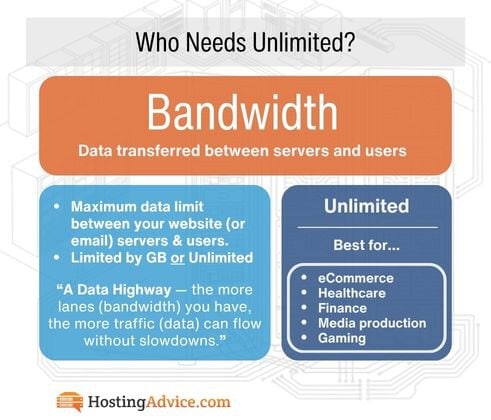
Think Minecraft hosting as an example of a demanding use case — you'll want a plan that includes unlimited bandwidth as standard. An eCommerce website, healthcare, finance, and media production need unlimited bandwidth.
For business email-only hosting, bandwidth is rarely a bottleneck for everyday correspondence (plain-text emails consume very little). The exception is high-volume environments: enterprises sending thousands of emails daily, teams regularly sharing large file attachments, or businesses running email marketing campaigns at scale.
Check for daily caps on sending limits. Hostinger(1,000 emails/day on Starter) and IONOS (500 emails/hour) have base-tier restrictions worth knowing before you commit.
5. Functionality & Security (Managed WordPress)
Never compromise on security, especially when you'll be handling sensitive information like customer credit card data or personal information. Managed WordPress may be the best option to simply add established security plugins that receive regular updates. Wordfence (with Cloudflare), Malcare, and Defender Security.
SiteGround, DreamHost, and Bluehost are the top picks for the best managed WordPress hosting. Want to figure out which is best for you?
Use our WordPress tool to find the best host (with one-click plugins) for your needs:
At minimum, your host should offer basic security features such as SSL certificates, regular backups, and malware scanning by default on every plan. If you need an extra layer of protection, look for advanced options such as the MyDefender feature from IONOS. If you'd like to learn more about our managed WordPress or our top picks, check our "What is Managed WordPress Hosting" article.
6. Plan for Scalability and Growth
Consider your future direction. Can your website or email account grow beyond its current state? If so, can your hosting plan grow with your business? Look for hosts that offer smooth scalability — the ability to expand resources or upgrade to higher-tier plans without significant downtime or the hassle of migrating everything from scratch.
The top choice is InMotion Hosting — the strongest overall. It moves cleanly from shared → VPS → dedicated with U.S.-based support at every tier, NVMe SSD storage, and unlimited email on all shared plans.
Next up is Hosting.com, which is built on A2 Hosting's infrastructure with LiteSpeed and NVMe across all plan types, meaning performance doesn't degrade as you scale. Unlimited email stays included.
Another great option is SiteGround. It's excellent for WordPress-focused scalability with staging environments, Git, and managed tools baked in, but it has one of the steepest renewal price jumps, so be aware.
7. "Free Trial" vs. "Included" Service
Not all bundled email are created equal — and this is worth knowing before you hand over your credit card. Unlimited email accounts are not rare, but they may have a catch! Free trials, pro upgrades, and space limitations may be hiding. SiteGround & Hosting.com have the only truly unlimited email.
Some providers bake email into their hosting plans permanently. Hosting.com, InMotion (free cPanel included; Pro/ 30-day trial), SiteGround, and DreamHost (on select plans) all include email as a genuine, ongoing part of the package — no expiry date, no surprise upgrade prompt. What you see is what you keep.
Others lead with a free trial period. Hostinger's bundled email is a one-year trial that matches the Business Starter plan — after 12 months, all mailboxes automatically renew as a paid Business Starter plan if a valid payment method is on file, or require a manual upgrade if not. Miss that window, and if the trial is canceled, expired, or suspended, the email data is purged after 30 days.
That's not a dealbreaker — Hostinger's email is genuinely excellent for the price — but it's not "free email" in the way you'd like to assume.
Bluehost similarly includes a free trial of its professional email service rather than a permanent bundle, and all plans include a domain for the first year only. Same principle: great value at launch, but the email upsell becomes clearer at renewal.
The smart move? Before signing up with any provider, ask two questions:
- Is the email included permanently or on a trial? And...
- What does the renewal price look like (for both hosting and email separately)?
Here's a quick breakdown of what's permanent versus what expires:
| Provider | Email Included | Permanent or Trial |
|---|---|---|
| Hosting.com | Unlimited (10 Accounts) | Included (Permanent) |
| InMotion Hosting | Unlimited Accounts, 5-20 GB/ inbox - Or - Upgrade to a separate "Professional Email Plan" | Free limited option using cPanel Email, or paid upgrade. InMotion offers its separate Titan-powered email (up to 100 GB). |
| SiteGround | Unlimited | Included (Permanent) |
| HostGator | 10 GB Storage (up to 100 GB) | 1 mo/ free trial for bundled, renews at $2.99/mo (1.67/mo for email only) |
| IONOS | 1 accounts, 2 GB inbox (Upgrade to 25 accounts, 10-50 GB) | Included (Permanent), but will need an upgrade ($1-$5/mo) |
| DreamHost | 20 mailboxes, 25 GB/ inbox (Upgrade to DreamPress or VPS for Unlimited) | 3 mo/ free trial, renews at $1.99 per mailbox/mo - Or - Permanent (Upgrade for Unlimited) |
| Hostinger | 2-10 mailboxes per site | 1 yr free trial, renews at an additional $2.99/mo (bundled); $1.59/mo email only |
| Bluehost | Basic - Shares SSD with Website - Or - Upgrade to a separate "Professional Email Plan" | Free limited option using Roundcube — or paid upgrade. Bluehost is pushing its separate service. (10-100 GB) |
The bottom line: bundling saves money and headaches, but only when you know exactly what you're bundling into.
8. Customer Support Quality
Excellent customer support is not to be overlooked, whether you're a seasoned developer or a first-time site owner. In the world of web hosting, you should have the peace of mind knowing that when something goes wrong at the worst possible time — and it will — you definitely want a responsive, knowledgeable support team available to help, whenever you need them.
| Provider | Support Rating | Real Human Guaranteed | 24/7 Chat & Email/Ticket | Phone Support |
|---|---|---|---|---|
| Hostinger | 4.7/5 | Yes — on request via chat (type "Agent") | Yes | No |
| Hosting.com | 4.4/5 | Yes — Guru Crew in-house team | Yes | Yes |
| IONOS | 4.7/5 | Yes — personal consultant assigned | Yes | Yes |
| DreamHost | 4.7/5 | Yes — in-house team; no scripted bots | Yes | Callback only (extra cost) |
| InMotion Hosting | 4.5/5 | Yes — U.S.-based humans, 24/7 | Yes | Yes |
| HostGator | 3.7/5 | Yes — though quality is inconsistent | Yes | Yes |
| SiteGround | 4.9/5 | Yes — consistently rated best in class | Yes | Billing/sales only |
| Bluehost | 3.4/5 | Yes — 24/7 multilingual | Yes | Yes (Upgrade to Business for +phone) |
9. Value-Adding Extras + AI Email Tools
Once the essentials are covered, consider the bonus features that make day-to-day management easier. Some additional perks include having a website builder handy (especially if you're just starting with web design), and compatibility with popular email clients like Zoho Mail, Microsoft Outlook, and Apple Mail, which ensures a smooth workflow. The extras are where providers start to genuinely differentiate themselves — and in 2026, the biggest differentiator is AI.
But the feature arms race has moved decisively into AI-powered inbox management, and it's worth knowing which providers have made meaningful investments here versus which ones are still offering the same feature list from five years ago.
Here's how the eight providers stack up on AI email extras specifically:
- Hostinger (Kodee AI) — Writes, replies, and summarizes emails in your tone. Smart inbox auto-organizes priority emails and flags urgent replies. The most complete AI email tool at the lowest price point on this list. Kodee is unique to Hostinger.
- Hosting.com (Titan AI / Smart Write) — You'll hear Titan a lot. It drafts and refines emails in your style, with built-in appointment booking, email campaigns, and read receipts. One of the most feature-complete AI email platforms available, bundled with hosting.
- IONOS (AI Email Assistant) — A simpler and more intuitive approach, with a twist. It handles writing, scheduling, and smart replies. The twist? It's unique for assigning a personal consultant to help configure your setup. This could come in handy if you need some hand-holding - get it? Bad joke.
- DreamHost (AI Business Advisor & Content Creator) — Strong AI site and content tools, though the AI email features are less mature than Hostinger or Hosting.com. Better suited for WordPress content workflows than inbox management. But this is a game changer for small businesses that are active on social media if you're clever with building on its "Content Creator."
- InMotion (Professional Email via Titan — 30-day trial) — Yep, Titan again. AI writing tools and email summaries are available on the Professional Email upgrade. Not included in the free cPanel tier, so you'll have to dish out for it, but it's a solid offer.
- HostGator (Titan Ultra) — Requires a big upgrade. AI summary, writing assistant, invoice tools, and Titan Drive are available on the Ultra plan upgrade. The base plan? No luck, it doesn't include AI.
- SiteGround — AI for themes and website building. Not so much for email. AI tools are focused on WordPress content generation rather than email specifically. No dedicated AI inbox features at this time.
- Bluehost (Professional Email via Titan — 30-day trial) — Back to Titan AI inbox tools, available on the Professional Email upgrade. Like InMotion, not included in the free cPanel base tier.
The takeaway: if AI-assisted email is a priority, Hostinger and Hosting.com offer it baked in from day one at the base level. Kodee and SmartWrite are excellent. Everyone else either requires an upgrade or hasn't prioritized it.
Access to email templates, spam filtering, and one-click integrations with tools like Google Workspace and Microsoft 365 make for a well-rounded hosting package — but AI is now the feature that separates the forward-thinking providers from the rest. It could mean 2-5x your workflow!
Top Questions: Email Hosting Q&A
You may still have questions, and we have answers. Jump to...
- What Is Email Hosting and Why Does It Matter? >>
- Website Hosting vs. Email Hosting: What's the Difference? >>
- Can You Host Your Website and Email with Separate Providers? >>
- Can I Create a Free Email if I Already Pay for Hosting? >>
- What Is the Difference Between IMAP and POP3? >>
- Does Web Hosting Always Include Email Hosting? >>
- How Much Does Combined Website Hosting with Email Cost in 2026? >>
- How Do I Stop My Business Emails From Going to Spam? >>
What Is "Email Hosting" and Why Does It Matter?
Generally speaking, a professional email address is a custom-domain email address tied to your business name.
Email hosting is a service that stores and manages your email accounts on a dedicated server, allowing you to send, receive, and organize messages using a custom domain address — think info@[yourbusiness].com instead of a generic free account, e.g., [yourbusiness]@gmail.com.
In plain terms, it's the behind-the-scenes infrastructure that keeps your inbox running, your emails delivered, and your business communications looking professional.
If you sell cat pajamas and your business is Cat Pajama Time, then your email should reflect that. Think info@catpajamatime.com (no affiliation with any real company). Think, info@[yourbusiness].com instead of yourbusiness2003@gmail.com.
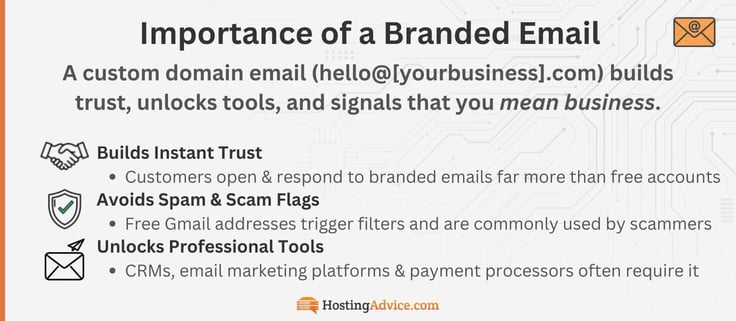
It may seem like a small detail, but it makes a real difference. When potential customers, partners, and affiliates get an email from a branded domain, they're much more likely to trust it, open it, and reply.
Free Gmail or Outlook addresses, on the other hand, can trigger spam filters, break content deliverability rules, and get dismissed as unprofessional, or worse — be associated with scammers who routinely use free accounts to impersonate businesses.
Trust is only part of the story. Some professional tools simply won't work without a custom domain email, let alone custom inboxes. Email marketing platforms, CRM integrations, and some payment processors require a business-verified address before you can get started.
The good news? Every provider on this list gives you the ability to create one — and if you're already paying for hosting, you likely already have access to it at no extra cost or for a competitive deal.
Website Hosting vs. Email Hosting: What's the Difference?
Website hosting and email hosting may sound like the same thing, but they're not. Website hosting is when you make your website accessible online. To do this, you'll need to store and serve website files on a server provided by the hosting company.
Here's how this type of hosting works: when someone types your website's domain name (like www.YourWebsiteName.com) or clicks a link, the server delivers the requested file to their browser. This allows them to view the content they want on your website.
For example, let's say you run a blog. You've just finished publishing and sharing a new blog post with your readers. When they click on the blog title, the website will send a request to the server provided by the web host.
The server will find the requested information from its heap of web files, in this case, the blog you wrote, and then share it with the reader.
Email hosting operates in a similar fashion, but it specifically focuses on managing emails. In this setup, the web hosting company handles and supports email accounts along with related services.
With email hosting, you can create and use customized email addresses with your own domain name (e.g., info@YourWebsiteName.com). Once you've created the email account, the web host will provide the server that stores email messages and related data. That way, you can view, receive, and send emails.
Whenever you encounter this question, remember the main difference is that website hosting is all about managing website files, whereas email hosting focuses on handling email accounts and messages.
Can You Host Your Website and Email with Separate Providers?
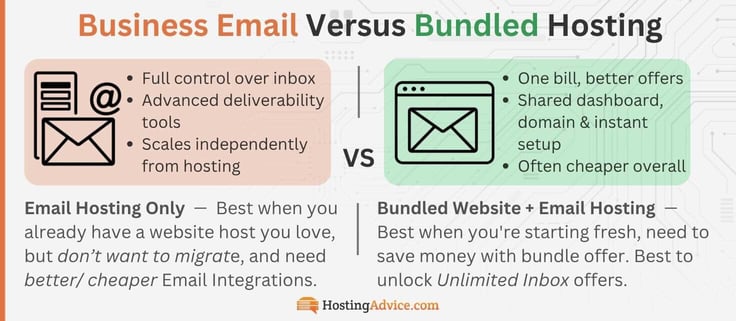
Yes, that's possible, but I wouldn't recommend it for several reasons. Let's start with the positives first. If you are heavily time and resource invested in your current web host, it may not be feasible or reasonable to migrate your site, but another provider may simply have a better Email deal.
When you host your website and email separately, you'll most likely enjoy specialized providers for each service. As a result, you'll have more flexibility in selecting the best options for your specific needs.
Consider it this way: You can select a service that focuses on website hosting and provides the resources needed for your site. Alternatively, you can choose an email host that specializes in email services, potentially offering advanced features for managing your email accounts.
But if convenience and affordability are what you're after, this usually isn't your best option. Hosting companies that bundle email and web hosting into one package tend to be easier on your budget. Better yet, managing everything in one place is much simpler than juggling separate providers.
Can I Create a Free Email if I Already Pay for Hosting?
Yes — if you're already paying for web hosting, a branded email address is usually included in your account at no extra cost. So here's the better question: why not get more value from the plan you already have?
The catch?
- You may need cPanel, WordPress, or managed hosting to access a free tool like Roundcube
- It will likely use your site storage SSD and have send limits (500-1000 email/day)
- It will generally be bare bones, without all the fancy marketing tools in pro services (Titan & Outlook)
At the end of the day, any business-branded email is better than nothing. So, we'll go over the cPanel setup process. It's generally easy to set up (depending on your host).
Bluehost (a great example): once logged in, you simply...
- Navigate to Hosting
- Click cPanel Email
- Click "+ Create" under Email Accounts
- Choose your domain & set a username (think support@, info@, or john@[yourdomain].com)
- Assign a password and storage quota
And your professional email is live in minutes — no separate purchase required. You can read more with our full guide HERE.
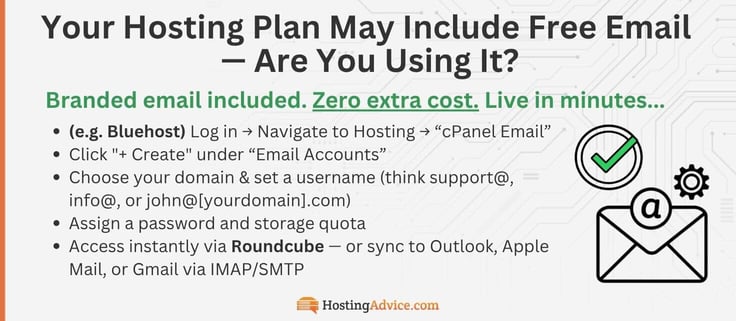
From there, you can access it instantly via the built-in Roundcube webmail client (in Bluehost), or connect it to external apps like Outlook, Apple Mail, or Gmail using IMAP/SMTP for seamless multi-device syncing.
What Is the Difference Between SMTP, IMAP and POP3?
SMTP is used to send your emails to recipients, e.g., the mail carrier!
SMTP (Simple Mail Transfer Protocol) is the protocol used by mail servers to send and receive email. User-level email clients (like Gmail, Yahoo, or Apple Mail) typically use an SMTP service to get your message to a server for delivery.
Both IMAP and POP3 are protocols that control how your email client (Outlook, Apple Mail, Gmail, etc.) retrieves messages from your mail server — but they behave very differently, and choosing the wrong one can cause real headaches.
IMAP (Internet Message Access Protocol) keeps your emails stored on the server and syncs them across all your devices (iPhone, computer, etc.) in real time. Read an email on your phone, and it shows as read on your laptop too.
You get the idea for IMAP. Move a spam email to Junk — it gets synced. Delete something on your tablet, and it's gone everywhere. It's one of those features that disappear into the background and just works! For anyone using email across multiple devices (which is basically everyone), IMAP is the right choice. Supported by all eight providers on this list.
POP3 (Post Office Protocol) downloads your emails to one device and typically deletes them from the server. It's a bit outdated, and was designed for a world where people checked email from a single desktop computer.
Unless you have a very specific reason to use it, like extremely limited server storage, there's almost no scenario where POP3 is the better option for a modern business. Don't worry about it.
The short version: use IMAP. Always.
Does Web Hosting Always Include Email Hosting?
Not by default. Some web hosting packages might include email hosting as part of the entire package, while others offer these services separately. That's why it's crucial to review the features and specifications of your web hosting plan, especially if email hosting is just as important to you.
All web hosting providers we've discussed here offer email hosting for free, or at a minimum, a free trial. The only difference is the number of email accounts you can open or the storage space for each email.
Some, like hosting.com and SiteGround, allow you to open unlimited email accounts, while others, like Hostinger and IONOS, only allow a certain number of emails via SSD space or a hard limit.
Bluehost offers free unlimited email accounts built in with cPanel (limited to host SSD), but jumps to 25 GB –100 GB per mailbox with Dedicated cloud storage when you upgrade. HostGator is only a one-month free trial, then $2.99/mo.
How Much Does Combined Website Hosting with Email Cost in 2026?
This service does not have a standard price; it all depends on the specifics of the plan you choose, especially in terms of the features included. Prices can range from a few dollars per month for basic shared hosting plans, the cheapest web hosting option, to higher costs for dedicated or VPS hosting.

For instance, Bluehost and HostGator are both quite budget-friendly. On the other hand, SiteGround costs a bit more but comes with additional features. Ultimately, the price you pay for website and email hosting depends on the resources you need.
Check out the Cost Breakdown below >>
How Do I Stop My Business Emails From Going to Spam?
I get it. This is one of the most frustrating problems that pops up, but it happens all the time. Inbox providers like Google will flag unrecognized emails, especially if you're using a free cPanel email account on a shared hosting server. So, let's fix it.
The most common culprit is a shared server IP address with a bad reputation. This isn't something we usually think about, but if your hosting plan puts your website on "Shared Servers" with hundreds of other sites, and one of those "other" sites gets flagged for spam, your IP address goes down with the ship. It gets blacklisted by association.
Shared servers are standard on most entry-level plans, so it's not your fault. Do not pass GO, do not collect $200... Your emails just go straight to spam with no warning, until one of your customers mentions they haven't seen your emails in a while.
Quick note: This is exactly why Bluehost and InMotion's Professional Email upgrades use dedicated email infrastructure with built-in reputation management — it's not just a premium feature, it's a real solution to a real problem.
Beyond IP reputation, the other main fixes are:
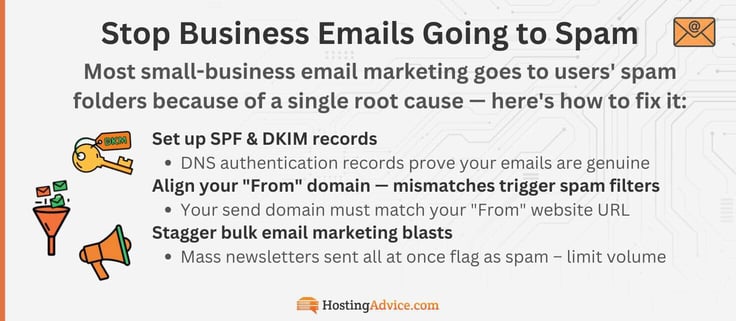
- Set up SPF and DKIM records: these are DNS authentication records that prove (to receiving mail servers) that your emails are genuinely coming from your domain. Most hosts walk you through this in their control panel, and IONOS makes it particularly straightforward. It's a must.
- Align your "From" domain with your sending domain: if your domain is yourbusiness.com but your emails say they're coming from somewhere else, spam filters will flag it. Another reason for a domain-based email. They should be exactly the same. Spammers are known to exploit this by creating small variations.
- Avoid blasting mass newsletters all at once: stagger large sends. In my experience, I can almost guarantee this is what got you in trouble. Hostinger caps Starter plan users at 1,000 emails per day, and IONOS at 500 per hour for exactly this reason. You thought it was just because they're stingy? Nope, they're protecting their server reputation. Sudden high-volume sends from a new domain are a classic spam signal.
If you're consistently landing in spam despite following these steps, it's a strong signal that it's time to upgrade from free cPanel email to a dedicated professional email plan. The tools dramatically improve.
Cost Analysis and Pricing Tiers
Know what you can get for what you pay! You may still be deciding what the best bang for your buck is, so here's a breakdown of the benefits of upgrading. Decide what Tier best fits your business: Starter, Professional, or Enterprise.
1. Starter Tier: Free or Budget Email
Best for: solopreneurs, freelancers, personal brands, and small businesses just getting started
Average price: $0–$1.99/mo
- Custom domain email (yourname@yourdomain.com)
- Basic webmail — Roundcube or Horde
- IMAP/POP3 sync across devices
- Standard spam & virus filtering
- Shared hosting SSD storage (5–20 GB)
- No dedicated IP — deliverability tied to shared server
- Daily send caps may apply (Hostinger: 1,000/day; IONOS: 500/hr)
- No AI tools or advanced productivity features
Who's in this tier: Hostinger ($0.39/mo), IONOS ($1.10/mo), Bluehost free cPanel email, InMotion free cPanel email, DreamHost ($1.67/mailbox — 3-mo trial), HostGator ($1.99/mo email-only)
2. Professional Tier: Titan-Powered or Bundled
Best for: growing businesses, small teams, eCommerce, and anyone who relies on email for sales or customer communication
Average price: $2.99–$4.99/mo
- Branded custom domain email with a clean, professional interface designed for business communication
- 5–30 GB dedicated storage per mailbox, depending on tier
- Dedicated email infrastructure — improved deliverability vs. shared IP
- Email templates, scheduled send, read receipts, and follow-up reminders
- Calendar & contacts built in
- Mobile app + seamless desktop client sync
- AI Smart Write (Titan) for drafting and refining emails
- Two-factor authentication, SSL/TLS encryption, spam & virus filtering
- 99.9%–99.99% uptime SLA
Who's in this tier (bundled): Hosting.com ($1.99/mo — Titan, permanent), SiteGround ($2.99/mo — permanent), InMotion Professional Email ($4.59/mailbox — Titan, 30-day trial), HostGator Pro Email ($2.99/mo — Titan, 1-mo trial), Bluehost Professional Email ($1.67–$3.99/mo — Titan, 30-day trial)
3. Enterprise Tier: Premium + Managed Hosting
Best for: agencies, enterprises, high-traffic eCommerce, and WordPress-heavy operations needing managed performance and maximum email reliability
Average price: $5–$14.99/mo
- Unlimited email accounts — permanently included
- 50–100 GB dedicated storage per mailbox
- Full Titan AI inbox management — email campaigns, tracking, invoicing, Titan Drive, and appointment booking
- Managed WordPress with pre-installed plugins and staging
- Dedicated server infrastructure — no shared IP risk whatsoever
- Google Workspace or Microsoft 365 integration is available
- 99.99% uptime SLA with formal compensation policy
- Priority or callback phone support
- Advanced security: DDoS, WAF, DreamShield, MyDefender
Who's in this tier: DreamHost DreamPress 1 ($14.99/mo), SiteGround GrowBig/GoGeek ($5.99–$10.69/mo), InMotion Power/Pro ($5.59+/mo), Hosting.com higher-tier plans, IONOS with Microsoft 365 add-on, HostGator Ultra with full Titan AI suite
Most small businesses are perfectly served by Tier 2 — the jump from free cPanel email to a proper bundled or professional plan is usually under $3/month. It includes all the basic calendar, contact, template, and features you'd ever need. It also eliminates the shared IP deliverability risk.
Should You Bundle Website and Email Hosting? Our Verdict
It's a great idea to have both a website and a business email address, but it's even better to combine these into a single hosting package. The moment you're all-in on one web host, they tend to throw in all the perks. Just be aware of what benefits are a limited-time trial and which ones are baked into the service.
Instead of paying separately for email hosting, it's wiser to purchase a web hosting package that includes a free email account, especially with unlimited custom inboxes, storage, and/or bandwidth. This way, you can create more professional emails supported by a stunning website for your business or personal use.
Hopefully, we've answered all your questions, but if not, you'll find the HostHelper™
AI Hosting Advisor tool to be incredibly... Helpful.