
Writer: Surajdeep Singh


Editor: Lillian Castro


Reviewer: Christina Lewis

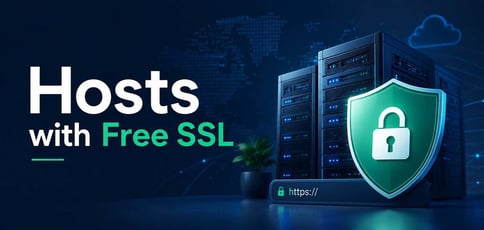
Free SSL used to be a genuine differentiator. In 2016, when Let’s Encrypt launched, and a handful of forward-thinking hosts were early adopters, offering free SSL certificates was a selling point worth shouting about. Fast forward to today, and the landscape has changed completely — free SSL is now table stakes.
The vast majority of reputable hosting providers include it automatically, and most activate it without you lifting a finger. So why does this article still matter? Because not all free SSL is equal.
Some hosts offer Let’s Encrypt specifically, while others use alternative certificate authorities like Sectigo or DigiCert. Some automate everything, while others require manual installation. And as the industry moves toward 90-day certificate lifetimes as a universal standard in 2026, automatic renewal is more important than ever.
Here’s what you actually need to know about the best hosts for free SSL certificates in 2026.
1. SiteGround
Built with speed and security in mind, SiteGround is a remarkable web hosting provider. Each SiteGround hosting plan offers a free Let’s Encrypt wildcard SSL certificate. A wildcard SSL certificate is an SSL/TLS certificate that allows you to secure a primary domain name and unlimited subdomains. Access the Let’s Encrypt interface in the SiteGround control panel to install the wildcard SSL certificate in a few clicks.
SiteGround.com

Monthly Starting Price $2.99
- FREE website transfer service to get started
- 99.9% uptime guarantee and unlimited traffic
- User-friendly WordPress installation
- 24/7 support featuring custom systems
- 4 caching options plus staging and Git
- Get started on SiteGround now.


Lynn Cadet

| Money Back Guarantee | Disk Space | Domain Name | Setup Time |
|---|---|---|---|
| 30 days | 10 GB SSD – 100 GB Google Cloud SSD | FREE (1 Year) | 6 minutes |
It should be noted that a standard Let’s Encrypt SSL certificate is automatically installed on every hosted domain (but not on subdomains). That said, a standard SSL certificate must be manually installed on each subdomain, making wildcard SSL certification more attractive. In 2016, SiteGround was one of the first web hosts to back up the Let’s Encrypt initiative. The hosting service is easily one of the best hosting with free Let’s Encrypt SSL providers.
More about SiteGround:
- Free drag-and-drop website builder, CMS installation, email accounts, email migrator, CDN, and daily backups.
- Robust security solutions and 24/7 customer service.
- Stellar business email hosting solution.
- Trusted managed WordPress hosting provider.
2. Hostinger
Hostinger is one of the best hosting with free Let’s Encrypt SSL providers. Each Hostinger web hosting plan offers unlimited free Let’s Encrypt SSL certificates. These certificates are automatically enabled and renewed, adding ease to your website hosting experience. Hostinger’s overall hosting feature set makes it a phenomenal option for businesses of all sizes.
Hostinger.com

Monthly Starting Price $2.69
- Best overall value: Nothing at this price comes close feature-for-feature.
- AI builds your site in minutes — no technical skills needed
- Up to 3 websites with free SSL
- Weekly backups and managed WordPress
- 2 business mailboxes free for 1 year
- Get started on Hostinger now.


Sead Fadilpasic

| Money Back Guarantee | Disk Space | Domain Name | Setup Time |
|---|---|---|---|
| 30 days | 20 GB SSD | FREE (1 year) | 3 minutes |
If Let’s Encrypt SSL is not activated for your hosting plan, do not fret; you can effortlessly install Let’s Encrypt SSL in cPanel by clicking on Let’s Encrypt SSL. Follow this guide if you are facing an installation error in cPanel. Both of these situations are anomalies — Let’s Encrypt SSL should be automatically activated for your hosting plan.
More about Hostinger:
3. Bluehost
Bluehost offers a free shared Let’s Encrypt SSL certificate for all assigned and parked domains and subdomains. According to the free SSL certificate provider, the certificate should automatically assign and install itself to each new and existing domain. However, new customers may have to install the certificate manually. You can enable the free SSL certificate through the Bluerock interface (Bluehost’s original control panel) or the Account Manager control panel.
Bluehost.com

Monthly Starting Price $1.99
- Beginner-friendly setup with free domain for the first year
- AI-powered site setup with 1-click WordPress install
- Free CDN, malware scanning, WAF, and DDoS protection
- Weekly backups + 99.99% uptime SLA
- WordPress.org recommended host since 2005
- Get started on Bluehost now.
Sead Fadilpasic
| Money Back Guarantee | Disk Space | Domain Name | Setup Time |
|---|---|---|---|
| 30 days | 10 GB NVMe SSD | FREE (1 year) | 5 minutes |
We recommend the Bluerock control panel, as it is easier to use. Once you have toggled the free SSL certificate on through the Bluerock interface, it may take a few hours to install and activate the certificate. You may be required to take a few actions to complete the process. If so, you will receive an email with further instructions.
While the process of installing and activating an SSL certificate might not be as simple on Bluehost as it is on SiteGround, it is among the best hosting with free Let’s Encrypt SSL solutions.
More about Bluehost:
- Services are built on or leverage cutting-edge, open-source technology.
- Free drag-and-drop site builder.
- Free one-click installation of popular applications such as WordPress, Drupal, and Magento.
- Recommended by WordPress itself, Bluehost is a leading WordPress hosting provider.
4. InMotion Hosting
InMotion Hosting’s shared hosting plans include cPanel’s free AutoSSL. This SSL certificate is auto-enabled forever. An AutoSSL certificate keeps your website secured with minimal custom configuration. It makes it easy to manage your SSL, especially on shared servers. The security certificate automatically renews every three months.
InMotionHosting.com

Monthly Starting Price $4.59
- FREE BoldGrid site builder and templates
- FREE website, domain, and cPanel migrations
- SSD storage makes your site load up to 20x faster
- Security suite includes SSL and hack protection
- Unlimited bandwidth and email accounts
- Get started on InMotion now.


Dave McQuilling

| Money Back Guarantee | Disk Space | Domain Name | Setup Time |
|---|---|---|---|
| 90 days | 100 GB SSD – Unlimited SSD/NVMe | Select Plans | 5 minutes |
InMotion Hosting supports Let’s Encrypt SSL on shared servers, making it a solid choice for anyone who prefers the Let’s Encrypt standard specifically. Installation requires a bit of technical know-how — you’ll need to manage root access and run a series of commands — but InMotion has a detailed guide to walk you through the process step by step.
5. Hostwinds
Hostwinds’ shared hosting plans offer cPanel’s automated AutoSSL tool. Note that this tool provides the same type of SSL certificate as Let’s Encrypt; the only difference is that AutoSSL certification is issued by cPanel (powered by Sectigo). Unfortunately, Hostwinds shared hosting plans do not offer a Let’s Encrypt certificate. This provision is only available on their VPS hosting and dedicated server plans.
Hostwinds.com

Monthly Starting Price $4.54
- Unlimited SSD storage, databases, and email
- FREE site migration with cPanel and Softaculous
- Instant upgrades without downtime
- FREE around-the-clock monitoring
- Automatic nightly backups available
- Get started on Hostwinds now.


Jack Wallen

| Money Back Guarantee | Disk Space | Domain Name | Setup Time |
|---|---|---|---|
| 3 days | Unlimited SSD | New or Transfer | 6 minutes |
You can easily manage your AutoSSL certificates through WebHost Manager (WHM) on the AutoSSL configuration page. If you are on a VPS or dedicated hosting plan, you can enable Let’s Encrypt in WHM by following a few steps. Although Hostwinds does not offer free Let’s Encrypt SSL for shared hosting, it is worth exploring.
More about Hostwinds:
- Unlimited subdomains, email accounts, FTP accounts, and databases.
- Free site builder and dedicated IP.
- A 24/7 website monitoring service, nightly backups, and a customer support team composed of specialized technicians.
- Softaculous auto-installer provides one-click access to hundreds of applications.
6. DreamHost
DreamHost offers a free Let’s Encrypt SSL/TLS certificate for your domain. A Let’s Encrypt SSL/TLS certificate is automatically enabled for your domain name upon purchasing a shared hosting plan. This certificate automatically renews every 60 days, taking the burden off system administrators to manually renew certification.
DreamHost recommends purchasing a Sectigo certificate if your business processes credit card information or transmits sensitive data. Don’t worry though, as Let’s Encrypt SSL incorporates modern security techniques and best practices to offer a secure website experience.
DreamHost.com

Monthly Starting Price $2.89
- Free handcrafted starter website built for you, just add content
- Host 25 websites with unlimited bandwidth and daily backups
- AI website builder + AI business tools included
- Free SSL, DDoS protection, and automated malware scans
- 100% uptime guarantee with 24/7 support
- Get started on DreamHost now.


Christina Lewis
| Money Back Guarantee | Disk Space | Domain Name | Setup Time |
|---|---|---|---|
| 30 days | 25 GB NVMe SSD | FREE (1 year) | 4 minutes |
DreamHost does not offer automatic certification for subdomains. This means that you must enable Let’s Encrypt SSL for your subdomains manually through the secure hosting section of your control panel. This process is technically complicated, and you may need to seek the help of a professional. Here is a guide to help you through the process.
More about DreamHost:
- Unlimited traffic and fast SSD storage.
- One-click, instant WordPress installation, WordPress website builder, and free automated WordPress migrations.
- Automated daily backups.
- 100% uptime guarantee.
7. IONOS
IONOS offers a DigiCert wildcard SSL certificate for your free domain name and up to 10,000 subdomains. DigiCert is a partner of IONOS and one of the world’s most-renowned SSL providers. With DigiCert SSL security, you can enjoy additional security features such as daily malware scans. Log in to your IONOS account to activate your DigiCert SSL certificate or to change its settings if it is already activated.
IONOS.com

Monthly Starting Price $1.00
- Most affordable option: Pay just $12 at checkout
- 1-click WordPress install gets you online in minutes
- Unlimited websites, storage, and databases
- Daily backups, free SSL, and 24/7 support
- Free professional email included
- Get started on IONOS now.
Christina Lewis
| Money Back Guarantee | Disk Space | Domain Name | Setup Time |
|---|---|---|---|
| 30 days | 10 GB SSD | FREE (1 year) | 4 minutes |
IONOS only offers an option to obtain a Let’s Encrypt SSL certificate for your website if you have purchased a cloud hosting plan. You can easily create and deploy a Let’s Encrypt certificate for your domain through the Plesk interface. Follow the steps listed in this guide to proceed.
More about IONOS:
- The IONOS Plus plan is one of the best web hosting plans in the industry.
- A blazing-fast, full-page load time of 1.23 seconds beats the likes of Bluehost and GoDaddy.
- Unlimited websites, storage, and databases.
- Daily backups, DDoS protection, and easy installation of applications like WordPress, Drupal, and Joomla!
8. ScalaHosting
ScalaHosting is among the best hosting providers with free Let’s Encrypt SSL solutions on the market. Each ScalaHosting web hosting plan features easy access to Let’s Encrypt SSL through an automated process. A Let’s Encrypt certificate will be installed within 24 hours of your domain pointing to a ScalaHosting web server. Your certificate will be automatically renewed after three months.
ScalaHosting.com

Monthly Starting Price $2.95
- Rated 4.9/5 on Trustpilot with 2,000+ reviews
- Turbo-fast NVMe SSD storage on all plans
- 1-click WordPress install with free migration & guided setup
- Daily backups, free SSL, and AI-powered security (SShield)
- Price lock guarantee — your rate never increases
- Get started on ScalaHosting now.


Laura Bernheim

| Money Back Guarantee | Disk Space | Domain Name | Setup Time |
|---|---|---|---|
| Anytime | 10 GB NVMe SSD | FREE (1 year) | 6 minutes |
If, for some reason, your Let’s Encrypt SSL certificate is not put in place within 24 hours, you can reach out to the ScalaHosting service team for an update on the situation or manually install the SSL certificate through your web hosting control panel. The three-step SSL installation process takes no more than a few minutes to complete. Here is a guide for the same.
More about ScalaHosting
- Unlimited bandwidth, emails, and databases.
- One-click installation of more than 400 scripts, including WordPress, Prestashop, Drupal, and Joomla!
- Daily backups to a remote server.
- Easy website management with SPanel.
9. HostArmada
HostArmada is a new-age cloud web hosting provider and a Let’s Encrypt partner. The website hosting solution provides eight hosting services with free SSL certificates for all domains that point to HostArmada’s cloud servers.
A free SSL certificate from Sectigo/Cloudflare SSL is automatically issued on your domain name when you purchase a HostArmada cloud hosting plan. Oddly, despite being a Let’s Encrypt partner, there is no mention of Let’s Encrypt SSL certificate issuance on HostArmada’s website.
HostArmada.com

Monthly Starting Price $1.99
- Cloud-based NVMe SSD servers across 11 global data centers
- 7 daily backups, free SSL, and Imunify360 WAF protection
- Free cPanel, Softaculous 1-click installs, and website migration
- 45-day money-back guarantee — longer than most hosts
- 24/7/365 support via phone, chat, and tickets
- Get started on HostArmada now.
Christina Lewis
| Money Back Guarantee | Disk Space | Domain Name | Setup Time |
|---|---|---|---|
| 45 days | 15 GB NVMe SSD | FREE (1 year) | 3 minutes |
If you opt for a cloud WordPress hosting plan, you must activate your already-installed SSL certificate. Take note that this holds for all WordPress hosting plans, as WordPress is a domain-sensitive application. This means that you must configure your website to open through HTTPS. Luckily, it is easy to enable SSL on your HostArmada WordPress website. Simply follow these steps.
More about HostArmada:
- Web server cache, cloud SSD storage, and daily backups.
- One-click installation of open-source applications such as WooCommerce, Magento, WordPress, Drupal, Prestashop, Opencart, and Joomla!
- AI-based security. HostArmada’s security suite is one of its top-selling points.
- 24/7 technical support.
What Is Let’s Encrypt?
Let’s Encrypt is an automated and open SSL certificate provider that issues free SSL/TLS certificates to enable HTTPS for websites. HTTPS encryption protects against man-in-the-middle attacks, eavesdroppers, and hijackers who try to spoof trusted websites. The service is run by the Internet Security Research Group (ISRG).
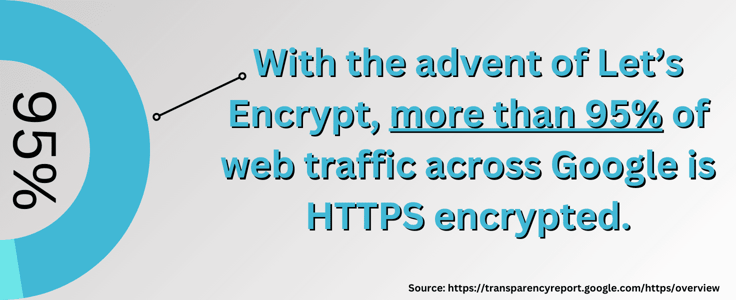
The nonprofit certificate authority aims to “create a more secure and privacy-respecting web.” With the advent of Let’s Encrypt, more than 95% of web traffic across Google is HTTPS-encrypted. Countries like Belgium, India, the United Kingdom, Germany, and the United States have more than 93% of encrypted traffic.
While activating an additional layer of security is the primary goal of HTTPS encryption, websites that use HTTPS are given a search ranking boost by Google, so take advantage of the free Let’s Encrypt SSL service.
Is SSL Free With Hosting?
Free SSL is effectively the industry standard. The vast majority of reputable hosting providers include an SSL certificate automatically with every plan — you shouldn’t have to pay extra for basic HTTPS protection on a modern hosting plan.
That said, not all free SSL is the same. Most hosts use Let’s Encrypt, but some use alternative certificate authorities like Sectigo or DigiCert. The certificate authority doesn’t affect encryption quality for most websites — what matters more is whether installation and renewal are automatic, which they are on every host in this article.
The exception is if you run an eCommerce site or handle sensitive user data. In that case, you may want to invest in an Organization Validation (OV) or Extended Validation (EV) certificate, which verifies your business identity rather than just your domain. Those still cost money, but for the vast majority of websites, a free DV certificate from Let’s Encrypt or similar is more than sufficient.
Are There Any Disadvantages of Using Let’s Encrypt SSL?
Honestly? Not many — and the one that used to come up most often is becoming a non-issue. Let’s Encrypt SSL certificates are valid for 90 days, which sounds short compared to the one-year certificates you’d get from a paid CA.
But here’s the thing: the entire industry is moving to 90-day maximum lifetimes as a standard anyway, so paid providers are actually catching up to what Let’s Encrypt has been doing all along. Automatic renewal handles the short validity period anyway, so you’ll never notice it.
The real limitation worth knowing about is certificate type. Let’s Encrypt only issues Domain Validation (DV) certificates, which confirm you own the domain but don’t verify the organization behind it. If you need an Organization Validation (OV) or Extended Validation (EV) certificate — say, for a financial institution or a site where users need extra assurance about who they’re dealing with — you’ll need to pay for that.
But for the overwhelming majority of websites? There are no notable disadvantages to Let’s Encrypt SSL. Amazon doesn’t have an EV certificate. Neither do most of the sites you visit every day. A free DV certificate is all you need.
How Do You Install Free SSL from Let’s Encrypt on Shared Hosting?
Many shared hosting providers offer automatic Let’s Encrypt SSL installation the moment you purchase a hosting plan. Honestly, most of the time you won’t have to do a thing. Some hosts do require manual installation, but it’s usually a straightforward process through cPanel or your hosting panel.
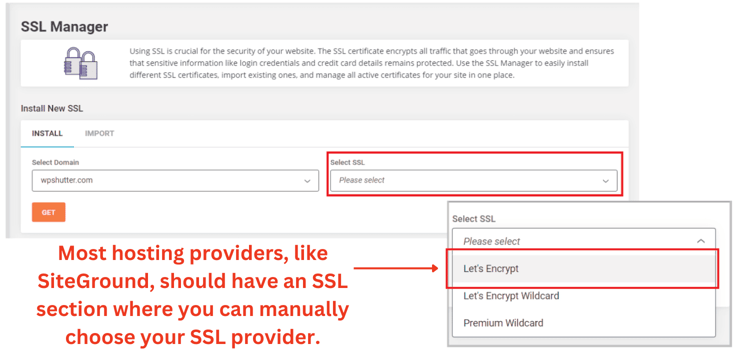
If your hosting panel doesn’t have a one-click install option, don’t panic. Your hosting provider almost certainly has a published guide to walk you through it, and the SSL For Free website makes the process relatively painless, even if you’re not technically inclined.
Here are the steps:
- Visit the SSL For Free website.
- Type your website domain name in the enter your website to secure input box and click on Create Free SSL Certificate.
- You can add a subdomain by clicking on Add / Edit Domains.
- Verify your domain/subdomain through Automatic FTP Verification, Manual Verification, or Manual Verification (DNS).
- Once SSL For Free creates an SSL certificate, you may opt into receiving an email notification a week before your SSL certificate expires.
For a comprehensive understanding of the process, here is an in-depth guide to secure your website with HTTPS.
Encryption Has Never Been Easier
Free SSL is no longer a premium perk — it’s the baseline. Every host on this list includes it, and most handle installation and renewal automatically, so you never have to think about it. That’s a far cry from where things stood even a few years ago.
Unless you need an OV or EV certificate for compliance or business verification, there’s genuinely no reason to pay for SSL. Pick a hosting plan that fits your needs, and the security comes with it. And if you run into any hiccups activating your certificate, every host here has a support team ready to walk you through it, plus step-by-step guides to make the process even easier.
HostingAdvice.com is a free online resource that offers valuable content and comparison services to users. To keep this resource 100% free, we receive compensation from many of the offers listed on the site. Along with key review factors, this compensation may impact how and where products appear across the site (including, for example, the order in which they appear). HostingAdvice.com does not include the entire universe of available offers. Editorial opinions expressed on the site are strictly our own and are not provided, endorsed, or approved by advertisers.
Our site is committed to publishing independent, accurate content guided by strict editorial guidelines. Before articles and reviews are published on our site, they undergo a thorough review process performed by a team of independent editors and subject-matter experts to ensure the content’s accuracy, timeliness, and impartiality. Our editorial team is separate and independent of our site’s advertisers, and the opinions they express on our site are their own. To read more about our team members and their editorial backgrounds, please visit our site’s About page.