

Writer: Andrew Wandola


Editor: Lillian Castro


Reviewer: Christina Lewis

If your site or application has outgrown shared or virtual private server hosting, you’re likely ready for dedicated hosting. Wondering where to begin your search for the best Linux dedicated server hosting providers? Here are eight top choices recommended by our web hosting experts.
1. IONOS
IONOS is a rather affordable dedicated server hosting provider with tons of powerful features and resources worth using. With this host, you can choose between two dedicated server options: AMD and Intel.
IONOS.com

Monthly Starting Price $41.00
- Best for teams wanting enterprise dedicated hardware at affordable prices
- AMD EPYC, Ryzen, and Intel Xeon — GPU servers also available
- Unlimited bandwidth, RAID included, up to 80 TB storage
- 99.995% server availability across 6 global data centers
- Every plan includes a dedicated personal consultant
- Get started on IONOS now.


Christina Lewis
| Setup Time | Disk Space | CPU | RAM |
|---|---|---|---|
| 7 minutes | 480 GB SSD – 4 TB SATA HDD | 4 – 32 cores | 16 GB – 256 GB |
AMD servers offer more performance, ideal for resource-intensive projects. IONOS also lets you choose your preferred storage technologies when setting up your dedicated server.
You can choose SSD storage for fast speeds or even pump it up higher by adding NVMe storage technology to the SSDs.
Alternatively, if you’re seeking greater scalability, durability, and efficient server memory, Intel-powered dedicated servers from IONOS are an excellent choice. Even better, this host offers a pay-as-you-go pricing model, meaning you only pay for the resources you actually use.
2. InMotion Hosting
Like IONOS, InMotion Hosting also lets you choose what works for you. You’ll notice that freedom is the common denominator of dedicated servers. Since you have all server resources dedicated to your project, you have the freedom to use them as you please.
InMotionHosting.com

Monthly Starting Price $35.00
- Best for businesses needing enterprise hardware with managed support
- Bare-metal or fully managed dedicated servers from $35/mo
- Intel Xeon to AMD EPYC, up to 16 cores and 192 GB DDR5 RAM
- Monarx security & 500 GB backup storage with Premier Care
- 24/7 Advanced Product Support from senior sysadmins
- 99.99% uptime SLA, up to 10 Gbps unmetered bandwidth
- Get started on InMotion now.


Dave McQuilling

| Setup Time | Disk Space | CPU | RAM |
|---|---|---|---|
| 7 minutes | 960 GB SSD – 7.68 TB NVMe | 4 – 16 cores | 16 GB – 192 GB DDR5 |
At InMotion, you have two options for Linux dedicated server hosting. You can choose managed dedicated server hosting (fully equipped with cPanel) or unmanaged hosting (known as bare-metal hosting). However, the major downside of bare-metal hosting is that it lacks a control panel.
The unmanaged option works best for tech-savvy users like system administrators and web developers. The managed option, on the other hand, is ideal if you need your server managed by the web host.
Whichever dedicated server you choose, rest assured that it will come with state-of-the-art technologies and powerful resources.
To give you some perspective, the base dedicated Linux server plan features at least 16 gigabytes of memory and one terabyte of SSD storage. The most expensive plan has up to 512 gigabytes of memory and two NVMe SSD storage units, each with 3.2 terabytes of storage space.
3. Liquid Web
Liquid Web is another powerful Linux dedicated server hosting service. While it may not be as powerful as InMotion regarding server resources, it can still work magic, especially for large projects.
If you opt for the base plan, for instance, you’ll be looking at about 16 gigabytes of memory, six CPU cores, and 480 gigabytes of SSD RAID 1 storage, all running on Linux. But what makes this host particularly special is the use of RAID 1 storage technologies on all of its Linux servers.
LiquidWeb.com

Monthly Starting Price $55.50
- Best for mission-critical sites needing fully managed dedicated hardware
- Save up to 50% for 2 months with this HostingAdvice offer
- Fully managed or self-managed — Linux or Windows
- PCI-ready environments with 99.99% uptime SLA
- cPanel, Plesk, or InterWorx — 24/7 Heroic Support® included
- Get started on Liquid Web now.
Christina Lewis
| Setup Time | Disk Space | CPU | RAM |
|---|---|---|---|
| 8 minutes | 383 GB SSD – 3.2 TB SSD | 4 – 32 cores | 12 GB – 192 GB |
You’ve probably heard about redundancy in web hosting. This refers to the web host’s ability to keep its systems up and running at all times, even during emergencies or technical difficulties. RAID 1 is one of those technologies that make redundancy possible.
This technology mirrors, or duplicates, your website’s data across at least two disks. So, if something happens to the first disk, making it impossible to read or access data, the second disk serves as a replacement.
That will give the original disk enough time to recuperate. The best part is you won’t even notice this switch since it happens instantaneously.
4. HostGator
HostGator’s Linux dedicated hosting packages are feature rich and developer friendly. I’m talking about compatibility with Apache web servers, MySQL databases, PHP, Python, Perl, Ruby on Rails, and more.
HostGator.com

Monthly Starting Price $141.19
- AMD EPYC processors, DDR5 RAM, and NVMe SSD on all plans
- Linux or Windows — cPanel/WHM or Plesk included
- 100 Gbps port speed with unmetered bandwidth
- RAID 6 storage, DDoS protection, and live kernel patching
- Guided server setup and 24/7/365 support included
- Get started on HostGator now.


Lynn Cadet

| Setup Time | Disk Space | CPU | RAM |
|---|---|---|---|
| 6 minutes | 1 TB – 3 TB NVMe | 8 – 32 cores | 32 – 128 GB DDR5 |
HostGator also uses some of the best web server security technologies, such as iptables, to configure IP packet filter rules based on criteria like IP address, protocol used, or port number. This helps define security policies for outgoing and incoming network traffic, keeping your server secure.
HostGator, however, isn’t the best option for a super powerful project. Its resources aren’t close to those of other hosts I’ve covered so far, like InMotion and Liquid Web.
But that’s not necessarily a bad thing — it’s actually great for a resource-specific project. Think of the kind of website or application that requires fewer predictable resources. That’s a smart move; it saves you money and gives you exactly what you need with no leftovers.
5. Bluehost
Up next is Bluehost, another legendary and highly respected web hosting provider. Bluehost is one of the largest web hosting companies today, right below HostGator, IONOS, Google Cloud Platform, Amazon Web Services, and GoDaddy.
Bluehost.com

Monthly Starting Price $144.19
- AMD EPYC processors, DDR5 RAM, and NVMe SSD on all plans
- RAID-1 storage mirroring and automated offsite backups
- DDoS protection >2 Tbps with Cloudflare Enterprise CDN
- Full root access with WHM/cPanel included
- 24/7 Tier 3 support —
- Get started on Bluehost now.


Sead Fadilpasic

| Setup Time | Disk Space | CPU | RAM |
|---|---|---|---|
| 8 minutes | 1 TB – 3 TB NVMe | 8 – 32 cores | 32 – 128 GB DDR5 |
Despite Bluehost’s popularity, most people tend to shop its cheapest plans without exploring the additional hidden gems it offers, especially for clients looking for dedicated hosting.
In fact, it was only a few years ago that I myself discovered Bluehost offers more than shared hosting for individuals and small businesses. Since this host is affordable, choosing a dedicated hosting plan means you won’t have to worry about spending more than you should.
Also, like HostGator, Bluehost’s resources are not overkill, making it perfect for a resource-specific project. I’ll give you an example of Minecraft server hosting. The eight gigabytes of memory, one terabyte of storage, and at least four CPU cores you’ll find with the base plan at Bluehost are more than enough to host a Minecraft server for 10 people without lagging.
Note that Bluehost uses traditional hard drives for its dedicated servers, which makes it even more affordable. At the same time, it could be a turn-off for projects that must run specifically on SSD drives.
6. InterServer
In less than 15 minutes, you can set up a dedicated server at InterServer and get started with your website, application, database, or whichever project you have in mind.
That’s not even the fun part. InterServer offers dedicated servers that cater to a wide range of projects, from small to large, so you won’t overpay for resources you don’t use.
InterServer.net

Monthly Starting Price $78.00
- Privately owned datacenters in NYC, Dallas, and Los Angeles
- AMD EPYC, Ryzen, and Intel Xeon — 80+ configs available
- IPMI access, zero setup fees, and unmetered 1 Gbps
- InterShield w/ ML firewall, DDoS protection, malware cleanup
- Price-lock guarantee — rates never increase at renewal
- Get started on InterServer now.
Sead Fadilpasic
| Setup Time | Disk Space | CPU | RAM |
|---|---|---|---|
| 8 minutes | 250 GB SSD – 80 TB HDD | 4 – 56 cores | 15 GB – 256 GB |
Before I go further, one important thing you need to know about dedicated server hosting is that it’s not only about getting super powerful resources. Instead, it’s about allocating these resources specifically to you and no one else. That’s what InterServer does. It gives you the perfect amount of resources for your project and fully protects you against noisy neighbor syndrome.
By dividing its hosting resources into smaller units, InterServer allows you to still enjoy the benefits of dedicated hosting without paying the industry-standard price for this service. That’s a win-win in my book.
7. Hostwinds
Hostwinds is a reliable, highly customizable, and scalable dedicated server hosting provider. With its Linux hosting plans, you can choose between different supported distributions, including but not limited to CentOS, Debian, Fedora, and Ubuntu. This is particularly helpful for running a distribution-specific project.
Hostwinds.com

Monthly Starting Price $122.00
- Highly configurable servers with a choice between Windows or Linux
- Fully managed support and nightly backups
- SAS Type II and Tier 4 datacenters
- 99.999% uptime guarantee and DDoS protection
- 1-hour hardware replacement
- Get started on Hostwinds now.


Jack Wallen

| Setup Time | Disk Space | CPU | RAM |
|---|---|---|---|
| 6 minutes | 120 GB SSD – 12 TB HDD | 4 – 16 cores, 8 – 20 threads | 8 GB – 32 GB |
Ubuntu is more user friendly and is the most used Linux distribution. Debian, on the other hand, offers more stability. Besides distributions, Hostwinds also lets you set up everything from scratch, starting with memory, number of server drives, and IP addresses.
No matter your choices, each dedicated server at Hostwinds comes with RAID storage technology for high redundancy, regular server monitoring, nightly backups, and full management by a team of experienced technicians.
What Is a Dedicated Server?
A dedicated server is a type of web hosting where you rent an entire server to yourself. In other words, the web host dedicates all the server’s resources, including CPU, memory, and storage, to you, and you won’t share them with anyone else.
As a result, dedicated servers offer higher performance and stability, ideal for websites with high traffic volumes, large-scale eCommerce sites, and businesses that require specific server configurations or run resource-intensive applications.
Enhanced security is another crucial characteristic of dedicated server hosting. This is because of the isolation from other users, unlike in shared hosting, where users share the same server resources. The isolation that dedicated hosting offers minimizes the risk of cross-site contamination or security breaches.

On top of the beefed-up security and high performance, dedicated servers allow for greater customization and control. With this type of hosting, users can choose their operating system, configure software and settings, and tailor the hardware specifications to their specific needs.
This flexibility benefits projects with specialized hosting requirements or those who need to comply with specific regulatory standards. For example, one of the clients I recently worked with needed a PCI-compliant host with dedicated servers, so I helped her migrate the company’s website to IONOS. That’s just one of the many examples of the different compliance requirements dedicated servers can help meet.
What Is Linux Hosting?
Linux hosting is a type of web hosting that uses a server running on Linux, an open-source operating system known for its stability, security, and flexibility. Today, Linux is one of the most popular server operating systems.
It is especially well-suited for websites and applications that require technologies typically associated with the Linux environment. Here, I’m talking about the likes of PHP, MySQL, and Apache.
Linux is also a preferred OS for hosting WordPress, Joomla, Drupal, and other content management systems. Because it’s open-source, Linux is highly customizable and generally more cost effective than its Windows counterpart.
Why Should I Use a Linux Server?
Linux servers are a popular choice for several reasons. Let’s take a quick look.
Reliability and stability: First, Linux servers are known for stability and reliability. I know that’s the bare minimum regarding web servers, but you don’t get to appreciate these things until you have a terrible experience with a different operating system.
Stability and reliability mean less downtime for your website or application. Less downtime means a lower bounce rate and more returns, especially for an eCommerce website.
The question of whether or not bounce rate is a ranking factor has been the subject of debate among marketing gurus. But everyone agrees that a high bounce rate isn’t a good sign, whether for SEO or not. That’s one of the things Linux hosting helps avoid, thanks to its stability and reliability.
Free and open-source: Secondly, Linux is also open-source. This means that anyone can access, redistribute, and even modify it.
Open-source software is usually available for free, and the same applies to Linux. The web hosting company does not need to pay for expensive licenses, which explains why most shared hosting plans are affordable. The vast majority of shared hosting providers run on Linux.
The open-source nature of Linux also means you’ll have access to a large community of developers who contribute to its improvement. So, it’s not just about getting this software for free; there are people who work to improve Linux regularly to serve you better.
Support and compatibility: Finally, Linux supports a range of software and programming languages. This includes the army of the most used programming languages, starting from JavaScript, Python, SQL, TypeScript, Java, and the trio of C#, C++, and C.
Is Linux Web Hosting Good?
The best way to approach this question is by considering both sides of the coin. As I’ve often said, nothing in this industry is flawless.
Yes, it could be perfect for you, but not for another user. Why so? Because we all have different needs, which also applies to the operating system our websites or applications use.
Linux web hosting is good but has some flaws. So, whether or not these “flaws” are significant enough to prevent you from using this type of web hosting will depend on your specific needs.
Let’s get into the details. I’ll start with the pros of Linux hosting.
Pros of Linux Web Hosting
- Its open-source nature makes it cost effective, as there are no licensing fees. So, if you’re a small business or an individual developer, you’ll really appreciate the fact that you can access Linux hosting at affordable rates.
- As discussed earlier, the Linux operating system also offers stability and reliability. Therefore, websites hosted on Linux servers experience less downtime.
- It is much more secure because Linux is less prone to viruses and malware than other operating systems.
- This OS supports many different programming languages and software.
Linux is a smart choice for most website owners, but there are a few disadvantages to be aware of.
Cons of Linux Hosting
- If your website requires Windows-specific software, Linux may not be the best fit. Examples include ASP.NET applications, .NET framework technologies, and MSSQL databases.
- Linux can have a steeper learning curve, which is quite a challenge if you’re unfamiliar with Linux commands.
- From a web developer’s perspective, adjusting to Linux takes a lot of time (and effort), especially after getting used to Windows-based environments.
As you’ve learned, most cons of Linux hosting don’t have anything to do with its quality. Everyone agrees that Linux is a great and powerful OS for hosting, but whether or not it is good for you will depend on your unique preferences.
How Do I Choose a Hosting Plan?
Contrary to popular belief, choosing a web host isn’t usually a walk in the park. For instance, most of my clients only had affordability in mind when shopping for a web hosting provider.
If you only focus on affordability (or solely on any other feature) without looking at the bigger picture, you’ll likely find yourself shopping for a new host just a few months later.
When looking for the ideal web host for your project, here are some quick tips to keep in mind:
- Analyze the nature of your website (blog, eCommerce, or portfolio) to determine the hosting requirements, including memory, CPU, storage, and even the operating system.
- The higher the traffic, the more resources you’ll need. Opt for a scalable host if you’re unsure what to expect regarding traffic.
- Some hosting services work best for specific CMSes like WordPress, Joomla, or Drupal. Make sure you know what platform you want to use.
- The amount of content, like images and videos, will also affect your storage space.
- High-traffic and media-rich sites require more bandwidth, but you can never go wrong with unlimited bandwidth if you are unsure of the amount you need.
- If your website handles sensitive information, for example, websites that take credit card information, prioritize robust security features.
- Your ability to manage server-side settings can influence the type of hosting (managed vs. unmanaged).
Once that’s out of the way, that’s when you start looking at additional factors such as:
- Your budget.
- Quality of customer support.
- Availability of extras such as unlimited email accounts, multiple datacenter locations, and content delivery networks (CDNs)
From the above points, I hope you’ve noticed that price is just a drop in the ocean of things you must look for when choosing a web hosting provider. Fortunately, at HostingAdvice.com, we only recommend web hosts that we’ve tried and tested ourselves, giving you the much-needed head start in finding the right web hosting provider.
Experience Linux’s Affordability and Reliability on a Dedicated Server
Linux already has a great reputation in the web hosting realm. On the other hand, a dedicated server is basically the highest rung you can climb on the web hosting ladder. Most people start with shared hosting, then they realize they need more infrastructure and move to VPS hosting.
As your needs expand beyond what a Linux VPS can support, moving to a dedicated server becomes essential. Once you have a dedicated server, the possibilities for growth are endless.
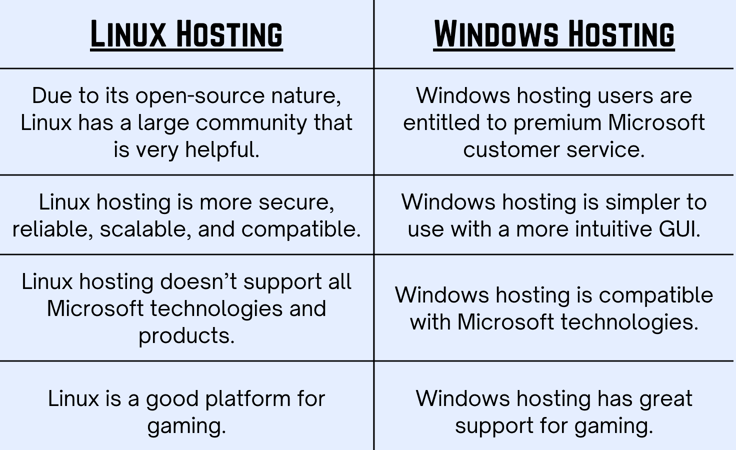
Blending the benefits of Linux and the freedom of dedicated hosting is a match made in heaven. It’s any web developer or administrator’s dream unless, of course, they prefer a Windows dedicated server. However, the differences between Linux hosting and Windows hosting are like night and day, so you won’t find it difficult to set these two apart.
HostingAdvice.com is a free online resource that offers valuable content and comparison services to users. To keep this resource 100% free, we receive compensation from many of the offers listed on the site. Along with key review factors, this compensation may impact how and where products appear across the site (including, for example, the order in which they appear). HostingAdvice.com does not include the entire universe of available offers. Editorial opinions expressed on the site are strictly our own and are not provided, endorsed, or approved by advertisers.
Our site is committed to publishing independent, accurate content guided by strict editorial guidelines. Before articles and reviews are published on our site, they undergo a thorough review process performed by a team of independent editors and subject-matter experts to ensure the content’s accuracy, timeliness, and impartiality. Our editorial team is separate and independent of our site’s advertisers, and the opinions they express on our site are their own. To read more about our team members and their editorial backgrounds, please visit our site’s About page.