

Writer: Surajdeep Singh


Editor: Lillian Castro


Reviewer: Christina Lewis

A load balancer is like a traffic cop who directs cars during rush hour. But instead of cars, a load balancer directs network traffic to available server space in your network. Without load balancing, unexpected traffic can cause your server to crash, resulting in a poor user experience and costly downtime.
A slow website often puts off potential customers. Websites owned by government agencies, banks, eCommerce sites, and social media platforms handle massive amounts of traffic, and downtime can have grim consequences.
The minimum goal and the industry standard for website uptime is 99.9%. If your website does not meet this standard, it is high time you consider hosting with a load balancing solution. Here are the best hosting with load balancing plans for your website.
-
Navigate This Article:
The Best VPS Load Balancing Plans — Starting at $4.00
Virtual private server (VPS) load balancing is a technique that distributes server workload across several network servers or resources. VPS load balancing uses a virtual server or software to receive incoming traffic requests and directs those requests — like a traffic cop. This technique prevents a single server from being overloaded.
The VPSes below offer a nice balance between affordability and performance to help maintain your site’s uptime.
1. Kamatera.com

Monthly Starting Price $4.00
- Best for developers: Fully customizable cloud VPS — choose your exact CPU, RAM, and storage
- Intel Xeon Platinum/Cascade Lake CPUs & NVMe SSD
- 20+ global data centers across 4 continents, with 99.95% uptime
- Hourly or monthly billing, only pay for what you use
- 30-day free trial with $100 credit — no commitment needed
- Get started on Kamatera now.


Surajdeep Singh
| Setup Time | Disk Space | CPU | RAM |
|---|---|---|---|
| 5 minutes | 20 GB NVMe – 4 TB NVMe | 1 – 32 cores | 1 GB – 128 GB |
Kamatera is a leading, cloud-based VPS load balancing provider. The VPS hosting platform guarantees a 99.95% server uptime, which is higher than most competitors. Each Kamatera virtual server has ultra-fast SSD storage and power-packed Intel Xeon Platinum CPUs.
Kamatera’s billing plans are both flexible and affordable. You can customize your web hosting environment by selecting the operating system version, processing power, bandwidth, memory, and disk space you need. What’s more, you can add Plesk or cPanel to your hosting plan, making it simple to manage. Make sure to check out the Kamatera cloud load balancing plans as well.
2. IONOS.com

Monthly Starting Price $4.00
- Lowest entry price for VPS: no hidden fees, unlimited traffic, from $4.00/mo
- NVMe SSD storage, 1 Gbps connection, and 99.99% uptime
- Full root access with Linux or Windows — deploy in minutes
- Personal consultant assigned to every account after signup
- 30-day money-back guarantee and award-winning support
- Get started on IONOS now.


Christina Lewis
| Setup Time | Disk Space | CPU | RAM |
|---|---|---|---|
| 6 minutes | 10 GB NVMe – 720 GB NVMe | 1 – 12 cores | 1 GB – 24 GB |
IONOS’ cheap, fully virtualized VPS load balancing plans include full root access, unlimited traffic up to 1 Gbps, maximum security and reliability, a performance boost with NVMe storage, and a free Plesk Web Host Edition license. If you’re on a budget and don’t want to sacrifice quality, IONOS is worth your attention.
You can choose from five VPS Linux plans and customize them to your liking. Customizable web hosting plan features include the operating system, system and version management system, and backup and recovery. Select a monthly or annual contractual term and enjoy the benefits of one of the best available hosting with load balancing solutions.
3. AccuWebHosting.com

Monthly Starting Price $6.33
- Windows Server 2019, 2022 & 2025 — fully licensed on all plans
- SSD storage, guaranteed resources, and 1 Gbps port included
- Free daily backups and RDP access on every plan
- 16+ global locations — deploy close to your users
- 24/7/365 live support and 99.9% uptime guarantee
- Get started on AccuWebHosting.


Jack Wallen

| Setup Time | Disk Space | CPU | RAM |
|---|---|---|---|
| 6 minutes | 40 GB – 200 GB SSD | 1 – 4 cores | 1 GB – 16 GB |
AccuWebHosting is a next-gen VPS hosting with load balancing solution with an exciting suite of VPS hosting features. Its reasonably priced VPS hosting plans come with free control panels such as Webuzo, DirectAdmin, Plesk, and cPanel, full root access and dedicated IP, unlimited traffic with a guaranteed 99.9% uptime, and a whole host of other free add-ons. And if your website visitors are globally distributed, you will enjoy its range of 15 worldwide server locations.
You can choose from eight self-managed and fully managed VPS hosting plans (four each) and enjoy the benefits of the renowned VPS load balancing solution. With a live chat response time of just seven seconds, the hosting service also offers world-class customer service. AccuWebHosting is, without a doubt, one of the best hosting with load balancing services.
4. Vultr
Vultr’s cloud-based, fully configured load balancers are ultra-easy to manage and deploy. The SSD cloud VPS hosting solution also comes with an option to automate your load balancers using its flexible API, saving you time and resources. Vultr VPS load balancers are also highly available and include automatic failover and built-in health monitoring.

Other features include SSL configuration options for secure traffic, intelligent traffic routing, and a flexible and powerful API for the automatic deployment and management of load balancer clusters. While Vultr VPS plans are on the more expensive side, the VPS load balancing service justifies its pricing plans by offering some pretty stellar web hosting features.
5. OVHcloud
OVHcloud is another cloud-based VPS hosting solution. Its plans pack a punch with unlimited traffic, anti-DDoS protection, minimal service latency, and VPS backup options for data safekeeping. There’s no doubt that OVHCloud offers some appealing features.

However, the OVHcloud STARTER pack doesn’t include load balancing by default. You’ll find it as a pricey add-on, making OVHcloud a costly alternative compared to the VPS load balancing solutions mentioned earlier. Additional features like IP addresses, storage, and backup are also offered as add-ons.
The Best Cloud Load Balancing Plans — Starting at $4.00
Cloud load balancing is a technique that evenly distributes workloads across computing resources, such as servers, containers, and virtual machines. More than 92% of organizations use cloud computing, so it’s no surprise many providers are supping up their plans with load balancers for added performance. Read on to discover the best cloud load balancing plans.
6. Kamatera.com
Monthly Starting Price $4.00
- Best for developers and devops teams needing full control
- Deploy in 60 seconds across 20 global data centers
- Fully customizable: 1–32 cores, 1–128 GB RAM, NVMe SSD
- Hourly or monthly billing — scale up or down anytime
- 99.95% uptime with built-in firewall and load balancing
- 30-day free trial, no charge if canceled
- Get started on Kamatera now.
Surajdeep Singh
| Setup Time | Disk Space | CPU | RAM |
|---|---|---|---|
| 5 minutes | 20 GB NVMe – 4 TB NVMe | 1 – 32 cores | 1 GB – 128 GB |
Kamatera’s reliable cloud load balancer evenly distributes your application traffic across available servers on the network. The cloud hosting platform uses UDP, TCP, and HTTP to reroute incoming network traffic to available servers, offering maximum uptime.
It also instantly shifts your workload to live servers in case of a server failure. With a 99.95% server uptime, smart routing, and dependable pricing, Kamatera is one of the best hosting with load balancing solutions on the market today. Other features include SSL decryption and 24/7/365 customer support service with a live chat option.
7. IONOS.com
Monthly Starting Price $5.76
- Start with $200 in credit for your first month
- Intel Xeon processors, Linux or Windows, full root access
- Scale instances up or down with no downtime
- By-the-minute billing — only pay for what you use
- 99.99% uptime, ISO 27001-certified data centers
- Get started on IONOS now.
Christina Lewis
| Setup Time | Disk Space | CPU | RAM |
|---|---|---|---|
| 6 minutes | 10 GB NVMe – 720 GB NVMe | 1 – 24 cores | 512 MB – 48 GB |
The IONOS Managed Application Load Balancer provides intelligent load distribution at the application level. The managed cloud hosting solution offers features such as individual routing rules, regular health checks, an integrated listener interface that supports numerous IP addresses, bidirectional communication channels, TLS connection relocation, and the ability to set up a warm-up phase.
The IONOS Application Load Balancer is compatible with the IONOS Network Load Balancer. Both IONOS load balancers can be deployed as part of a stack, extending load balancing and use cases. The hosting provider comes with a fairly-priced hourly model with no hidden costs and is undoubtedly one of the best hosting with load balancing solutions.
8. Cloudways.com

Monthly Starting Price $6.60
- Choose from AWS, Google Cloud, DigitalOcean, Vultr, or Linode
- Auto-healing servers with automated backups and free SSL
- 60+ global data center locations
- Pay-as-you-go — no contracts, cancel anytime
- 3-day free trial, no credit card required
- Get started on Cloudways now.
Jack Wallen
| Setup Time | Disk Space | CPU | RAM |
|---|---|---|---|
| 8 minutes | 20 GB SSD – 4 TB SSD | 1 – 96 cores | 1 GB – 384 GB |
Cloudways Autoscale is a fully managed WordPress hosting platform with load balancers. The managed cloud hosting platform offers exceptional performance and high availability for your WordPress site. Cloudways Autoscale takes care of cloud infrastructure and large amounts of traffic without slowing down your WordPress website or allowing it to crash.
The cloud load balancing solution is ideal for blogs, media websites, events and booking sites, eCommerce platforms, and LMS and memberships sites. Built on Kubernetes, its standout features include integrated edge caching, OCP, and enterprise DDoS and firewall protection. All said and done, Cloudways Autoscale is quite expensive and not ideal for beginners. If you have a mid to large-sized business, schedule a live demo today.
9. Hostwinds.com

Monthly Starting Price $0.006+/hour
- 99.9999% uptime guarantee with redundant network
- Hourly billing — deploy and scale in seconds
- Full root access, custom OS or 1-click app installs
- Nightly backups, snapshots, and enterprise firewall included
- 24/7/365 support with free website migration
- Get started on Hostwinds now.
Jack Wallen
| Setup Time | Disk Space | CPU | RAM |
|---|---|---|---|
| 6 minutes | 30 GB SSD – 750 GB SSD | 1 – 16 cores | 1 – 96 GB |
Hostwinds Cloud Load Balancers enable you to scale your website with improved speed and reliability. The cloud hosting platform supports HTTP/2 and Proxy Protocol and is quite easy to set up.
Hostwinds Cloud Load Balancers are cheap, secure, and scalable. That said, if you are looking for a cloud load balancing plan packed with features, Hostwinds’ solution is not meant for you. Hostwinds Cloud Load Balancers are ideal for beginners.
10. LiquidWeb.com

Monthly Starting Price $5.00
- Best for businesses that can’t afford downtime
- 100% uptime SLA — network and power guaranteed
- AMD EPYC processors with Cloudflare CDN included
- Acronis backups and DDoS protection built in
- 24/7 Heroic Support® via phone, chat, and email
- Get started on Liquid Web now.
Christina Lewis
| Setup Time | Disk Space | CPU | RAM |
|---|---|---|---|
| 7 minutes | 30 GB SSD – 440 GB SSD | 1 – 6 cores | 1 GB – 16 GB |
While Liquid Web has several blogs about load balancing, finding its load balancing product page was difficult. Nevertheless, Liquid Web offers solid, fully managed shared and dedicated server load balancers. Noteworthy features include SSL offloading for high performance, advanced traffic scripting options, and full redundancy configuration options.
Managed shared load balancers are generally cheaper than managed dedicated ones, but both can still be quite pricey. If you’re in search of an enterprise-level, shared hosting, or dedicated hosting product, it might be worth checking out the plans that Liquid Web has available.
11. Hetzner
Hetzner’s cloud-based load balancers take advantage of dedicated root servers, can handle TCP, HTTP, HTTPS, and HTTP/2 traffic, are highly available, and offer TLS termination, health checks, fast reconfiguration, and Proxy Protocol support. That’s a lot of value packed into an affordable load balancing plan.

Overall, Hetzner Cloud Load Balancers are cheap and have several amazing features. Hetzner’s cloud load balancing platform is by far one of the best hosting with load balancing solutions available for users on a tighter budget.
What Is Load Balancing?
Load balancing is a web hosting technique that distributes incoming traffic across multiple servers, improving scalability, reliability, and performance. With load balancing, websites can handle a higher traffic volume without slowing down or crashing.
The benefits of load balancing include:
- Consistent server health checks to ensure workloads are routed to a working server, maintaining high availability.
- No website downtime, regardless of the volume of traffic at hand.
- Virtual or physical servers can be added to or removed from your infrastructure at will.
- Security features such as MFA, WAF, and SSL encryption are available.
According to a recent survey, 71% of companies experienced unanticipated partial and/or full website downtime. Partial downtime refers to the unavailability of a few pages or areas of a website, whereas full downtime refers to the unavailability of the entire website. The numbers are staggering. Load balancing helps avoid unwanted website downtime, and the load balancing solutions listed above should be your first step in preserving your site’s availability.
Which Load Balancing Method Is Best?
Both VPS load balancing and cloud load balancing are fantastic techniques in their own right. They largely vary in how they allocate and manage resources:
- A cloud server is more functional, secure, and flexible than a VPS. A VPS comes with a fixed set of resources, provisioned on a single host.
- Cloud load balancing resonates with great performance.
- In terms of scalability, cloud load balancing again comes on top, as it is the more flexible option. You can scale up or down quite easily.
- In terms of pricing, VPS load balancing is the more affordable option.
- It is easier to customize a VPS load balancing solution.
Here is a table for a better understanding:
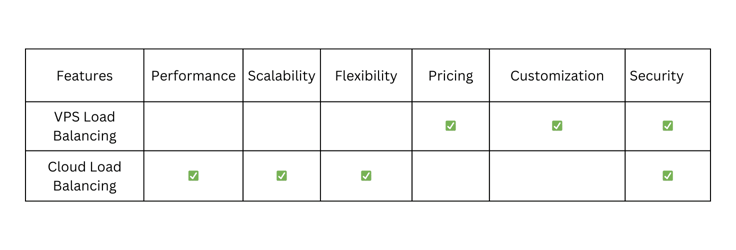
The type of load balancing solution you choose will likely depend on what’s most important to your application.
Is Cloudflare’s Load Balancing Better Than AWS?
Overall, AWS Elastic Load Balancing (ELB) is better than Cloudflare’s load balancing solution in terms of features and pricing. While Cloudflare’s load balancing plans are cheap and packed with features, AWS ELB offers slightly better features and 750 hours of free service monthly with the AWS Free Tier between the ELB Application Load Balancer and the ELB Network Load Balancer.
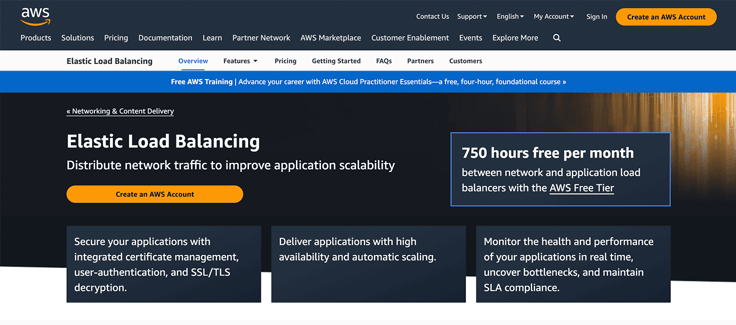
Standout AWS ELB features include SSL/TLS decryption, user authentication, integrated certificate management, automatic scaling and high availability, health and performance monitoring, SLA compliance, and bottleneck removal. We recommend AWS ELB as a sound alternative to the web hosting with load balancing plans we have explored.
How Do I Choose a Hosting Plan With Load Balancers?
From the table above, it might look like cloud hosting plans with load balancers are the top choice, but that’s not always true. When it comes to security, customization, and affordability, VPS load balancing solutions are excellent for beginners and small businesses. But if you’re after superior performance, scalability, and flexibility, and you’re willing to pay a premium, then cloud load balancing platforms could be the way to go.
Best VPS Load Balancing Plans: Kamatera, IONOS, and AccuWebHosting
Best Cloud Load Balancing Plans: IONOS, Cloudways, and Hetzner
What matters is your specific hosting needs. Study each of these hosting solutions in depth and select one that best meets your application’s requirements.
Selecting the Right Hosting With Load Balancing Solution
Here are the eight steps you need to follow when selecting the best hosting with load balancing plan for your website:
- Consider your business needs and draft a website blueprint.
- Assess the hosting type (VPS or cloud) and projected website traffic.
- Evaluate security requirements.
- Seek scalability and flexibility.
- Compare features and pricing plans.
- Narrow down your search to the top three hosting plans.
- Read authentic customer reviews.
- Make a purchase decision.
By following these steps, you can choose a load balancing plan that ensures high availability, optimal performance, and a sound experience for your users.
HostingAdvice.com is a free online resource that offers valuable content and comparison services to users. To keep this resource 100% free, we receive compensation from many of the offers listed on the site. Along with key review factors, this compensation may impact how and where products appear across the site (including, for example, the order in which they appear). HostingAdvice.com does not include the entire universe of available offers. Editorial opinions expressed on the site are strictly our own and are not provided, endorsed, or approved by advertisers.
Our site is committed to publishing independent, accurate content guided by strict editorial guidelines. Before articles and reviews are published on our site, they undergo a thorough review process performed by a team of independent editors and subject-matter experts to ensure the content’s accuracy, timeliness, and impartiality. Our editorial team is separate and independent of our site’s advertisers, and the opinions they express on our site are their own. To read more about our team members and their editorial backgrounds, please visit our site’s About page.