















Disclosure: When you sign up through links on our site, we often earn referral fees from partners. For more information, see our ad disclosure and review policy.

Top Overall Host

Hostinger.com

Hostinger review

Monthly Starting Price $2.69

Visit Site »
  • Best overall value: Nothing at this price comes close feature-for-feature.
  • AI builds your site in minutes — no technical skills needed
  • Up to 3 websites with free SSL
  • Weekly backups and managed WordPress
  • 2 business mailboxes free for 1 year
  • Get started on Hostinger now.
Our Expert's Review ★★★★★ 5.0/5.0

Sead Fadilpasic

Sead Fadilpasic

Sead Fadilpasic, Contributing Expert

Sead is a web hosting authority with over 15 years of hands-on experience evaluating hosting performance, WordPress optimization, VPS configuration, and modern website builders. Backed by a degree in Journalism and Public Relations, he specializes in translating technical hosting concepts into clear, actionable insights for businesses and site owners. His expertise extends into cybersecurity, blockchain, and privacy, and his work has appeared in top-tier outlets including TechRadar Pro, Tom’s Hardware, SiliconANGLE, Al Jazeera, and the Forbes Technology Council.

(HostingAdvice.com): As the shared hosting market has become more saturated, things like unlimited storage, bandwidth, and email accounts have become the norm. Hostinger, however, goes above and beyond the norm by also giving users an unrestricted  number of websites, databases, FTP users, subdomains, and parked domains for most plans. Go to full review »

Money Back Guarantee Disk Space Domain Name Setup Time
30 days 20 GB SSD FREE (1 year) 3 minutes
Best for Easy Setup

ScalaHosting.com

ScalaHosting review

Monthly Starting Price $2.51

Visit Site »
  • Rated 4.9/5 on Trustpilot with 2,000+ reviews
  • Turbo-fast NVMe SSD storage on all plans
  • 1-click WordPress install with free migration & guided setup
  • Daily backups, free SSL, and AI-powered security (SShield)
  • Price lock guarantee — your rate never increases
  • Get started on ScalaHosting now.
Our Expert's Review ★★★★★ 4.7/5.0

Laura Bernheim

Laura Bernheim

Laura Bernheim, Contributing Expert

Laura has spent more than 12 years crafting engaging and award-winning articles that share the passion behind organizations' products, people, and innovations. As a long-time HostingAdvice contributing expert, she combines a reputation for producing quality content with rich technical expertise to show experienced developers how to capitalize on emerging technologies and find better ways to work with established platforms. A professional journalist, Laura has contributed to The New York Times, Sports Illustrated, the Sun Sentinel, and the world's top hosting providers.

(HostingAdvice.com): In a budget web hosting market that's fiercely competitive,  ScalaHosting stands out by delivering a premium hosting experience that surpasses most. This premium experience includes all-SSD storage, unlimited bandwidth, databases, and email accounts — to go along with a topnotch support team. Go to full review »

Money Back Guarantee Disk Space Domain Name Setup Time
Anytime 10 GB NVMe SSD FREE (1 year) 6 minutes
Best for Site Migrations

Hosting.com

Hosting.com review

Monthly Starting Price $3.99

Visit Site »
  • Free SSL certificates, DDoS protection, and malware scanning are included on all plans
  • Imunify360 security suite + Web Application Firewall (WAF)
  • 99.9% uptime commitment
  • Automated daily backups with easy restore options
  • Free site migration, including files, databases, and emails
  • Get started on hosting.com now.
Our Expert's Review ★★★★★ 4.9/5.0

Christina Lewis

Christina Lewis

Christina Lewis, Senior Content Manager

Christina Lewis is a web designer and technical writer who bridges design, development, and hosting with clear, practical advice. With a Master’s degree in web design and communications from the University of Florida, she combines a foundation in mass communications with real hands-on experience creating websites and managing hosting environments. Now, she combines her writing experience with her technical knowledge to craft and edit content that gives value to novice techies and field experts.

(HostingAdvice.com): If speed and performance, partnered with support and security, are at all priorities in your web host shopping, hosting. com should be a leading contender. Go to full review »

Money Back Guarantee Disk Space Domain Name Setup Time
30 days 100 GB SSD - Unlimited SSD New or Transfer 5 minutes
Best for WordPress

Hostinger.com

Hostinger review

Monthly Starting Price $2.69

Visit Site »
  • Best overall value: The most complete managed WordPress hosting at this price
  • Kodee AI Agent manages your WordPress site via simple chat
  • LiteSpeed servers boost site speed by up to 40%
  • WAF, malware scanner, DDoS protection, and auto-updates
  • Free migrations — 85% completed in under 5 minutes
  • Get started on Hostinger now.
Our Expert's Review ★★★★★ 5.0/5.0

Sead Fadilpasic

Sead Fadilpasic

Sead Fadilpasic, Contributing Expert

Sead is a web hosting authority with over 15 years of hands-on experience evaluating hosting performance, WordPress optimization, VPS configuration, and modern website builders. Backed by a degree in Journalism and Public Relations, he specializes in translating technical hosting concepts into clear, actionable insights for businesses and site owners. His expertise extends into cybersecurity, blockchain, and privacy, and his work has appeared in top-tier outlets including TechRadar Pro, Tom’s Hardware, SiliconANGLE, Al Jazeera, and the Forbes Technology Council.

(HostingAdvice.com): As much as we love WordPress, one of our biggest pet peeves is when hosting providers exploit the popularity of the world's most-used content management system by offering so-called WordPress hosting that, in reality, is exactly the same as the host's shared server plans. Fortunately, Hostinger's ultra-fast infrastructure and easy access to SSL certificates and backups sets up the company to outperform the vast majority of the violators of our admittedly made-up rule. Go to full review »

Money Back Guarantee Disk Space Domain Name Setup Time
30 days 20 GB SSD – 100 GB NVMe FREE (1 year) 3 minutes
Best for Small Budgets

IONOS.com

IONOS review

Monthly Starting Price $1.00

Visit Site »
  • Most affordable option: Pay just $12 at checkout
  • 1-click WordPress install gets you online in minutes
  • Unlimited websites, storage, and databases
  • Daily backups, free SSL, and 24/7 support
  • Free professional email included
  • Get started on IONOS now.
Our Expert's Review ★★★★★ 4.8/5.0

Christina Lewis

Christina Lewis

Christina Lewis, Senior Content Manager

Christina Lewis is a web designer and technical writer who bridges design, development, and hosting with clear, practical advice. With a Master’s degree in web design and communications from the University of Florida, she combines a foundation in mass communications with real hands-on experience creating websites and managing hosting environments. Now, she combines her writing experience with her technical knowledge to craft and edit content that gives value to novice techies and field experts.

(HostingAdvice.com): If budget is the main factor on your mind when searching for your next web host, search no more. IONOS has an impressive range of robust web hosting and website building packages for what may be the best price we've ever seen in the world of hosting. Go to full review »

Money Back Guarantee Disk Space Domain Name Setup Time
30 days 10 GB SSD FREE (1 year) 6 minutes
Best for Uptime

Hostwinds.com

Hostwinds review

Monthly Starting Price $4.54

Visit Site »
  • 500% faster speeds via SSDs
  • LiteSpeed web server performance
  • FREE dedicated IP address
  • 99.999% uptime guarantee
  • Datacenters in Dallas and Seattle
  • Get started on Hostwinds now.
Our Expert's Review ★★★★★ 4.8/5.0

Jack Wallen

Jack Wallen

Jack Wallen, Contributing Expert

Jack Wallen is a veteran technology journalist and prolific author whose career spans more than two decades. Since the late 1990s, he has covered Linux, open-source software, cybersecurity, and web hosting infrastructure for major publications including ZDNET, CNET, TechRepublic, Linux.com, The New Stack, Linode, TechTarget, and Linux New Media. Jack has tested and reviewed countless hosting platforms, control panels, and server-side tools, earning a reputation for clear, practical guidance and deep hands-on expertise. He’s also written more than 70 novels — one of which even revolves around the Linux operating system. For more on Jack’s work, visit jackwallen.com.

Close
(HostingAdvice.com): Promising enterprise-grade hosting solutions for prices that appeal to small and medium businesses, Hostwinds delivers the full range of operating systems and server configurations to help customers build and grow an online presence. With hosting plans covering niches like vBulletin and Minecraft, Hostwinds attracts a customer base as mixed as the server configurations. Go to full review »

Money Back Guarantee Disk Space Domain Name Setup Time
3 days Unlimited SSD New or Transfer 5 minutes
Best to Grow With

HostGator.com

HostGator review

Monthly Starting Price $3.75

Visit Site »
  • Free domain name, SSL certificate, and CDN included
  • Unmetered bandwidth — no limits on traffic or storage
  • 1-click WordPress install and easy cPanel control panel
  • 30-day money-back guarantee, no long-term contracts
  • Get 66% OFF by buying 36 months upfront
  • Get started on HostGator now.
Our Expert's Review ★★★★★ 4.5/5.0

Lynn Cadet

Lynn Cadet

Lynn Cadet, Contributing Expert

Lynn Cadet is a seasoned technology writer with extensive experience covering web hosting, software platforms, and IT infrastructure. At HostingAdvice.com, she has authored more than 300 articles analyzing everything from server architecture and cloud performance to cybersecurity, SaaS innovations, and developer-driven tools. She also conducts hands-on testing of web hosts, evaluating performance, usability, and reliability, to produce thorough, data-driven reviews. A graduate of the University of Florida, Lynn’s reporting and editorial work can also be found across multiple online publications.

(HostingAdvice.com): HostGator is a great compromise between performance and price. The company offers unlimited emails, MySQL databases, disk space, and bandwidth, plus one-click installs of popular open-source projects, in addition to a 99. Go to full review »

Money Back Guarantee Disk Space Domain Name Setup Time
30 days 10 GB SSD - 100 GB SSD FREE (1 year) 6 minutes
Best for Optimization

HostArmada.com

HostArmada review

Monthly Starting Price $1.99

Visit Site »
  • Cloud SSD hosting across 11 global data centers
  • LiteSpeed servers, NVMe SSD, and Cloudflare CDN included
  • Imunify360 security with AI-powered malware protection
  • Free SSL, daily backups, and website migration on all plans
  • 24/7/365 support — tickets answered within 10 minutes
  • Get started on HostArmada now.
Our Expert's Review ★★★★★ 4.6/5.0

Christina Lewis

Christina Lewis

Christina Lewis, Senior Content Manager

Christina Lewis is a web designer and technical writer who bridges design, development, and hosting with clear, practical advice. With a Master’s degree in web design and communications from the University of Florida, she combines a foundation in mass communications with real hands-on experience creating websites and managing hosting environments. Now, she combines her writing experience with her technical knowledge to craft and edit content that gives value to novice techies and field experts.

(HostingAdvice.com): Launched in 2019, HostArmada offers cloud-based hosting plans that range from shared to dedicated server services. The web hosting provider cements its services on three pillars: speed, security, and stability. Go to full review »

Money Back Guarantee Disk Space Domain Name Setup Time
45 days 15 GB - 40 GB NVMe SSD FREE (1 year) 3 minutes
Best for Micro Sites

Bluehost.com

Bluehost review

Monthly Starting Price $1.99

Visit Site »
  • Beginner-friendly setup with free domain for the first year
  • AI-powered site setup with 1-click WordPress install
  • Free CDN, malware scanning, WAF, and DDoS protection
  • Weekly backups + 99.99% uptime SLA
  • WordPress.org recommended host since 2005
  • Get started on Bluehost now.
Our Expert's Review ★★★★★ 4.9/5.0

Sead Fadilpasic

Sead Fadilpasic

Sead Fadilpasic, Contributing Expert

Sead is a web hosting authority with over 15 years of hands-on experience evaluating hosting performance, WordPress optimization, VPS configuration, and modern website builders. Backed by a degree in Journalism and Public Relations, he specializes in translating technical hosting concepts into clear, actionable insights for businesses and site owners. His expertise extends into cybersecurity, blockchain, and privacy, and his work has appeared in top-tier outlets including TechRadar Pro, Tom’s Hardware, SiliconANGLE, Al Jazeera, and the Forbes Technology Council.

(HostingAdvice.com): Bluehost pricing is about as competitive as the industry offers. Sign up for a shared hosting plan for as little as $1.99 per month, and WordPress hosting packages are consistently priced; a VPS plan starts at around $4.99 per month; and the dedicated hosting rates are as little as $144.19 per month. Go to full review »

Money Back Guarantee Disk Space Domain Name Setup Time
30 days 10 GB NVMe SSD FREE (1 year) 5 minutes
Best Website Builder

Wix.com

Wix review

Monthly Starting Price $17.00

Visit Site »
  • Trusted by 250 million websites across 190 countries
  • 2,000+ designer-made templates for every industry
  • Built-in eCommerce, scheduling, blogging, and events
  • Built-in SEO tools, email marketing, and Google/Facebook ads
  • 99.99% uptime on multi-cloud hosting with enterprise security
  • Get started on Wix now.
Our Expert's Review ★★★★★ 4.6/5.0

Lynn Cadet

Lynn Cadet

Lynn Cadet, Contributing Expert

Lynn Cadet is a seasoned technology writer with extensive experience covering web hosting, software platforms, and IT infrastructure. At HostingAdvice.com, she has authored more than 300 articles analyzing everything from server architecture and cloud performance to cybersecurity, SaaS innovations, and developer-driven tools. She also conducts hands-on testing of web hosts, evaluating performance, usability, and reliability, to produce thorough, data-driven reviews. A graduate of the University of Florida, Lynn’s reporting and editorial work can also be found across multiple online publications.

(HostingAdvice.com): Website building is where Wix shines. The thousands of templates, the intuitive editor, the industry-leading designs that cater to a variety of specific fields and use cases — all these facets represent a platform that excels at facilitating easy web design for the non-tech-savvy user. Go to full review »

Money Back Guarantee Disk Space Domain Name Setup Time
14 days 2 GB - Unlimited FREE (1 year) 4 minutes
Best for VPS

Hostinger.com

Hostinger review

Monthly Starting Price $5.84

Visit Site »
  • Best overall value: The most complete AI-managed KVM VPS at this price
  • AMD EPYC processors, NVMe SSD, and 1 Gbps network
  • Kodee AI manages your server — no command line needed
  • One-click deployment of 100+ apps including Docker and n8n
  • Free weekly backups, DDoS protection, and full root access
  • Get started on Hostinger now.
Our Expert's Review ★★★★★ 5.0/5.0

Sead Fadilpasic

Sead Fadilpasic

Sead Fadilpasic, Contributing Expert

Sead is a web hosting authority with over 15 years of hands-on experience evaluating hosting performance, WordPress optimization, VPS configuration, and modern website builders. Backed by a degree in Journalism and Public Relations, he specializes in translating technical hosting concepts into clear, actionable insights for businesses and site owners. His expertise extends into cybersecurity, blockchain, and privacy, and his work has appeared in top-tier outlets including TechRadar Pro, Tom’s Hardware, SiliconANGLE, Al Jazeera, and the Forbes Technology Council.

(HostingAdvice.com): Hostinger's laser focus on providing affordable hosting solutions shines brightest with the company's VPS packages. The company provides four different virtual server plans, including one that costs less than $6. Go to full review »

Money Back Guarantee Disk Space Domain Name Setup Time
30 days 50 GB NVMe - 400 GB NVMe New or Transfer 3 minutes
Best for Dedicated Servers

InMotionHosting.com

InMotion review

Monthly Starting Price $35.00

Visit Site »
  • Best for businesses needing enterprise hardware with managed support
  • Bare-metal or fully managed dedicated servers from $35/mo
  • Intel Xeon to AMD EPYC, up to 16 cores and 192 GB DDR5 RAM
  • Monarx security & 500 GB backup storage with Premier Care
  • 24/7 Advanced Product Support from senior sysadmins
  • 99.99% uptime SLA, up to 10 Gbps unmetered bandwidth
  • Get started on InMotion now.
Our Expert's Review ★★★★★ 4.9/5.0

Dave McQuilling

Dave McQuilling

Dave McQuilling, Technology Journalist

Dave McQuilling is a technology journalist with nearly two decades of experience and bylines in Forbes Vetted, SlashGear, Digital Trends, HowToGeek, and more. He specializes in hands-on reviews of web hosting and digital services for HostingAdvice.com, helping readers make informed, practical tech decisions.

Close
(HostingAdvice.com): InMotion Hosting offers amazingly fast and reliable dedicated hosting on market-leading hardware — making it an easy choice for anyone seeking a premium dedicated server host. From free SSDs to a fanatical support team, InMotion has all the bases covered for both small-scale and large-scale operations. Go to full review »

Money Back Guarantee Disk Space Domain Name Setup Time
30 days 960 GB SSD – 7.68 TB NVMe New or Transfer 4 minutes
Best of the Rest

SiteGround.com

SiteGround review

Monthly Starting Price $2.99

Visit Site »
  • FREE site transfer or new site setup
  • FREE daily backups, CDN, email, and SSL
  • 24/7 expert support with no wait on phone or chat
  • Feature-rich hosting plans for all businesses 
  • Beginner-friendly Site Tools control panel 
  • Get started on SiteGround now.
Our Expert's Review ★★★★★ 4.9/5.0

Lynn Cadet

Lynn Cadet

Lynn Cadet, Contributing Expert

Lynn Cadet is a seasoned technology writer with extensive experience covering web hosting, software platforms, and IT infrastructure. At HostingAdvice.com, she has authored more than 300 articles analyzing everything from server architecture and cloud performance to cybersecurity, SaaS innovations, and developer-driven tools. She also conducts hands-on testing of web hosts, evaluating performance, usability, and reliability, to produce thorough, data-driven reviews. A graduate of the University of Florida, Lynn’s reporting and editorial work can also be found across multiple online publications.

(HostingAdvice.com): With an impressive breadth of overall hosting services offered, SiteGround is a leading innovator in the hosting space — from custom software solutions to premier customer support.The company offers the full range of web hosting features, including a free... Go to full review »

Money Back Guarantee Disk Space Domain Name Best Overall Hosting Plans
30 days 10 GB SSD - 100 GB Google Cloud SSD FREE (1 Year) www.siteground.com

LiquidWeb.com

Liquid Web review

Monthly Starting Price $3.50

Visit Site »
  • Heroic Support® and fully managed hosting
  • Linux or Windows options with cPanel, InterWorx, or Plesk
  • Industry leader in customer loyalty and NPS score
  • Servers proven faster than AWS and Rackspace
  • 100% uptime guarantee plus built-in backups
  • Get started on Liquid Web now.
Our Expert's Review ★★★★★ 4.8/5.0

Christina Lewis

Christina Lewis

Christina Lewis, Senior Content Manager

Christina Lewis is a web designer and technical writer who bridges design, development, and hosting with clear, practical advice. With a Master’s degree in web design and communications from the University of Florida, she combines a foundation in mass communications with real hands-on experience creating websites and managing hosting environments. Now, she combines her writing experience with her technical knowledge to craft and edit content that gives value to novice techies and field experts.

(HostingAdvice.com): We've gotten to know a few key members of the Liquid Web team personally, and let us tell you: The passion they put into talking about their products hints that this is a company worth checking out.Liquid Web boasts supreme uptime, always-there-for-you... Go to full review »

Money Back Guarantee Disk Space Domain Name Best Overall Hosting Plans
30 days 40 GB SSD - 200 GB SSD New or Transfer www.liquidweb.com

DreamHost.com

DreamHost review

Monthly Starting Price $2.89

Visit Site »
  • Unlimited traffic, storage, websites, and email
  • US-based customer support available 24/7
  • 200% faster performance with SSDs
  • Free AI website builder
  • Enjoy preinstalled WordPress and FREE transfer
  • Get started on DreamHost now.
Our Expert's Review ★★★★★ 4.8/5.0

Christina Lewis

Christina Lewis

Christina Lewis, Senior Content Manager

Christina Lewis is a web designer and technical writer who bridges design, development, and hosting with clear, practical advice. With a Master’s degree in web design and communications from the University of Florida, she combines a foundation in mass communications with real hands-on experience creating websites and managing hosting environments. Now, she combines her writing experience with her technical knowledge to craft and edit content that gives value to novice techies and field experts.

(HostingAdvice.com): A top-notch host for those who know what they're looking for, DreamHost offers nuanced and performant hosting perfect for scaling websites and applications through the ranks of shared, VPS, cloud, and dedicated hosting.We love the company's features but... Go to full review »

Money Back Guarantee Disk Space Domain Name Best Overall Hosting Plans
30 days Unlimited FREE (1 year) www.dreamhost.com/overall

GreenGeeks.com

GreenGeeks review

Monthly Starting Price $2.95

Visit Site »
  • 300% powered by renewable energy
  • Unlimited SSD storage and bandwidth
  • FREE SEO and marketing tools
  • FREE drag-and-drop website builder
  • FREE Cloudflare CDN and automatic nightly backups
  • Get started on GreenGeeks now.
Our Expert's Review ★★★★★ 4.8/5.0

Dave McQuilling

Dave McQuilling

Dave McQuilling, Technology Journalist

Dave McQuilling is a technology journalist with nearly two decades of experience and bylines in Forbes Vetted, SlashGear, Digital Trends, HowToGeek, and more. He specializes in hands-on reviews of web hosting and digital services for HostingAdvice.com, helping readers make informed, practical tech decisions.

Close
(HostingAdvice.com): It's hard to imagine something intangible, like a website, contributing to climate change. In fact, with millions of servers and thousands of datacenters drawing massive amounts of electricity, the web hosting industry is on pace to surpass air travel as one... Go to full review »

Money Back Guarantee Disk Space Domain Name Best Overall Hosting Plans
30 days 50 GB SSD - Unlimited SSD FREE (1 year) www.greengeeks.com

WPEngine.com

WP Engine review

Monthly Starting Price $27.00

Visit Site »
  • Enterprise-level WordPress hosting
  • Built-in caching and staging
  • Unlimited data transfer
  • Daily backups and 1-click restore
  • 33% discount for HostingAdvice users (was $30/month)
  • Get started on WP Engine now.
Our Expert's Review ★★★★★ 4.5/5.0

Lynn Cadet

Lynn Cadet

Lynn Cadet, Contributing Expert

Lynn Cadet is a seasoned technology writer with extensive experience covering web hosting, software platforms, and IT infrastructure. At HostingAdvice.com, she has authored more than 300 articles analyzing everything from server architecture and cloud performance to cybersecurity, SaaS innovations, and developer-driven tools. She also conducts hands-on testing of web hosts, evaluating performance, usability, and reliability, to produce thorough, data-driven reviews. A graduate of the University of Florida, Lynn’s reporting and editorial work can also be found across multiple online publications.

(HostingAdvice.com): We absolutely adore WP Engine as a hosting company, but there's one huge reason we can't recommend it to everyone: It's exclusively built for WordPress users. If you are a WordPress fan, then read on!If not, you'll want to try one of our other recommendations.... Go to full review »

Money Back Guarantee Disk Space Domain Name Best Overall Hosting Plans
60 days 10 GB - 50 GB New or Transfer www.wpengine.com/overall

Review Breakdown: How We Tested Hosting Providers

2026's Best Web Hosting

Our experts signed up for test accounts with each web hosting provider reviewed on our site to evaluate their services in real-world conditions. We set up websites across multiple hosting environments — including but not limited to shared, VPS, cloud, and WordPress hosting — to understand how each platform performs for different types of users and websites.

Each host was tested for at least three weeks, allowing our team to monitor uptime, ease of use, features, and overall reliability. We also conducted independent speed and performance tests to compare server response times and page load speeds across providers, helping us identify the best web hosting services based on real-world performance and value for your money.

Here are the best web hosting services for 2026:

Award Web Host Price Overall Rating
Top Overall Host Hostinger $2.69/mo. ★★★★★ 5.0
Best for Easy Setup ScalaHosting $2.51/mo. ★★★★★ 4.7
Best for Site Migrations Hosting.com $3.99/mo. ★★★★★ 4.9
Best for WordPress Hostinger $2.69/mo. ★★★★★ 5.0
Best for Small Budgets IONOS $1.00/mo. ★★★★★ 4.8
Best for Uptime Hostwinds $4.54/mo. ★★★★★ 4.8
Best to Grow With HostGator $3.75/mo. ★★★★★ 4.5
Best for Optimization HostArmada $1.99/mo. ★★★★★ 4.6
Best for Micro Sites Bluehost $1.99/mo. ★★★★★ 4.9
Best Website Builder Wix $17.00/mo. ★★★★★ 4.6
Best for VPS Hostinger $2.69/mo. ★★★★★ 5.0
Best for Dedicated Servers InMotion $2.79/mo. ★★★★★ 4.9

Looking for something other than the best web hosting?

Cheap Web Hosting

Cheap Web Hosting

If price is your top deciding factor when choosing a web host, check out our recommendations for cheap web hosting plans. Our reviews cover the cheapest hosts with the most budget-friendly features. See all reviews »

Dedicated Server Hosting

Dedicated Server Hosting

Looking for a dedicated server to host your website? Choosing the right host can make all the difference. See what our team discovered when comparing the various dedicated hosting options. See all reviews »

VPS Hosting

VPS Hosting

While not a good solution for beginners, virtual private servers offer ideal computing resources and scalability for those who are comfortable managing advanced settings. Check out our reviews of the top VPS options. See all reviews »

WordPress Hosting

WordPress Hosting

If WordPress is your platform of choice, you'll want to read about our experiences installing and maintaining WP with various hosts before deciding on a hosting plan. See which one has our highest recommendation. See all reviews »

Website Builder

Website Builder

Want your own website but don't know where to start? These services enable you to build your own site, without any coding or programming knowledge required. Be on the web in no time — and at a super-low price! See all reviews »

Frequently Asked Questions About The Best Web Hosting Services

Lynn Cadet

Lynn Cadet

Lynn Cadet

Lynn Cadet, Contributing Expert

Lynn Cadet is a seasoned technology writer with extensive experience covering web hosting, software platforms, and IT infrastructure. At HostingAdvice.com, she has authored more than 300 articles analyzing everything from server architecture and cloud performance to cybersecurity, SaaS innovations, and developer-driven tools. She also conducts hands-on testing of web hosts, evaluating performance, usability, and reliability, to produce thorough, data-driven reviews. A graduate of the University of Florida, Lynn’s reporting and editorial work can also be found across multiple online publications.

,
Contributing Expert

Whether you’re setting up an online business or personal blog, everyone wants to have the best web hosting to support their web experience. Your choice of web hosting provider influences all the internal operations of your online presence that lead to success, including page-loading speed and site availability. Essentially, your hosting plan is the backbone of your website.

Finding a hosting service that best suits your needs is crucial. But the search isn’t always easy and may even feel overwhelming, especially when you don’t know what you’re looking for or lack the decision-making details.

If you’re having trouble differentiating or choosing plans, let us answer some of the most asked questions about web hosting to help you get started.

What Is Web Hosting?

Before you identify the best hosting service for your next project, you must first understand the basics of web hosting.

Surely, no one wants to make a purchase without knowing how the product or service will serve them. So let me give you the breakdown on web hosting.

Defined simply, web hosting is a service that stores and maintains files that make up a website.

A web host provides you with the necessary hardware, storage, and bandwidth to publish web pages and maintain an online presence. Without web hosting, a website cannot be accessible on the internet.

Web hosting is powered by servers (read: computers). When purchasing a hosting plan, you rent space on a server, leveraging its computing power and disk space to store your website files and data. The server then transfers the files needed to load your website when someone clicks on it.

There are three main types of hosting, including:

  • Shared hosting: You rent a portion of a server, which is shared with other customers. Much like renting an apartment rather than purchasing a house, you enjoy a much lower annual cost, but you run the risk of “noisy neighbors” influencing your environment. Security, storage, and bandwidth are limited to match the lower price point.
  • Dedicated hosting: You rent or purchase an entire server, as you would buy a single-family home, dedicated to serving your web project needs. The hardware performance and bandwidth options are limitless, and the price will follow suit.
  • VPS or cloud hosting: A physical machine or server is partitioned into smaller virtual or cloud servers. This is the happy medium between shared and dedicated server hosting. You’re shielded from the security risks and performance limitations of a shared hosting environment, but you’re not saddled with the full weight of a dedicated server and its associated costs.

Using hosting services allows you to access their resources to power and secure your website operations. A web hosting company also simplifies the hosting process by providing physical server maintenance, backup power supply, stable connection, technical support, and static IP addresses.

Now that you understand web hosting, let’s discuss some common misconceptions.

Common myths about web hosting:

  • Web hosting is only for experts: Shared hosting plans make it easy for beginners to purchase and manage a web hosting plan through intuitive control panels, such as cPanel and Plesk.
  • Web hosting is expensive: Sure, web hosting can be expensive, but it doesn’t have to be. For a small site, you can purchase a web hosting plan for as little as $1 per month.
  • Free web hosting is just as good as cheap web hosting: It has its uses, but it’s not nearly as good as a cheap hosting plan. Free hosting has strict resource limitations, and ads may be placed on your site. Therefore, I recommend paying a few dollars a month for a paid plan.

Regardless of the hosting type you choose, you’ll see the same feature sets and key phrases in the plan breakdowns.

A hosting provider includes these general resources:

  • Random Access Memory (RAM): RAM is the short-term memory a computer uses to process multiple requests. It holds the necessary data to upload a website.
  • Central Processing Units (CPUs): CPUs handle the processing of a website and carry out the various functions to make a website available to users. A typical CPU has two cores. Additional cores boost the processing power, helping your server handle more requests with faster speed.
  • Storage Space: The storage space can determine how much a website can grow. Maximum storage capacity for websites is usually measured in Gigabytes.

Your project needs, including the RAM, CPU, and disk space requirements, will help you determine whether to go with dedicated, VPS, or shared hosting.

Which Type of Web Hosting Is Best for Beginners?

For most beginners, shared hosting is the best place to start. Shared hosting plans are affordable, easy to manage, and typically include beginner-friendly tools such as one-click software installations, drag-and-drop site builders, and simple control panels like cPanel.

If you plan to build your site with WordPress, managed WordPress hosting can also be a good option. These plans come with the platform pre-installed and include automatic updates, security features, and performance optimizations designed specifically for WordPress websites.

Website builders are another beginner-friendly option. Platforms such as Wix combine hosting and site-building tools in one package, allowing you to create and launch a website without needing technical experience.

As your website grows and attracts more traffic, you can always upgrade to more powerful hosting solutions such as VPS, cloud, or dedicated hosting.

What Features Should I Look for in a Web Hosting Plan?

Web hosting plans offer an abundance of features included, from SSD storage to unlimited bandwidth. When choosing a hosting provider, it comes down to prioritizing what meets your needs. For instance, an up-and-coming blogger won’t need the same features as a mature small business that offers multiple products or services.

A user with limited coding skills may require an extensive site builder application. A small bakery owner might use eCommerce hosting and plugins to display the bakery’s catalog properly. A larger business with many customers will need high-level data protection to secure its operations.

But before selecting the customer-specific features, all online ventures need the absolute essentials. Without the basics, a website can’t run efficiently. Every user should look for dependable uptime, security and protection, ample or unlimited storage, bandwidth, and memory.

If you’re a first-time hosting customer, shared hosting is probably your best bet.

When browsing plans, keep an eye out for these hosting feature staples:

  • Free domain name registration (at least for the first year)
  • Free SSL certificate
  • Built-in website builder that supports drag-and-drop editing
  • Easy integration with popular apps such as WordPress or Magento
  • The ability to host unlimited domains and email accounts
  • Ample storage space: minimum 50 GB (many hosts offer unlimited disk space)
  • Free trial or 30-day money-back guarantee

These essentials can also come in levels with different plans such as lower storage and memory on a cheaper hosting plan.

If a hosting plan lacks basic features, it may not be the best web hosting choice because you’ll probably have to pay additional fees to get add-ons usually included for no cost from another hosting platform.

Just as some restaurant menus will whet your appetite more than others, some web hosts make juicy bonus features available.

If you see any of these options on the menu, you’re on the right track:

  • Complimentary website migration or transfer by experts
  • Host unlimited websites on a single account
  • Automatic software updates for WordPress users (WordPress Core and plugins)
  • Routine website backups
  • Expert support for triaging technical difficulties
  • 24/7/365 customer support via live chat, phone, and email

Above all, you should look for the best features to drive your business or online web presence.

What Is the Difference Between a Shared Hosting Plan and a Dedicated Server?

Shared hosting and dedicated hosting are true opposites in nature. People use them for various purposes, but they’re usually used to solve the problem the other can’t accommodate.

Shared hosting is precisely what it sounds like. So don’t worry about remembering its meaning. The shared web hosting process consists of running more than one website on one server. In other words, multiple users or websites share that singular server space.

A dedicated server lies on the opposite side of the spectrum. Dedicated hosting allows users to access a whole server for their individual use. So no sharing of a server for them.

Each of these hosting plans comes with its benefits and drawbacks:

  • Dedicated servers require more technical expertise to maintain and manage, but users can leverage better performance because they have the whole server to themselves.
  • Shared hosting users are more likely to endure latency because of the noisy neighbor syndrome. The noisy neighbor effect occurs when an account uses a majority of a server’s resources and reduces network performance for the other accounts on the shared infrastructure. A lack of bandwidth is often the culprit of the noisy neighbor syndrome.

The main factors in deciding between these two hosting types comes down to budget size and use case. If you have a business that thrives off incoming traffic, you will probably want to invest in a dedicated server to sustain security and uptime.

A user with a lower budget who can rely on fewer resources, including RAM, data, and CPU, will benefit from a shared hosting plan.

What’s the Difference Between a Site Builder and a Web Hosting Service?

Although they often come in a package deal, site builders and web hosting serve entirely different functions.

A website builder helps create the external view of a site, while the hosting service handles the technical aspects that you usually don’t see. The service takes the responsibility of powering websites, so you can have a website to display and design with a site builder.

A few popular examples of a site builder are Wix, Squarespace, and Weebly. These companies provide users with the tools to build professional websites with tons of features and templates to simplify the web design process. Site builders help you display your personalized touch even if you have no coding or design skills.

But website builders also deliver a hosting experience. Although their hosting may not be the most efficient, it is much more simplified and streamlined than hosting from actual providers. No need to worry about managing any server process.

Web hosting solutions from standalone providers are usually more affordable and allow you to have more control over the technical components. You can also create and host multiple websites and transfer your site to a new host if needed, rather than be bound to the website builder.

Some web hosting providers, including GoDaddy and HostGator, offer a site builder application with their hosting services. In contrast, others may offer third-party sourced builders as a complimentary add-on to their packages.

Is a Domain Name Included With Web Hosting?

Domain names are a significant pillar of a website’s branding. They help distinguish a site from the rest of the pack, and selecting the right one can make a huge difference.

Choosing a memorable domain name can contribute to better traffic and word-of-mouth referrals, building your brand, and increasing sales. Similar to hosting, a domain name is vital to website creation.

For instance, people generally find .com extensions more familiar and trustworthy than other extensions like .net. The .com extension remains the most common and widely recognized extension. You can follow a few strategies to help you succeed at choosing a valuable domain name.

Here are some rules for domains:

  • Use a .com extension,
  • Avoid numbers or dashes,
  • Stay clear of trademarks,
  • Select a brandable or discoverable name.

Most web hosting companies provide domain name registration with their packages. Web hosting providers will either have their own registrar or provide one through a third-party source.

As for how domain registration works, it’s pretty simple. You can either retrieve a domain name through your hosting provider (which can also be a registrar) or an ICANN-accredited domain registrar. But it is usually much easier to register through your hosting company to manage everything under one account.

When you pick a web address, your registrar will send your information to the registry for the domain. Once the registry completes the request, it will store the domain information in its database.

The registry is the organization that manages top-level domain names and works with registrars to sell domain names.

Domain names typically cost $10 to $20 per year. But some web hosts offer the value-add of free domain name registration for a year or more, depending on the hosting plan. And if you switch hosting providers, you can usually keep your domain name, though there may be a non-refundable domain fee.

Companies, including Bluehost and InMotion Hosting, provide a free domain name when you sign up with them.

The domain name owner or registrant is responsible for renewing the domain registration, managing the domain name’s settings, and communicating updates to the registrar. The registrar will then send any changes to the registry for a database update.

What Is VPS Hosting, and Who Needs It?

Narrowing down a hosting option from an abundance of choices can be challenging. But knowing your priorities can make the choice a lot simpler. If privacy ranks high on your list, you should definitely look into VPS hosting.

VPS hosting is a balance between shared hosting and a dedicated server.

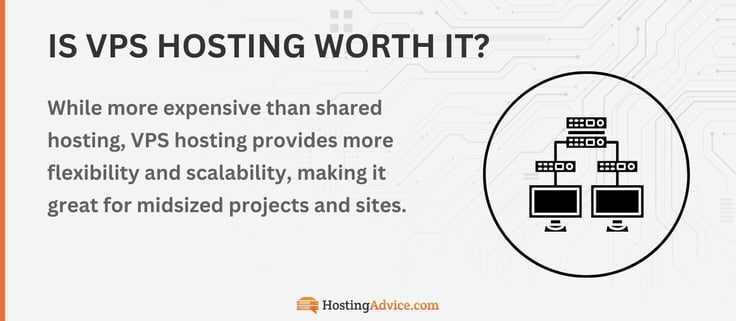
VPS stands for “virtual private server.” It allows users to gain an isolated portion of a physical server with their own resources. This way, VPS hosting provides better reliability, security, and performance than does shared hosting but with a lower cost than dedicated hosting.

VPS hosting allows you to have independence, install applications, and fully control your server environment.

VPS hosting usually aligns best with specific use cases. Because it provides greater flexibility and customization, VPS hosting works best for software engineers and web designers who need to install custom modules, frameworks, and applications. Being technically apt usually allows you to leverage and manage the best of VPS capabilities and customizations.

But you can use the services of your web hosting company if you don’t have the technical expertise or time to handle your dedicated server space.
infographic about vps hosting value

For those looking for scalability, VPS hosting also allows you to scale your resources up or down as needed without switching servers. So this feature can benefit a business as it goes through massive growth or even operations downsizing.

VPS hosting is also more secure than shared hosting because it gives you root access for advanced security integration while allowing you to access the underlying operating system.

What Is the Difference Between Cloud Hosting and Traditional Hosting?

Cloud hosting is a form of hosting that makes websites accessible through cloud resources.

Instead of a single server infrastructure, cloud hosting leverages a network of connected virtual and physical servers to deploy solutions and host applications and websites.

Your hosting environment isn’t limited to on-premises server management with cloud hosting. The flexibility of the cloud allows users to scale to their needs easily without worrying about hardware upgrades.

Many companies have migrated to the cloud over the years as cloud hosting has gained dominance globally. Cloud adoption has increased for several reasons. It responds to needs that traditional hosting can’t provide.

The benefits cloud hosting offers include:

  • No hardware maintenance: Cloud hosting doesn’t require on-premise servers. Also, as technology evolves, users won’t have to upgrade servers or replace outdated hardware.
  • Reduced costs: Companies don’t have to make sizable hardware investments, which relieves them of infrastructure costs. They also don’t have to pay for staff to maintain those servers. Users also only pay for resources they use with a pay-as-you-go model.
  • Security: Mega cloud providers, such as Google Cloud, deliver top-level cybersecurity for their data centers. Data restoration and protection are also more likely with cloud hosting since data isn’t stored on local infrastructure or in one place.
  • Disaster recovery: Local servers are more vulnerable to weather disasters because of their in-house location. Companies can restore their data through cloud backups, with little to no downtime, in the event of a disaster.
  • Increased collaboration: Cloud hosting gives companies more flexibility because their workflow isn’t bound to an on-premise server environment. Employees can leverage the cloud’s accessibility to share and update files in real time, no matter their location.
  • Elastic Scalability: No need to buy additional hardware to accommodate your business growth. The cloud expands as you scale up. This flexibility allows users to handle traffic increases or seasonal demands without bandwidth limitations from traditional hosting.

Many companies have taken a hybrid approach to cloud hosting and local infrastructure to balance out their operations.

Although cloud hosting has tons of upsides, it also has its drawbacks, including latency, knowledge gaps, and sensitive data issues. Going for a hybrid approach can sometimes offset some of those problems because of the server proximity and familiarity that local infrastructure provides.

When choosing between cloud and traditional hosting, users should consider what will best fit their needs going forward.

What Is WordPress Hosting?

WordPress remains one of the most popular open-source CMS in the world, and it currently powers 42.5% of all websites and 59.8% of sites where a CMS is known. So it’s no surprise that many people choose it to power their blogs and websites.

Users without coding experience can easily build a presentable website with streamlined features and plugin architecture, making it perfect for beginners.

Though WordPress provides hosting (see also: WordPress.org vs. WordPress.com), it is limited in resources, and the software system serves best as a publishing platform and CMS.

You can self-host WordPress by purchasing hosting from a web provider that already has a WordPress installation. This hosting option may require more work, depending on the plan, since you will have to perform backups and maintenance yourself.

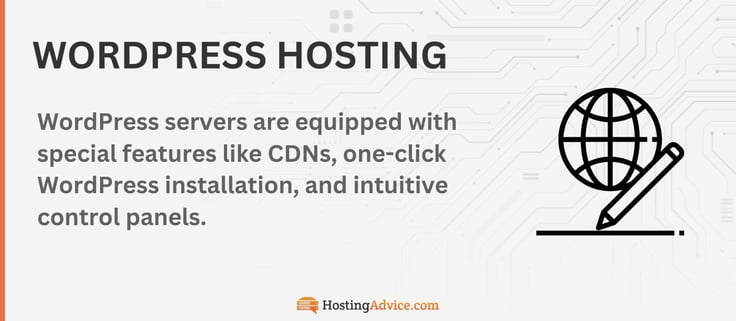
But, you can also use your web provider’s managed WordPress hosting services. This way, the hosting company will take care of your server maintenance duties. Managed WordPress platforms also provide easy-to-use dashboards and automate low-value tasks such as daily backups and malware scanning, which helps simplify your workflow.

WordPress hosting, at its core, is a shared hosting service optimized for the WordPress experience. Your web hosting provider will usually offer WordPress-specific features and automatically install the CMS on your hosting plan.
WordPress hosting infographic

So if you would like to use WordPress for your website, it would be best to purchase a hosting service with an optimized WordPress solution. This way, you can have an environment specifically tailored to run WordPress smoothly with an easier setup than a traditional hosting plan.

But it is good to know that WordPress web hosting won’t allow you to set up a non-WordPress website. So if you have plans to create various website types, you should consider using a shared hosting, dedicated hosting, or VPS hosting plan.

WordPress hosting is typically just as affordable as shared hosting plans, but pricing can increase with more add-ons. The best WordPress hosting plan should provide unlimited monthly data transfers, email, storage, and 24/7 customer support.

How Much Should I Pay for Web Hosting?

Web hosting comes in various packages, and the prices vary based on certain needs. Whether it’s managed hosting or dedicated servers, anyone can find the hosting solutions that align with their business or personal objectives.

Shared hosting is the cheapest form of hosting. The shared distribution of resources makes it more affordable than other hosting types. The rates usually start at $1 a month and go up to $15 or more a month. The low end is for the most basic features, but you can upgrade for additional resources and pay more.

Although cheap hosting is an excellent resource for users, it may not deliver on all the criteria for those with more complex needs. Cheap hosting is ideal for beginners, WordPress users, small business owners, and developers managing multiple web projects for clients.

Dedicated hosting is the most expensive because it provides the most real estate. Users pay around $30 to $730 a month on the high end to access its resources. But you get what you pay for, as dedicated hosting delivers a complete hosting environment without any sharing.

VPS hosting lands in the middle of the pack. As traffic begins to increase, many people switch to VPS hosting to meet the demand without breaking the bank by deploying dedicated servers. You can purchase this hosting option starting at $2 to $100 or more per month from the best web hosting companies.

For the most part, cloud hosting is relatively inexpensive. It is a reliable hosting form and suitable for users looking for an optimized solution to downtime. Most cloud hosting plans range from $3 to $500 per month.

Pro tip: Get a taste of cloud hosting with a free trial from Kamatera or Cloudways.

Users searching for WordPress hosting need not worry about the price tag because it is pretty affordable as well. WordPress hosting plans typically range from $3 to $60 or more a month. You get what you pay for. There are beginner WordPress plans on the low end, and there are managed WordPress plans on the higher end of that range.

Hosting providers often give new customers impressive discounts when they first sign up: We’ve even secured a few exclusive deals and coupons at various price points from some of our favorites.

Host Name Monthly Rate Discount
Hostinger $2.69/month 78% off
Hosting.com $3.99/month 85% off
InMotion Hosting $2.79/month 79% off
HostGator $3.75/month 85% off
Bluehost $1.99/month 75% off
SiteGround $2.99/month 83% off
The best web hosting service will be the one that aligns with your objectives and budget. When choosing a web host, make sure you look at the different tier prices associated with each yearly term.
Some web hosts offer specific discounts and better deals if you subscribe for a longer term. If you’re not sure about your web hosting journey, it would probably be best to start with a one-year term and renewal before paying for a longer term upfront.

Is Free Web Hosting Worth It?

Most of the time, free products are a steal. When we get a complimentary item, it usually sweetens the deal and brings a smile to our faces. But there are some free things we should avoid.

Free hosting may seem like a great offer at face value, but it doesn’t truly deliver an exceptional hosting experience. Free web hosting offers a limited range of resources, making it challenging to set up a unique online website.

Here are the three types of free hosting:

  • Free trials: A hosting provider can offer a limited-time deal that allows users to try out its hosting solutions for up to a month before settling.
  • Website builders: Many website builders allow users to create template-driven websites for eCommerce or portfolios.
  • Subdomain hosting: Companies such as WordPress limit users to web accounts with username.subdomain.com only. Users don’t have access to custom domain names with standard extensions unless they sign up for an upgraded plan.

Free hosting platforms usually lack resources, including disk space, bandwidth, security, performance, database options, and cPanel administration. These platforms are also less likely to engage in 24/7 customer support and offer only community forums instead of technical assistance.

An affordable shared hosting service will provide more bang for your buck in the long run and will scale your website as your vision evolves, allowing better flexibility.

Opting for a free hosting plan works best for developers who are testing a project or feature before entering the production phase. It may also work for users who are unsure about website hosting and whether they want to run an online site.

If you really want to give free hosting a try, I typically recommend the website builder platforms from Wix and GoDaddy. For more advanced users, Kamatera offers new customers one free month of cloud hosting.

How Does Unlimited Bandwidth Affect the Hosting Experience?

Everyone wants to have a successful online presence. Success may look different for different people, but most of us would like to see some form of high traffic for our websites. The key to high traffic is high performance.

Your website has to have the capacity to take large waves of visitors without crumbling from overload, or those visitors most likely won’t return. So how does unlimited bandwidth tie into this whole talk of efficient performance?

Bandwidth is the rate at which a server can transfer data and is measured by bits per second (bps). The larger the bandwidth, the quicker a website can display content to incoming traffic.

The bandwidth level should be able to accommodate your site, or the site’s performance will suffer.

Unlimited bandwidth allows you to upload, download, and stream with little to no interruption unless the downtime issue comes from another source within the hosting environment. Factors such as clunky coding, excess plugins, and a large number of high-resolution images can affect bandwidth speed.

Bandwidth affects three essential components: network, connection, and systems. The speed of these three components relies, in part, on the bandwidth’s efficiency. Most web hosting providers will provide unlimited bandwidth in tiered plans to ensure better performance and loading speed.

What Is SSD Storage?

Storage holds our most prized possessions, whether they’re photo book memories on a smartphone or a baby blanket in an upstairs attic. As in the real world, a website needs storage to store its files. Web hosting providers usually include SSD storage in their plans to answer that need.

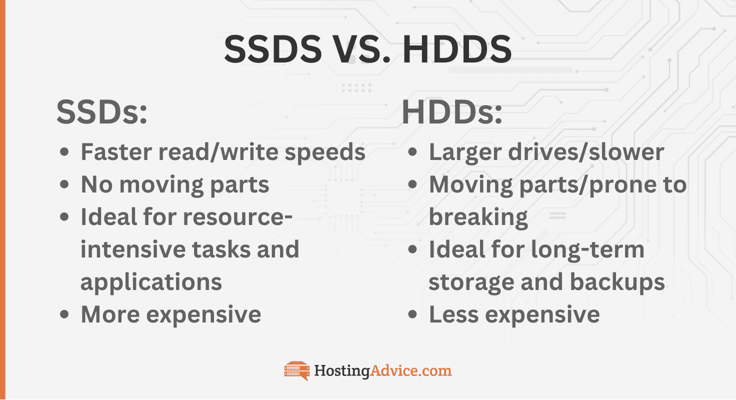
SSDs versus HDDs: SSD storage stands for solid-state drive storage, and it has essentially replaced the traditional mechanical hard disk. SSD uses flash memory to read, write, and store information. The storage device plays a significant role in a website’s growth.
SSDs vs. HDDs comparison chart

All servers have this hardware built into their infrastructure, so expect to see it on most hosting options. SSD storage also plays a factor in website speed.

If you have a goal for scalable growth, your website will need optimal storage to cover that increase. Many web hosting companies provide unlimited storage in their premium options. The most basic plan will probably have a baseline of 100GB, depending on the web hosting provider.

Some web hosting companies, including hosting.com, provide even higher levels of SSD storage. Hosting.com goes above and beyond by offering SSDs that perform thousands of input/output operations per second, unlike standard SSDs that only do hundreds per second. This factor helps eliminate bottlenecks and boost speed.

Why Does Customer Support Matter?

Many people often overlook the significance of customer service in business, but its role in customer satisfaction and company operations is certainly unmatched.

Customer service drives engagement, boosts retention rates, and influences word-of-mouth. Without it, many customers won’t find the help they need to make the right purchase or operational decision.

Customer support matters because it demonstrates whether a hosting provider is genuinely reliable through every step of the process. When you run into a problem, you need the assurance that your web host will assist you through it.

Running a website can come with plenty of complications, such as unexpected downtime, advanced PHP hosting support, and plugin issues. And if you don’t have much technical expertise, hosting problems can seem foreign. That is why quality customer support is such a vital consideration when choosing a web host.

Well-run customer support will provide you with the answers to your questions and deliver on software repair requests. Support that runs around the clock is usually best so the staff can address your requests no matter where you are, and many hosting services offer 24/7 support and live chat.

Hosting.com, for example, has a very well-received customer service team that handles its face-to-face engagements. Customers can leverage 24/7/365 support via live chat, phone, or email ticketing. Although hosting.com already promises reliable servers, it also goes a step further by deploying 24/7 network monitoring and a team of professionals equipped to help with any hosting conundrum.

Liquid Web also has a standout customer support staff called Heroic Support, with designated teams for Linux and Windows hosting users and more than 250 technicians certified in Windows, Linux, Cisco, and Red Hat. The well-trained and knowledgeable technicians guarantee a response within 59 seconds for phone and live chat responses.

Choose Your Next Web Host Wisely

Choosing the best web hosting provider ultimately depends on your website’s goals, technical experience, and budget. The good news is that many modern hosting companies offer flexible plans that make it easy to start small and scale your resources as your website grows.

Whether you’re launching a personal blog, building an online store, or managing a growing business website, the providers listed above offer reliable performance, strong security, and helpful support to keep your site running smoothly. By comparing features such as uptime guarantees, storage, pricing, and customer support, you can confidently choose a hosting service that will support your online presence for years to come.

About The Author

Lynn Cadet is a seasoned technology writer with extensive experience covering web hosting, software platforms, and IT infrastructure. At HostingAdvice.com, she has authored more than 300 articles analyzing everything from server architecture and cloud performance to cybersecurity, SaaS innovations, and developer-driven tools. She also conducts hands-on testing of web hosts, evaluating performance, usability, and reliability, to produce thorough, data-driven reviews. A graduate of the University of Florida, Lynn’s reporting and editorial work can also be found across multiple online publications.
Advertiser Disclosure

HostingAdvice.com is a free online resource that offers valuable content and comparison services to users. To keep this resource 100% free for users, we receive advertising compensation from the hosts listed on this page. Along with key review factors, this compensation may impact how and where hosts appear on the page (including, for example, the order in which they appear). HostingAdvice.com does not include listings for all web hosts.

Our Editorial Review Policy

Our site is committed to publishing independent, accurate content guided by strict editorial guidelines. Before articles and reviews are published on our site, they undergo a thorough review process performed by a team of independent editors and subject-matter experts to ensure the content’s accuracy, timeliness, and impartiality. Our editorial team is separate and independent of our site’s advertisers, and the opinions they express on our site are their own. To read more about our team members and their editorial backgrounds, please visit our site’s About page.

Lynn Cadet