

Writer: Andrew Wandola


Editor: Lillian Castro


Reviewer: Christina Lewis

Key Takeaways
Our experts compared today’s top Wix alternatives to help you find the best host for your migration.
-
SiteGround ($2.99/mo) free site transfer with 24/7 expert support and zero wait.
-
Bluehost ($1.99/mo) WordPress-endorsed hosting for up to 100 websites.
-
IONOS ($1.00/mo) free domain, SSL, and $100 in ad credits included.
Wix is the world’s largest website builder, boasting more than 45% of the global market share. And thats not surprising. Wix is incredibly good at helping users build websites from scratch with zero technical knowledge. If you can move your computer’s mouse from one corner of your screen to another, you can build a website with the Wix editor. It’s as simple as that.
That’s exactly why I chose their hosting service. Creating a website took just minutes instead of the hours I was used to! However, no web host is flawless. It’s crucial to find the one that best suits your needs.
One issue I faced with Wix was its higher cost compared to most web hosts I’ve tried. Combined with the platform’s lack of detailed analytics and slower speeds, I began looking into how to switch a site from Wix.
If you’re in the same boat, I’ll share with you the simple three-step process for migrating your Wix site.
-
Navigate This Article:
Step 1: Choose a New Host
First and foremost, it’s essential to choose the right destination for your website transfer. This isn’t just about picking any host and starting the transfer; it’s about understanding precisely what you need from that host to ensure it meets your expectations.
Transferring an online store? Then you’ll want a host with outstanding eCommerce features. Moving a Wix blog? Choose a platform with strong SEO tools. Below, I’ve highlighted five top alternatives to Wix and explained why they stand out for any website owner.
1. SiteGround.com

Monthly Starting Price $2.99
- FREE site transfer or new site setup
- FREE daily backups, CDN, email, and SSL
- 24/7 expert support with no wait on phone or chat
- Feature-rich hosting plans for all businesses
- Beginner-friendly Site Tools control panel
- Get started on SiteGround now.


Lynn Cadet

| Money Back Guarantee | Disk Space | Domain Name | Setup Time |
|---|---|---|---|
| 30 days | 10 GB SSD – 100 GB Google Cloud SSD | FREE (1 Year) | 6 minutes |
SiteGround is number one on our list because it truly is the whole package. With unparalleled customer support, fair pricing, and incredible reliability, SiteGround is the perfect option for anyone who wants more than just the basics and to get the best bang for their buck.
SiteGround has been a trusted host for nearly 20 years. It is also compatible with major content management systems (CMS) and apps such as WordPress, Joomla, and WooCommerce, with an easy migration process that only takes a few minutes.
2. Bluehost.com

Monthly Starting Price $1.99
- Support for up to 100 websites and unlimited email hosting
- 1-click WordPress installs and software updates
- Support for popular shopping carts with FREE SSL
- Up to $200 in Microsoft and Google Ad credit
- Industry-leading hardware and uptime rates
- Get started on Bluehost now.


Sead Fadilpasic

| Money Back Guarantee | Disk Space | Domain Name | Setup Time |
|---|---|---|---|
| 30 days | 10 GB SSD – 100 GB SSD | FREE (1 year) | 5 minutes |
You’ll find Bluehost in the league of legendary web hosts, just next to IONOS. Founded in 2003, this web host always has its place in most conversations about great and affordable web hosts.
Bluehost proudly enjoys the endorsement of WordPress, the world’s largest content management system. With Bluehost, you have everything you need to be successful on your WordPress dashboard.
A major perk for bloggers is the ability to integrate the Yoast SEO WordPress plugin. This tool assists in optimizing content for better search engine rankings. So, if you’re planning to migrate to a WordPress site, Bluehost’s managed WordPress hosting offers everything you need to publish your next blog post.
3. IONOS.com

Monthly Starting Price $1.00
- FREE domain and SSL, plus daily backups
- Drag-and-drop site builder and starter kit
- Gain exposure with $100-worth of ad credits
- Packages cater to businesses & personal use
- FREE custom SEO and marketing tools
- Get started on IONOS now.


Christina Lewis
| Money Back Guarantee | Disk Space | Domain Name | Setup Time |
|---|---|---|---|
| 30 days | 10 GB – Unlimited | FREE (1 year) | 6 minutes |
I mentioned earlier how expensive the Wix platform is when compared with other hosts I’ve used. I was referring to 1&1 IONOS, one of the cheapest (if not the cheapest) web hosts you’ll find. Here’s a breakdown of what it offers.
The best thing about this host is that despite being affordable, you will never have to worry about finding yourself in a “cheap is expensive” type of situation. This host keeps the prices low but never compromises on its quality.
With IONOS you can start with a new web hosting plan in minutes and migrate your old website easily. The user interface and price-to-value ratio make this web hosting provider a smart choice.
4. Hostinger.com

Monthly Starting Price $2.69
- 24/7/365 ticket and live chat support
- 99.9% network uptime guarantee
- FREE domain, site builder, backups, SSL certificate, and AI tools
- Unlimited bandwidth, databases, and email accounts
- Speedy NVMe SSDs optimize performance
- Get started on Hostinger now.
Sead Fadilpasic
| Money Back Guarantee | Disk Space | Domain Name | Setup Time |
|---|---|---|---|
| 30 days | 25 GB SSD – 100 GB NVMe SSD | FREE (1 year) | 3 minutes |
You should choose Hostinger if you love free stuff (who doesn’t?). Look at my review of the best unlimited cPanel hosting, and you’ll see why Hostinger deserves a front-row seat on this list. It offers unlimited everything, from storage and email accounts all the way to databases.
Hostinger’s hosting plans are also reasonably priced (not as cheap as IONOS, though). If you think the deal is too good to be true, this host will let you try its services for free. If you’re not satisfied, you can cancel within 30 days to get a refund.
5. HostGator.com

Monthly Starting Price $3.75
- Free domain, SSL, CDN, and unmetered bandwidth on all plans
- AI-powered malware detection and removal included
- Managed WordPress updates, staging site, and Yoast SEO built in
- cPanel access with 1-click installs for WordPress and more
- 66% off your first 3 years
- Get started on HostGator now.
Lynn Cadet
| Money Back Guarantee | Disk Space | Domain Name | Setup Time |
|---|---|---|---|
| 30 days | 10 GB SSD – 100 GB SSD | FREE (1 year) | 6 minutes |
HostGator claws its way onto this list partly because of the freebies you’ll get when you first sign up and the many possibilities it presents. Gators aren’t known to be this generous, but HostGator is clearly from a different swamp.
To summarize, you’ll get a free SSL certificate, a free domain, and email accounts when you sign up for selected plans (shared, WordPress, and VPS hosting). And if you need something more powerful (like dedicated server hosting), or something that puts more money back in your pockets (reseller hosting), HostGator has your back.
Now that you’ve found the right web host to move your website, here are some quick steps to begin moving your Wix website.
Step 2: Access Your Wix Dashboard and Export Your Site
The second step involves your Wix dashboard, otherwise known as the control panel among non-Wix users.
Once you get there, head over to “Account Settings” (or a similar option, given that dashboards change over time), and select “Transfer Site.”
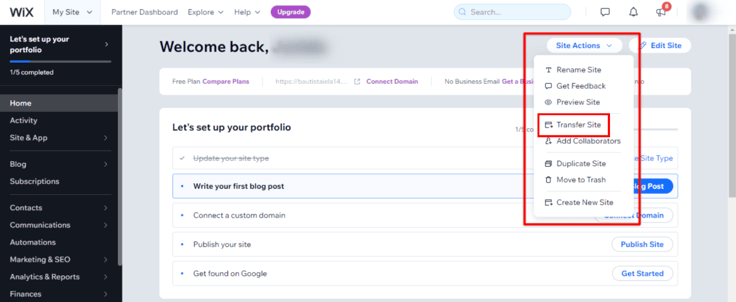
Next, use the “Export” option on Wix to export your website’s files to the new host. These include text, images, and videos for the new host. Each web host has a website import feature in its control panel, but the instructions are pretty much the same.
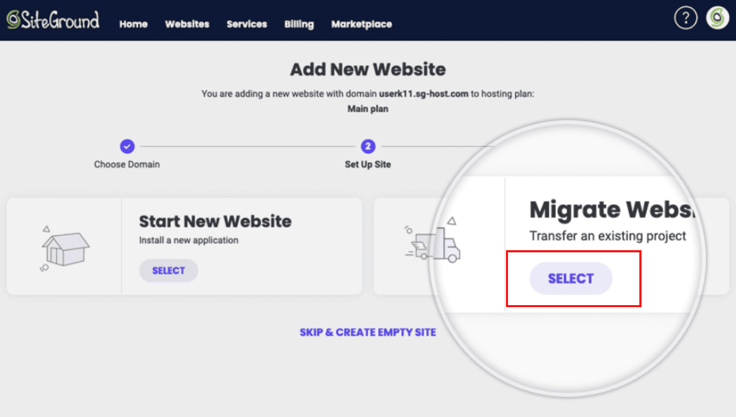
For instance, SiteGround offers a “Migrate Website” feature that becomes available when you first sign up. You’ll find it under the “Websites” section of the control panel. Look for a similar option with your new web host and follow the instructions.
Step 3: Move Your Website from Wix
Once you’ve exported (downloaded) your website files, you must upload them to your new host via the control panel. This should be easy, but it may take some time for the upload to complete and the changes to propagate.
Note that during this process, the website could go offline unexpectedly, and you may not be able to access certain features and services, such as your email accounts. After moving the website, you can begin tweaking it using the files you’ve imported from Wix.
Pro tip: Prepare for your new website to look different when you transfer it to another platform.
Make no mistake; transferring your website from Wix to another host won’t be a walk in the park for everyone. That’s because Wix is quite different from other hosts (it uses a unique code). So, while you can transfer the website, don’t expect it to look the same as it did on Wix. That shouldn’t be a problem, though. A few tweaks here and there will fix everything.
What Is Website Migration?
I’ll be honest; the first time I moved a website, it felt overwhelming. It seemed like there were countless ways to slip up. However, while mistakes can happen, it’s manageable once you have the right guidance.
Website migration refers to moving your website from one platform to another, typically a web host.
When I migrated my first website, I had to create a backup of my site files before transferring everything to my new host. I also had to transfer my domain name, which involved pointing it to the new platform’s nameservers. When all was said and done, the most critical part (in my opinion) was performing all the quality assurance tests. I QA’ed everything — from user experience to links and contact forms.
Can I Move My Wix Website to WordPress?
Yes, you can. While you have many options to choose from to turn your Wix website into a WordPress website, the easiest and safest way is to import your Wix blog posts via the Wix RSS feed. Here’s how to go about it.
- First, sign up for a WordPress-supported hosting provider (SiteGround or Bluehost are great options) and install WordPress on your new host. These two hosts will do this for you automatically when you sign up. You only need to authorize the installation.
- Once you’ve set up WordPress, make sure you set the permalink settings to reflect how you want your blog’s URLs to appear on the browser. I recommend the following format: “your website name + post title.”
- Next, choose and install your preferred WordPress theme. For best results, choose one that closely resembles your Wix template.
- Head back to the Wix page and download the RSS file by adding “/feed.xml or /blog-feed.xml” to your Wix website address. You’ll see the website’s code.
- Right-click anywhere inside the website’s code, select “Save As,” return to your WordPress dashboard, select “Import,” and then under RSS, select “Install Now.”
- You’ll see the “Run Importer” link. Click on it, select the feed.xml file you saved on your PC, and click “Upload and Import,” and that’s it!
After the WordPress migration, you can now start making changes to your new WordPress site.
How Do I Release My Domain From Wix?
If you purchased a domain and hosting plan from Wix, you probably want to take your domain with you when you move your website. Thankfully, Wix makes this process painless.
- Go to your Wix dashboard and open the “Domains” page
- Select the domain you want to release from Wix (if you have more than one domain.
- Click the “Show More” icon, which appears as three horizontal dotted lines, and then select “Remove from Wix”
- Click “Remove Domain” to confirm the removal.
You likely won’t encounter any issues during this process, but if you do, Wix’s customer support is just a call or click away. If you’re ready to move your domain to your new host, just follow the steps below.
Can I Cancel Wix and Keep My Domain?
According to the policy, Wix does not let you close your Wix account if you still have an active Wix domain. But not to worry, you have options.
The alternative is to start a domain transfer away from Wix. This should be pretty easy.
- Go to your Wix dashboard and open the “Domains” page
- Click on the domain name you want to transfer and select “More Actions” (the three dotted lines next to the domain)
- On the drop-down menu, select “Transfer Away from Wix”
- Click “Transfer Domain” and then select “I Still Want to Transfer” if prompted
Wix will send the transfer codes to your new hosting account. Follow your new host’s instructions to complete the domain transfer.
The Ultimate Quick Fix for Moving a Website from Wix
Wix sits in its own unique corner, far away from other web hosts. For some, this is what makes this host unique. This exclusivity frustrates the web design process for others because of the limited options web designers have.
It’s akin to iPhone and Android users trying to do something together with their devices. They’ll likely bump into numerous compatibility issues. For instance, Airdrop is only available on iOS, making it difficult for Android users to share files with their iOS counterparts.
WordPress offers thousands of free plugins, whereas most Wix plugins come with an additional cost. Combine that with Wix’s high hosting fees, and you might find it challenging to keep your site running. Plus, blogging and SEO are both easier on WordPress than on Wix.
If you’re ready to switch from Wix to another provider, don’t worry about feeling overwhelmed. Just follow the straightforward steps above, and you’ll be all set with your new hosting provider.
HostingAdvice.com is a free online resource that offers valuable content and comparison services to users. To keep this resource 100% free, we receive compensation from many of the offers listed on the site. Along with key review factors, this compensation may impact how and where products appear across the site (including, for example, the order in which they appear). HostingAdvice.com does not include the entire universe of available offers. Editorial opinions expressed on the site are strictly our own and are not provided, endorsed, or approved by advertisers.
Our site is committed to publishing independent, accurate content guided by strict editorial guidelines. Before articles and reviews are published on our site, they undergo a thorough review process performed by a team of independent editors and subject-matter experts to ensure the content’s accuracy, timeliness, and impartiality. Our editorial team is separate and independent of our site’s advertisers, and the opinions they express on our site are their own. To read more about our team members and their editorial backgrounds, please visit our site’s About page.