
Writer: Laura Bernheim


Editor: Lillian Castro


Reviewer: Cristian Lopez

When encountering the buffet of web hosting plans for the first time, the cloud hosting vs. shared hosting debate can easily overwhelm site owners with the various options, configurations, and acronyms.
Matching the right server portions and hosting flavors to your appetite can be daunting, but we’re happy to serve as your waiter and present this week’s specials: cloud hosting and shared hosting.
Boasting high-powered and reliable infrastructure, cloud hosting is a fast-growing option for consumers with a somewhat more refined palate, while shared hosting serves up affordable, easy comfort food.
Read on as we feed you through a six-course feast of information studying the similarities and differences between these two savory web hosting choices.
12 Best Shared & Cloud Hosting Services
Before we detail the nitty-gritty differences and similarities between shared hosting and cloud hosting services, it’s time to find the meal that best suits your taste and budget — you might be craving a burger, but do you prefer it come from a greasy fast-food joint or an acclaimed chef at a sit-down restaurant?
After years spent scouring the internet and testing tons of hosting plans — for both personal use and for our work here at HostingAdvice — we have identified the strongest plans and providers for a variety of hosting services. See which categories and recommendations below will satisfy your cravings.
Top 3 “Shared Hosting” Providers
As the base level of the hosting pyramid, shared hosting has the unlucky distinction of attracting customers with the widest range of technical needs and experiences. Some hosts excel at appealing to diverse audiences by balancing user-friendly features with high-performing hardware. The three hosts highlighted below offer the perfect mix of performance, usability, and support:
1. Hostinger.com

Monthly Starting Price $2.69
- Best overall value: Nothing at this price comes close feature-for-feature.
- AI builds your site in minutes — no technical skills needed
- Up to 3 websites with free SSL
- Weekly backups and managed WordPress
- 2 business mailboxes free for 1 year
- Get started on Hostinger now.


Sead Fadilpasic

| Money Back Guarantee | Disk Space | Domain Name | Setup Time |
|---|---|---|---|
| 30 days | 20 GB SSD | FREE (1 year) | 3 minutes |
2. IONOS.com

Monthly Starting Price $1.00
- Most affordable option: Pay just $12 at checkout
- 1-click WordPress install gets you online in minutes
- Unlimited websites, storage, and databases
- Daily backups, free SSL, and 24/7 support
- Free professional email included
- Get started on IONOS now.


Christina Lewis

| Money Back Guarantee | Disk Space | Domain Name | Setup Time |
|---|---|---|---|
| 30 days | 10 GB SSD | FREE (1 year) | 4 minutes |
3. DreamHost.com

Monthly Starting Price $2.89
- Free handcrafted starter website built for you, just add content
- Host 25 websites with unlimited bandwidth and daily backups
- AI website builder + AI business tools included
- Free SSL, DDoS protection, and automated malware scans
- 100% uptime guarantee with 24/7 support
- Get started on DreamHost now.
Christina Lewis
| Money Back Guarantee | Disk Space | Domain Name | Setup Time |
|---|---|---|---|
| 30 days | Unlimited | FREE (1 year) | 4 minutes |
See more shared hosting options »
Top 3 “Shared Hosting” Providers with SSDs
If you’re a little hesitant about taking the cloud hosting leap, upgrading your shared hosting plan to a service powered by solid-state drives can be a very productive and rewarding baby step forward. Hosts that are willing to upgrade their infrastructure to the faster and more expensive hardware are signaling their attention to quality user experiences as opposed to just cramming as many clients on the same server. Although shared hosting plans with SSDs tend to be slightly more expensive, we’ve found the hosts reviewed below are certainly worth the investment:
4. Hostinger.com
Monthly Starting Price $2.69
- Enhanced performance with LiteSpeed Cache
- WordPress accelerator and CloudFlare CDN
- Unlimited websites, bandwidth, and databases
- Optimize your site with a custom control panel
- FREE weekly backups and GitHub integration
- Get started on Hostinger now.
Sead Fadilpasic
| Money Back Guarantee | Disk Space | Domain Name | Setup Time |
|---|---|---|---|
| 30 days | 20 GB SSD | FREE (1 year) | 3 minutes |
5. InMotionHosting.com

Monthly Starting Price $4.59
- Shared business hosting with FREE SSD storage
- FREE website migration with zero downtime
- Develop in PHP, Ruby, Perl, Python, and MySQL
- FREE drag-and-drop builder or WordPress
- FREE data backups and FREE SSL cert
- Get started on InMotion Hosting now.


Dave McQuilling

| Money Back Guarantee | Disk Space | Domain Name | Setup Time |
|---|---|---|---|
| 90 days | 100 GB SSD - Unlimited SSD/NVMe | Select Plans | 5 minutes |
6. GreenGeeks.com

Monthly Starting Price $2.95
- Eco-friendly hosting with unlimited SSD storage
- RAID-10 storage arrays with LiteSpeed and MariaDB
- Proactive server monitoring and real-time virus scans
- FREE site migration and domain registration
- 300% energy match via renewable energy credits
- Get started on GreenGeeks now.
Dave McQuilling
| Money Back Guarantee | Disk Space | Domain Name | Setup Time |
|---|---|---|---|
| 30 days | 25 GB SSD | FREE (1 year) | 4 minutes |
See more SSD shared hosting options »
Top 3 “Cloud” Hosts
Don’t be surprised if you see many of the same hosting brands represented below. We’ve found the best overall hosts are usually more than just one-trick ponies — they excel at providing and supporting a variety of services, from shared and cloud hosting to dedicated servers and plans specifically tailored for platforms such as WordPress.
Aligning yourself and your online presence with a strong hosting provider bodes well for your website as you traverse across the hosting universe. The three superb cloud hosts examined below will help customers move their files from one service to another while minimizing downtime:
7. Kamatera.com

Monthly Starting Price $4.00
- Best for developers and devops teams needing full control
- Deploy in 60 seconds across 20 global data centers
- Fully customizable: 1–32 cores, 1–128 GB RAM, NVMe SSD
- Hourly or monthly billing — scale up or down anytime
- 99.95% uptime with built-in firewall and load balancing
- 30-day free trial, no charge if canceled
- Get started on Kamatera now.


Surajdeep Singh

| Setup Time | Disk Space | CPU | RAM |
|---|---|---|---|
| 5 minutes | 20 GB NVMe – 4 TB NVMe | 1 - 32 cores | 1 GB - 128 GB |
8. Cloudways.com

Monthly Starting Price $6.60
- Choose from AWS, Google Cloud, DigitalOcean, Vultr, or Linode
- Auto-healing servers with automated backups and free SSL
- 60+ global data center locations
- Pay-as-you-go — no contracts, cancel anytime
- 3-day free trial, no credit card required
- Get started on Cloudways now.


Jack Wallen

| Setup Time | Disk Space | CPU | RAM |
|---|---|---|---|
| 8 minutes | 20 GB SSD - 4 TB SSD | 1 - 96 cores | 1 GB - 384 GB |
9. LiquidWeb.com

Monthly Starting Price $5.00
- Best for businesses that can't afford downtime
- 100% uptime SLA — network and power guaranteed
- AMD EPYC processors with Cloudflare CDN included
- Acronis backups and DDoS protection built in
- 24/7 Heroic Support® via phone, chat, and email
- Get started on Liquid Web now.
Christina Lewis
| Setup Time | Disk Space | CPU | RAM |
|---|---|---|---|
| 7 minutes | 30 GB SSD - 440 GB SSD | 1 - 6 cores | 1 GB - 16 GB |
See more cloud hosting options »
Top 3 “Cloud VPS” Hosts
Similar to shared hosting plans with SSDs, cloud hosting also comes in a few different flavors. To us, the service most worth exploring is cloud VPS. Although cloud hosting relies on multiple virtualized or clustered servers, a VPS plan divides an individual server into a handful of virtual machines. Think of a virtual private server as a blend of the shared hosting environment with the cloud-minded features of control and dedicated resources.
The difference between virtual and cloud servers is fairly small and can be difficult to understand, but many providers opt to blend the two server architectures to take advantage of the high-availability strengths found in the cloud. Virtualized server environments are backed by redundancy to boost your site’s speed and uptime. Here are our three favorite providers that blend the best of both worlds:
10. Hostinger.com
Monthly Starting Price $5.84
- Best overall value: The most complete AI-managed KVM VPS at this price
- AMD EPYC processors, NVMe SSD, and 1 Gbps network
- Kodee AI manages your server — no command line needed
- One-click deployment of 100+ apps including Docker and n8n
- Free weekly backups, DDoS protection, and full root access
- Get started on Hostinger now.
Sead Fadilpasic
| Setup Time | Disk Space | CPU | RAM |
|---|---|---|---|
| 6 minutes | 50 GB NVMe - 400 GB NVMe | 1 - 8 cores | 4 GB - 32 GB |
11. IONOS.com
Monthly Starting Price $2.00
- Lowest entry price for VPS: no hidden fees, unlimited traffic, from $2/mo
- NVMe SSD storage, 1 Gbps connection, and 99.99% uptime
- Full root access with Linux or Windows — deploy in minutes
- Personal consultant assigned to every account after signup
- 30-day money-back guarantee and award-winning support
- Get started on IONOS now.
Christina Lewis
| Setup Time | Disk Space | CPU | RAM |
|---|---|---|---|
| 6 minutes | 10 GB NVMe - 720 GB NVMe | 1 - 12 cores | 1 GB - 24 GB |
12. Kamatera.com
Monthly Starting Price $4.00
- Best for developers: Fully customizable cloud VPS — choose your exact CPU, RAM, and storage
- Intel Xeon Platinum/Cascade Lake CPUs & NVMe SSD
- 24 global data centers across 4 continents, with 99.95% uptime
- Hourly or monthly billing, only pay for what you use
- 30-day free trial with $100 credit — no commitment needed
- Get started on Kamatera now.
Surajdeep Singh
| Setup Time | Disk Space | CPU | RAM |
|---|---|---|---|
| 5 minutes | 20 GB NVMe – 4 TB NVMe | 1 - 32 cores | 1 GB - 128 GB |
See more VPS hosting options »
Overview: What is Cloud Hosting vs. Shared Hosting?
Now that we’ve skimmed the menu of major web hosting flavors, let’s dive into the specific ingredients that make each plan delicious. Even though shared and cloud web hosting can mean drastically different things as far as behind-the-scenes server arrangements, both types of plans are quite popular with individual site owners and businesses of all sizes.
In general, hosting entails renting out space on a company’s hardware; simply put, the distinction between cloud and shared hosting lies between whether your files are stored on a network of multiple servers or within a single machine.
Cloud hosting, a premium option that touts performance, reliability, and scalability, entails connecting and virtualizing several servers to share storage and processing resources. The hardware components are optimized to handle particular tasks, and extra servers are ready to fill in if something breaks or has to go offline. Customers can provision or turn off additional computing resources to meet traffic demands, making the product particularly relevant to growing businesses.
Shared hosting, the most common plan on the market, resonates especially with first-time site owners and individual developers. In a shared hosting provider‘s datacenter, individual servers can host hundreds or thousands of websites. Several customers share each server, meaning that storage and computing resources are limited. As the cheapest and most accessible type of hosting, shared packages often come with extra features such as one-click software installations, marketing credits, and website builders.
1. Server Resources, Configuration, and Management
As is the case with desktop computers, tablets, or smartphones, web hosting servers are equipped with a finite amount of processing power and storage capacity. In shared hosting, server resources are divided among several hundred clients with customarily smaller websites.
Shared hosting providers make an effort to set the table with everything beginners need to get online, often including a free domain registration, drag-and-drop site builder, email accounts, search engine marketing credits, automatic backups, and a security certificate. The host will take care of the technical details of server maintenance such as operating system updates and security patches.
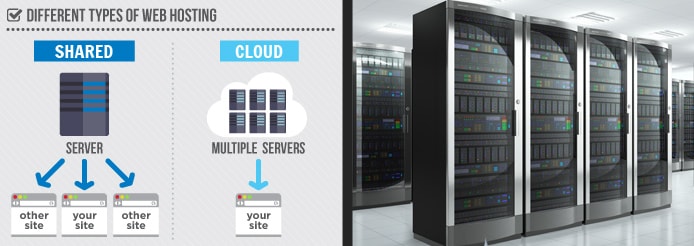
Shared hosting means multiple customers can use one server, while cloud hosting entails several virtualized servers.
Cloud hosting, however, takes a different approach; multiple servers pool their resources together and cooperate to host multiple websites. The added hardware means more resources are available to each customer — and even more can be tacked onto your account with just a click of the mouse.
Instead of shared hosting’s usability features, however, the best cloud hosting plans typically feature upgraded hardware, a control panel, root access, and managed services to handle the more mundane maintenance tasks and configurations.
2. Scalability
Shared and cloud hosting are at opposite ends of the spectrum when it comes to the ability to add and subtract computing resources to handle varying numbers of visitors. With shared hosting, providers allocate a certain amount of disk space, bandwidth, and processing power; acquiring more resources requires upgrading to a higher-tier shared hosting package or another service altogether.
Even though numerous shared hosting providers tout unlimited resources for storage, bandwidth, databases, email accounts, and the like, so-called unlimited hosting is a myth — shared hosts commonly ask customers to enjoy their “unlimited hosting” within certain parameters deemed fair to the other customers on the server. Websites that exceed the allocated resource usage are often penalized with fees or decreased performance.
Conversely, scalability is perhaps cloud hosting’s biggest advantage. With so many servers on standby, data storage and processing needs can be adjusted on the fly. Most cloud hosts provide an intuitive management portal for customers to monitor their usage and scale up or down as needed, with some even introducing the ability to add and remove resources automatically.
3. Performance
More servers are roughly akin to more horsepower — as one might expect, cloud hosting services typically outperform shared hosting plans. In addition to the ample resources producing ultra-fast page loads, cloud hosting platforms typically allow site owners to configure their hosting environment to the exact specifications they prefer. The customized configurations mean users can match certain operating systems with particular software to maximize all possible efficiencies and performance metrics.
Shared hosting speed, on the other hand, can fluctuate between perfectly acceptable and downright slow. Customers’ site speed is largely dependent on the performance of other websites on the same server. The more a shared server is maxed out, whether in terms of the number of accounts or the amount of traffic it needs to handle, the slower it processes requests for information.
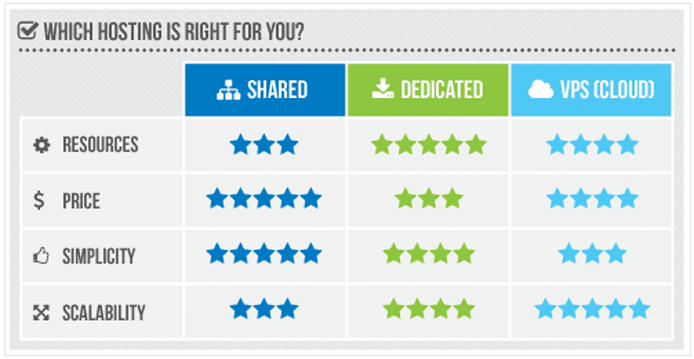
Although cloud servers’ resources outperform other types of hosting, shared plans excel at simplicity and affordability.
Speed is particularly important to online businesses, as roughly 80% of shoppers indicated they wouldn’t revisit a website if it was too slow. Because eCommerce hosting customers require more performance and security, cloud hosting is typically the best option.
For bloggers and developers looking for a spot to house some pet projects, however, shared hosting provides perfectly fine performance. To maximize your shared hosting speed, look for a plan powered by solid-state drives, which use flash memory chips and an embedded processor to deliver data up to 20 times faster than traditional hard disk drives.
4. Security
As far as protecting your data from attackers, it can be hard to determine if a particular hosting platform is inherently more secure than another. A website’s security is largely dependent on the expertise and behaviors of those installing, maintaining, and operating the programs behind the scenes.
Because so many customers depend on each server’s security, shared hosting providers typically go to great lengths to protect their hardware. Many plans include SSL certificates, which are more accurately known as TLS certificates; having one means the information passing between your server and visitors’ devices is encrypted. Additionally, shared hosting customers should look for included anti-virus, anti-spam, and DDoS protections. High-end plans and shared packages tailored for WordPress might also include additional security plugins, automated malware scans, and a web application firewall.
With cloud hosting, customers have more control over how their hosting environments are configured — that oversight extends to security, as well. Although cloud providers will take similar anti-virus and data encryption measures as shared hosts, users commonly have to install and configure the appropriate firewalls, intrusion detection systems, and monitoring tools. If you’re not confident in your abilities to secure your cloud hosting space, look for top-notch managed hosting packages.
5. Cost
Not only can the prices for shared and cloud hosting differ drastically, but the entire billing structure is also different. Shared hosting prices, similar to those for virtual and dedicated server plans, are commonly marketed on a per-month basis, but customers can find greater discounts by signing up for plans that last at least one to three years.

Cloud hosting’s pay-as-you-go model is refreshing to some, while others appreciate the stability of shared hosting costs.
The flat fee covers all included features, with additional fees for upgraded tools such as access to a content delivery network or enhanced security. Shared hosting is definitively the cheapest option available, and hosts often try to distinguish themselves from the tight competition by amping up the extra services. In addition, shared hosting’s long-term plans can help customers budget their technology spend well into the future.
Many cloud hosting plans differ from traditional hosting formats by invoicing customers precisely for the number of various computing resources consumed over a given time period. The fluctuations can be challenging for site owners to anticipate, especially if their hosting account is set to automatically scale with traffic demands.
6. Common Features
Although shared and cloud hosting take wildly different approaches to server configuration, price, performance, and security, the types of plans do have a remarkable number of similarities. Here are some of the core qualities the two hosting packages often share:
- Uptime guarantees: Hosts promise a certain level of availability or time when your website is fully operational and accessible online. If the provider can’t deliver the rates promised, the company will refund customers a portion of their hosting bill. Cloud hosting typically comes with higher uptime guarantees, because of the redundant hardware, but shared customers will be perfectly served by the industry-standard 99.9% uptime.
- 24/7 support: Hosting providers want their customers to be successful online; happy clients and growing websites mean more services and upgraded plans. Seemingly all shared hosting providers tout around-the-clock support through email tickets, live chat, and phone calls, but pay attention to response times. Cloud hosting support tends to be slightly less hands-on, but hosts that specialize in managed services will gladly help you out.
- Software installations: What good is a server if you can’t add the programs needed to drive your success? Reputable shared server hosts will provide hundreds of one-click software installations to cover your needs for content management systems, blog platforms, wikis, forums, webmail packages, and eCommerce stores. The scripts are less common in cloud hosting, as customers are more commonly expected to have the skills to install the applications manually. However, cloud hosting lets site owners choose and install software such as operating systems, load balancers, and security measures.
Naturally, however, there are some pretty distinct differences in terms of which features are commonly found in each hosting level. In addition to supreme affordability, shared hosting plans typically include a free domain registration, site migration or transfer, a website builder, email setup, and tools for advertising your site on search engine results pages. Cloud hosting often gives customers root or administrative access to their environment, along with disaster recovery assistance and reselling capabilities.
Shared Hosting vs. Cloud Hosting: Which Service is Right for You?
Whether you’re ordering off the value menu or paying market price for prime proteins, hosting connoisseurs can find success with either shared or cloud hosting plans from the providers listed above.
Each type of hosting service obviously comes with perks and drawbacks, but you’ll find that many important features and concepts span the divide. Look for something reliable, fast, and secure that comes with friendly customer support.
By explaining the differences between the two server configurations and sharing some of our most successful hosting experiences, we hope you’ll know exactly which flavors and features will come out of the kitchen.
HostingAdvice.com is a free online resource that offers valuable content and comparison services to users. To keep this resource 100% free, we receive compensation from many of the offers listed on the site. Along with key review factors, this compensation may impact how and where products appear across the site (including, for example, the order in which they appear). HostingAdvice.com does not include the entire universe of available offers. Editorial opinions expressed on the site are strictly our own and are not provided, endorsed, or approved by advertisers.
Our site is committed to publishing independent, accurate content guided by strict editorial guidelines. Before articles and reviews are published on our site, they undergo a thorough review process performed by a team of independent editors and subject-matter experts to ensure the content’s accuracy, timeliness, and impartiality. Our editorial team is separate and independent of our site’s advertisers, and the opinions they express on our site are their own. To read more about our team members and their editorial backgrounds, please visit our site’s About page.