

Writer: Alexandra Anderson


Editor: Lillian Castro


Reviewer: Cristian Lopez

Shared vs. reseller hosting services can look surprisingly similar at first, as you’ve got one server being shared by multiple customers. However, reseller hosting enables you to take ownership of a larger slice of the computing resources and share the wealth with friends, family, or clients.
For those who always seem to get recruited to help folks start a website, make a little extra money on the side, or those looking to start a web hosting business, reseller is the way to go. Shared hosting, on the other hand, roughly follows a “one account, one site” approach with much more limited resources.
Rather than signing up friends and clients for shared hosting accounts billed by a plethora of providers, consider becoming a hosting reseller and managing each of the accounts yourself. More money for you, less headache for them — everybody wins! Deciding between shared or reseller hosting can get confusing, though, so let’s go over the key differences.
Shared Hosting vs. Reseller Hosting – Top Hosts for Each
Before diving into the nitty-gritty details of how shared and reseller hosting differ, let’s take a 30,000-foot view at the best hosting providers for each configuration. You can quickly notice some major differences right off the bat, such as cost and prominent features.
3 Best Shared Hosting Services
We’ve reviewed tons of shared hosting providers, both personally and in our day jobs at HostingAdvice.com. We advise prospective shared hosting customers to look for free domains, easy site-building options, and marketing incentives. And don’t underestimate the significance of support ratings and uptime guarantees! Without further ado, check out the top shared hosts:
1. Hostinger.com

Monthly Starting Price $2.69
- Best overall value: The most complete shared hosting plan at this price point
- AI builds your site in minutes — no technical skills needed
- Free domain, free SSL, and weekly backups on all plans
- Managed WordPress with AI agent and free email marketing
- 30-day money-back guarantee with 24/7 expert support
- Get started on Hostinger now.


Sead Fadilpasic

| Money Back Guarantee | Disk Space | Domain Name | Setup Time |
|---|---|---|---|
| 30 days | 20 GB SSD | FREE (1 year) | 3 minutes |
2. SiteGround.com

Monthly Starting Price $2.99
- Best for security: AI blocks 99.99% of malicious traffic automatically
- Free CDN across 170+ locations, daily backups, and free SSL
- Unlimited traffic, free email, and free site migration included
- 4.9/5 Trustpilot rating with 98% customer satisfaction
- 24/7 in-house expert support via live chat, phone, and tickets
- Get started on SiteGround now.


Lynn Cadet

| Money Back Guarantee | Disk Space | Domain Name | Setup Time |
|---|---|---|---|
| 30 days | 10 GB SSD - 100 GB Google Cloud SSD | FREE (1 Year) | 6 minutes |
3. GreenGeeks.com

Monthly Starting Price $2.95
- 300% renewable energy match; the web's leading green host
- LiteSpeed servers with daily backups and free CDN on all plans
- Free SSL, DDoS protection, and AI-powered firewall included
- 1-click installs for WordPress, Joomla, Drupal, and 150+ apps
- 99.9% uptime with 24/7 support via phone, chat, and email
- Get started on GreenGeeks now.


Dave McQuilling

| Money Back Guarantee | Disk Space | Domain Name | Setup Time |
|---|---|---|---|
| 30 days | 25 GB SSD | FREE (1 year) | 4 minutes |
See more shared hosting plans »
3 Best Reseller Hosting Services
As we move along to the top reseller hosting providers, you may notice some familiar faces. We’ve found the best hosts overall boast a myriad of services, included shared, reseller, managed, and application-specific hosting.
As we conducted our comprehensive reviews, we assessed pricing, storage, management options, and monitoring features, as well as the reliability factor we emphasized for shared hosting customers. You can trust the hosts below to help you launch your own web hosting biz:
1. InMotionHosting.com

Monthly Starting Price $0.99
- Best for agencies/freelancers building a hosting business
- Free WHMCS, cPanel/WHM, and eNom domain reseller license
- White-label hosting, custom nameservers, 100 cPanel licenses
- Monarx security and free dedicated IPs on all plans
- 90-day money-back guarantee, longest in the reseller market
- Get started on InMotion Hosting now.
Dave McQuilling
| Money Back Guarantee | Disk Space | Domain Name | Setup Time |
|---|---|---|---|
| 90 days | 80 GB SSD - 300 GB SSD | Select Plans | 5 minutes |
2. SiteGround.com
Monthly Starting Price $4.99
- Save up to 83% — limited time offer
- Google Cloud with automatic RAM and CPU scaling
- White-label Site Tools, granular per-client access controls
- Add collaborators, manage all sites from one dashboard
- Daily and on-demand backups, free CDN and private DNS
- Get started on SiteGround now.
Lynn Cadet
| Money Back Guarantee | Disk Space | Domain Name | Setup Time |
|---|---|---|---|
| 30 days | 10 GB SSD - 100 GB Google Cloud SSD | FREE (1 Year) | 6 minutes |
3. Hosting.com

Monthly Starting Price $24.50
- Best for agencies managing client sites at scale
- AMD EPYC, NVMe SSD, and full LiteSpeed license on all plans
- Fully white-label, private nameservers, 12 global locations
- Free migrations handled by in-house team — not self-serve
- WHMCS, Blesta, and Upmind API integration included
- Get started on hosting.com now.


Christina Lewis

| Money Back Guarantee | Disk Space | Domain Name | Setup Time |
|---|---|---|---|
| 30 days | 100 - 500 GB NVMe | FREE (1 year) | 4 minutes |
See more reseller hosting plans »
Shared vs. Reseller Hosting: Who Uses Each
Shared hosting
is ideal for individuals and business owners who simply need a means of getting their website online. Your host is in control of what resources are allocated to you, and you focus on your site design, email setup, and domain management.
Reseller hosting is great for freelance developers who want to host multiple client sites, serial startup owners who anticipate launching various projects, and/or technical entrepreneurs who want to take on web hosting as their next business venture. Once you purchase a select amount of bandwidth and server resources from a host, you can reallocate those resources to other clients or websites as you see fit. You get greater control over server settings and domains, and you get the added benefits of billing tools since you’re essentially running your own hosting business by reselling your host’s services.
Shared vs. Reseller Hosting: cPanel / WHM Control
Both shared and reseller hosting customers are typically given some sort of management panel. Typically, end users get cPanel (shared hosting), and resellers get WHM (reseller hosting).
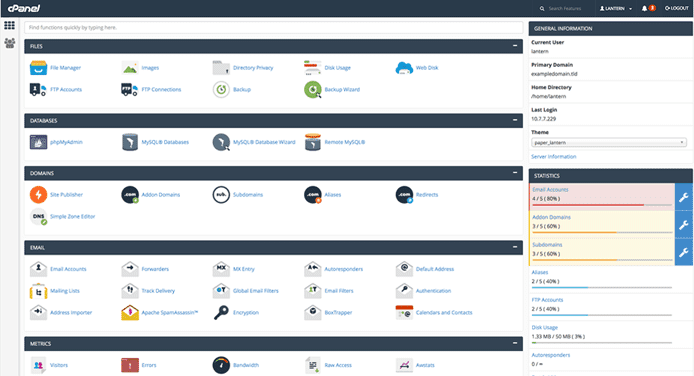
Most reputable web hosting providers will include a cPanel license in shared hosting plans.
A web hosting control panel, like cPanel, gives users access to management options for domains, email, FTP, SSH users/keys, databases, and backups, as well as some sort of application that lets you download and install other software such as WordPress or Magento.
The majority of hosts will offer a free cPanel license with shared hosting accounts, and this is more than enough to satisfy the typical shared hosting customer. Other popular control panels include Plesk, Webmin, and ISPmanager.
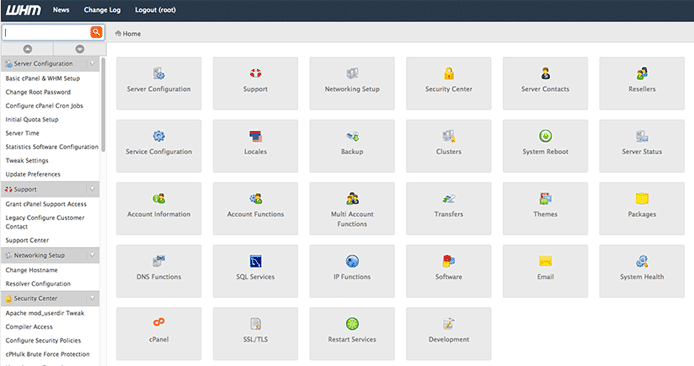
Reseller hosting customers can use cPanel & WHM to manage multiple accounts from one console.
Reseller hosting users get an upgraded flavor of cPanel: cPanel & WHM. The latter part of the name is short for Web Host Manager, and it functions as the billing and hosting account management portal for your hosting business. You can create, change, and manage reseller accounts and admin permissions; set up server alerts; assign custom features to or upgrade or downgrade specific hosting accounts; park domain names; generate and install SSL certificates; and limit bandwidth usage by your clients, among other capabilities.
Shared vs. Reseller Hosting: Number of Sites
For the most part, shared hosting users can host one website on a basic plan. Some hosts, such as InMotion, will allow you to host unlimited websites on a single account. Others will allow it, but at a premium rate, and some limit one website per account.
In case it wasn’t obvious, reseller hosting users can host more than one site. For the most part, you can reallocate resources however you see fit, so long as you don’t cause issues for your host such as I/O or CPU bottlenecking.
Resellers get the added perks of personal nameservers, which streamline the management intricacies of hosting multiple websites. A nameserver is a computer that translates domain names into IP addresses and vice versa. Without nameservers, you’d have to type in a 10-digit code to reach your favorite website. Domain names are much more memorable, and nameservers allow us to use them to navigate the web. Personal nameservers give you greater control over your domain and your clients’ domain names, which can become associated with your main domain, simplifying management a whole bunch.
Shared vs. Reseller Hosting: Performance / Security
Shared hosting comes with a central risk and reward. You’re sharing server resources, including bandwidth, storage, RAM — and the responsibility of all of your server neighbors’ sites. If one of their sites becomes compromised, your site is susceptible to the same fate.
That being said, shared hosting means there is a finite number of resources available to be dispersed between customers. Although shared hosts often promise unlimited or unmetered resources, that’s not technically true. Those hosts know, however, that most shared server customers won’t come anywhere near those limits, so it’s a nice marketing ploy. When you do start to outgrow the shared hosting environment, the best hosts are great about welcoming you into the worlds of VPS and dedicated hosting options.
Although shared hosting provides more than enough performance for the average site owner, and it is inherently safe, folks looking to host multiple websites would probably do better with a reseller hosting plan.
Shared vs. Reseller Hosting: Price
It should come as no surprise that the added server resources, control, and business opportunities that come with reseller hosting bump the price up a notch or two from the shared hosting ballpark. Shared hosting typically costs $2 to $5 per month — an impressively affordable rate given the number of features and amount of resources you can use for your site.
Because reseller hosting comes with the power to house and manage several websites on an upgraded server, it’s understandably more expensive. Reseller plans typically start around $15 to $20 per month. That being said, don’t forget that you can likely offset that cost by your monthly profits as a reseller of hosting services.
Is Shared or Reseller Web Hosting the Better Call for Your Project?
As is the case when purchasing any other hosting type, the decision to sign up for shared or reseller hosting entirely depends on how you intend to use it and how much control you require.
If it’s just you, your website, and your business, shared hosting will more than suffice. If you’re planning on running multiple sites, or if you have the fate of multiple businesses in your hands as a freelancer, reseller hosting is a worthwhile route to explore. Whichever path you choose, I hope it’s laden with growth and revenue opportunities — because no one takes the time to build an online business to be paid in hugs and happy thoughts, right?
HostingAdvice.com is a free online resource that offers valuable content and comparison services to users. To keep this resource 100% free, we receive compensation from many of the offers listed on the site. Along with key review factors, this compensation may impact how and where products appear across the site (including, for example, the order in which they appear). HostingAdvice.com does not include the entire universe of available offers. Editorial opinions expressed on the site are strictly our own and are not provided, endorsed, or approved by advertisers.
Our site is committed to publishing independent, accurate content guided by strict editorial guidelines. Before articles and reviews are published on our site, they undergo a thorough review process performed by a team of independent editors and subject-matter experts to ensure the content’s accuracy, timeliness, and impartiality. Our editorial team is separate and independent of our site’s advertisers, and the opinions they express on our site are their own. To read more about our team members and their editorial backgrounds, please visit our site’s About page.