

Writer: Joe Warnimont


Editor: Lillian Castro


Reviewer: Christina Lewis

I’ve experimented with dozens of AI website builders over the past year, and I can confidently say I’m both amazed at some elements AI can produce but also skeptical about its abilities for more advanced, custom builds.
One thing is for sure: web developers and tech-savvy business owners can now design their sites in a fraction of the time. But as I said, AI web design also comes with limitations.
For instance, I recently worked on a photography portfolio website, and AI helped me spin up a site within minutes. I never would have published the final result, but I was still happy with the initial design.
AI gave me what I like to call a “sophisticated template.” The site looked professional. It was modern, and it had all the right pages and some nice stock images. But it lacked the level of polish and customization that makes a site unique.
I’ve discovered that AI web builders help you skip the tedious tasks and get a minimally viable website online quickly. And isn’t that a step in the right direction? It’s certainly faster. In this guide I’ll show you exactly how to improve your workflow by building a website with AI for free.
-
Navigate This Article:
Step 1: Sign Up for the Free Wix AI Site Builder
To get started building a website with AI, go to the Wix AI Website builder page. You can get started for free by clicking the Visit Site button below. Keep in mind that you don’t have to add a credit card for a new Wix account. You can even publish your website for free on a Wix subdomain.
But to publish with a real domain name, you must purchase a monthly Wix subscription.
Wix.com

Monthly Starting Price $17.00
- Trusted by 250 million websites across 190 countries
- 2,000+ designer-made templates for every industry
- Built-in eCommerce, scheduling, blogging, and events
- Built-in SEO tools, email marketing, and Google/Facebook ads
- 99.99% uptime on multi-cloud hosting with enterprise security
- Get started on Wix now.


Lynn Cadet

| Money Back Guarantee | Disk Space | Domain Name | Setup Time |
|---|---|---|---|
| 14 days | 2 GB – Unlimited | FREE (1 year) | 4 minutes |
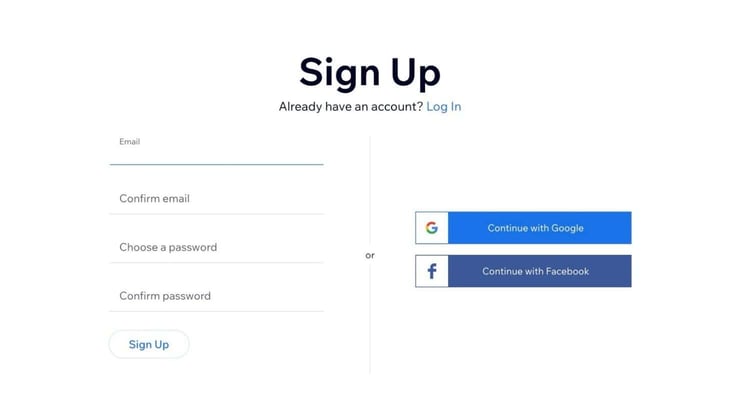
Once you’re on Wix’s website, you’ll see a Sign Up page, where you can create an account.
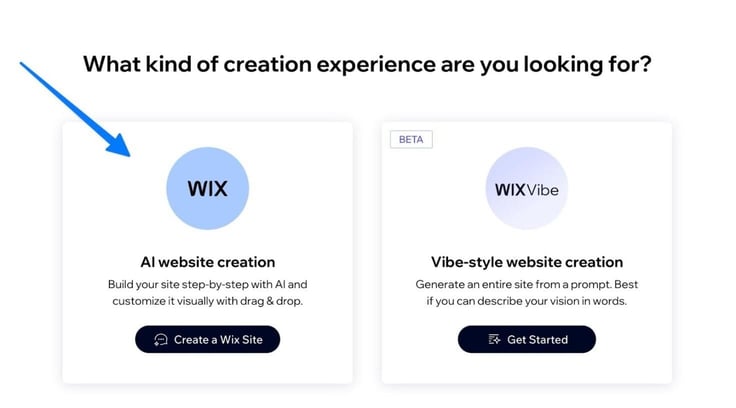
On the next page, either go with AI Website Creation or Vibe-style Website Creation (also uses AI but only requests one highly visual prompt). I recommend going the AI Website Creation route.
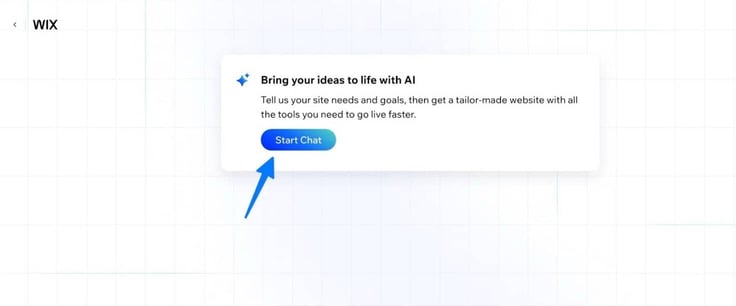
After that, you’ll move on to an AI chat where you answer questions about your desired website design.
Step 2: Answer the Prompts
This part is just like speaking with an online chatbot. Click Start Chat.
The AI chatbot asks you questions to get a feel for how it should design your website. Give answers with as much detail as possible.
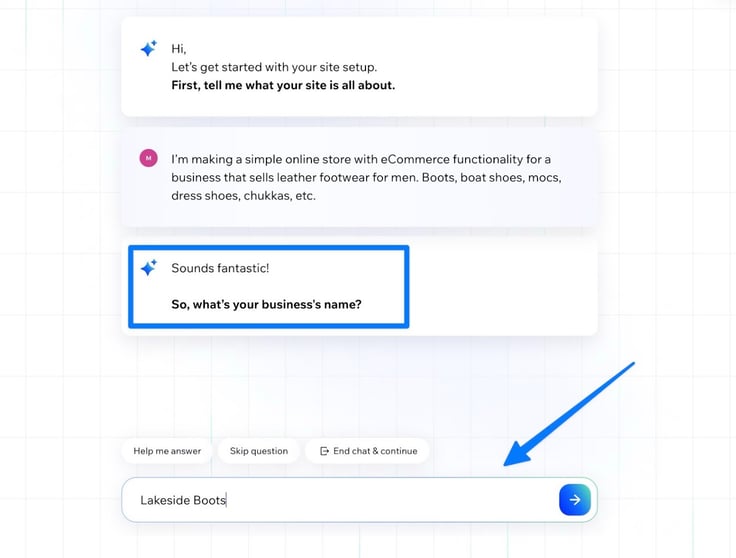
For instance, the first question I replied to was “What is your site all about?” I mentioned my business, what I sell, and that I need eCommerce functionality. For each answer, click the Submit (Arrow) button to continue.
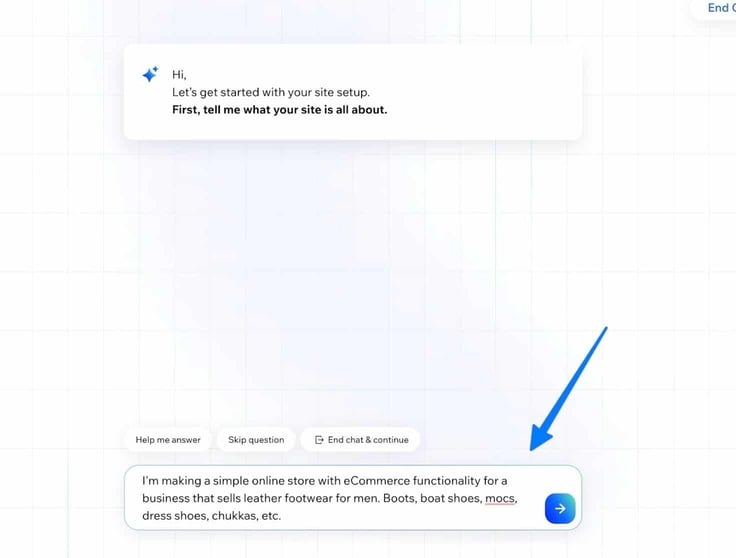
The more specific you can be, the better. Next up, type in your business name.
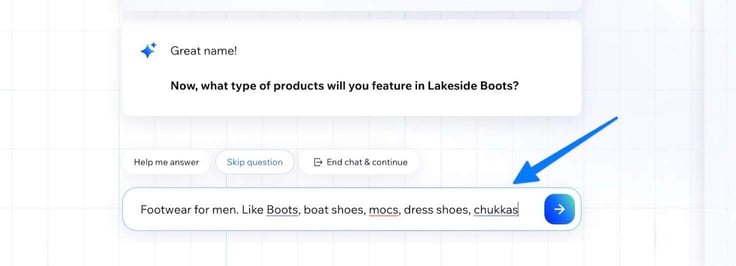
It then asks you which types of products you want to feature. Your answer will differ from mine, but I mentioned certain types of boots and men’s shoes.
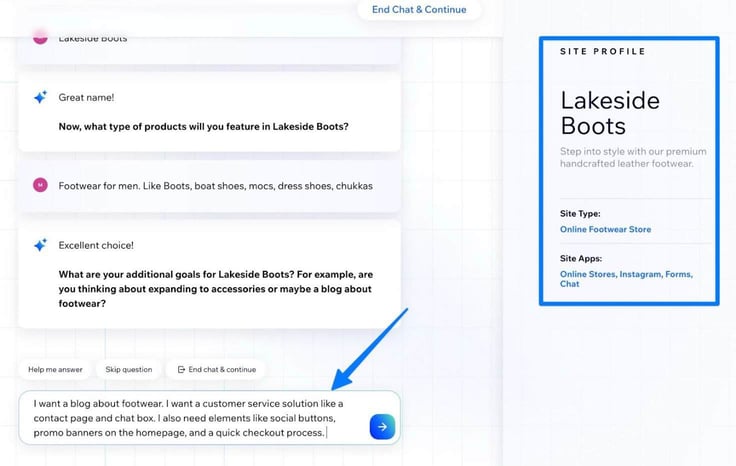
You should also suggest any additional goals you have for the site. I mentioned things like a contact page, social buttons, and a quick checkout process.
You’ll see a “Site Profile” to the right, which is simply the AI organizing information about your website.
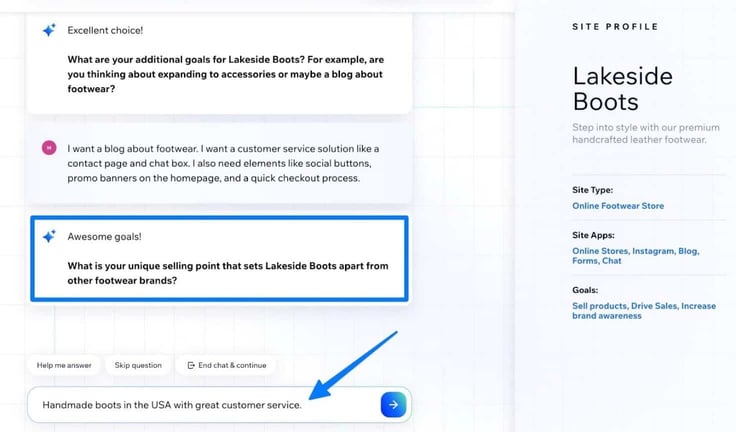
Next, type in your unique selling point. Think of anything that makes your business stand out, like customer service, items made locally, or handmade goods.
I also recommend filling in the history of your business. Even if it’s a new business, explain how you came up with the idea, who owns the business, and where it’s located.
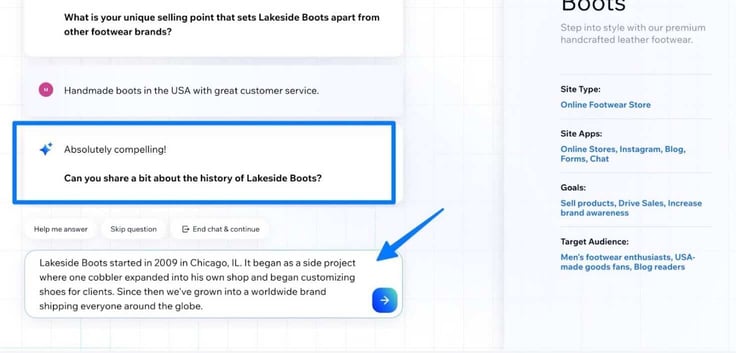
After all that, the Wix AI has everything it needs to work its magic. Click the Generate Site button.
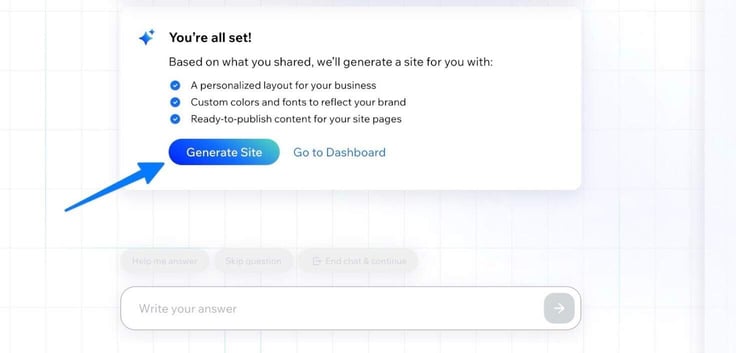
This is where you can admire Wix’s handiwork. You’ll see a finished version of your website and options to either buy a domain name, continue editing, or set up your business. I recommend going to the editor to finish customizing your site.
The first generated version looked like this:
Now to make it unique…
Step 3: Edit Your Site
Once you’re inside the Wix Editor, you can add elements like titles, buttons, and boxes. You can also add full website sections or work on your site menu. This is where your customizations can really bring your site to life and give it a more personalized look and feel.
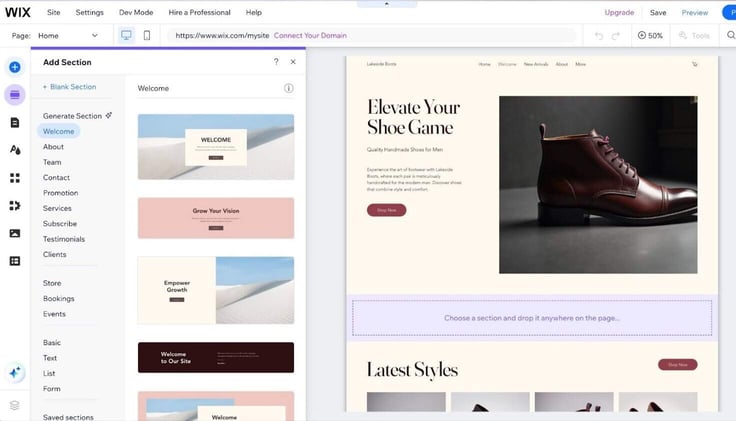
I mainly prefer editing by clicking on any items in the Wix drag-and-drop editor. This way, you’re given a visual of all edits while adjusting images, products, or text.
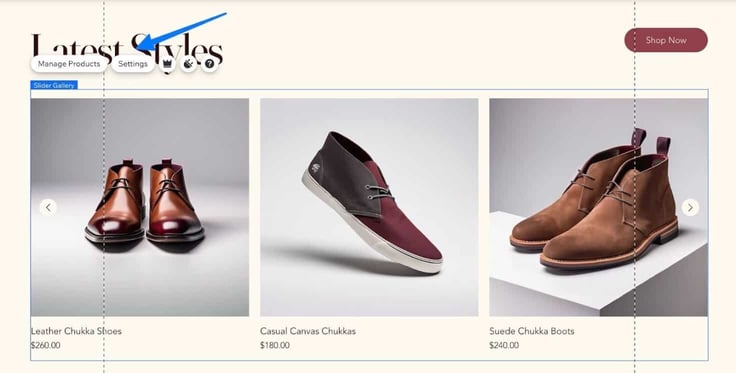
There are also tabs to customize your site design (colors and backgrounds and themes), add apps, customize business elements (like a members’ area or online store), add media and create blog posts.
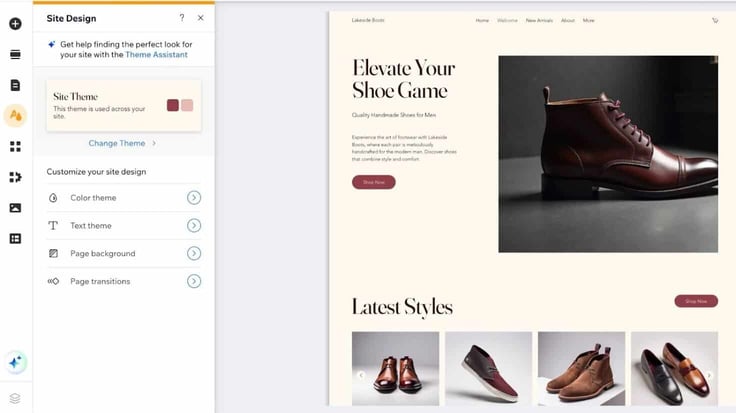
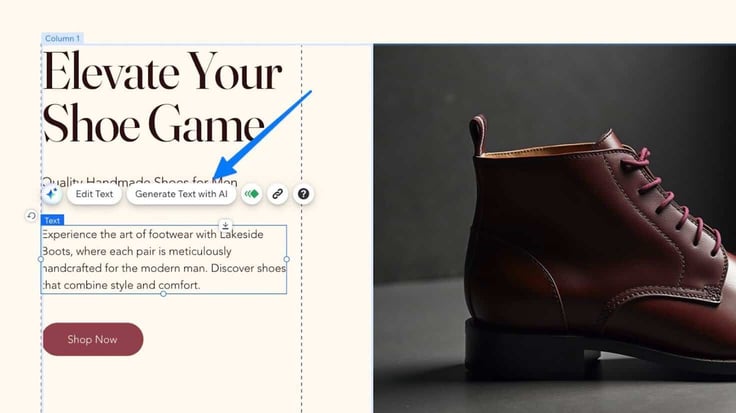
You have the option of continuing to use AI during the site editing process. I, for example, was able to adjust some of my homepage text with the Generate Text with AI button, which is a major time saver.
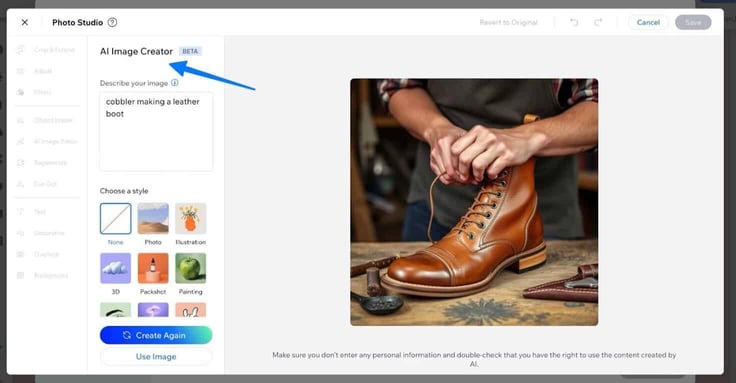
It’s possible to generate images with AI, as well. Wix offers regular stock images, too, but give AI image generation a whirl if you can’t find a suitable stock photo.
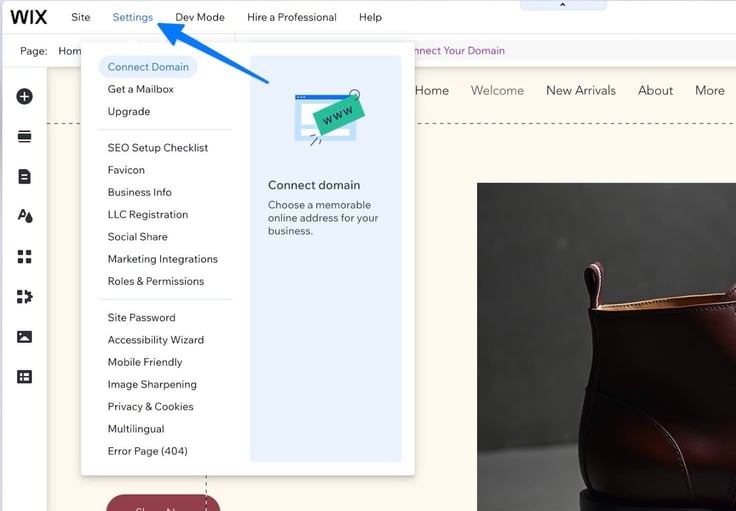
Once you’re done with editing, I recommend going to the Settings tab. This is where you can configure the rest of your website with elements like a domain name, email address, favicon, and social sharing tools.
You can spend hours and hours customizing a website, even after AI whips up a design for you. But to save you time and make things easier, Wix offers page builders and additional AI tools to help you along the way.
Step 4: Preview, Test, and Publish
The final step is for you to preview, test, and publish your site. In the Wix Editor, click on the Preview button in the upper-right corner.
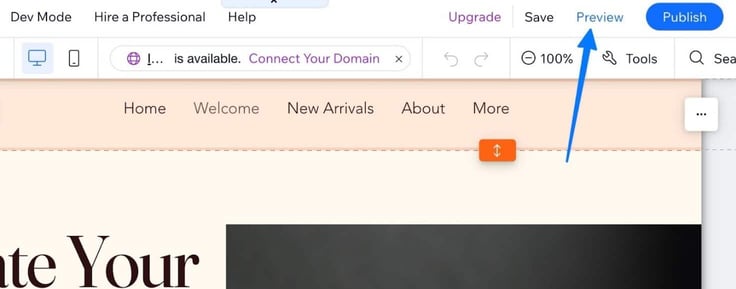
This delivers a working preview for you to click around, test out the site functionality, add items to your cart, and see if all the buttons work.
Here’s my site’s preview so far:
Once you’re satisfied, click on the Publish button to make your website live — and you’re done!
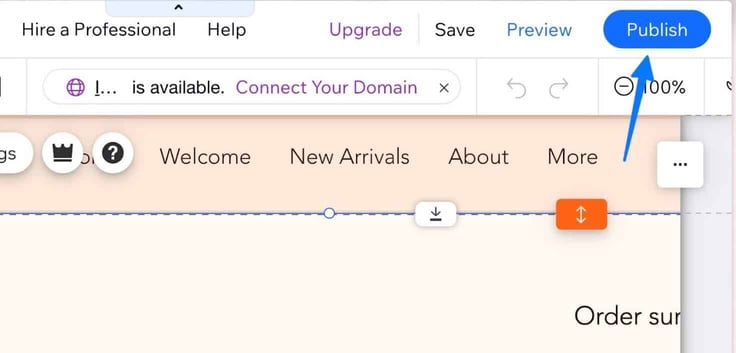
Be sure to bookmark the Wix dashboard to come back and edit your pages, add promotions, or even write a few blog posts.
Paid Alternatives
I’ve tinkered with Wix’s AI builder, along with others (most of which require some sort of payment) including AI website builders from Hostinger, IONOS, and hosting.com. I typically like paid options more than free ones, especially if you want extra features or more customization.
Hostinger’s AI Site Builder
I recently used Hostinger’s AI website builder for an old client who wanted to add some AI web design capabilities to their self-hosted website.
I’d argue this is my favorite AI builder from a hosting company, and it’s mainly because the AI builder launches a modern website for you in seconds, then you have complete control over everything from SEO to blog posts and images to written content.
Hostinger.com

Monthly Starting Price $2.69
- Best website builder: The most complete AI-powered builder at this price point.
- Describe your site to AI and go live in minutes
- 300+ designer-made templates with drag-and-drop
- Built-in eCommerce with 0% fees and 100+ payment methods
- Built-in SEO, email marketing, and AI logo maker included
- Free domain for 1 year + 14-day free trial to start
- Get started on Hostinger now.


Sead Fadilpasic

| Money Back Guarantee | Disk Space | Domain Name | Setup Time |
|---|---|---|---|
| 30 days | 25 GB SSD – 100 GB NVMe SSD | FREE (1 year) | 3 minutes |
I also like that Hostinger’s AI website builder is affordable. I received a free trial at first, allowing me to test tools like the AI blog generator. I’m also fond of the non-AI tools that come with Hostinger. These features, like the Google Ads integration or built-in Hostinger Reach email marketing suite, complement its AI tools nicely.
IONOS’s AI Site Builder
When I think of IONOS, I think of low-cost web hosting, all-in-one website building, and easy domain name management. On top of all that, I’ve now grown fond of its AI website builder, mainly because of its rapid website creation that helped me launch a site within five minutes.
I also discovered several tools from IONOS that assisted in the “refinement” process after the AI had done its work. I’m talking about tools for AI writing, text improvement, SEO optimization, and image generation.
IONOS.com

Monthly Starting Price $1.00
- No coding skills necessary with MyWebsite Creator
- Free domain name or transfer your existing site
- FREE social media and marketing widgets
- Pro templates with pre-filled text and images
- Multilingual support and tools for SEO
- Get started on IONOS now.


Christina Lewis
| Money Back Guarantee | Disk Space | Domain Name | Setup Time |
|---|---|---|---|
| 30 days | 10 GB – Unlimited | FREE (1 year) | 5 minutes |
One feature I particularly enjoy is its AI Section Generator, which creates complex website sections with just a few input words. For example, I typed in a topic like “bespoke suits,” along with a few other key terms, and IONOS’s AI produced a beautiful website section with text, bullet points, and imagery suitable for a tailor.
Hosting.com’s AI Site Builder
I didn’t expect as much from hosting.com’s AI Site builder product, but it surprised me with an affordable hosting price, nice templates for those who want a very specific industry design from the AI, and a three-step process for launching a modern, responsive website without coding knowledge.
What I found cool about this AI builder is its hybrid approach for building my website. I’m able to pick a template while also having AI tweak that design. After that, it provided me with AI section builders, stock images, and ways to make everything from social feeds to contact pages with artificial intelligence.
Hosting.com

Monthly Starting Price $4.99
- Multiple website builder options for code-free design
- Softaculous 1-click installs for WordPress, Drupal, and Joomla
- Optimized caching (6x faster page loads) and Turbo Server (20x faster)
- FREE blogging and eCommerce tools available, plus SSL security
- 24/7/365 Guru Crew support
- Get started on hosting.com now.
Christina Lewis
| Money Back Guarantee | Disk Space | Domain Name | Setup Time |
|---|---|---|---|
| 30 days | 50 GB SSD – Unlimited SSD | New or Transfer | 4 minutes |
I even tested out making an online store with AI, and it went rather smoothly. I told the AI I wanted a secure checkout with payment processing and several product pages.
After a few minutes typing in specifics about my business and products, it went to work generating an eCommerce store with options to add my inventory. Other than that, I enjoyed how the hosting.com AI builder included a straightforward, drag-and-drop designer for adjusting everything after the AI finished.
What’s An AI Site Builder?
An AI website builder creates websites, but with help from machine learning. You simply answer a few questions, and the AI generates your website. It’s like answering two or three questions from an architect who then builds your entire house — except this architect has studied thousands of previous designs to make the best one for you.
Here’s how the process works:
- You answer questions about your business; things like the business name, design industry, and design preferences.
- The AI designer takes this information and looks at high-performing sites in your industry that it can use as inspiration.
- It generates as much of your website as it can, ranging from its menu to the homepage. The AI handles your design, color scheme, font, and website structure.
- It produces filler content, like images and text, that aligns with your business.
- You receive a full website within minutes that you can then tweak with no-code design tools.
I see AI web design as similar to working with a website template, except that the template is customized heavily for your brand. You shouldn’t expect a finished product, but it’s much closer to a publishable website than designing from scratch or using a normal template.
How Long Does It Take to Build a Website With AI?
That entirely depends on your website, how many pages you plan to include, the complexity of those pages, and if you intend on adding more advanced features.
There’s no doubt in my mind that AI website building speeds up the creation process, even if that means you’re still going to have to customize some of the website yourself or hire a web designer.
Below, I’ve outlined what I believe to be valid timeframes for different AI-designed websites. I’ve also compared those timeframes to traditional development timelines:
| Website Type | AI Website Builder | Traditional Development |
|---|---|---|
| Simple Website (1-10 pages) | 5-10 minutes | 2-4 weeks |
| Larger Website (10-25+ pages) | 10-30 minutes | 2-6 weeks |
| Website with More Customization (forums, user registration, live chat, subscriptions, etc.) | 2-4 hours | 6-10 weeks |
| Advanced eCommerce Website | 8-10 hours | 3-6 months |
As I mentioned, these timelines depend on many factors, like content readiness, customization level, site complexity, and your experience building a website.
My mom, who has no experience designing websites, could spend 10 minutes making a simple website with an AI site builder. Yet, she would have no clue how to change the content, design a logo, or configure a simple contact form.
So, the “Simple Website” timeline could jump to several weeks, or she could pay for a web developer to finish the job.
What Are the Pros and Cons of Using an AI Site Builder?
Sometimes it makes sense to start your design process with an AI website builder. Sometimes there’s no reason to even bother if your entire project demands customization.
Using an AI is like opting for prefabricated furniture — mass-produced and ready to buy at a big-box store — over custom, handcrafted furniture. You receive your product quickly and affordably, but you’re not getting any premium results or unique features.
As I said, it depends on what you’re trying to achieve. Here are my pros and cons of an AI website builder:
Pros
- Affordability: I can make a minimally viable website, one that serves as a foundation for continued customizations, for a few bucks a month.
- Simplicity: You hardly need any technical skills to use AI.
- Speed: This is perhaps the biggest advantage, since it speeds up work for developers and beginners alike.
- Design Based on Best Practices: You’re not just picking from templates. These AI web builders have learned about the most effective designs, while also training on essentials like responsiveness, SEO, and UX standards.
Cons
- Platform Lock-in: You may end up dependent on one platform like Wix or IONOS.
- Limited Customization: AI never delivers a finished website. You usually need to customize everything from logos to the written content.
- Template Similarity: I’ve found that some platforms just pump out the same generic design over and over.
- Limitations on Content Generation: Written AI content struggles with natural voice, accuracy, and all the custom brand elements you need to type in yourself.
I’d argue that an AI site builder could lay the foundation for any website. All web developers could benefit from a quick design with the right colors, fonts, and filler content, even if they intend to customize it drastically. It’s a timesaver, and isn’t that the point of AI?
My Final Recommendation on AI Website Builders
I suggest trying multiple AI website builders to, first, see if it fits into your workflow at all. Secondly, this testing should also help you find the AI site builder that produces the best websites for your needs.
I don’t think AI website builders have truly democratized professional web design, but they’ve certainly provided more free options for those who can’t afford web development. I also love them for laying a quick foundation for your website and to customize endlessly after that.
I encourage all web developers and business owners alike to try out AI website builders, because there’s some point in your workflow that could use optimizing.
HostingAdvice.com is a free online resource that offers valuable content and comparison services to users. To keep this resource 100% free, we receive compensation from many of the offers listed on the site. Along with key review factors, this compensation may impact how and where products appear across the site (including, for example, the order in which they appear). HostingAdvice.com does not include the entire universe of available offers. Editorial opinions expressed on the site are strictly our own and are not provided, endorsed, or approved by advertisers.
Our site is committed to publishing independent, accurate content guided by strict editorial guidelines. Before articles and reviews are published on our site, they undergo a thorough review process performed by a team of independent editors and subject-matter experts to ensure the content’s accuracy, timeliness, and impartiality. Our editorial team is separate and independent of our site’s advertisers, and the opinions they express on our site are their own. To read more about our team members and their editorial backgrounds, please visit our site’s About page.