

Writer: Andrew Wandola


Editor: Lillian Castro


Reviewer: Christina Lewis

More than 800 million websites use WordPress. In fact, WordPress is the CMS that powers HostingAdvice.com. WordPress is powerful, flexible, and easily customizable (plus it’s free). It’s the perfect choice to build a thriving website.
But you can’t expect to host your WordPress site with any old hosting plan. Your choice of web hosting provider will ultimately influence the success of your WordPress site. Sometimes, it’s not just the host; the specific hosting plan matters, too.
Assuming you own a high-traffic WordPress website, you’ll want to keep an eye on the specifics of the hosting plan. The best WordPress hosting for high-traffic sites will offer powerful hardware and scalability while still being gentle on your wallet. That’s what we’ll be looking at today.
1. Bluehost
Bluehost is a WordPress-approved host, so there’s no question about its reliability when it comes to hosting this popular content management system. Its Pro plan should be a great place to start for high-traffic WordPress sites.
Recommended Plan: Pro
Monthly Visits: ~400,000
Bluehost.com

Monthly Starting Price $3.79
- Best for WordPress: WordPress.org’s longest-running recommended host since 2005
- 0.35s average load time — independently verified by WPShout
- AI builds your complete WordPress site in under 60 seconds
- Yoast SEO, NVMe SSD, WAF, and daily malware scans
- 24/7 WordPress experts — under 2-minute average response
- Get started on Bluehost now.


Sead Fadilpasic

| Money Back Guarantee | Disk Space | Domain Name | Setup Time |
|---|---|---|---|
| 30 days | 10 – 100 GB NVMe SSD | FREE (1 year) | 7 minutes |
The Pro plan supports five websites and offers 100 gigabytes of storage, free content delivery networks (CDNs), free secure sockets layer certificates (SSL), and free daily website backups. If your site outgrows the Pro shared hosting plan, you can always upgrade to a virtual private server (VPS hosting) or a dedicated plan offered by this managed WordPress hosting provider.
2. SiteGround
SiteGround is another popular and scalable WordPress hosting provider. Powered by Google Cloud technology, SiteGround can accommodate high-traffic WordPress websites, including those built with WooCommerce.
Recommended Plan: GoGeek
Monthly Visits: ~400,000
SiteGround.com

Monthly Starting Price $2.99
- Best for performance: WordPress sites average 78% faster speeds after migrating to SiteGround
- Free AI agent manages your WordPress site via simple chat
- Smart WAF, AI bot protection & geo-distributed backups
- Free staging, WP-CLI, SSH, Git, and one-click migrations
- 4.9/5 Trustpilot — 98% customer satisfaction for 10+ years
- Get started on SiteGround now.


Lynn Cadet

| Money Back Guarantee | Disk Space | Domain Name | Setup Time |
|---|---|---|---|
| 30 days | 10 GB SSD – 100 GB Google Cloud SSD | FREE (1 Year) | 6 minutes |
The good thing about this host is that it gives you value for your money. Yes, it costs slightly more than you would pay for, say, Bluehost. But where else do you get unlimited websites, free domains, SSL certificates, daily backups, CDNs, unlimited emails, unlimited databases, and out-of-the-box caching all under one roof?
3. Hostinger
Hostinger’s Cloud Startup plan is perfect for a website with about 200,000 monthly visitors. While not officially endorsed by WordPress, this host goes above and beyond to provide an optimal environment for WordPress users.
Recommended Plan: Cloud Startup
Monthly Visits: ~200,000
Hostinger.com

Monthly Starting Price $2.69
- Best overall value: The most complete managed WordPress hosting at this price
- Kodee AI Agent manages your WordPress site via simple chat
- LiteSpeed servers boost site speed by up to 40%
- WAF, malware scanner, DDoS protection, and auto-updates
- Free migrations — 85% completed in under 5 minutes
- Get started on Hostinger now.
Sead Fadilpasic
| Money Back Guarantee | Disk Space | Domain Name | Setup Time |
|---|---|---|---|
| 30 days | 20 GB SSD – 100 GB NVMe | FREE (1 year) | 4 minutes |
Its managed WordPress plans include support for standard WooCommerce and also offer free automatic website migrations, free one-click WordPress installation, auto-updates, a staging tool, on-demand backup, and a host of AI-powered tools to help you get your project off the ground.
4. InMotion Hosting
InMotion Hosting boasts powerful infrastructure, which includes up to 40x faster WordPress performance (WP Pro plan only), unlimited bandwidth and email addresses, a dedicated IP, and NVMe SSD storage for faster read and write speeds.
Recommended Plan: WP Pro
Monthly Visits: ~300,000
InMotionHosting.com

Monthly Starting Price $5.09
- UltraStack NVMe hosting makes WordPress up to 40x faster
- Automatic WordPress updates, free SSL, and malware scans
- Free domain, free cPanel, and free expert migration on all plans
- BoldGrid drag-and-drop WordPress builder with free themes
- 90-day money-back guarantee and 24/7 award-winning human support
- Get started on InMotion now.


Dave McQuilling

| Money Back Guarantee | Disk Space | Domain Name | Setup Time |
|---|---|---|---|
| 90 days | 100 – 300 GB NVMe SSD | FREE (1 year) | 5 minutes |
This host also suits WordPress users who would like to handle their website’s marketing aspects internally. Say, for example, you’re just getting started and can’t afford a marketing team. The InMotion suite of marketing tools should be good enough to propel your website closer to its target audience while staying in the good books with Google, Bing, Yahoo, and other search engines.
5. DreamHost
DreamHost, another WordPress-approved host, offers enterprise-level hosting infrastructure, ideal for medium to large companies. Don’t get me wrong; you can still host a simple website with high traffic at DreamHost. But be ready to experience powerful speeds and overall high performance thanks to its NGINX-powered servers and unlimited CDNs.
Recommended Plan: DreamPress Plus
Monthly Visits: ~300,000
DreamHost.com

Monthly Starting Price $1.99
- One of only three WordPress.org officially recommended hosts
- Free handcrafted starter website built by DreamHost experts
- Remixer AI builder, NVMe SSD, and daily automated backups
- Free domain privacy for life — included with every domain
- 100% in-house support including WordPress core contributors
- Get started on DreamHost now.


Christina Lewis
| Money Back Guarantee | Disk Space | Domain Name | Setup Time |
|---|---|---|---|
| 30 days | 25 – 100 GB NVMe SSD | FREE (1 year) | 4 minutes |
Dreamhost gives you one free domain, unmetered bandwidth, 60 gigabytes of SSD storage, priority site migrations, and unlimited emails. This host also has a flexible billing option. You can either choose to pay monthly or sign a long-term contract. Keep in mind that the longer the contract, the cheaper the plan.
6. Liquid Web
Liquid Web does not impose any limits on the amount of traffic your website can receive every month. But that’s not to say that you shouldn’t expect any issues if you receive, say, 500,000 visitors on a monthly basis. In that case, you’ll likely receive a notification from the WordPress hosting company requesting that you upgrade your hosting plan, which I find quite reasonable.
Recommended Plan: Thrive
Monthly Visits: Unlimited
LiquidWeb.com

Monthly Starting Price $5.00
- Speedy WP-optimized hosting
- FREE Object Cache Pro, image compression, and CDN
- Supports up to 250 WordPress sites
- Automatic plugin updates and performance monitoring
- FREE premium plugins and advanced PHP support
- Get started on Liquid Web now.
Christina Lewis
| Money Back Guarantee | Disk Space | Domain Name | Setup Time |
|---|---|---|---|
| 30 days | 15 GB – 800 GB | New or Transfer | 5 minutes |
To start off in the right direction, I recommend the Thrive plan. It comes with 10 PHP workers and 15 gigabytes of SSD storage.
7. WP Engine
WP Engine prides itself on providing state-of-the-art web hosting engines that power thousands of WordPress websites. Here, you’re looking at about 400,000 monthly visits if you choose the Scale plan. It comes with 500 gigabytes of bandwidth and 50 gigabytes of storage and supports up to 30 sites.
Recommended Plan: Scale
Monthly Visits: 400,000
WPEngine.com

Monthly Starting Price $27.00
- 0% OFF your first payment for our readers
- FREE Genesis Framework & StudioPress themes
- Fast, scalable, and secure WordPress
- FREE SSL certificate and CDN ready
- Upgrade for geotargeting and edge security
- Get started on WP Engine now.
Lynn Cadet
| Money Back Guarantee | Disk Space | Domain Name | Setup Time |
|---|---|---|---|
| 60 days | 10 GB – 50 GB | New or Transfer | 6 minutes |
So, where do you go after the Scale plan, assuming you’ve consistently accumulated more than 400,000 web visitors every month? In that case, WP Engine will create a custom plan for you based on your website’s unique needs in terms of traffic and even WordPress-specific features.
8. Cloudways
Cloudways has some really powerful cloud hosting plans, and that’s because it sources its cloud hosting technology from the industry’s giants, including Amazon Web Services, Google Cloud Platform, and DigitalOcean. This Premium package supports unlimited visits, but you may need to upgrade your hardware at some point as your traffic grows.
Recommended Plan: Premium
Monthly Visits: Unlimited
Cloudways.com

Monthly Starting Price $6.60
- Exclusive 40% off for 4 months for HostingAdvice readers
- Managed WordPress Hosting on DigitalOcean, AWS, GCP, Vultr, or Akamai
- AI Copilot for instant troubleshooting and server insights
- Free unlimited WordPress migrations via Cloudways plugin
- Pay-as-you-go — no contracts, scale up or down anytime
- Get started on Cloudways now.


Jack Wallen

| Money Back Guarantee | Disk Space | Domain Name | Setup Time |
|---|---|---|---|
| 3-day FREE trial | 20 GB SSD – 4 TB SSD | New or Transfer | 8 minutes |
Despite partnering with the biggest names in the cloud hosting industry, Cloudways’ plans are reasonably priced. As you would expect, plans under DigitalOcean are way cheaper than those under AWS or GCP.
9. Flywheel
Flywheel’s top-tier plan, dubbed Agency, comes equipped with 50 gigabytes of storage, 500 gigabytes of bandwidth, and support for 30 websites per hosting account. As the name implies, this plan works best for agencies that need to host several high-traffic websites under one roof.
Recommended Plan: Agency
Monthly Visits: 400,000
Flywheel.com

Monthly Starting Price $25.00
- High-touch managed WordPress hosting
- FREE speed boost via built-in CDN and custom FlyCache technology
- One-click sandbox environment for staging
- In-house WP expertise and support available 24/7
- FREE 14-day demo site
- Get started on Flywheel now.


Laura Bernheim

| Money Back Guarantee | Disk Space | Domain Name | Setup Time |
|---|---|---|---|
| 60 days | 5 GB – 50 GB | N/A | 4 minutes |
Keep in mind that you don’t have to be an agency to experience Flywheel’s power; the Freelance plan is excellent if you’ve just started hitting the runway. It can accommodate up to 100,000 monthly visits and 10 websites.
10. GoDaddy
GoDaddy’s managed hosting for WordPress, named Ultimate, doesn’t really care about the number of people who visit your website in any given month. Why so? It comes with powerful features, including 30 gigabytes of NVMe storage, unlimited malware removal, WordPress code optimizer for faster speeds, and a global Cloudflare CDN for 2x faster speeds and performance, among other features.
Recommended Plan: Ultimate
Monthly Visits: Unlimited
GoDaddy.com

Monthly Starting Price $6.99
- Airo AI for WordPress — SEO optimization and site insights
- Automatic WordPress updates, daily backups & malware scans
- WAF, DDoS protection, and free SSL on all plans
- Free domain, free email, and WordPress pre-installed
- 7 Stevie Awards — 3,500+ support experts in 20+ countries
- Get started on GoDaddy now.
Lynn Cadet
| Money Back Guarantee | Disk Space | Domain Name | Setup Time |
|---|---|---|---|
| 30 days | 10 – 30 GB NVMe | FREE (1 year) | 6 minutes |
It’s also worth mentioning that GoDaddy is the world’s largest domain registrar and a highly respected web hosting provider. Founded in 1997, this host has more than 20 million customers and has registered north of 84 million domains.
11. Kinsta
Kinsta’s WordPress hosting plans are great for medium to large-scale enterprises with high traffic. The base plan accommodates about 100,000 monthly visitors, but you can scale all the way to the Business 1 plan, which supports about 600,000 monthly visits.
Recommended Plan: Business 4
Monthly Visits: 600,000
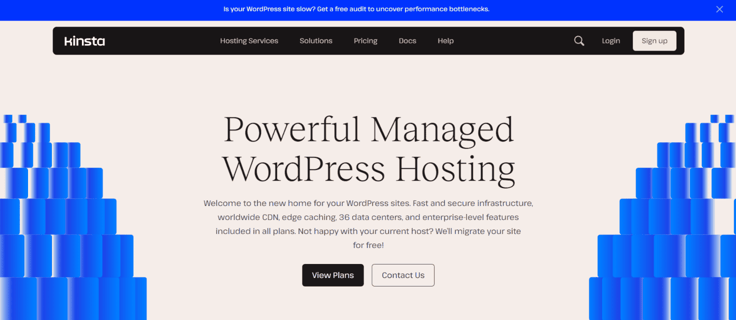
I wouldn’t recommend this host if you’re on a budget, though; it’s one of those web hosting providers that offer top-tier services at premium rates. But if you run a big enterprise and don’t mind spending top dollar on top-notch hosting infrastructure, go for it.
What Is WordPress Hosting?
As the name implies, WordPress hosting is a type of web hosting optimized for WordPress websites. The WordPress host fine-tunes the hosting environment to enhance WordPress’s performance and security needs.
A typical WordPress hosting environment will have features like:
- One-click WordPress plugin and theme installations
- Support from WordPress-experienced staff
- A content delivery network and caching technology
- Automatic WordPress updates
One of the most valuable features of a quality WordPress host is a knowledgeable support team. For context, when you contact DreamHost, SiteGround, and Bluehost, the three WordPress-approved hosts, a WordPress expert will help you troubleshoot any site issues.
What Is Managed WordPress Hosting?
A managed hosting plan simply means your web host takes care of the server’s setup and maintenance so you can focus on running your website. Your web host will likely include updates, security, and backups as part of your services.
Hostinger, for example, offers a high-quality managed WordPress plan that starts at less than a few dollars a month. It includes a free domain and website migration — a big time-saver for less experienced site owners who lack the technical know-how to do this easily.
Hostinger.com
Monthly Starting Price $2.69
- Best overall value: The most complete managed WordPress hosting at this price
- Kodee AI Agent manages your WordPress site via simple chat
- LiteSpeed servers boost site speed by up to 40%
- WAF, malware scanner, DDoS protection, and auto-updates
- Free migrations — 85% completed in under 5 minutes
- Get started on Hostinger now.
Sead Fadilpasic
| Money Back Guarantee | Disk Space | Domain Name | Setup Time |
|---|---|---|---|
| 30 days | 20 GB SSD – 100 GB NVMe | FREE (1 year) | 4 minutes |
It’s worth noting that managed hosting may cost a little bit more than unmanaged varieties, but the price is worth the convenience to many site owners.
What Is Considered High Website Traffic?
High website traffic describes a high number of visitors to your website over a given period, usually a month. When web hosting companies set up their plans, they normally consider the amount of traffic each plan can accommodate.
Of course, high traffic leads to an increased demand on your web server. The specific number that constitutes “high traffic” can vary greatly depending on the website and its hosting capabilities.
High traffic may mean about 400,000 visitors a month for larger, more established websites.
Which Type of Hosting Is Best for High Traffic?
Cloud hosting is the best hosting option for a high-traffic website. That’s because of its scalability and elasticity. This means that it allows you to easily adjust resources (like bandwidth, storage, and processing power) to accommodate traffic spikes without interruption.
Say, for example, you run an eCommerce store that sells seasonal products, such as outdoor furniture. You’ll likely witness more sales in the summer than in winter.
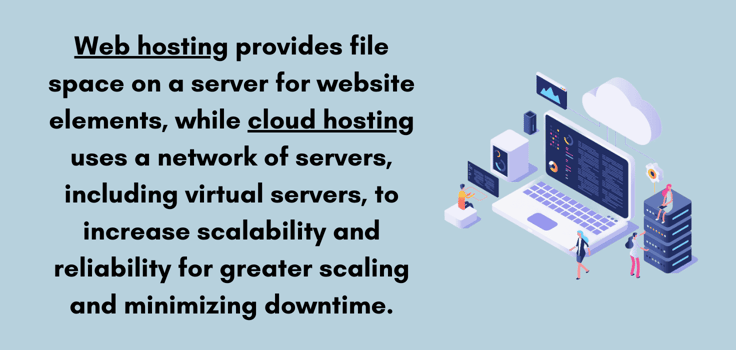
So instead of constantly upgrading or downgrading your hosting plan, cloud hosting automatically adjusts its resources based on the current demand. If the traffic shoots up, the resources expand, and vice versa.
That’s what’s referred to as “elasticity” in web hosting lingo. This elasticity contrasts with traditional hosting solutions like shared or dedicated servers that may have fixed resources and less flexibility to deal with large traffic surges.
Is WordPress Good for High-Traffic Websites?
WordPress’ flexibility and scalability when combined with the right hosting environment (preferably a VPS or cloud server), can withstand large volumes of traffic. Also, you can optimize a WordPress website for performance through caching, image optimization, and content delivery networks (CDNs).

But don’t take my word for it; let’s look at the facts. A huge number of popular websites on the internet run on WordPress. These include but are not limited to the PlayStation Blog, TechCrunch, Time Magazine, CNN Press Room, Microsoft News, TED Blog, Vogue magazine, and, of course, HostingAdvice.com.
Exactly How Much Traffic Can WordPress Hosting Handle?
The amount of traffic WordPress hosting can handle isn’t written in stone. It depends on the WordPress hosting plan and the server resources.
Shared WordPress hosting, while cost-effective, might struggle to support high traffic. From my experience with shared WordPress hosts, you should plan on upgrading if your website receives more than 25,000 monthly visitors.
In fact, for most hosts, the 25,000 visitor mark is usually their monthly maximum for shared hosting. Once you go over that limit, they’ll start bombarding you with emails asking you to upgrade your plan or risk getting kicked out.
VPS, cloud, or dedicated server hosting for WordPress, on the other hand, can typically handle much higher traffic loads. VPS and cloud, as mentioned earlier, are great for unpredictable traffic. A VPS, in particular, gives you more control and privacy over your hosting environment.
The straightforward answer to this question is that it just depends on the specifics of your hosting plan. The type of hosting and its hardware will ultimately decide how much traffic a particular server can handle. A shared host will handle between 0 and 25,000 monthly visitors. With a VPS, you’re looking at anywhere between 25,000 to 200,000 monthly visits.
Dedicated hosting, on the other hand, has more powerful resources since you don’t share them with anyone on the server. That makes it a great candidate for a high-traffic website with 400,000 or more monthly visitors.
Finally, most cloud hosts will handle pretty much anything you throw at them since they’re elastic.
Don’t Let Your Old Host Hold You Back
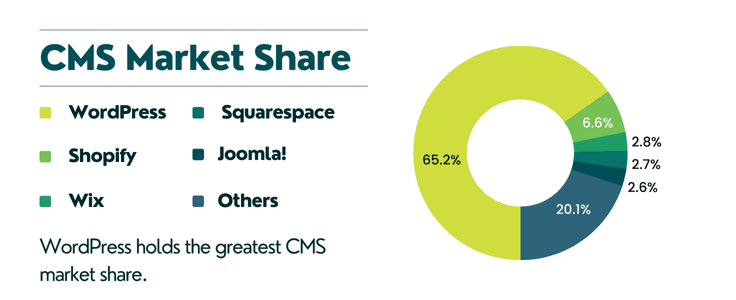
WordPress is by far the world’s most popular CMS. This technology commands a 43.1% grip on the market share, translating to about 810 million websites on the internet.
But here’s the thing: WordPress cannot work its magic alone.
It needs a powerful web host when dealing with high traffic. So next time you go window shopping for the best hosting for your WordPress site, look beyond the host itself; its hosting plans matter a lot.
HostingAdvice.com is a free online resource that offers valuable content and comparison services to users. To keep this resource 100% free, we receive compensation from many of the offers listed on the site. Along with key review factors, this compensation may impact how and where products appear across the site (including, for example, the order in which they appear). HostingAdvice.com does not include the entire universe of available offers. Editorial opinions expressed on the site are strictly our own and are not provided, endorsed, or approved by advertisers.
Our site is committed to publishing independent, accurate content guided by strict editorial guidelines. Before articles and reviews are published on our site, they undergo a thorough review process performed by a team of independent editors and subject-matter experts to ensure the content’s accuracy, timeliness, and impartiality. Our editorial team is separate and independent of our site’s advertisers, and the opinions they express on our site are their own. To read more about our team members and their editorial backgrounds, please visit our site’s About page.