



Writer: Brent Godwin


Editor: Britain Simons


Reviewer: Lillian Castro

Key Takeaways
Our experts tested and compared every major hosting provider offering unlimited email accounts, ranking them by price, AI, features, and what “unlimited” really means.
-
ScalaHosting ($2.95/mo) is the cheapest host with unlimited email account creation.
-
SiteGround ($2.99/mo) offers unlimited email with zero upgrade tier required, no fine print.
-
Bluehost ($1.99/mo) pairs free cPanel email with the fastest confirmed load times.
Picture this: You’re waiting for your dog’s Bark Box, only to open it and find cat toys inside. Annoyed, you contact customer support, only to see the email address is “support@gmail.com” instead of a professional barkbox.com domain. That doesn’t exactly inspire confidence, does it?
That’s why it’s crucial to choose the right email hosting provider. Aligning your email address with your domain name, like john@[yourdomain].com, enhances customer trust — something every business needs. Just know, you can use separate hosting providers for professional email and website hosting, but you’ll save money and get better perks by bundling both with one host.
Online businesses frequently require multiple email addresses, so I’ve explored the best web hosting plans that provide unlimited email accounts. Unlimited can also mean different things for different hosts, and the competitive options have never been better. We’ve worked hard to answer all your questions and make sure you get the best possible option for your venture.
-
Navigate This Article:
Top 3 Hosts With Unlimited Email Accounts
Building your online presence is more than just selecting the best web hosting service and creating your website. If you plan to communicate with your visitors, you’ll need a web host that also provides email services.
Our Top 3 Picks for Site Hosts with Unlimited Email:
Email hosting doesn’t need to be expensive. Many providers offer shared hosting plans with unlimited email accounts that fit comfortably within your budget. These unlimited accounts make it easy to expand your communications as your team grows, at the lowest advertised tier, with no separate upgrade required to unlock it.
These three include unlimited email-account creation without requiring a separate paid email tier. Storage, sending, and acceptable-use limits still apply.
1. ScalaHosting ($2.95/mo): Fast NVMe with Unlimited Email
We double-checked ScalaHosting’s own comparison table and put it to the test in our full review. They offer “Unlimited Emails” across all four web-hosting tiers, Mini through Entry Cloud. No asterisk, or upgrade required — a beautiful thing.
Beyond the inbox itself, ScalaHosting’s SPanel includes IP-reputation monitoring and outbound email scanning to help protect email deliverability. Its separate AI-powered SShield system monitors hosted websites for malicious activity and cyberattacks.
1. ScalaHosting.com

Monthly Starting Price $2.95
- Rated 4.9/5 on Trustpilot with 2,000+ reviews
- Turbo-fast NVMe SSD storage on all plans
- 1-click WordPress install with free migration & guided setup
- Daily backups, free SSL, and AI-powered security (SShield)
- Price lock guarantee — your rate never increases
- Get started on ScalaHosting now.


Laura Bernheim

| Money Back Guarantee | Disk Space | Domain Name | Setup Time |
|---|---|---|---|
| Anytime | 10 GB NVMe SSD | FREE (1 year) | 6 minutes |
The highly ranked ScalaHosting is a great contender, thanks to a strong foundation in business-oriented cloud hosting. The web host’s low-cost shared hosting comes with superb features and customer support.
Pros
Cons
- “Mini” tier limited to 1 website; Go with “Start” for unlimited sites
ScalaHosting launched in 2007 with a mission to make hosting technology accessible to everyone. Join the community of over 700,000 websites that call ScalaHosting their home.
Important to note: A separate ScalaHosting product, standalone Business Email, works differently: it’s tiered by mailbox count, and you’d need the pricier Cloud tier ($14.95–$19.95/mo) to get unlimited there too. Don’t confuse the two — the unlimited email covered here comes from buying web hosting, not the standalone email product.
Some of ScalaHosting’s best email hosting features include:
- Unlimited Email accounts on ALL shared hosting plans
- AI-powered SShield security and spam filtering
- Hourly IP blacklist monitoring
- Free, no-downtime email migration
- Daily offsite backups
- SPF, DKIM, and DMARC auto-configured
- 24/7/365 in-house technical support
- Anytime unconditional money-back guarantee
This is the pick for anyone who’s been burned by a shared IP landing in spam before. SPanel’s IP-reputation monitoring and outbound email scanning address a real deliverability concern for businesses using hosted email. If deliverability keeps you up at night, this could be worth every penny.
See our full expert review of ScalaHosting >>
2. InterServer ($2.50/mo): Cheap WordPress and Unlimited Email
InterServer skips the whole multi-tier game entirely — there’s one Standard Web Hosting plan, and it includes unlimited email accounts, storage, and data transfer from day one. No “unlimited on the top tier only” fine print to track down. For that alone, we can’t recommend this enough.
What sets it apart from the group above isn’t just the unlimited claim; it’s what backs it. InterServer routes outgoing mail through “Mail.Baby,” a dedicated smart-host system that scrubs messages for spam before they leave and actively protects your sender reputation with other providers. That’s how you handle the shared hosting (shared-IP) blacklisting problem, not just marketing fluff.
2. InterServer.net

Monthly Starting Price $2.50
- $0.01 first month with coupon code HOSTINGADV
- $2.50/month after. No contracts or increases
- Softaculous one-click installer for WordPress and 450+ apps
- Register or transfer domains for less than $10
- InterShield security suite with AI firewall & Cloudflare CDN
- Get started on InterServer now.


Sead Fadilpasic

| Money Back Guarantee | Disk Space | Domain Name | Setup Time |
|---|---|---|---|
| 30 days | Unlimited SSD | New or Transfer | 4 minutes |
As far as cheap email hosting providers are concerned, InterServer continually impresses me with its quality, affordable email hosting plans. Users don’t have to sacrifice performance or features when they choose a hosting plan from InterServer.
Pros
- Unlimited email accounts, confirmed (one tier)
- Unlimited dedicated email storage
- Guaranteed mail delivery: spam scrubbing happens before it leaves your server
- One plan means no confusing tier comparisons
- Smallest renewal price of any host on this list
Cons
- No AI tools or modern builder features baked in, this is old-school hosting done well
For over 22 years, InterServer has honed its expertise in providing adaptable hosting plans. You can enhance your plan with optional add-ons to perfectly suit your needs. This provider includes unlimited email in its shared, VPS, WordPress, and dedicated hosting plans. Whichever plan you decide on, you’ll have ample email addresses to support your website.
Some of InterServer’s best email hosting features include:
- Unlimited email accounts and forwarders
- Guaranteed delivery via Mail.Baby (spam scrubbing, reputation protection)
- Webmail, SSL, and outgoing SMTP included
- Weekly backups, free Cloudflare CDN
- InterShield security: machine-learning firewall, virus scanning
- Free migration for new accounts
- One flat plan, no tier confusion
- Hosting since 1999
This is the pick for someone who just wants a working, unlimited inbox and doesn’t care about AI chatbots or flashy dashboards. One plan, no upsell maze, a genuinely gentle renewal, InterServer is the “get out of my way and let me run my site” option, and there’s something refreshing about that.
See our full expert review of InterServer >>
3. SiteGround ($2.99/mo): Marketing Tools and Unlimited Email
SiteGround’s “unlimited email” promise is no joke: every hosting plan, from StartUp through GoGeek, includes unlimited professional mailboxes, with no separate upgrade tier required to unlock them. The tradeoff for a packed hosting service (AI, site builders, marketing tools, unlimited email, etc.) is a bit higher renewal price, but still competitive for the web hosting market.
Unlimited applies to the number of mailboxes you can create, not storage. All email accounts on a shared hosting plan collectively receive up to 10GB of email storage, and SiteGround also imposes hourly sending limits.
Beyond email, SiteGround runs on Google Cloud with custom-tuned PHP and MySQL, backed by an AI-driven bot and DDoS protection that blocks over a million attacks daily. It delivers on infrastructure depth you don’t usually see at this price. They want your attention and dare I say, they deserve it.
3. SiteGround.com

Monthly Starting Price $2.99
- FREE website transfer service to get started
- 99.9% uptime guarantee and unlimited traffic
- User-friendly WordPress installation
- 24/7 support featuring custom systems
- 4 caching options plus staging and Git
- Get started on SiteGround now.


Lynn Cadet

| Money Back Guarantee | Disk Space | Domain Name | Setup Time |
|---|---|---|---|
| 30 days | 10 GB SSD – 100 GB Google Cloud SSD | FREE (1 Year) | 6 minutes |
Again, all of SiteGround’s hosting plans include free unlimited email accounts, accessed through a friendly webmail interface. When you sign up for SiteGround, you can create as many email addresses as you need. SiteGround’s “Site Tools” dashboard manages domain, email, and backups from a single interface, no separate cPanel logins to juggle. Free email migrator software that securely transfers your messages and inbox structure
Pros
- Unlimited email on every tier, entry through top
- AI-powered spam, virus, and phishing protection
- Built on Google Cloud with strong uptime and CDN coverage
- Free migration, backups, and SSL standard
Cons
- Unlimited email is a bundled only perk
Trusted by the owners of over 2.8 million domains, SiteGround consistently demonstrates its worth by providing high-speed, scalable cloud-powered infrastructure. Customers praise this web host for its user-friendly features, reliability, and excellent support. With an unlimited email account from SiteGround, the possibilities are endless.
Some of SiteGround’s best email hosting features include:
- Unlimited professional email, every hosting tier
- SiteGround Email Marketing product (templates, automation, AI writer)
- 10 GB – 100 GB of Premium Google Site Storage
- Built on Google Cloud, 99.9% uptime
- AI security: 99.99% spam/phishing/virus blocking
- Free daily backups and email migration
- Free CDN across 170+ locations
- 24/7 live support
- 98% customer satisfaction rating
This is the pick for someone who wants Google Cloud-grade infrastructure without paying enterprise prices, and is willing to accept a bit of a renewal jump for the abundant perks and an organized dashboard. If you set a calendar reminder for everything, SiteGround is a perfect fit.
See our full expert review of SiteGround >>
Next Batch: Unlimited Email, But Some Tradeoffs
These hosts generally run the same cPanel foundation. Technically, “unlimited email” accounts may hit storage caps. You’ll generally access cPanel email through Roundcube, a free, open-source webmail interface that lets you check your email from a browser.
Here’s Our Top Picks for Basic Professional Email:
4. Bluehost ($1.99/mo): Cheapest Price for Free Email >>
5. InMotion Hosting ($4.59/mo): Unlimited Accounts, Tiered Storage >>
6. Hosting.com ($2.99/mo): cPanel Email Bundled >>
7. GreenGeeks ($2.95/mo): Sustainable Unlimited Email >>
8. HostGator ($3.75/mo): Domain Email with cPanel >>
The perk of free email is reason enough to celebrate. It’s one less thing to worry about. Treat these as basic bundled email options, understanding that mailbox allowances and features vary, and that you may eventually need a paid upgrade.
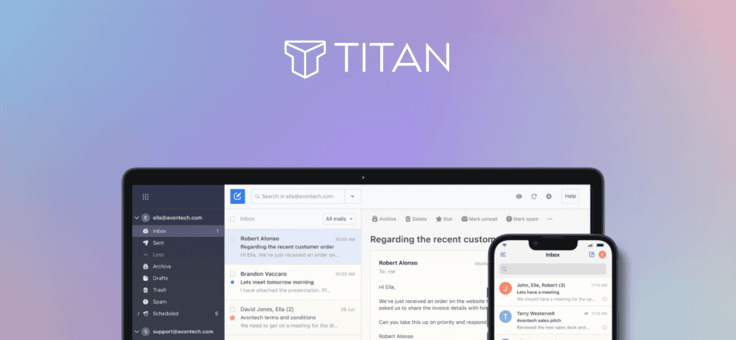
Titan Email is the polished upgrade sitting above a free cPanel email. The same Titan-powered product shows up across Bluehost, InMotion, HostGator, and you’ll find similar in Hosting.com’s stack.
Upgrade from cPanel’s bare-bones webmail to Titan for read receipts, send-later scheduling, branded templates, and (on the top tier) AI-drafted replies and full email campaigns. Read more below.
It’s the right call for a small business that’s outgrown a bare address book and wants scheduling, branding, and marketing tools without switching platforms entirely; a solo operator who just needs to send and receive won’t miss anything by skipping it.
Think of it as the difference between a rental car and a leased one you’ve actually customized: cPanel email gets you there reliably, but Titan gives you a dashboard built for running a business from your inbox. You can get by with cPanel email for a while, but you may face challenges when you start to do bigger automated marketing campaigns.
4. Bluehost ($1.99/mo): Cheapest Price for Free Email
Bluehost’s free cPanel email tier shows email “accounts available” right in the account dashboard, and it’s permanent, not a trial. At $1.99/mo, this is the lowest advertised entry price on this list, though the feature set beneath that price is leaner than ScalaHosting’s or SiteGround’s.
4. Bluehost.com

Monthly Starting Price $1.99
- Beginner-friendly setup with free domain for the first year
- AI-powered site setup with 1-click WordPress install
- Free CDN, malware scanning, WAF, and DDoS protection
- Weekly backups + 99.99% uptime SLA
- WordPress.org recommended host since 2005
- Get started on Bluehost now.
Sead Fadilpasic
| Money Back Guarantee | Disk Space | Domain Name | Setup Time |
|---|---|---|---|
| 30 days | 10 GB NVMe SSD | FREE (1 year) | 5 minutes |
Where Bluehost earns its spot is WordPress-specific performance: it posts the fastest US load times of any host we compared, 0.35 seconds, backed by a WordPress.org endorsement dating back two decades.
Pros
- Free cPanel mailbox, limited to two mailboxes
- Fastest load times of any host in this comparison
- No trial clock running — the free tier just stays free
- WordPress-optimized infrastructure standard
Cons
- Per-mailbox storage quota is low by default (100MB, adjustable)
- Want AI email tools or bigger storage? That’s the paid Professional Email “Titan” upgrade (separate product entirely)
- Unlimited cPanel mailbox and Titan email are both upsells
What used to be free, unlimited cPanel email has now fallen prey to upsells, but they still do offer the option at the highest tier. Their free entry cPanel email has a much lower per-inbox allowance than ScalaHosting’s or InMotion’s. Its Professional Email lineup, powered by Titan, gives you a clear three-tier path: start small, then scale up as your team grows.
As for Bluehost, here’s a clearer picture of the two separate email systems:
- cPanel Email is the basic inbox tied directly to your hosting plan — free for up to 2 mailboxes, then tiered from $2.99/mo (3–10 mailboxes) up to $8.99/mo for unlimited mailboxes with higher sending limits and advanced spam filtering.
- Professional Email (Titan) is a different product entirely, a more full-featured inbox with AI drafting, calendars, and branded templates, sold on its own separate pricing page. It starts at $1.99/mo (renews at $2.99) for Pro, with read receipts, templates, and calendar syncing. We go into more detail later in the article.
If you’re comparing “free email with Bluehost,” make sure you know which of the two you’re actually looking at, and how many mailboxes you’ll realistically need, since only the smallest setups stay free under cPanel Email now. Bluehost’s free cPanel email uses Roundcube webmail, giving you basic domain-based accounts with manual storage quotas.
Some of Bluehost’s best email hosting features include:
- Free cPanel email (2 mailboxes), unlimited tier available
- Fast page loads: 0.35s average US load time
- 2+ Tbps DDoS protection, 24/7 firewall
- Free domain, SSL, and CDN
- Malware scan AND removal
- Free zero-downtime migration
- 99.99% uptime SLA
- WordPress.org endorsed since 2005
This is the pick if WordPress is your whole world and speed matters more than bells and whistles. You’re not getting SiteGround’s AI polish or ScalaHosting’s deliverability extras, but you are getting strong WordPress performance and up to two free domain-based mailboxes, with paid options available as your needs grow.
See our full expert review of Bluehost >>
5. InMotion Hosting ($4.59/mo): Unlimited Accounts, Tiered Storage
InMotion’s own plan specification table lists unlimited email addresses across every tier, Launch, Power, and Pro alike. It costs more at entry than the three hosts above it, but backs that price with the longest money-back guarantee on this list.
The nuance worth knowing: account count is unlimited, but per-inbox storage isn’t. That scales with plan tier, from 5GB on Launch up to 20GB on Pro. So you’ll never run out of addresses to create, but a heavy user might run out of room in any single one.
5. InMotionHosting.com

Monthly Starting Price $4.59
- FREE BoldGrid site builder and templates
- FREE website, domain, and cPanel migrations
- SSD storage makes your site load up to 20x faster
- Security suite includes SSL and hack protection
- Unlimited bandwidth and email accounts
- Get started on InMotion now.


Dave McQuilling

| Money Back Guarantee | Disk Space | Domain Name | Setup Time |
|---|---|---|---|
| 90 days | 100 GB SSD – Unlimited SSD/NVMe | Select Plans | 5 minutes |
InMotion sets the bar high for its shared hosting plan with unlimited emails. This web host is frequently crowned one of the top web hosts for its high-powered features across all four shared hosting plans. Website owners can choose between Core, Launch, Power, and Pro hosting plans depending on their bandwidth and SSD storage needs.
InMotion is refreshingly candid about the email-deliverability risks associated with shared IP addresses. Its Pro plan includes a dedicated IP, which gives you greater control over your sender reputation, though it cannot eliminate deliverability problems entirely.
Pros
- Unlimited email addresses at every tier, with storage caps
- 90-day money-back guarantee, longest of any host here
- 100 GB SSD — Unlimited SSD storage
- Dedicated IP (Pro tier) eliminates “Shared Hosting” spam vulnerabilities
- Free domain, SSL, and migration bundled standard
Cons
- Per-inbox storage capped by tier (5GB/10GB/20GB), not truly unlimited
Free inbox migrations, hack and malware protection, and setup guides for Google Workspace and Microsoft’s hosted Exchange server were welcome additions to the plan. If you need another reason to love this hosting provider, check out its money-back guarantee above.
Here’s the caveat — email storage is not technically “Unlimited,” but it is subject to plan storage caps. The good news is that it takes around 26,400 emails to fill 2GB of storage.
InMotion Hosting service’s best features include:
- Unlimited email addresses, every shared-hosting tier
- Per-inbox storage: 5GB (Launch) to 20GB (Pro)
- Free domain, SSL, and expert-handled migration
- Dedicated IP available (included on Pro)
- UltraStack performance (NGINX + PHP-FPM + OPcache)
- 90-day money-back guarantee
- 24/7 human support, no bots
- Google Workspace setup guides available
This is the pick for a business that’s already thinking about growth, not just getting a site live. The 90-day guarantee alone tells you InMotion expects you to actually test-drive the thing, and the dedicated IP option on Pro is there for when your email volume grows alongside your business.
See our full expert review of InMotion >>
6. Hosting.com ($2.99/mo): cPanel Email Bundled
Hosting.com bundles professional email through cPanel on every plan. Its own FAQ says plainly, “you can create professional addresses using your domain name,” with aliases, forwarders, auto-responders, and catch-all support built in. This isn’t necessarily unlimited (there are very few), but it’s definitely worth the overall hosting plan.
Hosting.com sets clear mailbox limits by plan: Starter includes 10 mailboxes, Pro includes 20, and Max includes 40. Each mailbox receives up to 10GB of storage, so its email is bundled but not unlimited. Hosting.com focuses more on NVMe storage speed, site builders, Softaculous 1-click installs, and WordPress compatibility.
6. Hosting.com

Monthly Starting Price $2.99
- LiteSpeed servers with NVMe SSD storage on all plans
- One-click installs and free expert site migration
- Built-in WAF, malware scanning, and DDoS protection
- Automated daily backups with 30-day restore
- Free domain for 1 year + free SSL included
- Get started on hosting.com now.


Christina Lewis

| Money Back Guarantee | Disk Space | Domain Name | Setup Time |
|---|---|---|---|
| 30 days | 15 GB NVMe SSD | FREE (1 year) | 4 minutes |
Known for its cutting-edge servers with blazing-fast performance, hosting.com has decades of experience in the web hosting industry and provides great value for its email hosting services.
Pros
- FREE Email bundled standard via cPanel (Pro upgrade available)
- Free unlimited migrations
- Room to scale to a dedicated managed server, zero downtime
- 24/7 in-house engineers plus Orbi AI assistant
- SpamAssassin protection and free domain privacy on select plans
Cons
- Hosting.com doesn’t advertise “Unlimited,” but the free email is a bonus
This email hosting service is all about giving you a complete hosting experience. It offers a variety of plans designed to meet the diverse needs of different website owners.
Hosting.com’s best features include:
- Email via cPanel, bundled on every plan
- Aliases, forwarders, auto-responders, catch-all supported
- SPF/DKIM configured, inbound/outbound spam filtering
- Free unlimited site migrations
- NVMe SSD storage, LiteSpeed caching
- Softaculous one-click app installs
- 99.9% uptime SLA
- Orbi AI assistant, 24/7 in-house support
This is the pick for someone who trusts a strong reputation more than they need a company to spell out every technical detail on a landing page. The infrastructure and migration story here are genuinely excellent; the email situation deserves the old “good enough” pat. Honestly, the strength of this host is more on the hosting side.
See our full expert review of Hosting.com >>
7. GreenGeeks ($2.95/mo): Sustainable Unlimited Email — Plant a Tree
GreenGeeks allows up to 50 email accounts on its entry-level plan and unlimited account creation on its higher tiers. You can adjust individual mailbox quotas through cPanel, but all mailboxes remain subject to the plan’s total email-storage and server-resource limits.
The real hook here isn’t the inbox, though. It’s everything happening behind it. GreenGeeks matches 300% of its energy usage with renewable credits and plants a tree for every account it provisions. So if you’ve ever wanted your email hosting to double as a small act of climate penance, this is your host.
7. GreenGeeks.com

Monthly Starting Price $2.95
- 300% renewable energy match — the leading green web host
- Daily backups, free CDN, and LiteSpeed caching on all plans
- 1-click installs for WordPress, Joomla, Drupal, and 150+ apps
- Free SSL, DDoS protection, and AI-powered firewall
- 24/7 support via phone, live chat, and email
- Get started on GreenGeeks now.
Dave McQuilling
| Money Back Guarantee | Disk Space | Domain Name | Setup Time |
|---|---|---|---|
| 30 days | 25 GB SSD | FREE (1 year) | 4 minutes |
Standard cPanel access, 1-click installs for 150+ apps, and container-based isolation come bundled at every tier, even the $2.95/mo entry Lite plan.
Pros
- Unlimited email on nearly every plan (except the bottom tier)
- Storage quota is yours to adjust, all the way up to unlimited
- 300% renewable energy match, a genuinely different pitch than “we have good uptime”
- AI-driven firewall and round-the-clock DDoS monitoring
Cons
- Lite50, the true entry price, isn’t actually unlimited, just generous
- Renewal jump is steeper than most
GreenGeeks’s best features include:
- Unlimited email accounts (all plans except Lite50)
- Webmail, IMAP, and POP3 access
- 250MB default quota, adjustable to unlimited in cPanel
- Free SSL, CDN, and daily backups
- AI-powered firewall, DDoS protection
- 1-click installs for 150+ apps
- 24/7 human expert support
- 300% renewable energy match, tree planted per account
This is the pick for someone who cares as much about their hosting bill as they do about the impact data centers have on nature. If sustainability is just a nice-to-have and speed or price is your real priority, you’ve got cheaper or faster options on this list. But if you’ve been meaning to make one more part of your business a little less guilty, GreenGeeks makes that swap painless.
See our full expert review of GreenGeeks >>
8. HostGator ($3.75/mo): Domain Email Through cPanel
HostGator, a Houston-based web host, is great for users of any skill level. Plus, HostGator’s plans are designed to expand with you, offering excellent scalability for your site, perfect for personal blogs and small businesses planning for future growth. It’s a WordPress go-to.
HostGator offers domain-based cPanel email with its hosting plans, including webmail, forwarding, autoresponders, and spam-filtering tools. Its mailbox allowances are now tiered, and customers need the Premium cPanel Email plan to create unlimited mailboxes.
That’s three email products:
- cPanel Email: HostGator offers Basic and Plus plans with limited mailbox allowances, while its Premium plan supports unlimited mailboxes.
- Titan Pro: (the standalone paid email upgrade) runs ~$1.67/mo (1-year term) on its own. You have the option for a 1-month free trial.
- Titan Ultra: (the AI-powered top tier) jumps to $5.83/mo (1-year term) for large enterprise needs.
HostGator is a WordPress site builder through and through, plus their unique flavor of hosting. HostGator includes a free SSL certificate, while services such as SiteLock security and CodeGuard backups are available as paid add-ons. You also have access to thousands of WordPress plugins and features.
8. HostGator.com

Monthly Starting Price $3.75
- Free domain, free SSL, and Cloudflare CDN with Argo Routing
- AI-powered malware scanning, WAF, and DDoS protection
- Unmetered bandwidth, cPanel, and 1-click WordPress installs
- Managed WordPress updates and staging on all plans
- 30-day money-back guarantee and 24/7 phone & chat support
- Get started on HostGator now.
Lynn Cadet
| Money Back Guarantee | Disk Space | Domain Name | Setup Time |
|---|---|---|---|
| 30 days | 10 GB SSD – 100 GB SSD | FREE (1 year) | 4 minutes |
HostGator provides top-notch web hosting for any type of website. I had to include this provider in my list because it offers oodles of free features with its shared hosting plans. Another perk is an email marketing suite with forms and CRM, plus support for integration with Google Workspace.
Pros
- Unlimited Email Aliases, Autoresponders, Mail Forwards, 25 Mailing Lists (cPanel email)
- Get email on phone via IMAP support
- Prevent spam with SpamAssassin
- 24/7/365 phone and chat support
- 2 million+ sites hosted, deep WordPress-specific experience
- Free 1-month trial of Pro Email with Titan
Cons
- Website transfer is a paid add-on, not free
- Free email restricted to sending a maximum of 500 emails per hour per domain
Note: Mailing lists larger than 900 addresses must run during off-peak hours, and lists over 5,000 require a VPS or Dedicated server.
HostGator’s best features include:
This is the pick for someone who wants a well-known name, real security bundled in the standard plan, and doesn’t want to think too hard about which plan to choose. Its tiered email options, familiar cPanel tools, free SSL certificate, and available security add-ons make it a dependable, if unflashy, choice.
See our full expert review of HostGator >>
Unlimited Email Hosting Comparison Chart
As you begin looking for an email host, it’s easy to feel overwhelmed. Providers love to spotlight flashy features to grab your attention. But which ones do you actually need? And what really makes one email host the “best”?
Here’s every provider from this list side by side, so you can compare price against storage, features, and who each one actually fits, without scrolling back through the sections to piece it together yourself.
This chart helps break down the key things to look for:
| Host | Price | Site Storage + Email | Top Benefits | Best For |
|---|---|---|---|---|
| ScalaHosting | $2.95/mo | 10 GB NVMe – Unlimited SSD; unlimited email, every tier | Email: IP-reputation monitoring and outbound email scanning Website: 1-click WordPress, cPanel or sPanel, auto-backups, unmetered | Worry-free site migration, daily backups, and cybersecurity, with unlimited email account creation |
| InterServer | $2.50/mo | Unlimited SSD; unlimited email, one plan | Email: Mail.Baby guaranteed delivery, no tier maze Website: Weekly backups, Cloud Linux OS, SSD caching, and free Cloudflare CDN. | Love “Unlimited” storage space, data transfer, email accounts, and FTP accounts. |
| SiteGround | $2.99/mo | 10 GB – 100 GB Google Cloud SSD; unlimited email, every tier | Email: Unlimited email accounts, webmail, and autoresponders Website: Google Cloud infrastructure, AI security, Free email, CDN, SSL & Backups | Want the best website builder: Drag-and-drop, AI image & text, templates, Free image gallery, SEO |
| Bluehost | $1.99/mo | 10 GB NVMe SSD; 2 inbox free tier, unlimited email upgrade available | Email: Up to Unlimited cPanel accounts (2 free), Titan upgrade path Website: AI site builder, WordPress endorsed, 2+ Tbps DDoS | Fastest load times (0.35s), WordPress sites that need a few free inboxes and a paid upgrade path |
| InMotion Hosting | $4.59/mo | 100 GB – Unlimited SSD/NVMe; unlimited addresses, tiered storage | Email: Unlimited addresses, dedicated IP on Pro Website: BoldGrid builder, free migrations, UltraStack performance | Growing businesses that want room to scale, backed by a 90-day guarantee |
| Hosting.com | $2.99/mo | 15 GB NVMe SSD; 10–40 cPanel mailboxes, depending on plan | Email: Bundled cPanel, aliases, catch-all support Website: LiteSpeed caching, free unlimited migrations, Orbi AI assistant | Buyers who trust a fast, reputable host that scales to a managed server with zero downtime |
| GreenGeeks | $2.95/mo | 50 GB – Unlimited SSD; unlimited email except Lite50 | Email: Unlimited accounts, adjustable storage quotas Website: 300% renewable energy match, AI firewall, 1-click installs | Sustainability-minded site owners who still want unlimited email. Plant a tree! |
| HostGator | $3.75/mo | 20 GB–100 GB SSD; tiered cPanel mailbox allowances | Email: Tiered cPanel email; unlimited mailboxes available Website: 1-click WordPress, Free SSL | A familiar name with real security bundled in standard, plus unmetered bandwidth |
All eight web hosts offer domain-based email, but mailbox allowances and costs vary by provider and plan. Some include unlimited account creation with web hosting, while others provide a limited number of mailboxes or require an upgrade for unlimited accounts.
Know which one you actually need before you compare prices, or you’ll end up comparing apples to a much more expensive orchard. This comparison chart won’t pinpoint which host is perfect for you, since everyone’s email hosting needs differ, but it will help you weigh your top choices.
Top Questions: Unlimited Email
You may still have questions, and we have answers. Jump to…
The Basics
- What’s the Difference Between Email Hosting vs. Web Hosting? >>
- Does Web Hosting Always Include Email Hosting? >>
- Can You Host Your Website and Email with Separate Providers? >>
- What Is the Difference Between SMTP, IMAP, and POP3? >>
Making the Right Choice
- How Do I Choose the Best Plan with Unlimited Email? >>
- Which Hosts Offer the Best AI Email Tools in 2026? >>
- What Are the Pros and Cons of Using a Paid Email Hosting Service? >>
- Is There Free Email Hosting? >>
Getting More From Your Plan
What’s the Difference Between Email Hosting vs. Web Hosting?
The difference between web hosting and email hosting is subtle: Web hosting is the service of providing space on a server to store your website’s information and connect it to the internet, so users can visit your site.
Email hosting is similar, except that the type of information being stored is different. Instead of housing entire web pages, images, code, and files, an email host just stores emails.
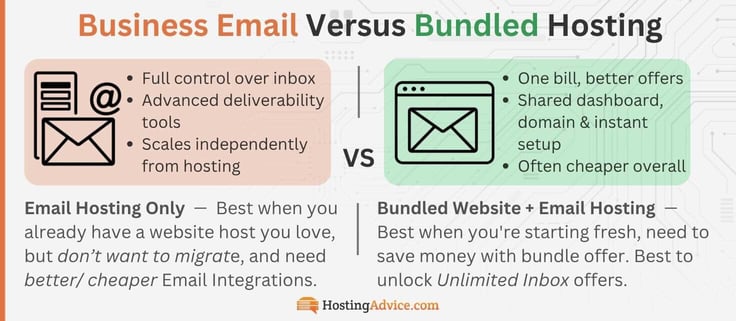
It’s common for web hosting companies to bundle free email hosting with your plan. This setup is excellent for keeping all your services with one provider.
Does Web Hosting Always Include Email Hosting?
Not automatically, no, and this is exactly the kind of assumption that gets people burned. Some hosting packages fold email in as a genuine, permanent perk. Others treat it as a separate product entirely, or dangle it as a trial that quietly auto-renews once the clock runs out. But, even a cheap renewal price could be better than other “totally free” options.
It can even get more confusing when we look at only one hosting provider. The exact same host may have one promotional offer that includes it (like the ones we’ve included above) and a different offer, on a different offer page somewhere else, with the included email perk nowhere in sight. That’s why we went to the trouble of finding the best hosts for you.
ScalaHosting, InterServer, SiteGround, and InMotion include unlimited email-account creation with their standard hosting plans, subject to storage, sending, and acceptable-use limits. GreenGeeks includes up to 50 accounts on its entry-level plan and unlimited account creation on higher tiers. Bluehost and HostGator offer paid upgrades for unlimited mailboxes, while Hosting.com includes 10 to 40 mailboxes, depending on the plan.

The lesson: “includes email,” “includes email with this specific promo offer,” and “includes unlimited email, permanently, at no extra cost” are all different promises. Read the actual plan page, not just the headline feature list.
Don’t assume every host is giving you the same great deal. They are all unique, so you have to be conscious of your business needs at this stage of growth.
Can You Host Your Website and Email with Separate Providers?
Yes, that’s entirely possible, but I wouldn’t recommend it unless you’ve got a specific reason to. Let’s start with the upside: if you’re heavily invested in your current web host, whether that’s years of content, a custom setup, or just plain inertia, it might not be worth the migration headache just because another provider has a slightly better email deal.

Splitting the two may also get you specialists on both sides. One host handles nothing but making your site fast and secure; the other focuses entirely on inbox deliverability, storage, and features. In theory, that’s the best of both worlds, but you will pay separately for two distinct services. In practice, for most small businesses, it’s just more logins to remember and more bills to reconcile.
Bundled email from a web host is often sufficient for solo operators and small businesses that primarily need professional domain-based inboxes. A separate email provider may be worth the additional cost if your team needs more advanced collaboration, centralized administration, deliverability controls, security, or compliance features.
The smart move: only separate the two if you can name the specific thing you’re separating them for. “Might be slightly better” isn’t enough reason. “I need HIPAA-compliant email but my host doesn’t offer it” is. Now, if you already have a WordPress site and one of these hosts looks tempting, it is not as difficult as you’d think to migrate your website to a new host.
What Is the Difference Between SMTP, IMAP, and POP3?
SMTP is used to send your emails to recipients, e.g., the mail carrier!
SMTP (Simple Mail Transfer Protocol) is the protocol used by mail servers to send and receive email. User-level email clients (like Gmail, Yahoo, or Apple Mail) typically use an SMTP service to get your message to a server for delivery.
Both IMAP and POP3 are protocols that control how your email client (Outlook, Apple Mail, Gmail, etc.) retrieves messages from your mail server — but they behave very differently, and choosing the wrong one can cause real headaches.
IMAP (Internet Message Access Protocol) keeps your emails stored on the server and syncs them across all your devices (iPhone, computer, etc.) in real time. Read an email on your phone, and it shows as read on your laptop too.
You get the idea for IMAP. Move a spam email to Junk — it gets synced. Delete something on your tablet, and it’s gone everywhere. It’s one of those features that disappear into the background and just works! For anyone using email across multiple devices (which is basically everyone), IMAP is the right choice.
POP3 (Post Office Protocol) downloads messages to a device and may remove them from the server, depending on your email client’s settings. Unlike IMAP, it isn’t designed to keep mailbox activity synchronized across multiple devices.
Unless you have a very specific reason to use it, like extremely limited server storage, there’s almost no scenario where POP3 is the better option for a modern business. Don’t worry about it.
The short version: IMAP is generally the better choice if you check email on multiple devices.
How Do I Choose the Best Plan with Unlimited Email?
With an estimated 4.48 billion people using email worldwide, only recently surpassed by 5.79 billion social media users, the real question isn’t whether you need a professional inbox — it’s which of these top priorities is highest on your list.
Match your top priority to the column below and skip the rest.
| Top Priority | Host & Price | Overall | Host Features |
|---|---|---|---|
| Tight budget | Bluehost ($1.99/mo) | Strong WordPress performance plus up to two free cPanel mailboxes, with tiered upgrades available | AI site builder, weekly backups, recommended by WordPress.org since 2005 |
| Zero tiers, zero upsells | InterServer ($2.50/mo) | Unlimited email, storage, and data transfer on one flat plan, gentlest renewal on this list ($7/mo) | Mail.Baby scrubs outgoing mail for spam before it leaves the server, 461 one-click app installs, free Cloudflare CDN |
| Deliverability is your top concern | ScalaHosting ($2.95/mo) | IP-reputation monitoring and outbound email scanning through SPanel | Turbo-fast NVMe SSD, anytime unconditional money-back guarantee, price lock on select terms |
| Want unlimited mailbox creation | SiteGround ($2.99/mo) | Unlimited email on StartUp through GoGeek, backed by Google Cloud infrastructure and AI blocking 99.99% of spam/phishing | Free CDN across 170+ locations, Site Tools dashboard, 98% customer satisfaction rating |
| Planning to scale past year one | InMotion Hosting ($4.59/mo) | 90-day money-back guarantee, plus a dedicated IP on Pro that avoids reputation problems caused by other users on a shared IP | Unlimited email addresses on every tier, free domain and migration, UltraStack performance |
| Care about carbon footprint | GreenGeeks ($2.95/mo) | 300% renewable energy match and a tree planted per account, unlimited email on every tier except the bottom one | AI-powered firewall, 24/7 DDoS monitoring, 1-click installs for 150+ apps |
| Want a familiar, industry-standard name | HostGator ($3.09/mo) | Domain-based cPanel email with an unlimited-mailbox upgrade available | Free SSL; SiteLock and CodeGuard available as paid add-ons, 1-click WordPress install, 24/7 phone and chat |
| Trust reputation over niche features | Hosting.com ($2.99/mo) | Free unlimited migrations regardless of how your site was built; 10–40 domain-based mailboxes, depending on plan | Orbi AI assistant resolves 60% of support requests instantly, NVMe storage, LiteSpeed caching |
So which one actually wins? Depends what you’re optimizing for.
If price and simplicity are everything, Bluehost offers a low-cost starting point for a small number of mailboxes, while InterServer includes unlimited email accounts in its standard plan. If you want unlimited mailbox creation without purchasing a separate email tier, SiteGround is a strong option.
Either way, you’re not locked in forever; every host on this list lets you upgrade later if your needs outgrow the plan you start with.
Which Hosts Offer the Best AI Email Tools?
Approximately 77% of business executives use AI to personalize marketing emails. The perks, automation, and functionality race has moved decisively into AI-powered inbox management, and it’s worth knowing which providers have made meaningful investments here versus offering the same old feature list.
Each host has integrated AI in unique ways. Some focus their AI on site builders and email templates. Others focus on smart writing tools or the old-school way, with no AI at all. This can change at any time, as the AI landscape is rapidly evolving.
AI Features by Host: Website Builder vs. Email
| Host | Website AI (Builder/Agent) | Email AI (Writing, Reply & Summaries) | Email AI (Templates & Campaigns) | Price Tier/Available At |
|---|---|---|---|---|
| ScalaHosting | WP Spectra Builder: describe your business, get a full WordPress site with pre-built templates | N/A | N/A | Included at base price |
| InterServer | N/A | N/A | N/A | N/A |
| SiteGround | AI-generated WordPress themes and layouts, tailored to your site’s purpose | N/A | N/A | Included at base price |
| Bluehost | AI-assisted setup with guided 1-click WordPress install | Drafts and refines messages in your tone | Signature Designer, Email Designer, full Email Campaigns | Ultra tier, ~$5.83/mo |
| InMotion Hosting | BoldGrid site builder with template library | Drafts and summarizes emails | Email Campaigns, Advanced Tracking, Invoice Builder | Enterprise tier, ~$5.24/mailbox |
| Hosting.com | Build with AI: describe your business, get a working WordPress site generated | N/A | N/A | Included at base price |
| GreenGeeks | AI Website Builder: writes homepage copy, picks conversion-focused templates automatically | N/A | N/A | Included at base price |
| HostGator | 1-click WordPress install with template library | Drafts and summarizes messages | Email Campaigns, Invoice Builder, Calendar Bookings | Ultra tier, ~$5.83/mo |
The takeaway: no host on this list includes AI email at the free tier. It’s an upgrade everywhere it exists, but you can take advantage of AI integration in other ways, like site builders. At least for email, Bluehost, InMotion, and HostGator offer the best AI features across the board, with upgraded tiers, for the lowest price. Know which AI features are most important to you.
ScalaHosting, SiteGround, Hosting.com, and GreenGeeks all invest in generating your homepage with AI, but none of that intelligence follows you into the inbox. Bluehost, InMotion, and HostGator do offer email AI, but it’s locked behind their pricier Ultra or Enterprise tiers. Don’t assume “AI-powered” covers your whole online presence.
If you like the offers of any of the website hosts on this list, it is always an option to integrate Zoho Mail, Google Workspace, and Microsoft 365. Most budget hosts support third-party email hosting out of the box. Or stick with the free option. You can always upgrade to a premier service down the line.
What Are the Pros and Cons of Using a Paid Email Hosting Service?
By now, you know there’s a big difference between a free email like [yourbusiness]@gmail.com and a domain-based professional email (info@[yourdomain].com). And, signing up for a professional email means finding a provider to host that email. You can choose to bundle web hosting and domain-based email service (which may be included), or use a separate provider for both.
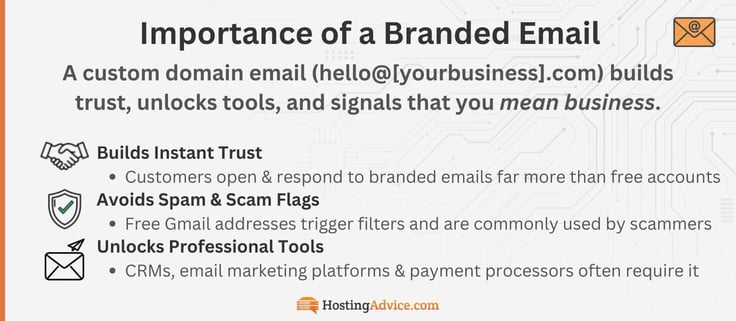
The Pros and Cons of upgrading your business email from free to domain-based:
Pros
- Build trust with customers and new site users
- Avoid your emails being flagged as spam by the major email providers
- A requirement for many payment processors, CRMs and marketing platforms
- Open the door to run email marketing campaigns
- Use your custom domain name @yourdomain.com
- Create employee and department email addresses (info@yourdomain.com or john@yourdomain.com)
- Productivity apps and advanced collaboration tools
- Advanced security features like encryption, spam tools, and smart responders
- More dedicated storage per mailbox with room to scale
- Business-grade compliance (HIPAA, GDPR)
Cons
- Monthly or annual fees per user
- Requires some technical setup
- Vendor lock-in
As you can see, the Pros greatly outweigh the Cons.
Either way, if you’re in the market for a paid email hosting service, you likely have a good reason. Maybe you’re launching a small business and need a custom domain name. Or perhaps you’re tasked with finding a new solution for your workplace. Whatever the case, understanding the pros and cons of paid email hosting is beneficial before making your choice.
If you want to look professional, there’s really only one option. Get a domain-based email. This goes for anyone who has a website or is currently building one: small business, artist, entrepreneur, influencer, actor, public figure, or local mom ‘n pop. They go hand in hand. Now’s the best time with competitive options if you’re building your public brand for the first time.
Is There Free Email Hosting?
The most obvious answer is yes, but only for a non-professional email like Gmail, Yahoo, or Apple iCloud mail. But those are not really an option when it comes to leveling up to professional domain-based email. The question becomes, is it possible to get a Pro email for free?
Many hosting providers offer a free trial, giving you a great chance to test an email (or web) host before you decide. That’s a good way to test inbox features and the dashboard before you go all in. Still, it’s wise to be careful with completely free standalone email hosting services. There’s usually a catch, unless you make the smart decision and decide to bundle your website hosting and email hosting.
In most cases, you’re better off choosing a budget-friendly website provider with enough bandwidth and solid features that includes unlimited domain-based email for free. For most businesses, this will cover all your general email hosting needs.
This can get a bit confusing, so look at it like this:
- Free personal email: Always free with limited storage. Think Gmail, Yahoo, or iCloud. This is not a professional email and will deter your customer base, as hackers and spammers also tend to cycle through these free email services. Free sounds good, but an email like [yourbusiness]@yahoo.com will hurt your credibility in the long run.
- Free professional email trial: This is a good way to test an industry-standard domain-based email provider. You can play with the settings, inbox, and marketing features before you fully commit. This is more common if you’re already hosting a live website and need to find an email host separately. Just be sure to check the renewal price.
- Free standalone email hosting: This may be the only red flag on this list. Remember, emails do take up server space in a data center somewhere, and that space isn’t free. There could be a few reasons for this, so what’s the catch? They may try to get money through data/send limit overage charges, an upsell ecosystem, or they may be operating at a loss to acquire you as a customer. Whatever the case, there are so many good and cheap options; why gamble on “free”?
- Free bundled and unlimited email: This is almost exclusively a bundled offer when signing up for a website host. Totally legitimate. You’re trusting them to host and build your website, so they sweeten the deal with free email included. Some hosts offer unlimited, some have basic email storage, and some offer a cPanel option to get you started, with the ability to upgrade later (to something like Titan).
I understand that budget constraints can be a major factor in selecting a web host for personal use. So, if you’re still interested in free web hosting, check out our recommendations for the best free or low-cost web hosts. You may have to upgrade to a paid plan in the future, but these choices will give you a lot of value for what you pay.
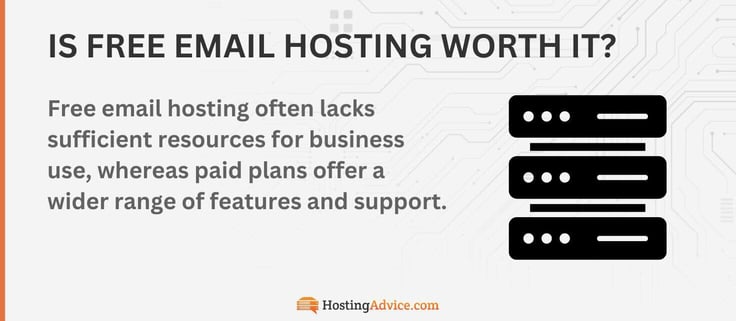
When you’re looking at options for a professional email host, investing in a service that truly meets your business’s needs is a smart move. Although it may cost more initially, the benefits you gain will far outweigh the expense.
Can I Create a Free Email if I Already Pay for Hosting?
Yes, and if you’re not already doing this, stop reading and go check your account right now. If you’re paying for hosting with any of the cPanel-based hosts on this list, a branded email address is very likely already sitting in your dashboard, unused, waiting for you to notice it.
The catch, and there’s always a small one:
- You’ll need cPanel access to find the tool; most hosts bury it a click or two deep.
- It typically runs on your site’s own storage, not a separate allocation, so a media-heavy website eats into your email room, too.
- It’s genuinely bare-bones compared to a paid Titan upgrade: no AI drafting, no read receipts, no calendar sync, just a working inbox.
That last point is fine. A working inbox is the whole point. You don’t need Titan’s bells and whistles to send a professional-looking email from support@yourbusiness.com instead of yourbusiness2003@gmail.com.
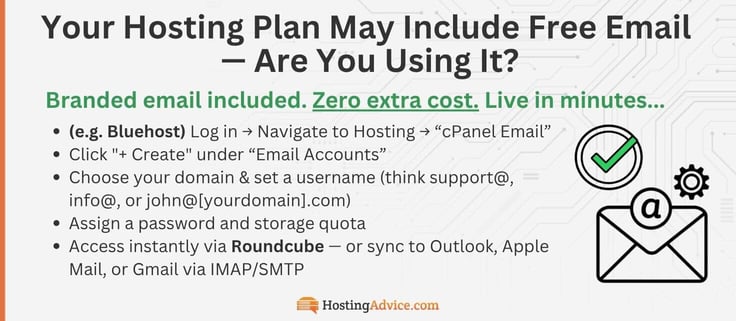
Here’s the process on Bluehost, which is about as representative as it gets:
- Log in and head to Hosting
- Click cPanel Email
- Click “+ Create” under Email Accounts
- Choose your domain and set a username, support@, info@, or john@[yourdomain].com
- Set a password and a storage quota
If you need a little more in-depth guidance, check out this full article. If you remain within Bluehost’s free mailbox allowance, you can create a professional email address without a separate purchase. Additional mailboxes require a paid cPanel Email tier. From there you can check it through the built-in Roundcube webmail client, or connect it to Outlook, Apple Mail, or Gmail over IMAP for syncing across your phone and laptop.
The real question isn’t “Can I get free email?” It’s “Why haven’t I set this up yet?”
What is Titan, and Why Would I Upgrade?
Titan’s whole pitch is that a free inbox gets you a professional-looking email, but it doesn’t get you a business toolset. As we’ve discovered, the professional email offerings are better and better, so you may never need to upgrade, but it’s important to know why people do.
Once you’re actually running a growing eCommerce site, the gaps in email marketing needs start to show up:
- No way to know if a quote got read
- No scheduling link
- No AI helping you write faster
- No way to send more than a handful of messages a day without tripping spam filters.
Titan fills every one of those gaps, and on the top Ultra tier, it turns your inbox into something closer to a lightweight CRM. You don’t have to jump into the deep end of email marketing just yet. With Bluehost, HostGator, InMotion, and Hosting.com, you can upgrade if and when you’re ready. The option will be there.
AI & Writing Tools
- Titan AI (compose, reply): drafts full emails or replies from a prompt, pick Professional, Casual, or Friendly tone, and it works in multiple languages
- AI Summary: condenses a long thread into the two or three lines that actually matter, so you’re not scrolling through twelve replies to find the decision
- Grammar & Spell Check: catches errors before they go out and makes you look sloppy in front of a client
Sales & Marketing Tools
- Titan AI (compose, reply): drafts full emails or replies from a prompt, pick Professional, Casual, or Friendly tone, and it works in multiple languages
- AI Summary: condenses a long thread into the two or three lines that actually matter, so you’re not scrolling through twelve replies to find the decision
- Email Campaigns: send bulk, personalized emails without switching to a separate marketing platform
- Email Designer: build visually engaging, branded emails instead of plain text
- Titan Bookings (Appointment Booking): a scheduling page clients book directly, no back-and-forth
- Invoice Builder: create, send, and track invoices right from the inbox, no separate accounting tool needed
- Attachment & Link Tracking: see who opened a file or clicked a link, not just who opened the email
Productivity
- Read Receipts: know the second your pitch gets opened
- Send Later: write at midnight, land in someone’s inbox at 9 am
- Follow-Up Reminders: a nudge when a thread’s gone quiet
- Email Templates: save your best responses and reuse them
- Priority Inbox: important messages surface automatically, noise gets pushed down
- Contact Groups: email a whole team or client list in one click
- Signature Designer: a signature that actually looks designed, with social icons and branding
- Undo Send: the “wait, no” button for a typo or missing attachment
Storage & Backup
- Titan Drive: dedicated cloud storage separate from your inbox
- Email Backup: automatic backup with restore anytime
Security & Deliverability
- Custom DKIM: proves to receiving servers you’re a legitimate sender, not a spoofer
- Advanced anti-spam and anti-virus: filters both directions, inbound and outbound
- Two-factor authentication and data encryption
- Higher sending limits by tier: the free tiers on most hosts cap out fast; Titan’s top tier allows up to 2,000 emails a day per mailbox, a real ceiling for anyone running actual campaigns
The honest way to think about it: a solo freelancer sending the occasional invoice will use maybe three things on this list. A five-person sales team running outreach, sending quotes, and booking calls will use almost all of it, and that’s exactly who Titan is built for.
Hosts That Let You Upgrade to Titan
| Host | Titan Integrated? | Free Tier | Titan Upgrade Cost |
|---|---|---|---|
| Bluehost | Yes | Free cPanel or basic Titan trial | Titan Ultra tier, ~$5.83/mo |
| HostGator | Yes | Free basic tier (email is billed separately after the term period) | Titan Pro ~$1.67/mo, Titan Ultra $5.83/mo (1-year term) |
| InMotion Hosting | Yes | Free cPanel email (base tier) Titan is a separate service. | Professional Email (Titan), Enterprise ~$5.24/mailbox |
| Hosting.com | Yes | Free cPanel (base tier) Titan is a separate service. | Full Titan AI suite on Ultra, ~$5.99/mailbox |
| ScalaHosting | No, uses its native SPanel email tools | N/A | N/A |
| SiteGround | No, unlimited is the only tier offered | N/A | N/A |
| InterServer | No, one flat plan covers everyone | N/A | N/A |
| GreenGeeks | No, runs basic Roundcube webmail | N/A | N/A |
Four of the eight hosts on this list, Bluehost, HostGator, InMotion, and Hosting.com, plug directly into Titan, and it’s the same underlying product across all four, just priced and packaged slightly differently depending on which host is reselling it.
Average cost to upgrade: landing right around $5 to $6 a month per mailbox for the full Titan Ultra tier with AI compose, AI summary, email campaigns, and invoicing. HostGator‘s entry Pro tier is the cheapest door in at $1.99–$2.99/mo, but that only gets you the basics, no AI, no campaigns.
If AI and marketing tools are the actual goal, budget for the Ultra-equivalent tier on whichever of these four hosts you’re using.
Cost Tiers: What You Actually Get at Each Price Point
Rather than comparing hosts one at a time, zoom out and look at what tier of email experience your budget actually buys. Three tiers, three very different inboxes.
Tier 1: The Professional Baseline (Free Bundled Email)
Price: Free, bundled into hosting you’re already paying $2–$5/mo for
Best for: Solopreneurs, freelancers, hobby sites, and anyone just getting a business email off the ground
Who’s here: Bluehost, InMotion, GreenGeeks, HostGator, and Hosting.com
What you get:
Pros
- Custom domain email (yourname@yourdomain.com)
- Webmail via Roundcube
- IMAP/POP3 sync across devices
- Standard spam and virus filtering
- Multiple email accounts, depending on the plan
Cons
- Little to No AI tools, no calendar sync, no read receipts
- No dedicated IP (deliverability depends on shared server’s reputation)
This tier is genuinely fine for most people. A working inbox on your own domain beats a free Gmail address every time, and none of these hosts charge extra for it.
Tier 2: Unlimited Email Accounts Included
Price: Included with web hosting; no separate email tier required for unlimited account creation
Best for: Businesses that need numerous professional email addresses without paying per mailbox
Who’s here: ScalaHosting, InterServer, SiteGround
These three include unlimited email-account creation without requiring a separate paid email upgrade, although storage, sending, and acceptable-use limits still apply:
- ScalaHosting ($2.95/mo): unlimited email-account creation with IP-reputation monitoring and outbound email scanning through SPanel.
- InterServer ($2.50/mo): one plan with unlimited email accounts, storage, and data transfer, subject to acceptable-use limits.
- SiteGround ($2.99/mo): unlimited email on every plan, StartUp through GoGeek, no Titan-style tier lurking above it.
What you get with these Top 3 picks:
Pros
- Everything from Tier 1, plus more: same custom domain email, webmail, and IMAP/POP3 sync, with real upgrades stacked on top
- Unlimited email accounts, no upgrade tier required, ever
- AI-driven spam and security tools standard (ScalaHosting’s SShield, SiteGround’s AI-powered filtering)
- Guaranteed or actively monitored deliverability (hourly blacklist checks, Mail.Baby spam scrubbing)
- One flat price with no paid “Pro” tier sitting above it
- No decision fatigue later, no feature gate you’ll eventually hit
Cons
- Priced slightly above the cheapest Tier 1 options ($2.50–$2.99/mo vs. Bluehost’s $1.99/mo)
- No path to Titan-style AI writing or marketing tools if you ever want them
Bluehost, HostGator, InMotion, and Hosting.com offer paid email upgrades for customers who need additional mailbox capacity or advanced features. With these three Tier 2 hosts, creating more email accounts does not itself trigger an upgrade, though other email or hosting limits may eventually affect your needs.
Tier 3: Standalone Business Email, Per-Seat Pricing
Price: Starting at $5–$7/user/mo, climbing with every hire
Best for: Teams that prioritize collaboration, centralized administration, advanced security, or compliance tools
Examples: Google Workspace, Zoho Mail, Microsoft 365
Unlike the first two tiers, these services don’t include conventional web hosting or unlimited mailboxes. You’ll still need a separate provider for your website, and your email cost generally increases as your team grows.
What you’re paying for is a broader business suite: tools such as shared calendars, document collaboration, video meetings, centralized account management, and more advanced security controls. This tier can make sense when those capabilities matter more than getting email bundled with an inexpensive hosting plan.
Worth considering if your team already works within one of these ecosystems. Probably unnecessary if you only need a few professional addresses on your domain.
Pros
- Full productivity suite bundled in (Docs, Sheets, Meet, or Word, Excel, Teams)
- Gemini or Copilot AI built directly into the inbox
- Formal compliance certifications (HIPAA, GDPR) at higher tiers
- Enterprise-grade admin controls and per-user permissions
- Instant name recognition, no explaining “what’s this email service” to a client
Cons
- No unlimited mailboxes at entry, ever, pricing is strictly per seat
- $6–$7/user/mo minimum entry, and it climbs every time you hire someone
- Zero web hosting included, this is an extra bill stacked on top of your site
- Overkill if all you actually wanted was a branded inbox
- A five-person team can run 10x the cost of a budget host for the same mailbox count
The takeaway: Tier 1 is sufficient for many solo operators and small businesses that need a few professional inboxes. Tier 2 is better for businesses that want to create unlimited email accounts, though storage and sending limits still apply. Tier 3 makes sense for teams willing to pay separately for advanced collaboration, administration, and security tools.
Which Email Hosting Provider Is Best?
Honestly? There isn’t one universal answer, and anyone who tells you otherwise is trying to sell you something. But there is a fast answer, and it comes down to matching your actual situation to one of three buckets.
- Solo operator, freelancer, or small local business just getting off the ground? Bluehost offers a low-cost starting point if you only need a few mailboxes, while InterServer and ScalaHosting include unlimited email-account creation for businesses that need more addresses.
- Running a small business that’s starting to send quotes, book appointments, or chase leads? That’s the moment to look at Titan through Bluehost, HostGator, InMotion, or Hosting.com; the AI drafting and read receipts alone tend to pay for themselves fast once you’re actually running outreach.
- Need centralized collaboration, administration, or advanced security across a growing team? Consider a standalone service such as Google Workspace, Zoho Mail, or Microsoft 365, understanding that you’ll pay separately for website hosting and generally pay per user for email.
With so many services and pricing options from email and web hosts, reflect on how crucial features like unlimited bandwidth, complimentary email, or a free domain are for you. If you’re hosting a professional portfolio or personal blog, you might find cheap unlimited hosting or WordPress website builder hosting beneficial.
The practical approach is to start with the mailbox capacity and features you need today, then upgrade if your team or email usage grows. Before signing up, compare the introductory term, renewal price, storage allocation, sending limits, and number of included mailboxes.
Choosing the right email hosting provider means finding one that fits your unique needs. If ScalaHosting, InterServer, or Bluehost caught your eye, compare its current plans to confirm which email features are included at the advertised starting price and what the service will cost upon renewal.
There are plenty of quality, affordable email hosting providers to choose from, and one of our favorite recommended providers will help you proceed with confidence. Thank you for reading, and don’t forget to follow us on social media!
HostingAdvice.com is a free online resource that offers valuable content and comparison services to users. To keep this resource 100% free, we receive compensation from many of the offers listed on the site. Along with key review factors, this compensation may impact how and where products appear across the site (including, for example, the order in which they appear). HostingAdvice.com does not include the entire universe of available offers. Editorial opinions expressed on the site are strictly our own and are not provided, endorsed, or approved by advertisers.
Our site is committed to publishing independent, accurate content guided by strict editorial guidelines. Before articles and reviews are published on our site, they undergo a thorough review process performed by a team of independent editors and subject-matter experts to ensure the content’s accuracy, timeliness, and impartiality. Our editorial team is separate and independent of our site’s advertisers, and the opinions they express on our site are their own. To read more about our team members and their editorial backgrounds, please visit our site’s About page.