

Writer: Surajdeep Singh


Editor: Britain Simons


Reviewer: Cristian Lopez

Have you ever craved comfort food, maybe pizza, at one in the morning? Where I live, my late-night cravings go unsatisfied — the restaurants close shop by 10 PM. And before you know it, they miss out on all that sweet-sweet business I’d give them. And yes, I know how to cook, I just don’t want to do that late at night.
Now, picture the digital world. Can you imagine a life where websites decide to close shop or “take a nap” for, let’s say, eight to twelve hours every night? That’s a minimum of 33.3% downtime — yeah, that would never fly for a digital business.
A website is only as good as the amount of time it’s online. Factor in global time zones, consumer habits, and the expectation of 100% availability — hosting servers can’t afford a break. Can you imagine if Amazon were down every night? Its direct competitors, like Walmart, Target, Best Buy, and eBay, would have a field day… er… night?
Website uptime statistics tell us how reliable, resilient, and trustworthy a website really is. In this analogy, Amazon’s uptime would be 66.7%, which would be far from the minimal acceptable standard of 99.9% (Thankfully, Amazon AWS really has close to “five nines” uptime – 99.999% availability).1
In business, even 0.1% downtime matters. No, I’m not being dramatic. 0.1% downtime means that your business might face around 43 minutes of server outage per month. 43 minutes. That could mean thousands in lost revenue, customer retention, and a tarnished reputation.
If you’re a website owner or just a curious reader, here are 15 website uptime statistics that you must know. I hope you can use this knowledge to better understand your own uptime stats and prepare your website to be reliable.
1. No Website Has 100% Uptime
We are limited by real-world hardware. See, as much as we’d like to maintain 100% uptime, it’s not technically possible — you will face downtime for maintenance, traffic spikes, code errors, and unforeseen issues. There are more than a billion websites and counting (1.4 billion, to be precise), and not a single one of them has 100% uptime.2
You might be thinking, “What about banks?” There must be some exception.
Not even billion-dollar banks, governments, or hospitals have 100% uptime. On occasion, I receive emails from my bank telling me they’ll be offline for a short period for maintenance. And no, this doesn’t mean cybercriminals can “break in” when the site is offline.
If it were that simple, the “Mission Impossible” movie series would be renamed Mission Very-Possible.

I mean, Tom Cruise would just open his tablet, from his plush sofa, type a few lines of code, and boom — a billion dollars transferred to some megalomaniacal evildoer’s overseas account. Two minutes in… End of movie. How anti-climactic!
Websites will “go down” a fraction of the time, but it’s not the end of the world.
Now that I think about it, cyberattacks (DDoS) flooding servers could be another cause of downtime. But, back to these stats and tips!
Pro Tip: Schedule maintenance for late at night, based on the most active user region, so fewer users are affected.
2. 99.9% Website Uptime is the Minimal Acceptable Standard
We’ve played with the math for 99.9% uptime, so now let’s run the numbers for 99.999%, or as I call it, the “five nines” — it’s what the banks and Fortune 500s swear by.1
0.001% downtime basically means your website is offline for only about five minutes per year. Now, you don’t need that level of availability unless you’re running an extremely high-level website that absolutely can’t go offline. If I were you, I wouldn’t even stress about the five nines, but it’s good to be aware of what’s possible.
For you, my friend, 99.99% uptime is more than adequate. Even at 10 times more downtime than five nines, 99.99% strikes a perfect balance between reliability, attainability, and cost. Check your web host for uptime stats.
3. Downtime Can Cost Small Businesses Up To $427/Minute
Can you imagine losing $137 to $427 for every single minute your website is down? Forgive my math skills, but here goes: at 99.99% uptime, or a little less than an hour of downtime total, that could add up to roughly $22.6k in lost revenue annually!1
You might be thinking: “I could save 10 times more by achieving 99.999% uptime!” And theoretically, that’s true. Less downtime means less money lost, but only when revenue exceeds the sunk cost. Other, more manageable factors play in for smaller businesses, such as navigating high-traffic times.
Simply put, hosting and maintaining the premium infrastructure required for five nines can cost thousands of dollars per month, and you’d have to scale to millions in revenue to make it worth it.
4. Large Companies Lose $16,000/Minute to Downtime
I came across a website called Site-Down.com while researching for this guide, and it’s super interesting. It monitors thousands of popular sites and provides real-time statistics like 30-day uptime, 30-day outages, and website loading speed.
Guess which website I tested first? Drum roll, please… Amazon.com, of course. I had to do it justice!
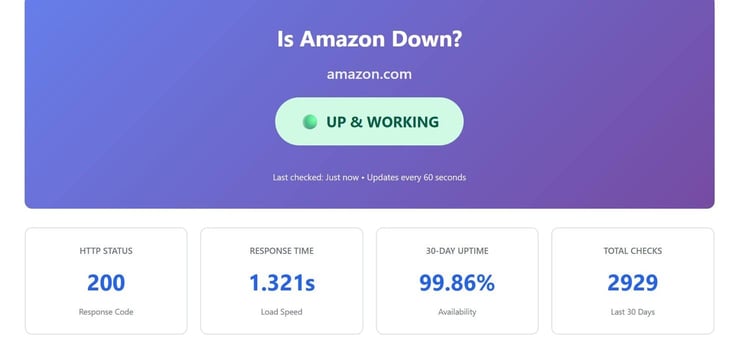
Apparently, Amazon has had a 30-day uptime of 99.86% (not quite the purported five nines) and faced only four outages in this period. Even so, that’s spectacular, really, and I expect no less of Amazon. But let’s do the math.
The reality is, this tiny percentage of 0.14% downtime means shareholders and Jeff Bezos’ company lost an estimated $967,000 over the last 30 days.1,3 That’s a lot of money. That’s a projected $11.6 million over the course of a year — gone!
5. There Are 12.5k Website Outages Hourly
I’m going to jump from one awesome website to another — this one’s even better. Have you heard of Pingdom? It’s quite similar to Site-Down and is, frankly, a much more popular option for website uptime and performance monitoring.
The website displays a live broadcast of the state of the internet, and I’m all for it! Check out this live “State Of The Internet” below.
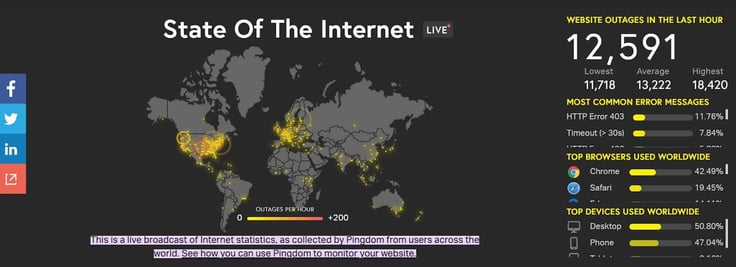
How cool is that? Do you see the yellow dots and reddish-yellow circles? They represent live website outages around the world. I guess the U.S. and Europe are particularly affected, but that could be a limitation of data availability. I mean, Russia is practically spotless! Of course, Pingdom can’t possibly assess every website in the world, but still, this is pretty impressive.
According to Pingdom, there have been more than 12,500 website outages in the last hour itself.4 Ouch.
6. HTTP 403 Errors Account for 12% of All Website Outages
Let’s stay on this website for a while. Can you see the data on the right-hand side of the screen — you’ll really enjoy the visual effect.
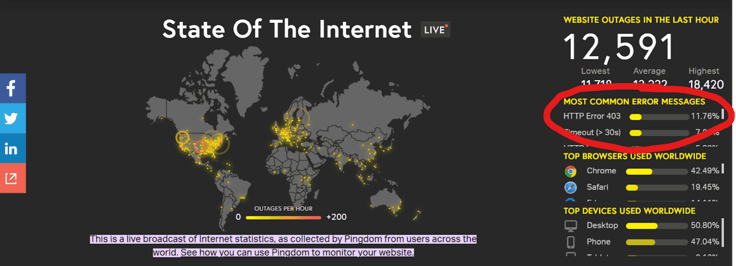
According to Pingdom, “HTTP Error 403” is the most common error message that’s displayed on a website when it faces an outage — it accounts for around 12% of all outages.4
If you’re on a website and this error message pops up, it means the site is technically online, but you can’t access it. The most common reason for this error is over-aggressive security measures. If your website is affected, check your security configurations to identify what’s blocking access.
7. 4% of All Website Outages Are Due to an HTTP 503 Error
Now, while HTTP 403 errors are relatively harmless (simple security fix), alarm bells should go off in your head if your website is facing an HTTP 503 error. Your system is overloaded and just can’t cope.
First, check your firewall, disable new plugins, and clear your cache. If that doesn’t solve the problem, you need to either reduce the CPU load or increase memory capacity. Around 4% of all website outages are due to an HTTP 503 Service Unavailable error. Four percent is roughly 53.6 million websites, so you’re not alone.4
But you need to act — and fast.
More common solutions: refresh the page, temporarily disable the CDN (content delivery network), and check the update schedule. Again, review your server health to see if something is maxed out: CPU, RAM, or storage capacity. Also, check your logs, rule out traffic spikes and possible DDoS attacks.
Above all, stay calm, and please put up a maintenance page for your site visitors — you need to master damage control for such situations.
8. 79.39% of Global Internet Users Favor the Chrome Browser
Which web browser do you use? I used Google Chrome on my previous laptop for its great extensions, but I prefer Microsoft Edge now for its simplicity. And, since I have an iPhone, it’s Safari all the way for everyday mobile browsing.
The stats don’t lie, and the winner is clear for global users. Are you in the Google Chrome camp? Then, you’re among the 79.39% of worldwide internet users who prefer it in 2026. Edge is around 10%, but the surprising one is Safari at 6%, respectively.4 I always knew I was unique.
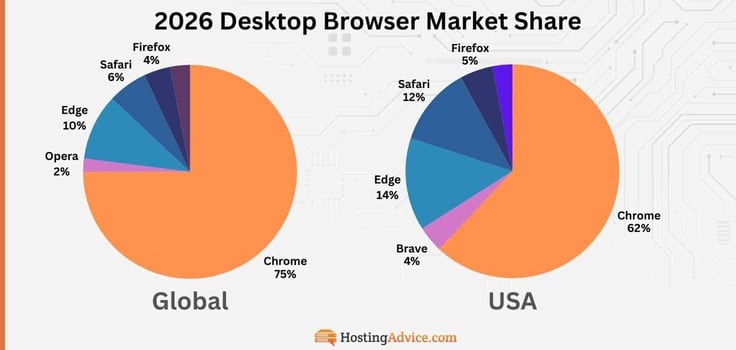
Users in the USA are similar, with around 62% preferring Chrome over the 14% using Edge. The big difference is in the niche users — 4% prefer the Brave browser over the growing 2% of Opera browser users abroad.
9. 60.5% of Global Web Traffic Comes From Smartphones
If you truly analyze the “State of the Internet” site, from stat number 6, you’ll see that Pingdom shows computer browsing is more popular than smartphones. We both know that’s not true. So why did they publish that?
The likely explanation is that they collect live information from users around the world and display these stats in real time. So, at the particular time of writing this, a large chunk of these users were likely also at work, like me, from their laptops and work computers!
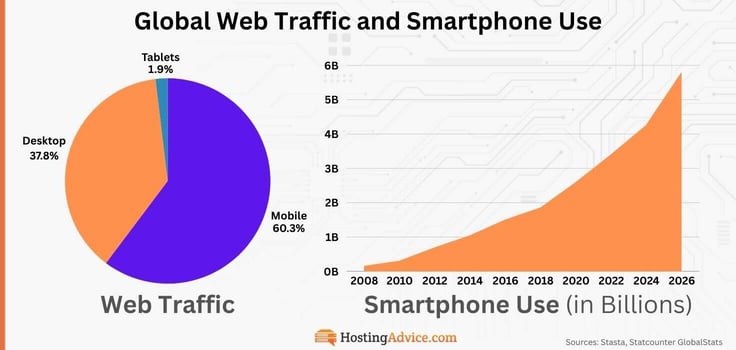
The reality is that around 60% of web traffic comes from mobile devices.5, 16 And here’s another fun stat for you: there are approximately 5.78 billion smartphone users in the world today.6 That was the entire population of the Earth when the TV show “Friends” hit its peak in broadcasting. In the late 90s, Nokia was also the king of brick cellphones — they weren’t even smart yet!
10. 50% of Data Center Downtime is Human Error
Even if you’ve done everything right from your end, a single mistake from your data center operator could lead to a full website outage.
And considering your website “lives” on data center servers, this is a problem. According to my research, around 50% of significant human-related downtime in data centers is because staff failed to follow procedures.7 Their negligence could cost you.
The solution? Build your website with a built-in safety net that is prepared and catches errors before they reach your users. Human error is almost a given. Do your bit to prevent an even worse outage: use a CDN (content delivery network) like Cloudflare, keep security updated, choose a reliable host, and automate backups.
11. Under One-Hour MTTR Cuts Customer Churn by 50%
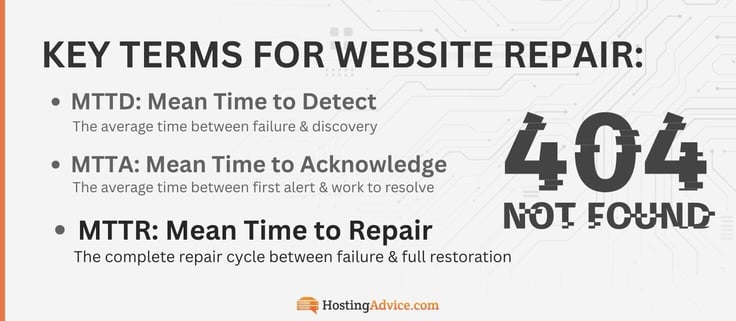
This one is big! Let’s assume your website is down. Of course, you need to find the root cause and address it ASAP. The time it takes to do that is MTTR.
The term MTTR stands for Mean Time to Repair. You want to be up and running again as soon as possible. You will lose users if they land on your website and it’s down. In a free market, there are just so many options for them. This is especially true if you sell products from an eCommerce website.
The important time window? If you’re able to recover your website within an hour, you may experience 50% fewer customer churn incidents.8 Every second counts. I recommend being transparent about the cause for the website outage on your socials (and email list), once you’ve resolved it. If anything, a company that has a human side stands out — own it, apologize, and move forward.
12. An Expired Certificate Can Cost Enterprises Up To $5M
Talk about a crazy synchronicity. Remember Site-Down.com? It was working properly and had a valid SSL certificate when I first visited it. I revisited the website a few moments ago, and boom — it’s now an “HTTP” site. It’s lost all its credibility, and I’m never going to visit it again.
If you don’t already know, HTTP is dangerous because it’s stripped of any security encryption, which is much needed on the internet. HTTPS, on the other hand, validates a website’s identity through digital certificates and protects information like passwords and sensitive data. That’s why your browser will warn you if you accidentally visit one.
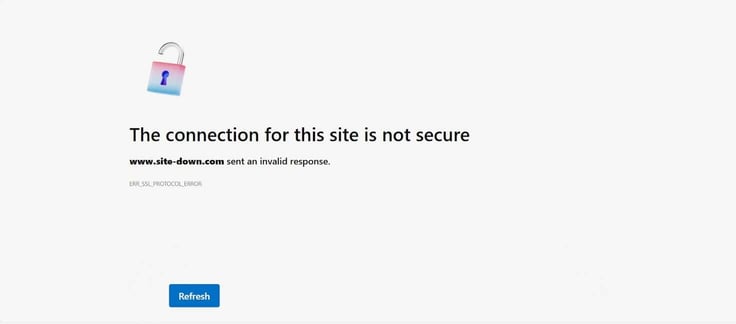
However, since I do my best to be a good man, I’ll try to find a point of contact and make a recommendation to update their certification. Or else, well, they’ll become untrusted and irrelevant. I might sound harsh, but that’s the name of the game.
This is your sign to set up automatic SSL certificate renewal — it’s the smart thing to do, financially and intrinsically.
Enterprises are losing between $500,000 and $5 million due to website downtime caused by it — we’ve gone over how bad downtime can be. A simple oversight costing millions. It takes more than five hours to renew an SSL certificate, like the DMV of the internet.9
13. Mobile Websites Have a Bounce Rate of 51%
Do you still use Wikipedia? I only use it to read about the careers of my favorite footballers. Since they typically have long careers and resulting bios, I end up skimming through and getting bored. I might switch apps and finish up later. Technically, that’s not bouncing — I do revisit the webpage most of the time. But it gets to the core reason people leave your site.
What I’m trying to say is, mobile users lose interest quickly. And while I will come back to Wikipedia to learn more about my favorite players because I trust it, most users who bounce from your site won’t return.
You can think of the experience of visiting your website for the first time as a first date — if they stay and try to get to know you better, you might get a second date. Typically, mobile websites have a bounce rate of around 51%, so expect half of your “dates” to bail on you anyway!10
To improve your retention, focus on these tips: optimize images for fast loading, unclutter your design, deliver high value, and speak directly to your target audience. Beat the 51% average!
14. AI-based Uptime Monitoring Tools Have 90% Accuracy
ChatGPT isn’t the only AI tool you should be using — far from it. The safety net I talked about for your website should include AI-based anomaly detection. I know you don’t have the time to sit in front of your screen to monitor your outdated security tools 24/7.
What if there’s an IT incident that you don’t have the time or expertise to spot? AI-based anomaly detection is around 7 minutes faster than traditional tools and achieves 90% accuracy.11
For this, I’d recommend Site24x7.com for cloud, server, and general website IT monitoring. We’ve talked about how costly downtime and poor security are, so this deserves a good shoutout.
15. Three Websites Are Created Every Second

Think about this stat! Three per second. 175 per minute. 10,500 per hour. 252,000 per day.12 By the time you read and process these numbers, more than a hundred new websites will have gone live. Let that sink in.
Your website is just a teeny-tiny part of the internet, but that doesn’t mean it’s not special. It is. You offer something unique. And now? It will be even more secure, attention-grabbing, and fast.
Remember, it could be the best website in your niche, but let’s say you let its SSL expire — you’re cooked. What matters most is how you take care of it to make it stand out from the crowd.
The Bottom Line on Website Uptime Statistics
I hope you found these statistics as interesting as I did. Out of curiosity, I wanted to show you a stat that ties site downtime to SEO rankings, but I couldn’t find anything credible. Let’s just say your page rankings in search could drop if your website is down even briefly — downtime hinders Google crawlability, which limits accessibility, and signals low trust.
Yes, downtime = unreliability, and it is factored into rankings. Even if indirectly through crawl and indexing errors. So, please treat these stats as an eye-opener.
Of course, we had fun along the way, but I want you to learn from these real-world stats and avoid mistakes that could affect your website. Aim for 99.99% uptime, use AI tools to stay secure, be upfront about maintenance, and always look for ways to improve your website.
‘Til next time, take care. Don’t forget to follow us on social media and use our search function to find the best expert-written advice articles on the web!
Sources Used to Compile This Data
- https://www.hostinger.com/in/tutorials/how-to-monitor-uptime-and-downtime
- https://siteefy.com/how-many-websites-are-there
- https://www.site-down.com
- https://livemapdata.pingdom.com
- https://research.com/software/guides/mobile-vs-desktop-usage
- https://www.demandsage.com/smartphone-usage-statistics
- https://www.statista.com/statistics/1481877/latest-crucial-human-error-data-center-outages-cause
- https://hyperping.com/blog/mttr-guide
- https://redsift.com/resources/blog/how-expired-certificates-can-cause-service-downtime-and-financial-losses
- https://blockagency.co/blog/bounce-rate-statistics
- https://uptimerobot.com/knowledge-hub/monitoring/11-best-uptime-monitoring-tools-compared
- https://siteefy.com/how-many-websites-are-there
- https://gs.statcounter.com/browser-market-share/desktop/worldwide/#monthly-202601-202602
- https://www.statista.com/forecasts/1143723/smartphone-users-in-the-world/
- https://www.statista.com/statistics/263437/global-smartphone-sales-to-end-users-since-2007/
- https://gs.statcounter.com/platform-market-share#monthly-202511-202601-bar/