

Writer: Andrew Wandola


Editor: Lillian Castro


Reviewer: Christina Lewis

You’re probably searching for the best web hosting with Softaculous because building a website or application can feel overwhelming. I’ve lost count of how many times my excitement for a project vanished after switching tabs nonstop just to access a plugin, update a feature, or troubleshoot an issue.
But hey, that’s a web developer’s job, right? Not really! Ever heard of working smart, not hard?
Any experienced developer will tell you that the entire development process consists of 20% development and 80% troubleshooting. So why work hard when you can work smart? That’s where Softaculous comes in.
-
Navigate This Article:
Best Web Hosting Providers with Softaculous
I started using shared hosting plans with Softaculous primarily because this type of hosting was the most affordable (it still is). Further down the line, I discovered more advantages and learned important lessons worth sharing.
1. Hostinger.com

Monthly Starting Price $2.69
- Best overall value: Nothing at this price comes close feature-for-feature.
- AI builds your site in minutes — no technical skills needed
- Up to 3 websites with free SSL
- Weekly backups and managed WordPress
- 2 business mailboxes free for 1 year
- Get started on Hostinger now.


Sead Fadilpasic

| Money Back Guarantee | Disk Space | Domain Name | Setup Time |
|---|---|---|---|
| 30 days | 20 GB SSD | FREE (1 year) | 3 minutes |
You probably know that shared hosting is one of the cheapest ways to host a website. But I haven’t seen anything quite like Hostinger in a very long time. This web host unlocks a new level of affordability I didn’t know existed.
A free website domain name for the first year, a free three-month subscription, and a 30-day money-back guarantee headline this host’s generosity when you first sign up.
Not everyone knows how Softaculous works, and the name alone can sound a little intimidating. The good news is that the software itself is designed to make things much easier.
If you don’t know what it is and how it works, stick around. I’ll go over that at the bottom half of this article.
So, to avoid all that confusion, Hostinger has an excellent tutorial on how to use it directly from its cPanel to install the applications you need. And with unlimited free SSL certificates, unlimited bandwidth, a free email account, weekly backups, and at least 100 gigabytes of SSD storage for their base plan, what else would you need to start utilizing Softaculous?
How to use Softaculous with Hostinger >>>
2. Bluehost.com

Monthly Starting Price $1.99
- Beginner-friendly setup with free domain for the first year
- AI-powered site setup with 1-click WordPress install
- Free CDN, malware scanning, WAF, and DDoS protection
- Weekly backups + 99.99% uptime SLA
- WordPress.org recommended host since 2005
- Get started on Bluehost now.
Sead Fadilpasic
| Money Back Guarantee | Disk Space | Domain Name | Setup Time |
|---|---|---|---|
| 30 days | 10 GB NVMe SSD | FREE (1 year) | 5 minutes |
Bluehost reminds me of that one friend you can always count on to show up at your party. When it comes to any conversation on affordability, trust this web hosting provider to make an appearance.
Just to give you some perspective, if you thought Hostinger and HostArmda were cheap web hosting options, you’ll be happy to find out that Bluehost is a few cents cheaper than the two. And the best part is that despite being incredibly affordable, this web hosting company still stands tall and proud in the web hosting sphere.
While Bluehost supports Softcalous, how you’ll access this feature depends on the interface your account uses. This website hosting service offers the Legacy and Bluerock interfaces, each with a unique process of accessing Softaculous.
Fortunately, you don’t have to figure everything out by yourself. Bluehost also has in-depth tutorials on accessing this feature on its platforms, as shown in the link below.
How to use Softaculous with Bluehost >>>
3. HostArmada.com

Monthly Starting Price $1.99
- Cloud-based NVMe SSD servers across 11 global data centers
- 7 daily backups, free SSL, and Imunify360 WAF protection
- Free cPanel, Softaculous 1-click installs, and website migration
- 45-day money-back guarantee — longer than most hosts
- 24/7/365 support via phone, chat, and tickets
- Get started on HostArmada now.


Christina Lewis
| Money Back Guarantee | Disk Space | Domain Name | Setup Time |
|---|---|---|---|
| 45 days | 15 GB NVMe SSD | FREE (1 year) | 3 minutes |
Initially, I wasn’t really sure about HostArmada and not only about their ability to support Softaculous but also their performance in general. Because they’re generally new (founded in 2019), I decided to take them for a spin.
The first thing I noticed is that they’re actually affordable. They seem to have almost the same pricing model as Hostinger, but the latter has more incentives, such as the free three-month subscription offer. That said, I’m aware that some of these special offers are temporary and don’t entirely reflect how affordable a web hosting service is.
Even without the special offers, Hostinger and HostArmada are still quite affordable. HostArmada, in particular, comes with a free SSL, free domain, and free website transfer. They’ll also optimize your website for a plethora of open-source applications, including WordPress, Magento, Joomla, WooCommerce, Drupal, PrestaShop, and OpenCart, all for free!
Affordability aside, I also loved the fact that they made it easy for users to find Softaculous on their cPanel. All you need to do is locate the “Software” directory, select the “Softaculous Apps Installer” icon, and the rest is self-explanatory.
How to use Softaculous with HostArmada >>>
4. InMotionHosting.com

Monthly Starting Price $4.59
- FREE BoldGrid site builder and templates
- FREE website, domain, and cPanel migrations
- SSD storage makes your site load up to 20x faster
- Security suite includes SSL and hack protection
- Unlimited bandwidth and email accounts
- Get started on InMotion now.


Dave McQuilling

| Money Back Guarantee | Disk Space | Domain Name | Setup Time |
|---|---|---|---|
| 90 days | 100 GB SSD – Unlimited SSD/NVMe | Select Plans | 5 minutes |
I’ve had a profound love and admiration for web hosts designed for website owners but with web developers in mind. That’s because I know how frustrating it is to host a website or application that has little to offer for developers.
InMotion Hosting is what comes to mind when I think about such web hosts built for both developers and website owners. Their backend, for example, not only supports Softcalous but also provides FTP/SSH access, email creation and management, and other admin-level functions.
In addition, their Softcalous access process is pretty straightforward; all you need to do is choose your preferred hosting plan, log in to the cPanel, and locate the Softaculous installer. Before I forget, you can also buy a Premium Softaculous license directly from the web host’s cPanel.
Speaking of affordability, just how affordable is InMotion Hosting? To begin with, the base plan costs almost the same as what Hostinger and HostArmada offer. But the key benefits here are a free SSL certificate, unlimited bandwidth, up to 10 email addresses, and the freedom to choose your preferred datacenter.
Pro tip: For faster speeds, always choose a datacenter closest to you whenever you get this option.
How to use Softaculous with InMotion Hosting >>>
Best WordPress Hosting Providers with Softaculous
If your website runs on WordPress, using Softaculous makes your work even easier. From a one-click installation process, automatic updates, backup and restoration to a staging environment feature, nothing can prepare you for the true power of Softcalous on WordPress.
But you’ll need an equally incredible WordPress host to realize these and many other advantages of using Softaculous. Here are a few great options to choose from.
5. Bluehost.com
Monthly Starting Price $3.79
- Best for WordPress: WordPress.org’s longest-running recommended host since 2005
- 0.35s average load time — independently verified by WPShout
- AI builds your complete WordPress site in under 60 seconds
- Yoast SEO, NVMe SSD, WAF, and daily malware scans
- 24/7 WordPress experts — under 2-minute average response
- Get started on Bluehost now.
Sead Fadilpasic
| Money Back Guarantee | Disk Space | Domain Name | Setup Time |
|---|---|---|---|
| 30 days | 10 – 100 GB NVMe SSD | FREE (1 year) | 7 minutes |
As I mentioned earlier, trust Bluehost to show up when you need them most. And when it comes to WordPress hosting, very few hosts boast a WordPress endorsement. Bluehost is among the few hosts recommended by WordPress. When you choose Bluehost’s WordPress hosting with Softaculous, particularly the Basic plan, my only advice is that you keep an eye on the number of applications you intend to install.
That’s because the Basic plan comes with limited storage of about 10 gigabytes. The more applications you download with Softaculous, no matter the hosting plan, the more storage space they’ll consume.
6. Hostinger.com
Monthly Starting Price $2.69
- Best overall value: The most complete managed WordPress hosting at this price
- Kodee AI Agent manages your WordPress site via simple chat
- LiteSpeed servers boost site speed by up to 40%
- WAF, malware scanner, DDoS protection, and auto-updates
- Free migrations — 85% completed in under 5 minutes
- Get started on Hostinger now.
Sead Fadilpasic
| Money Back Guarantee | Disk Space | Domain Name | Setup Time |
|---|---|---|---|
| 30 days | 20 GB SSD – 100 GB NVMe | FREE (1 year) | 4 minutes |
Hostinger is yet another powerful web host that makes WordPress websites fast and easy to manage. I recommend this website if storage space is important to you and you also want to host multiple websites in one hosting account — the base plan lets you host up to 100 websites and offers unlimited bandwidth.
If you’re not fully comfortable with WordPress yet, Hostinger includes Managed WordPress on all its plans. You also get WordPress command line (WP-CLI), which lets you manage the program from a single place.
7. InMotionHosting.com
Monthly Starting Price $5.09
- UltraStack NVMe hosting makes WordPress up to 40x faster
- Automatic WordPress updates, free SSL, and malware scans
- Free domain, free cPanel, and free expert migration on all plans
- BoldGrid drag-and-drop WordPress builder with free themes
- 90-day money-back guarantee and 24/7 award-winning human support
- Get started on InMotion now.
Dave McQuilling
| Money Back Guarantee | Disk Space | Domain Name | Setup Time |
|---|---|---|---|
| 90 days | 100 – 300 GB NVMe SSD | FREE (1 year) | 5 minutes |
InMotion Hosting wraps up my list of recommended WordPress hosts with Softaculous. I’m a big fan of the fact that it offers optimization features such as W3 Total Cache for speed and tons of marketing tools, which can be especially useful if you run an eCommerce store.
And because WordPress runs on PHP, InMotion Hosting has at least two PHP workers per site for the base plan. The number increases up to six for the most expensive plan. Note that PHP workers are not actual human workers. Our web hosting expert Christina Lewis has covered more on that in this article.
Other Softaculous hosting providers worth mentioning include hosting.com (fastest web hosting provider), ScalaHosting (best for scalability), Google Cloud Hosting (best cloud hosting), and Liquid Web (best customer support).
What Is Softaculous Used For?
Softaculous is basically an auto-installer software. By that, I mean it simplifies the installation, management, and updating of various web applications. It also offers numerous scripts and applications you can install on web hosting platforms to achieve various outcomes such as content creation, marketing, speed optimization, and more.
Is Softaculous Included With cPanel?
Yes, Softaculous is usually one of the built-in features of a web hosting control panel. But there’s no standard process to locate this feature; it all depends on the layout of the control panel.
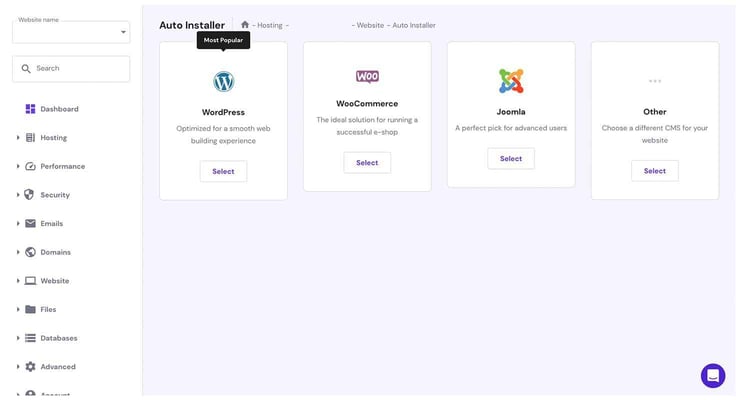
In most cases, it appears as an icon or a section specifically labeled as “Softaculous Apps Installer” or something along those lines.
Why Should I Use Softaculous?
I’ve used Softaculous on numerous occasions and for many different reasons. For one, I don’t have to browse through pages to manually install an application to my websites.
With a simple click of a button on Softaculous, I can install my preferred application from a database of more than 350 applications. I’m talking about content management systems (e.g., WordPress, Joomla, Drupal), eCommerce platforms (e.g., Magento, PrestaShop, WooCommerce), forum software (e.g., phpBB, MyBB), and many others.
I’ve also used Softaculous to manage installed applications through its user-friendly interface. From one dashboard, I can update apps, handle themes and plugins, adjust settings, and take care of backups and restores.

As a web developer, I usually have so much to do on a daily basis, and the last thing I want to do is keep up with application updates. It’s even more difficult when building or managing numerous websites that use different applications. Enter Softaculous, which automatically notifies me about available updates for installed applications and allows me to apply the updates with just a few clicks.
Teamwork is very much part of my routine development process. I find Softaculous very useful for staging environments, allowing my team members to work on a clone or a copy of a website or application for testing purposes. That way, the team can easily experiment with changes, themes, plugins, and updates, and just about anything else without affecting the live site. Once the client approves the final changes, all I need to do is push it to the live site.
You’re Only “One Click” Away From an Awesome Host
Softcalous offers one-click installation for web applications, but you’ll still need a dependable host to get the most from it. If that’s what you’re after, you’re just “one click” away from unlocking the full value of the hosts I’ve covered in this article. No matter which one you choose, you can feel confident that our web hosting experts, a team I’m proud to be part of, have tested them individually and trust them to deliver a smooth Softaculous experience.
HostingAdvice.com is a free online resource that offers valuable content and comparison services to users. To keep this resource 100% free, we receive compensation from many of the offers listed on the site. Along with key review factors, this compensation may impact how and where products appear across the site (including, for example, the order in which they appear). HostingAdvice.com does not include the entire universe of available offers. Editorial opinions expressed on the site are strictly our own and are not provided, endorsed, or approved by advertisers.
Our site is committed to publishing independent, accurate content guided by strict editorial guidelines. Before articles and reviews are published on our site, they undergo a thorough review process performed by a team of independent editors and subject-matter experts to ensure the content’s accuracy, timeliness, and impartiality. Our editorial team is separate and independent of our site’s advertisers, and the opinions they express on our site are their own. To read more about our team members and their editorial backgrounds, please visit our site’s About page.