

Writer: Laura Bernheim


Editor: Lillian Castro


Reviewer: Cristian Lopez

Like Python and PostgreSQL, the best ColdFusion hosting services are sure to elicit enthusiastic, spirited discussions among developers passionate about their favorite programming language.
In the scientific world, cold fusion is (or was, depending on who you ask) considered a phenomenon. The mere possibility of its existence “is still an unresolved and controversial subject that generates strong opinions and passionate debate.” In web hosting, Adobe ColdFusion holds the same regard. We know Adobe’s version actually exists; some have abandoned the development platform for other languages and frameworks, but many programmers continue to praise ColdFusion.
Read on as we dive into the nuances of the world’s best ColdFusion hosting services. From shared or Windows environments to virtual and dedicated servers, we find out which hosts empower ColdFusion developers to build, launch, and scale applications with ease.
Best ColdFusion Windows Hosting
ColdFusion makes it easy to rapidly develop modern applications, enabling you to create server-side web apps using its scripting language, ColdFusion Markup Language. CFML’s syntax is highly user-friendly and resembles HTML and XML, while still packing the scripting power of Java.
Because ColdFusion runs within a Java virtual machine, or JVM, it doesn’t matter what else is happening in the underlying server environment. ColdFusion runs perfectly fine on both Windows and Linux-based operating systems. The best operating system for ColdFusion depends entirely on your expertise, comfort level, and budget.
For operating system flexibility, in general, and top-notch Windows environments, in particular, we turn to Hostwinds. In addition to affordability, the host offers high-performance solid-state drives and a stunning 99.99999% uptime guarantee (that’s barely 3 seconds of downtime per year). Customers can launch their server with Windows 2008, 2012, or 2016 and enjoy fine-grain control over reboots, firewall systems, and other dev tools.
1. Hostwinds.com

Monthly Starting Price $22.99
- Managed or unmanaged virtual servers available in Windows
- Cloud hosting with hourly or monthly billing
- Instant upgrades without downtime
- FREE around-the-clock monitoring
- Automatic nightly backups available
- Get started on Hostwinds now.


Jack Wallen

| Setup Time | Disk Space | CPU | RAM |
|---|---|---|---|
| 6 minutes | 30 GB SSD - 750 GB SSD | 1 - 16 cores | 1 - 96 GB |
Best ColdFusion VPS Hosting
While it doesn’t matter which operating system you use for ColdFusion app development, you do need to make sure you have enough resources to power your creation. That typically takes developers straight to the top of the VPS hosting heap. Particularly beneficial to ColdFusion are dedicated resources instead of shared servers that spread the workload across a variety of languages and frameworks.
Because app developers and site owners have more control over their VPS environment, they can allocate resources to best serve ColdFusion’s needs. However, not all hosts give you the green light to install ColdFusion—check with your shortlisted hosts to ensure ColdFusion is available for the VPS plan you’re eyeing.
Hostinger, an up-and-coming host you may not have heard of, offers an appealing and intriguing VPS plan for ColdFusion users. The company is more known for its super-cheap shared hosting plans but has plenty of high-speed hardware and developer-friendly features ready to lure customers away from the big name brands. Learn more about Hostinger by clicking on our review below:
2. Hostinger.com

Monthly Starting Price $5.84
- Best overall value: The most complete AI-managed KVM VPS at this price
- AMD EPYC processors, NVMe SSD, and 1 Gbps network
- Kodee AI manages your server — no command line needed
- One-click deployment of 100+ apps including Docker and n8n
- Free weekly backups, DDoS protection, and full root access
- Get started on Hostinger now.


Sead Fadilpasic

| Setup Time | Disk Space | CPU | RAM |
|---|---|---|---|
| 6 minutes | 50 GB NVMe - 400 GB NVMe | 1 - 8 cores | 4 GB - 32 GB |
Best ColdFusion Dedicated Server Hosting
If you expect success for your ColdFusion app, why not equip it with the best of the best when it comes to hosting? As your application scales and reaches wider audiences, a top-notch dedicated server gives you the most control and power to meet any traffic demands.
Unsurprisingly, the top tier of hosting options also comes with the highest price. But if it’s within your budget, a dedicated server is definitely the way to go for seriously running and developing ColdFusion applications. Having a whole machine to yourself means you can customize the software and systems to fit your exact needs.
For dedicated servers, no host is better than Liquid Web. The company doesn’t even bother with shared hosting, opting to skip right ahead to luxurious VPS and dedicated environments. With Liquid Web, you can enjoy fully customizable and built-to-order single-tenant servers with around-the-clock monitoring and support. Take a look at all the perks you can enjoy below:
3. LiquidWeb.com

Monthly Starting Price $55.50
- Best for mission-critical sites needing fully managed dedicated hardware
- Save up to 50% for 2 months with this HostingAdvice offer
- Fully managed or self-managed — Linux or Windows
- PCI-ready environments with 99.99% uptime SLA
- cPanel, Plesk, or InterWorx — 24/7 Heroic Support® included
- Get started on Liquid Web now.


Christina Lewis

| Setup Time | Disk Space | CPU | RAM |
|---|---|---|---|
| 8 minutes | 383 GB SSD – 3.2 TB SSD | 4 - 32 cores | 12 GB - 192 GB |
See other top dedicated server hosts »
Best ColdFusion Shared Hosting
For developers who are learning ColdFusion or looking for affordable hosting to run a new application through a proof-of-concept experiment, you can get by for a little while with select shared hosting plans. Because ColdFusion requires a good bit of computing power, however, be prepared to scale quickly or look for a specialized provider.
Realistically, ColdFusion apps often require at least 2GB of memory to run effectively, which is more commonly found among VPS plans. In fact, Adobe recommends 4GB of RAM and 4GB of disk space for its platform.
You may find success with hosts that tout unlimited resources, but be sure to take a look at the fine print. Many of the world’s most popular hosts either flat out don’t support ColdFusion or will require you to upgrade to a more expensive plan if you go above your allotted resources. That being said, let us introduce you to Network Solutions — the legacy hosting provider and domain registrar offers a ton of resources and a very extensive roster of supported programming languages and frameworks.
4. NetworkSolutions.com

Monthly Starting Price $2.39
- Trusted domain registrar since 1979 — the world's first
- 1-click installs, staging environments, and SSH access
- Daily malware scans and free SSL (Essential plan+)
- Drag-and-drop AI website builder included
- 24/7 expert support via phone and live chat
- Get started on Network Solutions now.
Christina Lewis
| Money Back Guarantee | Disk Space | Domain Name | Setup Time |
|---|---|---|---|
| N/A | 10 GB | N/A | 7 minutes |
Best of the Rest: Specialized ColdFusion Hosting
We usually suggest that site owners and app developers choose established, globally recognized hosting brands known for leading the industry with excellent customer support, reasonable prices, and cutting-edge technologies. However, the particular needs of ColdFusion might lead you to consider a hosting provider that exclusively focuses on hosting apps built using this platform.
Adobe lists a number of hosting partners on its website for North American, European, and Asian fans of ColdFusion. After examining their offerings with those of other ColdFusion-only hosting providers, here are the top four providers we recommend:
5. xByte Cloud
Recognized as one of the best at tuning ColdFusion servers, xByte Cloud has been listed as a speaker at all the most recent Adobe ColdFusion conferences on the topic of server optimization. Their support and enterprise focus are how xByte Cloud differentiates itself from other hosting providers.
Unlike many hosts, xByte Cloud does not offer shared hosting plans, which may place it outside the range of smaller websites. However, when comparing like-for-like configurations, its pricing remains highly competitive.

Another unique factor about xByte Cloud is the relationship with its sister company, xByte Technologies, a long-time Dell Technologies partner with decades of experience supporting enterprise servers and datacenter infrastructure. This connection provides xByte Cloud with a strong hardware foundation, exceptional network redundancy, and the rare ability to deliver hybrid hosting environments that span private cloud, public cloud, and on-premises servers.
5. Media3
With its entire website, support, billing, sales, and control panel operations driven by ColdFusion, Media3 embraces the platform more than most. Instead of simply tolerating the resource-heavy ColdFusion, the company can offer personalized, expert support with an insider’s perspective. Media3’s fully managed ColdFusion plans come with total administrative access, a control panel, a mobile app, and a money-back guarantee between 30 and 90 days.
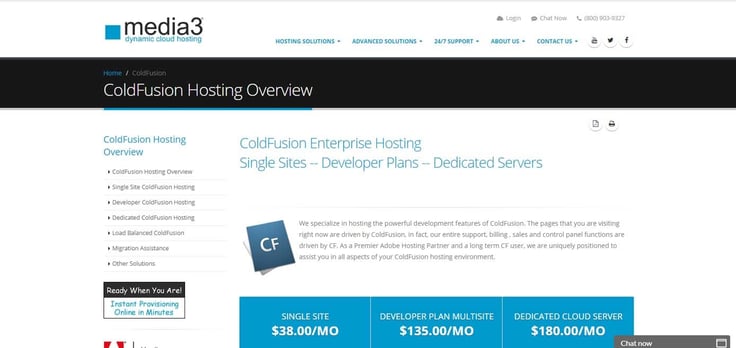
Although we’re a little perplexed as to why the company doesn’t yet support ColdFusion 2018, Media3 will install and help users operate everything else since ColdFusion 8 is on its Windows 2012 servers. The company also operates on a pay-as-you-go model, meaning you won’t be locked into a lengthy contract and can easily upgrade, downgrade, or cancel at any time.
6. CFDynamics
Since making its initial impact on the ColdFusion hosting scene over two decades ago, CFDynamics has expanded to offer environments tailored for WordPress, PHP, and ASP.NET. The company focuses on user-friendly tools and simplicity while still appealing to developers with innovative integrations.
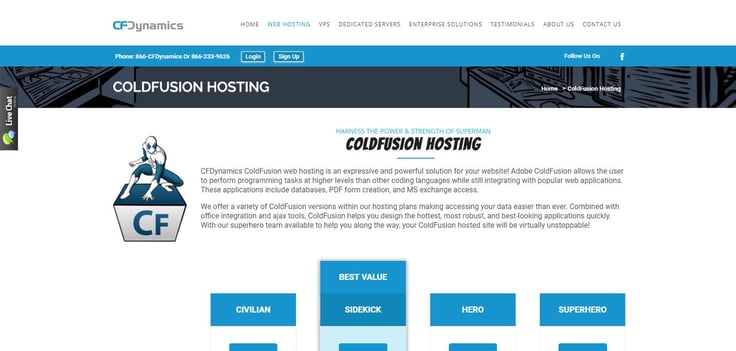
CFDynamics offers multiple versions of ColdFusion, pre-installed and ready to go. More advanced users can opt for the company’s FusionReactor service, which enables teams to proactively monitor and fine-tune their ColdFusion servers by tracking memory usage, metrics, and logs.
7. Newtek
Boasting support for ColdFusion versions as early as 2001’s Version 5.0, Newtek offers the full range of shared, virtual, and dedicated server environments perfectly optimized to run and support ColdFusion apps with stability, performance, and security. The company owns and operates its own datacenter in Scottsdale, Arizona, meaning highly qualified engineers, system administrators, and other experts are on hand 24/7/365.
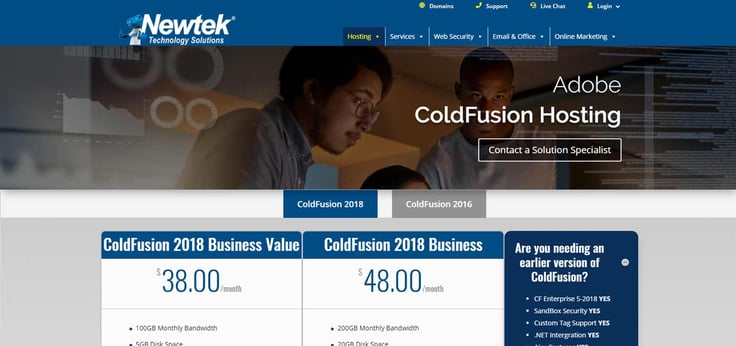
Newtek’s ColdFusion environments come with RAID and firewall protection, along with an in-house control panel, PHP support, and weekly security and virus scans. For those customers and developers needing to meet stringent ecommerce, healthcare, or government regulations, the company also provides full compliance services, as well.
8. Hostek
Certainly not among the cheapest options, Hostek is nonetheless an extremely highly regarded host with thousands of customers and servers under management. We especially appreciate the lack of long-term contracts and the company’s attitude that it needs to earn your business each month, but $120 per month may be too much for some customers.

That being said, few hosts offer the power, flexibility, and support that Hostek does. The company defaults to Windows environments for ColdFusion users, having developed a custom ColdFusion-integrated control panel for the operating system, but Hostek includes the always-helpful cPanel interface for customers who prefer Linux-based systems.
What is ColdFusion?
First introduced in 1994 to make linking simple HTML pages to a database easier, ColdFusion has evolved into both an integrated development environment and a scripting language. Essentially, the platform is a collection of tools and mechanisms that enable developers to swiftly generate code and build dynamic websites and applications.
ColdFusion can also help generate remote services such as WebSockets, Flash Remoting, and SOAP or RESTful web services.
The platform is built on ColdFusion Markup Language, which is much easier to grasp for beginners compared to Java, PHP, or Ruby. Code is written in tags alongside HTML, and files are saved with .cfc or .cfm extensions. Experts frequently describe ColdFusion as both expressive and robust, allowing you to program at a higher level while still enjoying the integration and functionality needed for web applications.
ColdFusion’s main features include the ability to:
- Query or access a database
- Monitor, measure, secure, and monetize APIs
- Convert HTML pages to PDF documents
- Schedule tasks to run automatically
- Index, move, or manipulate files
Two brothers, J.J. and Jeremy Allaire (who would eventually go on to create Brightcove), created ColdFusion in 1995. Macromedia, known for creating Flash and Dreamweaver, acquired the Allaire Company before, in turn, being purchased by Adobe in 2005. New versions are released every few years, with the debut of ColdFusion 2018 being the most recent.
Is ColdFusion Dead?
It’s true that ColdFusion isn’t as popular as some other programming languages. ColdFusion makes up just 0.2% of the server-side languages behind popular websites, with PHP and ASP.NET together comprising 90%. While not exactly mainstream, developers who stick with ColdFusion aren’t leaving anytime soon—Adobe reports double-digit growth in ColdFusion sales over the past few years.
Open-source (read: free) programming languages like Java, PHP, Python, Perl, Ruby, and others undoubtedly contribute to ColdFusion’s niche status, given that a standalone license of ColdFusion Standard or Enterprise can cost thousands of dollars. However, the growing popularity of open-source, lightweight, and dynamic CFML scripting language Lucee seems to be bolstering the ColdFusion community.
The annual State of the CF Union survey, which questions developers about their practices, shows that more than 70% of CFML developers have been using the language for over ten years. They stay engaged because of the rapid development, ease of learning, and enjoyable coding experience.
How Does ColdFusion Compare to Others?
Picking the right programming language, framework, and development tools is vital for your website or application’s success. Developers are continually searching for technologies that let them produce high-quality code faster, while still having a reliable support community or user base to turn to if issues arise.
Here, we’re comparing the similarities and differences between ColdFusion and other popular languages.

For instance, both PHP and ColdFusion can be embedded seamlessly within HTML code. PHP’s roots trace back to C; however, it is less intuitive to write and read than the HTML-based CFML. PHP is a mature and incredibly popular open-source language that lacks some of the built-in features found in ColdFusion. Given the no-cost onboarding and ubiquitous hosting support of PHP, you’ll have to closely weigh budget and functionality when choosing between the two.

A comparison between ASP.NET and ColdFusion pits two titans of technology against each other: Microsoft and Adobe, respectively. Both are web application frameworks, with ASP.NET compiling to a .NET-compatible language such as Visual Basic or C#. ColdFusion, on the other hand, relies on a Java background. Both languages offer a syntax easy for developers with HTML, CSS, or JavaScript experience to pick up.

Finally, the comparison of Ruby on Rails and ColdFusion further blurs the lines of user-friendly app development. Both come with feature-intuitive and efficient syntax, and the general concept of connecting databases, web services, and web pages. Rails uses a model-view-controller framework by default and is interpreted instead of compiled, like ColdFusion, adding a bit more flexibility and efficiency to the development workflow.
Pros and Cons of Specialized ColdFusion Hosting Services
After reading through all this, there’s one lingering FAQ: Do I need a specialized ColdFusion host or not? Although you can run ColdFusion with several mainstream hosting providers, there can be a certain appeal to choosing the focused infrastructures of the ColdFusion experts we’ve listed above.
No matter your host, the first critical marker of a good ColdFusion environment is one that has enough (really, more than enough) computing resources. That bar is typically set a little higher for conventional hosts that are typically trying to provide a variety of languages and frameworks to customers. The ColdFusion hosts often isolate ColdFusion in favor of other technologies, which could be either a benefit or a disadvantage for those trying to deploy ColdFusion apps within a PHP or WordPress website, for example.
Perhaps the most readily apparent difference between generalized and focused web hosting services is found in the price tag. Mainstream hosts are far more cost-effective, enabling developers and site owners to get started on a high-quality VPS for $5 or less per month — perhaps paying as much as $20 per month for extra resources and managed services. Services from ColdFusion-specific hosts typically cost double the higher rate.
Finally, the last major sticking point between mainstream and ColdFusion hosting providers falls on the customer and technical support. There’s a big difference between a host simply tolerating ColdFusion versus embracing the framework. Specialists not only tend to make more versions of ColdFusion available, but the company can also sometimes even help troubleshoot configuration or coding issues — assistance that may not come from the one-size-fits-all hosts.
HostingAdvice.com is a free online resource that offers valuable content and comparison services to users. To keep this resource 100% free, we receive compensation from many of the offers listed on the site. Along with key review factors, this compensation may impact how and where products appear across the site (including, for example, the order in which they appear). HostingAdvice.com does not include the entire universe of available offers. Editorial opinions expressed on the site are strictly our own and are not provided, endorsed, or approved by advertisers.
Our site is committed to publishing independent, accurate content guided by strict editorial guidelines. Before articles and reviews are published on our site, they undergo a thorough review process performed by a team of independent editors and subject-matter experts to ensure the content’s accuracy, timeliness, and impartiality. Our editorial team is separate and independent of our site’s advertisers, and the opinions they express on our site are their own. To read more about our team members and their editorial backgrounds, please visit our site’s About page.