

Writer: Christina Lewis


Editor: Lillian Castro


Reviewer: Cristian Lopez

The best budget-friendly KVM hosting solutions can set your website up for success by offering secure, high-performance hosting at an excellent price. While KVM hosting isn’t the cheapest option available, you can still find a quality plan for much less than a dedicated server.
A KVM, or kernel-based virtual machine, is a type of virtual private server that lets you fully customize your hosting environment with the operating systems and applications you prefer.
Picking the right affordable KVM hosting provider for your website lets you enjoy all the benefits of this virtual environment without breaking the bank.
The hosting plans below are the best of the best when it comes to KVMs. If you choose a hosting service from our list, your website will be in good hands, and your wallet will thank you.
-
Navigate This Article:
1. Hosting.com
Hosting.com offers unique, performant, and high-quality hosting packages for users needing a virtual server to power their sites. The host combines managed services with full root access, providing the perfect KVM hosting environment.
If you need variety, hosting.com is ready to give you a range of choices. Users can choose from managed or unmanaged services, operating systems, and even cloud VPS offerings to customize their plans.
Some of our favorite features of hosting.com include:
- Turbo server & cache options for faster page loads
- Well-built plans starting with 4GB RAM
- Free CDN plus auto-installs with Softaculous
If you’re unhappy with your hosting plan from hosting.com, you can request a full refund within 30 days of your plan purchase. What have you got to lose?
Check out our offer below to see why this host boasts up to 20 times faster web hosting than a standard shared hosting plan.
Hosting.com

Monthly Starting Price $9.99
- AMD EPYC processors and NVMe SSD storage on all plans
- Full root access — install tools, containers, and custom stacks
- Choice of Ubuntu, Debian, or AlmaLinux with optional cPanel
- 10 global data centers with free CDN and 99.9% uptime SLA
- 24/7/365 in-house support — no outsourcing, no bots
- Get started on hosting.com now.


Christina Lewis
| Setup Time | Disk Space | CPU | RAM |
|---|---|---|---|
| 7 minutes | 20 GB NVMe – 450 GB NVMe | 1 – 10 cores | 1 GB – 32 GB |
2. InterServer
InterServer is known in the hosting space for its SSD-powered VPS plans, backed by a 99.9% network uptime guarantee and choice of seven operating systems, including Windows and Linux VPS hosting packages.
The web host is ideal for users with a bit of technical experience, which is particularly helpful for those looking to manage their own KVM.
Users can save money with a VPS hosting plan from InterServer, which starts at $3.00 per month. You can choose from one of three web hosting control panels, including Plesk, DirectAdmin, and cPanel.
For an additional monthly fee, this host allows you to add a remote backup service to protect you from data loss.
Some of our favorite InterServer features include:
- Latest of PHP, MySQL, Perl, Python, and Ruby
- 7 operating system options for Linux or Windows
- Full root access and choice of datacenter
- 24/7 support through phone, email, and live chat
In addition to using KVM, InterServer also usesOpenvz, Virtuozzo, and Hyper-v virtualization platforms to containerize its servers. Check out our full review of this host to see if it’s right for you.
InterServer.net

Monthly Starting Price $3.00
- $0.01 for the first month using code HOSTINGADV
- Price locked for life, no renewal increases, ever
- Scale instantly by adding slices — each adds 1 CPU, 2 GB RAM, 40 GB SSD
- Linux or Windows with full root access, choice of data center
- 24/7 in-house support from an independently owned provider since 1999
- Get started on InterServer now.


Sead Fadilpasic

| Setup Time | Disk Space | CPU | RAM |
|---|---|---|---|
| 6 minutes | 30 GB SSD – 480 GB SSD | 1 – 16 CPUs | 2 – 32 GB |
3. ScalaHosting
ScalaHosting makes cloud VPS hosting scalable and accessible to users worldwide. This provider’s VPS plans are backed by AWS and DigitalOcean, giving users access to the best performance and hardware the hosting industry has.
For easy site management, customers can choose from several control panel options, including ScalaHosting’s proprietary SPanel. Site owners who use SPanel can adjust their computing resources and configure backups.
Some of our favorite ScalaHosting features include:
- Fully managed VPS with cloud performance
- Choice of Scala, AWS, or DigitalOcean datacenters
- 100% SSD storage and unmetered bandwidth
If that’s not enough to make you choose ScalaHosting, you should also know the web host includes a free domain name for your first year and a 30-day money-back guarantee.
ScalaHosting.com

Monthly Starting Price $12.71
- Fully managed VPS with cloud performance
- FREE site migration executed by experts
- NVMe SSD storage and unmetered bandwidth
- Anytime unconditional money-back guarantee
- HostingAdvice readers get 73% off the first term
- Get started on ScalaHosting now.


Laura Bernheim

| Setup Time | Disk Space | CPU | RAM |
|---|---|---|---|
| 6 minutes | 50 GB SSD – 200 GB SSD | 2 – 12 cores | 4 GB – 24 GB |
4. Liquid Web
Liquid Web is another premium web host offering top-notch performance and Heroic Support®. Although this provider is not the cheapest VPS on our list, it gives users a lot of value for the monthly cost.
With Liquid Web, customers can enjoy decreased latency through the availability of RAID-protected SSD storage, which comes with all of Liquid Web’s VPS plans.
Users choose from a range of management plans, control panels, and API access to create the exact environment they’re looking for.
Some of our favorite Liquid Web features include:
- High-speed hosting that’s faster than AWS, Rackspace, and Digital Ocean
- FREE backups, CDN, and DDoS protection
- Up to 16 processors with all-SSD storage
- Support through phone, email, and live chat
While this web host doesn’t provide a money-back guarantee, it’s unlikely you’ll be disappointed with their service. Liquid Web is renowned for its exceptional customer support, thanks to its Heroic Support® team of experts.
Explore our review to see why you should consider Liquid Web for your KVM VPS hosting plan:
LiquidWeb.com

Monthly Starting Price $5.00
- Third-party tested faster than Rackspace, DigitalOcean, and Amazon
- Choice of managed or self-managed VPS with full root access
- cPanel, Plesk, or InterWorx control panel included
- DDoS protection, dedicated IP, and 100% uptime guarantee
- Trusted by 600,000+ customers including FedEx and Red Bull
- Get started on Liquid Web now.
Christina Lewis
| Setup Time | Disk Space | CPU | RAM |
|---|---|---|---|
| 7 minutes | 30 GB SSD – 440 GB SSD | 1 – 6 cores | 1 GB – 16 GB |
5. InMotion Hosting
InMotion Hosting may be more expensive than some of the other VPS hosts on this list, but it provides great value for what you pay. With InMotion, customers get the best managed VPS packages on the market.
Performance and security are where this hosting service truly shines. InMotion proves its dedication to customers by serving up the latest VPS hardware, with DDoS attack protection and ample bandwidth and disk space.
Some of our favorite features of InMotion Hosting include:
- 2 – 3 dedicated IP address options
- FREE cPanel/WHM licenses included
- Highly available servers with real-time redundancy
InMotion offers an impressive 90-day money-back guarantee on most plans. However, this refund doesn’t apply to remote KVMs, so keep this in mind when you’re shopping for a KVM VPS server.
InMotionHosting.com

Monthly Starting Price $7
- HostingAdvice readers get 74% off the first term
- FREE site migrations and 2 hours of Launch Assist
- 2 – 3 dedicated IP address options
- SSH and DDoS protection included
- Highly available servers with real-time redundancy
- Get started on InMotion now.


Dave McQuilling

| Setup Time | Disk Space | CPU | RAM |
|---|---|---|---|
| 6 minutes | 30 GB – 540 GB SSD (or NVMe) | 2 – 16 cores | 1 GB – 32 GB |
What is KVM Hosting?
A kernel-based virtual machine, or KVM for short, is an open-source technology that uses virtualization to turn a Linux-based server into a hypervisor. This allows you to run more than one virtual machine on your server.
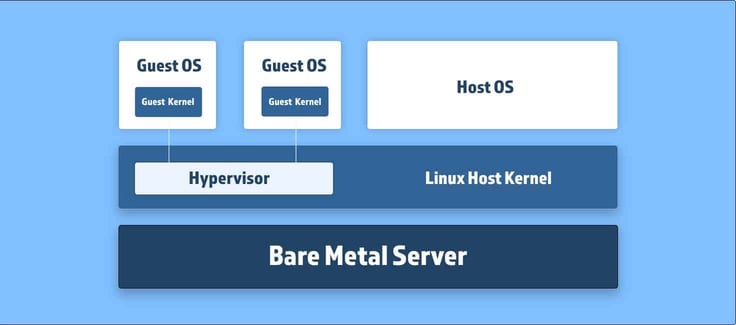
In simple terms, this means you can transform a physical server designed for one website into several virtual servers to host multiple websites. This setup offers more security and control over your server than shared hosting since the virtualization technology acts as a protective shield for your VPS.
If a neighboring KVM suffers a DDoS attack or experiences a spike in traffic, your server will remain unaffected.
A KVM is explicitly built for Linux servers, but you can run several other guest operating systems on it.
What Are the Advantages of a KVM VPS?
A KVM VPS has several advantages, but these are the most notable:
Performance: A KVM offers enhanced performance and scalability for your site. It’s difficult for hosting providers to oversell space on a KVM server because of the way it allocates resources. Unlike with shared hosting, an increase in your neighboring site’s traffic will not impact your page load speeds.
Control: With a KVM VPS server, your hosting environment acts like a mini dedicated server. You’re guaranteed a set amount of resources, and if you opt for a self-managed plan, you can select your own operating system. This is a perfect solution for those who want greater control of their environment for a lower cost.
Security: The virtualization of your environment means that your KVM VPS is protected from attacks on neighboring virtual servers. The partition that’s created on your KVM acts as a shield against hackers — something you don’t get with a shared hosting plan. With the rise in DDoS attacks, this is a major appeal for site owners who don’t want to be affected by their neighbor’s downtime.
What Is a Virtual Private Server?
A virtual private server is a web hosting environment that uses virtualization software to turn a physical server into several virtual servers.
The virtualization software, called a hypervisor, is installed on top of the server’s operating system layer. The hypervisor creates several compartments that act as dedicated servers, allowing each VPS owner to fully customize and control their environment.
Although you’re technically sharing server resources with others, you have a set amount dedicated to your website.
VPS hosting is often the next step after a simple shared hosting plan because it provides increased speed, performance, and security compared to shared hosting. Entrepreneurs and small business owners often use a VPS hosting provider because it costs less than your typical dedicated server.
Depending on your experience with web hosting, you may choose either a managed VPS or an unmanaged VPS plan.
Managed VPS: Most website owners will choose a managed VPS plan. Fully managed VPS hosting means your web hosting provider takes care of the server’s setup, maintenance, and upkeep, allowing you to focus on the critical aspects of your online business.
This service costs a bit more than an unmanaged VPS plan, but it is worth the extra monthly cost of technical support and maintenance.
A managed plan typically starts at $15 per month and includes features such as ample SSD VPS storage, roughly 10 TB of bandwidth, DDoS protection, and at least 99.9% network uptime.
See top recommended managed VPS plans >>
Unmanaged VPS: An unmanaged VPS provider is a smart choice for users with technical experience managing a web server. This cheap VPS option is an excellent way to save money on your monthly hosting bill while getting the full advantages of a virtual server environment.
Unmanaged plans are more affordable than managed plans because your hosting provider doesn’t give you as much support. A good unmanaged hosting service will help you with your initial setup and may even offer limited technical support if you run into any issues.
On the flip side, they don’t offer ongoing server support. That’s why we only suggest this option if you’re at ease with setting up and managing your own operating system and additional software.
What Is the Difference Between Cloud Hosting and VPS Hosting?
Although cloud hosting and VPS hosting are similar, they have differences in their infrastructure and setup. A VPS hosting plan exists on a physical server and is virtually partitioned using hypervisors.
On the other hand, cloud hosting uses several physical servers, which are connected to a globally dispersed network. This connectivity offers superior reliability and redundancy because if one of the cloud servers in the network goes down, the others seamlessly step in to handle your website’s traffic.
How Much Does KVM Hosting Cost?
KVM hosting falls in the middle of the hosting spectrum, starting at roughly $9.99. The price you pay for your KVM VPS hosting plan depends on the level of support and features you choose.
The KVM VPS hosting providers on this list range from $9.99 to $7.
If you opt for a cheaper plan, you might get less bandwidth, storage, and speed. However, a premium KVM server plan can offer fantastic perks like unlimited bandwidth, 99.99% network uptime, enhanced DDoS protection, and nearly 500 GB of SSD storage.
Can I Get KVM Hosting for Free?
Free hosting is an ideal choice for students or developers working on experimental projects that need minimal bandwidth and storage. A free plan can provide everything you need to get your site up and running without investing in a hosting provider.
However, if you’re considering KVM VPS hosting for your online business or organization, it’s better to opt for an affordable hosting provider rather than a free one.
You have plenty of cheap KVM VPS hosting plans on this list that will give your website the resources it needs while allowing you to stay within your budget.
If you’re still interested in exploring free options, you can take advantage of a free trial from one of our favorite VPS hosting services. A free trial doesn’t offer free hosting forever, but it’s an excellent way to dip your toes into the world of VPS hosting without making a financial commitment.
Check out our favorite VPS free trials >>
What Is the Difference Between KVM and VMWare?
Although KVM and VMWare are both virtualization software that creates hypervisors used for virtualization, KVM is an open-source solution so there isn’t an additional cost.
To use VMWare, you must purchase the required licenses and agree to the enterprise license agreement, which may place limits on what you can do with your server environment and how long you may use it.
Whether you choose KVM or commercial software, your bottom line will be affected.
Choosing the Right KVM Hosting Provider
Finding a cheap KVM VPS host can be challenging. You’re not likely to find a KVM server for the same price as a shared hosting plan. The features and support required to build a quality KVM hosting experience, though affordable, do require a small monthly cost.
But if you’re ready to invest between $5 and $20 per month in a package from a reputable VPS provider, you’ll likely see a significant boost in your website’s performance.
HostingAdvice.com is a free online resource that offers valuable content and comparison services to users. To keep this resource 100% free, we receive compensation from many of the offers listed on the site. Along with key review factors, this compensation may impact how and where products appear across the site (including, for example, the order in which they appear). HostingAdvice.com does not include the entire universe of available offers. Editorial opinions expressed on the site are strictly our own and are not provided, endorsed, or approved by advertisers.
Our site is committed to publishing independent, accurate content guided by strict editorial guidelines. Before articles and reviews are published on our site, they undergo a thorough review process performed by a team of independent editors and subject-matter experts to ensure the content’s accuracy, timeliness, and impartiality. Our editorial team is separate and independent of our site’s advertisers, and the opinions they express on our site are their own. To read more about our team members and their editorial backgrounds, please visit our site’s About page.