

Writer: Laura Bernheim


Editor: Lillian Castro


Reviewer: Christina Lewis

When it comes to delivering information to a global online audience, the basic principles of the best CDN hosting can seem like an episode of “Where in the World is Carmen Sandiego?“
Just like your website visitors, the elusive brunette and her red trench coat can be anywhere in the world; finding her and being as close to her as possible accelerates how quickly she can be brought into custody. Likewise, using a content delivery network (CDN) to store website files as close as possible to end users reduces load times and increases your chances at conversions.
We’ve scoured the planet for the best CDN hosting options that pair a global network with superior web hosting services and customer support.
-
Navigate This Article:
Best Overall CDN Hosting
We’ll get into the details of how a content delivery network works later in the article, but a CDN is another tool website owners and application developers can use to increase performance and improve user experience. Site speed and page load times are critical to the success of your online presence; every additional second your site takes to appear increases the number of visitors likely to give up and go elsewhere.
Many web hosting providers include a free CDN when you sign up for services, usually in the form of a plugin found within your cPanel control panel. Getting started with a CDN is extremely easy, and we especially appreciate hosts that combine the performance boost with optimized hardware, programming languages, and caching tools.
SiteGround is far and away our favorite option, featuring high-powered solid-state drives, PHP 7, HTTP/2, Memcached, and OpCache. The company includes the Cloudflare CDN for free with all plans, so be sure to check them out below:
1. SiteGround.com

Monthly Starting Price $2.99
- FREE site transfer or new site setup
- FREE daily backups, CDN, email, and SSL
- 24/7 expert support with no wait on phone or chat
- Feature-rich hosting plans for all businesses
- Beginner-friendly Site Tools control panel
- Get started on SiteGround now.


Lynn Cadet

| Money Back Guarantee | Disk Space | Domain Name | Setup Time |
|---|---|---|---|
| 30 days | 10 GB SSD – 100 GB Google Cloud SSD | FREE (1 Year) | 6 minutes |
Cheap CDN Hosting
CDNs deploy servers across numerous global data centers to bring your content and data closer to your visitors. This extensive worldwide network might seem like a luxury reserved for large enterprises with massive budgets. Although premium CDNs can cost hundreds of dollars monthly, many networks are eager to offer enhanced performance, security, and stability at no charge.
Most hosting providers will include the massively popular Cloudlfare CDN to customers for free, while others (including HostGator and iPage) opt to provide the TrueSpeed CDN that is part of SiteLock’s larger security suite. No matter the network, though, hosting your content on a CDN can be as affordable as a low-cost web hosting account — often for far less than $5 per month.
The three hosting providers we’ve listed below excel at meeting that price-to-performance balancing act. Bluehost and hosting.com are both well-known and highly trusted brands known for giving customers tremendous bang for their bucks. Both companies include Cloudflare with shared hosting plans, along with tons of other features to help you get started.
2. Bluehost.com

Monthly Starting Price $1.99
- Beginner-friendly setup with free domain for the first year
- AI-powered site setup with 1-click WordPress install
- Free CDN, malware scanning, WAF, and DDoS protection
- Weekly backups + 99.99% uptime SLA
- WordPress.org recommended host since 2005
- Get started on Bluehost now.


Sead Fadilpasic

| Money Back Guarantee | Disk Space | Domain Name | Setup Time |
|---|---|---|---|
| 30 days | 10 GB NVMe SSD | FREE (1 year) | 5 minutes |
3. Hostinger.com

Monthly Starting Price $2.69
- Best overall value: Nothing at this price comes close feature-for-feature.
- AI builds your site in minutes — no technical skills needed
- Up to 3 websites with free SSL
- Weekly backups and managed WordPress
- 2 business mailboxes free for 1 year
- Get started on Hostinger now.
Sead Fadilpasic
| Money Back Guarantee | Disk Space | Domain Name | Setup Time |
|---|---|---|---|
| 30 days | 20 GB SSD | FREE (1 year) | 3 minutes |
4. Hosting.com

Monthly Starting Price $2.99
- LiteSpeed servers with NVMe SSD storage on all plans
- One-click installs and free expert site migration
- Built-in WAF, malware scanning, and DDoS protection
- Automated daily backups with 30-day restore
- Free domain for 1 year + free SSL included
- Get started on hosting.com now.


Christina Lewis
| Money Back Guarantee | Disk Space | Domain Name | Setup Time |
|---|---|---|---|
| 30 days | 15 GB NVMe SSD | FREE (1 year) | 4 minutes |
Cloud CDN Hosting
Because both cloud hosting and content delivery networks rely on a large group of servers, it can be easy to confuse the two services. Not every cloud hosting provider is a CDN, and not every CDN is a cloud computing host — though there can be some overlap. Broadly speaking, the group of servers behind your cloud hosting plan can all be located in the same data center. Your files and processing needs are spread around the cloud network in a way that promotes stability and scalability.
For a CDN to effectively deliver content to your website visitors, servers need to be strategically placed around the globe. Each of these servers manages the full workload of processing user requests and loading content for audiences close by.
The high levels of hardware and data redundancy built into both cloud hosting and CDNs make both platforms highly reliable services that can withstand large spikes in traffic and malicious attacks. Pairing the two services provides the most firepower for data-heavy sites with dense databases, dynamic content, or large image and video files.
Two of our all-time favorite hosts are poised to show you the best of both the cloud and CDN worlds, providing the control of a dedicated server paired with the cost-effective scalability of a VPS.
5. Cloudways.com

Monthly Starting Price $6.60
- Choose from AWS, Google Cloud, DigitalOcean, Vultr, or Linode
- Auto-healing servers with automated backups and free SSL
- 60+ global data center locations
- Pay-as-you-go — no contracts, cancel anytime
- 3-day free trial, no credit card required
- Get started on Cloudways now.


Jack Wallen

| Setup Time | Disk Space | CPU | RAM |
|---|---|---|---|
| 8 minutes | 20 GB SSD – 4 TB SSD | 1 – 96 cores | 1 GB – 384 GB |
6. LiquidWeb.com

Monthly Starting Price $5.00
- Best for businesses that can’t afford downtime
- 100% uptime SLA — network and power guaranteed
- AMD EPYC processors with Cloudflare CDN included
- Acronis backups and DDoS protection built in
- 24/7 Heroic Support® via phone, chat, and email
- Get started on Liquid Web now.
Christina Lewis
| Setup Time | Disk Space | CPU | RAM |
|---|---|---|---|
| 7 minutes | 30 GB SSD – 440 GB SSD | 1 – 6 cores | 1 GB – 16 GB |
WordPress CDN Hosting
While improved website performance benefits every site or application, WordPress users especially gain from a CDN. The world’s leading content management system isn’t always famed for speed and can quickly slow down if the platform, plugins, and themes aren’t diligently maintained and updated.
What’s more, many CDN providers include additional security features to protect its network stability and your data privacy. Web application firewalls are particularly useful for WordPress administrators, as the platform’s popularity makes it a prime target among attackers. Additionally, a CDN’s monitoring tools and log reports mean it can quickly identify common security threats like Distributed Denial of Service (DDoS) and other spammy activities from bots and scripts.
The three hosts below balance the needs for top-notch speed and security with WordPress-optimized environments. Hosting.com has built its reputation around performance by featuring 100% SSD infrastructure and a variety of custom server configurations, while the WordPress core team itself vouches for SiteGround‘s developer tools for caching and staging.
7. Hosting.com
Monthly Starting Price $6.95
- Cloudflare Enterprise CDN and dual WAF on all plans
- AMD EPYC NVMe — performance guaranteed or 1 year free
- Free WP Rocket and Object Cache Pro on select plans
- Free unlimited migrations with zero downtime
- 97% satisfaction — under 1 minute average response time
- Get started on hosting.com now.
Christina Lewis
| Money Back Guarantee | Disk Space | Domain Name | Setup Time |
|---|---|---|---|
| 30 days | 20 GB – 200 GB NVMe | New or Transfer | 5 minutes |
8. Bluehost.com
Monthly Starting Price $1.99
- Best for WordPress: WordPress.org’s longest-running recommended host since 2005
- 0.35s average load time — independently verified by WPShout
- AI builds your complete WordPress site in under 60 seconds
- Yoast SEO, NVMe SSD, WAF, and daily malware scans
- 24/7 WordPress experts — under 2-minute average response
- Get started on Bluehost now.
Sead Fadilpasic
| Money Back Guarantee | Disk Space | Domain Name | Setup Time |
|---|---|---|---|
| 30 days | 10 – 100 GB NVMe SSD | FREE (1 year) | 7 minutes |
9. SiteGround.com
Monthly Starting Price $2.99
- Best for performance: WordPress sites average 78% faster speeds after migrating to SiteGround
- Free AI agent manages your WordPress site via simple chat
- Smart WAF, AI bot protection & geo-distributed backups
- Free staging, WP-CLI, SSH, Git, and one-click migrations
- 4.9/5 Trustpilot — 98% customer satisfaction for 10+ years
- Get started on SiteGround now.
Lynn Cadet
| Money Back Guarantee | Disk Space | Domain Name | Setup Time |
|---|---|---|---|
| 30 days | 10 GB SSD – 100 GB Google Cloud SSD | FREE (1 Year) | 6 minutes |
Video & Image CDN Hosting
As we mentioned before, the line between web hosting and CDN hosting can seem somewhat blurry at times. In all its forms (shared, cloud, virtual, or dedicated), web hosting entails a specific set of features and functionalities. For instance, the operating system has a major influence on the types of applications and programming languages you can use effectively.
A CDN is less reliant on the underlying software and applications, making it great for handling more complicated files. Images and videos are particularly heavy files that can quickly overwhelm a standard web hosting environment.
Offloading those big chunks of data to a large number of CDN servers enables your visitors to quickly access the content from nearby locations, making them extremely useful for those websites and applications that maintain vast image libraries or video streaming services. We’ve reviewed a ton of premium CDNs that amplify the benefits and features needed to effectively optimize video and image hosting and have included our favorites below.
10. Cloudflare

Yes, the hosts above show that Cloudflare is pretty easy to come by; and who can argue with free? But here’s the thing, when you upgrade your Cloudflare package, you unlock a host of performance and security features that protect and optimize your website. Alongside a web application firewall and DDoS protection, professional-grade Cloudflare applies lossless or optional lossy optimizations to images, trimming file sizes by an average of 35%.
- Cost: FREE to upward of $200 per month
- Server locations: 165 data centers in 81 countries
- Highlighted features: Unmetered DDoS mitigation, shared SSL certificates, simple DNS and API management, video streaming
Additionally, the company’s Mirage tool automatically streamlines image loading through virtualized and lazy loading images. The platform detects your users’ browser types and optimizes performance for the particular device — especially critical for those on mobile connections. When it comes to video streaming, Cloudflare customers spend just $1 for every 1,000 minutes viewed and $5 for every 1,000 minutes of video stored.
11. Amazon CloudFront
No list of cloud hosting and global delivery networks would be complete without mentioning Amazon Web Services. The company’s CDN, Amazon CloudFront, integrates seamlessly with other AWS services to deliver content, applications, and APIs with low latency and high transfer speeds. Although AWS still faces criticism for poor support and complex pricing, its effectiveness as a global leader is undeniable.
- Cost: FREE tier includes 50GB of data transfer and 2 million HTTP and HTTPS requests each month. Otherwise, on-demand pricing starts at $.085 per gigabyte.
- Server locations: 166 POPs in 29 countries
- Highlighted features: Developer-friendly environment that integrates with other AWS services, including DDoS protection, load balancing, and custom code functions
Developers and site owners will want to tailor their approach, combining CDN with load balancing and DDoS mitigation as needed. However, you can be confident that AWS offers all the functionality you could imagine.
12. Fastly
Fastly’s CDN is a developer’s dream, offering unique tools that streamline collaboration and control. The service supports dynamic and event-driven content and allows for more content to be cached simultaneously. This means your site’s performance will skyrocket and, in turn, user experience and satisfaction will improve.

Here’s a closer look at what you can expect when you purchase a content delivery network from Fastly:
- Cost: FREE for less than $50/month usage. Paid plans start at $50 (depending on use) and scale up to thousands per month for enterprises.
- Server locations: 89 POPs in 6 continents
- Highlighted features: Fastly offers out-of-the-box security, featuring DDoS, next-gen WAF, and TLS. It also has a 32% faster Time to First Byte (TTFB) than competing CDNs.
Fastly’s network is impressive, offering POPs in North America, Europe, Asia, Australia, Africa, and South America. Its hardware includes Tier 1 servers backed by lightning-fast solid-state drives for better performance and greater caching abilities.
13. StackPath

Pairing Lance Crosby, the entrepreneur who sold SoftLayer to IBM for $2 billion, with the ultra-popular and highly rated MaxCDN, StackPath represents a rapidly growing and intriguing option for developers looking for premium security without sacrificing speed or user experience.
- Cost: $20 to $2,000 per month (one-month FREE trial)
- Server locations: 45 edge locations in 16 countries
- Highlighted features: Unlimited websites and requests, private SSL certificates, and network-layer DDoS protection
The company expects to accelerate customer websites by at least 68% and give users better control of caching. Intelligent caching and instant purging makes exactly the right content available in exactly the right places for exactly the right amount of time. The innovative company perpetually looks for ways to improve services and move more computing functions out to the edge.
14. KeyCDN

Featuring a user-friendly dashboard and custom plugins to integrate with WordPress and Joomla, KeyCDN offers a flexible but high-performance network optimized with 100% SSD coverage and latency-based routing technology. Every account has access to the company’s full set of features, including HTTP/2, IPv6 support, TLS 1.3, Gzip compression, and real-time reporting.
- Cost: Pay-as-you-go pricing starts at $.04 per gigabyte; minimum of $49 per year
- Server locations: 34 data centers in 25 countries
- Highlighted features: Real-time reports, HTTP live streaming, Let’s Encrypt or custom SSL, and Brotli compression
The Optimus plugin offers smart image compression for PNG and JPEG files. Additionally, video options include on-demand distribution and live streaming for all major video and audio formats. While the pay-as-you-go pricing model may be a bit challenging to plan around, smaller sites are likely to notice some cost savings.
15. CDN77

Used to deliver images from the Hubble Space Telescope to scientists and astronomers around the world, CDN77 is a fascinating service powering more than 45,000 websites. The forward-thinking company was the first CDN to implement and offer HTTP/2 and Brotli compression in 2016, and CDN77 continues to expand its network and bandwidth capabilities.
- Cost: $199 to $999 per month or pay-as-you-go pricing starting at $.049 per gigabyte
- Server locations: 33 data centers in 26 countries
- Highlighted features: FREE 50GB of storage and SSL, 24/7 live support, CMS integrations, and API management
Video delivery is especially easy, as users just need to upload their MP4 or FLV files and let the company encode, secure, and deliver the videos to visitors worldwide. The company’s video streaming service has been used to broadcast a variety of concerts, sports, and TEDx events.
16. Incapsula

Springing from an inspiration to deliver the first web application firewall in the cloud, Incapsula expanded its vision to speed up secure content delivery. Owned by leading IT security company Imperva, Incapsula now serves more than 125,000 clients and has received recognition from both Gartner and Forrester.
- Cost: $59 to $299 per site per month
- Server locations: 44 data centers in 32 countries
- Highlighted features: Static and dynamic content caching powered by machine learning, TLS and IPv6 support, and web application security
Incapsula‘s CDN uses intelligent caching and control options to deliver website speeds that are, on average, 50% faster and consume up to 70% less bandwidth. The CDN is not designed for video streaming quite yet, but Incapsula recommends those users combine its services with a CDN from Akamai. Advanced image optimization via compression and progressive loading helps those with large static files.
What Is a Content Delivery Network?
As we’ve alluded to throughout the article, a content delivery network is a collection of servers geographically distributed around the world. The various points of presence, otherwise known as POPs, represent the physical locations of the servers. CDN servers largely fall into one of two camps: An origin server is the primary source of your website’s data, and edge servers are the global locations that store and deliver copies of your website.
Your origin server is typically where your hosting provider’s server or data center is located. For instance, SiteGround maintains data centers in Chicago, London, Amsterdam, and Singapore. Customers will want to choose a server location that is closest to their target audience to reduce or eliminate any delays.
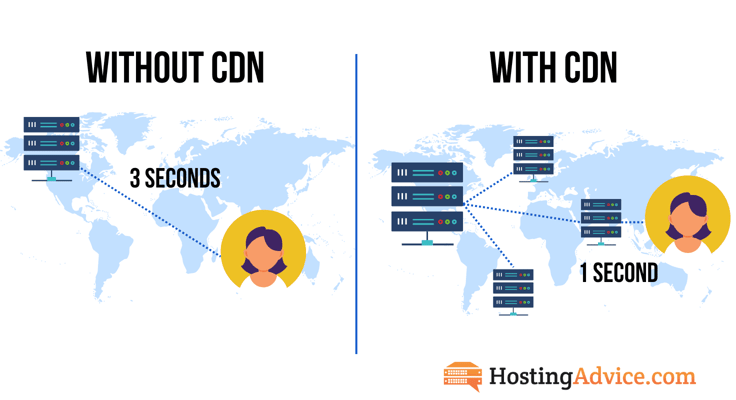
Latency, or the time between a browser’s request for information to travel to the server and be processed, can be exacerbated by the distance the data has to traverse. Without a CDN, all of your website visitors would need to request information from the origin server in that one specific location, which is the only place that can serve the data.
CDNs distribute copies of your website or application to edge servers. When a visitor’s browser requests data, the edge server closest to the visitor’s location will supply the information, greatly reducing the latency and distance between your website and its end users.
How Does a CDN Work?
Instead of completely duplicating your website on dozens or hundreds of servers, CDNs essentially take a snapshot of your site. Let’s say you wanted to make a copy of a certain document. Instead of typing it again, measuring the margins, ensuring you have the correct font, and printing it, a CDN goes straight to the photocopier. That process, where data is stored locally to speed up subsequent delivery, is called caching.
There are two types of website content, and CDNs can treat them quite differently. Static content, as the name implies, generally doesn’t change very often. These files typically include images, CSS files, JavaScript, and fonts, as well as heavy, resource-intensive files like audio and video. Pretty much all CDNs will cache and store static files.
Where things can get tricky is with dynamic content, or data that changes at unpredictable intervals. Static content caching enables dynamic content to load much faster, but some CDNs will also cache dynamic content. WordPress websites and online stores, in particular, display dynamic content in the form of blog posts, product inventory, breaking news, and other time-sensitive information. Caching dynamic content often entails storing the generated HTML versions of websites at certain time intervals and purging older copies.
No matter the content, CDNs route browser requests to the edge server that can deliver the information the quickest. Usually, that’s the machine physically closest to the user, but not always. If a server is currently busy processing other requests, the visitor may be routed to one with more availability.
What Factors Should I Consider When Selecting a CDN?
When you begin your search for a content delivery network, you’ll find selecting the right one is a lot like selecting a new car; the right one depends on your preferences and budget. Generally speaking, these are the things you should consider in your search:
- Reputation and reliability: This goes without saying, but you should only consider CDN companies with a solid reputation. Major providers such as Fastly and Cloudflare offer tried and tested services.
- Price: If you’re on a tight budget, consider buying a cheap hosting plan that comes with a free CDN.
- Security: Your CDN provider is responsible for securing your files in transit. Find out what security practices it uses to ensure your data is protected.
- Customer support: Having quality customer support is an underrated feature. Make sure the providers you’re considering have multiple support channels and agents available 24/7.
Create a short list of your top two to five options and compare these features to make your choice.
Benefits of Using a CDN to Deliver Videos, Images, and Dynamic Content
By offloading static content, images, and large files to a CDN, you can enhance the user experience and reduce the strain on your origin server. This allows your website or application to connect with customers wherever they are, providing a premium and personalized experience. The speed boost from a CDN can decrease bounce rates, enhance search engine rankings, and boost conversions, all contributing to the growth and success of your online presence.
According to 2018 research from Google, more than half of mobile users will leave a site if it takes longer than three seconds to load — not good news for the average mobile site, which takes an average of 15 seconds. A two-second increase in page load time (from one to three seconds) increases the bounce rate by 32%; a five-second delay more than doubles the likelihood your visitor will leave without interacting with your site.
Beyond simply pleasing your customers and visitors (and, in turn, boosting your conversion rates and revenue), fast page load times are important for another reason: Google considers page speed a key factor in mobile search rankings. By emphasizing website speed, which has been a ranking factor since 2009, search engines significantly influence your site’s search result position and the volume of traffic you receive.
That said, not everyone will experience the same advantages. For instance, individual bloggers, professional portfolios, and small brick-and-mortar businesses without eCommerce stores may not notice much difference in load times. These local audiences are likely already near your origin server, and your files might not be too large to manage.
Websites that display a lot of images or offer video or audio streaming are prime candidates to use a CDN, along with an online business that generates income or encourages subscriptions. Does your site experience traffic fluctuations because of holiday shopping seasons or a particular sports season? A CDN will help you stay online and operate at peak performance.
HostingAdvice.com is a free online resource that offers valuable content and comparison services to users. To keep this resource 100% free, we receive compensation from many of the offers listed on the site. Along with key review factors, this compensation may impact how and where products appear across the site (including, for example, the order in which they appear). HostingAdvice.com does not include the entire universe of available offers. Editorial opinions expressed on the site are strictly our own and are not provided, endorsed, or approved by advertisers.
Our site is committed to publishing independent, accurate content guided by strict editorial guidelines. Before articles and reviews are published on our site, they undergo a thorough review process performed by a team of independent editors and subject-matter experts to ensure the content’s accuracy, timeliness, and impartiality. Our editorial team is separate and independent of our site’s advertisers, and the opinions they express on our site are their own. To read more about our team members and their editorial backgrounds, please visit our site’s About page.