
Guides

Studies 
Studies
Our studies cover a range of trending topics and deliver original, reliable data you can't get anywhere else on the web.
Green hosting, bold AI, and a few unexpected plot twists.

By: Dave McQuilling

Editor: Lillian Castro

Reviewer: Cristian Lopez
Disclosure: When you sign up through links on our site, we often earn referral fees from partners. For more information, see our ad disclosure and review policy.
Maybe I was optimistic, but I initially approached GreenGeeks like any other review. I thought it would involve messing around with a couple of website builders, finding a minor issue for customer service to help out with, and then running a speed test or two. Instead, it turned into one of the more unexpectedly eventful hosting reviews I’ve done.
I can see it now. Many years from now, a frail but still surprisingly handsome Dave McQuilling is in a hospital bed. The machines around him are beeping, his loving family surrounds him with tears streaming down their faces. His grandson has started dating an AI, but he can’t disapprove as his life flashes before his eyes — and 90% of it is troubleshooting this website.
GreenGeeks’ AI Website Builder is genuinely a taste of the future. I can see a similar experience being standard in most years, with the AI Builder essentially functioning like a personal web developer and the customer simply providing prompts to build and tailor their site. I prefer it to most available site builders I’ve used.
GreenGeeks’ frontend experience is polished, but my deeper dive — particularly into VPS hosting — revealed inconsistencies and setup issues that significantly impacted usability.
If you’re considering anything beyond shared hosting, be prepared for a more hands-on, troubleshooting-heavy experience than the marketing suggests.
A GreenGeeks shared plan is what most customers will likely opt for. There are three options: “Lite,” “Pro,” and “Premium.”
All plans include perks like a free domain name and unmetered traffic. The main difference between the three is the amount of storage you are allocated: the most affordable plan gets 25GB, the Pro plan gets 50GB, and the Premium plan gets 100GB of “Web Space.”
The number of websites you can create also varies: Lite is limited to 1, while the other two plans allow unlimited sites. Finally, pricier plans come with better customer support, while the most expensive plans benefit from a free dedicated IP and free AlphaSSL.
I’m starting this review on a positive note. Don’t worry, we’re going to strap on a helmet and go headfirst down the mountainside of despair soon enough. But the signup experience wasn’t actually bad.
As with many other sites, I simply visited the homepage and chose the type of hosting I wanted (shared hosting in this case) from a dropdown menu. From there, it was easy to compare plans. Though a lot of the features do tend to overlap.
Even with the most affordable plan, I would get the “Green” features that seem to be the site’s unique selling point. Those include a “300% Renewable Energy Match,” whatever that is, and “a tree planted.” They didn’t specify the type of tree or location, and visitation rights are probably out of the question, but it’s definitely a lot more eco-friendly than other hosting sites.
All plans have access to GreenGeeks’ “AI Website Builder” too, and the option I chose also comes with a free domain and free access to cPanel.
I settled on the “Ecosite Pro 50” plan and filled in all of my details before proceeding. Unlike some other sites, GreenGeeks did not try to sneak a bunch of extras into my basket and hope I wouldn’t notice.
The “total price” was exactly what I expected ($4.95 per month for a year, plus tax). I also got to choose my server location, and could select from Singapore, Canada, Europe, or the United States.
My site was constructed with GreenGeeks’ AI site builder, which is a tool the website loves to shout about. However, I did have some issues initially getting things going. WordPress came pre-installed, but it wasn’t the correct version of WordPress. After a bit of initial confusion, I caved and contacted customer services via the handily placed text chat.
After verifying my account, the associate quickly spotted the issue. Uninstalling the pre-installed version of WordPress and replacing it with GreenGeeks’ version took no time, and I was on my way. I’ll go into greater depth on the AI site builder experience shortly.
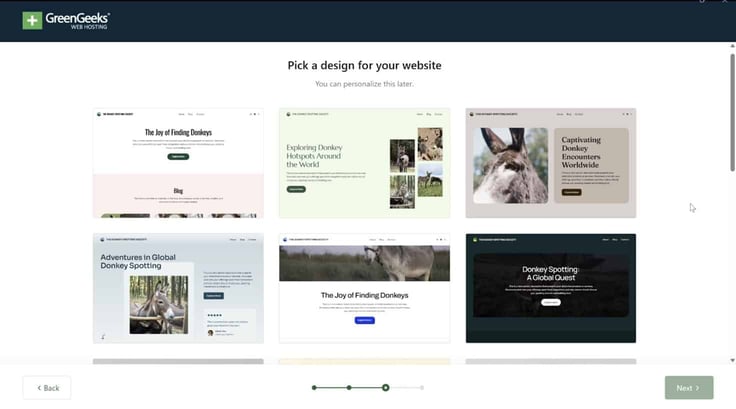
It is worth pointing out that other site-building options are available. Standard WordPress can be installed if you’re more comfortable doing things the old-fashioned way.
Full disclosure, I don’t usually put a ton of stock into these performance tests. Ideally, I’d be testing these websites under heavy load. Like what happens if I’m hosting a news site and a story goes viral? Or what would happen if a shopping site I owned got a huge surge in customers for whatever reason?
Those are circumstances where you want a hosting service to be reliable and give you the bandwidth you paid for. But I can’t just magically command thousands of people to hit up my test site. Not without essentially DDoSing it, which would hopefully trigger the DDoS protections in place and render the test invalid anyway.
But GreenGeeks is an exception. Not because I can test server load, but because I can check just how good the AI Website Builder is at optimizing a site. Ideally, a site should load quickly while still looking good. But if the AI Website Builder has gone too flashy or failed to optimize something, then my site will look slow on GTMetrix.
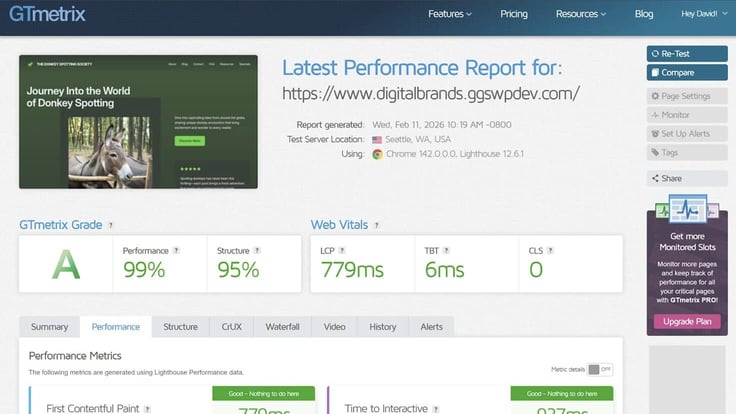
To GreenGeeks’ credit, the AI-built site absolutely aced this test. The results (which you can see in the screenshots) are better than the vast majority of prebuilt WordPress templates, which you think would be ideal right out of the box.
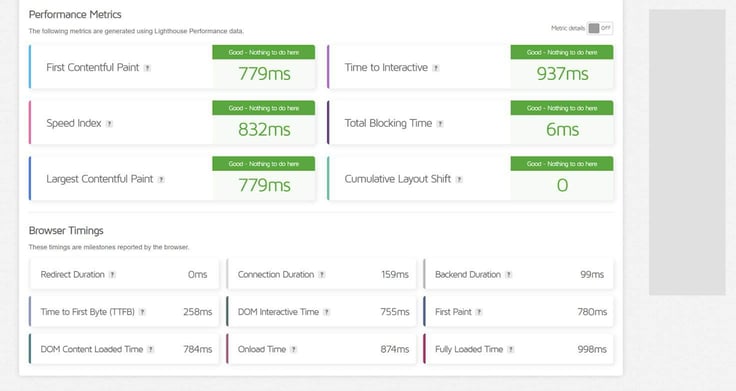
It is worth pointing out that, if this score did come out bad, I could further tweak the site with the AI builder and attempt to hit that A rating. I could actually do this by explaining the problem to the suite builder, “the largest contentful paint is taking too long and it makes the site look unprofessional,” for example, and it should fix that exact problem for me.
While there was a minor snag with the WordPress installation, it was resolved quickly enough via a chat with customer service. I think the “Sale” price is reasonable, though I would like the option to lock in the $5 a month (or even a slightly higher) rate for several years, as some of GreenGeeks’ competitors allow me to do.
When I did get access to the version of WordPress with the AI Website Builder, I found that I preferred it to pretty much all of the other options on the table. It’s easier to use than SiteJet, SitePad, or any of the other mainstream website builders.
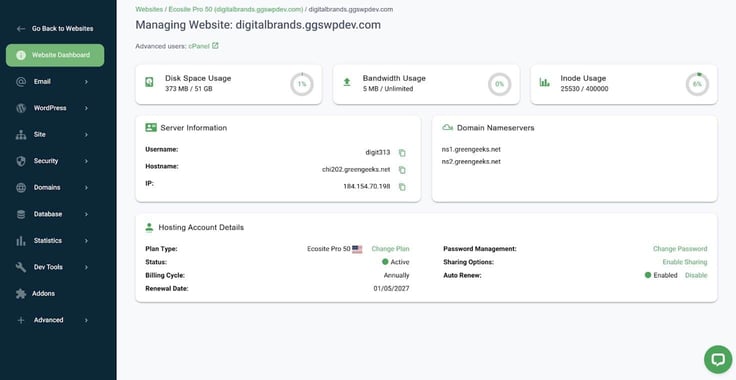
With AI advancing as it is, I would say this kind of website-building process is the future and will get a lot better. In the long term, it will likely have abilities akin to those of a senior web developer. But for now, it’s just a little taste of that.
I firmly believe GreenGeeks’ AI website builder is the standout feature of this hosting service. It’s essentially a generative AI that takes your instructions and uses them to build or modify a WordPress site for you.
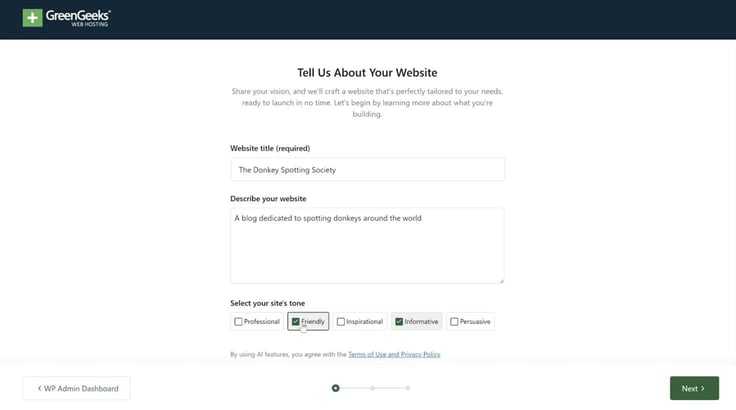
For instance, if I tell it I want a St. Patrick’s Day themed site for my new non-alcoholic stout with a green, foamy head, it will create a site matching those specifications. I can then use it to fine-tune that site to meet my needs. Where it can’t directly do something, it can usually guide me through it.
All of GreenGeeks’ plans come with access to its AI website builder. I found that the website builder itself does slap a limitation on you. It works through WordPress, so if you don’t want a WordPress-based site, then the AI tool is not for you.
Personally, I think if the site builder has to be restricted to one platform, WordPress is the one to go with. There’s a reason it remains the most popular backend choice, and it powers about 44% of websites.
If only certain plans included the AI website builder, its presence might be enough to make me opt for one that did, even if it cost a little more. Thankfully though, that’s not a dilemma I had to face.
Accessing the builder wasn’t difficult, but it wasn’t immediately obvious either. It requires a specific version of WordPress, and I initially spent an annoying amount of time trying to track it down. You’d think a feature like this would be front and center, with a big shiny button urging you to get started. But no.
After I contacted customer service, I learned that the version of WordPress that had handily come pre-installed wasn’t the one with the site builder on it. So I had to go into cPanel, then Softaculous, then uninstall WordPress, then install the specific AI version.
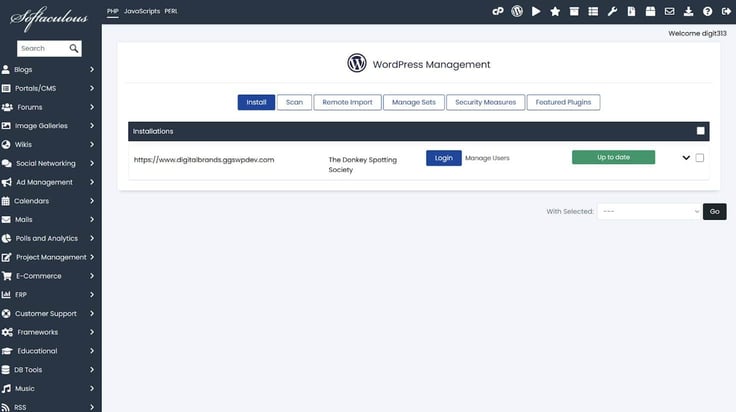
Customer service could not do this for me, so I was left with no choice but to get my hands dirty. Still, it was all quite straightforward.
After I finally found it, GreenGeeks’ AI Website builder made life a lot easier. But as with all AI products, you should temper your expectations. I started by entering my site’s name and a description of what I wanted it to do.
In this case, I was making a donkey spotting website, just to make things a bit weird and prove GreenGeeks AI wasn’t just popping out generic nonsense. The AI responded by generating a page of what I would describe as custom templates. You only get one page of these templates, and this may be to save tokens.
I would appreciate the ability to regenerate or continue to generate more templates, along with the option to tweak my initial prompt. But it’s still a more interesting variety of templates than I usually see, so I will give credit for that.
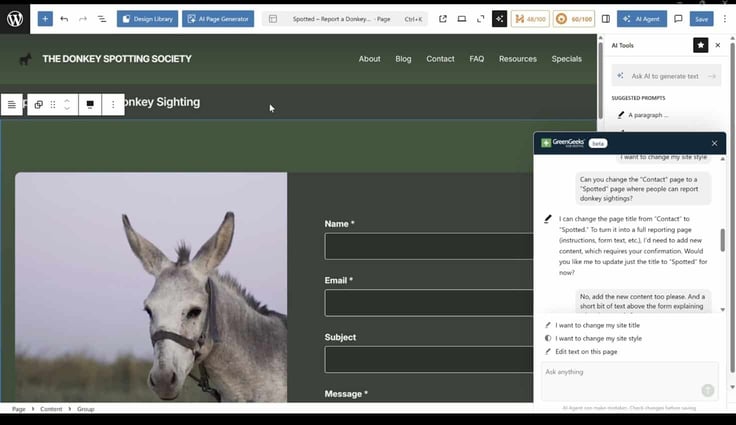
GreenGeeks’ AI Website Builder really started to shine after I selected my template. It can modify pages for you, talk you through how to do things, and hammer out code when needed. It does suffer from the same overconfidence as other AIs tend to have.
For instance, I asked it if it could add a game to my site and outlined plans for a version of “Frogger” but with a donkey crossing the road instead. It said it could, wrote some code, modified the page, and claimed everything was working. The page had changed, but it mainly just added a “start game” button that led to nowhere. I didn’t expect it to succeed in this task, but I do think it’s a good example of the site builder’s limitations.
For me, the main benefit is having an AI tool that knows WordPress to some degree and can see the site as you’re working on it. It can make minor changes for you and talk you through more complex ones. It can also teach you a bit about modifying a WordPress site, in theory.
Overall, I see the benefits outweighing the jank and believe this is a genuine glimpse into the future of website design.
When it works, GreenGeeks AI Website Builder might be one of the best options out there. It isn’t perfect, and you will need to do some work yourself. However, it’s far better than anything else I’ve used.
An absolute amateur could likely use this website builder to create something very unique and functional. I can’t really say that about any other product I’ve encountered. Yes, anyone can get something together on WordPress’s built-in site builder, but it’s going to look like the same template everyone else has.
“GreenGeeks AI Website Builder might be one of the best options out there. It isn’t perfect, and you will need to do some work yourself. However, it’s far better than anything else I’ve used.”
By the time you read this review, GreenGeeks’ AI Website Builder may have gotten even better. AI seems to be accelerating at breakneck speed. But if I were to give GreenGeeks some advice, there are probably a few other things that need fixing first…
GreenGeeks also offers Reseller hosting, which allows you to purchase server resources from the company in bulk, then repackage those resources to sell in smaller chunks. It also offers VPS hosting, which is where my experience took a turn for the worse.
In my professional experience, VPS hosting tends to be a little more involved than shared hosting. So when I’m reviewing a VPS hosting service, I like to play a little dumb. The way I see it, the average person is likely to find VPS and dedicated hosting somewhat complex.
If a hosting service can still help that average person navigate it all and get their site going with minimal fuss, it’s a solid hosting service. Based on my VPS experience, I wouldn’t consider GreenGeeks to be a solid option in this category.
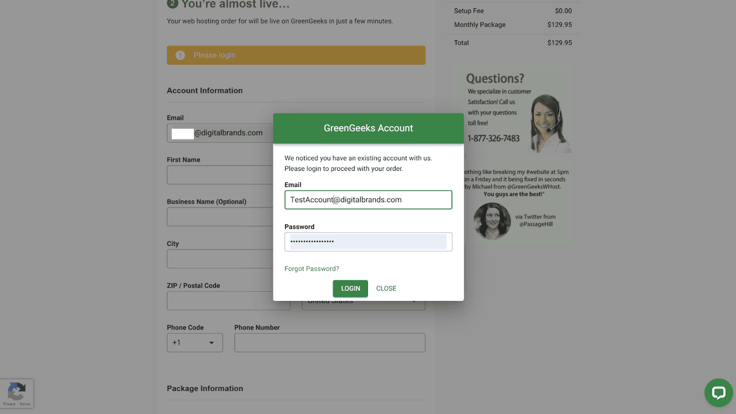
Adding a VPS plan was pretty straightforward. You’re prompted to log in once GreenGeeks recognizes the email address you’ve entered, which will autofill all of your details. However, if the card you’re paying with doesn’t match those details, you will get an error.
This problem isn’t going to affect everyone, but if you’re planning on adding a second plan with a company card or any other payment method that doesn’t exactly match the name and address you signed up with, it may be quicker to make a second account.
On paper, I found GreenGeeks’ VPS plans competitively priced. A cPanel and Softaculous subscription is included with all plans, including the 4GB VPS plan I signed up for. I see this as a massive bonus, as cPanel is sometimes a pricey extra with this kind of plan. I found the plan also benefits from the same “green” incentives as the shared hosting plans.
The VPS hosting plans do not come with a free domain name (which turned out to be a bit of an issue later), and the listing doesn’t mention anything about the AI Website Builder being included. However, customer service did assure me I have access to the AI website builder with my 4GB VPS plan when I asked them.
GreenGeeks does offer a “Free Website Transfer” with these plans, which would be handy if I were migrating another site across.
When I first signed in after purchasing my VPN plan, the server was having some kind of issue. I tried resetting it to no avail, so I contacted customer service using the same chat box that helped me out before.

But I was informed that the text chat couldn’t do anything with a VPS plan, and I had to instead open a support ticket. The support ticket process is a little slower, but I still received a reply within an hour telling me my server was up and running normally.
In hindsight, I probably tried to get going a little too quickly; things tend to take some time to get set up after you purchase a plan. If only the issues had ended there.
During testing, nothing came pre-installed with my VPS server, so my next step involved installing cPanel through Web Host Manager (WHM). But I couldn’t access the Web Host Manager. After signing up, GreenGeeks sent me an email with a link to a page offering specific VPS setup instructions for their service. At the time of testing (though GreenGeeks seems to have fixed it), that page is just 404d.
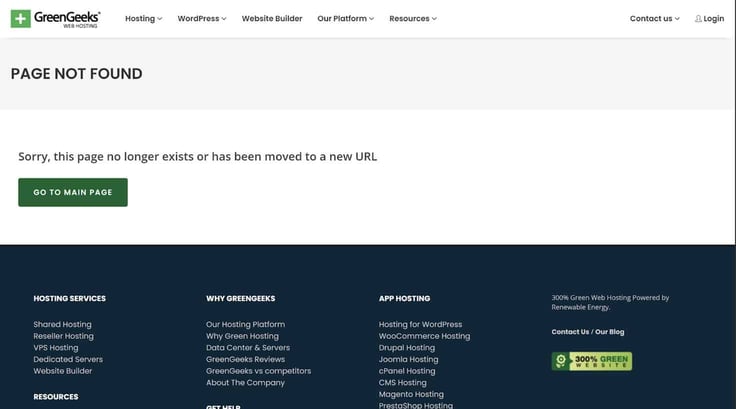
In hindsight, that was the canary down the mine shaft. The sign of things to come.
I contacted customer service again, who had to open another support ticket, which resulted in me receiving a “temporary login” link straight to WHM. Once in, I managed to install cPanel. I have no direct link to either the WHM or cPanel on GreenGeeks’ dashboard, so this entire time I’ve had to use the temporary login link to get into the WHM and then launch cPanel from there.
From cPanel, I should be able to install Joomla, WordPress, or anything else I want to use to build and manage my website. But I ran into another snag.
Those of you who have been paying attention will recall that my VPS plan included a free Softaculous subscription. Well, in cPanel, I was prompted to pay for Softaculous. I know it’s only $15 for a year or something, but it’s the principle of the matter. And after getting messed around this much, principles are pretty much all I have left.
So another support ticket was opened. The good news is that GreenGeeks managed to add my missing Softaculous subscription. The bad news is that they then managed to break something else in the process…
Customer service reached out with the following message out of the blue:
“I’m reaching out to inform you that there’s been a change in your VPS assigned IP address as the original IP was assigned by mistake, as this IP had already been allocated, and should not have been available for a new VPS.
Old IP: 67.208.40.109
New IP: 67.208.40.39
To resolve the immediate issue, I’ve added the new IP to your VPS, and updated the relevant configuration files on the VPS for all services to work under this new IP.”
Despite the fact that I haven’t managed to get near a website builder, and customer service acknowledging a site had not been published on the VPS server, my new IP address was seemingly linked to a website that sells potatoes. In addition to all of that, I still couldn’t install the version of WordPress with the AI Site Builder included. I could only install regular old WordPress.
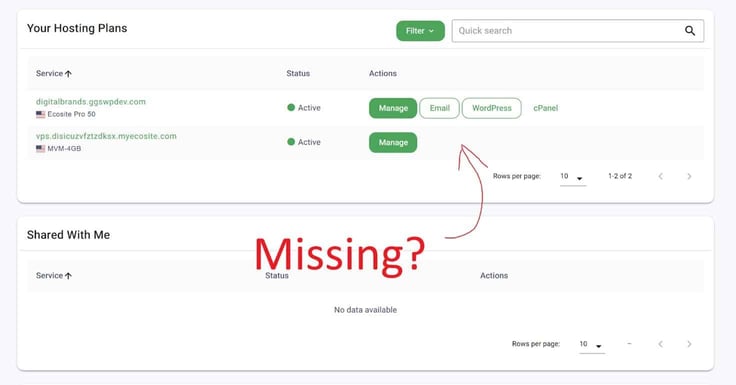
I contacted customer support yet again, who told me the AI Site Builder works best with a fresh install of WordPress. I pointed out it was a fresh install, and they responded with:
“We noticed that your punctual-emerald-raccoon.67-208-40-109.cpanel.site temporary domain directs to https://yukongold.online/ as A record is pointed to vps.yukongold.online (67.208.40.109)
https://www.whatsmydns.net/#A/punctual-emerald-raccoon.67-208-40-109.cpanel.site
But your VPS main IP is 67.208.40.39
Also your temporary punctual-emerald-raccoon.67-208-40-109.cpanel.site cPanel domain name should be have name with your VPS IP address, like as
punctual-emerald-raccoon.67-208-40-39.cpanel.site
So, please update your temporary domain name and we will proceed with AI Website Builder installation.”
None of this is anything I did. The mystery potato site and the chaos that came with it all happened on GreenGeeks’ end. I pointed this out, and also pointed out that it wouldn’t let me generate a new temporary domain, so I couldn’t fix things on my end. I politely asked them to sort it all out.

GreenGeeks responded by saying they didn’t issue temporary domains, which was a shock, as the site initially had one before they decided to scramble everything out of the blue. I was told I’d have to buy one, and those principles kicked in again. I didn’t fancy giving GreenGeeks even more money, and getting a domain through that website starts at $20, so I opted to purchase one elsewhere.
Once again, I asked them to disconnect the Potato Emporium or whatever tuber-based outlet they’d linked me to, attach the new site (www.thisistakingawhile.com), and install the version of WordPress I’ve asked them to install several times now. The version that has their flagship feature. The one redeeming thing about their so-far-awful VPS hosting experience. That one.
I received a reply telling me that the correct version of WordPress had been installed. This included a screenshot:
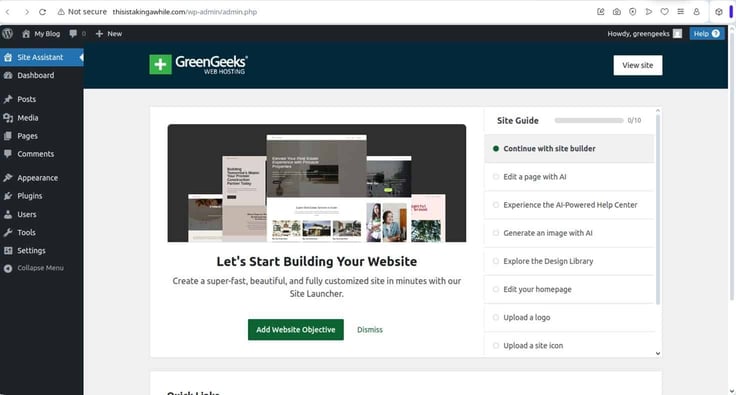
Now, I’m not accusing GreenGeeks’ customer service of lying. And looking at cPanel, some version of WordPress is certainly installed. But if I go to the address listed on that screenshot, or click the login button next to WordPress on cPanel, I don’t get the WordPress backend. I get an indication that the domain isn’t connected to the server yet.
So, sitrep. I have got the ball rolling with the domain name. Connecting that takes a few days, though, and I’m beginning to suspect this process exists purely to test my patience. In an absolute best-case scenario, the web address connects, and everything works smoothly from there.
But let’s be honest, it was difficult to see a clear path to resolving the issues quickly. I don’t see a road back up the mountain for GreenGeeks, just the possibility of sliding further into the abyss.
This is where the previously helpful customer support turned out to be less than helpful. On the plus side, it’s available 24/7, and you get a reply in the text chat very quickly.
On the downside, if your inquiry is in any way complicated, then it’s likely more than the person on the other end of the live chat can handle. It almost seems like they exist to quote from an FAQ page and walk people through very basic tasks.
The support ticket side of things seems to have broken more than it’s fixed. It’s a long, drawn-out process that has made me think I’ll have to basically fix everything myself. Cashing in the 30-day money-back guarantee and starting from scratch is likely a better option than unraveling the tangled mess this server is in.
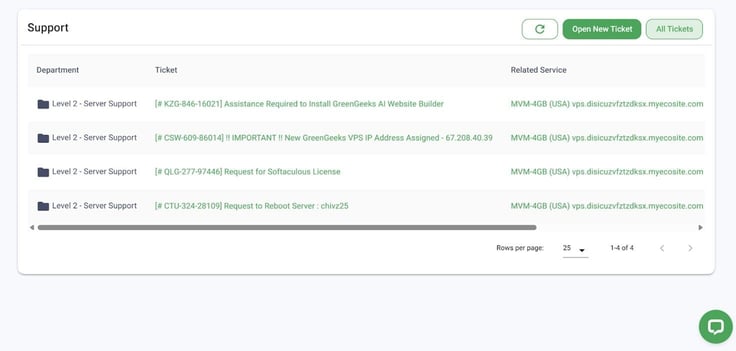
If you have little to no experience with VPS servers, avoid GreenGeeks because you’re very much on your own. If you are experienced, just avoid the customer service side as much as possible.
I’m going to be frank here: the cons outweigh the pros on this one. GreenGeeks has an interesting USP that could lure in plenty of folks worried about the impact their server could have on the environment. They’re also at the absolute cutting edge when it comes to website builders.
But you can’t have one tool designed to streamline the experience and then bury it so deeply that a new customer needs to contact support to find it. And that was the most minor problem I encountered.
I found this whole experience pretty depressing. GreenGeeks has an absolute gem of a website builder on their hands, and it works with the most popular CMS on earth. Unfortunately, repeated setup issues undermined what should have been a straightforward experience.
That being said, I cannot recommend GreenGeeks’ VPS plan. On a personal level, I’d rather attempt home dentistry than try to put together and manage a site using GreenGeeks again.
Based on my experience, the problems run deep to the point of being systemic. The operational side of the service needs significant refinement to match the quality of the AI Website Builder. Maybe the AI Website Builder can help them with that.

HostingAdvice.com is a free online resource that offers valuable content and comparison services to users. To keep this resource 100% free for users, we receive advertising compensation from the hosts listed on this page. Along with key review factors, this compensation may impact how and where hosts appear on the page (including, for example, the order in which they appear). HostingAdvice.com does not include listings for all web hosts.
Our site is committed to publishing independent, accurate content guided by strict editorial guidelines. Before articles and reviews are published on our site, they undergo a thorough review process performed by a team of independent editors and subject-matter experts to ensure the content’s accuracy, timeliness, and impartiality. Our editorial team is separate and independent of our site’s advertisers, and the opinions they express on our site are their own. To read more about our team members and their editorial backgrounds, please visit our site’s About page.


