
Writer: Surajdeep Singh


Editor: Britain Simons


Reviewer: Cristian Lopez

More than 21 million people “secure” their accounts using passwords like “123456” and “admin.”1 That’s like setting up an all-you-can-eat buffet for hackers. In the same way, HTTP websites fail to protect data traveling from user browsers to their servers.
The data isn’t encrypted on an HTTP site. It’s transmitted in plain text. Anyone on the same WiFi (like in a cafe or hotel), network operators (like ISPs and system admins), or attackers along the route can read or even modify their data. Think passwords, credit card information, and cookies (to impersonate you) just lying there for the taking.
Your website needs to be HTTPS-protected. You can and should always enable it by installing an SSL certificate on your site.
Whatever data you share on our website is securely scrambled using SSL/TLS encryption technology, making it almost unreadable to anyone who might try to intercept it. Most web hosting providers give you a free SSL certificate by default — you don’t have to pass a test or jump through hoops to get one!
Through these SSL certificate stats, I’ll show you how adoption affects security (on a broader scale), SEO rankings, user trust, browser behavior, and how to protect your site.
1. HTTPS Adoption Reaches About 90% of All Websites
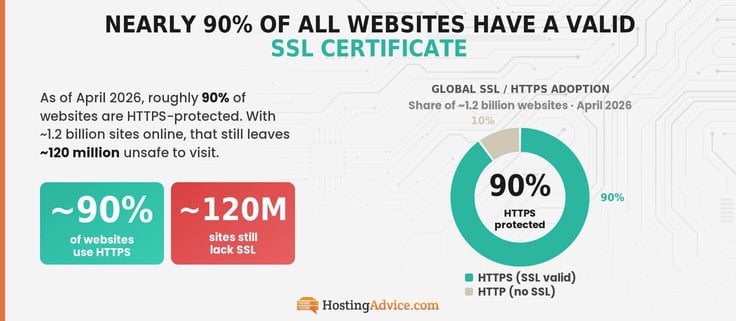
As of April 2026, nearly 90% of all websites have a valid SSL certificate. Since there are around 1.2 billion websites on the Internet, this means that approximately 120 million websites still are not safe to visit and use. If you see a warning, steer clear.2,3
Some of these websites are simply old, abandoned (inactive), or poorly maintained, and receive negligible traffic. Browsers like Google Chrome, Microsoft Edge, and Safari, display “Not secure” warnings on HTTP websites. Mozilla Firefox might show this warning or a padlock icon with a red strike-through — it’s best to leave immediately. Be aware. Stay safe.
Hot tip: This may be a simple fix if your site is outdated. In many cases, all you have to do is click “Enable SSL” in the website’s Content Management System (CMS), like WordPress.
2. Websites Without SSL Certificates Represent Only 10% of the Web
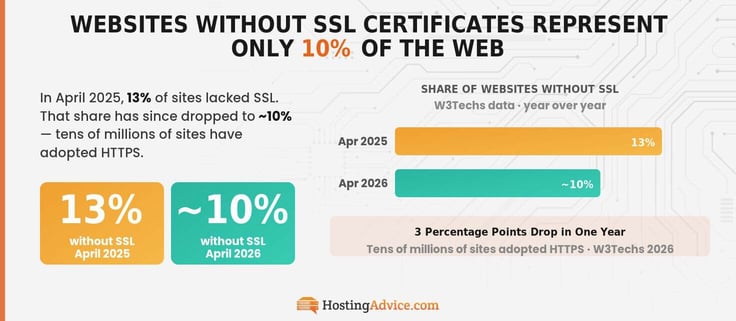
According to W3Techs, back in April 2025, approximately 13% of websites on the Internet didn’t have SSL certification. Based on its latest data, that share has declined to around 10% — meaning tens of millions of websites have since adopted HTTPS.2,3 I hope the figure reaches single digits when I update this guide in 2027.
Without SSL, browsers will alert you if a connection is “Not Secure”, but to check for a valid SSL certificate, start by looking at the URL of this webpage. There may be a padlock icon.
If not, click the small menu icon in the search bar (for Chrome) to see “Connection is secure”. For Safari, click “Safari” (in the menu bar) > “Connection security details” > “Safari is using a secure connection”. The path is similar for most browsers, but the sure sign is HTTPS in the URL.
3. Chrome Users Spend About 96% of Browsing Time on HTTPS Sites
According to the most reliable research, around 96% of traffic on the Google Chrome browser is encrypted — HTTPS-protected. Mind you, this data is from August 2024 — According to trends, the projected figure is slightly higher today.
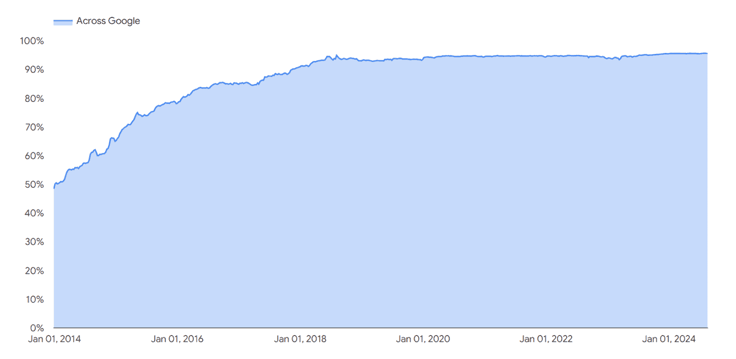
From the chart, you can see encrypted traffic across Chrome has been consistently above 90% since November 2017, nearly doubling the upward trend from 50% in 2014 and leveling off.
For perspective, encrypted traffic has been consistently in the 93% to 96% range since April 2018. HTTP websites still receive the occasional visitor — and that’s where ~4% of traffic comes from.4 Sometimes, the SSL certificate of a site you “trust” may expire. In this situation, the browser can fall back to HTTP — risking security.
If something seems off with a site that should be secure, try refreshing the page and checking the URL carefully. Do not enter any personal information. Make sure you’re on the correct domain, as website lookalikes with a slight URL deviation (like an added letter) are a common phishing trick.
If the site is trusted and the problem persists, I suggest clearing cookies and cache and waiting for the owner to renew the certificate before interacting with it. Personally, I’d visit the website’s contact page and try to get in touch with them — issues like this often go unnoticed until someone flags them. Especially with Mom ‘n Pop stores.
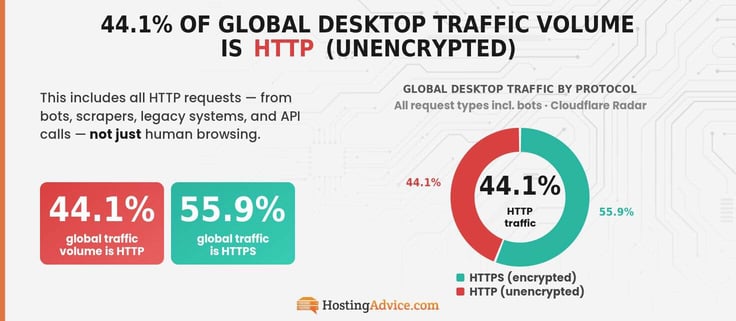
4. 44.1% of Global Desktop Traffic Volume Is HTTP
This headline most definitely sends alarm bells ringing. ~44.1% is a huge chunk of global desktop traffic volume.5 We’re moving beyond Chrome-exclusive “human” browsing time on HTTPS websites for this stat.
It includes all unencrypted HTTP requests to servers to get or send data. Most notably, those generated by bots, scrapers, and crawlers, as well as API calls, background services, legacy systems, and automated scripts.
Bots (such as scrapers and crawlers), in particular, skew the numbers heavily, as many of them still make plain HTTP requests where possible — defaulting to HTTPS otherwise. You might be wondering why they’d choose the less secure option.
There are some practical trade-offs, especially since many of these bots operate in controlled, secure environments:
- Speed and Lower Overhead: On a purely technical level, HTTP can be slightly faster and use less overhead since it avoids the TLS handshake and encryption. For a bot making tens of thousands to millions of requests, those extra milliseconds can add up.
- Simplicity: HTTPS requires certificate validation and a TLS handshake. With HTTP, it’s simpler — just send a request and get a response.
- Crawling Legacy Sites: Crawlers might need to scan older or misconfigured HTTP websites, so they still have a use.
And, well, some bots are just built sloppily — they might ignore HTTPS entirely! Unlike us humans, bots don’t have to worry about exposed credit card details or passwords — whatever “damages” might happen due to these trade-offs are often limited to bad data or failed tasks.
5. 28.5% of All Site Traffic in the U.S. is HTTP
The percentage of site traffic going to unsecured sites is fairly small, but if you parse out that sliver by region, the U.S. has the highest percentage of HTTP traffic of any country, at approximately 28.5%. India is a distant second at about 5.5%.5
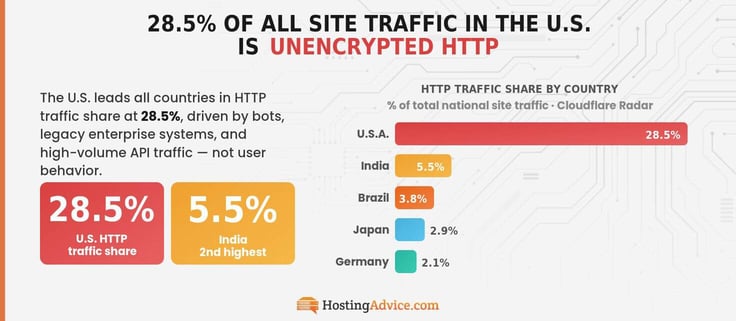
This is more about the kind of traffic in the U.S. rather than user behavior — it doesn’t necessarily mean Americans browse HTTP websites more than everyone else. Think more bots and automation, legacy enterprise systems, and high-volume API traffic.
Here’s the full “Geographical distribution worldwide” from Cloudflare:
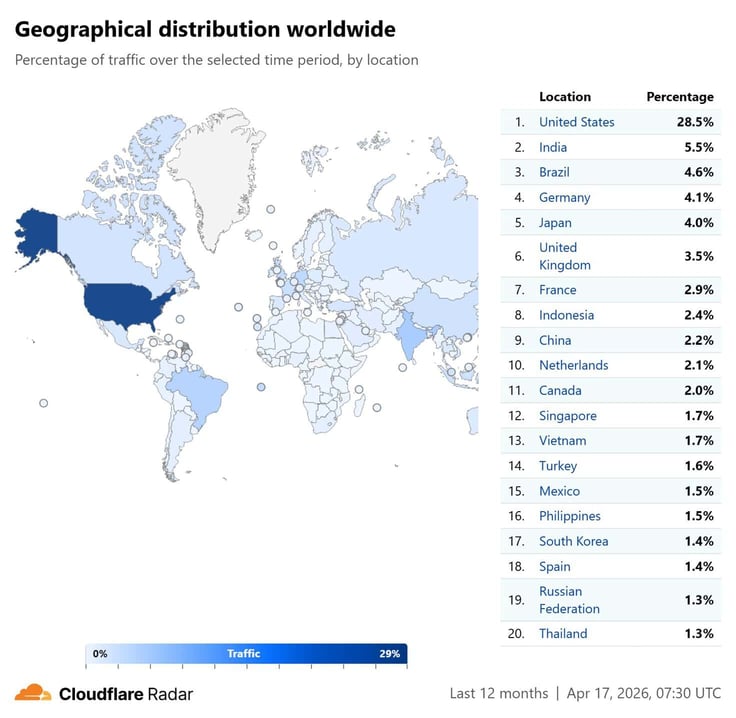
China should probably be higher on this list. The thing is, China’s internet traffic operates behind the Great Wall of China… er… the Great Firewall of China. This means that it’s nearly impossible for data providers like Cloudflare to get a complete picture of its traffic.
6. 30% of Global HTTP Traffic Volume is from Bots
I’ve never used a bot, but I’ve read a lot about them, especially for automated trading. They monitor market data, apply a trading strategy, and execute trades without manual intervention. While I’ve seen many traders successfully implement them and share their success stories on platforms like X and Reddit, I wouldn’t trust my money with a bot.
These bots are different from the kind I’ve talked about — since they deal with real money, they’re engineered with security in mind and connect to exchanges via HTTPS APIs. Mind you, roughly 30% of global HTTP traffic comes from bots, and many of them are configured to prioritize efficiency over security, so be careful when using bots to handle any sensitive data.5
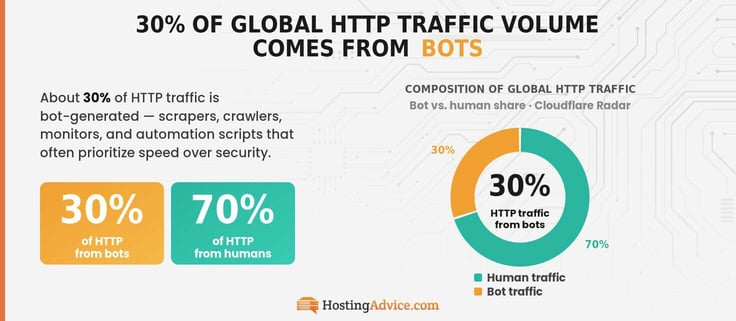
If it doesn’t use encryption, asks for full account access, and sounds too good to be true (like making outlandish profit promises), it’s a red flag. Bots automate repetitive, high-volume dataset tasks, like indexing crawlers, security monitoring, and data/ metrics scraping.
7. Around 70% of Global HTTP Traffic is from Humans
The other side of the coin is just as interesting.
Here’s the rundown for HTTP: around 10% of all websites are HTTP, 44.1% of global traffic volume is HTTP, and 70% of HTTP traffic is from humans.
Since Chrome users spend only about 4% of browsing time on HTTP websites (similar to other browsers), you might think the human side of HTTP traffic doesn’t add up, but we’re analyzing a subset of the shrinking HTTP use and some factors we haven’t covered yet.2,4,5
Human traffic includes app activity, background browser requests, embedded content, redirect chains, and cached or outdated links. So even if you’re casually browsing the web, you might generate a significant number of HTTP requests without realizing it. Also, there’s the small matter of bots mimicking real users and being classified as human.
You know, the kind that can breeze past those “I’m not a robot” checks!
8. Users Avoid Websites Marked “Not Secure” at a Rate of 97% when Searching Google
Approximately 85% of users won’t browse your website if it isn’t secure.6 The thing is, this is around the same time browsers began widely warning site visitors that HTTP websites were not secure, in 2018.
Only a handful of users will ignore warnings to spend “significant” time on unsecured websites. Today, that number is nearing 99%.
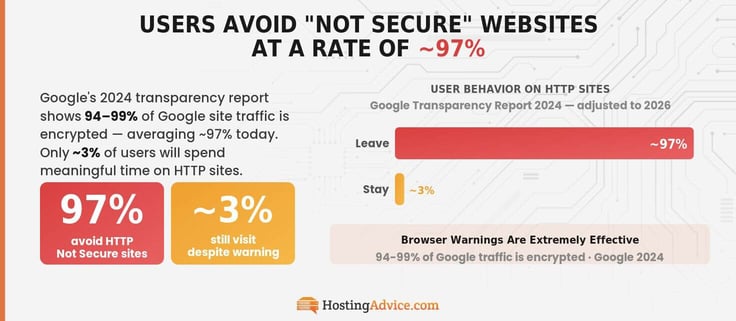
Another way to look at this is by reviewing the percentage of encrypted traffic. According to Google’s “HTTPS encryption on the web” transparency report in 2024, 94-99% of Google site traffic is encrypted. An average of around 97% when adjusted to 2026.4
Hot tip: You can download the uBlock Origin extension (it’s supported on most major browsers) and add a custom filter like “||http://^” to block all HTTP websites. No HTTP, no headaches. You can think of it as a mini firewall inside your browser!
9. 93.7% of the Top Million Websites Use HTTPS by Default
In August 2014, Google announced HTTPS as a lightweight ranking signal. This means that simply adopting HTTPS doesn’t guarantee higher search preference over an HTTP website with similar content, authority, and relevance.
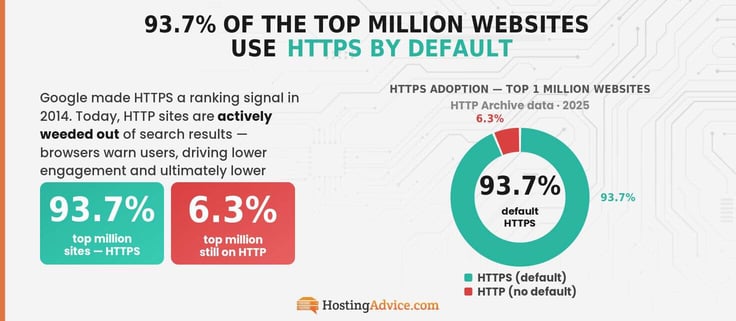
Today, you’ll be hard-pressed to find any HTTP website that ranks highly unless you search for something extremely niche (like legacy software documentation). They are actively weeded out. The logic is simple: browsers warn users against using them, leading to lower engagement and ultimately, lower rankings.
So while SSL adoption is still considered a lightweight ranking factor in 2026, its indirect SEO benefits (improved user trust, lower bounce rates, and stronger engagement signals) are substantial, which helps explain why approximately 93.7% of the top million websites use HTTPS by default.7,8
10. Websites With SSL Certificates Increase User Trust by About 84%
According to a GlobalSign survey from 2020, around 84% of users would abandon a purchase if the website didn’t have an SSL certificate.9 Most similar surveys were conducted between 2018 and 2020, as that’s when browsers first started aggressively flagging HTTP.
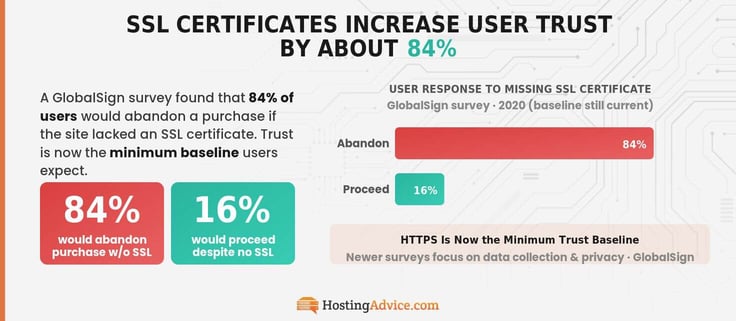
You can see a rise in SSL adoption (Stat 3) in this period. Since then, HTTPS has become the minimum security requirement users expect.
Newer surveys have shifted toward broader privacy concerns, such as data collection practices, third-party tracking, and how user data is stored and shared.
11. SSL Certificates Help Reduce Bounce Rates by Around 85%
A high bounce rate means visitors land on your page and leave almost immediately. If less than 40% of visitors bounce, you’re in good shape — the majority are sticking around to engage with your content. Most sites sit somewhere in the 26–70% range, with news and blog sites pushing 80–90% even on a good day.
Now imagine a browser warning greeting every visitor before they even see your content. That’s exactly what happens with HTTP sites. And, unsurprisingly, it’s a conversion killer.
Content relevance, page speed, and UX all affect bounce rates, but none of it matters if users never get past a “This site is not secure” warning. According to Google’s data, users avoid unsecured websites at a rate of around 97%. That warning acts as a hard gatekeeper, immediately pushing bounce rates to the top of the typical range, anywhere from 70% to 100%.
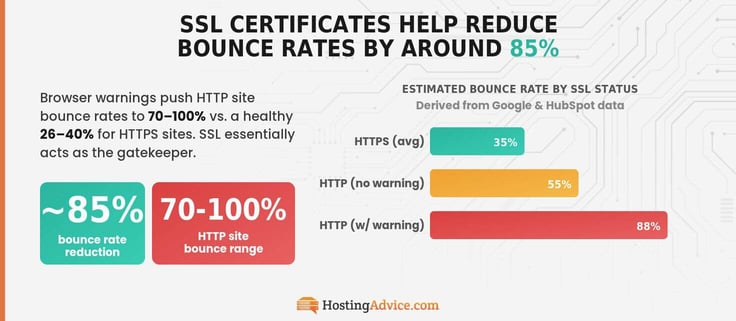
We can cross-reference this with Stat 10: 84% of users say they don’t trust an unsecured site and won’t stick around. Taken together, the data points to SSL certificates reducing bounce rates by roughly 80–90% — an ~85% average.4,9,10,11
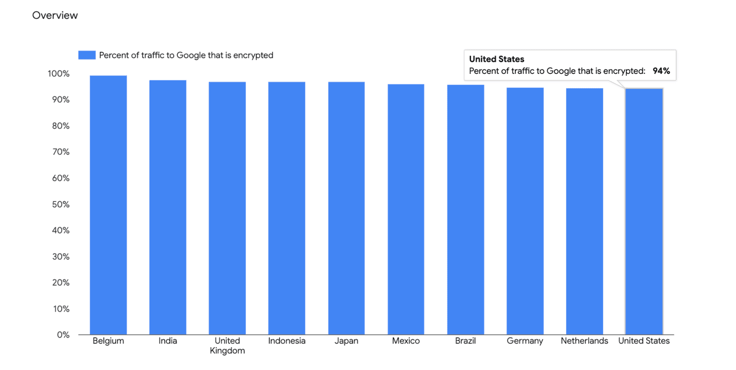
While there’s no single study that measures this directly, the evidence is consistent enough to say with confidence: SSL certificates help reduce bounce rates by around 85%.
12. SSL Certificate Errors Lead to User Drop-Off Rates of About 70%
You likely have a website hosting plan from a trusted provider like GoDaddy, Bluehost, or SiteGround. They usually offer free, auto-renewing SSL certificates (from certificate authorities (CAs like Let’s Encrypt) with a 90-day term. If everything is configured correctly, they’re auto-renewed every ~60 days.
Paid SSL certificates, like those issued by DigiCert, typically have a validity of around a year (the maximum term for any certificate is 398 days). While they can be auto-renewed, you might need to be hands-on with reinstallation or validation. You don’t need a paid SSL unless you’re running a site that legally needs a verified business identity — so stick with free SSL.
You can check the status of your SSL certificate on your CMS dashboard. Just navigate to the “Security” or “SSL/TLS” section to see if it’s active, expiring, or set to auto-renew. Keep an eye on it as it approaches expiry — add your domain to UptimeRobot and set SSL expiry alerts for 30 days (that’s when renewal usually takes place), 15 days, and seven days before expiry.
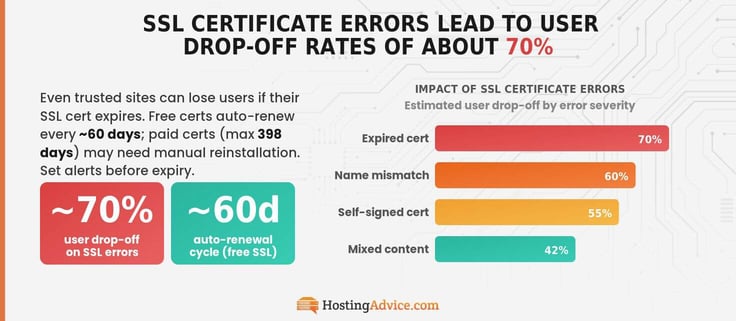
If it still hasn’t renewed, you need to investigate immediately. Sometimes, DNS changes, hosting misconfigurations, expired domains, or even a temporary server issue can cause it to fail. Fixing the issue before your users start seeing security warnings in their browsers could be the difference between retaining their trust and loyalty and facing drop-off rates of around 70%!12
13. Free SSL Providers Power More Than 60% of All SSL Certificates
When I was a preschooler, I looked forward to our supermarket visits every weekend. Not because my parents were going to restock my favorite chips or chocolates, but because I was going to gobble down a free munchy at the produce section!
Cookie days were my favorite, but life rarely gives us free goodies — SSL certificates are one of them. In fact, free providers now power more than 60% of all SSL-enabled websites!13
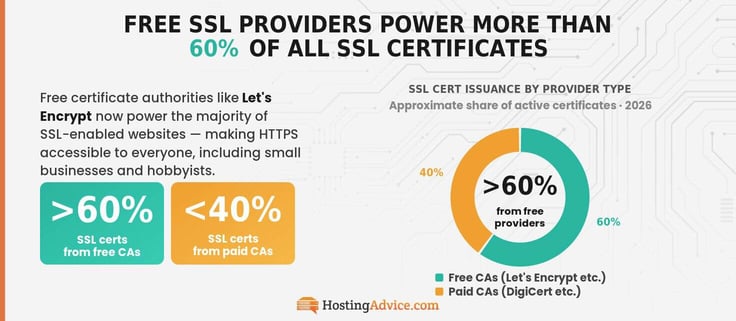
So if you’re still running HTTP, you’re essentially turning down free cookies, and that’s just bad decision-making.
14. Let’s Encrypt Has More Than 540 Million Active SSL Certificates
Let’s Encrypt has the largest chunk of the SSL Certificate Authority (CA) market share — around 65.3%. GlobalSign (23.1%) and Sectigo (5.5%) take second and third spot. All certificates issued by Let’s Encrypt are free. There are no loopholes — they’re a nonprofit CA with the goal of making HTTPS free and universal. And they’re doing quite well.
While the CA has issued billions of SSL certificates, only about 540 million are active at the time of writing.13,14
15. 6.5 Million Let’s Encrypt Certificates Are Issued Per Day
When I say “issued,” I’m not just talking about websites that are getting a brand-new SSL certificate. Of the 6.5 million Let’s Encrypt certificates issued every day, most are renewals and reissues.
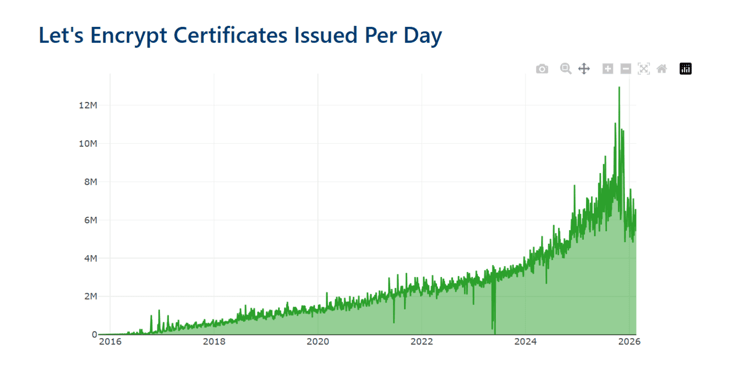
These certificates last 90 days, and most are renewed every ~60 days. You know what this means: hundreds of millions of certificates are being recycled continuously. I wonder what happened in October 2025 — the huge spike on the chart. Almost 13 million certificate issuances per day is crazy!
That’s almost one certificate per day for every person in the three largest U.S. cities by population — New York City, Los Angeles, and Chicago — combined!14,15
16. eCommerce Websites Use SSL Certificates at a Rate of Approximately 95%
Imagine depositing your check, and an ATM loudly reads out your account details and password — the shady guy behind you frantically typing it on his phone. Then, your account is emptied out in a flash. That’s what it’s like shopping at an eCommerce website that doesn’t use SSL certificates.
The moment you swipe your card, your data can be exposed to anyone eavesdropping on the network. Data is transmitted in plain text, like a neon sticky note, over HTTP connections.
All top websites are driven by some sort of eCommerce, so stick to the vast majority (~95%) of top websites that are HTTPS-protected, according to Si-Tech Today.16
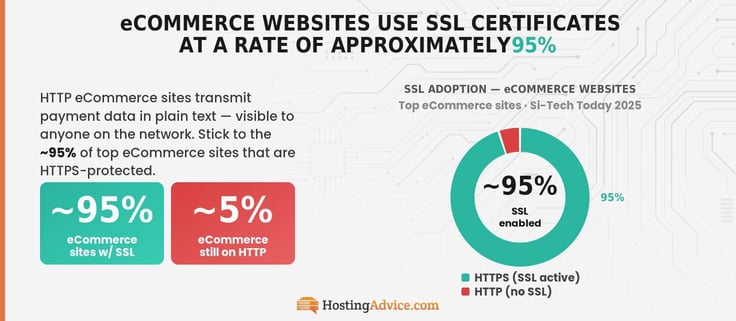
Some owners of HTTP eCommerce sites are either negligent or completely unaware of basic web security practices, like SSL. That could be because of the digital divide and the technical skills, or lack thereof, of different generations. Either way, I hope they get their act together soon, as they’re exposing user data to unnecessary risk.
17. Small Business Websites Use SSL Certificates at a Rate of Around 75%
Yes, around one in four small business websites still run on HTTP. This might be difficult to digest given the easy (and free) access to SSL. Availability doesn’t guarantee adoption.
Here are a few reasons why 25% of small business websites still aren’t properly using SSL:
- Outdated site builds: Many of these sites were built years ago (by freelance developers on Upwork or Freelancer, for example) and haven’t been touched since.
- Knowledge gaps: Their owners might be non-technical and don’t even know what SSL is and why it’s important. Especially true for older generations.
- Technical issues: They might have a certificate, but it isn’t enforced — the site still loads over HTTP. Often, a technical issue, like a certificate mismatch or incorrect server configuration.
- Certificate expiration: Broken auto-renewals often go unnoticed. It’s simply expired.
- Dead sites: Old or abandoned sites, which still count in stat analytics.
Access to SSL isn’t the only problem. Often, site owners lack maintenance, awareness, or the correct setup know-how. Good thing 75% of small business owners use up-to-date SSL.
I mean, about 70% of small business sites struggle to attract even 100 visitors per month, so it’s understandable why some owners might leave their sites unattended. It’s highly likely that a significant portion of the overall ~10% of non-SSL sites are from small businesses!2,17,18
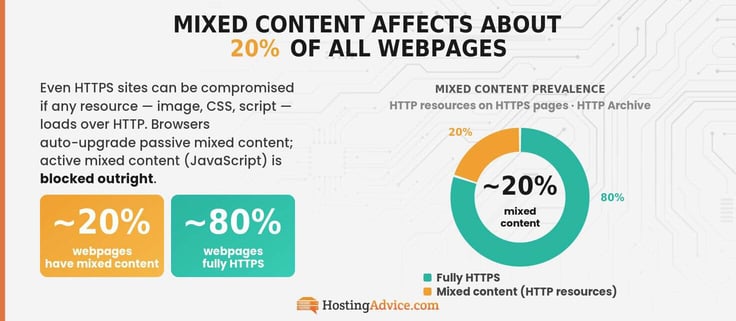
19. Mixed Content Affects About 20% of Webpages
Desktop and mobile webpages may have mixed content. Every page on your site might load images, CSS files, JavaScript, fonts, analytics, ads, and embedded widgets. Even if one of these resources loads over HTTP, your page will be classified as having mixed content. Mixed HTTP content affects around 20% of sites.19
Let’s take an established online publication like HostingAdvice.com as an example. When an image is uploaded to an article, the file is stored on a server, and the system inserts a URL into your page — that’s what your browser uses. HostingAdvice has thousands of publications, but they have a dev team making sure all media HTTPS is up to date.
Sites that have been around since before the large HTTPS rollout in 2018 may have images with HTTP links — from before a system admin enabled HTTPS on any given site.
Don’t worry, though — you don’t have to go digging through HTML code to find all media resources that point to HTTP. Most modern browsers attempt to automatically upgrade passive mixed content, like images, to HTTPS. If the HTTPS version isn’t available, the resource is actively blocked.
Active mixed content, like JavaScript, is a whole different story — it’s blocked outright.
JavaScript is code that controls how a webpage behaves. It can be requested over HTTP on an HTTPS page — your users would think they’re browsing securely — so browsers block it to prevent attacks.
A reminder to keep your site and media plugins up to date!
20. 36% of Mobile Webpages Implement HSTS
You thought you had everything figured out with SSL? Here’s a curveball — HSTS.
When I said approximately 93.7% of the top million websites default to HTTPS, there isn’t a guarantee these sites will always load over HTTPS. The “default” part means the server redirects users to HTTPS. When you type something like “example.com” in your browser, modern browsers typically try an HTTPS request first.
If you explicitly use “http://” in the URL or click on an HTTP link from another website, the browser will first make an HTTP request before relying on the server’s redirect.
In that small window of time, if there’s an attacker on the network, they can execute an SSL stripping attack — where HTTPS is downgraded or blocked, and the user is silently kept on an unencrypted HTTP connection. And you know what that means.
Vulnerability to digital attackers.
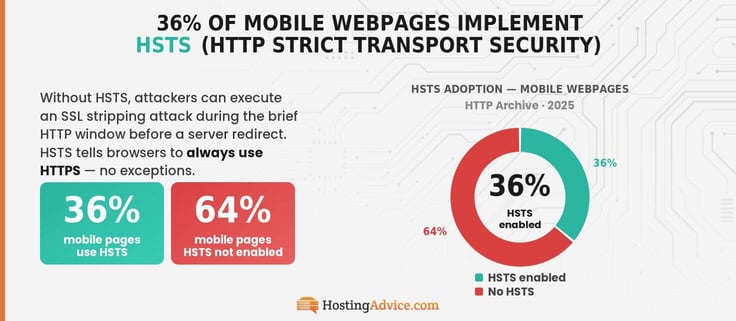
You can make your website more resilient to such attacks by enforcing HTTP Strict Transport Security (HSTS) — through this response header, servers will instruct browsers to only visit pages on your site over HTTPS. According to HTTP Archive, around 36% of mobile pages use it — and so should you.8,20
21. SSL Adoption in Developing Regions Lags by About 10-15% Compared to Developed Markets
According to Mozilla Research, HTTPS adoption in North America, Europe, and Oceania is roughly 10% to 15% higher than in parts of Asia, South America, and Africa.
Here are the top five countries with the highest and lowest HTTPS adoption:
| Rank | Highest | Lowest |
|---|---|---|
| 1 | Denmark (98%) | Sudan (51.2%) |
| 2 | Norway (97.3%) | Myanmar (55.2%) |
| 3 | Canada (97.1%) | Uganda (62.4%) |
| 4 | New Zealand (97.1%) | Paraguay (62.5%) |
| 5 | Belgium (97%) | Mali (66.1%) |
Are you surprised the U.S. isn’t in the top five? With an HTTPS adoption rate of around 96.4%, it’s in seventh place, just behind France (96.8%)!21
In countries like Sudan and Myanmar, nearly half of web traffic is still unencrypted — it’s a completely different browsing experience. SSL may be free, but the infrastructure to support it isn’t always in place.
It’s hard to ignore the gap, but SSL certificate adoption is improving across the board.
What These SSL Certificate Adoption Statistics Mean for Website Security and Trust
Do you know when the first SSL certificate was designed? 1994.22
SSL 1.0 was never publicly released, but 2.0 was launched by Netscape in 1995. It should’ve never been optional — not when it directly affects the data and privacy of your users. But adoption of new tech takes time. More than 30 years later, we still haven’t reached 100% adoption, and we probably never will.
If you’re in a country with high HTTPS adoption, consider yourself lucky.
Through these SSL certificate stats, I’ve shown you how HTTPS shapes user trust and protects user data as the first line of defense — ignore it, and you won’t just fall behind, you’ll be exposed. Take a few minutes to check your SSL setup right now. Make sure everything is in place, renewed, and that your site is fully secure.
Follow us on social media (@HostingAdvice) for more expert content on security and performance, and check out more of our stats and how-to guides using our new handy HostHelperTM smart tool!
Sources
1. https://nordpass.com/most-common-passwords-list
2. https://w3techs.com/technologies/details/ce-httpsdefault
3. https://www.netcraft.com/blog/may-2025-web-server-survey
4. https://transparencyreport.google.com/archive/https/overview
5. https://radar.cloudflare.com/traffic
6.https://cdn2.hubspot.net/hubfs/137828/Website%20Optimization%20Course/Transcripts/Implementing%20Website%20Security%20Best%20Practices%20-%20Transcript.pdf
7. https://security.googleblog.com/2014/08/https-as-ranking-signal_6.html
8. https://w3techs.com/technologies/breakdown/ce-httpsdefault/ranking
9. https://x.com/GlobalSignAPAC/status/1260404732184715264
10. https://wifitalents.com/bounce-rate-statistics
11. https://www.semrush.com/blog/bounce-rate
12. https://www.namesilo.com/blog/en/domain-security/ssl-expiry-shock-how-lapsed-certificates-quietly-kill-conversions-and-rankings
13. https://w3techs.com/technologies/overview/ssl_certificate
14. https://letsencrypt.org/stats
15. https://ciowomenmagazine.com/list-of-the-largest-u-s-cities-by-population
16. https://www.sci-tech-today.com/stats/ssl-statistics-updated
17. https://wifitalents.com/small-business-website-statistics
18. https://worldmetrics.org/small-business-website-statistics
19. https://almanac.httparchive.org/en/2019/security
20. https://almanac.httparchive.org/en/2025/security
21. https://research.mozilla.org/files/2025/03/the_state_of_https_adoption_on_the_web.pdf
22. https://www.ssldragon.com/blog/history-of-ssl-tls-versions