

Writer: Surajdeep Singh


Editor: Lillian Castro


Reviewer: Christina Lewis

I have a fun fact for you: there are approximately 520 million WordPress websites. That’s around 43.4% of all the websites on the internet.1,2 Impressive, right? Here are five other WordPress usage statistics that will blow your mind:
- A New WordPress Website Is Built Every 0.8 Seconds.
- WordPress CMS Has a Market Share of 61.2%. Shopify Is a Distant Second with Just 6.7%.
- You Can Bring a WordPress Website Online for $0.
- More Than 100 Million Websites Use the WordPress Plugin WooCommerce
- Only 93 million WordPress sites are active.
Read on — the fun has just begun.
520 Million Websites Use WordPress
You already know that 43.4% of all websites on the internet use WordPress.1 That about 520 million sites.
The numbers are staggering. WordPress’s success can be attributed to its free, open-source roots, enormous database of plugins and themes, and flexible infrastructure.
WordPress Has a CMS Market Share of 61.2%
Are you into football? Cristiano Ronaldo, who’s the GOAT (according to me, anyway) might become a club owner after he retires as a player. I mean, he already owns Atletico Madridi. Jokes aside, you can compare running a football team to building a website.
In this context, having a content management system (CMS) is like having a world-class football manager, coaching staff, and training infrastructure all in one. Without one… you might as well accept relegation from the first day of the season. WordPress is the Real Madrid of the CMS world, with a market share of 61.2% — it’s simply the best.
Content management system market share:
| CMS | Market Share |
|---|---|
| WordPress | 61.2% |
| Shopify | 6.7% |
| Wix | 5.3% |
| Squarespace | 3.3% |
| Joomla | 2.1% |
You can compare Shopify (6.7%), Wix (5.3%), Squarespace (3.3%), and Joomla (2.1%) to football clubs like Bayern Munich, Paris Saint-Germain, Arsenal, and AC Milan.1
WordPress Is Downloaded Every 0.12 Seconds
If you visit WordPress’s official website and check out the download counter, you can see exactly how many times the latest WordPress version — WordPress 6.8 at the time of writing — has been downloaded.
It was launched in April 2025, and has already been downloaded more than 23.68 million times. Can you help me figure out how many times it was downloaded per second? Take out your calculator and do the math.
If you arrived at around 0.12 seconds per WordPress download (8.33 per second), you’re definitely as much of a math geek as I am! Now, download stats aren’t quite the same as usage stats. But if they were, that pace would theoretically translate to around 163 million new WordPress websites by the end of 2025!3 That’s a huge portion of the 250,000+ sites made every day.2
A New WordPress Site Is Created Every 0.8 Seconds
A WordPress download doesn’t necessarily lead to a new website being created. Since WordPress 6.8 is downloaded every 0.12 seconds, and a new WordPress website is launched roughly every 0.8 seconds (trust me, the math checks out), let’s put this into perspective: for every new WordPress site, there are around 6.56 WordPress downloads.1,3
Here’s a table that summarizes my findings:
| WordPress Usage Stat | Figure |
|---|---|
| WordPress downloads per second | 8.33 |
| WordPress downloads per day | 720,000 |
| New WordPress sites created per day | 109,368 |
| Download-to-website ratio | 6.56 downloads/website |
If you’re wondering how this is possible, here’s the answer: many people download it, experiment with it, and never go live.
A WordPress Website Costs $0 to Bring Online
Hey, hear me out: you can create a WordPress website for free, but there are certain caveats.4 Firstly, you’ll only have free themes and plugins to play with. Secondly, your website URL will look something like this: yourwebsite.wordpress.com.
I recommend this route only for testing and experimenting. While some experts may say you can even create a personal blog for free, I disagree — WordPress will display ads on your website, you’ll have limited customization options, and most importantly, you won’t own your domain name or brand.
WordPress could suspend or delete your (their?) website at any time. While I’m not against free WordPress themes and plugins, give your website a professional look with a paid hosting plan.
You Can Buy a WordPress Hosting Plan for $2 to $10 Per Month
I won’t say you can’t monetize a free WordPress website — you can build an email list and use affiliate links to direct-sell to your visitors — but your options are limited. And when I say limited, I mean bare-bones limited. In my experience, a shared hosting plan should be enough to get your website off the ground, and it doesn’t cost much: just $2 to $10 per month.4
With a paid hosting plan, you can display your own ads (through Google AdSense), sell digital products (like e-books and courses), display sponsored posts, and create a membership plan. If you want to launch an eCommerce store, Bluehost offers some fascinating eCommerce plans I want you to check out.
Only 93 Million WordPress Websites Are Active
Have you ever had a startup idea? One of the first things people usually do when they have one of these “million-dollar ideas” is purchase a website. After all, what if someone snags your business name first?
Business owners often start with enthusiasm, but slowly (and surely) lose momentum. This is one of the many reasons why about 82.17% of all websites are inactive.
Yes, only around 17.83% of websites are actively maintained! So, while 520 million WordPress websites sounds remarkable (and it is), just about 93 million of them are active.1,2,5
WordPress Provides 13,000+ Free Themes
I don’t want you to get triggered by the word “free” here. Okay, let me paint a picture for you: WordPress is free software, so you can download it on your computer without paying a cent.
You can then visit the WordPress Theme Repository (through your dashboard), select from more than 13,000 free themes for your website, and tweak them to your taste.6
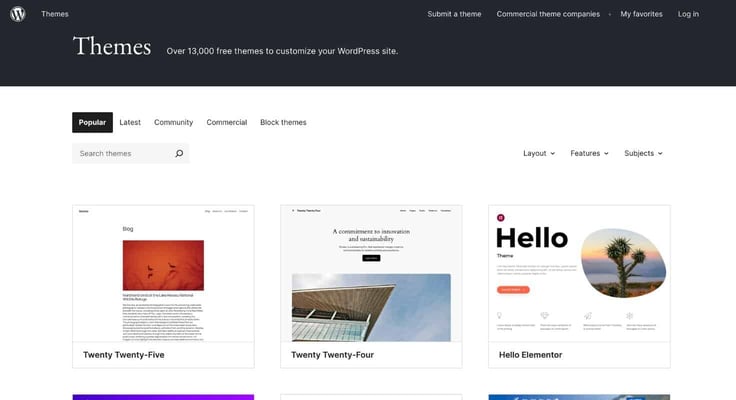
Once the look and feel of your website is ready, visit the WordPress Plugin Directory (again, through your dashboard) and equip your website with all the free tools it needs to run.
Now, there’s only one thing left to do: bring it online with a web hosting plan. To summarize, I don’t have anything against free themes and plugins. A free website, though? Na.
WordPress Provides 59,000+ Free Plugins
I want you to choose a clean, classy theme for your website that aligns with your goals. For example, for an eCommerce store, it makes sense to select a theme that’s optimized for WooCommerce. Now, this isn’t rocket science — but incorporating the right plugins is.
There are literally more than 59,000 free plugins, and you need to identify the ones that extend your website’s functionality.7
For example, for an online store, WooCommerce is almost always the right answer. Similarly, for SEO, you can’t go wrong with Yoast SEO. Do your research, prepare a list of all the plugins you might need, and make sure they’re installed correctly.
Oh, I almost forgot: you can buy premium themes or plugins as well. Good luck!
Yoast SEO and Elementor Have 10M+ Active Installations Each
Since we’re talking about how many websites use WordPress, I’m pretty sure you’re curious to know which are the most popular WordPress plugins and how many people use them. As always, I’m the man for the occasion.
Top WordPress plugins by active installations:
| WordPress Plugin | Active Installations |
|---|---|
| Yoast SEO | 10 Million+ |
| Elementor | 10 Million+ |
| WooCommerce | 8 Million+ |
| LiteSpeed Cache | 7 Million+ |
| WP Forms | 6 Million+ |
| Wordfence Security | 5 Million+ |
| UpdraftPlus | 3 Million+ |
| Redirection | 2 Million+ |
With more than 10 million active installations each, Yoast SEO and Elementor are must-haves for your website.7 But do you even know what Elementor is used for? Take a guess. Well, if you miraculously guessed it helps design custom web pages, you’re a smart chap… or you just Googled it.
Roughly 105 Million WordPress Sites Use WooCommerce
I bet you’re confused right now. Well, while it’s true WooCommerce has more than eight million active installations, the WordPress Plugin Directory can’t possibly factor in active installations from other sources, right?
No, I’m not talking about pirated software, which would be funny in this case, since WooCommerce is already free. Because the software is so popular in eCommerce setups, many eCommerce hosting plans include pre-installed WooCommerce.
In this case, “many” is around 105 million.8
Premium WordPress Themes Cost $59 on Average
If you have around $60 to spare, would you rather save your money and implement a free theme like Divi, which is used on about 3.8 million WordPress websites? Or would you rather spend that money on a premium WordPress theme? After all, you want the first impression of your website to be riveting.
Free themes are a great way to get started. But if you want your site to stand out, a premium theme is often worth the extra cash.
Paid themes cost approximately $59 on average (a one-time fee).8
Monetization Is Crucial for 78% of WordPress Website Owners
Let’s say you’ve downloaded WordPress, incorporated a free theme, installed each of the plugins I listed (and other necessary ones, of course), and brought your website online. What’s next? Are you set up for success? Yes and no.
You need to monetize your website to ensure its sustainability. Remember the active websites stat from earlier?
Well, if you don’t monetize your website, it’s likely to fall into the “inactive” category pretty soon. I mean, around 78% of WordPress website owners swear by monetization — and so should you.9
Start by creating an email marketing list, don’t underestimate the power of affiliate marketing, and display relevant ads to earn money from impressions and clicks. You can take it from there.
The Future of WordPress: Can Other CMSes Catch Up?
I don’t see any content management system matching the might of WordPress in the next ten years. There, I said it — WordPress is in a league of its own. I mean, there’s a reason why I compared it to Real Madrid. Something I haven’t talked about yet is WordPress online forums.
The WordPress community is super supportive, so if you ever run into any trouble, hop onto a forum before you open YouTube. Trust me, you’ll get the solution to your problems in a jiffy.
While WordPress’s CMS market share may not remain in the forties for long (the fifties are incoming), it is, and most certainly will be, the best way to build an online presence for the foreseeable future.
Cheers.
Sources and Further Reading
- https://w3techs.com/technologies/overview/content_management
- https://siteefy.com/how-many-websites-are-there
- https://wordpress.org/download/counter
- https://www.hostinger.com/tutorials/wordpress-pricing
- https://www.digitalsilk.com/digital-trends/how-many-websites-are-there
- https://wordpress.org/themes
- https://wordpress.org/plugins
- https://colorlib.com/wp/wordpress-statistics
- https://wecantrack.com/insights/wordpress-monetization-statistics