

Writer: Andrew Wandola


Editor: Lillian Castro


Reviewer: Christina Lewis

Website builders come loaded with various features, functionalities, and marketing buzzwords. If you’re on the hunt for the perfect one to bring your ideas to life, it’s often wise to read unbiased reviews before making a decision.
One place to find such reviews is Reddit. The online forum is filled with honest reviews from real people. In this guide, I’ll cover some of the best website builders Reddit users recommend. I’ll also add my thoughts and experiences using these website builders, including the areas in which they really excel.
1. Wix
Like many people, I didn’t know much about Wix until 2020. The company began in 2006, but the COVID-19 pandemic brought more attention to Wix’s website builder as millions of people sought ways to make money online.
Wix was, and is still, the easiest website builder — a sentiment many Reddit users share.
Wix.com

Monthly Starting Price $17.00
- Trusted by 250 million websites across 190 countries
- 2,000+ designer-made templates for every industry
- Built-in eCommerce, scheduling, blogging, and events
- Built-in SEO tools, email marketing, and Google/Facebook ads
- 99.99% uptime on multi-cloud hosting with enterprise security
- Get started on Wix now.


Lynn Cadet

| Money Back Guarantee | Disk Space | Domain Name | Setup Time |
|---|---|---|---|
| 14 days | 2 GB – Unlimited | FREE (1 year) | 4 minutes |
However, like any other drag-and-drop website builder, Wix is not perfect. Yes, it’s easy to use and navigate. If you can drag your mouse from one corner of the page to another, you can definitely build a simple website with Wix.
“Wix gets a lot of flak, but the product is pretty good. If all you need is a simple website, then go for it. That’s what it’s designed for.”
I completely agree with the previous comment. Wix often gets a bad rap for lacking complex features, but if simplicity is what you’re after, Wix will exceed your expectations.
2. WordPress
WordPress is the world’s most popular content management system. For perspective, more than 40% of websites worldwide run on WordPress. WordPress comes with a learning curve, but it’s worth it for the extra features you get, as this user noted:
“I stick with WP because of the major freedom and flexibility it offers in hosting, functionality, design, SEO, etc.”
Users can pair WordPress with powerful web hosting from InMotion to get the best of both worlds.
WordPress.org

Monthly Starting Price $2.62
- Intuitive, drag-and-drop site builder BoldGrid sits atop WordPress
- Developed and supported by the InMotion Hosting team
- Responsive themes so your WP site looks good on any device
- FREE to download WordPress software
- SEO-friendly end result
- Get started on BoldGrid for WordPress now.


Alexandra Anderson

| Money Back Guarantee | Disk Space | Domain Name | Setup Time |
|---|---|---|---|
| 90 days | 100 GB SSD – Unlimited SSD | FREE (1 year) | 5 minutes |
From what I’ve gathered and experienced, most people prefer WordPress over other site builders because it offers more functionalities and powerful plugins. True to the word, this CMS is home to some of the most popular websites on the internet. I’m talking about the likes of Microsoft News, TED Blog, BBC America, PlayStation, Skype, The Walt Disney Company, and Yelp.
One great thing about WordPress is its vast user community. If you’re just starting out, you’ll find a wealth of helpful resources, from blog posts to video tutorials. These guides cover everything from maximizing the potential of your WordPress site to solving common issues you might face during site creation.
3. IONOS
IONOS has an easy-to-use website builder. This platform works best for individuals looking for a mix of affordability and simplicity when building their websites.
Its hosting packages are among the cheapest, making it a perfect place to start if you’re on a budget.
IONOS.com

Monthly Starting Price $1.00
- No coding skills necessary with MyWebsite Creator
- Free domain name or transfer your existing site
- FREE social media and marketing widgets
- Pro templates with pre-filled text and images
- Multilingual support and tools for SEO
- Get started on IONOS now.


Christina Lewis
| Money Back Guarantee | Disk Space | Domain Name | Setup Time |
|---|---|---|---|
| 30 days | 10 GB – Unlimited | FREE (1 year) | 5 minutes |
Pocket-friendliness aside, IONOS has a website builder perfect for small websites. But you shouldn’t count on this website builder to create a complex website. It’s not the most powerful. IONOS also doesn’t have many website templates to choose from. That’s not necessarily bad if simplicity is all you want.
Some website builders can feel overwhelming and challenging to navigate for users with limited technical knowledge. That’s a problem IONOS solves. Before we head on to the next website builder, I’ll leave you with this Reddit comment that sums up everything I’ve noted about IONOS.
“They’re very reputable. I know a few people personally who have used them, and I’ve read a ton about them.”
Surely IONOS’ reputation speaks for the web host’s performance and value.
4. Hostinger
Hostinger is very affordable and generous. Its no-code drag-and-drop builder uses the power of artificial intelligence to create beautiful and powerful websites.
This website builder also provides over 150 expertly designed templates, letting you pick a template that truly aligns with your brand, style, and personal preferences.
Hostinger.com

Monthly Starting Price $2.69
- Best website builder: The most complete AI-powered builder at this price point.
- Describe your site to AI and go live in minutes
- 300+ designer-made templates with drag-and-drop
- Built-in eCommerce with 0% fees and 100+ payment methods
- Built-in SEO, email marketing, and AI logo maker included
- Free domain for 1 year + 14-day free trial to start
- Get started on Hostinger now.


Sead Fadilpasic

| Money Back Guarantee | Disk Space | Domain Name | Setup Time |
|---|---|---|---|
| 30 days | 20 GB SSD – 100 GB NVMe SSD | FREE (1 year) | 3 minutes |
On business marketing matters, Hostinger seamlessly integrates with Google Analytics and features an AI-powered copywriting tool, including heatmaps and more than 20 payment methods.
While Hostinger isn’t limited to business sites, it’s also ideal for creating small, non-resource-intensive websites. The standout feature of this builder is its support for numerous eCommerce-friendly tools, making it especially suitable for online stores.
Hostinger’s website builder may not be the best for blogging or building complex features, as confirmed by this Reddit user:
“Ultimately, I still like blogging on WordPress better. However, if I was just going to design a business page or something similar, Hostinger’s builder is prime for that.”
Now you know where to go if you want to create a simple website for a small business with a tight budget.
5. Shopify
Shopify reminds me so much of Wix, even though they have different features and functionalities. These two came into existence in the same year (2006) and became even more popular during the pandemic.
While Wix works best for any website, Shopify excels at eCommerce. When online business trends like dropshipping, subscriptions, and digital courses became popular in 2020, Shopify was at the center of it all as the go-to website builder for eCommerce businesses. It still is today.
Shopify.com

Monthly Starting Price $1.00
- Plans include a website builder with tons of Shopify themes
- Get help with your name, logo, and online presence
- Sell unlimited items via social media, a button, or POS
- Developers can easily build on the platform via the API
- Shopify experts available 24/7 to assist you
- Try Shopify FREE for three days.


Toby Sembower

| Money Back Guarantee | Disk Space | Domain Name | Setup Time |
|---|---|---|---|
| 3-Day FREE Trial | Unlimited | FREE Subdomain | 5 minutes |
What makes Shopify very powerful as a website builder is that it comes with essential features your website needs to thrive in the online business space.
You’ll find a wide range of features here, such as order management, customer accounts, analytics and reporting, social media integration, SEO tools, multi-channel selling, and abandoned cart recovery. These tools are designed to help you run your online store smoothly.
This Reddit user gets the point across even better:
“Shopify’s biggest selling point is the backend. Handling the inventory, shipping, payments, etc.”
The takeaway is that Shopify is tailor-made for eCommerce. If you use it for anything other than an online store, you might end up paying for needless services. Focus on building your online shop to maximize its benefits.
6. SiteGround
Although SiteGround is one of the few WordPress-approved web hosting companies out there (the others are DreamHost and Bluehost), it still offers a website builder you can use to create a website you’ll love.
I’m guessing you don’t want the hassle of learning WordPress, which can be a bit technical, and instead prefer to set something up with just a few clicks. That’s where SiteGround shines.
SiteGround.com

Monthly Starting Price $10.00
- AI-powered drag-and-drop builder with 6M+ free stock images
- Professional templates with built-in SEO and analytics
- Native eCommerce with 0% platform fees
- Daily backups, advanced security, and ultrafast hosting
- 14-day free trial, no credit card required
- Get started on SiteGround now.
Lynn Cadet
| Money Back Guarantee | Disk Space | Domain Name | Setup Time |
|---|---|---|---|
| N/A | 10 GB – 100 GB | New or Transfer | 5 minutes |
This website builder is easy to set up. And since SiteGround uses a clean propriety control panel, you won’t have too much trouble finding your way around it.
“SiteGround has for me a much simpler back end. It’s easy to find what I want.”
When setting up your hosting account, you’ll likely come across the website builder. It typically takes just a few minutes to get it up and running. However, the time required can vary depending on the complexity of your website.
That said, you shouldn’t expect too much from SiteGround’s website builder. Like others I’ve reviewed, it works best if you want to create something simple. But if you want something more complex, you can easily switch to WordPress.
What Is a Website Builder?
A website builder is an online software for building websites. It usually has user-friendly and mobile-first templates, customization options, content management systems, and drag-and-drop editors.
More advanced website builders may offer SEO and marketing tools, code editing (for web development), custom script integration, dynamic content, and eCommerce features.
The right website builder for you will depend on your skill level. Rest assured, there’s something for everyone.
How Much Should I Pay Someone to Build My Website?
The answer to this question depends on many factors. Complex websites will cost more than simple ones. Examples of such complexities include eCommerce store integration, user authentication and membership systems, dynamic page generation, or even multi-language support.
A small, basic website can cost anywhere between $2,000 and $4,000. A large, complex eCommerce website can cost north of $50,000. The website designer’s billing system (hourly or by a flat fee) will also determine the final cost of the design project.

Most designers charge between $30 and $100 an hour, so you should expect to spend more if you hire them to build a complex website. The longer it takes to build, the more it will cost if they charge hourly rates. They may also charge you for redesigns and additional deliverables.
Is it Worth Paying Someone to Build a Website?
Sometimes, it is, and sometimes, it’s not. Your skill level and budget will determine whether you should hire a website building expert. Free website builders like Wix and Shopify are usually easy to navigate, so it’s unlikely that you’ll need someone to help build a simple website on such platforms.
This is particularly true if you’re launching a small business on a tight budget. Rather than spending thousands on a website designer or developer, just dedicate a few hours in front of your computer, and you can create a simple, attractive, and functional professional website for your business.
Is WordPress Better Than Wix?
Both WordPress and Wix have their strengths and weaknesses. WordPress has more features and functionalities than Wix, but it is quite technical for a beginner.
On the other hand, Wix isn’t as powerful as WordPress but is way easier to set up and perfect for a small project. Most people can set up a website with Wix even without technical knowledge.
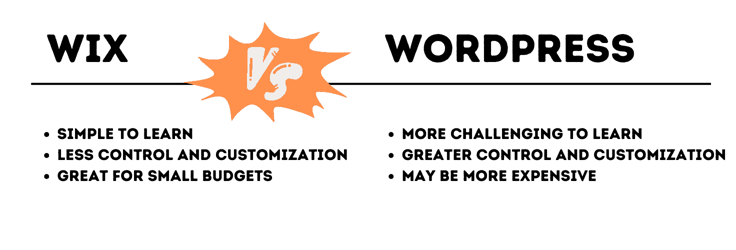
If you’re new to building websites, Wix is a fantastic choice. It’s easy to learn and great for creating simple websites for both personal and business use. However, if you have some web design experience, WordPress might be more suitable as it offers greater control and customization than standard builders.
Build a Stunning Website With a Reddit-Approved Site Builder
The best website builder will bring your ideas to life with a few clicks. That’s what you should expect from any of the nine options I’ve reviewed above.
Remember, before you choose a website builder, consider the platform you want your website to run on and your skill level. Importantly, ensure it offers solid customer service even if you feel you won’t need it. It’s better to have a reliable customer support team on standby if you run into any issues. Happy site building!
HostingAdvice.com is a free online resource that offers valuable content and comparison services to users. To keep this resource 100% free, we receive compensation from many of the offers listed on the site. Along with key review factors, this compensation may impact how and where products appear across the site (including, for example, the order in which they appear). HostingAdvice.com does not include the entire universe of available offers. Editorial opinions expressed on the site are strictly our own and are not provided, endorsed, or approved by advertisers.
Our site is committed to publishing independent, accurate content guided by strict editorial guidelines. Before articles and reviews are published on our site, they undergo a thorough review process performed by a team of independent editors and subject-matter experts to ensure the content’s accuracy, timeliness, and impartiality. Our editorial team is separate and independent of our site’s advertisers, and the opinions they express on our site are their own. To read more about our team members and their editorial backgrounds, please visit our site’s About page.