










How We Rate the Best VPS Plans for Linux & FAQs

Alexandra Anderson
Contributing Expert
Security, stability, and the backing of a vast developer community — the list of Linux perks seems endless for many hosting enthusiasts. This popular operating system has become a major draw for customers, prompting top hosts to showcase features like CentOS, automatic updates, and Linux-compatible software as staples of each VPS hosting service.
As someone who just searched “best Linux VPS” or the like, you’re left with a lengthy list of options to sift through. Here, we walk you through our methods for evaluating each Linux VPS server above, so you can make an informed decision for your upcoming project.
Linux Server Points of Comparison
Let’s hash out the details of Linux server hosting. I’ll unveil the features we look for, the hosts who deliver them best, and how the top offerings compare to those of competitors.
1. Hardware
A VPS host’s quality is directly linked to its hardware. One of the biggest advantages of VPS hosting is access to more dedicated server resources—so why not aim for the best?
We look into the RAM, storage specs, and disk space allowances in each VPS plan we review. Category leaders tout free SSDs that boost your server with added speed, and Liquid Web has RAID-protected SSDs available for free within its VPS hosting server.
2. Software
If you’re searching for “Linux VPS web hosting,” software is clearly a priority for you. The hosts we highly recommend in this niche provide business-class software to complement their top-tier hardware.
For starters, you might find enterprise-class CentOS 7 with InMotion Hosting, but then you should also look for other Linux-friendly applications and scripts compatible with the hosting plan.
With hosts like Bluehost and hosting.com, the Apache web server comes standard.
3. Security and Monitoring
Since reliability and performance are cornerstones of a quality VPS hosting experience, security and network monitoring features are crucial to Linux VPS shoppers. Customers expect round-the-clock server monitoring as a minimum.
InMotion Hosting includes complimentary Linux OS security patches with its services. While most providers enhance security for managed VPS customers, Liquid Web’s Heroic Support™ team truly excels by going above and beyond for every VPS hosting plan.
Built-in backups are included with Liquid Web plans, along with enhanced security for your server.
4. Uptime Guarantee
I can’t drive this point home enough: Uptime, uptime, uptime! It matters! To break it down, a 99.9% uptime guarantee is an industry norm, but frankly, it isn’t up to snuff for most of our VPS or dedicated hosting shoppers.
Hosts that guarantee five nines (99.999%) or better are significantly more worth your time and money.
Hosts like InMotion or Bluehost are good for an excellent-but-not-stupendous uptime rate of 99.99%, and — hold onto your socks — Liquid Web promises 100% uptime.
5. Technical Support
Customer support can be the most frustrating factor of a hosting experience. It’s a feature that distinguishes the good hosts from the great ones across all hosting niches.
Hosts that handle technical support best are known for their teams’ accessibility, timeliness, and helpfulness. Liquid Web surpasses most with promises to respond to chats and phone calls in less than a minute.
At the virtual server level, hosting is divided into managed and unmanaged VPS services. A web host will give site owners more flexibility to install a different Linux distribution if they choose, but won’t help as much on physical server maintenance and software support as with a managed VPS plan.
6. Price vs. Features
Last, but most certainly not least, we have to look at the overall value of a Linux VPS hosting package. The quality and quantity of features offset by the pricing determine a host’s worth to a potential customer.
Whether you want managed services, a WordPress VPS hosting plan, or just a virtual machine with CentOS installed, InMotion leads in high-value VPS hosting.
Features The Best Linux VPS Hosting Providers Share
As you have probably gathered from our reviews, each top Linux hosting provider has several key offerings in common.
The features listed below are particularly noteworthy for VPS users:
- Choice of Linux operating system
- cPanel, root, and SSH access
- OS security patches, updates, and monitoring
- Instant provisioning and reliable scalability
- Linux-friendly software (e.g., Apache, PHP, Perl, Python, Ruby)
- FTP accounts and MySQL databases
- A dedicated IP address and SSD storage
Of course, this list is not comprehensive. The leading web hosts for Linux fans tout these standard features and a host of others to streamline your Linux hosting experience.
Cost Comparison: Free Linux VPS Hosting vs. Quality, Cheap Alternatives
Buyer beware: As with any service you find online, free Linux VPS hosting options are advertised, but you’ll be sadly disappointed by the limited RAM, lackluster, or nonexistent, support, and limited customization options.
You’re much better off opting for a quality, low-cost VPS provider such as InMotion for your affordable Linux hosting needs.
What Is Linux VPS Hosting?
Linux VPS hosting is a popular server package that users leverage to build their applications and web resources. But Linux is only one type of hosting distribution within the VPS realm.
Before I dive into Linux VPS hosting, let’s discuss what VPS hosting is at its core.
VPS stands for virtual private server. A virtual private server uses virtualization to split and isolate resources among a single server and distribute these resources to multiple tenants. Unlike shared hosting users, VPS users and their websites don’t get bogged down by other tenants’ usage and performance needs.
While VPS users share a server, they enjoy dedicated resources. Virtual private servers offer a cost-effective alternative to dedicated servers, allowing you to access ample resources and features without the expense of dedicated hardware.
VPS hosting finds its place right in the middle of the hosting spectrum, striking a balance with its capabilities and pricing. It costs more than shared hosting but doesn’t come with the hefty price tag of dedicated server hosting plans. Plus, you can do much more with a VPS plan than with a shared one.
VPS capabilities allow users to customize and gain control over their server environment through root access, enabling users to configure their servers how they like. This freedom and functionality that VPS provides lead us to how Linux relates to the server type.
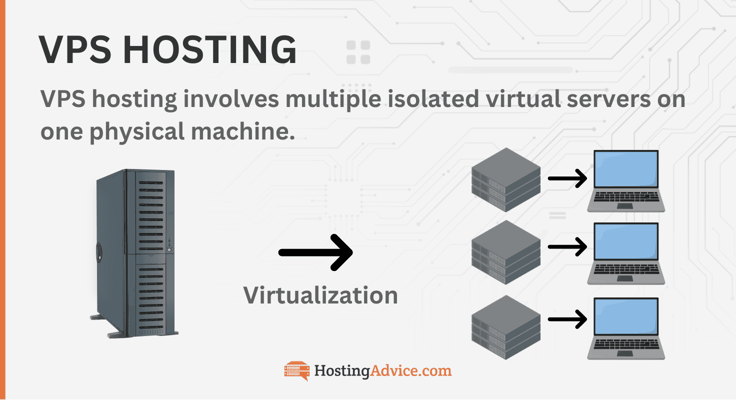
Linux is an open-source operating system that users can deploy on a VPS server. When a hosting provider offers a Linux VPS package, it delivers the performance capabilities of a virtual private server optimized for the Linux OS.
But users can choose to use a different operating system on their Linux server. Similar to a cloud server resource, a VPS hosting service offers excellent stability, scalability, and flexibility with its hosting resources, making it a fantastic choice for many users and small businesses.
What’s the Difference between Linux and Windows Hosting?
Hosting providers don’t only optimize their virtual private servers for the Linux operating system. Linux has a rival in this arena, and its name is Windows.
When you choose VPS hosting, you typically have the option to go with either Linux or Windows. But what sets these two operating systems apart? And why do some people prefer one over the other? Let’s take a closer look.
This debate comes down to the battle of the interfaces — more specifically, whether you prefer a graphical user interface versus command line.
With a Linux server, users leverage the command line to manage their customizations and configurations. But the Windows server has a graphical user interface embedded within its operating system for more visual users.
The command line and graphical user interface offer different benefits, showing why some users choose Linux over Windows VPS or vice versa.
Linux’s command line interface enables users to perform more hardware actions than the Windows operating system because the command line has direct access to a computer.
The graphical user interface’s point-and-click functionality separates it a bit from the hardware and limits it from doing certain tasks connected to the computer. If users want unrestricted access to their server, Linux would be the way to go.
Linux is also an open-source operating system, which gives users more freedom with the distribution and modification of software. It also supports various choices of tools. On the other hand, Windows solely relies on Microsoft for database solutions and website management tools.
Linux plans are typically less expensive than Windows plans. That means users can get almost the same performance, speed, and stability for a lower monthly cost.
What Are Linux Distributions?
Users aren’t limited to a single operating system with Linux. Because Linux is open-source, it can offer and support multiple operating systems. These operating systems are called Linux distributions, or distros for short.
To qualify as a Linux distribution, an operating system needs a Linux kernel, which is its core, and a package management system. These distributions can be downloaded and support various user programs, repositories, and libraries.
Thousands of Linux distributions exist. Since Linux is open-source software, anyone can create their own Linux distribution by modifying the code of an existing distribution or assembling the source code themselves.
Most hosting companies offer commercial distros within their Linux VPS plans. Below, I’ll share some of the most popular brands within the web hosting world.
These OS distributions include:
Linux distributions can be divided into two categories: enterprise and community versions. These distinctions are crucial because they guide the development process of distros and can influence your choice of Linux distro. Community distros are free Linux distributions maintained by the open-source community.
Enterprise distros differ significantly: a vendor provides a distro through a subscription and manages support and maintenance. Those new to VPS or with fewer long-term needs might prefer a community distro, which is primarily maintained by contributors.
Enterprise distros, on the other hand, are better for businesses or users with long-term projects needing consistent updates and vendor support.
Finding the perfect distribution for you might require some research or experimentation, especially if you’re switching from a Windows VPS or starting with your first Linux VPS plan. With so many distributions available, you’re bound to find one that suits your needs.
Each distro has a specific use case. These use case fields include servers, security, development, desktop computers, and so on. Users can leverage tools, such as the Distro Selector, to help them select a distribution tailored to their goals by answering a few simple questions about their experience and needs.
What Are the Pros and Cons of Linux VPSes?
Linux VPS hosting is incredibly versatile. You can use it for a variety of purposes, such as setting up a gaming server, proxy, file server, cloud service, mail server, or DNS server, among others.
Its reliability, flexibility, and robust performance capabilities give users the freedom and power to accomplish many different workloads, making it useful in various fields.
Below, I’ll look at the main features of Linux VPS hosting and expand on how you can benefit from purchasing a Linux virtual server compared to Windows VPS.
Cost
Linux VPSes are quite affordable, even more so than its competitor, Windows. As open-source software, hosting providers save on costs because anyone in the open-source community can distribute and modify it.
There are also multiple free Linux distributions with high functionality for users to leverage. That means VPS hosting providers don’t have to pay for a vendor subscription and charge more on their plans. In contrast, Windows VPS hosting charges steep licensing fees to use its OS services.
Flexibility
All VPS plans bring a level of flexibility that other hosting forms don’t. Most people adopt virtual private servers to increase this specific feature.
But if we’re comparing Windows and Linux servers, Linux VPSes definitely take the cake in this department. Since Windows is not open-source, it doesn’t offer support for various tools and CMS. Linux also provides more OS choices.
Security
In terms of security, Linux excels once more! It provides a more secure server environment with strong security features developed by a dedicated community ready to tackle any threat to the operating system. In contrast, Windows faces more frequent attacks due to its weaker structure and greater popularity among enterprises.
Its graphical user interface opens more avenues and lines of code for attackers to infiltrate and take over.
User-Friendliness
Ease of use is a bit more balanced in the battle between Linux and Windows.
Windows offers customers a graphical user interface (GUI) for their server configuration and management tasks, simplifying duties with a visual approach.
While Linux mainly uses a command line interface, you can add a GUI to some distributions. However, this change can introduce security risks. Fortunately, most Linux VPS plans come with cPanel and other tools to simplify management.
Technical Support
Above, we established that Linux OS requires more technical expertise than Windows when it comes to its management. Unfortunately, Linux also has a less robust technical support system than Windows.
With Windows VPS hosting, users receive the backing of certified Windows experts and an extensive Windows commercial support ecosystem for a paid fee.
On the other hand, Linux users must leverage the free aid of the open-source community, which isn’t the most reliable as users don’t know if they’ll get the assistance they need to resolve their query.
In short, Linux is free, flexible, and secure. However, it’s not as user-friendly as Windows, and it doesn’t have as robust customer support.
Linux is packed with amazing features and benefits to ensure your hosting success. Its affordability, flexibility, and security are truly unmatched.
And it truly embodies freedom. Its servers allow users to create and make configurations how they want and access the tools and knowledge of the massive open-source community.
What Is Managed VPS Hosting?
Managing VPS hosting plans can be challenging for many users. It requires a great breadth of technical knowledge to configure Linux servers, and handling it alone can be a daunting task.
If you can’t afford a dedicated team for server administration, you can leverage a managed VPS hosting solution. The best VPS hosting providers offer users the option of choice. In this case, it’s the choice between managed and self-managed VPS plans.
A managed VPS plan includes all the essential hosting resources a user needs but also delivers managed services on the tail end.
Many businesses and users want to focus on their core tasks and not have to worry about manual server duties.
With a managed VPS, users can offload their technical and server admin requirements to their VPS hosting provider’s capable hands.
Managed VPS services typically include:
- Server setup and maintenance
- Backups
- Software updates and installations
- Technical customer support at the bare minimum
Some hosts truly go the extra mile by providing security audits, monitoring, malware removal, and even custom development help.
Managed services offer a fantastic option to consider. The great thing is, you can utilize this solution across various hosting forms. ScalaHosting provides both managed cloud VPS hosting and managed WordPress hosting.
Its fast SSD VPS plans come with all the hosting essentials and the assistance of the hosting team for your server management needs. Some WordPress hosting plans even fall within the bracket of cheap VPS hosting, making these plans affordable for everyone.
How Much Should Linux VPS Hosting Cost?
Linux VPS hosting provides optimal performance, scalability, and security for users to power their online projects. It sits in the middle of the hosting spectrum because it offers greater benefits than shared hosting but for a lower price than dedicated hosting. But how affordable is it?
We know that VPS hosting comes in two forms: Linux and Windows. Linux VPS hosting typically costs less than Windows VPS because of its open-source framework and free distributions.
Hosting providers don’t run into licensing fees or paid technical support as is the case with Windows, so they can deliver Linux servers for less. Most VPS plan prices range between $20 and $200 per month. But there are also many cheap VPS plans on the market.
Your plan’s pricing will be determined by your specific needs. More budget-friendly VPS plans are often self-managed and require a higher level of technical expertise to operate. They might also offer fewer resources or support compared to pricier VPS packages.
A managed Linux VPS plan may work better for businesses needing more hosting assistance, with most plans starting around $20. Although you won’t find free VPS plans, users with tighter budgets can access the cheap Linux VPS hosting that multiple top web hosts offer.
Optimizing Your Linux VPS Server
After choosing your Linux VPS, you’ll want to optimize it for performance and security. If you opted for managed hosting, your provider will handle most of these tasks for you. If not, here’s what you should know:
- Improving server speed and performance: You can significantly increase your server’s speed by using a content delivery network, caching, and minimizing your website files, such as code and images. You can also purchase a server that uses NVMe SSDs instead of traditional SSDs. NVMes have much faster read/write speeds.
- Tools to monitor resource usage: When hosting experts discuss monitoring your server, they don’t mean sitting in front of your equipment and watching it like a security guard. Instead, they refer to monitoring software that detects usage, malware, and downtime. Popular tools include Datadog and Atera.
- Stay on top of backups and updates: Outdated software is unsafe software. When updates are available, act quickly by downloading the latest version to your server. This is particularly true for websites that use WordPress and other CMSes. It would help if you also backed up your server daily to protect website files and prevent data loss.
These are fairly beginner-friendly ways of managing your Linux VPS. If you need help with the more nitty-gritty configuration details, I recommend consulting with your hosting provider.
Hosting Linux VPS Sites Is Simple With the Top Web Hosts
Premier Linux hosting services abound with the top hosts listed above — and now you understand our reasoning for thinking so highly of them.
With instant server provisioning and daily billing from the expert-recommended providers, you can have a fully functional Linux project up and running in virtually no time at all.
The question remains: Which of the best Linux VPS hosting providers is your top choice? If you determine you’re not quite ready for a virtual private server, no worries.
Hop on over to our Linux shared hosting plan reviews, and go from there.