
Guides

Studies 
Studies
Our studies cover a range of trending topics and deliver original, reliable data you can't get anywhere else on the web.
InMotion has a solid range of hosting plans that will meet the needs of most people. While its management panel may be intimidating at first, it has a shallow learning curve and lots of options.

By: Dave McQuilling

Editor: Lynn Cadet

Reviewer: Cristian Lopez
Disclosure: When you sign up through links on our site, we often earn referral fees from partners. For more information, see our ad disclosure and review policy.
At first glance, it can be a bit hard to distinguish between all the big-name hosting services out there. But once you actually use the services, the differences become clear. That’s what I’m here to do.
InMotion is an established brand, where steep discounts are on offer, but its interface can feel intimidating to beginners.
I scratched beneath the surface to test the cheapest hosting plan, the WordPress hosting service, the VPS hosting, and the dedicated hosting service. So I can tell you with confidence: There’s a lot more to InMotion than meets the eye.
I used modern tools that make sitebuilding a breeze, browsed plans for pretty much any situation, and found help was readily available the second things got a little complicated.
InMotion actually impressed me when I tested it out. If you want some specific reasons to choose this site, read on to see what I encountered during my multi-week testing period, trying out everything from the cheapest plans to the complex enterprise-level stuff at the top end.
A good variety of plans is available at all price points.
Initial discounts offer solid savings that can be extended with longer subscription terms.
Even the high-level plans are simple to navigate, with dedicated customer service available by phone and online chat.
I headed to InMotion’s site looking for a “cheap” hosting plan. To be honest, it really wasn’t difficult to find.
InMotion, like pretty much every other hosting site, loves to promote a great deal. Or what might be perceived as a great deal, anyway.
As soon as I got to the InMotion homepage, my eyeballs were immediately drawn to promises of hosting plans from as little as $4.59 per month. That’s less than a McDouble.
I clicked the prominent Get Started button, and that brought me to a page with a comparison of InMotion’s plans.
Here is where everything you get with each plan is clearly outlined.
I found the menu very handy. I know its purpose is to upsell me, but it’s also a practical guide. If I wanted the speed of NVMe storage as opposed to SSD, I could clearly see which plans have it and how much extra I have to spend to get it.
The hosting company currently has four distinct “cheap” plans on offer: Core (the cheapest and most basic), Launch, Power (these two middle plans are priced the same), and Pro (which costs the most but also offers the most features).
The tantalizing “$4.59 bargain plan” is aptly named Core. It comes with these features included:
Power, Launch, and Pro all include these basic features as well, but they can cover more websites, higher traffic volume, and much more storage.
Power is usually about $2 more expensive than Launch, but the current discount pricing means both plans start at $4.59/mo right now. Here’s a comparison of the different features in these plans:
| Launch Plan | Power Plan |
|---|---|
| 2 Websites | 10 Websites |
| 100GB NVMe Storage | 200GB NVMe Storage |
| About 50k Visitors a Month | About 300k Visitors a Month |
| Live Chat With a Human | Live Chat and Phone Support With a Human |
| 99.9% Uptime Guarantee |
I think the Power plan is better than Launch in pretty much every single way (10 websites > 2 websites and twice as much storage). Definitely worth the extra $1.80 a month.
I don’t plan on making 10 websites, but the 200GB of NVMe Storage (which will load my site a lot faster than SSD storage) and the frankly excellent phone support was so worth it.
And finally, the Pro Plan offers the most, and it therefore also costs the most. This plan is for true professionals with multiple high-traffic websites. It comes with all the basics in the other plans and adds some impressive numbers:
You spend a little more on the Pro Plan, but you also get more. Not bad for only $10.59/mo.
Speaking of spending, a bit of fine print lets customers know these starting at prices won’t last. “Renews at $18.99/mo” means I will only have the “cheap” hosting plan for so long. This is pretty much standard practice in the world of web hosting.
Many of InMotion’s competitors have similar deals where the initial monthly price is very low, and then the renewal price, if you ever end up paying it, is higher. Longer terms are the secret to locking in those low monthly prices.
If I really were on a tight budget, the $4.59/mo Core plan would have me locked in for a year, though choosing a two-year or three-year option only adds another 20 cents per month and would give me three years’ worth of hosting for just under $115.
That’s not a bad deal at all, especially as I might be thinking about a website refresh after three years anyway. My site could have outgrown the cheaper plan by that point, or styles may have changed.
Either way, with the cheapest package coming in at under $40 per year, I think it’s probably worth going for the longest term just in case.
I wasn’t actually on a budget, so I decided to spend an extra five cents a day and test the Power Plan. After I chose this plan, I was prompted to connect a domain name.
If I’d already purchased a domain name, I could get the ball rolling by connecting it via this screen. A free domain is included with the plan. This step can be skipped, so don’t feel pressured into naming your site right this second.
For my test account’s domain, I went with JobsForCats.com.
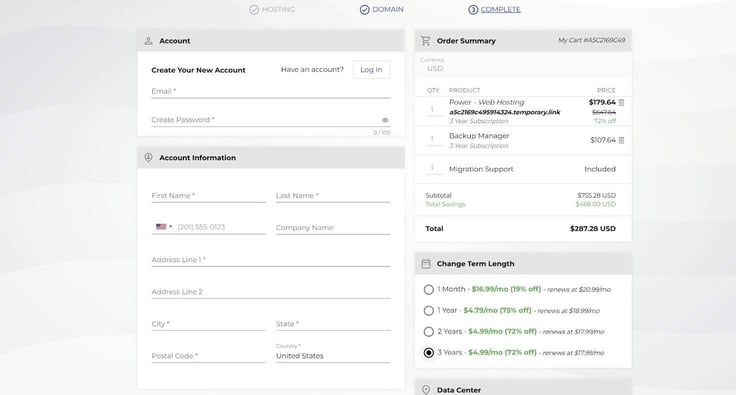
From there, I was taken to a pretty standard form asking for my email address and credit card details, among other things. I had the option of choosing the plan length, and I could lock in this deal for three years by paying an extra $0.20 per month. Bargain.
The total price didn’t quite add up, though, and I noticed a three-year subscription to InMotion’s Backup Manager service had made its way into my cart.
After doing some digging, I found out this service will automatically back up my website every day and allow me to easily manage previous backups, which is very handy. But I didn’t feel I needed it.
Luckily, it’s not hard to remove from the cart. A little click on the trashcan icon took care of it, and my hosting plan was set up for $179.64 plus whatever extortionate percentage New York is slapping on as a tax these days.
I built my site through the Sitejet Builder, a fairly modern tool that comes as part of cPanel.
Right off the bat, I want to say that Sitejet is an incredibly easy-to-use and versatile tool with a large variety of templates to get started. The tool comes with all of InMotion’s packages, and it made my life a lot easier.
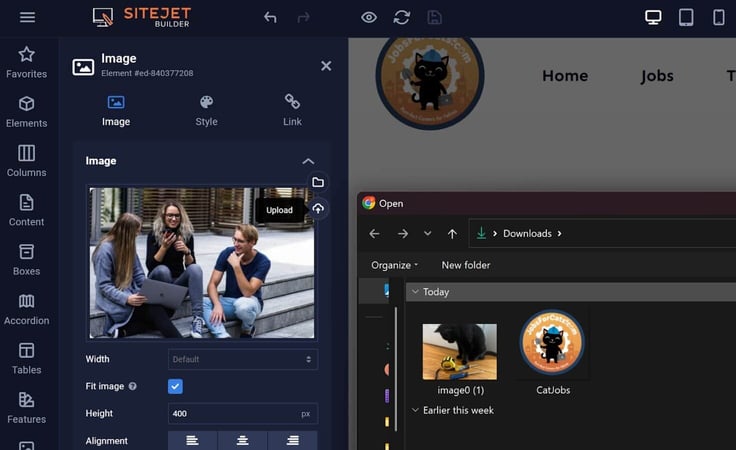
I found it all intuitive. If I wanted to edit a particular element of my site, I just clicked on it. This applies to text, images, and even video.
Speaking of images and video, Sitejet comes with free access to some pretty extensive media galleries. As someone who has spent countless hours hunting for images I can legally use, Sitejet’s media galleries are a massive time saver.

I found it so easy that I would bet someone with no web design experience could probably get a professional site together in a few hours.
The Sitejet Builder includes a tablet and mobile view, which you can access from the template stage onward. I found this particularly handy as the majority of web users will visit the site on a smartphone or other mobile device.
I appreciated the ability to fine-tune what my site looks like on a handheld device from the very beginning.
It’s simple, well-implemented, and I believe it gave JobsForCats.com that extra touch of professionalism. Not bad for a hosting service that costs less than Netflix did when it was actually good.
For all Sitejet’s strengths, I must say the autosave function is not reliable, and the “Are you sure you want to leave?” prompts can mess up, too. At one point, I did lose a couple of pages due to poor saving discipline.
I can blame the likes of Google Docs for making me complacent over the years, and ultimately, saving my work is my own responsibility. But it is also a glaring weak point in what is otherwise a very strong website-building tool.
Sitejet Builder isn’t the only option. I also had an opportunity to build a site with WordPress.
I definitely found Sitejet Builder more intuitive and easier to use (despite having more experience building in WordPress).
But if you are planning on using WordPress as your CMS, hosting a blog, or doing any of the multitude of other things WordPress is good for, then you’re sort of forced to do it this way.
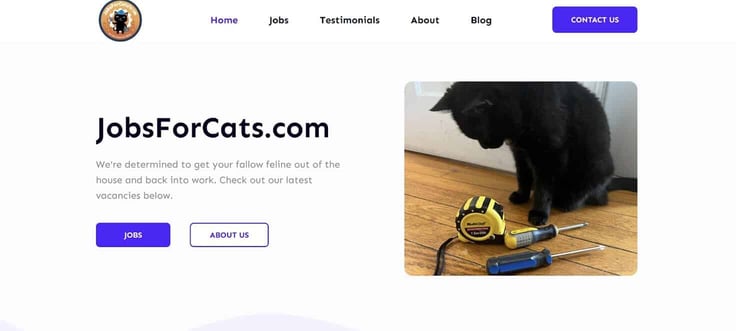
I could build the bulk of my site in the Sitejet builder and then essentially port it over to WordPress. This process was a bit of a pain. I was better off using WordPress’s own tools to build the site from scratch.
WordPress was also the easiest way to attach a site that has been coded but not uploaded anywhere else. There may be a different, more direct way to upload your custom code, but WordPress is familiar to many people.
Dumping a bit of HTML or JavaScript is a great way to build a highly customized site if you have the necessary skill set or the patience to learn. And, as expected, that’s fully possible here.
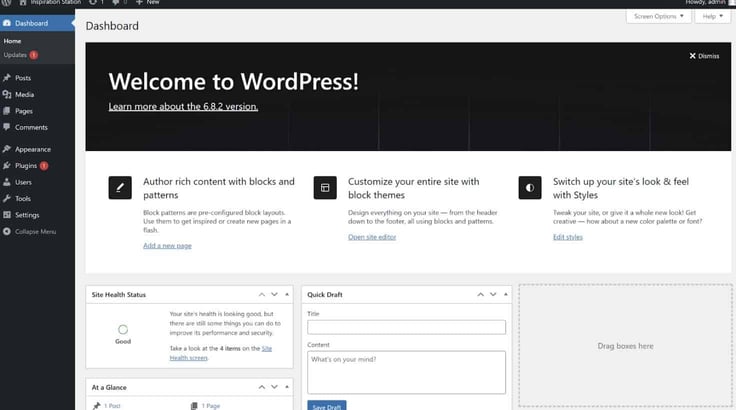
While I could use WordPress with any of the cheap InMotion plans, I should make it clear that none of the entry-level options are specialist “WordPress plans.”
InMotion does have a few options specifically designed for hosting a WordPress site, and I’ll delve into those shortly.
Finally, if I am switching hosting services and come with an already established site in my portfolio, InMotion makes things easy thanks to its “free migration support.”
Basically, the company will find my website and transfer it to the InMotion hosting service with minimal input from me.
I think this would be a great option for established websites in need of new hosting.
If my site was already using cPanel, the process looks a lot smoother, but it can still be done otherwise. After filling out a form with some details, InMotion gets to work switching the site over.
Despite a review period spanning a few weeks, I completely failed to turn JobsForCats into the kind of global powerhouse that would blast through the limitations of InMotion’s more affordable plans.
I can, however, make an educated guess based on the information InMotion provides about each plan.
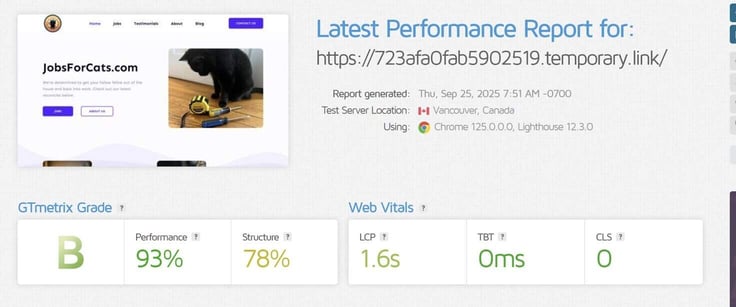
As things stand, even the cheapest of InMotion’s lower-tier plans is capable of decent performance in most circumstances.
cPanel inclusion is a pretty massive benefit, in my opinion. I might end up parting with $25 per month to pay for cPanel on its own. But it’s included with all InMotion plans. Which makes life a lot easier for me.
I did run the site through GTmetrix to get some idea of how it performs, and InMotion’s side of things was pretty solid.
The performance score was sitting at 93%. What sort of let things down was the site design. I used a complex template with animations and added a lot of images. That will always slow things down a touch.
Still, the whole site populated in just 1.3 seconds. I’d say that’s pretty good considering how bulky the homepage was.
The most complex element took 1.6 seconds to fully load. Still pretty quick!
If you have the option to lock one of the bargain rates (especially the Power Plan) for a year or more, then absolutely, I would recommend it.
I found the site builder easy to use. I liked that WordPress was an option, and cPanel inclusion made it possible to further specialize my site with widgets.
Should something go awry somehow, I felt secure in the knowledge that InMotion’s customer service staff would go above and beyond to get things back on track.
If you’re a small business owner or blogger, then this service has pretty much everything you need for a very low price. If you want a little bit more (perhaps super-fast NVMe storage appeals to you?), then one of the higher-tier options is likely a better fit.
The price is a big pulling factor. However, when I selected the month-by-month billing option, I saw it’s $14.49 per billing cycle. So two months billed that way costs about as much as a full year with the discount.
As I’ve said, pretty much all hosting services pull this kind of stunt, so I can’t get too mad at InMotion for it. Plus, with the way inflation is going, you’re probably better off locking a steeply discounted deal in for a multi-year period anyway.
As a journalist, I’ve spent my entire career dealing with WordPress. So I know a thing or two about WordPress sites.
WordPress has gotten a lot more user-friendly since I first used it back when dinosaurs roamed the Earth, a McChicken cost $1, and indie music was the best thing ever.
Nowadays, only one of those things still holds true, but at least you can use the block editor to easily slap a custom website together within the WordPress editor, and InMotion can help get it going. Here’s a breakdown of its WordPress offerings.
As soon as I visited InMotion’s site, I was struck by an offer of “cPanel WordPress Hosting” from as little as $5.09 per month. So it’s similar to the cheap option in price.
Once I clicked through, I was presented with four options: WP Core, WP Launch, WP Power, and WP Pro. Again, I noticed WP Pro had the biggest discount, bringing it level with Launch in terms of price, despite it being a far superior plan on paper.
InMotion’s descriptions are delightfully straightforward. Instead of mentioning things like RAM and CPUs, the company describes performance in terms of “WordPress Power” with WP Core, WP Launch, and WP Power having 10X, 20X, and 30X “WP Performance” respectively.
However, while this seems impressive at first glance, it’s hard to quantify without any indication of what the standard for 1X “WP Performance” is.
I feel the number of sites you can host with each plan is a more significant factor when it comes to WordPress.
While someone with a business may not need a second or third site, blogging is a different ballgame.
The WP Pro plan offers up to 10 websites, so if I have multiple interests, I can create a site for every niche I can think of. InMotion makes it easy to pursue multiple passion projects from one interface.
Signing up for the WordPress plans was the same as with the “cheap” plans.
I was prompted to snag a domain (which is included with the plan) during the signup process, or I could skip this step and complete it later on.
Then on the checkout screen, I could easily remove the backup service if I wanted to save some cash (though this did come back to bite me).
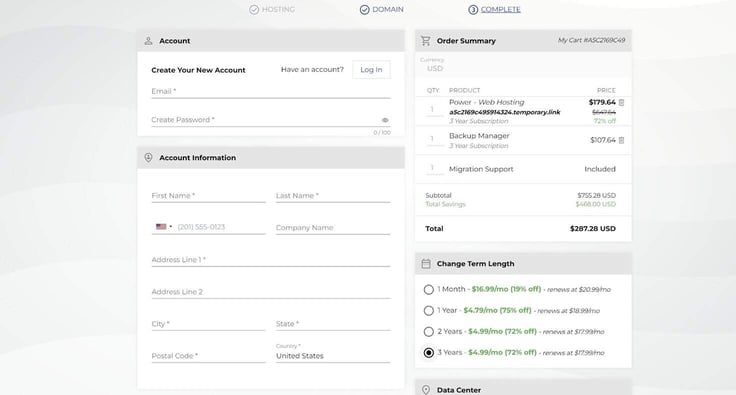
In terms of discount, the one-year plan is optimal. However, a guarantee I’ll be locked in at a rate of $5.49 per month for three years makes the longer-term plan a valuable option as well.
Once those boxes were checked, I entered my payment details, and I was ready to go.
Sitejet Builder is still an option with inMotion’s WordPress plans, and I think it’s a great option if you want a simple, straightforward website.
But I wanted a good magazine-style website with some custom features. So I had to get my hands dirty with WordPress tools.
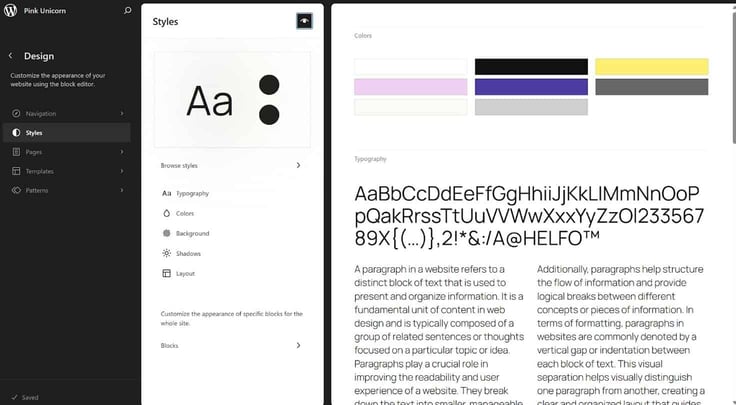
While the tools have improved since I last used them, I found the WordPress site builder a little clunkier than Sitejet (and I missed the extensive photo gallery more than you can imagine).
However, I believe the ability to add custom HTML and JavaScript to the whole site, a whole page, or even just a specific block more than makes up for this. If that sounds complex, don’t be put off. InMotion has your back.
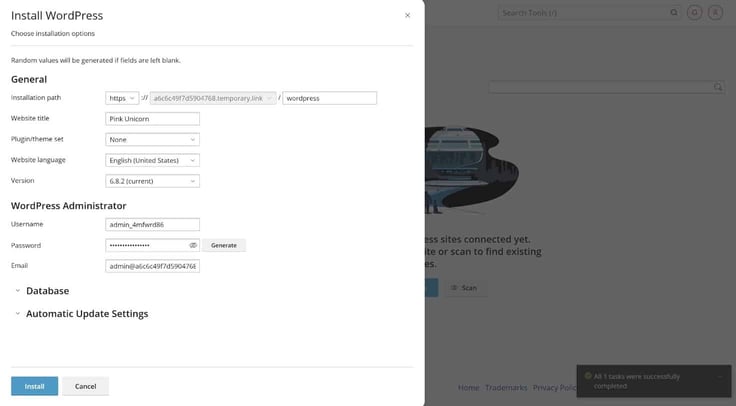
Beginners have an extensive selection of templates available to help them. But some more experienced users like me may want to do more customization.
A template can get me most of the way there, but I find those final tweaks are really what makes a site stand out.
Say I was going into this with next to no experience of HTML, JavaScript, or even something as basic as WordPress plugins. That doesn’t really matter as much thanks to InMotion’s Customer Service phone line and online chat support.
The company employs “WordPress Experts” who really do know their stuff. They talked me through various tasks and helped me polish my site to perfection.
These experts can dish out advice and make specific recommendations. It was so helpful to talk to them when I had a good idea of what I wanted to do… but was unsure of the best way to do it.
I did spend a good amount of time on hold (about 45 minutes), which is to be expected for any call service. Honestly, even with the wait time, the customer service is a fantastic offering, especially considering the price.
With that being said, I did purposely limit my queries as I would feel guilty hammering the customer service line for hours.
Best practice is still to look up YouTube tutorials or maybe take a beginner’s coding course and tackle the basics yourself, while saving the expert advice for specific, targeted, and complex queries. It’s only fair.
It’s worth pointing out that I can’t really stress test InMotion’s plans properly. To do so, I’d need to make a pretty popular website in a short space of time.
If I could do that on demand, I’d likely be sitting on a yacht made of diamonds instead of writing this right now. But giving you solid hosting advice is definitely a worthy alternative to obscene luxury, so maybe it worked out for the best.
What I can do is grab some benchmarks. I opted for a “coded from scratch” news site with a carousel at the top and other stories linked below that.
Oddly enough, the GTmetrix Grade was pretty much a mirror opposite of the cheap hosting site, with the structure being ideal but the overall performance taking a hit. The most complex element loaded in under a second while the site itself took 3.1 seconds to populate.
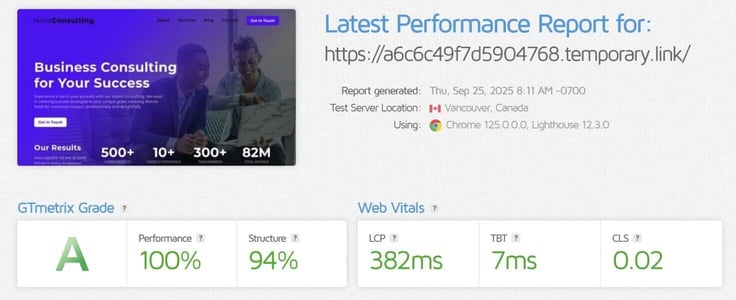
To keep things consistent, I also tested one of Sitejet Builder’s templates and got an almost perfect score.
The template site populated in 537ms, loaded its most complex element in 382ms, and demonstrated that any speed issues were definitely a “me” problem.
So, in summary, everything seems to be fine on InMotion’s end, and if you want a custom site, be prepared to do some tweaking and optimization work to get everything performing perfectly.
InMotion offers everything I would need to set up a straightforward blog or smaller news site, without a lot of overhead.
The ease of installing plugins via cPanel helped me get the backend to where I wanted it to be in no time.
The site itself was simple enough to pull together through a combination of templates and tweaking. I found the call-an-expert safety net helpful and believe it allowed me to be more ambitious with my plans.
Then there’s scaling. Many people, myself included, have started a WordPress site in hopes of growing it into something big.
Overall, this is a solid option when it comes to WordPress hosting. Especially if it’s a smaller site.
I believe the affordable prices on the one-year, two-year, and three-year plans give you enough room to experiment and find your groove, without breaking the bank.
VPS hosting is actually the first of four options I saw when I landed on InMotion’s homepage, and clicking on that began what is now a pretty familiar signup process.
The variety in plan tiers and pricing set the VPS hosting service apart. I’ll walk through the different options.
I saw three plan tiers: Premium, Custom, and Starter. The Starter option is, of course, the cheapest at $7 per month, and it offers 4 vCPU cores, 8 gigabytes of RAM, 5TB bandwidth, 160GB NVMe SSD, and 2 dedicated IPs.
The Custom tier has three plans that range from $22.99 to $44.99 a month. The cheapest offers three dedicated IPs while the most expensive has 10 IPs. All three custom plans have unlimited bandwidth included.
And the three premier care plans start at $88.49/month. A much steeper price, but this is more of the big leagues. Again, my eyes were immediately drawn to the bandwidth allocation, and I was glad to see unlimited bandwidth included for all options.
So the Starter plan offers 5TB of bandwidth, while the other plans have unlimited bandwidth. Is that a dealbreaker? It depends.
While 5TB is a lot, I see this as an obvious bottleneck if I were to host a site that was some combination of complex and popular.
Sites with a lot of photos and videos will struggle at the Starter level, and I think it’s likely worth a few extra dollars a month to jump to the VPS 8 vCPU plan at the very least.
I would only really go with the cheapest option if I were either experimenting and trying to find my feet in VPS hosting or if I had a specific plan for a small-scale website.
The other options are VPS 8 vCPU, 12 vCPU, and 16 vCPU respectively. In addition to the extra CPU cores, I noticed the higher tiers of plan come with more RAM (16, 24, and 32GB respectively) and extra NVMe SSD storage.
Basically, the higher tier the plan is, the faster my site will run and the more capable it will be under heavy load. Other perks include a choice of data center location.
As for what I would choose, that depends on what I’m using it for. If I were going the e-commerce route, stumping up for a faster plan would be the way to go.
Providing a smooth shopping experience is vital, and I wouldn’t want to lose sales because of a slow webpage. So I’d likely look through my business plan and match the tier to the amount of traffic I expect, while allowing a little extra headroom.
Once I selected my plan, I was taken to the domain name screen. As with the shared hosting checkouts, I could skip this part.
On the next page, things got interesting. Unlike with shared hosting, I couldn’t just double check my basket and breeze through to the payment details. I had two very important choices to make.
There are menus for “Control Panel Options” and “Optimized Configurations.” If I choose the free “No Control Panel” option, the second menu disappears. I would not recommend this course of action as it makes everything from this point on much more complicated.
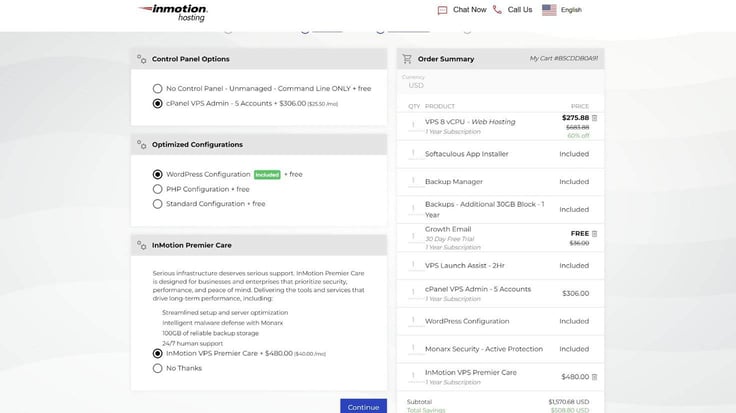
An affordable option is Control Web Panel, which works out to $5 a month. It’s a nice intermediate option if I was confident in my abilities but wanted an easier time getting the server going and managing it.
I get unlimited accounts with this option, so if I had a very large team then it may be worth considering. Control Web Panel is Linux based, and it’s a bit more difficult to use than option three, but still easier than using the command line.
Option three is the expensive option. And it is also totally worth it in my opinion.
It’s cPanel, but unlike with the shared hosting plans, it isn’t included in the initial cost.
For five team members, I’m looking at $25.50 per month. I did not see a “one account” option, which is a shame as this would be a no-brainer if it cost $5.
It’s worth pointing out that this is a discount on cPanel’s own pricing, so InMotion probably can’t get it any cheaper.
Another thing I noticed is that the $25.50 per month is paid upfront rather than billed monthly.
So while opting for three years was an easy choice with the shared hosting plans, it comes with an extra $900+ outlay if I’m using cPanel to manage my server.
On the bright side, this locks in cPanel for $25.50 and protects me against future price increases for the length of the term. But the figures did give me more of a price shock than I experienced with the shared hosting plan.
With cPanel selected, the next step was choosing my Optimized Configuration. These configurations are all free, so all I had to think about was what I wanted to use this server for.
The WordPress configuration is pretty self-explanatory, and it’s what I ultimately chose.
If I’d wanted to do a lot of server side coding, PHP configuration looks like it would give me a good base.
I didn’t see a clear description for the “standard configuration,” but I’d imagine that was a pretty blank slate that would be handy for anyone doing a complete custom job on the server.
Now the main checkboxes were finally out of the way, so I just had to choose the term length and then decide where I wanted my server.
Choosing somewhere close to your target audience is the key to good server placement. I could select from three regions: US East, US West, and EU Central.
I decided the East Coast was a good middle ground and proceeded to the payment details screen.
If I wanted to save a little money and avoid splashing out on cPanel, I would have to get technical to get my server going.
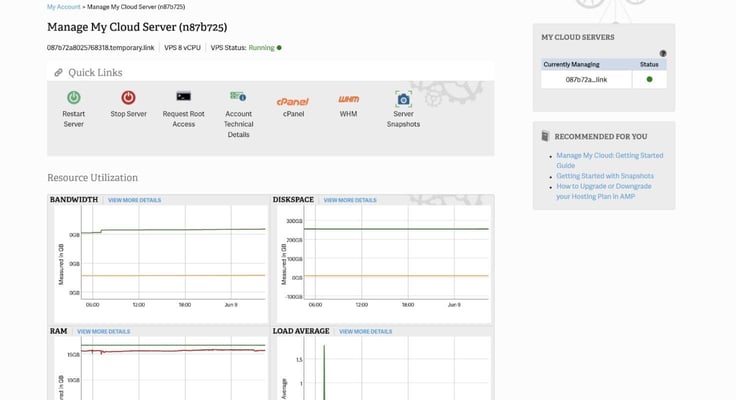
Thankfully, InMotion has an easy-to-follow guide that should help me get the basics down and port my site over from shared hosting.
From there, I could install the likes of WordPress or any other CMS I had access to.
The guide contains a troubleshooting section, and customer service is also on hand if anything goes wrong. However, I didn’t need to go to all that trouble.
I found that cPanel comes pre-installed if I opted to add it at checkout. Not only that, but it’s optimized to the exact configuration I selected.
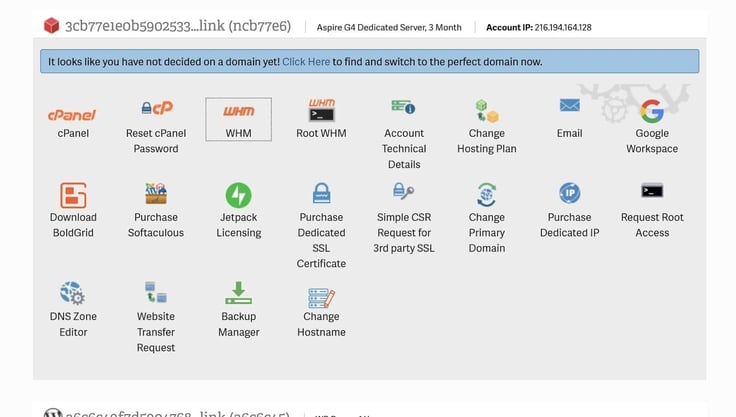
This means the only manpower needed is setting up a few logins for your teammates via WHM’s accounts menu. It’s all very intuitive, and I managed to work it out without looking at any instructions.
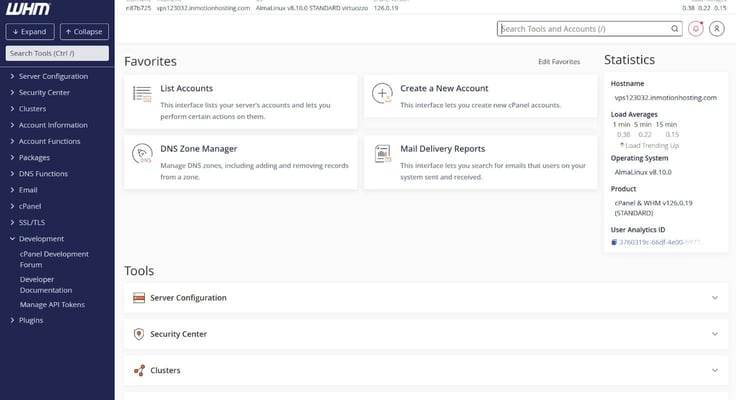
There’s a bit of a “best of both worlds” feel to the whole thing. The WHM makes modifying any of the server’s main functions simple, but an experienced developer may see it as restrictive.
That’s where the Terminal comes in. When I first clicked on the Terminal, I was advised to “use extreme caution.” Um, all right then. I suppose this is an area where you can really mess up if you don’t know what you’re doing.
A “request root access” button exists to enable others to access this feature. As the admin, I have access by default, and I feel secure in the knowledge that any team members I bring along won’t be able to stumble in and accidentally break anything if I don’t allow them access.
I also got to experience the VPS server without cPanel installed, and I wouldn’t recommend it for most people. Using the command line tool to get everything set up is far more difficult and just a bit of a pain compared to the cPanel experience.
You may save significant money by avoiding cPanel, but definitely make sure you know what you’re doing before you uncheck that box. If you change your mind later, you’ll need to cancel the subscription and sign up again to add cPanel to your plan.
To test the VPS server’s performance, I performed the same template test I’ve used for every service in this review so far.
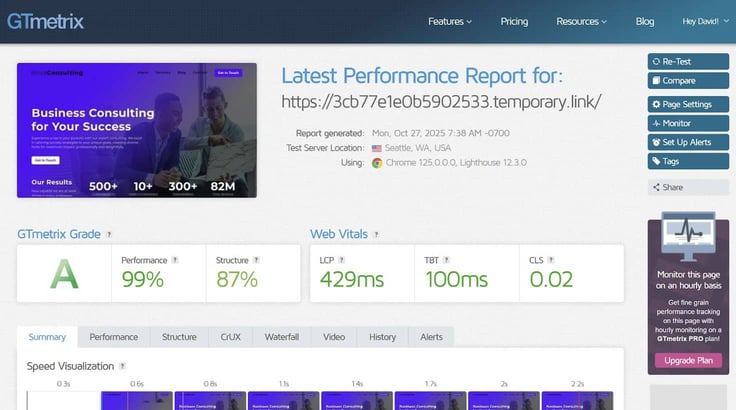
The site was good to go in just 429 milliseconds. Put it another way: about 205 milliseconds faster than the load time with the WordPress option.
I would’ve liked to test how the server handles itself during a period of heavy traffic, as the server’s ability to handle that is one of the main arguments for a VPS.
Unfortunately, I can’t drum up a few hundred thousand visitors from nowhere. However, I can confirm the lack of cPanel didn’t really hamper site performance.
So, if you can get everything set up with the command line alone, this could be a great money-saving option with few downsides once things truly get going.
Yes, VPS hosting is a definite step up in technicality. And it’s a necessary step up for many business owners. I think InMotion does a great job of streamlining the process and making it as easy as possible for less experienced people to get their site going.
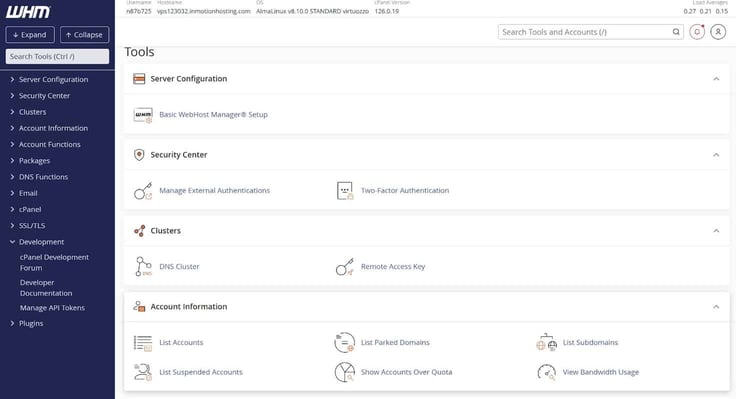
There is a question of budget. I would have had a far more difficult time getting my server going if I didn’t splash out on cPanel. That addition is worth it in my opinion, even if it is more than the actual hosting plan itself (after discounts are applied).
With that being said, InMotion’s setup guide is clear and easy to follow, you can find step-by-step YouTube tutorials aplenty, and the customer service line is right there if you need a hand.
It’s true that InMotion’s plans aren’t the cheapest around. The whole thing strikes me as a bit of a “you get what you pay for” type of experience. Throw enough cash at it, and you have all of the benefits of VPS hosting, with absolutely no learning curve or technical barriers.
If you really know what you’re doing (or are willing to knuckle down and learn), serious savings can be yours with this plan.
The dedicated hosting service is made for high-trafficked sites. Its big selling points are fast SSD and NVMe storage and, of course, the human customer service that’s been so helpful to me thus far.
In terms of pricing, my research indicates that InMotion is pretty middle of the road, even with the discounts. With that being said, the company does arguably give you more bang for your buck with a dedicated hosting service.
You get a lot bundled in to begin with, and if you’re comfortable splashing a little more cash, you can get pretty much every tool you need for a smooth hosting experience.
I spent more time thinking about what plan to choose here than I did on almost any other element of this review.
Not only is the cost higher when it comes to dedicated plans, but the difference in capabilities between plans is also significantly higher than it is with the other services.
My advice to anyone shopping for a dedicated hosting plan: Go in with a solid plan for your site and an idea of what you expect from it.
I ended up selecting the Aspire plan, though there is a really strong case for the Essentials plan.
Despite being the bottom rung, Aspire can handle a lot. I have an online game in mind for testing this out, and Aspire should give me enough oomph to build up a dedicated player base.
Switching between plans is easy if I change my mind. The Essentials plan could be a big upgrade (doubling the RAM and going from DDR3 to DDR4 alone will make a huge difference) if Aspire doesn’t meet my needs.
Given the price, I’m less inclined to lock myself in for three years than I would be on a shared plan where the discounts are significant, and the combined cost is almost trivial.
So, for me, it makes sense to start at the bottom and scale up as needed. Especially as it allows my site to build revenue and traffic. Which in turn means any future upgrades will basically pay for themselves.
A potential snag comes with the cPanel Dedicated Premier option. Despite cPanel 100 being on the list of included features a few screens back, I was dismayed to find cPanel Dedicated Premier actually costs $49.99 a month.
The only other selectable option is No Control Panel, which makes things a good deal more complicated. The cPanel pricing on these plans is something InMotion should really update and clarify.
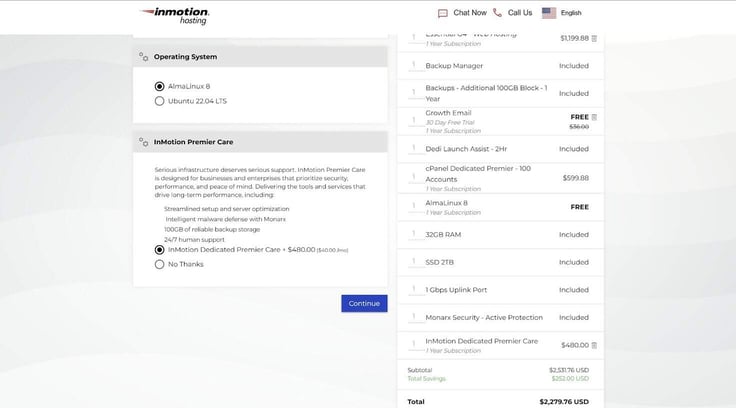
Caption: Once I’d chosen my control panel, it was time to choose an operating system — and it’s all Linux-based.
If I had opted for cPanel, I could choose from AlmaLinux 8 or Ubuntu 22.04 LTS. Opting for no control panel gave me several other OS options, including Debian 11 and 12.
There’s also the option of InMotion Premier Care, which costs $40 a month but may be a game changer for the less confident or capable.
I feel like, even with a fair amount of experience, the InMotion Premier Care plan is worth considering. Dedicated servers are a significant step up from everything else, and that extra help and a safety net may prove invaluable.
Despite the cPanel confusion, I did spot a good amount of “free” things in my cart, including the backup manager, an “Additional 100GB Block” of backups, and a year of Monarx Security – Active Protection.
The “Included Server Setup and Configuration” means the hard work was already done for me. The server came pre-deployed and configured to my exact needs (a WordPress site in this case).
I did have the option of tweaking a bunch of things via the WHM app.
This is where I would add up to 99 other accounts if I were actually running the sort of company that requires this level of hosting.
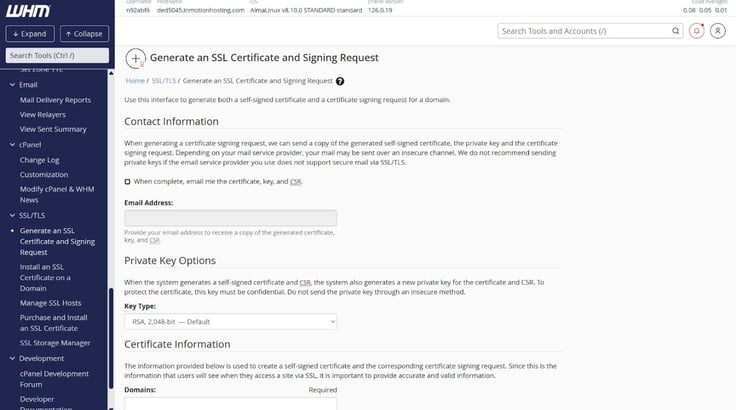
After browsing cPanel, it didn’t take long to work out what the main tools do and how they can help me manage both the site and server.
First, I can use a bunch of email tools to arrange how mail is handled. This includes routing, encryption, filtering, and a way to catch messages sent to the wrong address.
The Files section has a ton of tools I would be getting to grips with if I really wanted to create something unique.
It’s basically an easy way to store and arrange the files my site needs to run. Given enough time, I could use it to build a social network, an MMORPG, or anything else that goes beyond basic HTML.
Again, customer service is on hand to help. Backup Manager is also here… and something I should have tested earlier, as I managed to lose an entire website through not hitting save often enough. Working primarily in Google Docs has ruined me.
I decided to test out the Files function by uploading a demo of a browser-based game I’m working on, and I immediately spotted areas for improvement.
In an ideal world, I’d drag all the game files and folders across and drop them in, and then the tool would do the rest. As it was, I had to first click across to an upload screen, and then I could only drag files across. So I had to create every folder and drop each file in individually.
Although it’s currently a pretty basic game, it has a lot of folders, so this took me absolutely ages. It wasn’t complex, but it was tedious.
On the plus side, if I do make a mistake, moving things between directories is as simple as dragging the files you want to shift to the correct folder on the sidebar.
As for other apps, I spotted an option to purchase Softalicious (the tool I used to install various things on the shared hosting accounts) in the account management panel. However, clicking it led to a pop-up that said: “Softaculous could not be added to the cart at this time. Please try again later.”
So any apps will have to be downloaded and installed manually through the Files tool. Again, this isn’t too complex if I’m careful. It just could be streamlined to be more user-friendly.
On paper, this should have the best performance with the most bandwidth and upward potential. I can’t really stress it out to test the bandwidth, but it is easy enough to compare to other plans by launching the same SiteJet template and testing it on GTmetrix.
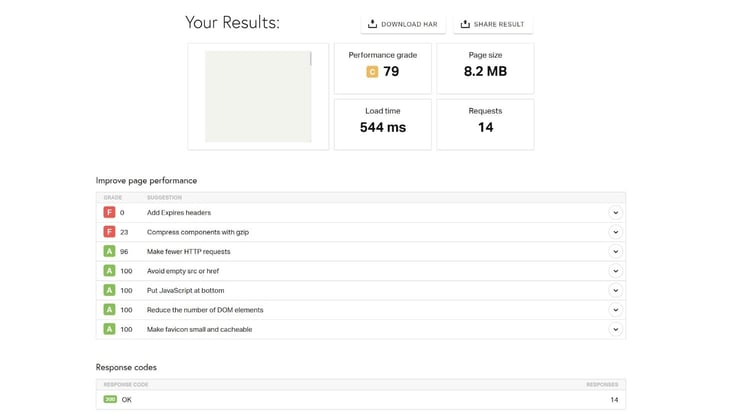
What I found wasn’t too surprising. The template loaded in 562ms, which is very fast and on par with the other options.
The difference is that this plan will likely retain that speed under heavy load. The cheaper options are likely to see their performance impacted. Again, I couldn’t test this, but it stands to reason.
As with a lot of InMotion’s services, there’s something for everyone here.
If you’re at the point where you need to make the leap to dedicated hosting, the aptly named Aspire plan ticks a lot of the boxes.
At the other end of the scale, I feel like the Extreme plan is a clear enterprise-level product that’s a solid last stop before “off the shelf” options don’t really cut it anymore.
I like how beginner-friendly the interface is. It’s possible to get all of the benefits of dedicated hosting while keeping the difficulty level around the same as it was with the shared hosting plans.
I feel like this is an absolute game changer, despite the extra expense. It means you can avoid hiring an expert, which will cost a lot more than the monthly fee you pay for cPanel.
If you want to save money, you may find a cheaper, stripped-down plan elsewhere. However on balance, this has the best all-round options and could arguably be your simplest route into dedicated hosting.
When naming InMotion’s main strengths, customer support is close to the top of the list for me. I found the staff friendly, knowledgeable, and willing to go that extra mile to resolve my problems.
The service can help with actual issues when something seems amiss, as well as offer hands-on advice with things like WordPress or a server if you don’t know how to complete a particular task.
As for downsides, I found the wait times a bit excessive. I spent over 45 minutes on hold during the most off-peak hours (with one person in front of me the whole time).
The phone chat (which I much preferred) isn’t 24/7 either.
However, this is all mitigated by the callback service. If you find yourself in a queue, you can opt to get a call back once a customer service rep is available. After choosing this option, I could hang up, go about my day, then deal with the issue once my phone rang later on.
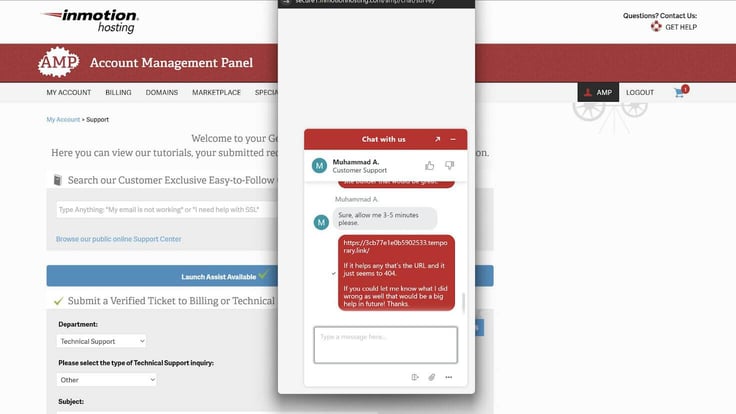
You also get a two-hour dedicated Launch Assist service with certain dedicated hosting and VPS plans, and that makes the whole process kind of foolproof.
During my session, I connected with an expert who quickly identified issues preventing my server from running properly, fixed those issues, and explained it all to me afterward.
This was all done via text chat, with minimal prompting on my end. I just had it running in the background while I got on with my day.
The problems I had only used 10-15 minutes of my allotted two hours of customer service time, and the rest of that time is still in the bank, should I run into issues down the road. It’s worth noting that the “two hours” is per user and doesn’t renew every month or apply per plan.
I was astounded by the variety of options available at InMotion. Dozens of different plans have every level of service for small-time one-person-show blog websites, all the way up to big businesses with multiple websites and hundreds of team members.
I did run into some limitations with the cheaper plans (unlimited bandwidth not being included can hamper larger operations), but I found upgrading was easy if a cheap plan just wasn’t getting the job done.
I don’t mean to sound like a broken record, but my experience with the InMotion customer service reps was by far the best part of trying out these plans. They were helpful, knowledgeable, and tailored to my needs.
It’s worth talking to these experts to get the most out of the tools and make sure your website(s) will be set up for success.
InMotion’s pricing is in line with many of its competitors, both when it comes to full price products and introductory offers. Of course, promotional pricing can fluctuate over time, but we’re talking a few dollars per year. Not really something that would turn me off a good service.
I feel InMotion excels in three departments: Variety, ease of use, and customer service.
First, InMotion provides plenty of options at signup. I explored four different overarching hosting plans, and each of those had four distinct plans. This means I had no problem choosing a plan that suited my needs, no matter what those needs were.
There’s a plan tailored to every type of website, and customers have plenty of room to grow. When you get beyond InMotion’s current capability (say you end up running a wildly successful e-commerce, social media, or blog site), that’s when you or a business associate would be picking up the phone and negotiating a corporate plan. Anything below that, I feel I’m covered.
Then there’s ease of use. Yes, at first I found everything a touch archaic compared to newer, flashier hosting sites. But I got a ton of flexibility. Given enough time, I’m certain I could use the toolset InMotion provides to build anything I want and keep it up to date.
I think cPanel being included with most plans is a massive perk. It’s a well-established suite of tools that will meet the majority of people’s needs.
With the server-level plans, again, the automatic setups are great for the basics and will meet the majority of people’s needs. If I really need to go deep, I do have the option of using the command prompt or editing a site with code.
Finally, the customer service safety net offers peace of mind. If I messed up, something didn’t feel right, or I was unsure of how to do something technical, dedicated help was only a phone call away. My advice to InMotion is to invest in the customer phone line, expand it, and shout from the rooftops about it because it can really set the hosting service apart if those wait times get tackled.
All in all, I found InMotion to be a solid service, and it’s something I’ll personally strongly consider next time I decide to try to launch my own media empire again.

HostingAdvice.com is a free online resource that offers valuable content and comparison services to users. To keep this resource 100% free for users, we receive advertising compensation from the hosts listed on this page. Along with key review factors, this compensation may impact how and where hosts appear on the page (including, for example, the order in which they appear). HostingAdvice.com does not include listings for all web hosts.
Our site is committed to publishing independent, accurate content guided by strict editorial guidelines. Before articles and reviews are published on our site, they undergo a thorough review process performed by a team of independent editors and subject-matter experts to ensure the content’s accuracy, timeliness, and impartiality. Our editorial team is separate and independent of our site’s advertisers, and the opinions they express on our site are their own. To read more about our team members and their editorial backgrounds, please visit our site’s About page.


