
Guides

Studies 
Studies
Our studies cover a range of trending topics and deliver original, reliable data you can't get anywhere else on the web.
From fast performance to affordable cloud-based plans, the web host that seems to do it all actually delivers on its promise.

By: Christina Lewis

Editor: Lillian Castro

Reviewer: Cristian Lopez
Disclosure: When you sign up through links on our site, we often earn referral fees from partners. For more information, see our ad disclosure and review policy.
From its cheap plans to its dedicated servers, HostArmada was a pleasure to review. Its shared and WordPress plans use cloud-based servers, which provide better speed and performance than competitors.
What I loved most was the managed support I got with HostArmada’s VPS and dedicated servers. Having the convenience of managed hosting while still maintaining root access gave me the best of both worlds — at a very reasonable price, too.
HostArmada’s managed VPS and dedicated plans were so easy to use; it felt like managing a shared hosting plan, but with more power and better performance.
All of its hosting plans are cloud-based, so even the entry-level shared hosting plans provide a level of performance I don’t usually see with budget hosting.
HostArmada includes some really nice introductory discounts, so I can save a lot of money if I go with a long-term hosting plan.
I signed up for the highest tier of HostArmada’s cheap hosting plan, Speed Reaper. For a budget web host, I loved that the performance and security features went above and beyond.
HostArmada’s plans are cloud-based, so I got a ton of performance perks while still keeping costs affordable.
I compared the different plans’ pricing and features, chose one, signed up, and built a website through SitePad. After publishing, I ran my site through GTmetrix to put it to the test. Here’s how everything went.
HostArmada’s graphic designer deserves a raise. Shopping for a plan on the HostArmada site was an absolute pleasure. It was aesthetically pleasing and highlighted all the important information I was looking for without being overwhelming.
I didn’t see any boring plan names, either. I could choose from three sci-fi-inspired plans: Start Dock, Web Warp, and Speed Reaper. And let me tell you, these plans were packed to the brim with explosive features.
I started by taking a close look at everything that came with each plan. Here’s a quick peek at the best features:
Mind you, this was just what was included in the base plan, Start Dock, and I only listed my favorite perks. There were at least 50 more features.
If I were to upgrade to the biggest plan, Speed Reaper, I could also get:
Everything HostArmada included was designed to make my site fast and secure, which was very reassuring for a budget hosting plan.
After checking out all the powerful features, it was time to compare pricing. HostArmada has some really incredible discounts. I could get up to 75% off just for being a new customer and an extra 15% off if I committed to three years upfront.
I’m usually a little skeptical about low introductory rates. My experience tells me that a lot of web hosts use this as a bait-and-switch tactic, but not HostArmada. Its renewal pricing was honestly very reasonable for what it included in its shared hosting plans.
Renewal rates were anywhere from $9.95 to $19.75 — a great deal for what I got. To back up these claims, I did a little homework to see what other hosts were charging for plans of a similar size.
HostArmada was on the cheaper end of the spectrum, which I found very impressive considering its cloud-based infrastructure.
| Host | Plan | Introductory Price | Renewal Price |
|---|---|---|---|
| HostArmada | Speed Reaper | $4.94/month | $19.75/month |
| ScalaHosting | Entry Cloud | $14.95/month | $29.95/month |
| Hostinger | Cloud Startup | $7.19/month | $27.99/month |
| Bluehost | Business | $3.99/month | $14.99/month |
I ended up going with the Speed Reaper plan to take advantage of all the extra performance boosts.
Once I chose my plan, I was ready to check out. I clicked on the purple “Get Started” button under Speed Reaper. On the next page, I was asked to choose my domain name.
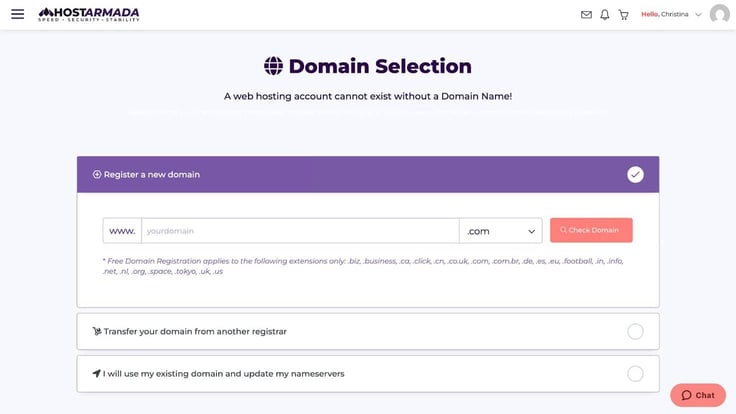
To keep things simple, I went with HostingAdviceTest2.com. Creative, I know.
After typing in the domain name I wanted, I clicked the “Check Domain” button to make sure it was available. After I got confirmation that my domain was available, I moved on to the next page where I configured my server.
I use the word “configured” lightly. There weren’t a lot of customizations to be had (it was a managed hosting plan, after all), but I did get to choose a few things.
HostArmada let me choose my billing cycle, data center, and a bunch of optional add-ons like Elastic Search/OpenSearch, additional SSLs, and AccessiBe Integration.
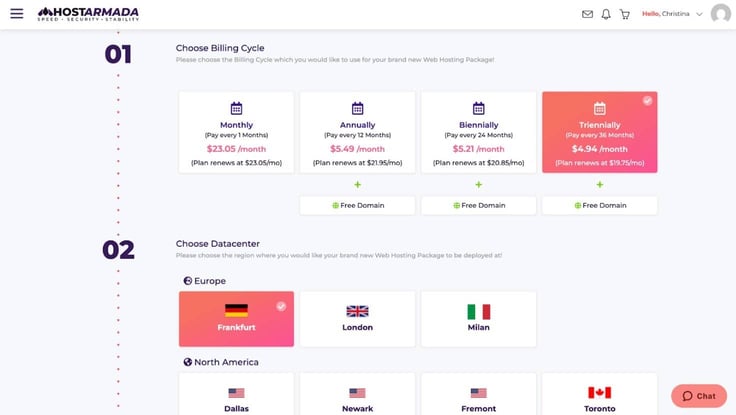
The next step was to configure the domain name I chose, which only involved confirming my domain and hosting plan and clicking the “Continue” button. It couldn’t have been any easier.
The final step before checkout was reviewing my purchase and clicking “Check out.” On the last page I entered my address and payment info before finalizing my purchase.
On the final checkout page, my total came to just $182.35 for three years of hosting, a one-year domain name, and domain privacy protection. In total, I saved more than $533 in introductory discounts. I couldn’t believe what a good deal I got.
My favorite part of reviewing web hosts is building websites through their various site builders. Getting to test out all the different tools, templates, and features is a fun way to flex creative muscles now and again.
I started building my HostArmada site by logging into my dashboard. I scrolled down to the first section, “My Services,” where I could see all the plans I had purchased.
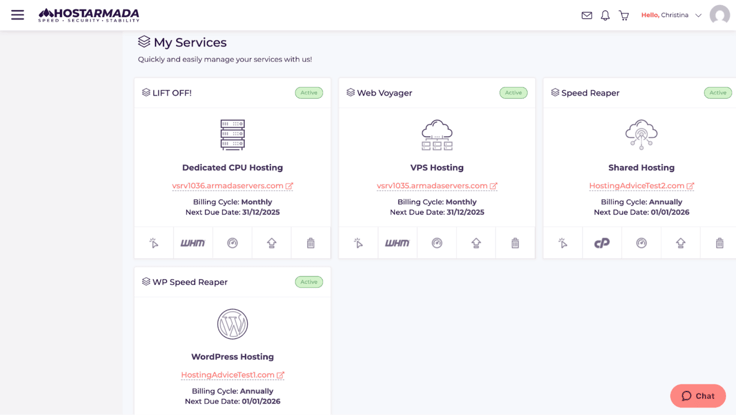
I clicked on Speed Reaper, which took me to this page where I spent a little time poking around. It wasn’t immediately obvious where I should start, which could be a little challenging for someone who’s never built a website before.
After a quick Google search I figured out that I could use the website builder, SitePad, to get started. I found it under the Software section of my cPanel account.
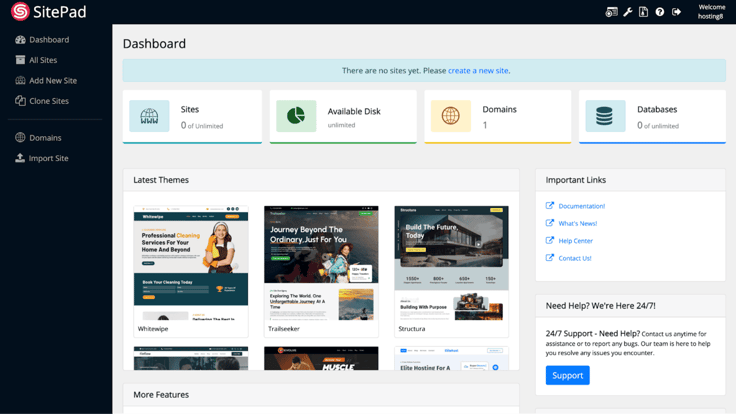
Note: Before I talk about my experience with SitePad, I want to make it clear that SitePad isn’t HostArmada’s in-house site builder. It’s just the solution they’ve made available through Softaculous.
I clicked on the “Create a new site” link at the top of my screen, which took me here:
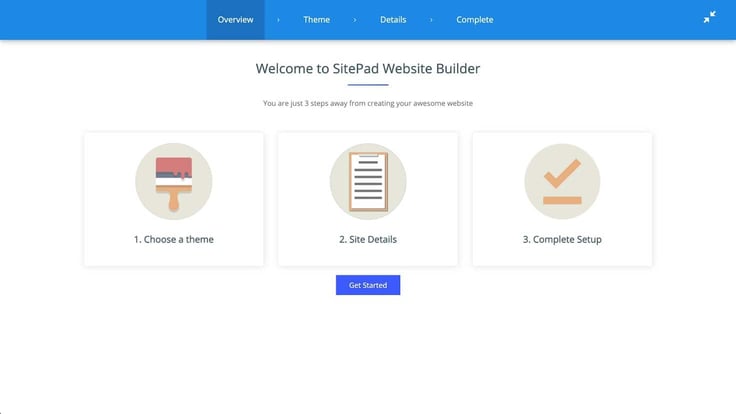
I clicked “Get Started” and spent some time browsing through the different themes. I was impressed with how many there were — 865 to be exact.
I had just finished rewatching season one of Bob’s Burgers, so I was feeling inspired by the food themes. I was impressed with the “Dining” theme, which looked like a design straight out of an Adobe Creative Suite commercial.
Okay, so maybe it was an AI cheeseburger, but the design was eye-catching.

After choosing my burger theme I was asked to fill out more site details like my website title, address, contact information, and social handles.
Once that was done, I was able to preview my site and start customizing it. My first impression of the site editor was that it wasn’t as intuitive as others. It didn’t come with any built-in tutorials to show me around the interface.
I tried hovering over elements at the top of my page, thinking some sort of editing icons would pop up, but they didn’t. After a few minutes, I figured out that only the lower sections could be edited from where I was in the site builder — the header area had to be changed elsewhere.
There was definitely a bit of a frustrating learning curve as I navigated through all the settings on each page. The platform was more similar to WordPress than a site builder in that way. More experienced users shouldn’t have too much of an issue figuring it out, but it’s probably not super friendly for absolute beginners.
Like I mentioned before, I can’t really fault HostArmada for SitePad’s shortcomings (after all, it’s not their own software). However, it would be nice to have a more functional, beginner-friendly site builder available.
Even though I didn’t love SitePad, I wouldn’t say that it took away from how great my hosting plan was. The simple solution for me would be to use WordPress instead of SitePad next time I build a site.
After I finished customizing my site, I ran it through GTmetrix to see how it performed. Across the board, HostAmada got pretty high marks for performance and web vitals.
The only metric that was slightly over the recommended time was the Largest Contentful Paint (LCP) at 1.4 seconds — preferred is 1.2 seconds or less. My best guess is that the large hero image contributed to that.
Simply swapping the large image out for something smaller would likely bring the LCP down.
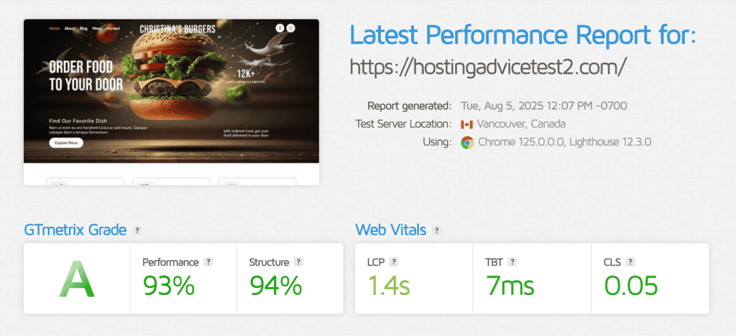
Given the report from GTmetrix and what I learned about HostArmada’s infrastructure, I don’t have any concerns about performance.
I loved that HostArmada made cheap hosting feel performant and secure. The kinds of features and resources included with each plan were more on par with other cloud hosting providers, not budget hosting plans.
While I loved the performance and security aspect, sometimes the dashboard and site-building tools lacked intuitiveness, which could potentially turn off beginner website owners.
As a whole, I still think HostArmada is an awesome choice for anyone who wants great performance on a budget — as long as they aren’t intimidated by the learning curve of SitePad or WordPress.
WordPress is my favorite way to build a site, so I’m always eager to check out different WordPress hosting services. I took HostArmada’s WP Speed Reaper plan for a spin to see how it would perform.
After choosing a plan, signing up, and building my site, I came to the conclusion that HostArmada’s WordPress plans compete with the best of them. Here’s a closer look at my experience.
I usually look for features that are going to make my WordPress site faster, more secure, and easier to build. That means I want lots of RAM, bandwidth, and storage, strong security features, and free premium themes.
At first glance, I could at least tell that HostArmada delivered on the fast and secure side of things, but I needed to dig deeper to explore its other features.
Just like its shared web hosting plans, HostArmada offered three WordPress options: WP Launcher, WP Evolver, and WP Speed Reaper.
I was just as impressed with its WordPress plans as I was with its web hosting plans. Each of them included:
When it comes to WordPress sites, I really prefer having a plan that includes WordPress-specific performance optimizations. I know that sounds a bit like marketing jargon, but it actually makes a difference.
Here’s the game changer: the WP Speed Reaper plan had dynamic caching and lower-density servers, so I knew my WordPress site wouldn’t suffer from slow speeds or noisy neighbor syndrome.
Even though it was the most expensive of the three plans, I decided to go with the WP Speed Reaper option. It made the most sense since I wanted to review everything HostArmada had to offer.
When it came to pricing, I felt like the rates were pretty fair. HostArmada is a budget-friendly web host, and it has a range of plans that can fit any budget.
When I compared its pricing to other WordPress hosts, it was cheaper than every other one except Bluehost.
| Host | Plan | Introductory Price | Renewal Price |
|---|---|---|---|
| HostArmada | WP Speed Reaper | $3.95/month | $19.75/month |
| SiteGround | GoGeek | $7.99/month | $44.99/month |
| Hostinger | Cloud Startup | $7.19/month | $27.99/month |
| InMotion | WP Pro | $11.09/month | $26.49/month |
| Bluehost | Business | $3.99/month | $14.99/month |
For a cloud-based WordPress host, HostArmada had super reasonable rates and pretty unbeatable introductory pricing.
After choosing my plan, I was ready to sign up. I had already gone through the same process when I signed up for my shared web hosting plan, so it was quick and easy to do it again.
I clicked on “Get Started” and chose my domain name. I went with another generic domain name (HostingAdviceTest1.com) and made sure it wasn’t already taken, although the chances of that were low.
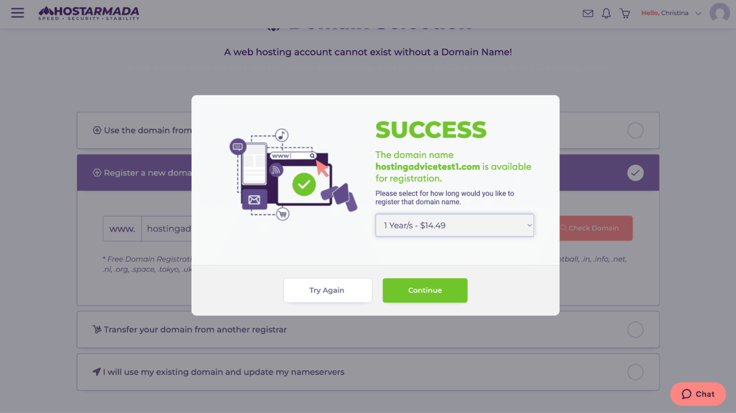
The pop-up window listed the cost of my domain name as $14.49 for a year, but since I was paying for a long-term hosting plan, it actually came free.
The next page had me confirm my plan, its duration, my data center location, and any add-ons I wanted to buy. When I clicked “Continue,” I was able to configure my domain name to my hosting plan — a step you don’t want to skip.
That’s where I was also presented with the option to add domain privacy protection for $4.65.
Note: If you don’t want your contact details and home address on the web for everyone to see, you want domain privacy protection.
On the very last page, I could see my total for three years of hosting, and it was only $182.35. I saved more than $533 in fees by purchasing a long-term hosting plan as a new customer.
I love building WordPress sites. It’s so easy once you know what you’re doing. What’s even better is that it’s pretty much the same no matter which hosting provider you choose. The only difference is the web host’s dashboard and the number of free premium themes included.
To get started building my WordPress site with HostArmada, I logged into the dashboard. Similar to my experience with its cheap web hosting plan, I didn’t see any instructions that screamed, “Start here!”
I figured it probably made sense to click on the option that said “WordPress manager by Softaculous.”
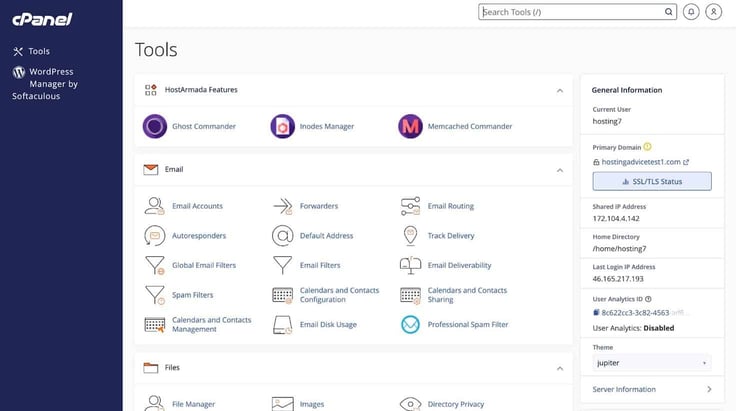
From there, I was redirected to Softaculous, where I installed WordPress in just a few clicks. After selecting “Install,” I entered a few details about my site.
I figured I would keep up with the burger theme, so I named my site “My Burger Blog.” Before the installation was complete, I had the option to change my WordPress username and password from the default settings, which I highly encourage you to do as well.
After all that, I clicked “Install” again. The process only took a few minutes. When it was don,e I logged into my WordPress admin account to choose a theme and start customizing my site.
I won’t bore you with all the things I did in WordPress — I’d rather focus on what’s unique to HostArmada. So all I’ll say is that it took me less than 15 minutes to choose a plan, sign up, and start customizing my site.
If I were in a time crunch, I could get a fully functional WordPress site online in less than a couple of hours with HostArmada.
It also had a ton of free premium themes, which was a huge advantage, since I didn’t have to pay extra to get the site design I wanted.
The final step in my WP Speed Reaper review was to check out my site’s performance. Would it perform as well as advertised?
A quick run through GTMetrix’s performance test proved that yes, it would. The results showed my fast food blog was speedy in more ways than one.
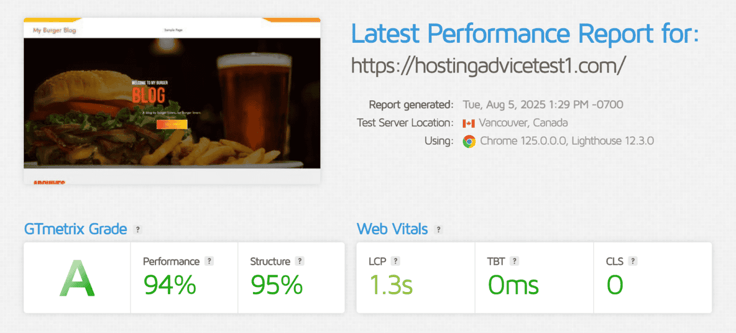
HostArmada’s WP Speed Reaper plan scored an “A” in performance and had a respectable LCP. These results made me feel pretty confident in my choice.
I would recommend HostArmada’s WordPress plans to anyone who wants cloud-level performance on a shared hosting budget. The level of performance and security I got was impressive for the price.
In addition to the base features, HostArmada also included some WordPress-specific optimizations, like dynamic caching and lower-density servers. To me, upgrading to the WP Speed Reaper plan was a really worthy investment.
Testing virtual private servers often comes with a few headaches for me. I’m not the best at working in the terminal and often have to outsource some help from our dev team at HostingAdvice.
This time, configuring my VPS couldn’t have been any easier. HostArmada’s managed VPS made it easy to sign up, set up my server, and install WordPress. Here’s how it all went:
I was already impressed with the performance of HostArmada’s web and WordPress hosting plans, so I was really curious to learn more about its managed VPSes.
Like always, I started my journey by taking a look at what HostArmada has to offer — resources, features, perks, and pricing.
This time there are four plans to choose from: Web Shuttle, Web Voyager, Web Raider, and Site Carrier.
I liked that each plan came with certain base features, so no matter which one I chose, I was at least getting:
I also noticed HostArmada has something unique I almost never see with VPS plans: a drag-and-drop site builder. Usually, I would have to install WordPress or upload site files via FTP, so having a site builder option is a great perk (even if I wasn’t a huge fan of SitePad).
Having four plans to choose from meant that I could find something that worked with my budget. The cheapest plan, Web Shuttle, started at just $29.95 a month for the first month, and the more advanced Site Carrier plan started at $74.23.
I ended up going with the Web Voyager plan, a nice mid-tier choice.
In terms of pricing, HostArmada fell in the middle of the pack compared to other hosts. Its introductory discount only lasted a month, but its renewal pricing was cheaper than two out of the four hosts I compared it to.
| Host | Plan | Introductory Pricing | Renewal Pricing |
|---|---|---|---|
| HostArmada | Web Voyager | $35.73/month | $71.45/month |
| Liquid Web | Advanced VPS | $25.53/month | $111.00/month |
| Hosting.com | Managed Linux VPS XS | $38.00/month | $75.99/month |
| Cloudways | Premium 2 vCPU/4 GB RAM | $32.40/month | $54.00/month |
| Hostwinds | Managed VPS 2 vCPU/4 GB RAM | $29.99/month | $39.99/month |
Even though HostArmada wasn’t the absolute cheapest, I felt pretty confident in my choice considering how much I was getting for what I paid.
Once I decided on the Web Voyager plan, it was time to sign up. I clicked on the “Get Started” button under the Web Voyager plan.
My first step was to choose my domain name. If I already had one, I could transfer it from another registrar or use my existing domain and update my nameservers. I opted to register a new domain, and I chose another pretty basic option (hostingadvicetest3.com).
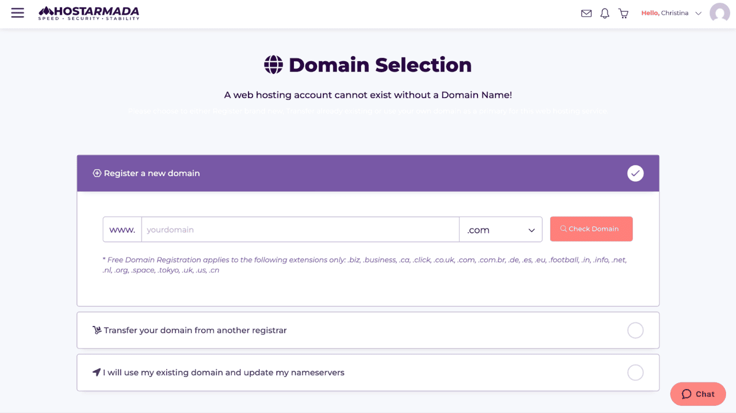
After taking care of my domain name, I moved on to the product configuration page where I confirmed things like my server, plan duration, data center, and any optional add-ons I wanted.
HostArmada had more than 20 locations for me to choose from, one of which was in my city, Atlanta.
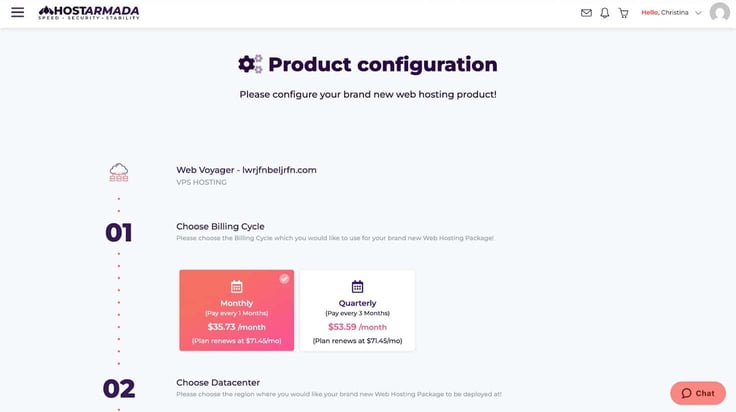
The most compelling add-ons were PCI compliance, an additional dedicated IP address, and other types of advanced SSL certificates. These were features that businesses could take advantage of (but weren’t necessarily right for my needs).
I previewed my order before checkout, and my total for the first month of hosting came to $35.73 — just as advertised.
After signing up, it was time for me to log in and configure my server. Within a few minutes I received an email that included a link to my HostArmada client area where I found all my login details for cPanel, WHM, and my SSH and FTP access information.
Since my VPS was managed, there wasn’t a whole lot I needed to do. In fact, the control panel aspect made it feel more like a shared hosting plan than a VPS. It took me less than two minutes to log in, find cPanel, and install WordPress.
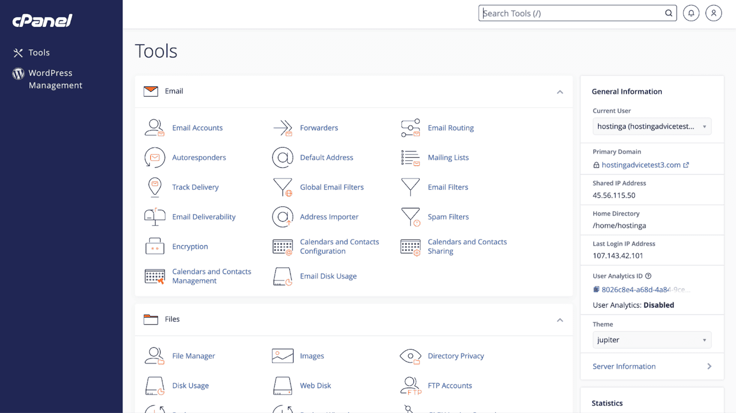
I also liked that I still had full server control and root access in case I needed it. Next, I used SSH to log into my server remotely, which was simple to do. I didn’t have any issues gaining access with the information HostArmada sent me in the setup email.
In terms of server management, I could view my VPS plan in the HostArmada client area, just like with my other plans. The dashboard was pretty simple.
The Graphical User Interface (GUI) was very user-friendly, and I quickly figured out how to navigate to my plan details, website, and control panels.
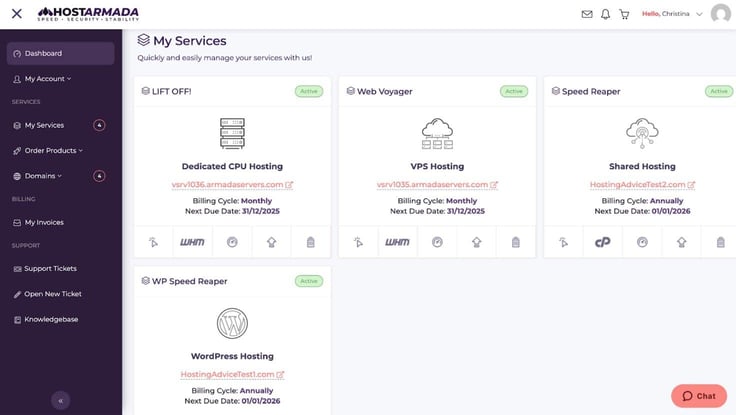
Having a really simple and clean dashboard was a nice change of pace from some of the other cluttered interfaces I’ve seen. I could easily see my services, invoices, support tickets, and the HostArmada knowledge base.
The easy-to-navigate dashboard and managed support made it clear to me that I was getting a ton of value from my hosting plan.
Before wrapping up my review of HostArmada’s managed VPS, there was one final step: putting its performance to the test.
I published my site and entered the live URL into GTmetrix’s performance testing tool. The results were nothing short of mind-blowing. To start, my site got an “A” in performance. But what was more impressive was the LCP coming in at just 522 milliseconds, or about half a second.
This core web vital tells me a lot about how long my users will have to wait for the largest piece of content to load. As it turns out, they won’t wait long.
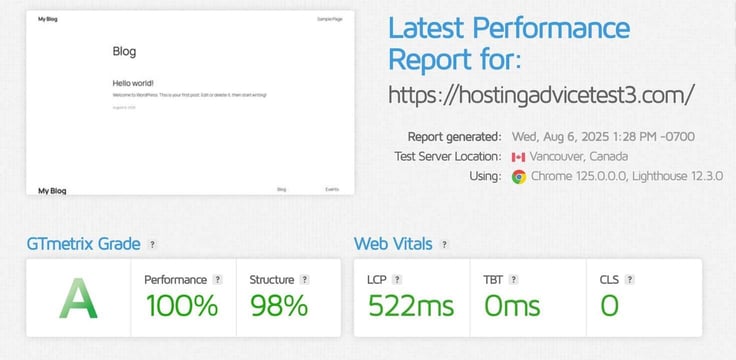
HostArmada put a lot of effort into making its VPS plans fast and performant, and I think the effort paid off.
I was really impressed with HostArmada’s managed VPS plans.
Even though they were more expensive than the unmanaged variety, the added support and convenience of a click-and-drag control panel made it well worth the cost. And if I ever wanted to get my hands dirty, I still had root access and full control over my server.
HostArmada’s managed VPS plans really gave me the best of both worlds in terms of control and convenience — and they come at a reasonable price.
The last stop in my HostArmada tour was its dedicated servers. I signed up for the LIFT OFF! plan, which gave me access to a managed dedicated machine with 4 cores and 8 gigabytes of RAM.
First, I configured my server, which couldn’t have been easier, and then I spent some time in cPanel checking out all the server management features. Before wrapping up my review, I performed some speed tests in GTMetrix. Here’s how the whole process went.
At last, I was ready to test HostArmada’s final hosting type: dedicated servers. Dedicated hosting represents the highest tier of performance and resource isolation.
If I were shopping for a solution for a high-traffic healthcare site requiring both privacy and performance, it wouldn’t get much better than this.
I started by checking out what the host had to offer, which included three options for dedicated CPU hosting. Like HostArmada’s other plans, each was named with a fun Sci-Fi theme: LIFT OFF!, Low Orbit, and High Orbit.
In each plan, HostArmada included:
I chose LIFT OFF! for my tests because it was the cheapest option and came with more than enough resources for me to run my tests.
I could pay either monthly or quarterly, with a pretty decent discount of 25% to 50% on my initial term, depending on which billing cycle I chose. The only downside I can think of to not having annual or multi-year plans is that the intro discount doesn’t last as long.
For example, InMotion’s introductory discount lasts up to two years, meaning I can lock in my low price for an extended period. It’s not a deal breaker, but it’s something to keep in mind when comparing hosts.
I dug a little deeper into pricing to see how HostArmada’s managed dedicated servers compared to others. To keep things fair, I only included the pricing for monthly plans. Here’s what I found:
| Host | Plan | Introductory Pricing | Renewal Pricing |
|---|---|---|---|
| HostArmada | LIFT OFF! | $81.95/month | $163.90/month |
| InMotion | Essential | $119.00/month | $119.99/month |
| Liquid Web | Intel Xeon E-2174G + managed support | $76.50/month | $169.00/month |
| Hostwinds | E3-1270 v3 | $122.00/month | $122.00/month |
HostArmada was on the higher end of the pricing spectrum, but it did have the second-cheapest introductory pricing. In fact, neither Hostwinds nor Liquid Web even offered a discount on monthly plans.
It seemed like HostArmada wasn’t the most budget-friendly dedicated server option overall, but I was impressed with the number of features and level of managed support it comes with. I also think folks who are shopping for a dedicated server are generally less concerned about a $40 a month difference in pricing than others.
The bottom line: HostArmada isn’t the cheapest dedicated host, but that’s not a bad thing for people who want something powerful, secure, fast, and convenient.
I checked out features, compared pricing, chose my plan, and finally it was time to sign up. HostArmada’s signup process is pretty much the same no matter which type of server you choose, so at this point, everything felt familiar.
I scrolled down and clicked on the “Get Started” button, which began my checkout process. Dedicated hosting doesn’t come with a free domain like shared hosting plans, but I could choose to buy a new one or transfer one I already own.
HostArmada’s domains were cheap. It only costs $14.95 for the first year for a .com domain.
As I moved through the rest of the checkout process, I got to confirm my plan’s duration, data center location, and add-ons like additional cPanel licenses, more backups, advanced SSL certificates, and an additional dedicated IP address.
Before paying, I took one last look at everything to confirm it was correct. My total came to just $81.95 (not including my domain name). I saved 50% on my first month of hosting!
It was surprisingly easy to set up my dedicated server. I guess that’s just one of the perks of managed dedicated hosting, which I’m now a huge fan of.
After signing up, HostArmada emailed me a link to my client area, where I could get all the login details for my control panels and everything I needed for remote server access.
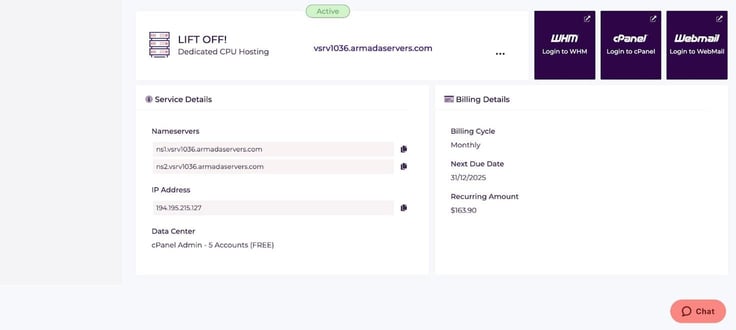
I started by signing into my client area and selecting the cPanel button. From there, I chose to install WordPress and build my site. I clicked on “WordPress Management” from the left-hand menu of cPanel, then clicked “Install.”
A window popped up, showing me installation options. HostArmada has a great sense of humor, as my site was prenamed “Cute and Fluffy.” They know their audience.
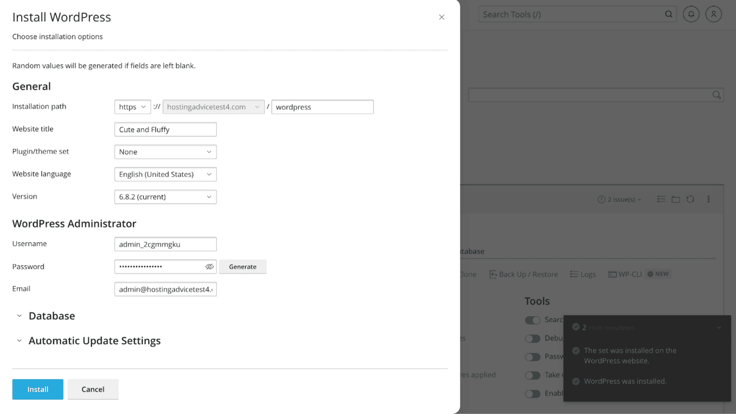
Installing my site took no more than 30 seconds, which was significantly faster than the seven to 10 minutes it took when I installed WordPress during my Nexcess review.
I chose a theme and added some content to my site before publishing.

Just like HostArmada’s VPS plans, the management aspect felt really similar to a shared hosting plan. It was so simple to get started, unlike some providers that don’t come with control panels preinstalled.
Since I was using a dedicated server, I felt like it was appropriate to check out the more advanced tools as well. I used SSH to get remote access to my server, which was pretty simple. I tried using the default port 22, which was refused. After checking the email HostArmada sent me, I realized it included a different port that I was supposed to use.
Even considering this small hiccup, I’d give HostArmada’s managed dedicated plans two thumbs up for user-friendliness and quick setup.
It didn’t come as a surprise to me that HostArmada’s dedicated server crushed the GTMetrix performance test, even with a massive hero image. The LCP came in well below the recommended time of 1.2 seconds or less.
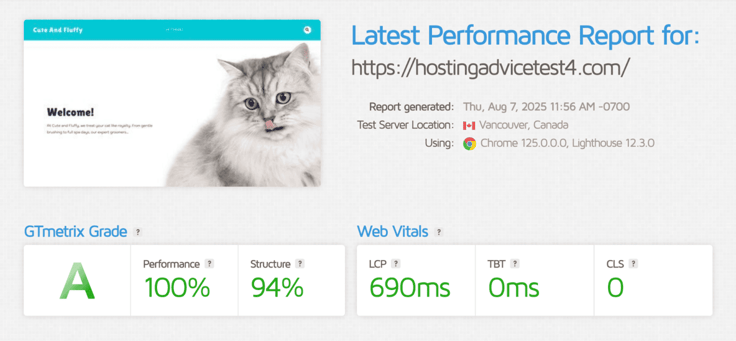
HostArmada also includes some other features to make sure your site loads fast, including NVMe SSD storage and enhanced caching. You don’t have to upgrade to get these either — they come with every dedicated hosting plan.
I definitely would. I really appreciated HostArmada’s LIFT OFF! plan. The drag-and-drop interface takes something complicated like dedicated hosting and makes it accessible and easy to use. Plus, full root access was still available. I didn’t have to trade control for convenience.
I think these plans would be ideal for anyone who needs the power and control of a dedicated server, but doesn’t have the time for the nitty-gritty server management tasks. You’ll need a slightly bigger budget for these plans, but it’s worth the trade-off for the level of support you get.
I truly believe the hallmark of a good product is how responsive and helpful its customer service is. HostArmada has a pretty great reputation online for having solid customer support, with one Trustpilot review saying, “…the help and INSTANT tech support is unbelievable.” That’s quite an endorsement.
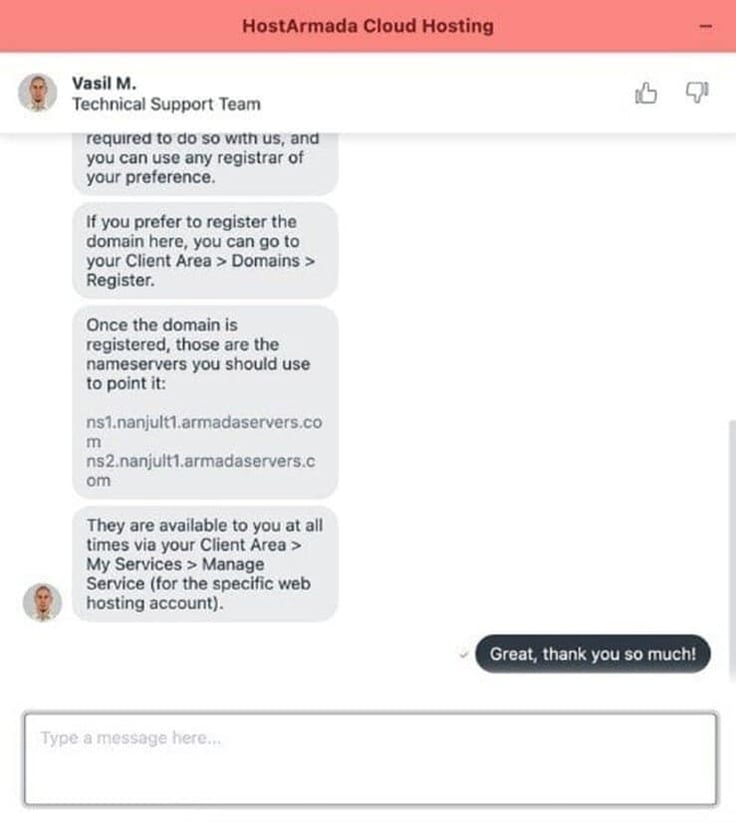
I wanted to see if I would have the same experience, so I reached out to them via chat.
I had an issue connecting my domain name to my VPS plan (which ended up being user error on my part), but the rep, Vasil M., was very helpful.
Vasil provided clear step-by-step instructions for how to point my domain name to my nameservers.
Vasil’s response was fast and accurate — I really couldn’t ask for more! In addition to chatting, I could also contact them via phone, email, or submit a support ticket.
Overall, I would give them two thumbs up for support.
I have many nice things to say about HostArmada, from its user experience and pricing to its performance and security. But to keep things short and to the point, I hand-picked a few of my favorite advantages.
I actually found it pretty hard to come up with cons for HostArmada. The main drawback for me was the lack of a real website builder.
HostArmada had a few options available through Softaculous, like the SitePad builder and Website Publisher, but I thought these tools were clunky and confusing. If I were to use HostArmada again, I would stick to WordPress or code a site from scratch.
HostArmada’s homepage says “Fast. Secure. Stable,” and I have to agree. Although I’d also add “Affordable” and “Convenient.”
Its cloud-based, cheap, and WordPress hosting plans gave me excellent performance for what I was paying, and I loved how easy it was to deploy and manage my VPS and dedicated server plans.
My only hangup was the lack of a beginner-friendly website builder (SitePad left a lot to be desired), but even that wasn’t enough to spoil the experience for me. Next time I’m in the market for an affordable cloud-based hosting plan, HostArmada will be at the top of my shortlist.

HostingAdvice.com is a free online resource that offers valuable content and comparison services to users. To keep this resource 100% free for users, we receive advertising compensation from the hosts listed on this page. Along with key review factors, this compensation may impact how and where hosts appear on the page (including, for example, the order in which they appear). HostingAdvice.com does not include listings for all web hosts.
Our site is committed to publishing independent, accurate content guided by strict editorial guidelines. Before articles and reviews are published on our site, they undergo a thorough review process performed by a team of independent editors and subject-matter experts to ensure the content’s accuracy, timeliness, and impartiality. Our editorial team is separate and independent of our site’s advertisers, and the opinions they express on our site are their own. To read more about our team members and their editorial backgrounds, please visit our site’s About page.


