

Writer: Jack Wallen


Editor: Britain Simons


Reviewer: Cristian Lopez

PHP is still one of the most widely used programming languages. One of the many reasons is that it’s very easy to learn. PHP is also a very good language for server-side web development.
In fact, PHP is used for nearly 75% of all websites and by nearly 19% of developers.
PHP is an important language for content management systems, eCommerce, web apps (and dashboards), server-side operations, machine learning, AI, command line, and task automation.
In other words, PHP is flexible.
The problem with PHP is that it’s not the fastest code on the market (at least with regard to older versions that are still in use). If you’re not careful with your code, you could wind up creating an application or service that functions poorly and causes bottlenecks.
That’s why it’s important to refactor your code. This process removes “technical debt,” complexity, and makes software easier to understand and maintain over time. Because PHP can sometimes be a slower language, inefficient code can be very problematic.
Refactoring code can be a tedious job, especially when your project reaches into the tens of thousands of lines of code. With the advent of AI, refactoring PHP is not nearly as challenging or time-consuming as it once was.
By carefully refactoring your code with AI, you can achieve considerable gains in the performance of your apps and services.
-
Navigate This Article:
Step 1: Identify Where Slow PHP Code Is Impacting Your Site
The first thing you must do is locate where your PHP code has issues that impact the speed of your site and/or apps.
There are several areas that can cause slowdowns with PHP code, such as database bottlenecks from unoptimized queries, large dataset handling, and database locking.
But the list doesn’t end there. Also consider: lack of caching due to no opcode cache, no data/object caching, and no full-page caching; file and system I/O operations because of excessive file includes, slow file I/O, and file-based sessions.
PHP code may slow with code and architecture issues (thanks to external API delays, inefficient loops and algorithms, overloaded frameworks, and memory leaks). Poorly configured server environments (by way of outdated PHP versions), low process limits, a misconfigured server, and/or having Xdebug enabled may also affect performance.
And then there’s slow admin dashboards, delayed page loads (TTFB), high CPU usage, timeouts, memory limits, 500 errors, resource-intensive plugins, poorly written theme functions.php, and global hooks.
Even before you begin the process of code refactoring, you need to narrow down the source of your issues with tools like Query Monitor, error logs, and hosting dashboards.
It can get very complex and involved.
That’s why, once you get to the refactoring stage, it’s a good idea to make use of AI. The AI isn’t writing your code; it’s improving it.
Step 2: Extract the Right PHP Code for Analysis
Now that you have an idea where we’re going with this and what’s required, the next step is to know what PHP code needs to be extracted for analysis.
You certainly don’t want (or need) to run 100% of your code through Claude AI for refactoring, as that could:
- Take a significant amount of time
- Cause problems with code (that don’t need to be analyzed)
As far as what type of code you should consider for refactoring analysis, target functions that are tied to slow queries or repeated execution.
Code to consider:
- Hooks that run on every page
- Database calls inside loops
- “Expensive” operations, long methods and large classes & code duplication
- Deeply nested conditionals & outdated PHP versions
- Manual data handling, spaghetti code (PHP scripts that mix business logic, database queries, and HTML presentation in a single file)
- Magic numbers and strings, poor naming, and hardcoded dependencies.
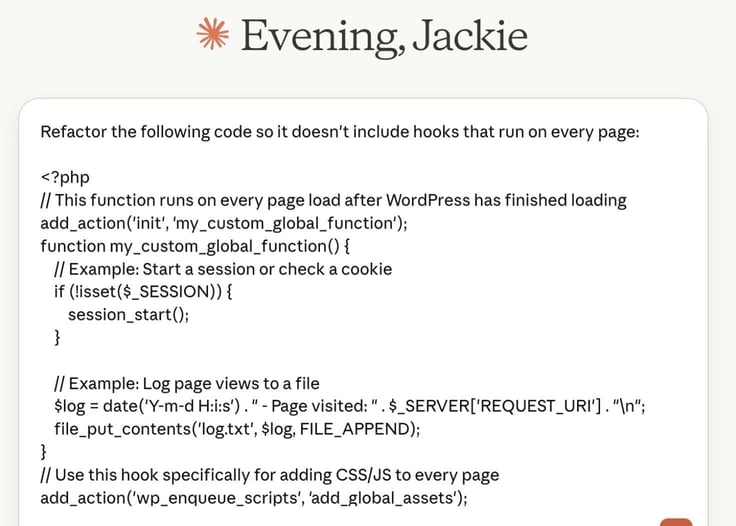
Before you begin the process of PHP code refactoring, you will want to be able to include: context for your code, remove any/all sensitive data within your code (including such things as API secrets), and make sure to keep snippets concise.
In other words, you need to ensure that you’re only sending the more complicated and/or problematic code into Claude AI for refactoring.
When you have a solid grasp on this step, the output generated by Claude AI will most likely be far more helpful.
Step 3: Ask Claude to Identify Performance Bottlenecks
It’s now time to make the big ask of Claude AI. I’ll run through three example prompting workflows (reducing repeated database queries, optimizing inefficient loops, and adding caching to expensive operations) a little further down, but let’s cover our bases first by identifying, prioritizing, and narrowing likely bottlenecks.
As always, you’ll want to make sure to structure your prompts so that the results will display clearly ranked insights into what’s going on with your work (and how to fix it).
You should make sure to have Claude AI identify any/all bottlenecks found within your code and clearly explain what is happening. You don’t want to have to untangle some unnecessary confusion in the output. This is all about making everything simple, so you can quickly get your code as clean and efficient as possible.
Make sure to request a prioritized list of performance issues. Most likely, Claude AI will find big-ticket items as well as smaller, less significant issues. You want to have those big problems listed at the top, so you know that they are the first things you should deal with.
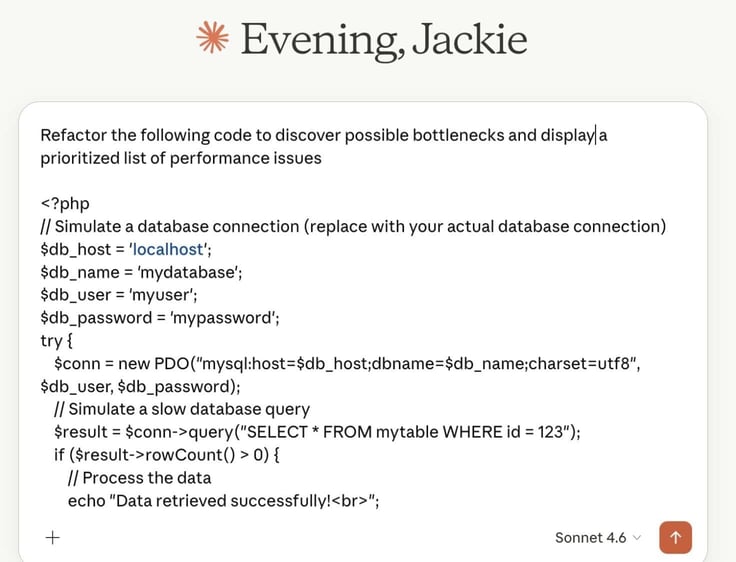
As I’ve explained earlier, Claude AI will likely find issues such as:
- Repeated database queries
- Inefficient loops and/or nested logic
- Uncached and expensive operations (that lead to high technical debt)
- Hooks that execute unnecessarily
Even once Claude gives you an answer to your query, you should always consider follow-up, targeted questions that result in fixes that deliver the highest impact first.
After Claude AI replies to your query, you could follow up with something like:
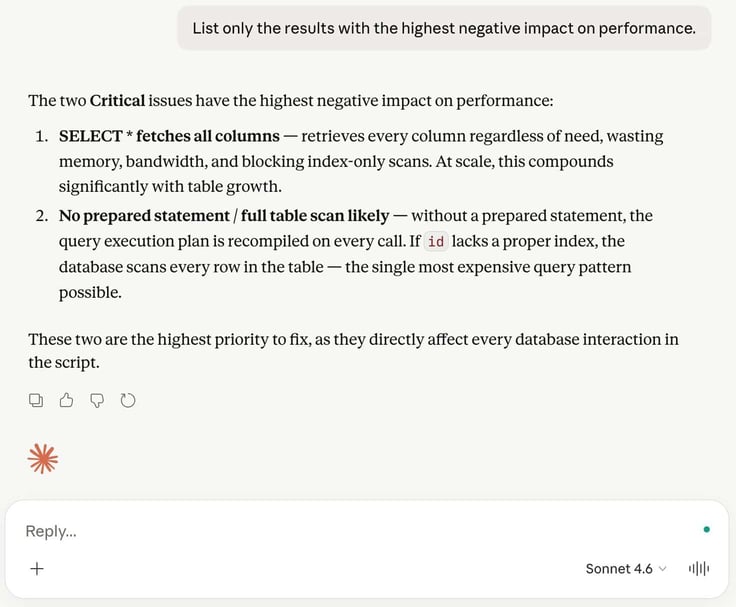
List only the results with the highest negative impact on performance.
Such a follow-up will remove the less problematic issues, so you know exactly what to concentrate on first.
Here are other prompt follow-ups you might consider:
- Identify any and all bottlenecks, making sure to explain how they are causing issues and how they can be resolved.
- Prioritize fixes based solely on performance issues.
- List the issues that deal with shared hosting constraints.
- Locate any repeated database queries that could cause bottlenecks.
- List any and all inefficient hooks and/or nested logic.
It’s also important to be specific in your queries; otherwise, Claude AI will either return information that isn’t helpful or (worse) can cause even more issues.
Even after you submit a follow-up query, you might find that further follow-ups are required. Whatever you have to do to get to the heart of the issue.
Let’s get to the queries.
Step 4: Ask Claude to Refactor the Code for Performance
Let’s say you’ve written a “PHP web form” that accepts user input for things like
- First name
- Last name
- Address
- Email address
- Phone number
- Explanation: text field for the reason they are contacting you and the priority of the issue.
That app would then need to rank those priorities and alert staff accordingly. Then, write the information to a database.
Thanks to PHP, that web app could be fairly easy to write. But will the code you generate be efficient enough to handle high demand?
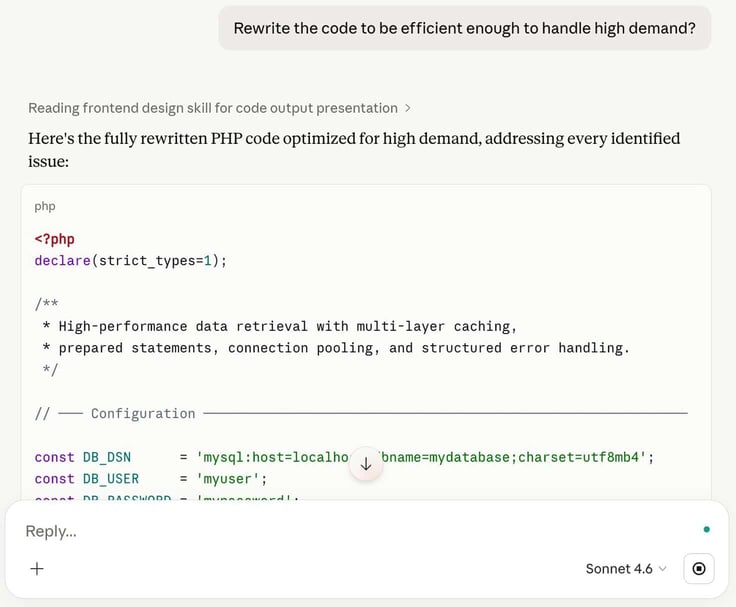
That’s where Claude AI comes in.
You’ve got your code, broken down into functions, libraries, and other various bits (because you’re certainly not going to create this app in a single file, as that would not be efficient).
Log into Claude AI (or open your app), and begin cutting/pasting or uploading the project files you suspect might contain issues that cause technical debt. After delivering your code, you are ready to query Claude AI to refactor your work.
Let’s take a look at some examples of refactoring queries.
Step 5: Prioritize Common PHP Performance Issues
Here are three of the most common performance issues and how to use Claude AI to fix them:
Example 1 — Reducing Repeated Database Queries
If your app depends on a database, this could be one of the primary pain points. When databases aren’t used efficiently and properly, they will cause performance bottlenecks: lack of indexing, new queries per item (N+1 query problem), and high database query volume.
This is especially true when app usage scales up.
In this example, you might have database queries that are executed within loops or are repeated across functions within your code. To that end, you should always start with a query monitor, which is a specialized tool used to track, analyze, and debug the performance and availability of SQL queries in real-time.
What this should do is help you determine if your app’s database calls and usage are the problem.
Some examples of popular query monitors include:
- Datadog Database Monitoring
- New Relic
- Dynatrace
- SolarWinds Database Performance Analyzer
- Redgate Monitor
Because a query monitor focuses on the execution and efficiency of database requests, it is a great resource for helping you pinpoint where problems between your app and its database exist.
Query monitors not only highlight performance issues, but also error detection, availability, and redundancy.
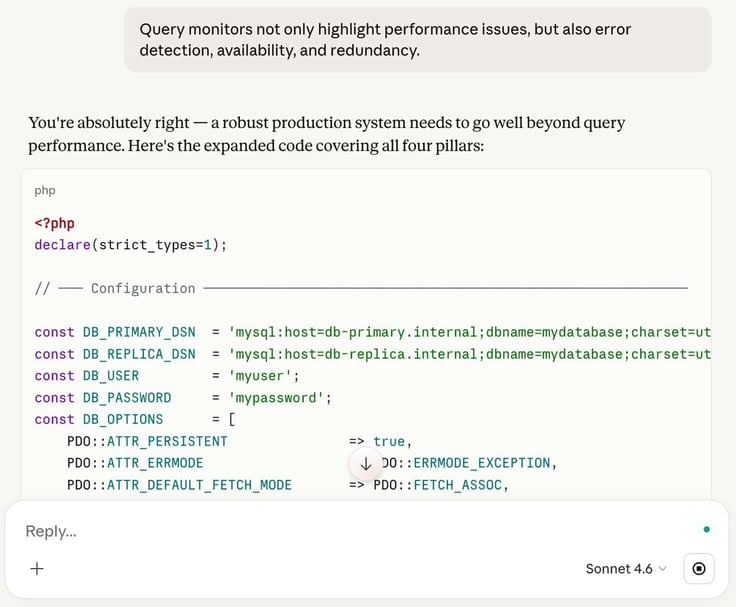
Once you’ve used the query monitor on your app, you will be further empowered to inform Claude AI what to look for. Using one tool (query monitor) to inform another (Claude AI).
For example, say the query monitor informs you that your app is querying the database with multiple, redundant calls.
You could tell Claude AI to:
Identify repeated query patterns and consolidate them into a single, optimized call (when possible).
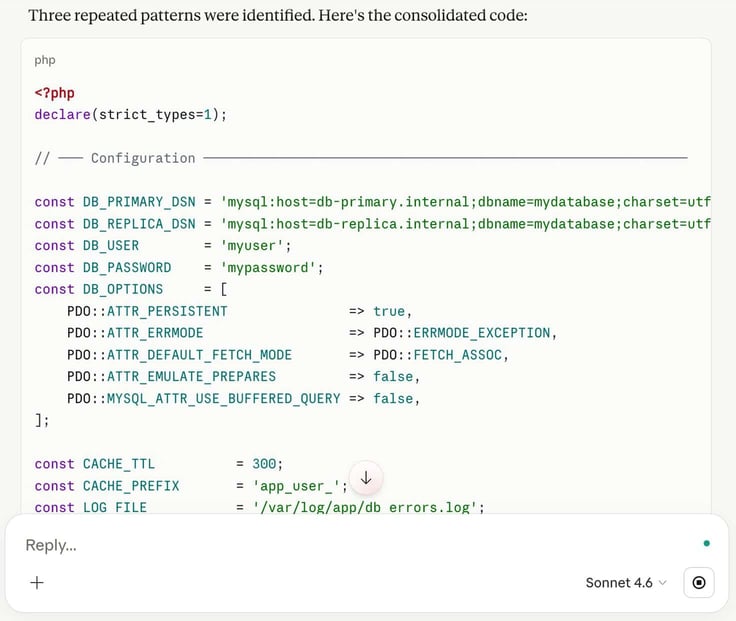
Claude Code was able to find repeated patterns.
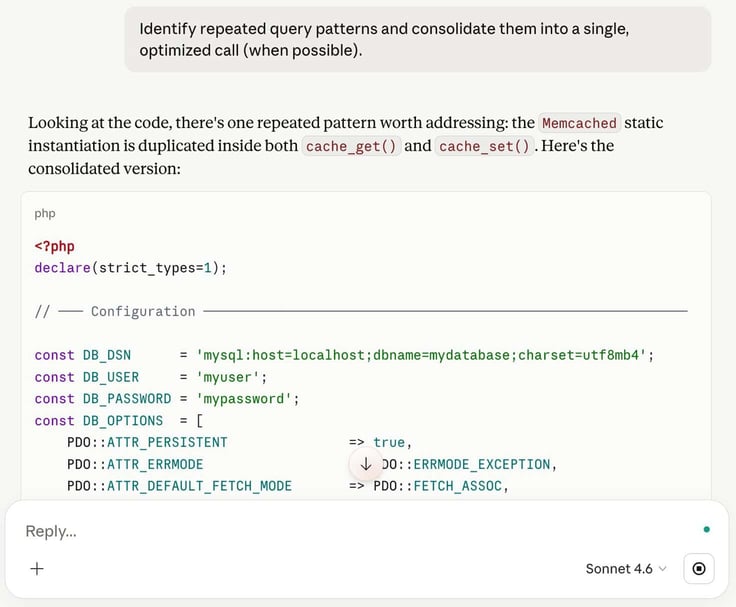
The query monitor might also suggest that your apps’ “storing of data” is causing a bottleneck because it’s being directly stored within the database. A more efficient method (and one the query monitor might point out) is to store the results in variables or in a cache.
To that end, you could instruct Claude:
When possible, rewrite the app to store database query results within variables or in a more efficient cache.
You could (and should) get more specific with those queries to ensure lower query counts, faster response times, and reduced database strain (to improve TTFB and crawl efficiency).
A possible adjustment query to improve crawl efficiency might be:
When possible, rewrite the app to store database query results within variables or in a more efficient cache to lower query count, achieve faster response times, and reduce database strain.
It’s all about specifics. Remember, Claude AI cannot read your mind, so the more information you can feed it, the better the results will be.
Example 2 — Optimizing Inefficient Loops and Conditional Logic
Inefficient loops and conditional logic are two issues that can plague PHP code.
For example, you might have a loop that looks like this:
for ($i = 0; $i <= count($array); $i++) {
echo $array[$i]; // count() is called every time
}
The above loop re-evaluates the array size on every iteration. That can dramatically slow things down. And then there are nested loops and/or redundancy checks that run on every page load, which are equally as problematic.
Such a loop might look like this:
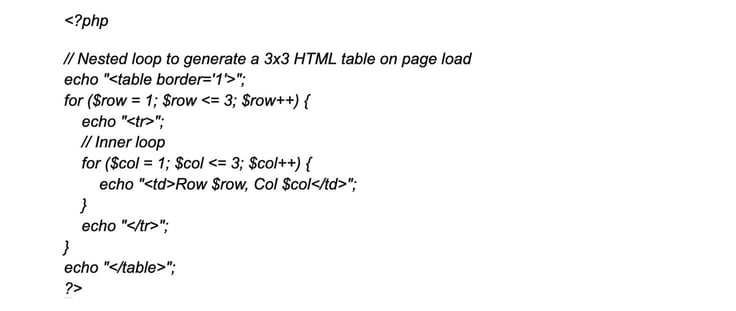
There are also PHP loops that are tied to global hooks, which are used to enable code execution at specific points in an application lifecycle. These can be problematic because they can cause things like “infinite loops”.
So, how do you use Claude AI to optimize inefficient loops and conditional logic?
Let’s take a look at a query that could help avoid the bottlenecks caused by these issues:
Identify any and all loops that are tied to global hooks, simplify the logic and reduce nesting of loops, add conditional checks (such as is_admin and is_page) when applicable, and avoid redundancy checks on every page load to reduce CPU usage, achieve faster page generation, and improve scalability under heavy demand.
Example 3 — Adding Caching to Expensive Operations
Expensive operations refers to tasks that consume considerable system resources.
For example, your PHP app might call an API (or multiple APIs) for every request. Another example is any operation that leaves the local server (which tend to be the most expensive operations).
You want to limit your app to the fewest possible expensive operations. Otherwise, it will suffer from serious bottlenecks.
For this, you’ll want to first ask Claude AI to identify all expensive operations found in your PHP code:
Identify all expensive operations in the following code:
Once Claude AI has identified those operations, you can then have it solve those issues. You would then paste your code snippet and allow Claude AI to run through it.
Let’s say Claude AI detects that your app calls multiple APIs on every request, then prompt:
Implement transients or caching wherever possible for API calls in the code below.
Paste your code and hit return.
You might also want to get a bit more granular with the above query:
Implement transients or caching wherever possible for API calls in the code below and set cache expiration where appropriate to achieve reduced repeated processing, faster repeat visits, and more stable performance on shared hosting.
Other Best Practices
These may be a given, depending on your experience level, but I highly recommend you follow these best practices.
Test Code on Local Environment
Ensure that you can test your refactored code in a safe environment. Although Claude AI is quite good at refactoring code, like with any changes made to your work, you want to test it prior to migrating it to a production environment. I’ve gone into detail on this process using WordPress local environment in “How To Use ChatGPT To Build A WordPress Plugin”.
Incremental and Auto-Backups
Always back up your code. Back up your site or web app before making changes. Back it up before you have Claude AI refactor it, back it up after Claude AI refactors it, and back it up yet again. And when you make changes, do yourself a favor and apply them incrementally. Don’t do wholesale changes, because you could easily get lost when something breaks.
Also, if you attempt to change too much at once, things can go sideways quickly. Use Claude AI to refactor your code in small chunks. Not only is that more efficient, but it also helps you to understand what Claude AI did, and it helps Claude AI understand what you need.
Measure Performance (Before & After)
Always measure performance improvements after Claude AI has refactored your code. You can do this by:
- Comparing query count before and after the refactoring.
- Monitoring page generation time and TTFB (time to first byte).
- Check hosting CPU/resource usage.
- Use tools like Query Monitor, GTmetrix, or hosting dashboards to confirm improvements.
Final Check & Live Deployment
After you’ve done all of your testing, compared metrics, and have everything backed up, make sure to deploy the changes to your live site safely.
You’ll want to upload your files via a “file manager”, using an FTP tool, or via git to replace only targeted code sections. Then, make sure to clear all caching layers, test key pages, monitor logs for errors, and carefully watch resource usage to measure improvements.
If you see no improvements, or things get worse, it’s time to go back to Claude AI for more refactoring (based on your newly acquired knowledge), and be thankful you made incremental backups.
Build a Repeatable Claude-Powered Optimization Workflow
Finally, it’s important that you create a repeatable and optimized Claude-powered workflow. By doing this, the next time you have to refactor your code, the process will be considerably easier.
A possible workflow might look something like this:
- Identify bottlenecks.
- Extract and analyze code.
- Refactor with Claude.
- Test and measure.
- Deploy and monitor.
You should also document any/all improvements the refactoring found, so you can then employ optimized patterns across other projects. Create a resource and reference document.
Avoid Common Mistakes When Using Claude to Refactor PHP Code
Now that you understand how to refactor your PHP code with Claude, it’s also important to tackle mistakes that can happen with AI.
The biggest mistake to avoid: refactoring your code without understanding its purpose.
If you have a section of code that you believe is causing bottlenecks, you have to be able to understand exactly what it does in order to help Claude AI to help you fix it. High specificity means solid results, lower likelihood of AI hallucinations, and far less hair-pulling.
If you just say, “Fix this code,” Claude AI won’t know exactly what needs to be fixed.
Also, if you have a section of code that works with a database, and you don’t know things like which database it uses, Claude AI might not be able to optimize the code to best streamline efficiency and speed for that particular database.
Know your code.
Let me stress — Do not skip the testing and validation steps. AI is very helpful, but it’s not perfect. I’ve had AI generate and/or improve code, only to find out the code generated or improved doesn’t work as expected.
I’ve had to then go back and say:
This code doesn’t run and gives me [X] error. Fix that issue.
(Where [X] is the error reported by the compiler or at runtime.)
When you measure performance, do not ignore the data. You could wind up with an app that performs the same or worse. Performance data is your best friend when refactoring.
If something worked, take note. If something didn’t work, take note. The only way you’ll know is by comparing performance data.
Small PHP Improvements Create Big Hosting Performance Gains
Remember, taking small, targeted steps with your refactoring efforts not only makes this process easier, but it can also help you and Claude AI improve your code in dramatic ways.
Not only can your app run faster, but it might also reduce the server load (which can equate to cost savings). Beyond speed and cost-cutting, optimizing your app so it functions more efficiently and reliably improves the experience for your customers/clients. A lower bounce rate can lead to higher conversions for sales, retargeting, lead gen., and user satisfaction.
Once you’ve started your refactoring journey with Claude AI, make sure to check out other guides that dive deep into the details of the process, so you can get the most out of your site, web apps, and development tools.
Thank you for following along! If you enjoy using expert articles to improve your website, feel free to use our smart tool HostHelper to read more, and follow us on social media below!