

Writer: Surajdeep Singh


Editor: Britain Simons


Reviewer: Cristian Lopez

Have you noticed “I’m not a robot” prompts appearing more often on your smartphone? Mobile networks use shared IP addresses across millions of users. If a few behave suspiciously, everyone gets flagged — and your website may try to protect itself from bots causing spam, data scraping, fraud, and fake transactions.
That’s why mobile performance isn’t just about speed. Security plugins like Wordfence (malware protection), Cloudflare (firewall), and two-factor authentication are worth looking into for your site.
But speed still matters enormously. Here are some fascinating mobile website performance statistics to help you win visitors over.
1. Mobile Pages That Take Longer Than 3 Seconds to Load Lose About 53% of Visitors
This website, HostingAdvice.com, takes about 1.5 seconds on average to begin loading on mobile — I tested it on three separate occasions. We’d grade that in the “A” tier of mobile page speed. Why?
In accordance with HTTP Archive standards, we consider any website that starts displaying content (even a tiny colored dot) in under 1.8 seconds good.
This metric is called “First Contentful Paint” (FCP). “S” tier speed — Between zero and 1.3 seconds is best. If your website takes more than three seconds to load, and drops to FCP “C” tier, you could lose roughly 53% of visitors.1,2
Speeding might end badly on the road, but on the internet, the faster, the better! Visitors’ patience levels are at an all-time low.
I remember waiting ages for popular sites like Orkut — popular in Brazil and India circa 2007 (the Facebook of that age) to load when I was a teen!
Here’s our site loading FCP grading system:
- S Tier: 0-1.3 seconds (best)
- A Tier: Under 1.8 seconds
- B Tier: 1.8-3 seconds
- C Tier: More than 3.0 seconds
If your website is slow and you can’t figure out why, or it’s reasonably fast and you want to push it to the next performance level, keep reading for some nuggets of wisdom.
2. A 1-Second Delay Can Reduce Mobile Conversion Rates by 21%
According to a Cloudflare study, a leading (unnamed) online retailer experienced its peak mobile conversion rate of 1.9%, at an average full page load time of 2.4 seconds. Interestingly, the conversion rates were lower on faster pages — 1.2% at 1.8 seconds and 0.4% at 1.5 seconds.
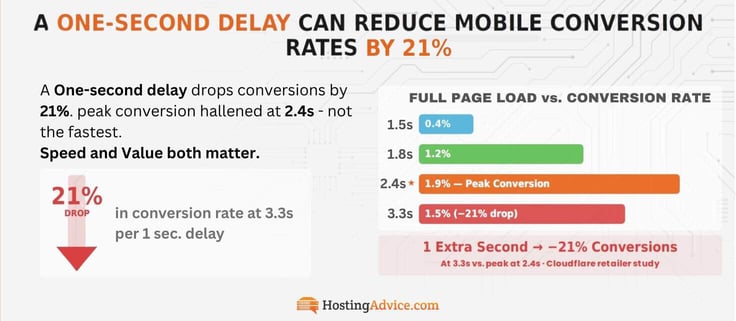
Please note: these are full site load times, not FCP.
What does this tell us? Speed isn’t a magical pill for success. High-converting pages (like product detail and checkout pages) are usually richer in content and take more time to load. As long as your website loads fast enough (in under three seconds) and delivers the value users are looking for, you’re in a strong position to retain their interest.
Back to that one-second delay — if your mobile website performance drops too much, your troubles might start at 3.3 seconds. Conversion rates dropped by approximately 21% (down to 1.5%) in this study.1,3
3. About 53% of Mobile Users Expect Pages to Load Within 3 Seconds
Last night, I asked my girlfriend how many seconds she thinks it’ll take for a website to open on her phone. You know what she said? 0.01 seconds! I calmly told her to open any browser and type “wikipedia.org.” I recorded the full page load time. Just under three seconds.
A classic case of “expectations vs reality.”
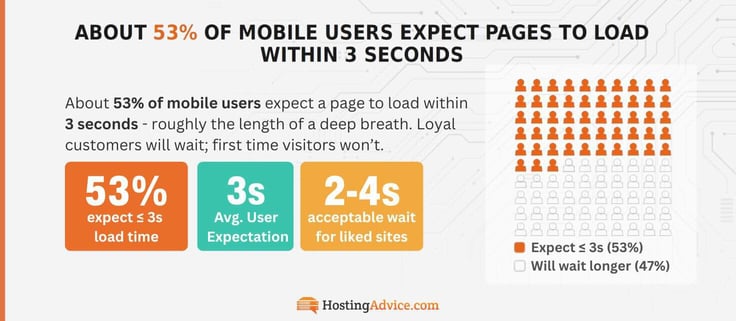
Jokes aside, after our little experiment, she thought about it and told me she’ll wait 2-4 seconds for a website she likes. And that’s close to what the average user actually expects — 3 seconds.1,3 For context, that’s the amount of time it takes to inhale a breath of fresh air!
Why did I emphasize likes? If your online business is well-established and you have a loyal customer base, you’ll probably get away with the occasional poor performance. For context, I use Amazon often, and it doesn’t always load instantly. I’ll wait, it’s won my trust.
I’d almost certainly abandon an SMB website if it’s too slow, though — every millisecond matters for small business owners. And I’ll probably think twice before visiting again. I mean, think about it. If you and your closest online competitor are on par quality-wise, but they have a faster website, which would users prefer?
4. The Average Mobile Webpage Requires 8 Seconds to Fully Load
Let’s contrast FCP and full page load times. If your website has an FCP of under 1.8 seconds and a full page load time of below 3 seconds, it’s acceptable according to modern website standards. That’s what you should be targeting.
Wikipedia has a similar FCP and fully loads within 3 seconds. The online retailer in Stat 2? Comparable numbers.
We should point out that Wikipedia is a text-heavy website, and the retailer is media-heavy. If your website is rich and you haven’t optimized media, for example, even if your FCP is good, these components will take longer to load and could drive mobile users away.
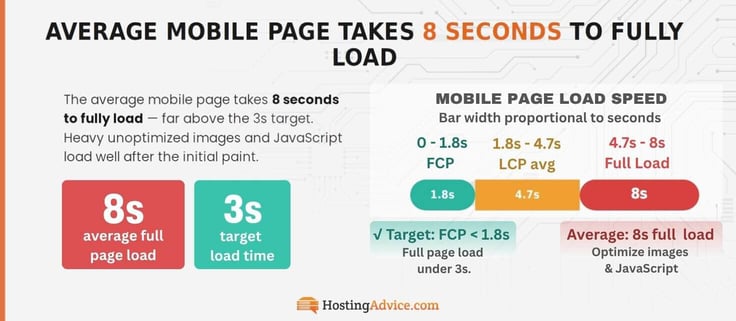
Imagine visiting an eCommerce store where product prices are immediately visible, but images are just a grey box! Most users would scroll away. Yet, it takes significant time (eight seconds) for the average webpage to fully load on mobile. This is your sign to get an image optimizer plugin, something like ShortPixel or Smush (lossy).
Users want engaging visuals and to use your website in under 3 seconds.1,4
5. It Takes 4.7 Seconds for the Average Mobile Page to Reach LCP
What’s the first “big” thing your mobile visitors notice on your homepage? A video, banner, bold headline? That’s your Largest Contentful Paint (LCP). If it takes 4.7 seconds or more to load, your homepage is “average” according to industry standards.
Here are a few LCP tricks to bring it closer to the passing score of 2.5 seconds:
- Image: Compress it, resize it properly, and preload it. Lazy-load all other images (they’ll load when the user scrolls).
- Video: Optimize it and use a thumbnail instead of loading it immediately (the video will load when the user interacts).
- Heading/text: Preload your main font.
You can apply these simple fixes directly on your website’s content management system (CMS) platform5 — it’s a piece of cake to optimize images and videos.
6. 75% of Total Mobile Page Views Must Meet the LCP Passing Score
Now, there’s a caveat with the LCP passing score. If your mobile homepage passes with flying colors, that’s great. Every webpage on your website has an LCP — you need an all-round win to be in Google’s good books.
Honestly, it’s not that hard. Think of it this way. In college, I needed to maintain at least 75% attendance. That’s all you need to do.
If at least 75% of your total page views meet the 2.5-second mark, Google thinks your website is “good.”6 If you follow my tips from Stat 5, you’ll optimize LCP for your website. But don’t fly off just yet.
LCP is just one of three Google Core Web Vitals (CWVs) your website must meet. Before I disclose the other two, we have a few more weight-related stats I want you to read and take note of.
7. The Average Mobile Homepage Size Is 2.4 MB
This mobile website performance stat is the shortest on our list. Do you know how much space images take on the average mobile homepage?
Around 911 KB. That’s about 38% of the total page weight.5
What else is weighing it down? Videos and JavaScript, primarily. Let’s explore both!
8. Videos Represent Roughly 21% of Mobile Homepage Weight
How many images and videos do you have on your website’s mobile homepage?
Before you upload any image to your website, make sure you convert it to the WebP or AVIF format using the FreeConvert tool.
For videos? Use the free tool HandBrake to lower the resolution to 720p to 1080p max and reduce the bitrate to 1.5 to 5 MB, depending on your video quality needs.
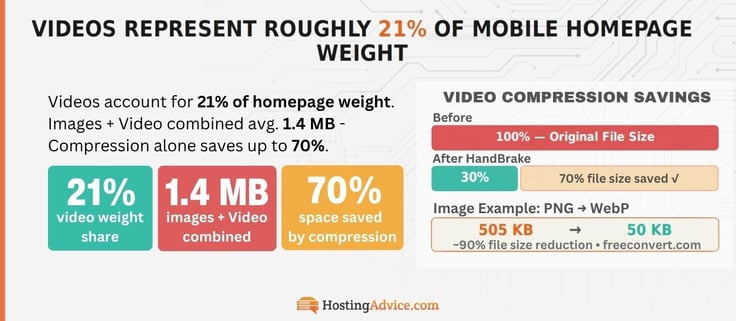
Images and videos take up about 1.4 MB of space on the average homepage. To accomplish that, most fast-loading websites compress their media. You can save up to 70% space with these simple steps.5
9. 57% of LCP Images on Mobile Sites Are JPG
Large-format image and video files are still common: 83% of mobile sites use legacy LCP image formats that make them heavier.2 26% of these LCP image formats are PNG. The best reason to convert them into WebP (or AVIF) is that it compresses images (more than JPG or PNG) without losing much quality.
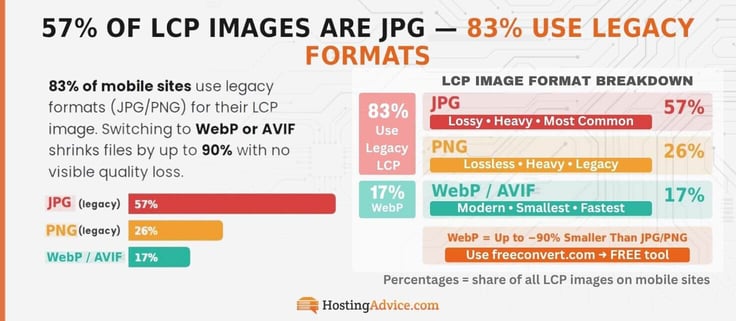
Example: I converted a 505 KB PNG file to WebP format using FreeConvert. Can you guess the compressed file size? Just 50 KB! Around 90% smaller, and you know what that means: faster site loading.
10. 17% of Mobile Sites Lazy-Load LCP Images
This is a great time to talk about lazy loading.
First, above-the-fold is a design concept for websites. It basically means the first thing you see on your screen when a site loads. It’s where the most attention-grabbing images and marketing copy live!
The moment you scroll, you’re out of its territory. It’s the most important part of your website’s homepage. If you have a lot of images on a page that aren’t in this territory (below-the-fold), lazy-loading them solves slow loading.
Lazy loading: the browser will only download media when your users scroll and are about to reach them. This speeds up the delivery of your above-the-fold content to your users.
The good news is, on WordPress and most modern CMSs, you can enable this by default. For the 17% of mobile websites that lazy-load LCP images — It’s the most important image of every webpage!2
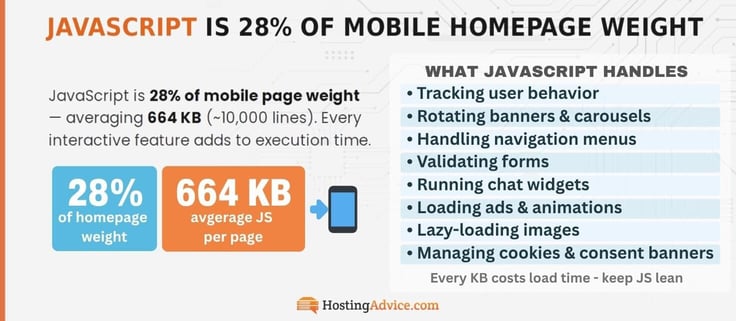
11. JavaScript Accounts for About 28% of Mobile Homepage Weight
Let’s talk about JavaScript. It’s a programming language that makes your website interactive. Let’s say you have a 300 KB banner on your homepage displaying discount products. When a user clicks on it, they’re redirected to the offer page to purchase the items.
When a user loads your website, it downloads the JavaScript code, but it has to read, understand, and execute parts of it to make your site interactive. This takes time and computational power.
The browser needs to execute many tasks if the average mobile homepage has around 664 KB of JavaScript.5 That equates to around 10,000 lines of code! When a user clicks on your banner, their browser executes that particular code.
Here are some other tasks JavaScript code typically handles:
- Tracking user behavior
- Loading and rotating banners and carousels automatically
- Handling navigation menus
- Validating forms
- Running chat widgets
- Loading ads
- Triggering animations
- Lazy-loading images
- Managing cookies and consent banners
- Updating UI without reloads
What does this tell you? JavaScript isn’t just “code.” It’s the puppeteer behind your website, pulling the strings that make everything move and respond to your users’ actions.
12. Around 48% of Mobile Websites Meet Core Web Vitals Benchmarks
The thing is, if your website isn’t “fit,” it won’t attract users: the heavier it is, the more time it’ll take to load, which means… less engagement.
The next step is to master the other Core Web Vitals (CWV): Interaction to Next Paint (INP) and Cumulative Layout Shift (CLS). They measure responsiveness (where JavaScript performance really shows) and visual stability (sometimes mobile website elements “jump” out of place).
Mind you, less than 50% of mobile websites meet all three standards.2
13. Just 51% of the 1,000 Most Popular Mobile Websites Have a Good CWV Score
Here’s a fun exercise. Take a look at these six popular mobile websites:
- YouTube
- Amazon
- Wikipedia
- Netflix
Which did you think had the best CWV score? Since around only 50% of the 1,000 most popular mobile sites meet CWV benchmarks, it’s essentially a flip of the coin.
The top 500 websites are far more likely to have a better score than the other half — they should have better engineering teams, performance budgets, and optimization pipelines.2 Amazon (~82/100 score), Wikipedia (~99/100 score), and Google (creator of CWV) top our list, but they all pass!
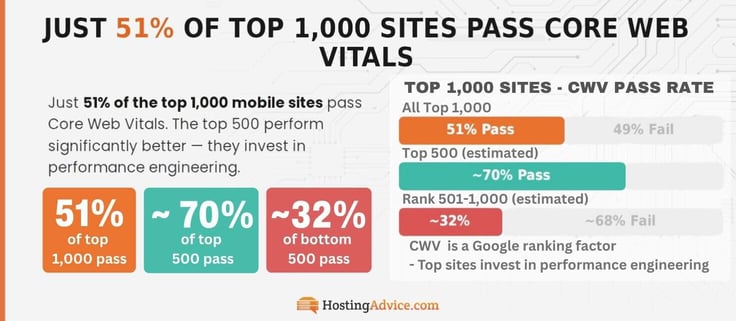
CWV benchmarks are a part of Google’s ranking signals. There’s a lot more to ranking well on Google (or any search engine) with a good CWV score, but it’s a factor.
Google metrics are a mobile performance standard. If you meet them, your website will be fast and silky — and that’s what users want.
14. 77% of Mobile Sites Meet INP Standards
If you’re shopping on Amazon and find a product you want, you either add it to your cart or purchase it immediately. When you click a button, you expect an instant response, right? That’s where Interaction to Next Paint comes in — it measures how fast your mobile site reacts to user interaction.
INP is calculated in a rather interesting way. Let’s say a user is having a great experience on your website, but one particular interaction (like a button, dropdown, or form) took more than 200 ms to respond. That session doesn’t meet INP standards.
INP is a collective measure of the time between a click or tap on all site inputs and the delay for your browser (Safari, Chrome, etc.) to paint the action.
Fortunately for you, only 75% of your site sessions need to meet this 200 ms standard. And, 77% of mobile sites have a good score.2
So what does it take to improve INP? JavaScript code should be clean and lightweight. I recommend using Claude to scan your JavaScript code (if you don’t have a programming background). Just don’t give LLMs any sensitive data. Try to keep your UI as simple as possible and don’t litter your website with third-party scripts like ads! They’ll only slow you down.
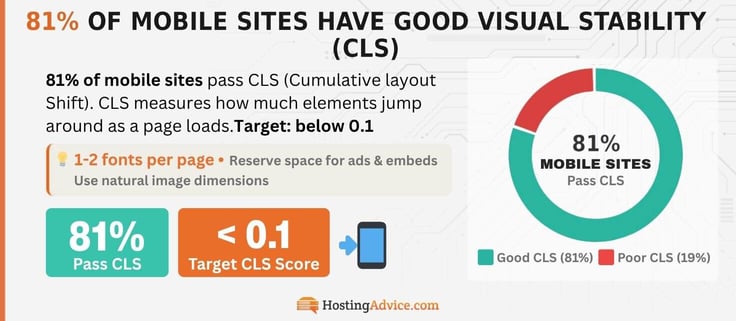
15. 81% of Mobile Sites Have a Good CLS Score
A good Cumulative Layout Shift score measures the visual stability of your webpage elements. The fewer buttons, text, and images that unexpectedly move around while loading and stay where your users expect them to be, the better.
When I created my Facebook account in 2007, there wasn’t an app for it. I opened it on a mobile browser (I had a Nokia E63). I remember the content of the login page never appeared in one go, or stayed in one place — the text appeared first, then the login boxes, and finally the logo.
That’s far from visually stable. Things have improved greatly over the years. I’m sure you’ve noticed there’s still some shifting of content (mostly due to pesky ads), but it’s not as bad.
You can thank modern content management systems (CMS tools) for that — they help you reserve space for your images, banners, ads, embeds, and other third-party components.
This way, your browser doesn’t have to do layout guesswork! One trick is to use natural media file dimensions, CMS tools, and max page dimensions for UI elements. That’s all you realistically need to nail CLS. The lower, the better (less than 0.1).
Tip: Stick to 1-2 font styles per page. Why? More fonts = slower loading. Each font style, even bold and underline, are seperate files the browser has to load.
16. Mobile Pages Load About 2.4 Times Slower Than Desktop Pages
Desktop pages load almost 2.4 times faster than mobile. This means they have better Core Web Vitals. Desktop websites have improved LCP performance and near-perfect INP scores. By design, computers are bigger, faster, and more powerful — mainly due to their ability to handle constant power and heat dissipation.
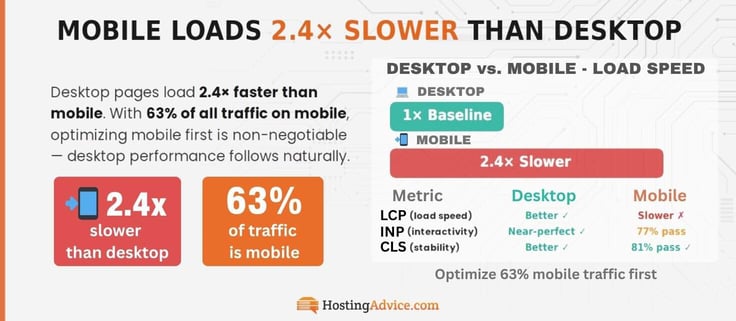
CLS (from the above stat) plays a factor. The same constraints for mobile computing force developers to design simpler websites. Fewer elements = fewer surprises = better CLS results. Since most of your users are on mobile, you need to ensure the mobile-viewing experience is seamless and fast ( around 63% of global web traffic).4,7
If your site performs well on mobile, I’m sure it’ll perform even better on desktop.
17. Mobile Sites Have a 60% Bounce Rate
The first 16 mobile website performance statistics will help you significantly improve your Core Web Vitals for mobile and desktop. Here are a few more stats to take your website to the highest level. For comparison, desktop websites have a lower bounce rate of 50%.
Bounce rate = % of users who bounce from your site after viewing just one page (without interacting).
People abandon mobile sites more because there’s more “noise”, or distractions, on their smartphone. A notification could catch attention. Maybe you need to skip a song on Spotify, or you get a call.
A mobile site needs to be impressive enough to make users want to stay. Your mobile users are distracted — and there’s nothing you can do about these distractions. Your job is to optimize your websites for performance and quality.
Tips to lower bounce rates:
- Your above-the-fold should be pristine. Within 2-3 seconds, your users should know about your page and what to do next — clear call-to-actions (CTAs) are a must.1,8
- Use short paragraphs (you’d hate me if I typed 7-8 line paragraphs) — clear headings, spacing, and bullet points.
- Images should be directly related to headers, products, or stories – not just for decoration.
- Avoid anything you’d consider spammy by reframing to offer solutions.
I hope you’ve been taking notes.
18. Mobile Pages With Load Times Under 3 Seconds Show Lower Bounce Rates
Mobile sites with load times under three seconds improve user retention.1,8
The tricks that can help you lower your bounce rate include optimized media file sizes, copy above the fold, a lower CLS score, and meeting INP standards. But even with all these improvements, you could have one of the best websites in your niche, and users may still bounce — 50-60% do.
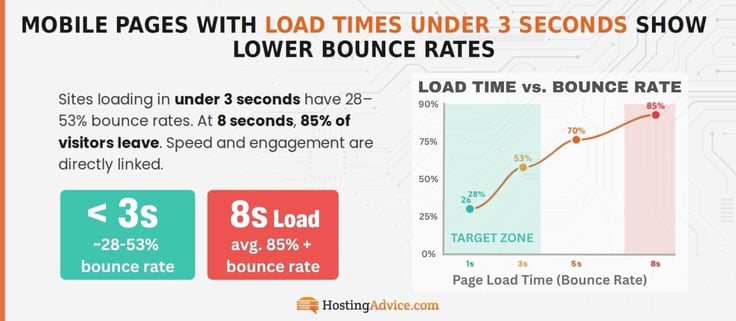
If you nail the tips we’ve shared (and your website delivers on quality), the data shows that the longer the stay, the better for your brand.
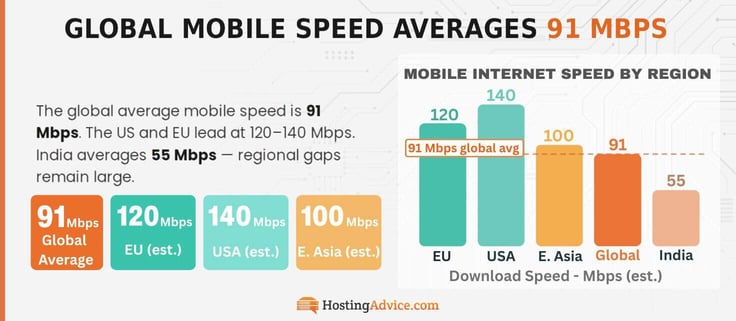
19. The Average Global Mobile Internet Speed is 91 Mbps
My Jio mobile internet speed is well below the global average of around 91 Mbps — about 55.4 Mbps. That’s a regional limitation. I do most of my high-resolution surfing via a WiFi network, so this doesn’t affect me much. But I do hope it’ll get closer to the global average soon.9
20. Fixed Broadband is 8.5% Faster Than Mobile Internet
I’m assuming you use WhatsApp or Instagram. Have you noticed it takes much longer to upload an image to these apps when you’re using mobile data? This has nothing to do with Meta servers!
Fixed broadband has upload speeds around 4 times faster than mobile internet, 8.5% faster download speeds.9
What These Mobile Website Performance Statistics Mean for Modern Web Performance
I’ll stress this again — make sure your users can interact with your website fruitfully within three seconds. Apply these tips, and it will help you achieve better user engagement and user experience (UX). You’ve got this! For more nuggets of wisdom, check us out on social media (@HostingAdvice).
Sources
1. https://support.google.com/adsense/answer/7450973
2. https://almanac.httparchive.org/en/2025/performance
3. https://www.cloudflare.com/tr-tr/learning/performance/more/website-performance-conversion-rates
4. https://httparchive.org/reports/loading-speed
5. https://almanac.httparchive.org/en/2025/page-weight
6. https://web.dev/articles/defining-core-web-vitals-thresholds
7. https://www.statista.com/statistics/277125/share-of-website-traffic-coming-from-mobile-devices
8. https://www.semrush.com/blog/mobile-vs-desktop-usage
9 https://www.statista.com/statistics/896779/average-mobile-fixed-broadband-download-upload-speeds