
Guides

Studies 
Studies
Our studies cover a range of trending topics and deliver original, reliable data you can't get anywhere else on the web.
I was impressed by the veteran host's AI tools but found the platform lacked power.

By: Christina Lewis

Editor: Lillian Castro

Reviewer: Cristian Lopez
Disclosure: When you sign up through links on our site, we often earn referral fees from partners. For more information, see our ad disclosure and review policy.
Over the course of a few weeks, I had the chance to test Network Solutions’ platform to determine if it was the right fit for me.
A web hosting pioneer, Network Solutions isn’t exactly a household name in the industry anymore, and unfortunately, through my review, it wasn’t too hard to understand why. While the veteran host does deliver on newer aspects, like its AI website builder, it left me wanting more from my packages, especially in terms of performance and resources.
Below is my full-fledged review of the Network Solutions hosting platform, hitting everything from its AI website builder plans to its WordPress packages.
Network Solutions offered a fast and seamless way to get my website online but lacked some of that speed on the web performance side.
The AI features were a standout in my opinion. They were straightforward, smooth, and intuitive. Creating my website and its content was all smooth sailing because its AI tools did most of the legwork while still giving me leeway for creative decisions.
While SSL and domain registration weren’t included in the base plan, Network Solutions did offer affordable plans and discounts on add-ons.
I began this hosting journey by signing up for Network Solutions’ cheap hosting service. Network Solutions had three affordable plans to choose from: Starter, Essential, and Premium.
Each plan included standard hosting features, including unmetered bandwidth, a site builder, email accounts, and FTP accounts.
Here’s a step-by-step walkthrough of my experience signing up for and using Network Solutions’ cheap hosting plan.
Once I got to Network Solutions’ homepage, I clicked on the “Hosting” tab at the top to reach its standard web hosting plans. There, it provided a side-by-side comparison of its three cheap hosting tiers.
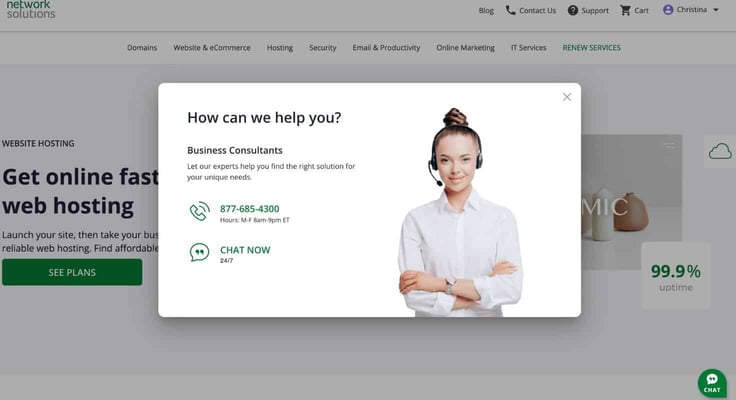
A highlight that stood out to me was Network Solutions’ eagerness to assist in my buying journey. A pop-up directing me to its customer service appeared not too long after I navigated to the page.
It provided me with its “Business Consultants” support number and chat link for help with choosing the right plan for my needs.
I also appreciated that Network Solutions was transparent about its pricing, especially the renewal costs. While the pricing fell in line with most cheap hosting plans, I would say its cheapest plan, priced at $2.39, left a lot to be desired.
It had the right amount of resources for a starter website, which included:
But where it went wrong was its lack of free SSL certificates and domain registration, which are essential to running a website. Though these services are available at an additional cost, I would’ve preferred they were included in the base cost, as is standard with most one-year hosting plans from competitors.
Thankfully, its second-tier plan wasn’t too much of a hefty difference in cost, just $1.60 more at $3.99 — which is like upgrading from a tall to a grande — and had all the resources I was looking for to create my site, including free SSL and domain registration — but only on annual plans.
The average cost for a domain name is $11.99 on Network Solutions, while its SSL certificates start at $82.44 a year. That means you can save a lot of money by just upgrading to tier two or three.
After choosing my plan, Network Solutions brought me to its domain registration page. It gave me these options:
I decided to buy a new domain and opted out of the domain privacy. Network Solutions does offer a discount if you buy domain privacy protection for a year. It goes from $3.25 a month to just $11.99 for the first year.
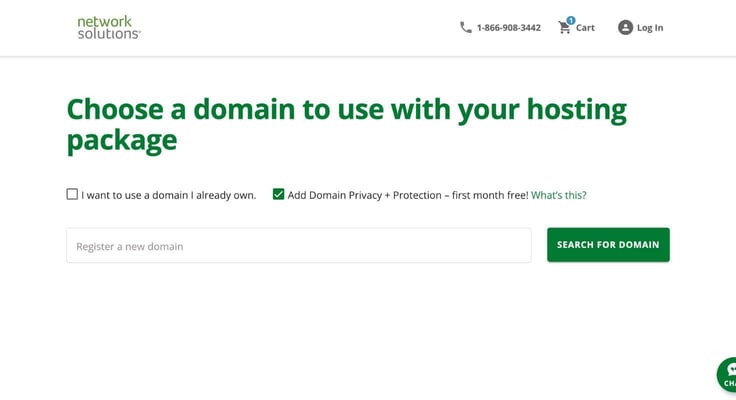
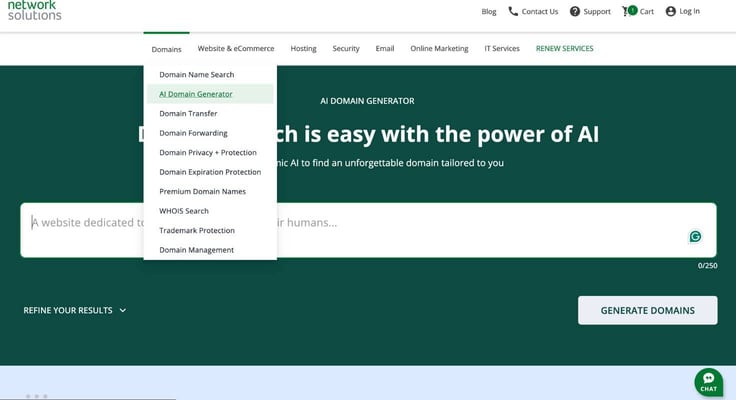
Then, I needed to figure out a name. Network Solutions does have an AI domain generator to help users create names. But it doesn’t include it in the hosting purchase process, which I thought was a missed opportunity.
To access the generator, I would have to go to another webpage, add the name to my cart, and then choose a hosting plan, making everything a bit disjointed.
Pondering for a few moments, I settled on making my website about baking — one of my favorite pastimes. I chose the website name: The Crafty Corner. I registered under the domain name: craftycorner22.com. And in a flash, I was on my way to checkout.
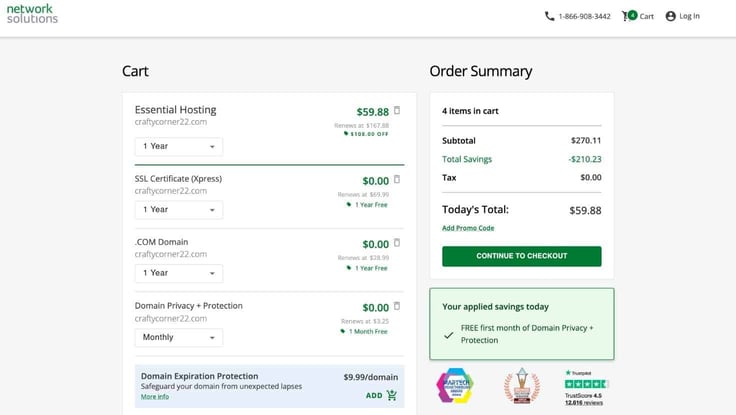
I got a quick overview of my billing. During payment, Network Solutions did try to upsell me by offering its domain expiration protection, which would safeguard my domain if I forgot to renew it on time.
After that, all I had to do was fill out my contact and billing information and I was all set for the adventure ahead. FYI: I paid the complete annual contract upfront — no monthly charges. The total came out to $47.90, and I saved $222.21 by going with the annual plan.
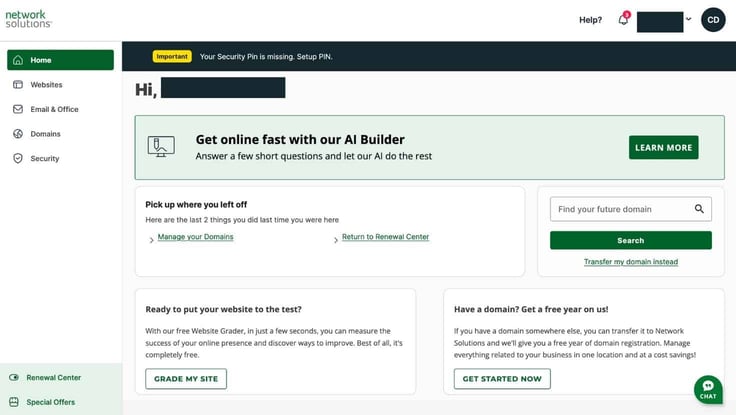
Now onto the fun part: building my website. The cheap plan came with a drag-and-drop site builder, which wasn’t difficult to find as Network Solutions lets you access it from its dashboard.
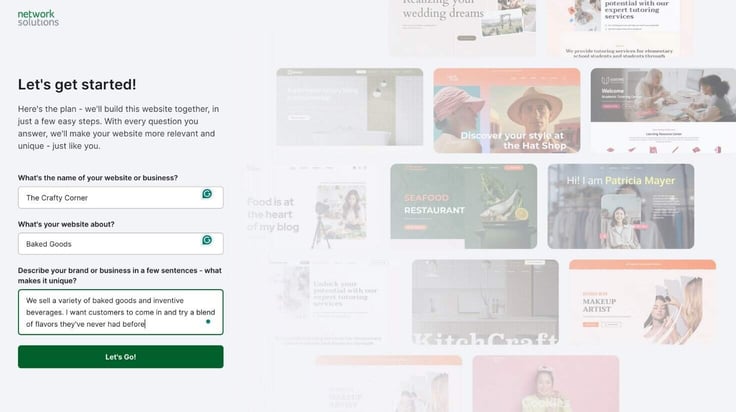
I enjoyed the interface Network Solutions built for its website-building experience. I was met with a page that read “Let’s get started!” and had a short questionnaire, inquiring about my website’s name, its purpose, and what makes it unique.
The website builder generated design renderings that could all fit the brand description I gave in the questionnaire, but each theme had a different feel, including:
After filling out the questionnaire, I was directed to a page where I could select from different themes. Upon first glance, I thought the designs were well thought out and sleek. Here are the different themes:
I chose the playful theme (which I would describe as fun fonts, a bright color scheme, and image-forward design) since I wanted to create a website to show off some imaginary baking recipes. After that, I clicked on “Header Image” where I chose from a pool of images for the perfect display piece to showcase my site.
From there, I did all the other small details, creating custom color palettes and making font choices. Though I didn’t have a logo in hand, the website builder did include a step that allowed me to add one.
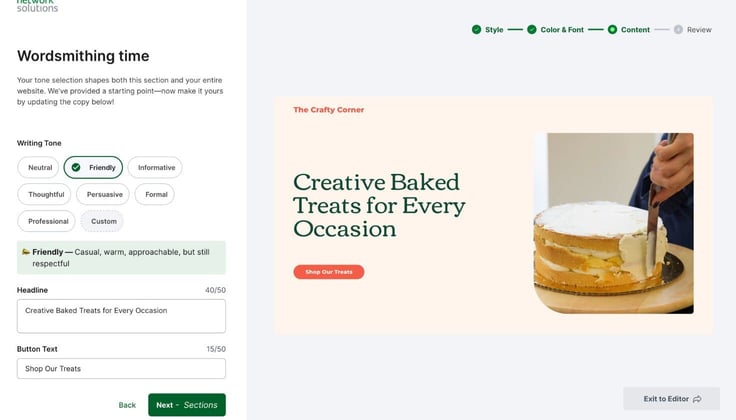
Wordsmithing time! Content was the next step in the design pipeline. Network Solutions was kind enough to give me a starting point, with several header ideas that each had its own tone. I decided to create my own header, however, as I felt the header ideas were a bit too generic, which makes sense since they’re just stand-ins for brainstorming.
Next, I clicked on Sections (another portion of the content stage) where I could select the sections I wanted to add to my website. I just went with a homepage because it didn’t allow me to add more at that point (I’ll expand on that later).
After that, Network Solutions took me to the editor. Here, I could add more customizations and personalize the website to my liking.
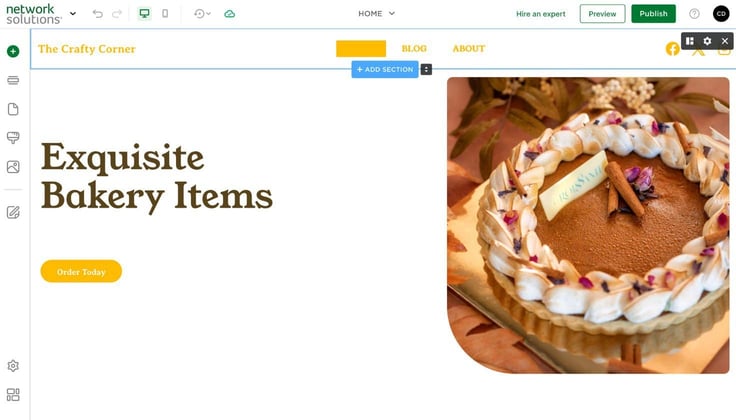
I liked that the editor had an AI generation integration. I used it to generate content for my headers and other sections around the page, including a countdown for a bakery test launch.
I wanted to test out its blogging capabilities, so I enabled the blog functionality. The blog interface was clean and straightforward and reminiscent of the WordPress editor, which was great. Lo and behold, Network Solutions also had an AI writer.
Of course, I had to try it out. I wrote in a simple prompt about choosing a wedding cake. And literally like magic, a full body of content appeared on the screen before I could blink. And it was good — a little cliché, but that’s just AI. The AI writer was a slam dunk in my opinion.
I could also schedule posts, which would definitely come in handy.
The editor also had a preview button for both mobile and desktop displays. The mobile display’s layout was a bit too narrow for my taste, but everything appeared clearly. The preview only allowed me to navigate one webpage at a time.
I was pleasantly surprised at how easy it was to connect essential third-party services, such as Google Analytics, Instagram, and more. I could also add a cookie banner.
The site backups were easily accessible as well. Found at the top of the editor, the backup icon allowed me to create a backup or access information on automatic backups.
I could exit the editor at any time throughout the process, and the site builder saved my progress.
When I finally published the site, it was responsive and exactly as I designed. But I had a difficult time finding a navigation bar to add, so I couldn’t browse over to my About page. After some digging, I finally found it toward the bottom of the “Add a Section” tab.
I would have liked it better if Network Solutions had made this feature more visible because not everyone wants a single-page website.
I also have to mention that Network Solutions also offers a template catalog. So if I had chosen to skip the AI builder and gone straight to customizing a template, that would’ve been a possibility.
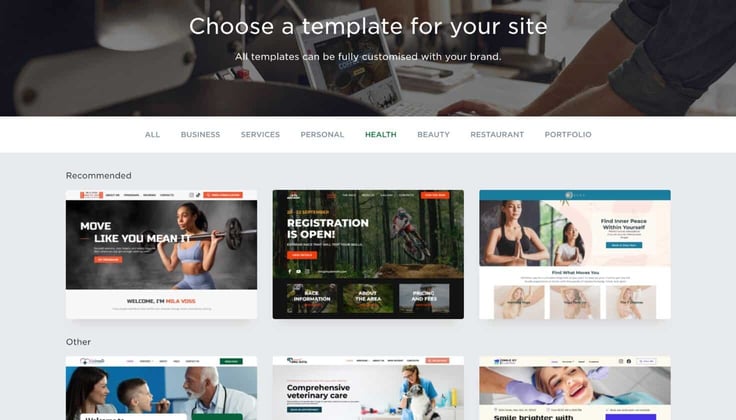
Overall, the cheap plan experience was pretty solid. It may not have all the shiny bells and whistles (i.e., expansive theme collection) that you may find with more upgraded website builders like Wix and GoDaddy, but it does the job, and that’s all that matters to me.
Now let’s see whether Network Solutions’ hosting infrastructure packs a punch or not. To check the performance of my site, I used GTmetrix to run a performance test and evaluate how well my website performed.
The results:
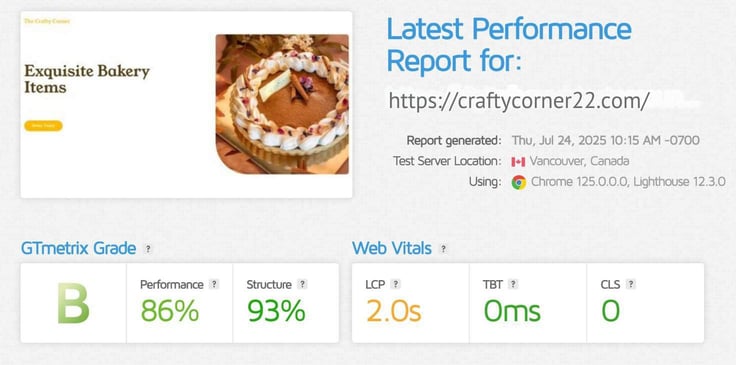
The performance grade was a B, and the overall score was 86%. For a web host that doesn’t tout performance optimization tools, such as CDNs, it performed how I thought it would: a bit below average.
Its LCP topped out at 2.0 seconds, while 1.2 seconds is the standard. Hosts, such as IONOS and Nexcess, all scored above 90% during our testing, showing that Network Solutions has some ground to cover before reaching the upper echelon of performance hosting.
If I could sum up this cheap hosting plan in one sentence, it would be: Network Solutions offers a seamless experience for an affordable price. The pricing was on par with industry competitors — reasonable and affordable for a monthly plan.
Did it have all the fancy tools and features of more well-known hosts? Not necessarily. But its platform had just enough to help me jump-start a beginner’s website.
Features I wished Network Solutions had: a CDN, NVMe storage, and more security (such as WAF and DDoS protection). I think adding the two former features would have dramatically helped its performance speeds.
And every site could do with more security these days. So Network Solutions having fewer features focused on securing the website was sort of a letdown, especially since other hosts offer a suite of WAF, DDoS protection, and SSL as just the bare minimum.
Putting those differences aside, I would say Network Solutions is a great solution for beginners who need to launch a website and get online ASAP because the entire process moves so smoothly and quickly.
In my humble opinion, WordPress is the site builder of site builders (although it’s also a content management system). So, of course, I was excited to get to this part of the review.
What distinguishes WordPress hosting from other hosting plans is its WordPress-tailored features. And I had to make sure Network Solutions was equipped with the right tools.
Like the saying goes, this isn’t my first rodeo with WordPress hosting. My first go-around wasn’t the smoothest, but I learned a lot along the way. So now, as a certified WordPress vet, I definitely know what to lock in on when searching for a plan to best fit the CMS.
No shopping experience can begin without a price comparison. Comparing it to other hosts on the market, while Network Solutions wasn’t the cheapest, it was priced at a fair, middle-of-the-pack threshold.
Its lowest-tier plan is $7.99. It may not be something I could buy at Five Below, but it certainly doesn’t break the bank. The renewal costs were also acceptable in my eyes, matching the typical industry cost for WordPress plans.
I decided to go with the base plan, as I was only in need of a single website. The other two higher-tier plans included more storage and multisite management, with the number of websites you can manage reaching up to five per plan.
Here is what the base plan included:
Again, like with its cheap hosting packages, Network Solutions didn’t offer extensive details on what was included in its plans on its landing page. I didn’t see anything about bandwidth, security, or additional WordPress accommodations.
The lack of transparency on product details made it difficult to decipher what I was really getting, which slightly made me feel I was going in blind. But I turned to their trusty customer service team to get a full scope.
Unfortunately, an SSL again wasn’t included in the base plan. Over time, SSL security can cost a pretty penny, especially through Network Solutions, as its SSL certificate pricing starts at $82.44 per year. But I could always purchase an SSL certificate for cheaper elsewhere.
Going with the Entrepreneurs’ plan, I clicked on “Add to Cart,” which led me to the domain registration. Coming from the world’s first domain registrar, Network Solutions’ domain registration process was certainly smooth and not at all antiquated.
Was its interface as sleek and modern as a megahost like GoDaddy (that includes AI assistance)? No, but it was straightforward and got the job done without any hiccups.
I appreciated that the domain registration was included with the hosting plan, and Network Solutions also offered domain privacy plus protection for one month free of charge.
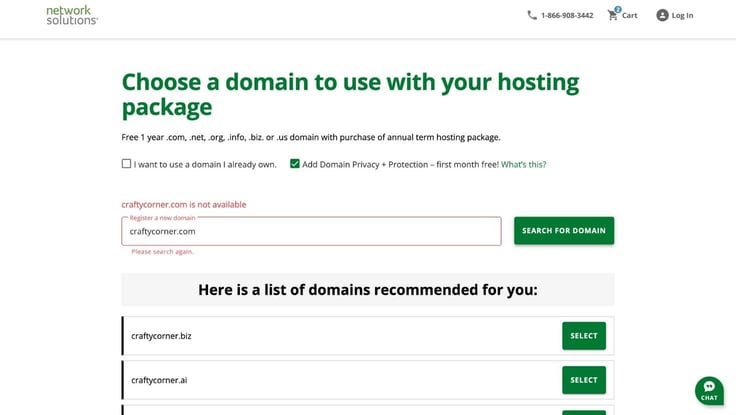
I typed in craftycorner.com but the name was already taken. Not one to leave customers without options, Network Solutions directed me to a list of available alternatives that I could choose from. I decided to go with craftycorner.net. But I did run into one problem: Its price came out to be over $800.
So I had to go back and create another name — craftycorner22.net, which didn’t have a head-scratching price. If Network Solutions added pricing to its alternatives, the process would’ve been much smoother.
However, if you navigate to its dedicated domain services tab, you will find a much better interface. I tested its AI domain name generator below:
There, I found an AI domain name generator and much more seamless and transparent registration (where all prices were listed). Unfortunately, its hosting plans weren’t connected to a domain registration lander with that layout or functionality.
After testing out the domain generator, I returned to the checkout. Network Solutions defaults its plans to monthly billing, so beware of that before proceeding. I had to switch to yearly to make sure I got all the free perks, including a domain name, CodeGuard backups, and added security.
The subscription totaled to just $28.70 due to an ongoing sale. I would say that’s a great price for a full year of WordPress hosting with domain registration included.
Now, it was time to set up WordPress. Network Solutions didn’t have a one-click WordPress installation.
Once I got to my account dashboard, I clicked on the WordPress tab on the sidebar. On that page, I clicked a button that said “Set Up WordPress,” which brought me to Network Solutions’ WordPress Setup Wizard.
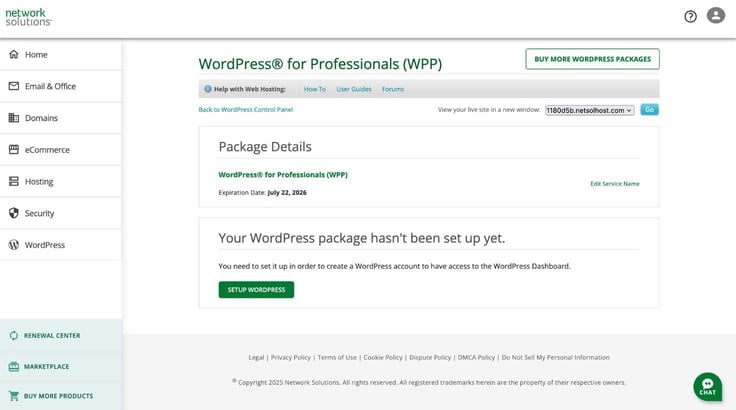
From there, it asked me to fill out some questions about my site. I described my role, rated my comfort level with using WordPress, and determined the primary purpose of my site. After that quick questionnaire, I entered my domain name and then typed in new account information to create my WordPress account.
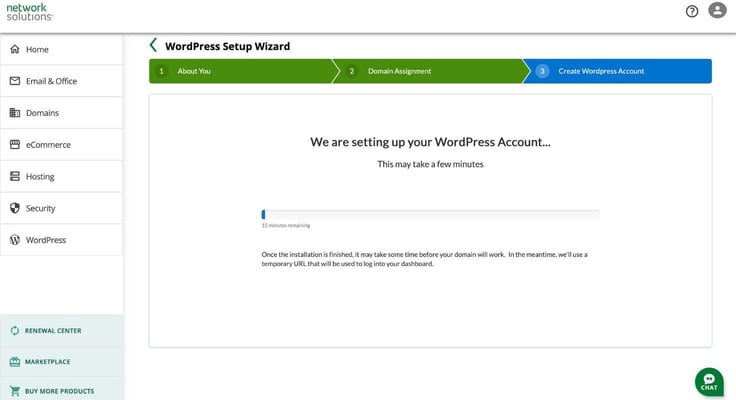
Here is where I hit a bit of a lull in the process. The setup wizard had me wait as it loaded my information and set up WordPress.
Though there was a bright side. The counter had read 15 minutes, but I actually ended up waiting around 5 minutes before I could click “Launch Dashboard.” And just like that, I was off to the races.
Because Network Solutions’ base plan doesn’t come with an SSL, my connection wasn’t secure, with a clear warning telling me that. I carried on anyway, ignoring that little snag in my plan.
Once I got on the WordPress dashboard, everything felt right in the world again. The familiar dashboard looked exactly as I thought it would look. As Network Solutions was formerly called Web.com, its WordPress control panel is still labeled as such, so don’t worry if you think you’re in the wrong place.
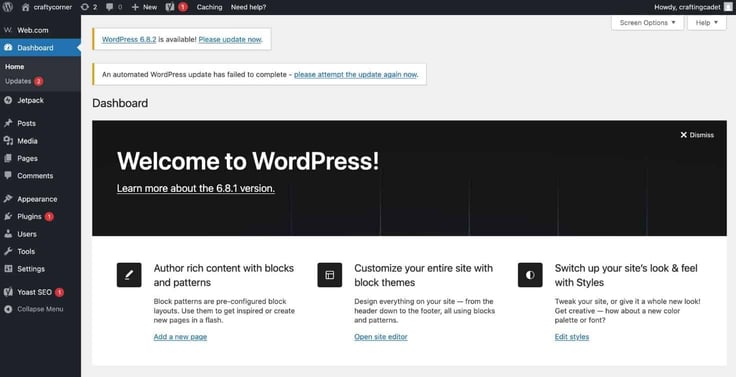
On the dashboard was a welcome banner. Network Solutions’ WordPress came equipped with Jetpack, Yoast SEO, and the Web.com plugins.
Since I didn’t want to create a website from scratch, I went ahead and downloaded a no-code website builder from the plugins page. I chose Elementor, which is a popular drag-and-drop builder for WordPress sites. I clicked “activate” and was transported to Elementor’s website.
I skipped creating an account and chose to continue with its basic Hello Biz theme. Elementor proceeded to offer some of its Pro features, which included a broader collection of widgets, premium themes, and advanced functionality.
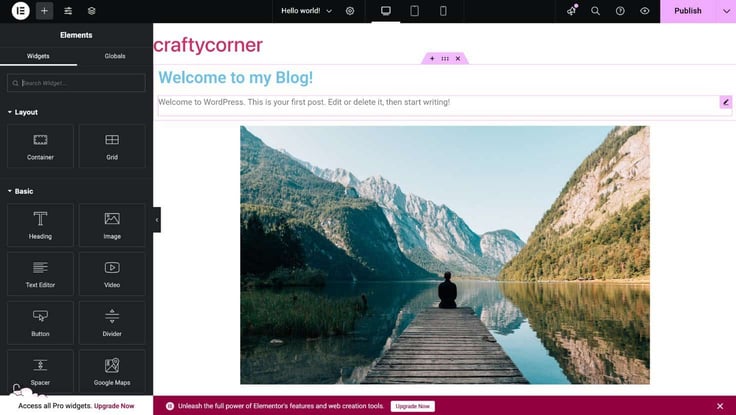
I wasn’t planning on creating anything too fancy, so I opted out of all that and went with the basics. In the next step, Elementor offers me three choices: edit a blank canvas with the Elementor editor, choose a professionally designed template, or create a professional site with AI in minutes.
All three options were equally appealing, and it was a tough decision. But I decided to go with the template experience, so I could customize the way I want (although AI would have saved me a lot of time). It was a happy medium; I didn’t need to pore over different layouts, but also got the chance to customize my site to my liking.
Once done there, I took a spin around the WordPress dashboard. I tinkered with the different tabs and found much of the experience to resemble the ordinary WordPress layout. All in all, Network Solutions didn’t make many changes to the WordPress experience — to which I didn’t find much trouble with. If it’s not broken, no need to fix it.
While Network Solutions didn’t share much about performance specifications, I decided to use GTmetrix to truly uncover WordPress speeds. And I have to say the score wasn’t exactly up to snuff:
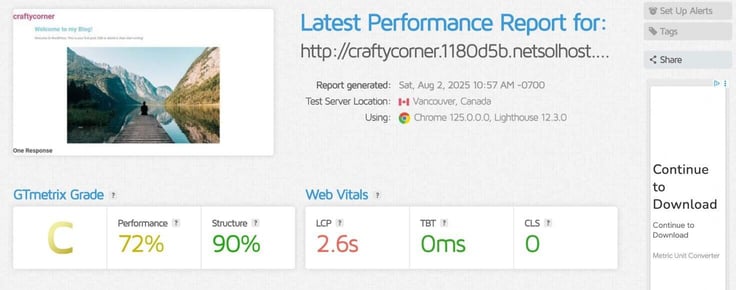
My website only consisted of a blog post and an image, so I wasn’t expecting it to have a hard time loading. But the test told a different story: a C grade, and it took 2.6 seconds to load.
Not the best. But if you’re just starting out or have a small personal blog, the performance may be something you could overlook and still find your site useful.
While the process of setting up Network Solutions’ WordPress plan was great, it lacked essential features. For instance, it had no SSL certificate. But, unfortunately, that was just the tip of the iceberg.
The performance report I received was pretty disappointing. A “C” GTmetrix grade is well below average, and my website wasn’t necessarily cluttered with images and media.
For the price, I thought Network Solutions’ WordPress plan would offer more. A web host like Hostinger or Bluehost could offer me more for less, including more WordPress-optimized features, such as managed updates and tailored speed optimization. So, no, I probably wouldn’t recommend Network Solutions’ WordPress hosting plans for those reasons.
While Network Solutions offers a website builder with all its plans, it also has a dedicated website builder hosting plan featuring its own set of specifications.
Compared with its cheap plans, its website builder plans are actually cheaper and include an hour of expert design support. In this section, I’ll be focusing primarily on the eCommerce side of its website builder.
So without further ado, let’s take a look at Network Solutions’ website builder package.
Keeping up with my baking theme, I knew I wanted an eCommerce hosting plan that could help sell my services, i.e., cake tastings, and showcase my shop’s unique dessert creations.
Scrolling through each plan’s details, I realized the primary differentiator between them was a gradual inclusion of more advanced eCommerce features. The higher the tier, the more marketing and eCommerce tools you receive.
The annual plans included free SSL certificates (with one month free on monthly plans) and three months of free professional email. The monthly plans are more a la carte-based, so while you’ll get a cheaper starting price, they’ll be more costly due to additional fees for add-ons, such as domain names and SSL certificates.
Network Solutions wasn’t forthright about how many hosting resources it provides with each plan. But here is how each plan compared based on what was listed:
| Website | Website + Marketing | eCommerce | |
|---|---|---|---|
| Introductory Price | $4.99/month | $7.99/month | $13.99/month |
| Renewal Price | $15.99/month | $20.99/month | $28.99/month |
| eCommerce Tools | Expert design support, logo builder, design studio | Everything included in first tier plus appointment scheduling, social media/email marketing, Google My Business listing | Everything included in second tier plus secure checkout and sales on any channel (Facebook, Amazon, etc.) |
| Use Cases | Starter business or personal blog | Online appointments and marketing booster | More mature business sites |
The middle tier was the perfect balance I needed: It was affordable and had just the right amount of features. Not too hot, not too cold, just right for me (move over, Goldilocks). I also got a free year of SSL security (only with annual plans) and three months of professional email (only with the annual plan).
What I must say, however, is that when I compared Network Solutions’ plans with others on the interwebs, they weren’t as generous. For example, Hostinger and IONOS had similar pricing to Network Solutions but offered more eCommerce solutions, complimentary email, and tons of storage.
But I did like that it kept up with the AI wave by providing an AI-powered website builder with several capabilities, including logo creation and content generation.
The signup process went the same as with its other plan types. After I clicked on “add to cart,” I was brought to its domain registration page, where I could type in any domain name I wanted.
Since the name I wanted wasn’t available, it gave me a long list of alternatives with different extensions to choose from. Instead of going with another extension, I slightly adjusted the name and went with craftedwithheart23.com.
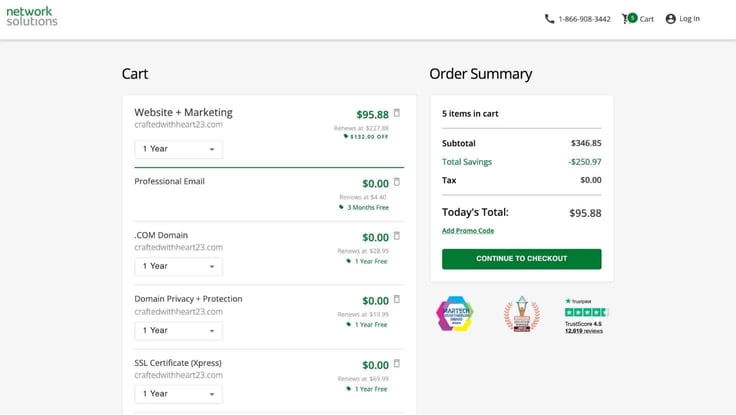
However, I realized I was still charged for the domain name when I reached the billing overview. I was unsure why, as the plan said the domain name was included free for one year with my plan.
Guessing the tiny asterisk at the top had something to do with it, I read the fine print and found that you needed an annual plan to collect this offer. So I switched my plan from monthly to yearly, and voila, I had free domain services for a year.
Like clockwork, at this step, Network Solutions again asked me if I wanted to purchase its domain expiration protection. I have to confess the upselling was getting a little old. Thankfully, I only needed to click “no thanks, continue,” and I was expedited to checkout where I filled out my contact and billing information. The total came out to $95.88 for a contract year. And finito.
I love using website builders to design websites. They’re simple, effective, and an incredibly fast way to get online. Let’s see if Network Solutions’ eCommerce builder can stand up to the task and meet those expectations.
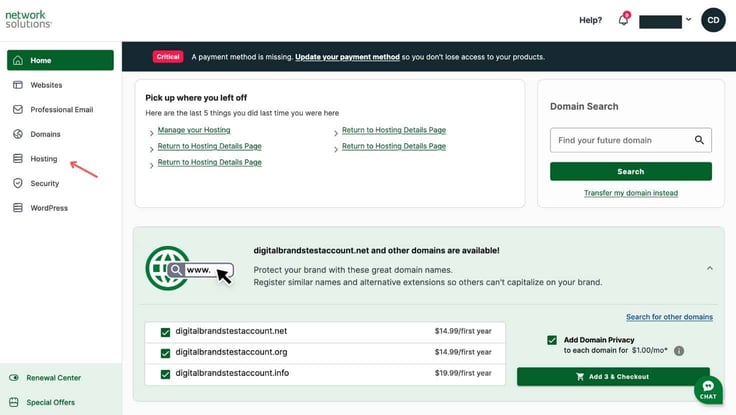
The dashboard for Network Solutions may not be flashy, but it is functional. After clicking on the “Hosting” tab on the sidebar, I was taken to another home interface that was all about my hosting plan.
It included navigation buttons for FTP managers, backups, logs, and more. From there, I could click on eCommerce, which took me straight to the site editor.
For this eCommerce site, I’m choosing to showcase a bakery that offers cake tastings as its services. I have to feed my sweet tooth, even if it just means creating a website that displays cakes and pastries.
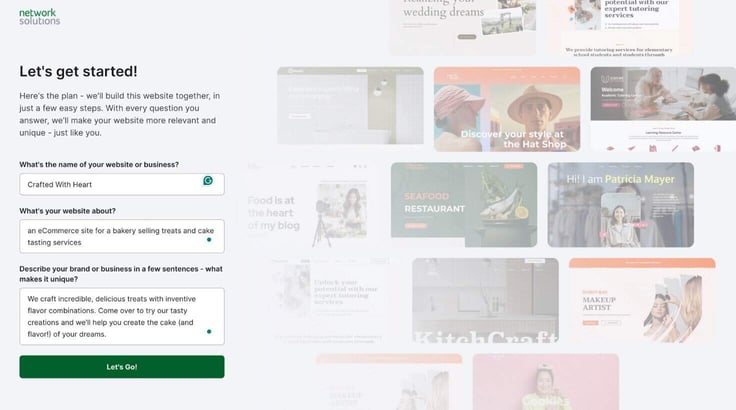
Moving forward, I had two options to create with a template or its intuitive AI website builder. I chose the AI builder. The AI asked me to answer a few simple questions, including:
Next, it asked me to choose a style and a header image for my homepage. I liked that it provided multiple examples and let me view them on the preview side of the editor. The designs weren’t showstoppers, but they exceeded my expectations with how modern they were.
I also liked that the AI builder didn’t do everything for me. It didn’t just spit out a design and have me make edits at the end. I could work in tandem with it and customize at every step.
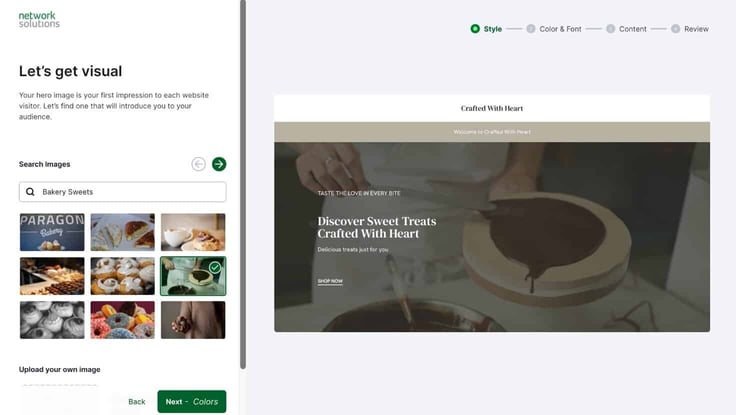
The AI also did a great job creating some great copy for the site, so I left the content as is. Then I selected sections I wanted to add, including an about section and a contact form. Just like magic, my site was ready.
To my pleasant surprise, it had everything I needed. The first time around with the cheap plan I wasn’t super specific with my design prompts, so I had to do a lot more work to jazz up the site.
But with this AI generation, all I had to do was switch out a few pictures to make it better fit my style. I also added a couple of blog posts to fill out my site. Using Network Solutions’ AI writer, I generated a couple of articles focused on cake tasting and baking and published them for more content.
Although I wanted to center my store around cake tasting appointments, I chose to browse the other eCommerce features Network Solutions had to offer to get a more complete picture of its platform.
From its editor, I could click on two icons at the bottom of the sidebar: an appointment icon and a store icon. Clicking on the appointment icon, I was able to see where I would manage and view upcoming bookings.
The appointments settings also allowed me to manually create bookings. I could create a digital business card with my hours and phone number. And it provided me with reporting and analysis. It also had logos galore, where I could create my own logo with its AI builder:
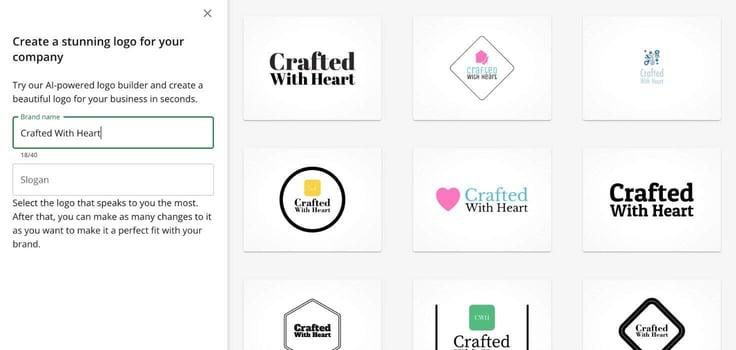
The store icon led me to a settings interface that was complete with all types of features and tools needed to run a storefront. Its comprehensive dashboard covered everything from sales figures, orders, and inventory all from one place. You can also view and compare abandoned carts to fulfilled orders.
To further build my eCommerce site, I decided to try out its product management feature. I created a sample size of product listings for baked treats, including cookies, cakes, and pies. The listing feature was thorough. I could add SKU numbers, images, pricing, and product descriptions.
Once I was done filling that out, I went back to the site editor and navigated to the store page. And like magic, my product catalog appeared on the store page of my site with pictures, pricing, and all. They were arranged in columns and rows and each listing had a “buy now” button.
Here is the finished product:
I thought Network Solutions did an excellent job of building an eCommerce solution that could serve entry-level entrepreneurs.
You may not get the super advanced and sophisticated platform that a company like Shopify or Squarespace could produce. But it had enough functionality and design elements for me.
After publishing it, everything appeared clearly and smoothly. It was also quite fast, compared to the other sites I built with Network Solutions previously.
But to make sure my eyes weren’t fooling me, I ran my eCommerce site through the trusty GTMetrix. And the performance report came back with flying colors! I was extremely impressed to say the least.
The results:
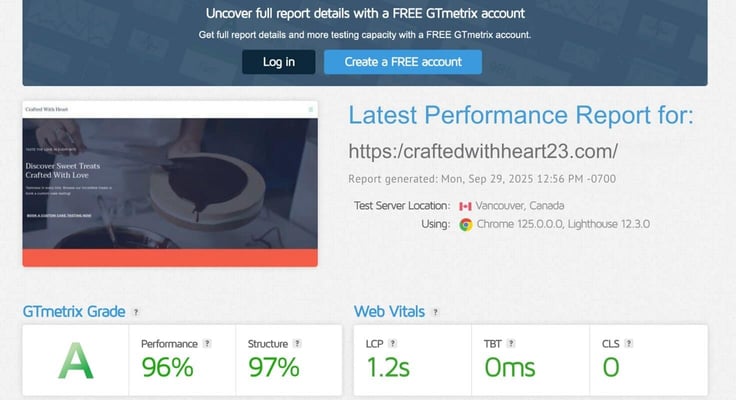
Even with heavier pages filled with pictures and a product catalog, Network Solutions did an outstanding job with the performance. This was a bit of a shocker as the other two plans didn’t perform nearly as well. But a win’s a win and I’m certainly not complaining about an A grade and an LCP rating of 1.2 seconds.
Do I think Network Solutions’ website builder is worth it? Well, I frame it this way: It may not be able to take on a major storefront, but Network Solutions’ eCommerce solution is small yet mighty.
The AI generator definitely helped in selling me on this website builder. It truly delivered on its promise of developing a website in minutes, which I thoroughly appreciated. I only needed to make a few tweaks.
Even if I wanted to take my time, I could post the website it generated and come back to edit whenever I wanted — without worrying about how it looks in the meantime.
Network Solutions gave me a solid foundation from the start — with great performance to boot. Its eCommerce features made adding products easy and I could create blog posts in minutes. The online store interface also provided me with analytics, booking tools, and a logo maker, among other features.
I would definitely recommend Network Solutions’ website builder for users looking to launch a small business or create a blog.
Network Solutions offers the standard customer support you’ll find anywhere: 24/7 live chat, some form of phone support, and a knowledge base. There is a caveat in the phone support feature, however.
When I clicked on Support on the Network Solutions’ website, it read that only its business consultants were available via phone support, not its product support team.
While I’m perfectly content with live chat support, if I wanted to discuss technical issues and setup over the phone, I wouldn’t have that option. But how Network Solutions does its customer support follows a broader trend in the hosting industry: live chat-forward.
For instance, when I checked out Bluehost, you now have to purchase its higher-tiered plans to get any type of phone support as a customer. Hostinger also follows a similar business model. So I guess it’s what you pay for in today’s hosting era.
I remember the days of 24/7 phone support and chat, but let me not bore you with rants about the good ole days.
Onto the actual customer support experience. I was quite impressed with the speed of the support process and the representative’s punctuality. To test out its live chat, I asked for assistance in understanding the features included in its cheap plans, since Network Solutions didn’t explain in thorough detail what you receive with each plan on its site.
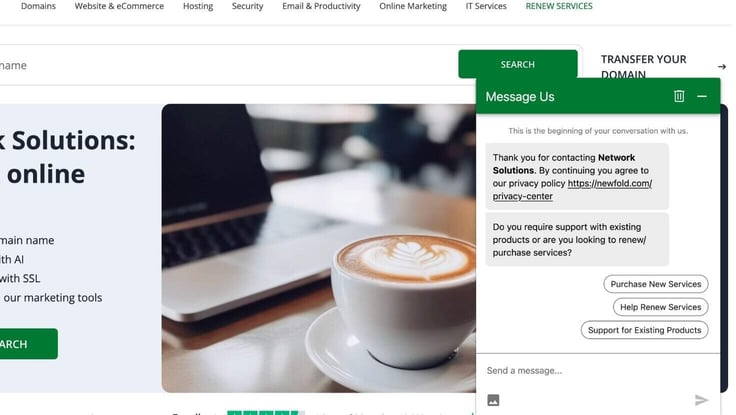
The live chat conversation started with a generic AI chat run-through. After answering the general live chat questions, I was directed to a customer support representative. And within a minute of submitting my question, I had received a response from a real human!
I asked a couple of follow-up questions about the cheap plan, and though there were some pauses in between, overall I thought the responses were speedy. It took a total of 15 minutes to start and end our chat conversation.
The representative also gave me their email address, so I could speak with them directly once I’ve decided on a plan, which was a thoughtful consideration that I don’t always receive with other hosts.
But did the team member answer my question? I would say they tried. I still didn’t get enough details on the plans that I was looking for, but overall, I would give the experience a B+ for the responsiveness, mostly.
Network Solutions is an older hosting brand, and in some ways, you can see its veteran status through its platform (in both good and bad ways). Though the web host had some catching up to do in some areas, it was well-versed in newer technologies, including AI tools, which impressed me.
Below are the main pros and cons of the Network Solutions’ platform:
Network Solutions did a phenomenal job building and designing its AI drag-and-drop website builder. Not only was it functional, but it also streamlined the entire development process. I was able to build my sites in minutes instead of hours.
But there were other areas where I wished Network Solutions put more time and effort. Its website didn’t offer a lot of details on each plan’s specifications. And the performance and page loading speeds needed some work. They weren’t up to industry standards, not hitting the average LCP speed of 1.2 seconds on both cheap and WordPress plans.
While its downsides could be viewed as dealbreakers for some, I think Network Solutions’ customer support, AI tools, and pricing made up for its shortcomings. The beginner sites I created with its various plans fared pretty well, especially my eCommerce masterpiece.
For an older host, Network Solutions put in a lot of effort to stay up with the times. I thought its AI tools were purposeful and thoughtfully integrated throughout the website design process, ready on standby to help me with everything from logo development to blogging.
Customer support is the lifeblood of a hosting company, and that’s something Network Solutions understands. While I didn’t get all the information I was looking for, the representative did crush it on response times and friendliness.
But my experience with Network Solutions was kind of like a rollercoaster. While it had high highs, its lows were disappointing. I wished it offered more information about its plans on its website, so I felt more confident that I was making an informed decision.
Details, such as storage space and RAM are essential in decision-making. And the performance could have been better when compared with its competitors’ speed tests. But the bright spot is that the performance for my eCommerce plan was excellent.
Overall, I think Network Solutions offers a solid hosting experience suitable for various beginner web projects and websites.

HostingAdvice.com is a free online resource that offers valuable content and comparison services to users. To keep this resource 100% free for users, we receive advertising compensation from the hosts listed on this page. Along with key review factors, this compensation may impact how and where hosts appear on the page (including, for example, the order in which they appear). HostingAdvice.com does not include listings for all web hosts.
Our site is committed to publishing independent, accurate content guided by strict editorial guidelines. Before articles and reviews are published on our site, they undergo a thorough review process performed by a team of independent editors and subject-matter experts to ensure the content’s accuracy, timeliness, and impartiality. Our editorial team is separate and independent of our site’s advertisers, and the opinions they express on our site are their own. To read more about our team members and their editorial backgrounds, please visit our site’s About page.


