
Guides

Studies 
Studies
Our studies cover a range of trending topics and deliver original, reliable data you can't get anywhere else on the web.
From beginner-friendly shared hosting to enterprise-grade cloud infrastructure, I wanted to see how Hostwinds performs at every level, and for who each plan truly makes sense.

By: Jack Wallen

Editor: Lillian Castro

Reviewer: Christian de Looper
Disclosure: When you sign up through links on our site, we often earn referral fees from partners. For more information, see our ad disclosure and review policy.
Hostwinds is right up my alley because they offer hosting plans geared for different skill levels, such as with SSH access to straight-up Linux servers. It’s also possible to spin up a Windows virtual machine, but my OS of choice has been Linux for decades.
I’m getting ahead of myself.
Hostwinds is a low-cost web hosting provider that offers everything from shared hosting to VPS, dedicated servers, and cloud infrastructure. This makes it more cost-effective for some businesses. The one caveat to this is that, should your site see a spike in traffic, it could slow down a bit. For some, this trade-off is worth saving some money.
But what does Hostwinds offer to help make this an attractive option for organizations looking for a new (or first-time) hosting service?
Let’s assume two things:
First off, when I say Hostwinds is cheap, I mean it. You can get a plan for as low as $4.54/month. Hostwinds is actually cheaper than my current hosting provider. Even at only $7.14, you get unlimited domains, disk space, and bandwidth.
That’s impressive.
Of course, that’s the bare minimum. There are also the VPS and the Dedicated plan. What’s the difference?
With that said, let’s dive into the service.
After testing every tier, I found Shared Hosting to be Hostwinds’ strongest option for beginners — it’s inexpensive, fast to deploy, and makes launching a WordPress site almost effortless.
The VPS plan delivers serious flexibility, but only if you’re comfortable with Linux and the command line; without that skill set, it quickly becomes more frustrating than useful.
For businesses that need consistent performance without added complexity, the Dedicated server offers the best balance between power, reliability, and ease of use.
The Cloud hosting plan is built for scale, not simplicity, while it’s incredibly capable, I’d only recommend it to larger organizations with the budget and technical staff to manage usage-based infrastructure.
The cheapest plan is the best place to start. To sign up, I pointed my browser to the Hostwinds shared service page, clicked “Hosting,” and selected “Shared Hosting” from the drop-down menu.
From there, it was just a matter of selecting which level of plan I wanted (Basic, Advanced, or Ultimate), filling out the required forms, and waiting for the confirmation of my signup and my host details.
The host details will include the necessary login information (server IP, username, and password) as well as SSH (Secure Shell) access information. Once I had that info, I was able to log into my plan’s dashboard and get to work.
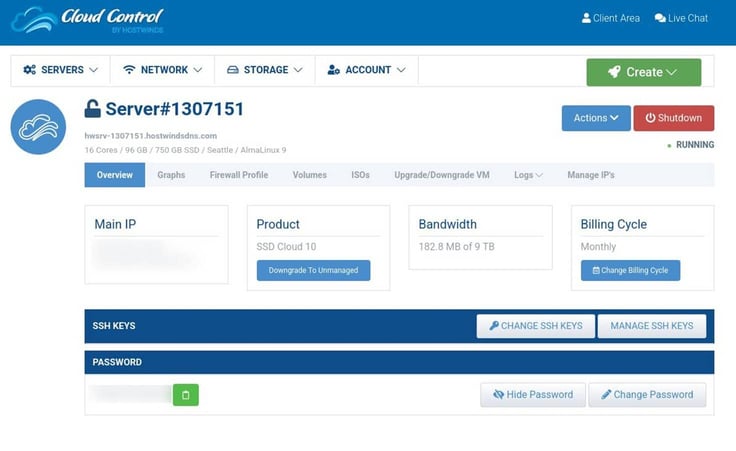
This is where I had to pay close attention. Since I signed up for the basic hosting plan, I found that Hostwinds had assigned me a server. To start building my site, I had to access the server by way of the Client Area (the link for which is in the upper-right corner).
Once in the Client area, I clicked cPanel, where I discovered how easy it is to deploy my favorite website framework, WordPress.
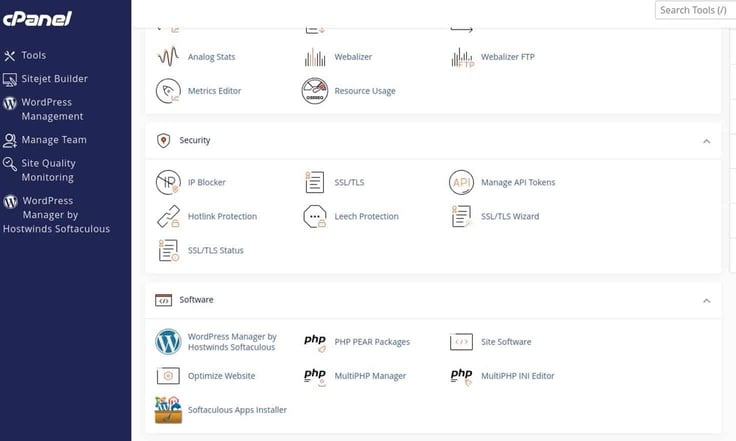
Click WordPress Manager by Hostwinds Softaculous, and I was prompted to select any plugins I might need added to my WordPress site.
After selecting the plugins I wanted, I clicked Install WordPress, and I was then presented with the usual Softaculous WordPress installer.
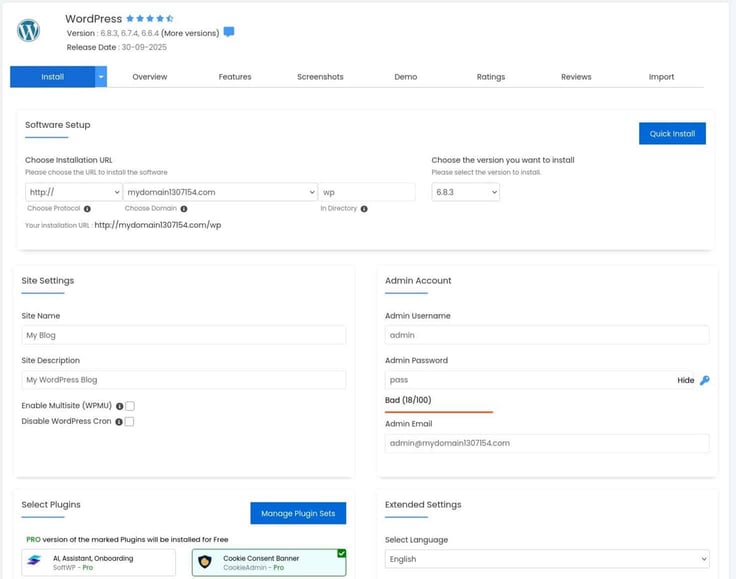
The installation took less than 30 seconds, and I was ready to log in to my WordPress site as the admin user. See below:
It doesn’t get any easier than that! … But it was then that I ran into the inability to reach my newly-deployed website. Time to reach out to support.
Hostwinds has chat support, so that’s the route I took. Austin was on the case. Turns out, a valid domain must be purchased, which makes perfect sense. With only a placeholder domain, I was unable to access my new WordPress site. That means there would be another cost involved, unless I had a domain I could transfer and use.
Turns out, I had to purchase a new domain (or migrate a current domain to Hostwinds). I opted to purchase a new domain, which is done via Domains > Register New Domain.
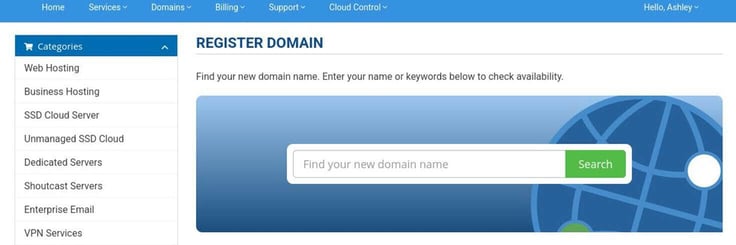
Keep in mind that every domain will have a different associated cost. Most often, .com domains will be cheaper, but it’ll be harder to find one that’s available.
Once I registered my new domain, I then had to go to the Change cPanel Domain Name page and add the new domain.
After typing the name, click Change. It’ll take a few hours for the change to take effect, and I also had to make sure that the new domain was selected in the “Choose Domain” section.
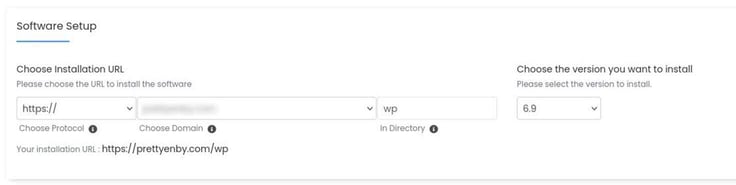
I then filled out the rest of the information for the WordPress deployment and installed the app. Once the installation was complete, I could then access the WordPress admin panel and start configuring my site.
The installation of the WordPress site via the Shared Hosting plan was quite easy. However, prior to going that route, I first used the VPS plan, which was a different story altogether.
I would recommend the Hostwinds Shared hosting plan without hesitation. This is an outstanding way for anyone (regardless of technical knowledge) to get a website/service up and running with just a few clicks. As long as you have a registered domain, you shouldn’t have any problems with this process.
If you have limited technical skills or simply want to get a website up and running quickly, the Shared Hosting plan is a great option.
Once I had the WordPress site up and running, it was time to test it for performance. Here’s how it fared with GTMetrix:
That’s exceptional performance.
The VPS plan requires considerably more tech skills than the Shared Hosting plan. In fact, you’ll need to understand Secure Shell and the Linux command line; otherwise, you won’t have any luck.
It just so happens that I’ve been using Linux for nearly 30 years, so I didn’t have any problems with the VPS plan.
Hostwinds offers Linux Managed, Windows Managed, Linux Unmanaged, and Windows Unmanaged VPS plans. I chose the entry-level Linux VPS hosting plan for my testing.
Essentially, the VPS plan allows you to remotely access your server’s command line interface, so you can do whatever you need to build your sites and services. By default, I had a single server, which was powered by AlmaLinux (a server-centric Linux distribution), and my domain was configured properly.
At first glance, Hostwinds appears to offer a similar application deployment workflow for VPS instances.
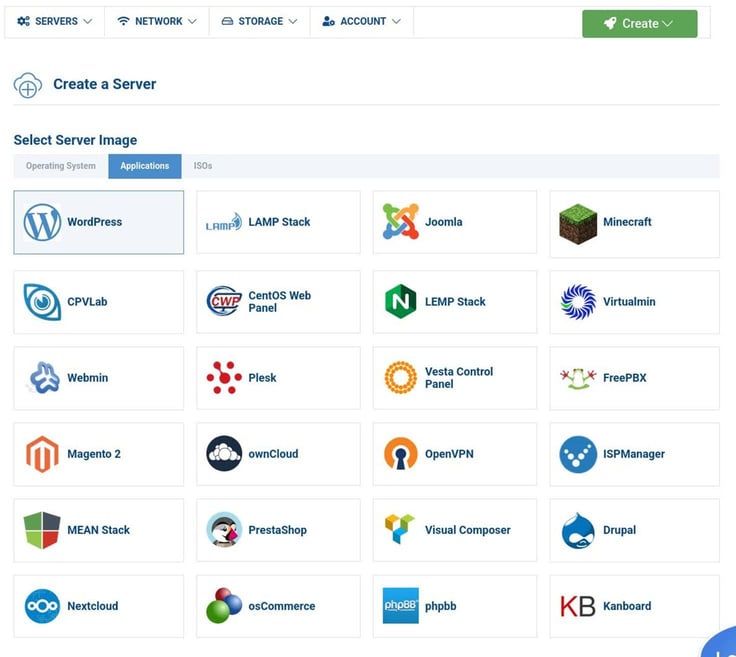
If I then go back to My Servers, the new instance is listed (with the nickname UbuntuWP).
At this point, I ran into trouble that required support (again). When I attempted to work with the new WordPress deployment, the site was unavailable.
After chatting with support (who was very attentive), I was told the VPS plan doesn’t include the ability to deploy applications via the web-based GUI, which means it’s all done via command line. To access the command line, you have to use SSH, like this:
ssh root@SERVER_IP
Where SERVER_IP is the IP address of your Hostwinds server (it should be listed in your confirmation email):
Most users aren’t going to be able to manage that, but I’ll share the basic steps of doing so (without all the gory details). Remember, this is all done via the command line.
If you’ve never installed WordPress manually, it’s a lot. For example, installing just the web server and database requires the following commands:
sudo dnf install nginx -y
Set the NGINX web server to start on boot, and start immediately with the command:
sudo systemctl enable –now nginx
To install a relational database that WordPress uses to store all the configuration and content for the site, you’ll issue a command like this:
sudo dnf install mariadb-server -y
Start and enable the database server to start on reboot with:
sudo systemctl enable –now mariadb
That’s just to install the web server and database. You also have to configure the web server, create the database, download the WordPress files, configure WordPress, open the firewall, and then run the GUI installer.
As I said, it’s a lot.
The only way I would recommend the VPS hosting plan would be if you had considerable Linux command line skills. If you’re not familiar with the Linux CLI (Command Line Interface), you will not know what to do here.
You should also have at least a fundamental understanding of how to install and configure both a web server (either Apache or NGINX) and a database server (either MySQL or MariaDB). With those skills, you’ll find the VPS plan to be incredibly flexible and powerful.
The performance of the VPS Hosting Plan was essentially identical to that of the Shared hosting plan. However, the reason for this is that the VPS hosting plan I had available to me wasn’t exactly configured for maximum performance.
Had I wanted to really gain the most performance from my site, I could have bumped my plan to the max available (16 CPUs, 96 GB of RAM, 750 GB of storage, and 9 TB of bandwidth). That plan would have cost me roughly $342/month, but the performance would have been incredible.
In other words, if you need more performance, you should purchase more system resources.
The dedicated plan ensures that you are the only host on a server, which means you get more performance, and you don’t have to worry that another site, individual, or company is going to cause problems with how well your site runs.
The Dedicated plan is pretty much the same as the Shared hosting plan in nearly every way (except that you get your own server).
Another difference is that you get to select the operating system used for your server. You can choose from:
You can also choose the version number of the operating system you’re using.
I tested the E3-1270 v3 Dedicated Server, but Hostwinds has more than 10 dedicated server configurations to choose from, all of which are fully customizable.
After you’ve configured your server, you can also include optional add-ons, such as cloud backups, enterprise DDoS (Distributed Denial of Service) protection, and Hostwinds monitoring.
Once you’ve taken care of the purchase, you’ll then be able to build your site in the same way you would have with the Shared hosting plan. The only difference between the Dedicated and Shared hosting options is that you get your own server, and you get to configure it.
As far as cost, the cheapest route to use with the Dedicated plan would be the following configuration:
The above configuration will run roughly $122/month.
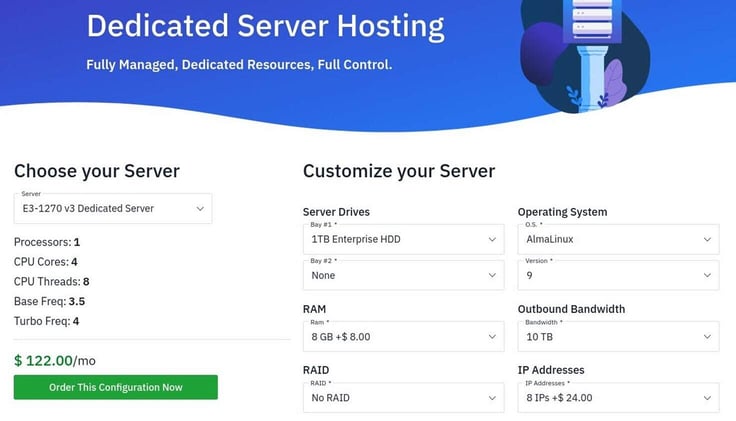
After you’ve completed the purchase, you’ll also need to register your domain (in the same way you did with the Shared Hosting plan). With that taken care of, you can then log in to cPanel and build your site via the same easy-to-use GUI you saw above with the Shared Hosting plan.
I ran the same test with the Dedicated hosting plan that I did with the Shared hosting plan, and the results were identical.
Here’s the thing about that. Chances are good that I ran my tests on the Shared hosting plan at a time when other sites on the server weren’t getting hit with much demand. Had I run the tests at a time when the Shared server was getting hit by a lot of traffic, the results could have been dramatically different.
However, with the dedicated server, that’s not going to happen. The only time your test results would vary would be when your site is getting hit with higher levels of traffic.
In the end, the Dedicated hosting plan performed as brilliantly as the Shared hosting plan, only the Dedicated plan’s performance will be much more consistent.
If you have the extra cash to dedicate to a Dedicated hosting plan, I would very much recommend it over the Shared Hosting plan. On the other hand, if you don’t think your site is going to get hit with much traffic, the Shared Hosting plan should be just fine.
If you want assurances that your site will always perform well, go with the Dedicated server.
Okay, the Cloud plan is a different beast altogether, and the difference is all about pricing.
With the Cloud hosting plan, you pay for usage for the configuration you choose. For example, the cheapest option is 1 CPU/1GB RAM/30GB Storage/1TB Bandwidth. That configuration will cost you $0.006931/hour.
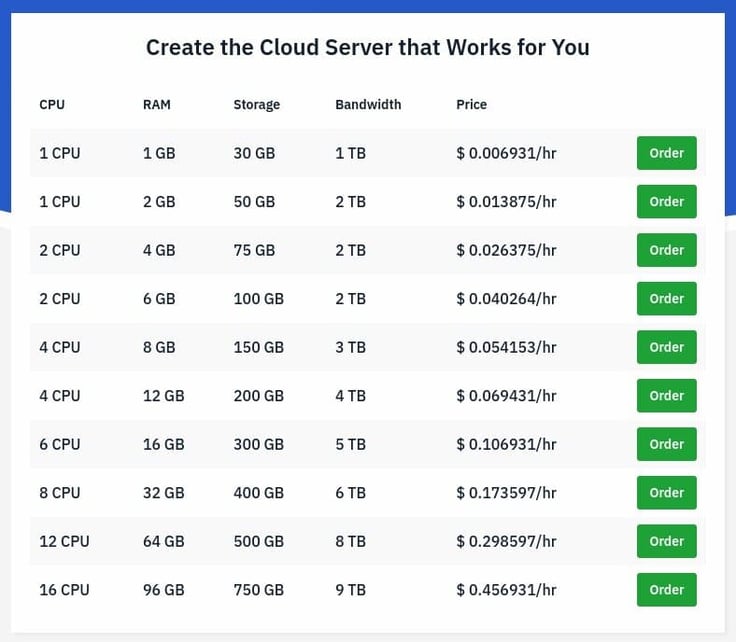
With this plan, you pay for the resources you use at the rate you use them. The trick is this: the more traffic your site receives, the more it’s going to cost.
To make the pricing a bit more concrete, let’s look at what this actually means on a monthly basis. The entry-level Cloud configuration (1 CPU, 1 GB RAM, 30 GB storage, 1 TB bandwidth) runs at roughly $0.0069 per hour, which works out to about $5 per month if the instance runs continuously.
A more realistic setup for a growing business site, say, 2 CPUs and 4 GB of RAM, lands closer to $20 per month, while a higher-traffic configuration with 4 CPUs and 8 GB of RAM would typically fall in the $40 per month range. Those numbers can climb quickly during traffic spikes, but the trade-off is that you’re only paying for the additional resources while you actually need them.
So, why would you choose the Cloud plan? Simple: If you are certain that you’ll need to eventually scale your site up to meet massive demand, this type of plan may be the better option.
I am of the opinion that Cloud hosting plans are better suited for larger businesses that see much higher traffic.
With the Cloud hosting plan, you also get the following features:
If you already have your site up and running on a different host, you get free transfer of that site to Hostwinds, which can be a big deal, especially if your site is big and complicated.
Before you get too excited about the Cloud hosting option, you need to understand that building sites with this plan is similar to that of the VPS plan. In other words, you’ll be building them manually.
This gives you greater flexibility than the Shared or Dedicated hosting plans, but it also requires considerably more skills. Of course, those who opt to go the Cloud hosting route are most likely larger companies that have a dedicated staff for building and maintaining websites.
The performance of the Cloud hosting plan is similar to the Dedicated plan. The only difference is that you can scale a site considerably more than a dedicated site (even including load balancers to help manage massive traffic).
Running the GTMetrix test on the Cloud hosting plan gave me the same results as all the other plans, but I had no way to test it under heavy load. You can bet, however, the Cloud hosting plan will not blink as traffic dramatically increases.
The only way I would recommend the Cloud hosting plan is if you’re a large company with the resources to pay for the service, as site traffic increases, and you also have the staff to build and manage more complicated sites.
During my testing, I had to reach out to Hostwinds support more than once, and in each case, the experience was consistently positive. Support is available via live chat, which makes it easy to get help quickly without opening tickets or waiting for email responses.
In one instance, I ran into an issue accessing a newly deployed WordPress site on the Shared Hosting plan, which turned out to be related to the use of a placeholder domain. The support agent quickly identified the problem, explained why a registered domain was required, and walked me through the steps needed to resolve it.
In another case, while testing the VPS plan, support clarified a limitation that wasn’t immediately obvious — namely, that application deployments must be handled manually via the command line rather than through the web-based interface.
In all, their support was clear, accurate, and refreshingly straightforward. They didn’t oversimplify technical explanations, nor did they gloss over limitations, which made it easier to understand exactly what each plan is designed to handle. Hostwinds’ customer support felt reliable and competent, and more importantly, transparent about what each hosting plan does — and does not — include.
To put Hostwinds in context, here’s how it stacks up against the other hosts people usually cross-shop.
| Provider | Best For | Key Difference |
|---|---|---|
| Hostwinds | Clear plan tiers from beginner to advanced users | Strong value at every level, but VPS/Cloud expect real technical skills |
| Bluehost | First-time site owners | Easier onboarding, but less flexibility and higher long-term costs |
| SiteGround | Managed WordPress users | Excellent support and performance, but pricing climbs quickly |
| Hostinger | Budget-focused beginners | Very low entry price, fewer advanced configuration options |
Compared to other mainstream hosting providers, Hostwinds strikes a balance between ease of use on the low end and flexibility on the high end, without forcing users into a single hosting model.
I found Hostwinds to be an outstanding hosting service across the board. From ease of deployment with the Shared plan, to the flexibility of the VPS plan, to the performance of the Dedicated plan, and the scalability of the Cloud hosting plan. Hostwinds essentially has a plan to meet just about any needs.
What really stood out to me during testing is that each plan feels purpose-built rather than padded with features most users won’t need. The Shared Hosting plan is clearly designed for speed and simplicity, while the VPS and Cloud offerings prioritize control and scalability for more advanced users.
Hostwinds didn’t try to blur the line between beginner-friendly convenience and hands-on server management.
Ultimately, the value of Hostwinds comes down to choosing the right plan for your skill level and traffic demands. If you match those two factors correctly, you get strong performance, flexible options, and pricing that remains competitive at every tier, which is something that isn’t always true with hosting providers that try to do too much with a single solution.

HostingAdvice.com is a free online resource that offers valuable content and comparison services to users. To keep this resource 100% free for users, we receive advertising compensation from the hosts listed on this page. Along with key review factors, this compensation may impact how and where hosts appear on the page (including, for example, the order in which they appear). HostingAdvice.com does not include listings for all web hosts.
Our site is committed to publishing independent, accurate content guided by strict editorial guidelines. Before articles and reviews are published on our site, they undergo a thorough review process performed by a team of independent editors and subject-matter experts to ensure the content’s accuracy, timeliness, and impartiality. Our editorial team is separate and independent of our site’s advertisers, and the opinions they express on our site are their own. To read more about our team members and their editorial backgrounds, please visit our site’s About page.


