




Writer: Jordan Sprogis


Editor: Lillian Castro


Reviewer: Cristian Lopez

Key Takeaways
- A surprising share of your website traffic may not be real — as in, not actual people — even if your analytics say otherwise.
- AI bots are using your content without sending visitors back to what you actually worked on creating and building.
- And guess what? Your hosting provider has something to do with which bots can access your site.
- The good news is there are a few things to look for in Google Analytics — or any traffic dashboard — that can signal bot activity.
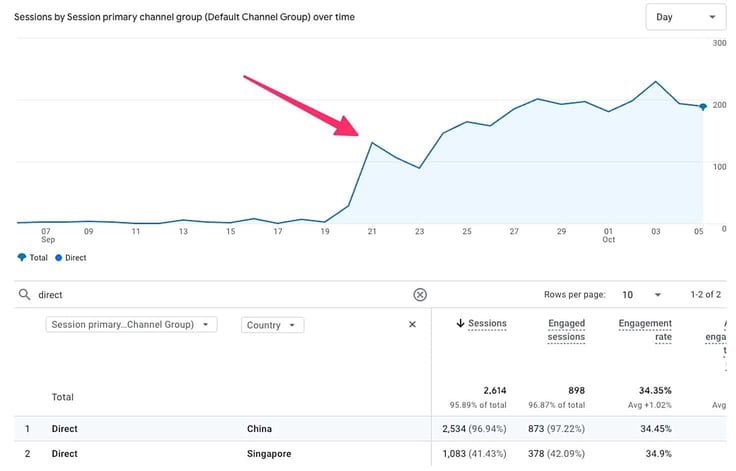
A guy who runs a paranormal blog — ghost stories, unexplained sightings — suddenly noticed something surprising: More than half of his site traffic was suddenly coming from China and Singapore.
Maybe a wave of international ghost enthusiasts had finally found his page?
But there was zero engagement, as in no scrolling, no clicks. How do you read ghost stories without even scrolling the page?
Well, the paranormal writer checked his traffic and quickly learned that his site was being hit by AI-driven scraping bots mainly linked to VPS-based IPs in China and Singapore. Not real people at all.
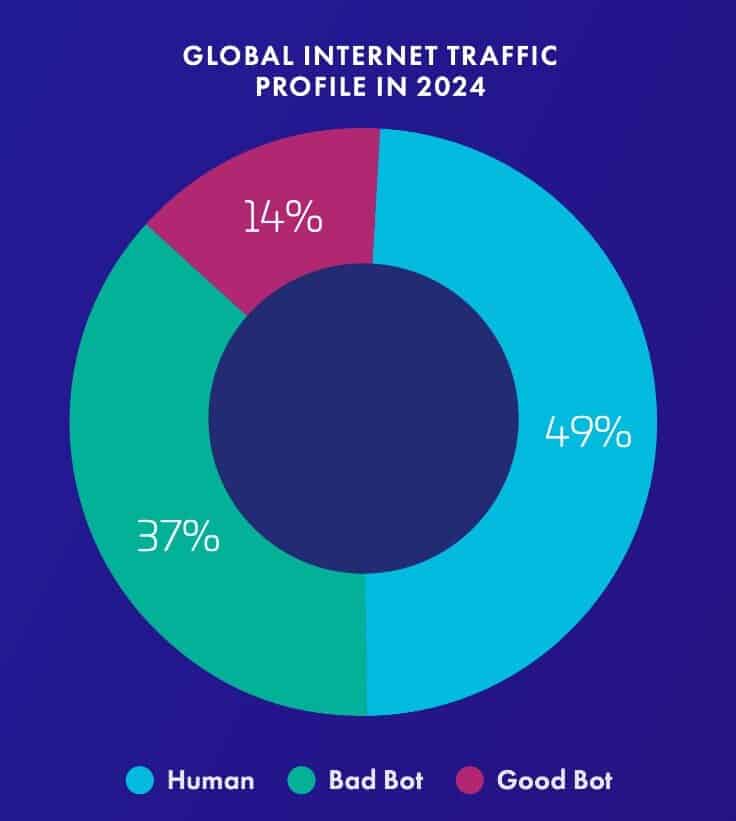
The reality is website traffic just isn’t what it used to be. More than half of it now comes from AI-driven bots, with automated activity growing faster than human visits. The problem is these aren’t the traditional bots you’ve probably become accustomed to, like Googlebot, which helps surface websites and pages in its SERPs.
Many of them these days are AI crawlers. And their job is simple: to pull content to train models or generate answers elsewhere. This means bots are literally being trained on the content you’re writing and posting. Oh, and skew your analytics while doing it, of course.
Your Analytics Might Be Lying to You
To reiterate, not all bots are bad. Googlebot crawling your site so it shows up in search results = good bot; a monitoring tool that’s checking your uptime = good bot.
But since more than one-third of all internet traffic is either AI scrapers and training crawlers, there’s a much bigger chance they’re what’s running into your site nowadays.
This is what bot traffic may look like on your analytics:
- Page view counts that look like they’re growing but don’t actually connect to any business activity (setting appointments, inquiries, buying something)
- Bounce rates that don’t make sense (millisecond visits, for example)
- Mysterious “direct” traffic spikes from geographic regions that have nothing to do with you
That last one is its own crisis, and it’s truly happening everywhere, to everyone.
At the end of 2025, Google confirmed that Google Analytics (now GA4) itself was being floated by bot traffic appearing as direct visits from China and Singapore.
If you’ve ever made a decision based on your website analytics or felt good about your traffic, it’s worth asking how much of that data you can actually trust.
The Red Flags You Shouldn’t Ignore in GA4
These are the red flags worth checking in Google Analytics (or whatever dashboard you’re using):
- Traffic sources with thousands of sessions and an average engagement time of 0:00:01
- Sudden spikes in “direct” traffic from countries outside your normal audience
- Pageview counts that don’t track with your actual business metrics (sales, sign-ups, replies)
- High CPU usage on your hosting dashboard during hours when your real audience is asleep
Also: Make sure bot filtering is actually enabled in GA4. It’s in Admin → Data Streams → your stream → More Tagging Settings. It’s not on by default for everyone.
Who Sees the Traffic Before You Do
Filtering good vs. bad bots on your site starts down at the infrastructure level, which is long before a bot request even reaches your site. Your hosting provider — whether it’s GoDaddy, Wix, Hostinger, or someone else — is the first thing between the open internet and your website.
If your host has bot filtering built in, a lot of that junk traffic gets stopped before it ever registers anywhere. If your host doesn’t, it goes straight through to your website — the server you’re paying for, the analytics you’re reading, and the numbers you’re looking at every morning.
This is exactly why two identical websites with the same content, the same SEO, the same traffic sources, can show completely different analytical profiles. Not because one is “better” or more popular, but because one’s host is doing the work to filter bots.
What Your Host Should Be Doing
Bot filtering that happens at the hosting or CDN layer is inarguably the most effective kind. It stops bot traffic before it reaches consumer server resources or messes with your analytics at all.
So when you’re searching for a web host (or maybe wondering if your current one is pulling its weigt), here’s what to look for:
- CDN-level filtering: This means traffic is screened while it’s still in the open web before it reaches your site
- Rate limiting: Automated requests that hit too fast will automatically get slowed or blocked
- Behavior analysis: Knowing how to distinguish bots that mimic human behavior from actual human behavior
- Visibility tools: Some hosts even offer dashboards that show you what bot traffic is being caught on your site, which, at a minimum, tells you what’s hitting your site
If your host offers none of the above, then the burden falls entirely to you — start hunting for third-party bot detection tools, custom GA4 filters, and a lot of manual monitoring. If you’re not interested in that, it may be time to look for a new host.
