
Guides

Studies 
Studies
Our studies cover a range of trending topics and deliver original, reliable data you can't get anywhere else on the web.
From one-click WordPress setup to seamless server management, Cloudways proved far easier to navigate than traditional hosting platforms.

By: Jack Wallen

Editor: Lillian Castro

Reviewer: Christian de Looper
Disclosure: When you sign up through links on our site, we often earn referral fees from partners. For more information, see our ad disclosure and review policy.
Cloudways is a cloud hosting service dedicated to deploying websites and web apps for blogs, e-commerce, and other services that can greatly expand your business’s online presence. One of the most impressive aspects of Cloudways is how it greatly simplifies the process of deployment and removes all confusion and hurdles.
This service is so simple, you need very few skills to get your site or app up and running. In fact, I don’t remember ever using a hosting platform that was this easy to use. And with several options for support, you can get your questions answered and your issues resolved without having to dive too deep into rabbit holes, so you can spend more time crafting your site to meet your exact needs.
During my Cloudways testing, I decided not to do much digging into how the platform works before my review because I wanted to see what it would be like for someone with little to no knowledge to handle working with the service. In the end, I found Cloudways to be remarkably easy to work with, even without reading a single page of documentation.
Cloudways simplifies the process of deploying websites and web apps; My site was deployed in less than 15 minutes with very little work.
Cloudways’ performance is on par with other hosts.
This service is ideal for small and mid-sized businesses that don’t have an IT staff for deploying such sites and apps.
Cloudways is a bit different from other hosting platforms in that it is a managed cloud hosting platform that allows you to deploy and manage PHP-based web applications on cloud providers such as DigitalOcean, AWS, and Google Cloud.
The benefit of using CloudWays is that it simplifies the management of servers by handling the setup, maintenance, security, and performance monitoring. You can think of CloudWays as a sort of “app-in-a-box” service. CloudWays is an ideal hosting provider for small and mid-sized businesses.
But how easy is it to use? That is the question.
Let’s find out.
The first step was to create my account. Cloudways uses a straightforward signup process on its Unified Platform page, where you simply enter your basic information and verify your email. There are no complicated forms or required technical details, which makes getting started incredibly quick. Within a minute or two, my account was active and I was ready to log in.
After creating an account, I logged in and was greeted by a somewhat informative window (Figure 1).
Figure 1
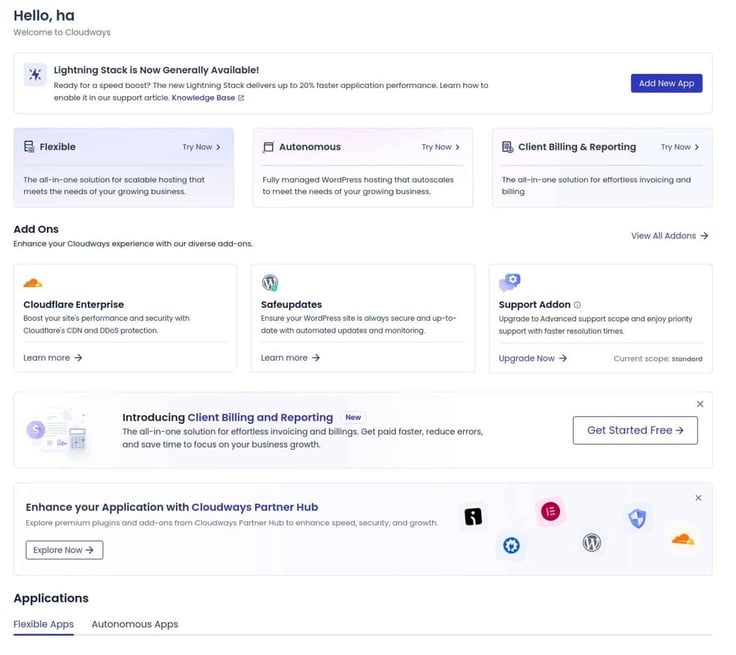
I would have liked a bit more explanation as to what CloudWays does and a more informative welcome screen, but it didn’t take me long to get my bearings. Obviously, there’s always the upsell; in this case, it’s by way of Add Ons. I’m going to bypass the add-ons and skip directly to the app creation.
The first step is to scroll down and click Add Application, under the Applications heading (Figure 2).
Figure 2
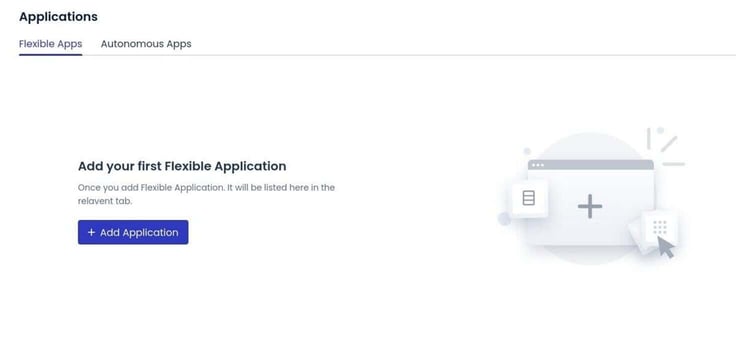
Once I clicked into the Applications area, Cloudways presented a clean layout that made it easy to understand what I needed to do next. The interface groups everything logically, so instead of digging through menus, I was immediately shown the two main paths: Flexible Apps and Autonomous Apps.
Even though I would have appreciated a bit more upfront explanation, navigating to the correct option was simple enough. The platform walks you through each step in a guided, almost wizard-like flow, which helps keep the process from feeling overwhelming — especially for someone new to deploying cloud-hosted apps.
I decided to click on the Autonomous tab, where I at least saw a description that said:
“Fully managed hosting for WordPress that autoscales to meet the needs of your growing business.“
I decided to go with the Flexible App installation because the Autonomous App requires the purchase of a plan that starts at $35, and I wanted to keep the cost as low as possible. I clicked the “Flexible Apps” tab and then clicked “Add Application.”
In the resulting screengrab, there were a few options that had to be selected, including:
Each field includes a short explanation or default suggestion, which helps speed up the process if you’re unsure what to choose. It’s clear Cloudways designed this setup screen with beginners in mind, because nothing feels overly technical or hidden behind jargon.
Selecting an application, naming the project, choosing a server size, and picking a data center location all happen on one page, making the entire configuration feel approachable. Within a couple of minutes, I had everything filled out and was ready to move on to server setup.
I went with the usual WordPress app and finished making my selections (DigitalOcean, Basic, and New York). After finishing that, I clicked Launch Now and then, when prompted, selected the free Omnisend plugin (which is a free email and SMS marketing platform for e-commerce stores).
During the deployment of my app, I went with DigitalOcean, simply because I’ve used that service before and know how reliable it is and how well it performs. As I mentioned earlier, I decided not to go with the Autonomous App because I wanted to keep the cost down. Given how simple the Flexible App solution is, it’s a no-brainer, even for those who are new to deploying apps on a cloud hosting platform.
After clicking Install, I was informed the launch would take roughly 7 minutes. The installer does give a handy countdown timer (Figure 3), so I could keep tabs on the progress.
Figure 3
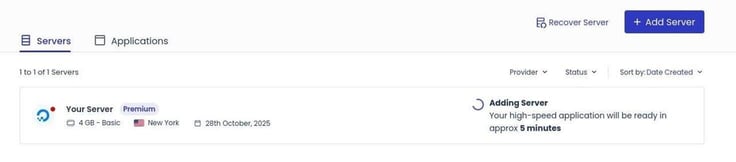
I will say this: like so many other digital systems, CloudWays doesn’t quite understand the concept of minutes. The 7 minutes wound up being roughly 15 minutes, but that could be attributed to a high traffic period for DigitalOcean. That could easily be the case for any hosting service.
Once the app was deployed, I was then able to click the tiny WWW icon (Figure 4) to access the details of the deployment.
Figure 4
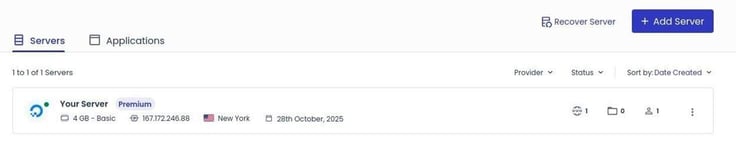
A side panel opens, where I clicked Your Application to access the details of the deployment (Figure 5).
Figure 5
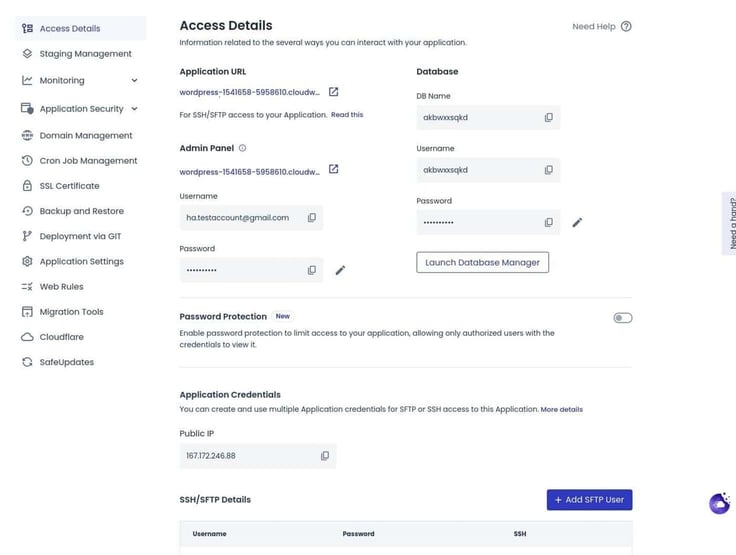
From that page, I could access the application by clicking the Application URL, I could manage the database for the applications, and even add an SFTP user, all from the initial tab.
As you can see above, there are a lot of management tools you can work with, which is really nice to have available.
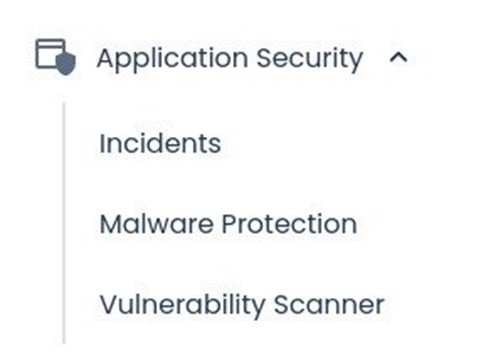
For example, I expanded the Application Security entry (Figure 6) to find I could manage incidents, malware protection, and even run a vulnerability scanner. That’s a big plus in my opinion.
Figure 6
You could (and should) spend a good amount of time in the app management section because it allows you to take care of so much from a single location. To me, that’s a great selling point for CloudWays because it simplifies so much.
App management can get a bit confusing when you have to click on several different pages to take care of a single deployed app. By having everything in one place, the administration of the app becomes significantly more efficient.
Beyond that, Cloudways includes several other management features that add to the platform’s overall convenience. For example, you can easily monitor resource usage such as RAM, disk space, and bandwidth without having to jump into your cloud provider’s dashboard. There are also built-in tools for handling cron jobs, SSL certificates, domain management, and backups.
For anyone who has ever managed a traditional VPS or bare-metal server, this kind of centralized control is a huge upgrade. Instead of switching between multiple dashboards, command line tools, and third-party services, Cloudways consolidates everything into one clean interface.
This centralization also helps with troubleshooting. If something goes wrong — slow load times, plugin issues, memory spikes — you don’t have to hunt through logs scattered across different systems. Most of the relevant information is accessible right from the application panel.
For a platform aimed at small and mid-sized businesses, this simplicity is invaluable because it means less time diagnosing problems and more time actually building your site or growing your business.
With the setup complete and the tools easy to navigate, I was ready to test how fast Cloudways could actually run my site.
Once my WordPress site was up and running, I ran the usual testing via GTmetrix, and the results were impressive. The site received an A grade with the following details:
The one thing to keep in mind, however, is that the above results are from a bare-bones WordPress site. The more content you add to the site (especially if it’s multimedia or e-commerce), the web vitals could change. Even so, the numbers speak for themselves.
As well, the WordPress site loads almost immediately. In comparison to the hosting platform I’ve used for decades, CloudWays is exponentially faster.
I would gladly recommend Cloudways’ cloud hosting service to just about anyone, but mostly to those small to mid-sized businesses that need to deploy cloud-based apps and don’t have the experience with more traditional hosting platforms.
Cloudways simplifies the process of app deployment in ways most other hosting platforms don’t, and that goes a long way when time is of the essence and you don’t have the resources to deal with more complicated deployment platforms.
The Cloudways hosting platform has several options for support, including live chat, tickets, and a community center. When I opened the community center, I found 3.7 thousand members, which is reassuring.
For my support needs, I opted to go with the live chat. As with most chat options, you are presented with chatbot options, which are actually pretty helpful in this case. In fact, my question (how to speed up page loading) was answered via the chatbot and the “Slow website/Caching/Varnish/Breeze/CDN” option. In less than two minutes, I had my answer.
I didn’t have to go any further than the chatbot option, but I assume any human interaction would be equally as effective. However, being able to get my answer that quickly is a plus in my book.
As far as the pros and cons are concerned, the only cons I was able to come up with were regarding cost, and even then, it’s relative.
If you’re a small or mid-sized business and you don’t have the skills it takes to deploy complicated apps and services, you will find Cloudways a breath of fresh air. This hosting platform makes deploying websites and apps far easier than you can imagine. With just a few quick clicks, you can have your site up and running with ease.
Do keep in mind, however, that depending on the app you deploy, there could be a lot of work to be done once the installation is complete. For example, the WordPress app deploys a bare-bones site, which means you will have to go through and manually add content.
However, that’s the easy part of WordPress. The challenging aspect is getting the site itself up and running, which Cloudways makes incredibly easy.
In the end, I would highly recommend this platform for businesses looking to expand their offerings with blogs, e-commerce, and other apps and services.

HostingAdvice.com is a free online resource that offers valuable content and comparison services to users. To keep this resource 100% free for users, we receive advertising compensation from the hosts listed on this page. Along with key review factors, this compensation may impact how and where hosts appear on the page (including, for example, the order in which they appear). HostingAdvice.com does not include listings for all web hosts.
Our site is committed to publishing independent, accurate content guided by strict editorial guidelines. Before articles and reviews are published on our site, they undergo a thorough review process performed by a team of independent editors and subject-matter experts to ensure the content’s accuracy, timeliness, and impartiality. Our editorial team is separate and independent of our site’s advertisers, and the opinions they express on our site are their own. To read more about our team members and their editorial backgrounds, please visit our site’s About page.


