



Writer: Jordan Sprogis


Editor: Lillian Castro


Reviewer: Cristian Lopez

Key Takeaways
In a year eclipsed by AI builders and automation, it’s easy to lose sight of the web’s most human priority: making it usable. But this year’s (and every year’s) WordPress Accessibility Day doesn’t let that happen.
From Oct. 15-16 at WordPress Accessibility Day 2025 (WPAD 2025) — a volunteer-based annual event that talks about how to make WordPress more accessible — folks from WP Engine and GoDaddy said the conversation went far beyond WCAG checklists.
“For us, this event isn’t just about reviewing current standards; it’s about looking ahead to where the accessible web is going,” Brian Gardner, the Head of Community at WP Engine, told us.
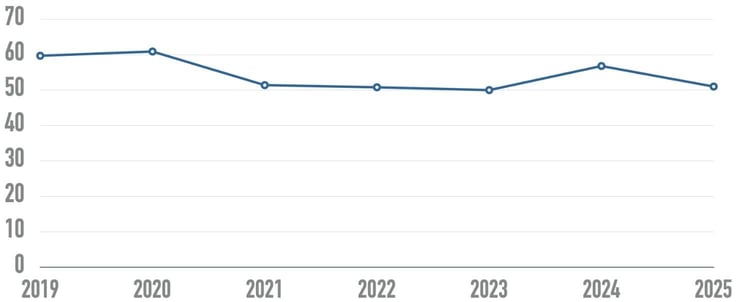
Still, the numbers show how much work there is to be done. The 2025 WebAIM Million Report, for example, found an average of 50 accessibility errors per homepage. And about 3% of all websites are considered fully accessible.
It’s why WPAD is so important, said Adam Warner, GoDaddy’s Director of Field Marketing: “By supporting events like this, we’re contributing to sharing best practices and fostering an inclusive community that ultimately makes the internet better for everyone.”
There’s a Cost in Waiting
Regulations are coming in hot: The U.S. Websites and Software Applications Accessibility Act is now sitting in Congress. At the end of last year, the DOJ ruled that state and local governments have until 2026-2027 to make their websites and apps accessible.
The latter was the first truly clear federal deadline for digital compliance — and probably just a preview of what’s coming next. A few states, like Colorado, have already implemented their own accessibility laws.

Similar things are happening across the pond. The European Accessibility Act (EAA) — which went into effect just this year — now requires each member country to adopt/enforce accessibility standards, including digital products/services.
For hosting providers, the liability will eventually fall onto them. Accessibility is not only a content, design, or developer-facing concern; it goes all the way up the stack.
Even global names like Netflix and Beyoncé’s website have faced legal action for having inaccessible websites.
This was the main theme of senior frontend engineer Jennifer Wjertzoch’s session, “Accessibility Isn’t Extra Work. It’s Risk Management.” WordPress powers about 43% of all sites, and prioritizing accessibility can be seen as a risk management selling point for a huge part of the internet, from NGOs and universities to banks.
But Wjertzoch’s main message was simple: Waiting is expensive.
“Accessibility isn’t an extra line item—it’s a foundational layer of risk management that safeguards brand trust, expands market access, and ensures our hosting services stand the test of compliance and continuity,” said Warner.
Gardner added: “Attendees are learning that accessibility is not a compliance checklist or a charitable act, but an essential component of risk mitigation and market expansion.”
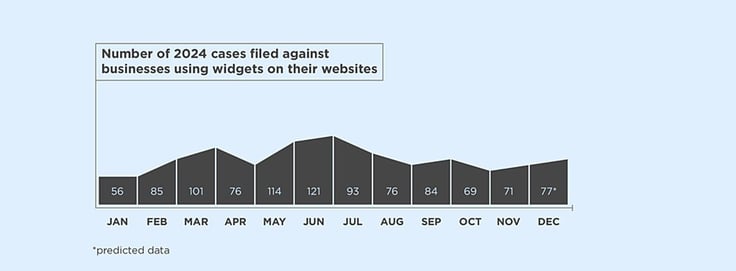
A UsableNet report found that in 2024 alone, more than 1,000 businesses were sued for having inaccessible sites, despite having accessibility widgets. So even though the effort is there, the work is not being completed.
These is no small potatoes: AudioEye estimates that the average digital ADA lawsuit is between $5,000 and $50,000.
Can AI Build a Fairer Web?
WordPress is in an interesting position: As it faces competition from SaaS builders and similar closed ecosystems, it’s also navigating how to weave automation and AI into its open architecture.
But WordPressers understand that the question now isn’t whether to automate. It’s how to do it meaningfully and inclusively.

“The exciting trend we’re seeing is AI’s ability to lower the barrier to entry and scale accessibility efforts for developers, making it faster and cheaper to achieve a high degree of compliance,” Gardner said.
That question was the center of software developer Rose Kivuva’s keynote, “The Future Is Automated — But Will It Be Accessible?”
WordPress powers more than 40% of the web and already integrates AI into SEO, writing, chat, and image generation. With that kind of scale comes responsibility.
It’s as Warner said: “Automating the future doesn’t mean progress if people can’t participate—accessible by design means inclusive by default.”
In her presentation, Kivuva cited common accessibility failures on WordPress sites — missing semantic HTML, bad contrast, no captions, and limited ARIA support. She suggested using built-in prompts — like “Make this block plain language,” “Add alt text to this image,” or “Use semantic HTML for this page.”
But Kivuva warned to keep humans in the loop, especially with those who have a disability and can give direct feedback to how well a feature is (or isn’t) working.
“The ultimate takeaway is that design must be validated by real people with disabilities and be inclusive of every type of user, or it fails completely,” Gardner added.
It’s a theme we’ve seen across global WordCamps as of late — automation can change processes and workflows for the better, but it still needs the human touch.
Looking Forward to ‘26
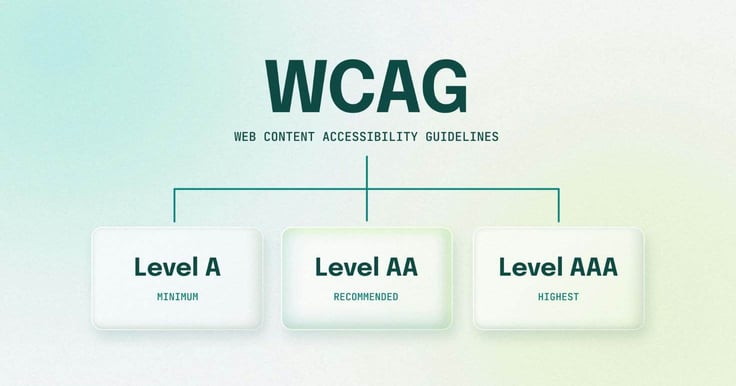
2026 could very well be the year where WordPress hones in on its accessibility features. Right now, the WordPress Accessibility Team is using WCAG 2.2 Level AA as its benchmark, which is considered the “recommended” tier.
WordPress 6.9 (to be released in December 2025) will include upgrades that meet “modern design standards.” Meanwhile, WooCommerce added more than 140 accessibility enhancements between 2024-2025.
The conversation will continue. But perhaps by WPAD 2026, it will move from why accessibility matters to how it can best be embedded in hosts’ stacks.
Learn more about WPAD and its future events on the official website.
