




Writer: Jordan Sprogis


Editor: Lillian Castro


Reviewer: Cristian Lopez

Key Takeaways
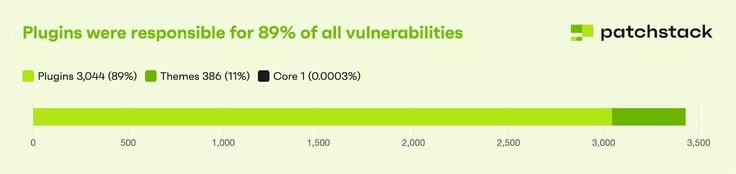
- WordPress plugins are still at high risk, and Kinsta’s Roger Williams says prevention starts with auto-updating.
- But not all plugins are created equal: Certain plugins, like eCommerce checkouts and contact forms, are more vulnerable.
- Version 6.6 added a safety net that could prevent outdated plugins from exposing sites, but it's not the be-all, end-all answer.
No matter how much love WordPress gets, plugin vulnerabilities have always been a problem. And now they’re coming in faster than ever.
In just the first six months of 2025, there were 6,700 new vulnerabilities identified, with 41.5% of those immediately exploitable. That’s a major jump from 30.4% last year.
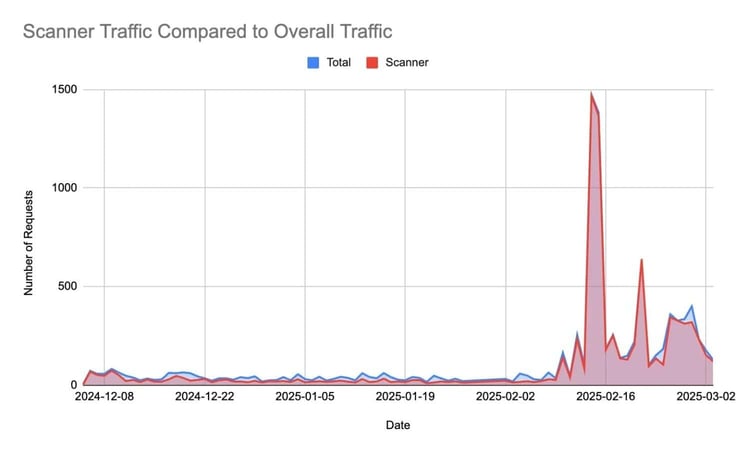
The reason is AI. Security research shows that automatic bots can scan thousands of sites in seconds — and they’re searching for exploitable things, like outdated plugins and weak configurations.

It’s why Roger Williams, Partnerships and Community Manager at Kinsta, told HostingAdvice that site owners need to stop treating plugin updates as an afterthought.
“Auto-updates are one of the simplest and most effective ways to reduce risk,” Williams said. “I’ve enabled them on my personal and client sites, and haven’t had issues. With WordPress 6.6 introducing auto-rollbacks for failed updates, the safety net is stronger than ever.”
If an auto-update fails, the auto-rollback feature automatically puts sites back to its previous version. It’s great for SMB clients who don’t have the time to manually check daily — and not a bad opportunity for a managed services package.
But even an automatic feature doesn’t fix everything. The rest of the job still falls to those actually running the infrastructure, and unfortunately for them, the clock starts ticking the moment a new vulnerability pops up.
AI Is in the Driver’s Seat
Old-school cyberattacks were effective, but slow. Even a skilled attacker might find and exploit a vulnerable plugin on a single target within a few hours, and mass campaigns could take weeks.
Now, instead of just probing one site at a time, bots can scan thousands of sites instantly. They can also adjust tactics mid-attack and mask their fingerprints faster than it takes many of today’s security tools to respond.
Human Security found that web scanner bots are often the very first visitors to new sites, probing for vulnerabilities before any real users arrive. In some honeypot tests, they also accounted for up to 100% of traffic on certain days.
But this should come as no surprise when Cloudflare estimates that up to 40% of all internet traffic now belongs to bots.
“That combo of sheer scale and shape-shifting makes these attacks tougher to spot,” Williams said.
If AI is the driver going 100 mph in an alleyway and hosts are the passengers trying to regain control, the best chance of taking the wheel is with defenses that are layered and fast, Williams said.
“Roll out fresh WAF rules the moment a plugin flaw hits the wire, watch for weird logins or sudden file-writes, and keep every site in its own sandbox so trouble can’t hop the fence,” he said.
Of course, hosts can leverage AI just the easily as cyberattackers. Plenty of newer tools can flag abnormal traffic patterns and even draft patches before exploits go public. But Williams warned against overreliance.
“There are a lot of cool things coming up… but security runs on proof, not promises,” he said. “The smart play is to treat AI like a junior analyst behind strict guardrails: great for speed and insights, always double-checked by deterministic rules and human eyes.”
High-Risk Plugins = Greatest Threat Vector
Not all plugins are created equal. Contact-form builders, file-upload tools, and eCommerce checkouts sit at the top of the threat pyramid, especially if they’re abandoned or rarely updated.
“Any abandoned plugins should be a red flag and avoided as much as possible,” Williams said.
In fact, a 2025 audit scanned 68,000 WordPress installations and revealed:
- Only 15.3% met basic security standards
- 66% were running outdated WordPress versions
- 85% lacked basic security headers
These are pretty intense numbers, but one could argue they only prove why managed WordPress providers are so important. All those things should be baked into every plan.
And yet, Williams said he has noticed plenty of pushback from developers who tend to prefer manual control.
“I get it — they’re doing the work of reading change logs and testing updates in staging… but it’s expensive in dollars and time,” Williams said. “Unless you are dedicated to daily checks for manual updates, or willing to hire someone to do that, it’s best to enable auto-updates.”
Collaboration is the Key
Even one of the most popular WordPress hosting providers understands that no single player can secure the ecosystem alone.
It’s something that WordPress itself emphasizes on its About page:
The WordPress open source project has evolved in progressive ways… supported by skilled, enthusiastic developers, designers, scientists, bloggers, and more… a large community of people collaborating on and contributing to this project.
Williams described security as a team sport, so tighter collaboration between hosts, plugin developers, and site owners is what will lead to better patch cycles and fewer security gaps.
“Hosts can invite plugin authors to test on real-world infrastructure and flag any permission or resource red flags,” Williams added. “Keep the feedback loops short, the mindset curious, and you get a shared responsibility model where everyone pushes the platform forward together.”
What hosts can do is act as an “early-warning radar”:
- Track fresh CVEs
- Push timely alerts
- Offer auto-update tools with visual regression testing and rollbacks
- Keep a fully patched stack (including PHP)
- Maintain daily backups and an on-call security team
It’s that kind of standard that makes evolving WordPress to the next era possible, even if that era is powered by an invisible attacker.
“Top it off with regular backups and a one-click rollback button,” Williams said, “and most plugin exploits stay in footnotes instead of front-page news.”
