

A WordPress website builder sounds like the best of both worlds, combining the world’s most popular content management system with ultra-simple, drag-and-drop web design.
Although WordPress can be wonderful, the platform can also be tricky to learn and operate effectively. Once you install the free software, you have to actually build your site, which doesn’t come easy to those who lack programming skills. WordPress is not a website builder, but the best web hosting, themes, and page builder plugins help bridge the gap.
Fortunately, these tools will make building your new site simple as can be — even if you’re a first-timer. Let’s take a look at the very best of these WordPress website builder options, along with other considerations you should have along the way:
First, Set Up WordPress Hosting
Before we dive into themes and plugins to ease your WordPress experience, keep in mind that you can’t build a site without first setting up web hosting. Web hosting costs just a few bucks per month, and the best hosts will let you download and install WordPress in one click. Some even have WordPress pre-installed for you.
Once you’ve set up a web hosting account and successfully installed WordPress, you’re ready to start designing. In the next section, we’ll cover the top theme and plugin options for building your WordPress site. We’ve tested all the popular web hosts, rating them on everything from cost to support to eCommerce features, and we highly recommend these three as the best hosts for WordPress:


- Best overall value: The most complete managed WordPress hosting at this price
- Kodee AI Agent manages your WordPress site via simple chat
- LiteSpeed servers boost site speed by up to 40%
- WAF, malware scanner, DDoS protection, and auto-updates
- Free migrations — 85% completed in under 5 minutes
- Get started on Hostinger now.


Sead Fadilpasic


As much as we love WordPress, one of our biggest pet peeves is when hosting providers exploit the popularity of the world's most-used content management system by offering so-called WordPress hosting that, in reality, is exactly the same as the host's shared server plans. Fortunately, Hostinger's ultra-fast infrastructure and easy access to SSL certificates and backups sets up the company to outperform the vast majority of the violators of our admittedly made-up rule.
Go to full review »| Money Back Guarantee | Disk Space | Domain Name | Setup Time |
| 30 days | 20 GB SSD – 100 GB NVMe | FREE (1 year) | 4 minutes |

- Best for performance: WordPress sites average 78% faster speeds after migrating to SiteGround
- Free AI agent manages your WordPress site via simple chat
- Smart WAF, AI bot protection & geo-distributed backups
- Free staging, WP-CLI, SSH, Git, and one-click migrations
- 4.9/5 Trustpilot — 98% customer satisfaction for 10+ years
- Get started on SiteGround now.


Lynn Cadet


Want a hassle-free, WordPress-optimized hosting service? SiteGround has thought of everything you need to get your site up and running.
Go to full review »| Money Back Guarantee | Disk Space | Domain Name | Setup Time |
| 30 days | 10 GB SSD - 100 GB Google Cloud SSD | FREE (1 Year) | 6 minutes |

- One of only three WordPress.org officially recommended hosts
- Free handcrafted starter website built by DreamHost experts
- Remixer AI builder, NVMe SSD, and daily automated backups
- Free domain privacy for life — included with every domain
- 100% in-house support including WordPress core contributors
- Get started on DreamHost now.

Christina Lewis


One of only three hosting providers recommended by the WordPress Core team, DreamHost has actively contributed to the WordPress community for more than a decade. The company's platform is optimized for the incredibly popular content management system, and plans include easy setup, automated updates and backups, unlimited bandwidth, and 24/7 specialized support.
Go to full review »| Money Back Guarantee | Disk Space | Domain Name | Setup Time |
| 30 days | 25 - 100 GB NVMe SSD | FREE (1 year) | 4 minutes |
See more WordPress hosting reviews »
Design Option 1: Choose a Page Builder Plugin
As those who are familiar with WordPress can tell you, there are two easy ways to build a WordPress site yourself without having to write code: themes and plugins.
Themes are simply pre-made templates that you can manipulate to make a site look and function as you wish, while plugins are a common form of software that you can install on your WordPress backend to get a certain type of functionality — in this case, site-building functionality.
Page builders get the closest to the traditional drag-and-drop website building experience. The plugins, which you can install from your WordPress dashboard, convert the WordPress editing interface to include content blocks that you can arrange however you’d like.
To help you perfect your layout and content, plugins work with your WordPress theme — making dragging and dropping and manipulating elements of your site’s design that much easier. These free WordPress website builder plugins also come with the option to upgrade to a premium license, which gives you access to expert support and more customization features than non-licensed versions.
1. BoldGrid
Created by the WordPress experts at InMotion Hosting, BoldGrid quickly shows beginners and experienced pros the path to website inspiration with a plugin that steers you to the right design, features, and content you may need. The platform offers several themes and variations tailored to specific industries and even fills in relevant text and imagery to help you get started.

- FREE drag-and-drop WordPress website builder
- WordPress pre-installed by InMotion Hosting
- Pre-built and customizable content with GridBlocks
- FREE WordPress themes with mobile/tablet editing
- PayPal integration and shopping carts available
- Get started on BoldGrid now.


Laura Bernheim


InMotion Hosting leads in shared, VPS, dedicated, and WordPress hosting, so it’s only fitting the team would craft one of the web’s first drag-and-drop site-building interface to sit atop WordPress. BoldGrid is a revolutionary platform that...
Go to full review »| Money Back Guarantee | Disk Space | Domain Name | Setup Time |
| 90 days | 100 GB SSD - Unlimited SSD | FREE (1 year) | 7 minutes |
See more WordPress hosting reviews »
2. Beaver Builder
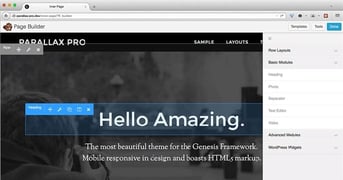
Beaver Builder is certainly one of the most popular page builder plugins for WordPress out there. There’s no need to bother with HTML or custom styling, because Beaver Builder allows you to visually edit elements of your site right on the frontend. If you are slightly tech-savvy, you’ll be happy to hear that you can add your own CSS classes and IDs, plus widgets and shortcodes.
3. Live Composer
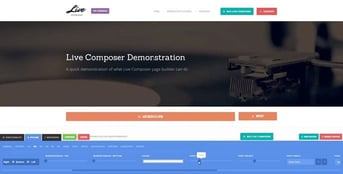
The page builder of choice for over 30,000 site owners, Live Composer is an extremely easy-to-use drag-and-drop frontend editor. You can edit your content in real-time, so you can have a ready-to-convert landing page or a blog boasting your recent travels up on the Web in minutes.
4.MotoPress
MotoPress is a drag-and-drop frontend builder that’s compatible with nearly any WordPress theme. It features over 30 content elements, with the option to gain additional customization options with MotoPress add-ons. The end result is a completely mobile-responsive website.

Design Option 2: Choose a Free WordPress Theme
The WordPress theme directory features thousands of free themes, which will work great for first-time site owners looking to create something small like a blog or professional portfolio. Businesses and developers with more lofty goals, however, are probably best suited by investing in a premium theme. Paid themes generally come with more features and more modern and secure code, and can cost between $50 and $100.
The following themes are not only beautiful and intuitive, but they also feature easy customization tools for users of all skill levels. In addition to drag-and-drop editing, you’ll also get responsive (mobile-friendly) designs and tons of customization options.
1. Sydney
Sydney allows site owners access to all Google fonts, with full control over layout, coloring, and navigation options. Professionals can upload logos, header images, and full-screen slider content to create eye-catching, responsive designs.

2. Astrid
Astrid features a sleek, seamless layout that allows site visitors to scroll through the facets of your business with ease. The template is dynamic and designing is intuitive. You’ll get color options, the ability to add a full-width header image, options for blogging, and custom widget support.

3. Llorix One Lite
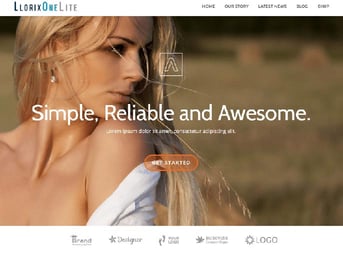
An all-star in the 1-page design arena, Llorix One Lite is ideal for professional-looking landing pages and basic personal site building needs. It includes a full-width template, a responsive blog section with threaded comment capabilities, and an array of color theme options to choose from.
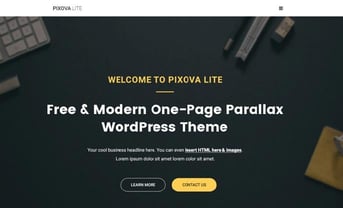
4. Pixova Lite
For clean lines and a modern feel, Pixova Lite offers a variety of content options to make your site look like it was designed by the pros. Included features are custom slider, animations, 2-column and full-width layout, responsiveness, and custom menus and headers.
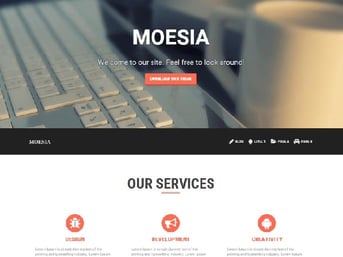
5. Moesia
Featuring cool animations, 11 predefined site elements, and two blog page layouts, Moesia makes building professional sites a breeze. This theme comes with an attentive support team, regular updates, and support for all the popular web browsers (Chrome, Firefox, IE9+, & Opera).
Design Option 3: Pay for a Premium Theme
WordPress themes are great, because even a non-techy can have a professional-looking website — complete with beautiful photo sliders, eye-catching buttons, and custom sidebars or menus — without touching a line of code. However, you can’t expect to get everything you want for free.
If you’re willing to commit around $50 to your site building endeavor, you can get the same drag-and-drop functionality, with more customization options, dynamic design options that may be limited in the free version, and all-around advanced features for premium-quality site building.
The following are our favorite premium WordPress theme options for site building:
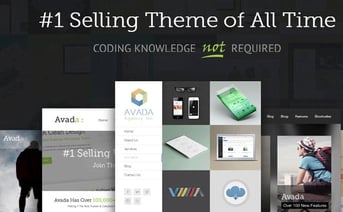
1. Avada ($59)
Our favorite of the premium WordPress website builders, Avada comes with an incredible amount of template layouts, header options, color choices, and additional integrations. Whether you want to blog, sell, or display photos, Avada is the #1 pick in premium WordPress themes.
2. X ($64)
With X, you also get nearly two dozen extensions, including MailChimp integration, Envira photo gallery, and Olark chat. Plus, X users get to take advantage of the extremely popular UberMenu, so your site has a navigation menu that matches the look you want.

3. Enfold ($59)
Enfold is great for an easy start in WordPress site building. Its creators offer different versions for bloggers, business folks, resume posters, and for various industry-specific niches. The drag-and-drop editor and narrated video tutorials warrant its reputation for mega-fast 2-minute setup.

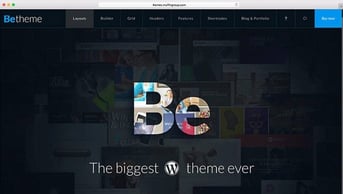
4. BeTheme ($59)
BeTheme is actually a beastly package of over 210 fantastic pre-made site templates, so you’re sure to find the design that matches your style. It’s fully customizable and easy to use — starting with the 1-click installation, all the way down to the custom font uploader.
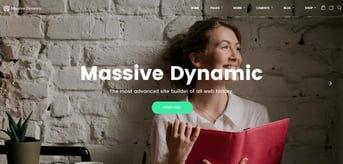
5. Massive Dynamic ($59)
Massive Dynamic features a live website builder that allows you to customize colors, layouts, and shortcodes and preview how it will look on your site easily. Design the perfect header to meet your objectives — whether you want visitors to pick up the phone or check out your portfolio — using the customizable menu designs.
Design Option 4: WordPress Website Builder Alternatives
Ask yourself this: Why does your site have to be built with WordPress?
If you don’t have a highly technical answer to that question, your site probably doesn’t need to use WordPress at all. While WordPress is a nice and popular platform, there are plenty of website builder options that will give your site the same look and functionality as a WordPress-based site.
Next up are hosts that offer a super-easy combo package: hosting with a free website builder. For just a few dollars a month, these hosts will give you the excellent web hosting you deserve, plus free drag-and-drop website builders and tons of free templates to make your own.
The beauty of these combo deals is that you get a free drag-and-drop editor to create beautiful, responsive designs and all you have to do is pay for the hosting — typically $3 to $10 per month.
- Best website builder: The most complete AI-powered builder at this price point.
- Describe your site to AI and go live in minutes
- 300+ designer-made templates with drag-and-drop
- Built-in eCommerce with 0% fees and 100+ payment methods
- Built-in SEO, email marketing, and AI logo maker included
- Free domain for 1 year + 14-day free trial to start
- Get started on Hostinger now.
Sead Fadilpasic
Whether you're taking your first foray into website hosting or are a developer looking to save some time, a strong website builder can dramatically streamline the creation process and enable users to launch a website in five minutes or less. Fortunately for customers, Hostinger has invested heavily in crafting an impressive visual editor sure to appeal to users of all levels of experience.
Go to full review »| Money Back Guarantee | Disk Space | Domain Name | Setup Time |
| 30 days | 20 GB SSD - 100 GB NVMe SSD | FREE (1 year) | 3 minutes |

- Blueprint AI Builder — named a TIME Best Invention of 2025
- Industry-leading templates built for creatives and businesses
- Built-in eCommerce, scheduling, invoicing, and memberships
- AI-powered content, SEO tools, and email marketing included
- Free trial, no credit card required — cancel anytime
- Get started on Squarespace now.
Lynn Cadet
Squarespace includes built-in ecommerce functionality that allows users to sell physical products, digital downloads, subscriptions, and services. Store owners can manage inventory, track orders, configure shipping rules, and accept secure payments directly from the dashboard.
Go to full review »| Money Back Guarantee | Disk Space | Domain Name | Setup Time |
| 14 days | Unlimited Storage | FREE (1 year) | ~5 minutes |

- Trusted by 250 million websites across 190 countries
- 2,000+ designer-made templates for every industry
- Built-in eCommerce, scheduling, blogging, and events
- Built-in SEO tools, email marketing, and Google/Facebook ads
- 99.99% uptime on multi-cloud hosting with enterprise security
- Get started on Wix now.
Lynn Cadet
Website building is where Wix shines. The thousands of templates, the intuitive editor, the industry-leading designs that cater to a variety of specific fields and use cases — all these facets represent a platform that excels at facilitating easy web design for the non-tech-savvy user.
Go to full review »| Money Back Guarantee | Disk Space | Domain Name | Setup Time |
| 14 days | 2 GB - Unlimited | FREE (1 year) | 4 minutes |
See more website builder reviews »
Ready to Start Building Your Site?
WordPress currently powers 36% of the web — and your site could be next. While the increasingly popular platform can be tricky for non-techies, now that you’re equipped with the best options for hosting and building your WordPress site, there’s no reason not to get started today.
Let me know in the comments below how you do — I’d love to hear your success story!
HostingAdvice.com is a free online resource that offers valuable content and comparison services to users. To keep this resource 100% free, we receive compensation from many of the offers listed on the site. Along with key review factors, this compensation may impact how and where products appear across the site (including, for example, the order in which they appear). HostingAdvice.com does not include the entire universe of available offers. Editorial opinions expressed on the site are strictly our own and are not provided, endorsed, or approved by advertisers.
Our site is committed to publishing independent, accurate content guided by strict editorial guidelines. Before articles and reviews are published on our site, they undergo a thorough review process performed by a team of independent editors and subject-matter experts to ensure the content’s accuracy, timeliness, and impartiality. Our editorial team is separate and independent of our site’s advertisers, and the opinions they express on our site are their own. To read more about our team members and their editorial backgrounds, please visit our site’s About page.