


Hate is a strong word, but it’s safe to say that I thoroughly dislike migrating websites. Even the word “migration” sounds like some massive upheaval where I have to carry all my belongings on my back just to get to my destination. But it doesn’t have to be as worrying as I make it sound.
I’ve written about thousands of migration strategies in the past, and I’ve even completed plenty of migrations for first-hand experience. From all that, I’ve learned a few things, and I’m here to make it as simple as possible for you.
The word migration — in the realm of website development — refers to the movement of website resources from one platform to another.
Examples include moving an entire website to a new hosting provider, changing your domain name, or even switching content management systems.
Lots of blog posts will try to convince you that migrations are simple. Let me tell you, that’s usually a lie. They’re often far more complicated than you think. In my experience, I need to carefully plan a migration to eliminate the chance of downtime, broken links, and missing content.
To ease the pain for your own future migrations, I’ll explain how to plan, implement, and manage each migration from start to finish.
Understanding Website Migration
To help you better understand website migrations, I’ll dive into the various types of migrations — everything from platform migrations to hosting migrations. After that, you’ll learn about the reasons for migrating in the first place.
Types of Website Migrations
Usually when I talk about a website migration, I’m referring to the process of moving from one web host to another. There are several other migration types, many of which you might initiate at the same time.
Platform Migration
A platform is the website builder or content management system used to manage a website. Popular content management systems — such as WordPress and Shopify — have proprietary systems for designing pages, creating blog posts, processing payments, and installing plugins.
A migration from one platform, like WordPress, to another, like Shopify, is called a platform migration. Throughout my history in web design and tech writing, I’ve noticed that most organizations perform platform migrations for these reasons:
- Improved security
- Better user experiences
- Lower pricing
I consider a platform migration one of the trickiest to complete since it requires you to export content and databases, then redesign your entire website using the new platform’s design tools. Let me know if you ever find two platforms where the design templates are interchangeable because I’ve never encountered such a situation.
Domain Migration
If I were to say “I migrated a domain name,” that would mean I changed the primary domain name of my website to something else. That also might tell you that I purchased a domain from a third-party domain registrar and pointed it to my hosting provider.
Here’s my simplest example of a domain name migration: changing the domain name from “example.com” to “examplepetstore.com.” It’s as straightforward as that.
I see businesses complete domain name migrations for the following reasons:
- SEO improvements
- Rebranding
- Name change purposes
You might complete a domain migration on its own, but I figure many site owners also pair such a migration with something like a hosting or platform migration.
Hosting Migration
A hosting migration, the type of migration that you and I hear about the most, takes place when you change hosting providers.
Here’s why you might commit to a hosting migration:
- Performance enhancements
- Better pricing
- A desire for more hosting features
- Improved customer support
If I were to migrate to another host, I’d probably keep the same platform (like WordPress or Joomla). However you, some of you may require a more drastic shift, like switching your platform, host, and domain all at the same time.
Design/Structure Migration
A design or structure migration occurs when you modify a website’s functionality or design elements. As you may assume, this migration type only focuses on aesthetics. I often see design/structure migrations take place without a shift in host or platform.
However, I’d almost always recommend doing a design/structure migration after a platform migration. In fact, you’ll probably find that it’s a necessity since competing platforms don’t have the same templates or design features.
I consider these to be common elements of design migrations:
- Wireframes
- Design mockups
- Picking different platform templates
Sometimes all of those happen together in one design migration. The time frame of a design migration can vary. When I swap out a Shopify or WordPress template for another, it may only take five minutes for the switch, then a few hours or days to refine the template’s settings.
If, however, I intend on overhauling my entire website, I’d expect a project that takes months.
Protocol Migration
Different protocol migrations exist, but here’s the simplest way to think of it: protocol migrations involve switching the coding languages used for a website. Sometimes you’ll see a drastic switch, like moving from JavaScript to Python. More often than not, however, I encounter protocol migrations from HTTP to HTTPS.
That shift from HTTP to HTTPS makes your site more secure, and it’s required in some municipalities. If that doesn’t convince you to move to HTTPS — which encrypts all your site data with an SSL certificate — it also prevents browsers from displaying terrifying warnings telling people not to visit your site.
So, if you end up completing any type of protocol migration, at least start with HTTPS — for the sake of your SEO.
Reasons for Migration
Whenever I’m presented with the choice to migrate a site, I know I better have a really good reason to do so. If I haven’t made it clear, migrations are not fun. You better ensure the migration will result in significant improvements in branding, scaling, or performance.
Here are the main reasons you might complete a migration:
- Performance improvements: Is your site running slowly? I consider performance one of the best reasons to consider a migration of some sort. You want to improve the performance of your site. Perhaps a better host or platform can help make that happen. More often than not, all you’d need to do is find a reliable host with cloud, VPS, or dedicated hosting.
- Enhanced security: I’ve found that some platforms have better security features than others. I can say the same about hosting providers. A protocol switch — like from HTTP to HTTPS — also serves to strengthen your site’s security.
- Better scalability: I learned a long time ago that some hosting providers just stink when it comes to scaling. If your discount shared hosting provider only has two or three pricing plans with little improvement in CPU, RAM, or storage, it’s time to look elsewhere. I recommend hosting migrations to improve scalability, most notably when you shift to a host with VPS and cloud hosting.
- Improved SEO: I have numerous recommendations for how to improve your SEO, and one of them involves migrations. Technically, any type of migration could improve your SEO. The question is whether it’s worth the effort. For instance, I might consider a domain migration to make my domain more relevant to search engines. It’s also possible that a platform, hosting, or protocol migration helps with SEO. Especially if we’re talking about shifting to a higher-performance host or platform. Design migrations can help SEO, too.
- Modernization and redesign: After ten years of running a website, I recommend all website owners consider design migrations to modernize everything. A platform migration may also help with this if you switch to a less antiquated theme. Yes, retro aesthetics are in, but if your website looks like it was made on GeoCities, it’s probably time for an upgrade.
If your website could use better performance, design, scalability, security, or SEO, a migration is probably right for you. It’s not a decision I’d take lightly, so in the following sections, I explain how to plan for and execute a migration.
Pre-Migration Planning
I’m begging you: NEVER take on any type of migration without a thorough plan of action. You’re bound to make mistakes otherwise. In this section, I explain how to set clear objectives, complete the necessary backups, and communicate with stakeholders like customers and workers.
1. Set Clear Objectives
Before anything, I want you to understand that a solid pre-migration plan begins by setting objectives. Make them clear. Make them very clear. Make them as specific as humanly possible.
Would you like to rebrand your company to attract more female customers in the 25-35 age bracket? Are you trying to improve security to bring in more privacy- and security-oriented users? Maybe performance is the reason for your migration.
Get a piece of paper. Or open a document on your computer. Write down those objectives. Identify all of the Key Performance Indicators (KPIs) so, in the future, you can quantify the success of your migration. I also love KPIs for setting goals.
If you’re wondering which KPIs to consider, here’s my list of go-to options: page load speed, SEO rankings, conversion rates, and user engagement.
2. Perform a Site Audit
My next step in any pre-migration plan, after setting objectives, is to perform a site audit. The most effective audits, in my opinion, help identify metrics to decide on the best type of migration to complete. Site audits also help out with tracking the success of your migration — after you’re done.
Whenever I complete a site audit, I look at these elements:
- Content quality
- SEO metrics
- User-experience
- Branding effectiveness
It’s also wise for you to consider issues with mobile responsiveness, broken links, and slow-loading pages.
3. Perform a Backup and Implement Security Measures
With your site audit complete and clear objectives set forth, you now know the type of migration to start. You’re also ready to track the results of that migration. I encourage you, however, to implement security measures (like backing up your website) before starting the migration.

I always say that a backup before a migration isn’t really a suggestion. It’s a requirement. Such a drastic move — something that could cause a loss of data and potential downtime — should have a backup just to be safe.
Here’s what to include in your site backup:
- Databases
- Content
- Assets
- Configurations
- Site files
- All transferable design elements
My other security measures involve the prevention of password and sensitive data loss. Tips include the usage of secure transfer protocols, encryption for sensitive information, and strong, updated passwords.
4. Communicate With Stakeholders
What’s a stakeholder? Anyone affected by the migration of your site. I’d say that includes you, any website visitors, all customers (past and present), anyone who works for your company, investors, and even suppliers.
My strategy before a migration is to send an email to all of these people outlining the timeframe of the migration, along with information about your objectives and potential benefits of the migration. For your team members, give everyone roles throughout the migration, and prepare your customer service team to handle any questions that come from customers.
SEO Considerations
My least favorite part about any migration (which is saying something, all things considered) is maintaining SEO rankings. So many delicate factors dictate your place in the search engines. Will I see an improvement or decline in SEO if I switch from WordPress to Shopify? Have I transferred all the metadata that established my SEO strategy in the first place?
The goal is for you to almost guarantee no loss of SEO rankings after the migration. I’ll explain how to preserve your SEO status with several tactics.
Preserving SEO
I may start sounding like a broken record, but yet again, I’m suggesting you make another plan of action. This time, however, I’m talking about a plan for how to transition your SEO rankings and strategy to the new site or domain. If you aren’t sure what these terms mean, bring in an SEO specialist as part of your migration team. Seriously, you’ll need one.
Actions to consider:
- Monitor and address crawl problems with programs such as Google Search Console.
- Update all internal links for your new site structure.
- Change sitemaps for your new structure.
- Use 301 redirects to keep link equity and help search engines find your newer links.
- Keep your navigation on the new site similar to the old website.
Can I promise that these tips completely maintain your search engine rankings throughout a migration? No, but it’s the best strategy I know of. It will get you as close as possible to your original rankings.
Hopefully your migration has the intention of boosting SEO in the process, therefore negating any slips in the search engines.
Content Optimization
I’m a lifelong content creator, so I understand the value of SEO elements on each article, image, and webpage. It takes a long time to establish search engine rankings, so it’s a necessity to transfer over as many of the healthy SEO elements as you can.
Here’s the goal: move all the good, optimized content to your new site without losing data or assets.
You’ll want to preserve metadata in articles, alt tags for images, and keywords within titles and paragraphs. Luckily, I’ve found that most content management systems have quick tools to export all content files for a seamless transition.
When you’re done with the migration, please go through all your content to add any missing meta tags or relevant keywords. Take the moment as a chance to improve everything from keyword optimization to readability (more bullet points, more images, and shorter paragraphs).
Analytics and Tracking
If your site doesn’t have any analytics or tracking tools, use the migration as an opportunity to add them. For previously implemented analytics and tracking tools, be sure to shift them to the new site. You may not need to do this for a design/structure migration, though.
It seems like every website uses Google Analytics, so I’ll use that as an example. Log into your Google Analytics dashboard and find out how to install it on your new host or platform. I recommend looking for plugins or extensions provided by the host or platform. If all else fails, Google Analytics offers embeddable code to connect with any platform.

Why do I stress the importance of migrating an analytics tool so much? Because I’ve found it’s one of the easiest tasks to forget during a migration. Not only that, but having an analytics tool on your new website or host sets you up for future success.
You can also use it to compare future metrics with pre-migration numbers, which is a great way to evaluate the success of the migration.
Technical Aspects of Migration
Although many platforms provide migration tools for streamlined transfer processes, it’s still difficult to avoid the many technical aspects of migration. If you’re a beginner and need help with things like DNS changes and data transfer, this is the section for you.
Domain Name System (DNS) Changes
In my experience with migrations, I almost always have to change DNS settings. That goes for domain and hosting migrations, and for platform migrations when you have to link a domain name or email address. A DNS change simply tells your domain to point to a server, which may achieve something like publishing your website or receiving emails in your inbox.
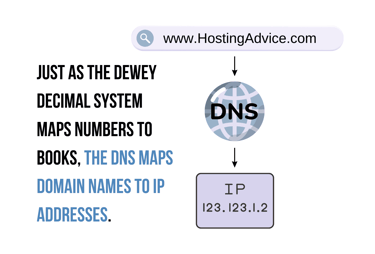
You’re either pointing that domain to a new server or an old server. For instance, buying a new domain would require you to point that domain to an old server (the one that hosts your website). On the other hand, transferring to a new host — but keeping your old domain — would require you to point that domain to a new server.
With some migrations, you’d do both.
Regardless of how you change your DNS setting, you must always be aware of domain propagation. The word propagation means “to update all servers about the recent change.” Modifying your DNS settings could actually affect dozens of servers on the internet, so it takes some time for all servers to recognize the change.
I’ve found DNS propagation to usually take a few minutes or hours, but it can take up to 48 hours. So, be patient and prepare for this potential slowdown in your migration. DNS checkers help minimize downtime and improve the accuracy of all records changed.
Server and Hosting Setup
For a hosting migration, you need to configure the new server (the one you’re migrating to) to meet the requirements of your website.
My suggested tasks for server and hosting configuration:
- Installing necessary software (such as a CMS)
- Configuring databases
- Testing performance
You’ll also want to enable all security and performance features provided by the host, such as firewalls, SSL certificates, and content delivery networks.
Once set up, you should test the hosting environment for performance and load times. For this, I use tools like GTMetrix and Google PageSpeed Insights.
Data and File Transfer
In my experience, transferring data and files is usually the easiest part of a migration. Content management systems, website builders, and hosts give you immediate access to site files and databases, often allowing you to download a zip or other file type for transfer.
Your goal, however, is to make the transfer of this data secure. Here’s my favorite best practice to help you with security: You should only use reliable, safe transfer methods such as database export tools and secure file transfer protocol (SFTP) for files.
As a bonus, I recommend encrypting sensitive data while moving it and verifying data integrity after you import it to the new site. Luckily, the SFTP (not FTP) process offers encrypted transfers.
Testing and Quality Assurance (QA)
After a migration, it’s easy to assume everything works properly. I beg you not to fall into this trap. Migrations are fickle. Please conduct a thorough quality assurance test before making your site live. Always complete this testing in a staging environment, too.
During a quality assurance test, I recommend you check for:
- Missing links
- Broken forms
- Broken links
- Faulty third-party integrations
- Odd formatting
- Buttons that no longer work
Have multiple people run their own tests and report back to you. Also, be sure to test the site on other devices and browsers.
Post-Migration Steps
You’ve migrated a website. Now what? The best course of action involves completing reviews, tests, and monitoring before going live. As always, I recommend using a staging environment to run these post-migration steps.
Go-Live Checklist
My most successful migrations come about when I use checklists. Before going live after your migration, walk through this “Go-Live” checklist to ensure it’s ready for publication.
- Check for broken links across your entire site.
- Identify any missing pages and add new ones.
- Confirm the integrity of all data transferred.
- Test your site’s functionality on all devices and browsers.
- Verify accurate DNS settings and successful propagation.
- Ensure you’ve implemented all necessary 301 redirects.
- Update all of your tools, such as Google Search Console and Google Analytics.
I also insist that you inform your users of potential downtime long before the migration occurs. This makes your customers aware of the situation and provides you with enough time to assess the success of your migration with greater accuracy.
Monitoring and Troubleshooting
Once you go live with a migration, it’s easy to think that the process is done. I encourage you, however, to remain vigilant with monitoring and troubleshooting. You’ll want to check in on website performance and user experience. Otherwise, how do you evaluate the success of the migration?
I find monitoring and troubleshooting particularly important during the early stages of a newly launched website. Your visitors may find a new interface troubling or might encounter missing links and slower load times.
For monitoring, I suggest you keep a watchful eye on:
- Traffic
- User engagement
- Load times
My preferred method for monitoring and troubleshooting involves asking for user feedback. This way, I can take all the information gathered to troubleshoot and fix functionality issues.
Performance Review
Outside of the regular performance monitoring, I suggest you complete a dedicated performance review to ensure the efficiency of your new host or platform.
Most importantly, you should analyze these metrics:
- Bounce rates
- Load times
- User engagement
These help give you an idea of performance issues.
Furthermore, a documented performance review lets you compare all new key performance indicators (KPIs) with those from your old configuration. In short, it helps you understand if the migration was successful in terms of performance.
SEO Monitoring
Nothing is worse than noticing your SEO rankings slipping in the first few months after a migration. I’ve seen it happen so many times, and it’s nothing short of heartbreaking. That’s why I recommend SEO monitoring to find and fix these issues early on.
Google Analytics and Google Search Console come in handy for SEO monitoring, but I’ve found the most success with more advanced tools like Ahrefs and Semrush.
With those tracking tools in place, you’re able to monitor posts, pages, and keywords to see how they perform after your migration. If you see drops in rankings, create a plan to further optimize content with meta tags, keywords, and high-quality content. Site performance and structure play a role in SEO as well, so don’t forget to check those.
Common Challenges and Solutions
I’ve explained how website migrations often come with challenges. Besides the specific difficulties of the migration process, I want to take a moment to also cover the general challenges (with solutions) that often occur during and after a migration.
Downtime and Data Loss
Downtime is often inevitable during a migration. Yet, from my experience, you have options to decrease that downtime significantly.
To minimize the effects of downtime:
- You should run the migration during off-peak hours.
- Use a staging environment that doesn’t affect the old or new site.
- Create a detailed plan of action for the migration and have your team in place to speed up the migration.
- Consider strategies such as load balancing and incremental data transfers.
As for data protection, I always use full site backups in multiple locations. This way, I know exactly how to restore those backups should the time come. I suggest you do the same.
User Experience Issues
If you think a migration is tough for you, just think about the frustrations your users may experience. After a migration, users might become discouraged, confused, or frustrated. I find that user experience almost always needs monitoring after a migration. Just because you think a new design is better doesn’t mean other people feel the same way.
To mitigate user experience problems, I encourage you to complete thorough testing after the migration. I prefer only making the site live after testing in a staging environment. It’s also wise to test the new website on multiple browsers and devices.
It’s different during a migration, though. I’ve found that open lines of communication solve most issues since customers are willing to cut you some slack as long as the changes don’t come as a surprise.
This open line of communication also tells your users that you value their feedback. You should ask for questions, encourage them to speak up, and send out your details and objectives. This helps users feel informed.
Here’s a tip: I find that updating your online documentation to reflect the new website is one of the best ways to improve your user experience. You should also consider including a form for them to submit user feedback.
SEO Impact
As I mentioned before, you may encounter an impact on your SEO results after a website migration. Whenever my search engine rankings drop, I begin by devising a rigorous SEO monitoring and troubleshooting plan. This helps me find trouble in the following areas: mobile friendliness, content optimization, and URL structures.
I also find it useful to conduct a comprehensive pre- and post-migration audit. This helps to fix any SEO issues before they become a consistent problem for me. As for post-migration SEO problems, I like to implement 301 redirects. These help maintain a reasonable site structure and preserve SEO link equity.
The Secret to a Successful Migration: Planning and Testing
I’ve seen simple domain migrations fail horribly. I’ve seen very complicated hosting migrations succeed without a hitch. The truth is that very few migrations are straightforward.
Luckily, you can make migration manageable and successful with a detailed plan and rigorous testing. That plan guides you along the path to an experience where you can migrate a site, experience its benefits, and end up with minimal issues at the end.
Here’s my final advice: please continue analyzing your site to identify when it requires a platform, design, domain, or host migration.
You might need a branding change, or perhaps your website could use a performance boost. Whatever the situation, a migration could help. Just approach all migrations with knowledge, planning, and active troubleshooting. I wish you the best of luck!