The annual cost of cybercrime amounts to roughly 9.2 trillion dollars, and cybersecurity experts predict this figure to grow to 15.6 trillion by 2029. Ransomware, a type of malware, is a major culprit of this financial damage.
Thankfully, as malicious parties evolve their techniques, so do technological innovators who develop threat protection solutions.
Malware protection is a cybersecurity solution designed to protect endpoints against malicious software or malware.
Malware protection software, such as antivirus or antimalware solutions, is designed to periodically scan a user’s computer to identify, quarantine, and eliminate malware.
In this guide, we’ll walk you through the ins and outs of malware protection so you can safeguard your digital assets.
Understanding Malware
Malware comes in all different shapes and sizes. These include viruses, ransomware, worms, spyware, and adware.
Most of the time, threat actors will use these types of malware to infect, steal, encrypt, or destroy user’s private data. This can be as simple as tricking them into downloading an attachment via a phishing email.
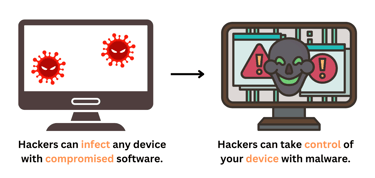
Infecting a device with compromised software enables the attacker to take control of the machine, exfiltrate the user’s data, and even turn the device into a zombie machine, which they can use to perform distributed denial of service (DDoS) attacks on downstream devices.
Malicious software has come a long way since the creation of the Creeper virus in 1971, which was created to move between multiple computers on ARPANET.
Today’s hackers aren’t just using malware to steal data; they’re using it to delete, encrypt, and exfiltrate files so they can simultaneously extort the victim and sell data on the dark web.
Common Types of Malware
There are many different types of malware that user’s need to be aware of online. These include viruses, worms, trojan horses, ransomware, spyware, adware, and rootkits.
Each can have a slightly different impact on your device, from a basic virus to self-replicating malware, to software disguised as legitimate programs, to tools that encrypt your files or spam unwanted adverts.
A breakdown of each type can be found below:
- Viruses: A virus is a type of malware that’s designed to spread between multiple computers. The virus continually replicates itself while damaging files and software in the process.
- Worms: Worms are self-replicating strains of malware designed to spread between multiple computers. This means that a single worm can traverse an entire network.
- Trojan horses: Trojan horses are malware disguised as a legitimate program to trick users into downloading it. The program will include malicious code designed to gain access to the victim’s files and systems.
- Ransomware: Ransomware is a form of malicious software developed to infect a device and encrypt its files. Once the files are encrypted ransomware will issue a ransom note threatening to delete the user’s files if they don’t pay up.
- Spyware: Spyware is stealthy malware that hides on the infected system and monitors the user’s activity. Spyware will collect data from the device, such as credit card details and passwords, and forward it to an unauthorized third party.
- Adware: Adware is nuisance software that automatically downloads and displays unwanted adverts like banners or pop-ups on your device. Adware is often downloaded unknowingly with other software.
- Rootkits: Rootkits are a set of software tools that lets a hacker gain access to a victim’s system without being detected. Hackers use rootkits to gain remote access to the victim’s device.
As you can see, each type of malware functions differently and enables the attacker to fulfill a different goal. Financially-motivated threat actors generally gravitate toward ransomware and spyware, whereas “troll” hackers gravitate toward viruses and adware.
How Malware Infects Systems
Compromised software can enter a system in a number of ways depending on the approach of the attacker. Below are some of the most common ways that malware infects systems.
Phishing Attacks
Hackers routinely use phishing emails to trick users into clicking on malicious attachments or websites. These emails attempt to disguise malware attachments as delivery receipts or invoices.
Malicious Downloads
If you download infected software from low-trust sources, your device can be infected by malware. File-sharing websites are notorious for being used to spread such infections.
Exploit Kits
Some cybercriminals may opt to use exploit kits to exploit vulnerabilities in your device. Doing so enables them to identify exploits in popular software such as Adobe Flash, Java, and Microsoft Silverlight.
Infected External Device
If an attacker has physical access to your device, then they may use a USB drive or other external device containing malware to infect a system. Other attackers may leave USB drives in public spaces to trick users into compromising their own devices.
Drive-By Downloads
Some websites may also have drive-by-downloads, a type of malware that automatically downloads whenever someone visits the site. Just clicking on one of these sites is enough to put your device at risk.
Methods of Malware Protection
While malware is a pervasive online threat, the good news is that there are plenty of cybersecurity solutions and methods at your disposal to protect against it. Below are some of the top ways you can protect your system:
- Antivirus software: Installing antivirus or antimalware software to your device should be your first line of defense against malware. A reputable antivirus or antimalware tool can detect and remove viruses from your device.
- Firewalls: Using a firewall can help protect your network from malicious traffic and malware. One of the ways it does this is by blocking unauthorized access to your devices.
- Anti-spyware and anti-adware tools: Downloading an anti-spyware or anti-malware tool can also help protect against spyware and adware. This reduces the risk of your device being hijacked by a third party.
- Regular software updates: Regularly updating your software is critical for ensuring that your devices don’t have unpatched vulnerabilities. We recommend turning on automatic updates so you don’t forget to update.
- Backup solutions: Backing up your data ensures you can still recover your files if your device gets infected. This is very useful for helping to defend against ransomware attacks.
Combining some or all of these measures together will provide you with plenty of protection against threat actors and help you stay safe online.
Best Practices for Malware Prevention
Of course, prevention is better than remediation. For this reason, it’s important to prevent your device from being infected in the first place. Here are some best practices for malware protection you can use to protect your device:
Email Security
One of the best ways to avoid malware infection is to recognize and avoid phishing emails. Look for strange URLs, spelling mistakes, grammatical errors, and high-pressure language.
Safe Browsing Habits
You can also reduce the risk of infecting your device by not visiting or downloading files from suspicious websites. Doing so will help protect your online privacy and ensure you’re less exposed to high-risk software in the first place.
Strong Passwords
Creating and maintaining strong, unique passwords is essential for protecting your online accounts. By selecting a strong password, you reduce the chance of someone being able to credential-stuff your accounts.
User Education and Awareness
Organizations can reduce the risk of malware breaches by training users on how to recognize and respond to potential threats. This can equip them with valuable knowledge of how to better protect their devices and information.
Network Security Measures
Implementing network security protocols and monitoring network traffic is essential for making sure that your local network isn’t vulnerable to compromise. After all, if your network isn’t secure or encrypted, someone can eavesdrop on your activity.
Responding to a Malware Infection
Knowing how to respond to a malware infection can be the difference between a manageable breach and a nightmare. Disconnecting your device from the internet and rapidly quarantining infected files can help reduce the overall impact of the breach.
- Immediate Actions: Below we’re going to look at some immediate actions you can take to protect your device from malware. These include disconnecting from the internet, securing your backups, and identifying the malware.
- Using Recovery Tools: Employing antivirus software and malware removal tools will help you to remove the infection from your device so you can return to normal operations faster.
- Restoring from Backups: Once you’ve removed the infection you can then revert to clean backups to recover the lost data. That being said, it is important to verify the infection has been removed first so that you don’t infect your backups.
- Professional Help: You may also want to seek assistance from a cybersecurity expert to help remove the infection. This can be useful if you want outside assurance that the infection has been completely removed from the device.
Following these steps can change the trajectory of a breach and lower the impact.
Stay One Step Ahead of Cyber Threats With Malware Protection
Getting to grips with the malware protection techniques and tools mentioned above will give you everything you need to master cybersecurity and protect your device against threat actors.
Being cautious about what sites you visit and what email attachments you open can go a long way toward reducing the risk of being exposed to a cyber attack.