When I was in high school, I had a pretty impressive Pokémon card collection. I kept my collection in a trading card binder with color-coded tabs to help me find what I wanted quickly. I can’t tell you how many times I flipped to my collection of Charmander cards — I had at least a couple of pages of them.
Databases work in a similar way to my trading card binder. Every database completes three functions: data storage (the protective sleeves), data retrieval (the tabs), and data management (the binder). This is all made possible by database hosting.
Database hosting is when you pay for space on a server to store said database. A database hosting plan comes with all the essential features and tools to improve performance and efficiency.
In this guide, I’ll explore databases in depth and explain how you can use database hosting to power applications.
Types of Database Hosting
When choosing a type of database hosting, I recommend looking at what you’re most in need of. If you’re on a budget, you may look into shared hosting for your database. On the other hand, I’d suggest considering more robust and redundant solutions like dedicated hosting for enterprise applications.
Below, I’ll explain each database hosting type, their advantages and disadvantages, and their ideal use cases.
Shared Database Hosting
It’s the cheapest database hosting option. It’s the simplest database hosting option. And it gives you streamlined customer support. I’m talking about shared database hosting.
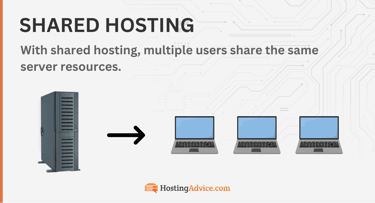
For this type of hosting, your database shares the same server with other databases. Hundreds, even thousands of databases use the same resources from one server.
Pros of shared hosting:
- Maintenance and customer support: Shared hosting providers take care of all server maintenance. You also receive extensive online documentation and on-call customer support.
- Simplicity: If you’re a beginner in the database hosting space, shared hosting is probably right for you. I still use shared hosting for many smaller projects, and that’s often just because it’s so simple to use the control panel that comes with it. I also like that shared hosting gives you one-click installations and integration tools for databasing and other applications.
- Cost-effectiveness: Are you on a budget? Then shared hosting is the right database hosting option for you. It’s significantly cheaper than every other type of database hosting.
Cons of shared hosting:
- Potential security issues: You’re at greater risk of security vulnerabilities with shared hosting. If one database on the server experiences a data breach, those issues could leak over to your database.
- Limited customization: Whenever you pay for a shared hosting account, it comes with a pre-designed interface. I like these for their simplicity, but for some projects, they severely limit my ability to customize the interface. You’re pretty much stuck with the pre-designed interface, features, and operating system.
- Performance limitations: When you’re on a shared hosting server, all server resources get pooled between you and the thousands of other database users. If some other database hogs resources, it risks lowering the performance of your own database.
I feel that shared hosting works best for smaller databasing projects or operations with limited budgets. I usually can’t recommend shared hosting if you intend on rapidly scaling or making money with your database, though.
Even small eCommerce databases need something more than shared hosting, and I wouldn’t risk the security or performance issues that shared hosting can present. Go for it, though, if you’re building a personal, testing, or very small-scale database.
VPS Database Hosting
The next highest form of database hosting is VPS hosting. It too uses a shared server, but (as my favorite part) separates all databases on the server. This results in a private, virtualized experience for your database.
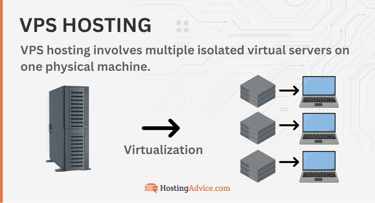
It’s completely independent from the rest of the databases on the server. Therefore, the security, performance, and control of your database increase drastically. In fact, I’d argue a VPS is as close to a dedicated server as you can get, except it’s a fraction of the cost.
Pros of VPS hosting:
- Improved control and customization: You get root access to your virtual environment with VPS hosting. This allows you to control things like dashboard settings, custom software, and the operating system.
- Scalability: You can upgrade RAM, CPU, and storage with a VPS. That’s a stark difference when compared to shared hosting, which limits your scaling options.
- Dedicated resources: When you or I use a VPS, our section of the server gets virtually partitioned so that it receives its own batch of server resources. As a result, the performance of your database improves since you never have to compete for resources with other databases on the server.
- Cost: Although you might see this is a con (when compared to shared hosting), the cost of a VPS is actually the cheapest you can find when putting it next to alternatives like dedicated hosting. I see VPS hosting as an excellent value. You get an environment so close to a dedicated server without the complexities and cost.
Cons of VPS hosting:
- Limited resources: Although you can upgrade a VPS and you receive dedicated resources, you’re still limited to the resources provided by the main server.
- Complexity: You need a certain level of technical skill to manage a VPS. Managed VPS plans make it easier, but it’s still more difficult than shared hosting. That’s one of the reasons I still opt for shared hosting when working on smaller, personal projects.
I see myself as the ideal user of VPS database hosting. I want something like dedicated hosting, but I never want to pay the price for it. Plus, VPS hosting is much easier to manage than dedicated hosting.
I like it best for mid-sized businesses, growing startups, and any database project where you want higher performance or improved customization.
Dedicated Database Hosting
Dedicated hosting — when a user leases an entire server — offers the highest level of performance for your hosting of a database. If I’m looking for the greatest control over my server environment, dedicated hosting offers the best options for that.

You also enjoy increased levels of security — perhaps the most security out of any hosting solution. But don’t get too excited. I can’t stress enough how difficult and expensive it is to manage a dedicated server, especially for larger databases.
You need an IT team or a strong background in server management. I only recommend dedicated hosting for enterprise operations or rapidly growing businesses.
Pros of dedicated hosting:
- High security: I should indicate that a high-security dedicated server depends entirely on the user who sets it all up. A poorly configured server could experience worse security issues than an average shared hosting setup. If you’re experienced, though, a dedicated server gives you the best security possible. It’s isolated and allows for custom monitoring and access controls.
- Maximum control: If you opt for dedicated hosting, you’ll enjoy full root access for making custom configurations. I, for one, would want to customize the operating system and add specialty database software. Dedicated hosting allows for all of that, since you can fine-tune settings however you want.
- Unmatched performance: Besides some cloud hosting setups, I’d argue dedicated hosting has the greatest potential for high-speed performance. You get a dedicated environment, so your database never competes for resources like RAM, storage, or CPU.
Cons of dedicated hosting:
- Cost: I can’t suggest dedicated hosting for small businesses and those on a budget. It’s simply too expensive. If you can’t swing the cost, I’d opt for something like cloud, VPS, or shared hosting. If you run a healthy, large business, however, dedicated hosting should always be in the conversation.
- Technical expertise: You must have an IT team to maintain a dedicated server and handle everything from security updates to troubleshooting. The management of any dedicated database server, I would argue, requires a high level of technical expertise. Some individuals might have the capabilities, but you usually need a dedicated, multi-person team.
- Complex scaling: I know. I mentioned that dedicated hosting offers improved scaling. But there are complexities involved. Yes, you have unrestricted scaling, but it’s often costly and time-consuming to do so. That’s because for me to scale with a dedicated setup, I must add more physical hardware items compared to how cloud hosting only requires the click of a button.
Here’s the deal with dedicated hosting: you don’t need it unless you run a rapidly scaling business or larger enterprise operation.
I’d argue it’s definitely an option for virtually any type of eCommerce store, but you would bite off more than you can chew if you went with dedicated hosting too early. Wait until your business has grown to something substantial.
Other than that, I like dedicated hosting for databases that need to protect sensitive data too.
Cloud Database Hosting
If you haven’t heard of Amazon Web Services (AWS), allow me to introduce you. It’s the number one cloud database hosting solution, followed closely by Google Cloud Platform and Microsoft Azure.
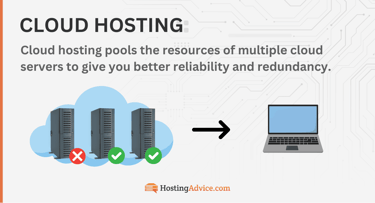
I recommend cloud hosting to more businesses than I do dedicated hosting. That’s because I see it as the future. You get the pricing of VPS hosting but with more redundancy.
And I can’t imagine opting for a dedicated hosting experience when cloud hosting gives you almost everything you need for much cheaper. Not to mention, cloud hosting is easier to manage than dedicated hosting. In short, I like cloud hosting for its value and redundancy.
Pros of cloud hosting:
- Redundancy and availability: Cloud database hosting offers increased levels of redundancy thanks to backup servers on the cloud network. This keeps your databases available at all times with no disruptions.
- Scalability: If you want to scale a database quickly, a cloud hosting solution allows for scaling without manual intervention. There’s no need for you to add new hardware, and much of the scaling happens on-demand.
- Managed services: Although I can’t guarantee this, the vast majority of cloud hosting providers offer managed database hosting. I love managed cloud hosting for a few reasons: The hosting company takes care of server updates, security patches, and ongoing maintenance. You, therefore, get to focus on your business and its database.
Cons of cloud hosting:
- Cost predictability: I’m hesitant to state the pay-as-you-go pricing model as a con. It’s actually both a pro and a con since it helps businesses save money by only spending what they need. However, you’re still bound to run into unpredictable pricing with this model. You and I can’t predict irregular usage patterns, so we may encounter some surprising bills.
- Problems with latency: I predict that virtually every business using cloud hosting has or will experience latency issues at some point. This essentially means that communications could take longer depending on how far away the servers within the cloud network are from each other. You often can’t do anything about this except potentially vet your host for latency issues before buying.
- Vendor lock-in: Have you ever felt “locked in” by a specific vendor? I often feel this way about Apple and Amazon products. It’s the same thing with cloud hosting. When you commit an entire database to a cloud hosting solution, it’s hard to migrate away. Google and Amazon make it difficult to do, and the logistics of moving a large database are rather daunting.
You should consider cloud hosting for your database if you require the utmost flexibility. I like cloud hosting for startups and booming businesses, mainly.
If you have special database requirements, like for consistent scaling and granular control, I can’t vouch for cloud hosting enough. That’s especially true if you’d rather not pay the high costs that come with dedicated hosting.
Managed Database Hosting
To make things clear, I want you to understand that managed database hosting is an add-on to the other database hosting options I outlined previously. So, I might sign up for a cloud or VPS hosting plan but then also get a managed hosting arrangement.
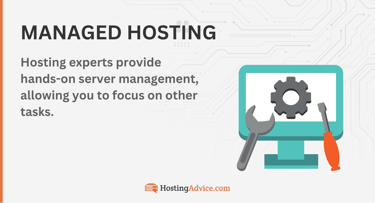
Sometimes these companies only advertise it as “managed database hosting.” In that case, make sure you check which type of hosting you’re actually receiving. As for the features you get with managed database hosting, I would expect pre-configured security elements, automated updates, ongoing maintenance, and backups.
Pros of managed hosting:
- Improved security: With managed hosting, you don’t have to install essential security elements. The provider does that for you. I often see managed hosting accounts with pre-configured backups and database server monitoring, along with automated updates and patches.
- More time: Without having to mess with the technical aspects of a server, you and I now have more time to spend on our businesses. If you’d rather focus on core operations, consider a managed hosting solution for your database.
- Expert assistance: Have you ever needed to contact support when hosting a website or database? Managed hosting takes that level of customer support to a new level. I’ve found that experts often solve technical problems for you when you have managed hosting. It also gives you a direct contact option for troubleshooting and asking questions.
Cons of managed hosting:
- Extra costs: If I were to purchase shared hosting, the managed version of that hosting would cost me more. It’s the same with VPS, cloud, and dedicated hosting. When you add the “managed” label to any type of hosting, the price goes up.
- Provider dependency: I find it difficult to migrate away from any type of hosting company. Now put yourself in a position where you know very little about the technical workings of your server and hosting configuration. With managed hosting, it’s possible the hosting company configured everything for you, making it even more difficult to get away from one provider. That’s called vendor “lock in.”
- Decreased control: If you’re a hands-on type of hosting user, I recommend you stray away from managed database hosting. A managed hosting plan takes some control of the database away from you. For instance, you may not be able to customize the timing of backups or the security measures used.
I recommend managed hosting for small to midsized organizations without an in-house IT team. I also like it if the extra cost for managed hosting is justified by the additional time you free up to work on other parts of your business. You should also have no problem giving up a little control over the server.
Database-as-a-Service Platforms
Here’s a modern alternative to all those database hosting options I just outlined above. A database-as-a-service platform, or DBaaS, provides the entire hosting and database management infrastructure in one, without you having to install a separate database on third-party hosting.

There’s usually a pay-as-you-go pricing plan for this all-in-one environment, and you receive a wide range of managed services like automated scaling and built-in security.
I’ve tested out DBaaS options like Google Cloud SQL and Amazon RDS, and they both work well for user-friendly database hosting.
Pros of DBaaS Platforms:
- Cost efficiency: If you like the idea of a pay-as-you-go pricing model, a DBaaS is the right solution for you. Most DBaaS providers have a pay-as-you-go pricing structure. This means you only pay for the resources used. I like this because it minimizes wasted expenses along the way.
- Improved scalability: I’ve never seen such easy scaling as what you receive with a DBaaS provider. All you have to do is click a button for more RAM, CPU, or database storage. And that’s without downtime or manual intervention.
- User-friendliness: Databases are complicated as is. That’s why I enjoy when the hosting comes in a neat package, like with a DBaaS. You also receive automation for tasks like updates, scaling, and backups.
Cons of DBaaS Platforms:
- Limits on customization: DBaaS providers are convenient and user-friendly, but that’s all at the expense of customization. Many of the features are pre-built, preventing you from customizing them.
- Performance fluctuations: The performance of your database depends entirely on the default hosting used by the DBaaS provider. Be sure to confirm the type of hosting used and look up reviews on the performance of each provider. I would avoid DBaaS providers that use shared hosting. Shoot for cloud or dedicated hosting instead.
- Severe vendor lock-in: A DBaaS provider gives you everything you need to build and manage a database. Many of the features are proprietary and non-transferable to other systems. There’s a good chance you’d have to completely rebuild many elements of your database infrastructure if you migrated.
Consider a DBaaS if you lack the necessary technical expertise to host and manage your own database. If you run a small to midsized business, I encourage you to explore DBaaS systems.
That’s particularly true if you’re looking for a hassle-free solution with most features included in the pay-as-you-go plan.
Key Features to Look for in a Database Host
My desired set of features for database hosting will vary from yours. However, all database hosting solutions should come with the essentials I’ve listed below.
Make sure your database offers these key features:
- Performance: Your database needs sufficient server performance for efficient data processing and fast query response times. To make that happen, I try to consider hosts with higher CPU and RAM. I’ve found that some hosts also add high-speed SSD storage and optimized database engines for the best performance.
- Scalability: If I were to build a database, I’d expect growth. You should too. To support your growing database, look for hosts with easy scaling solutions. I prefer seeing options to upgrade elements like memory, storage, and CPU. And I want as little downtime as possible during these upgrades.
- Security: When it comes to security, I crave prepackaged security tools. That’s especially true when I’m working with databases. The best hosts already give you security monitoring, firewalls, security updates, and breach protection. I’m okay with installing my own security features, but this saves me so much time.
- Reliability and uptime: During your search, I want you to look for database hosts with high levels of reliability and uptime. You can find this information in the SLAs (Service Level Agreements) from each hosting provider. Only opt for hosts with 99.9% uptime guarantees and research reliability reviews from other users.
- Value: I’ve made it a habit to always evaluate the pricing models for every database hosting provider I might use. This brings me to the best value and helps me understand if something like the pay-as-you-go model works for my project. I also encourage you to factor in additional costs for managed services, data transfers, and backups.
Those are the features I look for most often with database hosts. If you check each one off your list, your search should go smoothly. You may have to sacrifice in some areas — like increasing your cost for managed hosting or maximum performance — but that’s better than not getting the features your database needs.
Database Models
Several database models exist, including relational databases, NoSQL, and NewSQL. I’ll explain the ins and outs of each, primarily focusing on features and examples of these database types in the real world.
Relational Databases
All relational databases use tables with columns and rows to organize data. A new data record within the database creates a new row. I like to visualize a relational database like an Excel spreadsheet. They’re actually quite similar.
Relational databases also allow for relationships between tables. These relationships get established using primary and foreign keys. The primary keys identify unique records inside a table, while foreign keys connect records between different tables.
In other words, foreign keys link separate tables, and primary keys dive into one table, locate a record, and remain in that table.
I enjoy the efficiency of relational databases. It’s all thanks to the interlinking of multiple tables. Therefore, you can retrieve and change data quickly with your relational database. A table can link to one other table (one to one), to multiple others (one to many), or act as a link amongst a collection of tables (many to many).
Examples include:
- MySQL
- PostgreSQL
- Oracle
How do relational databases help you and me? They reduce latency and maintain data integrity thanks to the interconnected model. It’s also worth mentioning that the relational database is the foundation for every other database model I talk about below.
NoSQL Databases
The main element that separates NoSQL databases from standard relational databases is the ability to handle unstructured data. These types of databases also offer improved scalability in data storage.
The support for unstructured data helps with databases that need to store and query multiple elements like documents, keys, and cells.
For instance, NoSQL databases support documents using JSON-like documents while also supporting key-value databases (with a key-value pair model). In layperson’s terms, you can store a lot of random stuff in a NoSQL database, and none of it requires much organization.
You can even take advantage of column-family databases where the data gets placed into columns instead of the traditional row structure. I like how graph databases come into play with NoSQL, too. Graph databases power complex, interconnected relationships with edges and nodes, making them ideal for multi-relational queries — like the ones used on social networks.
Examples include:
- MongoDB
- Redis
- Cassandra
- Neo4j
NoSQL databases have many uses, which shows the model’s flexibility and scalability. Some NoSQL databases also support varying levels of performance, so a smaller organization can use NoSQL just like an enterprise organization.
NewSQL Databases
Sometimes I want a bit of SQL and a dash of NoSQL in my database. That’s where NewSQL comes into play. The NewSQL database type combines the best parts of NoSQL and SQL, giving you superior scalability, performance, and relational computing.
The NoSQL side of things offers superior scalability and performance, while theSQL side lets you use the relational model along with crucial ACID properties.
How does all this help you and me? Well, a NewSQL database can complete complex transactions and queries, and the results remain very consistent. I recommend NewSQL databases for projects that need real-time processing. For instance, big data operations and eCommerce stores should love NewSQL databases.
Examples include:
- Google Spanner
- CockroachDB
It’s hard for me to argue against the robust data management and horizontal scalability provided by NewSQL. However, I would only recommend a NewSQL database for large enterprise corporations. If you have a small business website with a database, skip NewSQL altogether.
In-Memory Databases
My final look into database models brings me to in-memory databases. Here’s a database type that works with a machine’s main RAM (Random Access Memory) instead of its usual disk storage. That gets you faster processing speeds and data access.
You’re most likely to see an in-memory database used for real-time applications and analytics.
Just like your personal computer, it’s much faster to access data from the RAM. Generally, however, your RAM may struggle with significant amounts of real-time data. So an in-memory database leverages unique indexing and data compression features to mitigate any issues.
Examples include:
- Redis
- Memcached
I can point to many use cases where in-memory data drives the entire database operation. Gaming platforms, financial trading systems, and even telecommunications databases all thrive on in-memory databases.
Core Concepts and Components
If you’re an average consumer, you may use a database for simple data entry — like logging your daily steps.
But I also want you to understand that just about every website, software, and app you use also has a database working overtime in the background — and in a far more complex fashion than how you may use a database as a consumer.
It’s true. Databases affect you and me almost every hour of our lives. At their most grand, databases support enterprise organizations with complex, relational databases — Netflix needs some way to support all of our binging habits, what with millions of people viewing content at one time.
Databases can also help you and your organization with data sharing, collaboration, and good old-fashioned data storage. I also can’t stress the importance of databases in eCommerce transaction processing, something all of us take part in regularly.
The features you need in a database depend on the type of database model used. Yet, most modern databases you stumble upon offer the same core concepts and components. Follow along as I explain these components as the core foundations of any database.
Schema
I like to think of schema as a database’s genetic makeup. When I say “schema,” I’m talking about the foundation of a database’s organizational structure.
The schema tells you whether a database has columns, rows, tables, and relationships between tables. Schema also serves as the blueprint for complicated queries in a relational database.
Schema, however, causes some structural rigidity. Like genetic code, you can’t simply change what the database does. Therefore, you can’t do some things with schema-based databases. Most notably, I’d have to rely on a non-schema database system like NoSQL if I intended on processing and storing unstructured data.
Indexing
An index in a database works much like an index in a book. It allows you (or the database) to locate and pull items in a faster, more efficient manner. In short, you’re not searching without any clues as to where the data lies.
Indexing provides more organization. The types of indexes include hash indexes and B-tree indexes. A hash index brings you right to the requested data, as long as the search matches the data exactly. A B-tree index gives you filters to sort data using ranges of data.
Although indexing makes data retrieval more efficient, I find it can hurt the performance of written commands. Not to mention you may experience a drain on storage capacity thanks to a clunky index.
Transactions
Simply put, transactions are the actions that occur within a database. Transactions could be any individual action, like an inventory item getting updated when an eCommerce store sells an item. Those transactions follow a set of properties (sort of like rules) called ACID.
ACID stands for Atomicity, Consistency, Isolation, and Durability. Each transaction completed should have all of these components.
The first component of ACID, atomicity, ensures execution in an all-or-nothing approach. The second component, consistency, validates data. Isolation helps stop transaction conflicts, while the durability aspect adds a level of security to all data after processing. When combined, the ACID components ensure data integrity during transactions, particularly in multi-user situations.
Normalization and Denormalization
Normalization is a word used in databasing for increasing integrity and reducing redundancies. Normalization essentially makes your data more accurate and more efficiently stored. I prefer normalization in a database for transactional applications. This is when you need the greatest data integrity and accuracy.
Denormalization, in my opinion, is not necessarily the opposite of normalization. Instead, it combines tables and other elements, so it actually does some of the same tasks as normalization by decreasing redundancies. Having said that, it could do the exact opposite, increasing redundancies.
I prefer denormalization in a database when it’s not necessary to have the strictest data consistency. A setup with denormalization works best for read-heavy applications, like data warehousing.
Database Management Systems (DBMS)
A database management system, or DBMS, acts as software for the efficient management and creation of databases. You’ll want to use a DBMS for things like transaction management, data retrieval, and basic storage.
In my experience, database management systems also play a pivotal role in how databases interact with one another.
Components of a DBMS
A DBMS has several primary components, including a storage engine, query processor, transaction manager, and metadata catalog. The storage engine takes care of data storage and retrieval, and the query processor handles interpretations and executions of all SQL queries.
A transaction manager helps make transactions reliable with ACID properties. Finally, the metadata catalog stores structural components for the database, along with schema definitions. Other components of a DBMS include backup managers, data recovery systems, and security management.
Types of DBMS
There’s a chance you interact with a database management system — especially if you’re a data analyst, developer, or database administrator — so I find it essential to understand the several DBMS types.
Some, for instance, have a more centralized approach, while others distribute data using other means.
Types include:
- Centralized: This is a DBMS where all operations get handled on one server. You’re more likely to encounter this for smaller, individual databases. I prefer centralized systems due to simpler data management and integrity. They have downsides, though, including reduced scalability and performance.
- Distributed: You’ll find distributed database management systems when you need to interconnect multiple servers. I find they’re most common with larger networks of database servers. You may look for a distributed DBMS for its fault tolerance, access to local data, and scalability. Some downsides I’ve encountered include complexities with data coordination and consistency.
- Cloud-based: As you may have guessed, this is a DBMS located in the cloud. I consider it to be almost the same as a distributed system, except that it minimizes the need for overhead. That’s because your organization no longer needs to manage a network of servers for your databases. I can vouch for a cloud DBMS if you crave on-demand access to data, mobile accessibility, and flexibility. On the flip side, cloud-based DBMSs have potential security issues and diminish your control over the database.
From my testing and research, I’ve found that a centralized DBMS works best for smaller and midsized businesses. That’s because an individual server can often hold the entire database. I’ve seen, for example, centralized DBMSs used at individual retail stores.
On the other hand, you might consider a distributed or cloud DBMS if you operate a multinational corporation or even just a rapidly growing business. Cloud-based systems, for instance, work well if you’re running a startup.
Query Languages
When a software or database management system interacts with your database, it uses a special language to complete requests. These are called query languages. You, as a user, may use a query language, too. Particularly to perform actions like data updates, retrievals, or insertions.
Below, I’ll talk about some of the common query languages.
SQL (Structured Query Language)
SQL acts as the go-to language for all relational databases. The language can help you perform many operations: updating records, modifying structures, and controlling permissions. It’s a well-known language. It offers powerful syntax. It’s perhaps my favorite language in terms of efficiency with relational databases.
Did I mention that it uses basic commands like SELECT and INSERT? It’s really easy to pick up.
Basics:
- SELECT: You use this when you want to retrieve data. You might even target certain conditions or columns with the SELECT command.
- INSERT: I like this command best for inserting additional rows with data into a table.
- UPDATE: Here’s a command that’s ideal for when you need to change current records with other conditions.
- DELETE: As you may have assumed, this command lets you remove records from a table.
If you’re interested in more advanced concepts from SQL, I’ll talk about those below.
Advanced concepts:
- JOINs: These are actions used for you to combine multiple rows pulled from two or more tables. JOINs make complicated queries easier to handle between several tables.
- Subqueries: You’ll always find these attached to a main query. Subqueries give additional results for a more detailed, focused overall query.
- Transactions: These are sequences of SQL operations completed as one. Transactions help maintain the integrity of your data through the properties of ACID.
With basic commands and advanced concepts, you can better understand the functionality behind any database using SQL. Another database language, NoSQL, takes a different approach, as I’ll explain.
NoSQL Query Languages
You can find numerous NoSQL query languages in use today. That’s because so many NoSQL database types exist. I’ll give you an example: MongoDB, a popular database software, uses a query language similar to JSON.
I’d argue that’s because MongoDB does well managing documents in its database. On the other hand, the Neo4j graph database uses a query language called Cypher. I suppose that’s because Cypher handles graph manipulation rather well.
Database Design and Architecture
If you’re wondering how databases work, you’ll benefit from learning about the design and architecture of databases. I’d argue that the architecture of any database relies on well-crafted design principles.
Design principles like ER modeling, logical design, and physical design. It’s also essential to take scalability into account while also optimizing for performance.
Design Principles
Here’s what I know about database design principles: You want efficiency. There’s a principle used in databasing called ER (entity-relationship) modeling. This helps build efficiencies by structuring data and its relationships visually.
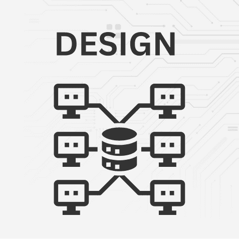
There’s also something called logical design in the databasing world. That defines everything from schema to relationships. It also prioritizes normalization (which I covered earlier in this article) and data integrity.
The counterpart of logical design is physical design. When you encounter databases with physical design in play, you’ll notice a focus on the optimization of storage and performance. I’ve also noticed more translations of schema into realistic database structures with physical design work.
You should keep in mind, however, that all of these elements tend to go into every database you use. So your website’s database probably uses ER modeling, logical design, and physical design.
Scalability
Scalability must play a role in the design of any database you create. A focus on scalability ensures your database can cope with increasing loads and growth for any application.
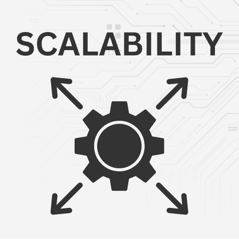
Here are my primary methods for scaling: vertical scaling, horizontal scaling, sharding, and partitioning.
Vertical scaling, at its most basic, requires you to add more resources to an individual server. With more CPU and RAM, the server naturally enjoys greater capacity. Horizontal scaling spreads the load of your database across multiple servers. I like this because it boosts performance and improves fault tolerance.
Sharding and partitioning act as horizontal scaling. Sharding separates data and spreads it across multiple databases while partitioning separates data inside a single database.
Performance Optimization
Performance is crucial in the design of your database since you’ll want smooth and speedy retrieval of data, especially for multi-database, multi-locational, and multi-user operations.

There are several performance optimization techniques and features I prefer:
- Indexing strategies: The practice of building indexes on database columns for a speedier, more organized data retrieval process.
- Query optimization: Multiple tactics like the usage of database management systems and the refining of SQL queries for the more efficient execution of queries.
- Caching mechanisms: Tools for logging frequently used data to serve it up quicker when you need it. This improves your data retrieval rates and reduces memory usage.
Along with denormalization and other techniques like load balancing, these performance optimization methods allow you to streamline requests across one or multiple servers. For performance optimization, it’s also essential for you to maintain and clean the database regularly.
Database Security
You’re always up against external and internal threats. That’s why database security remains a paramount focus for me, you, and anyone building a database. Below, I’ll talk about the importance of database security, various security measures, and regulations that often require compliance.
Importance of Database Security
You need sufficient database security to mitigate risks like cyberattacks, data breaches, and unauthorized access. Security measures help safeguard your sensitive data while also maintaining the confidentiality and integrity of your data.
Security measures:
- Authentication and authorization: The authentication process identifies which users try to access your database. Authorization gives them permission to enter based on access levels.
- Encryption (at rest and in transit): Database encryption converts data into a coded format so no bad guys can read it. This happens with stored data (at rest) and transmitted data (in transit).
- Backup and recovery strategies: Backing up a database involves making a copy of the tables and data and storing it in a different location. I strongly suggest an automated solution for backups. Most security measures for databases also offer a restoral process should something like data loss or corruption occur to your business.
Some common database security measures I recommend include encryption, backups and recoveries, and authentication.
Compliance
Here’s the part I like least about databasing. You’re already worried about security, sure, but did you know you also have to comply with whatever regulations your municipality or industry put forth?
This is particularly true for databases that store sensitive or personal user data. My go-to examples are the EU’s GDPR (General Data Protection Regulation) and the USA’s HIPAA (Health Insurance Portability and Accountability Act). Both of these mandate strict privacy measures for when you store user data. You must comply with these regulations if your business operates in those areas. Compliance requires regular audits and robust security practices.
I know it all sounds tedious, but here’s the good news: It’s all to ensure the responsible handling of data and to minimize the risk of security breaches (which you and I both know get insanely expensive).
How to Choose the Right Database
To choose the right database, you must first consider your use case. What does your organization require from a database? I suggest you start thinking about data type, scalability needs, performance requirements, and budget.
Considerations:
- Data type and structure: Consider a relational database if you need defined relationships with structured data. I usually go with NoSQL for unstructured data applications.
- Scalability needs: Think about whether you need a relational database or NoSQL database for scalability. Or perhaps a NewSQL database. I prefer NewSQL options for large, data-heavy operations in multiple locations. Consider NoSQL or cloud-based if you need flexibility and scalability on a smaller scale. SQL and relational databases are present in most databases, but a strictly relational database with SQL may work for a smaller organization in one location.
- Performance requirements: Take into account your performance needs, like if you need to prioritize read-heavy operations. Or perhaps the operation requires a more write-heavy situation.
- Budget and resources: To save money, you can opt for an open-source database. Commercial solutions, although I find them more expensive, provide dedicated support that you can’t get with open-source options.
Comparison of Popular Databases
| Database | Pros | Cons |
|---|---|---|
| Neo4J | Great for graph data, powerful query language, perfect for social networks | Hard to use for non-graph data, performance degradation when using very large graphs |
| Cassandra | Very fault-tolerant, highly scalable, multiple points of failure, excellent for distributed data at the enterprise level | Very complicated management, limits on advanced transactions and queries |
| MongoDB | Excellent schema design, great handling of unstructured data, horizontal scaling, solid scalability for large datasets | Potential for data redundancy, requires strict management, weaker ACID transaction support |
| MySQL | Extremely popular (so it’s well-supported), plentiful online documentation, open-source, budget-friendly | Potential requirement for commercial versions, limits on scaling |
| PostgreSQL | Open-source, large community, optimal for complex queries, highly scalable | Complicated management and setup process, less capable with read-heavy operations |
| Microsoft SQL Server | Plentiful features, smooth integrations with Microsoft products, top-notch performance | Mainly designed for Microsoft environments, extremely high licensing fees |
Each database has its pros and cons, so review the table above carefully before you choose which one to use.
Top Database Hosting Providers
The best database hosting providers range in the types of hosting they offer. You may also find that they each have differences in pricing, features, and support. To speed up your research, look at my list of the top database hosting providers below.
- Microsoft Azure: Database services like Azure SQL and Azure Cosmos DB offer features like automated scaling, high availability, and managed services. I recommend Azure for enterprises, or if you’re already committed to the Microsoft ecosystem.
- IBM Cloud: Some of the IBM database services include IBM Cloudant and IBM Db2 on Cloud. With those services, you can find features for managed hosting, automated scaling, and advanced analytics powered by IBM Watson. I find it best if you need robust data analytics and AI services with your database hosting.
- Amazon Web Services (AWS): Database hosting services include Amazon Aurora and Amazon RDS, both of which offer features like automated backups and multi-region support. You can get fully managed hosting, too. In my opinion, it’s most useful for startups but provides support for enterprises as well.
- Google Cloud Platform (GCP): Database hosting services from GCP include Google Cloud SQL and Google Bigtable. With Google’s database hosting, you get seamless integrations with Google products, enhanced security, accelerated performance, and automated backups. If you’re running a database of any size, I recommend you consider Google Cloud Platform.
- Oracle Cloud: My favorite database hosting services from Oracle include Oracle Autonomous Database and Oracle MySQL Database Service. You get tools for automated scaling, maximum performance, and autonomous management. I like Oracle Cloud most for fast-growing businesses and enterprises.
Overall, I recommend you start with Google Cloud Platform if you’re running a smaller business or database. You might also look at AWS for a smaller operation. Options like IBM Cloud, Microsoft Azure, and Oracle Cloud, in my opinion, make more sense as your business grows, since they’re ideal for larger operations.
Are You Ready to Host a Database?
Databases are all around us. They lurk behind the most complex eCommerce websites, provide smooth interactions on social networks, and help small and large businesses store, manage, and retrieve data in a timely and efficient manner.
Whether you use a relational or NoSQL database, or perhaps one with in-memory functionality, you now have the knowledge to make the right decision for the storage of your data.
I encourage you to continue learning about databases, since future trends may bring about changes that affect your organization’s database. And if you’re just looking to get started with a database, use the information I presented to locate the most secure and efficient database possible.