A Secure Sockets Layer (SSL) certificate is a digital certificate that performs two distinct roles for a website: authentication and encryption. It verifies a website’s identity when you visit it on a web browser and establishes a secure connection between the browser and the server. You can think of it as a TSA agent at the airport (they verify your passport and boarding pass to let you on the plane).
HostingAdvice.com, for example, has been issued an SSL certificate by a trusted certificate authority (CA). Any website with a padlock icon next to the “https” component of its URL is secure. Websites that aren’t secure will have an unlocked icon and a URL beginning with “http.”
Secure online communication is vital. Remember, wrongdoers are only getting smarter and stronger (with better tools at their disposal), so you must ensure interaction with SSL-protected websites only. Today, we will submerge ourselves in the vast ocean of SSL certificate knowledge — let’s dive in.
Understanding SSL Certificates
Now that you have surface-level knowledge of the workings of SSL certificates, it’s time to put both feet into the water. Let’s explore how SSL works, the purpose of SSL certificates, and its types.
Secure Sockets Layer
SSL is a security protocol that does all the dirty work in encrypting data transmitted over the internet. The cryptographic protocol is an integral component of Hypertext Transfer Protocol Secure (HTTPS), the secure version of HTTP. They work in tandem to encrypt data, ensure its integrity, and authenticate communicating parties. SSL is also referred to as SSL/TLS — it’s the predecessor to TLS, the modern standard of encryption.
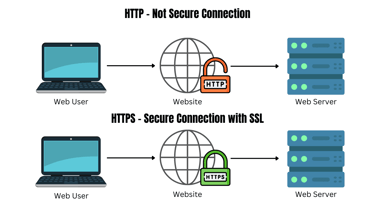
Such is the level of encryption provided by SSL/TLS that anyone trying to intercept this data will only see a jumbled-up mix of characters. This makes decryption nearly impossible.
Purpose
An SSL certificate makes encryption possible and validates the work SSL has done. An SSL certificate is essentially a data file hosted on a website’s origin web server that consists of data like the domain name of the registered website, the name of the entity it was issued to, associated subdomains, its expiry date, and the public key (the private key is stored separately and depends on your server setup).
SSL uses the public key and private key to encrypt and decrypt data respectively. To conclude, SSL certificates authenticate the identity of websites and establish secure connections between servers and clients — all “https” websites are issued an SSL certificate; “http” websites are insecure and you should stay far away from them.
Types
While there are several types of SSL certificates, each provides the same level of SSL/TLS encryption. They serve distinct purposes, though, and vary in cost (a DV SSL certificate is the cheapest, and an EV SSL certificate is the most expensive).
Overview of different types of SSL certificates:
- Domain Validated (DV): DV certificates are cost-effective and easy to obtain. They’re generally associated with a simple email verification process, require no business documents for verification, and are ideal for individuals, blogs, and small businesses. You can get a free or paid DV certificate from Let’s Encrypt.
- Organization Validated (OV): An OV SSL certificate requires both domain and business validation as well as third-party confirmation — this process usually takes one to three business days. It’s a solid option for startups and medium-sized organizations. Moreover, this certificate displays an organization’s details through a dynamic site seal and a time stamp from the respective CA.
- Extended Validation (EV): The original SSL certificates, EV certificates are associated with the highest trust levels and are used by large enterprises like financial institutions and eCommerce websites. They verify an organization in depth, secure domains and subdomains, and are compatible with most web browsers and operating systems (OSes). The validation process of an EV SSL certificate takes five to 15 business days.
- Wildcard: Wildcard certificates are available in the DV and OV forms but not in the EV form. According to CA/Browser Forum guidelines, the vetting process of EV certificates is so intense that you can’t issue an EV wildcard certificate. You can obtain a wildcard certificate to secure multiple subdomains under a single domain name. The character “*” is associated with wildcard certificates.
If you want to secure a single domain name and don’t want to spend over the top, a typical DV or OV SSL certificate makes sense. You can purchase a wildcard DV or OV certificate to secure multiple subdomains under the same domain. An EV certificate makes the most sense for organizations that process payments, as they’re associated with stringent verification methods.
How SSL Certificates Work
The SSL/TLS encryption process involves asymmetric encryption with digital signatures initiated during a TLS handshake and symmetric encryption after the TLS handshake during an active session. The entire process is bound together by an SSL certificate (it hosts the public key used during asymmetric encryption) issued by a certificate authority.
Encryption Process
SSL certificates enable multiple encryption methods to protect data in transit, including asymmetric encryption, symmetric encryption, and digital signatures. The SSL/TLS handshake plays an important role in this. The entire procedure is carried out by SSL/TLS and is made possible by an SSL certificate, which hosts all necessary data.
Here is how these components work:
- Asymmetric encryption: It’s executed during an SSL/TLS handshake and involves public and private keys. Public key information is published on the SSL certificate while the private key is stored on the server side in secrecy.
- Digital signature: You can think of digital signatures as a way for senders to “sign” a message. Only the sender can access the private key, and encrypting a message with it creates the digital signature — this establishes the authenticity of a message.
- Symmetric encryption: This process involves temporary session keys for encryption, which are used by a client and server during a session. Once the session ends, the keys cease to exist.
Now, let’s discuss the role of the SSL/TLS handshake protocol in the grand scheme of things.
Handshake Protocol
The SSL/TLS handshake protocol facilitates the exchange of cryptographic parameters and establishes a secure connection between the client and server. During the handshake, the server makes the public key public while keeping the private key private, as the name suggests. During asymmetric encryption (initiated during the handshake), data sent by the client is encrypted using the private key and can only be decrypted with the private key.
Once the connection is secured and temporary session keys are created, the handshake ends and the client can interact with the server using session keys (symmetric encryption of session data begins).
Certificate Authorities (CAs)
A CA issues SSL certificates to entities such as individuals, websites, organizations, and even email addresses. An SSL certificate authenticates the identity of these entities and hosts cryptographic keys, which enable secure and encrypted internet communication.
For certificate issuance, the entity must generate a public-private key pair and send a certificate signing request (CSR) to the CA (depending on the certificate type, moderate to strict vetting ensues). The CA then authenticates the entity and issues a certificate accordingly. For example, Let’s Encrypt and DigiCert are two popular certificate authorities.
Advantages
Any website that doesn’t have an SSL certificate is untrustworthy and may be on a mission to steal something from you, be it personal or financial information — be aware. Look out for website URLs that begin with “http” and avoid them. A trusted website will always offer HTTPS security for data exchange. Here are some of the advantages of SSL certificates.
Data Security
SSL certificates encrypt sensitive information, such as personal data and financial transactions, to protect against eavesdropping and data breaches.

They host necessary data for data encryption that SSL/TLS executes, help establish secure communication between a browser and the server, and ensure wrongdoers can’t intercept and decrypt data.
Trust and Credibility
SSL certificates enhance trust and credibility by displaying visual indicators, such as padlock icons and HTTPS URLs, to signal secure connections to users.
Once again, let’s take the example of HostingAdvice, but with visual assistance.
The URL is associated with “https,” which means it’s been issued an SSL certificate. If you click on the padlock icon next to the URL, followed by the Connection is secure tab, you’ll see proof of the website being issued a certificate by a trusted authority, guaranteeing that all personal information sent on the website is secure.
SEO Benefits
SSL certificates can improve search engine rankings and website visibility by complying with Google’s HTTPS ranking signal.

Since an SSL certificate guarantees higher website security, websites with HTTP URLs fare significantly lower in search rankings (no matter how good the content it publishes is). A higher ranking and greater visibility could lead to more organic traffic and potential customers.
How to Implement SSL Certificates
Before buying an SSL certificate from a CA, you should figure out the best certificate type for you. Once you’ve obtained one, you must install it on your web server — this process varies from server to server. Regularly renew and maintain your certificate to cement trust among your users.
Here’s all you need to know about SSL certificate implementation.
Obtaining an SSL Certificate
You must obtain an SSL certificate from a reputable certificate authority only. Any attempt to bypass this could lead to severe consequences (the certificate authority system will flag your site). The first step is to generate a certificate signing request (CSR) through your web host control panel or tools like OpenSSL. Next, you must select your preferred certificate type.
We recommend DV certificates for small organizations, OV certificates for mid-sized organizations, and EV certificates for large-scale organizations that process thousands of transactions daily. Additionally, a wildcard certificate is an option for DV and OV use cases.
Once you’ve chosen a validation level, submit your request to a trusted CA. The CA will authenticate your request and issue a certificate accordingly.
Installing SSL Certificates
The installation process for SSL certificates on web servers depends on your server type. Let’s explore how to configure an SSL certificate on popular web server software like Apache and NGINX.
How to install an SSL certificate on Apache:
- Download the Primary and Intermediate certificate files from the Customer Area, copy them to the web server directory, and assign them read-only root privileges.
- Locate the Apache configuration file to edit — search using grep.
- Identify and configure the SSL block for HTTPS (secure) connections only. Also, adjust the names of files like SSLCertificateChainFile, SSLCertificateKeyFile, and SSLCertificateFile to match your certificate files.
- Test your Apache configuration files before restarting the system.
- Restart the system — you’re all set.
We recommend watching a tutorial or two to get the hang of this process (code is involved).
How to install an SSL certificate on NGINX:
- Once you’ve received your SSL certificate file via email in the .zip format, you must download and extract the file and combine the server certificate, root certificate, and intermediate certificate into a new file called ssl-bundle.crt.
- Next, edit the NGINX configuration file to listen to port 443, define the path of the SSL certificate, ensure the server block includes ssl on, and specify the SSL Certificate Key directory location.
- Save and exit the file and restart the web server.
- Finally, connect to your server via a web browser to verify the installation of the SSL certificate on NGINX.
Again, we recommend watching a few tutorials to master the installation process.
Renewal and Maintenance
Certificate-related outages impact crucial business applications and cost organizations financially (to the tune of thousands of dollars per minute), damage reputations, and hamper growth rates. First and foremost, you should know where your SSL certificate is located.
We recommend renewing your certificate 15 to 90 days before it expires, ensuring private keys aren’t reused upon renewal, and creating private keys in a secure environment. You can also automate the renewal process through a top-notch certificate management program. Additionally, you should ensure your web servers and operating systems are up to date and remove weak hashes, cipher suites, and keys.
Common Errors and Troubleshooting
SSL certificate errors could be reputation-damaging. When a web browser fails to establish a secure connection with the server a website is hosted on, it warns visitors the website may be unsafe to access and use (in some cases, you can access it anyway). This is a result of the browser being unable to verify a website’s SSL certificate identity. Luckily, most of these errors are easy to troubleshoot.
Certificate Mismatch
If you come across the ERR_SSL_VERSION_OR_CIPHER_MISMATCH error (which has a few variations), a certificate name mismatch is likely. Some common reasons for this are employing a content delivery network that doesn’t offer SSL support (change your CDN), using an outdated TLS version (use the latest version), caching issues (simply clear your browser’s cache), and using an antivirus that blocks certain SSL-enabled websites (disable the app).
Mixed Content Warnings
When a secure website includes insecure resources, browsers may flag your website for mixed content. This basically means your website, which is HTTPS-based, may have some internal resources and links that load over HTTP instead of HTTPS (a very common error). You must ensure all scripts, files, and images use HTTPS. Simply put, enforce HTTPS on each website resource.
Expired Certificates
In some cases, the solution to an expired certificate is rather funny — it may be that your browser is set to a different time and date than the actual time and date. This may lead to the premature expiry of your SSL certificate. Update your system’s time and date to address this. If your certificate has well and truly expired, follow the steps listed in this article.
Best Practices
Purchasing any SSL certificate is not enough — you need to vet your organization’s needs and select the best fit. For example, if you operate an early-stage eCommerce website or financial startup, a DV or OV SSL certificate won’t cut it — an EV certificate is the tool for the job. Here are some SSL certificate best practices you should adhere to.
Extended Validation (EV) Certificates
An EV certificate is associated with maximum trust and credibility. As stated earlier, a blooming eCommerce company or financial startup, for example, may see hundreds (if not thousands) of transactions daily. You’ll have to deal with sensitive data like KYC information and customers’ credit card data. An EV certificate is a must.
The process of getting an extended validation certificate is detailed (which is necessary in this context), and obtaining one indicates you’re doing all the right things to safeguard your users.
Certificate Transparency
Logging SSL certificate issuances helps enhance transparency and accountability. Obtaining an SSL certificate from an untrusted source is easy, but thankfully, the certificate transparency system has made detecting such activity and issues easier.
The system requires public certificate logging, allows website owners and admins to check whether logging is accurate and publicly visible, helps prevent fraud, and enhances overall internet security standards.
HSTS (HTTP Strict Transport Security)
You must ensure your domain is HSTS-enabled. Earlier, we discussed the possibility of certain website resources being HTTP-enabled resources, which may cause concern while browsing. By activating HSTS on your website, the web security standard will ensure your web browser uses HTTPS whenever a user clicks on a potentially malicious HTTP link or resource — an automatic conversion from HTTP to HTTPS will take place.
This standard helps avoid man-in-the-middle attacks and provides bulletproof access to websites and their subdomains.
SSL Certificates: The Standard for Online Credibility
There are approximately 1.13 billion websites on the internet. SSL certificates are a standard for credibility, as they secure online communication and protect sensitive data. The internet will continue to grow exponentially, and so will the expertise of cybercriminals. Not opting for an SSL certificate and sticking to an HTTP domain is akin to kicking yourself.
Not only will it deem your website unsafe, but also damage your reputation and hamper your Google search ranking — HTTPS is a crucial Google ranking factor. As a website owner or administrator, you must prioritize SSL certificate implementation to safeguard users’ privacy and build trust. Make sure to determine the type of certificate you need and opt for a trusted CA.
Safe browsing, folks!