If you regularly surf the web like I do, then you’ve probably worried about your privacy at one point or another. After all, it’s not easy to maintain your privacy when everyone, from your ISP to advertisers and hackers, is trying to get their hands on your data.
The good news is that using a Virtual Private Network, or VPN is one of the easiest ways to maintain your anonymity online. But what is a VPN exactly? And…why would you want to be anonymous unless you were up to no good?
A VPN is an encrypted connection or tunnel that hides your activity, location, and IP address from third parties.
Despite what you may think, no, not everyone who uses a VPN is trying to hide bad behavior! A VPN encrypts your personal data and hides your activity, location, and IP address so that they can’t be seen by your ISP, government agencies, advertisers, or hackers. It actually allows you to protect yourself when working remotely or connecting to the internet from a public wifi hotspot.
Read on to learn how VPNs work, the benefits of using a VPN, what different types of VPNs there are, and how they can help you protect your data online.
How VPNs Work
How do VPNs work exactly? It’s so seamless, it’s easy to forget how much goes on behind the curtain.
For example, when I activate my VPN to work in a public space, the software immediately starts encrypting my traffic. I can log into my bank account and answer work emails without hackers getting their hands on my data.
I’ll explain more below:
Basic Mechanism
First, you activate the VPN’s encryption mechanism through a client installed on your device. In this context, the term “client” just refers to the VPN software you chose.
Once the VPN is active, it then reroutes your traffic through an encrypted connection to a remote server. This hides your IP address, location, and activity.
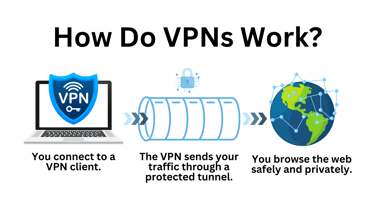
This is all made possible through the use of tunneling protocols like PPTP, L2TP/IPsec, OpenVPN, and WireGuard, which support the transfer of data from one point to another (see below for more information on how each of these protocols works).
Connection Process
A VPN intercepts your traffic and reroutes it through an encrypted tunnel. This masks your IP address and location, and ensures that third parties only see the IP address of the vendor’s VPN.
It is important to note that you can also use a technique called split tunneling to create a second unencrypted tunnel for traffic to pass through. This can help you maintain the performance of high-speed services that aren’t VPN-friendly, like streaming or banking apps.
IP Masking
A VPN works like a disguise for your IP address. As I mentioned above, using a VPN hides your IP address and replaces it with the remote VPN server’s. Doing this stops third parties from being able to see your IP address or location.
Benefits of Using a VPN
I’ve touted plenty of the benefits of a VPN already. Heck, I swear by it myself for when I’m using a public Wi-Fi connection. Here are some of the main reasons I use a VPN, which I’m sure you can relate to:
Privacy Protection
One of the main benefits of using a VPN is that it allows you to shield yourself from online surveillance and tracking. When browsing with a VPN, it’s much harder for websites, ISPs, government agencies, and cybercriminals to monitor your online activity.
Security
Using a VPN is a great security hack because it makes you less vulnerable to
man-in-the-middle attacks (MITM). In a typical MITM attack, a hacker will attempt to eavesdrop on your activity and steal sensitive data, such as your credit card details. This usually happens when you connect to a public or unsecured WiFi router.
Access to Geo-Restricted Content
Another plus of using a VPN is that you have a way to bypass geographical content restrictions. For instance, if a website tries to gatekeep what content and pricing you can see based on your location, you can simply change your VPN server to one in another country. You can use this method to stream TV shows that aren’t available in your country (although I’m not endorsing this behavior).
Anonymity
If you want to remain anonymous online, then VPNs are an essential tool. The moment your connection is encrypted, it becomes much harder for unwanted third parties to track your online activity.
Stop Data Throttling
Some ISPs may throttle your download speeds if you consume too much data in a month. Using a VPN can help you avoid these throttling measures by hiding your identity in an encrypted tunnel and preventing your ISP from monitoring how much data you’re consuming. Again, I’m not recommending you do this, as it falls into an ethical gray area.
Types of VPNs
Just like any kind of software, VPNs come in all different shapes and sizes. Below, I’m going to explain some of the most common types of VPNs available today:
- Remote Access VPN: A remote access VPN lets you connect to a remote private network through an encrypted connection. You open up a VPN client and connect to a VPN gateway, which lets you securely access remote resources like apps, servers, and databases.
- Site-to-Site VPN: A site-to-site VPN allows multiple networks to connect to each other over the internet. Many companies will use this approach to connect a branch office to a central office. The connection is made possible by deploying a VPN gateway at each site to create an encrypted tunnel to share data securely.
- Personal VPNs: A personal VPN is a VPN that’s intended to be used by an individual user. These are commercial VPNs that create a virtual tunnel between your device and the internet, so you can better protect your anonymity.
- Corporate VPNs: A corporate or business VPN is a VPN designed for business use. These VPNs enable you to securely connect to a company’s internal network. Remote access VPNs and site-to-site VPNs can be considered corporate VPNs.
Out of all these options, you’re probably most likely to use a personal VPN. I use one myself and there are a ton of cheap ones online — I’ll talk about those soon.
Popular VPN Protocols
Under the hood, there are a lot of different protocols that allow VPNs to protect your data. Some of the most popular include:
PPTP (Point-to-Point Tunneling Protocol)
Point-to-Point Tunneling Protocol (PPTP) is a protocol used to create an encrypted tunnel from one point to another.
Pros:
- Easy to use
- Fast connection speeds
- Compatible with Windows, MacOS, and Linux
Cons:
- Outdated
- Security issues (e.g., use of Microsoft Point-to-Point Encryption (MPPE))
- Poor authentication
PPTP is rarely used today because it is quite outdated and relies on Microsoft Point-to-Point Encryption (MPPE), which is easier to crack than other alternatives.
L2TP/IPsec (Layer 2 Tunneling Protocol with IPsec)
Layer 2 Tunneling Protocol (L2TP) is a VPN protocol that creates an unencrypted tunnel between your device and a VPN server. L2TP is often combined with IPSEC to provide an encrypted tunnel through which to send data back and forth.
Pros:
- Highly secure
- Verifies the data hasn’t been manipulated
- Easy to configure
Cons:
- Outdated
- Inefficient performance
- Connections can be unstable
IPSEC not only adds encryption but also helps verify the origin and integrity of the data. Although this helps you guarantee the data wasn’t manipulated, it also reduces efficiency and connection stability.
OpenVPN
OpenVPN is a VPN tunneling protocol that uses Secure Socket Layer (SSL) to create an encryption tunnel with AES-256-bit encryption.
Pros:
- Highly secure AES-256-bit encryption
- Open source
- Supports Windows, Mac OS, Linux, Android, and iOS
Cons:
- Manual setup
- Slower than more lightweight protocols like WireGuard
- Resource-intensive
OpenVPN’s use of AES-256-bit encryption makes it one of the most secure protocols available today.
WireGuard
WireGuard is a VPN protocol that uses cryptography like ChaCha20 for symmetric encryption and Poly1305 for authentication to enable you to transit data securely.
Pros:
- Easy to configure
- High Speed
- Secure
- Supports Windows, MacOS, BSD, iOS, and Android
Cons:
- Difficult to change network configuration
- Still undergoing development
This protocol is widely used because it offers better performance than other alternatives, like OpenVPN.
IKEv2/IPsec (Internet Key Exchange version 2)
Internet Key Exchange version 2 (IKEv2) is a tunneling protocol that creates a secure tunnel between your device and a VPN server.
Pros:
- High speed
- Supports AES-256-bit encryption
- Secure with no known vulnerabilities
- Stable
Cons:
- Not as fast as WireGuard
IKEv2 is highly secure because it verifies that both the device and VPN server have the same encryption keys. It can also be combined with IPsec encryption.
Top VPN Providers
The VPN market is extremely competitive, and there are a number of companies to choose from. Below, I’m going to compare some of the most popular VPN services in the world. Some I’ve had personal experience with, and others have been recommended to me by industry experts.
| Features | NordVPN | ExpressVPN | CyberGhost | Surfshark |
| VPN servers | 6,400+ servers in 111 countries | Undisclosed – Servers in 105 countries | 11,500 servers in 100 countries | 3,200+ servers in 100 countries |
| Device Connections | Supports up to 10 devices | Supports up to 8 connections | Supports up to 7 connections | Supports unlimited connections |
| Killswitch | Yes | Yes | Yes | Yes |
| Malware scanning | Yes | No | Yes | Yes |
| Ad Blocker | Yes | Yes | Yes | Yes |
| Support | 24/7 live chat and email | 24/7 live chat and email | 24/7 live chat and email | 24/7 live chat and email |
| Price | Starts at $12.99 per month | Starts at $9.99 per month | Starts at $6.99 per month | Starts at $2.19 per month |
Which is best will likely depend on your budget or your needs. If you’re not sure where to start, then I recommend trying out NordVPN, due to its high speeds and the number of virtual servers it has.
How to Choose the Right VPN
Choosing the right VPN can be tricky because there are so many to choose from. That being said, I’ll share some of the core features you may want to consider when choosing a VPN:
- Security features: It’s important to consider what type of encryption and authentication options the VPN has to offer. I recommend choosing a VPN that offers critical security capabilities like AES-256-bit encryption or multi-factor authentication.
- Speed and performance: You will also need to consider what kind of speed and performance you require from your VPN. If you’re going to use a VPN for light browsing, then you’re going to need less speed than you will if you’re going to stream content and watch videos.
- Server locations: Another thing to think about is server locations. Ideally, you want to choose a VPN that’s close to you to get optimal speed, but you may also want to look for a VPN that offers servers in a range of different countries (particularly if you want to bypass geographical content restrictions).
- Ease of use: If you’re new to using VPNs, then you’ll also want to select a solution that’s easy to use. Try to look for tools with a user interface that’s easy to use with minimal configuration, one-click activation, and a list of VPN servers that you can click on.
- Cost: Finally, you’ll want to consider the amount you’re willing to spend on a VPN. In many cases, you get what you pay for, so if you want access to high speeds and more virtual servers, then you’re going to need to pay more than you would for a more lightweight service.
Ultimately, it’s up to you to decide what type of capabilities you’re looking for out of your VPN.
Setting Up and Using a VPN
I’m going to assume that you’re using a consumer VPN, so I’ll show you how to set one up for free with Proton VPN.
Installation
First, create a free account.

Then, download the VPN client from the vendor’s website. This will provide you with an app you can use to activate the encryption tunnel and modify other settings, such as what server you’re connected to.

Configuration
Once you’ve downloaded your VPN, it’s time to configure it. The most basic way to configure your app is to use the settings provided in the VPN app. For example, the client will allow you to choose what server you want to connect to.

Manually configuring a VPN is a little more complex. You can manually configure the VPN by going to settings on your device, navigating to the Network menu, and adding manual configurations to your VPN. Here you can choose the type of VPN and the authentication options needed to sign in.
Usage Tips
Using a VPN isn’t a silver bullet for protecting your anonymity, so there are a number of other security essentials you’ll need to stay safe when browsing online. These include:
- Use automatic VPN connections: Select a VPN with automatic connections so that you don’t need to manually enable it each time you log on.
- Turn on the VPN killswitch: Activate your provider’s VPN killswitch so that your network traffic isn’t leaked if your connection to the VPN server is interrupted.
- Select a strong password: Add a strong password to your VPN provider account to reduce the risk of your password being brute-force hacked.
- Activate two-factor authentication: Enable two-factor authentication on your user account to make it harder to breach.
- Don’t click on links or attachments in unknown emails: Avoid clicking on links or attachments in emails from unknown senders because they can infect your device with malware and put your data at risk.
As someone who reports on cybersecurity for a living, take my word: you do not want to be the person who doesn’t take this stuff seriously. Follow my tips, and you’ll drastically beef up your online security.
VPNs and Legal Considerations
It is important to remember that not every country or website supports the use of VPNs. In this section, we’re going to look at some of the practical and legal considerations of using VPNs, so you don’t land yourself in hot water.
Legality
Before you connect to a VPN, you should check your local laws and regulations. Using a VPN is illegal in a number of countries, including North Korea, Belarus, Oman, Iraq, and Turkmenistan.
In addition, there are also many countries where only government-approved VPNs are permitted. These include China, Russia, the UAE, India, Egypt, and Uganda. Note that these VPNs may exchange data with nation-states.
Terms of Service
Most, if not all, commercial VPN providers will have terms of service that you’re expected to adhere to. These policies will depend on the vendor, but typically they will require you to only access the service where it is legal and not use the VPN to commit illegal acts or harm others.
Ethical Use
As a rule of thumb, you’ll want to avoid using a VPN to commit any unethical acts. For instance, your VPN’s terms of service may have provisions against threatening others, creating spam, violating intellectual property, or downloading or distributing content that’s protected under copyright without permission. In other words, you should still be on your best behavior while using a VPN.
Common Issues and Troubleshooting
While most VPNs are reliable, they’re not immune to problems. In this section, I’ll explain some common issues you may run into when using a VPN and how to resolve them.
- Connection Problems: One of the biggest issues you’re going to face, and probably the most annoying, is connection issues. Sometimes your VPN connection may drop or become so slow that it’s unusable. You can often fix this by restarting your computer and/or the VPN client or switching to a VPN server in another location.
- Speed Issues: If your VPN is running slowly, you can try to increase the speed by restarting your device, restarting the VPN client, switching to a server closer to your current location, moving closer to your router, or choosing a different communication protocol.
- Access Issues: Some sites may block your VPN. This is generally the case with streaming services and other sites with regionally gated content. You can generally address this by changing your IP address, DNS address, and the server that you’re connected to.
Sometimes there are just going to be issues you can’t fix on your own. In that case, it never hurts to reach out to the VPN provider’s customer support — that’s what they’re there for anyway.
Future of VPNs
Nowadays, you can blink and there’s a new type of technology being introduced. Even as a cybersecurity journalist, I’m always surprised by the ever-growing advancements in the field. From AI and machine learning to 5G and the Internet of Things, it’s unbelievable how quickly our technology is evolving.
All that being said, here’s what I anticipate VPNs to achieve in the next few years and beyond:
Technology Advancements
Probably one of the most significant technological advancements will come from integrating AI and machine learning with VPNs. AI models will enable VPNs to automatically find the servers with the best performance for users and reroute traffic to provide an optimal user experience.
Evolving Privacy Concerns
As technology becomes more advanced, there is a significant risk that quantum computers will be able to decrypt AES-256-bit encryption and other algorithms that VPNs rely on to protect user data.
Though experts warn this could happen by the late 2030s, VPNs will be able to adapt by using post-quantum encryption solutions, which are harder to crack.
Integration with Other Technologies
VPNs also have the potential to be integrated with emerging technologies like 5G and IoT. Greater integration of VPNs and IoT devices will enable businesses to hide the IP address and activity of these devices from unauthorized entities.
Use a VPN…Responsibly
When it comes to cybersecurity, VPNs are one of the most comprehensive modern privacy tools there are. They provide all the fundamentals you need to protect your identity and data when browsing online.
While they’re not foolproof, they are an essential tool for maintaining your digital hygiene and reducing your exposure to third parties.