When I started my small business, I didn’t have a physical office. I was concerned about revealing my home address to my clients. So just to be safe, I signed up for a mail forwarding service.
This is basically a service that receives mail on your behalf and then forwards it to your address without revealing the address to the original sender. That’s exactly how a proxy server works. It forwards requests to the target server.
A proxy server acts as a middleman between you and the internet. It forwards your request to the target server and relays the server’s response back to you.
I’m going to walk you through the basics of a proxy server below. You’ll learn why people, myself included, use it over traditional servers. Hopefully, you may even find a reason to use it yourself or recommend it to someone who might need it.
How It Works
I already explained how a proxy server is like a mail forwarding service, but let me dig a little deeper. If you break the process down, there are five steps that occur from when a user makes a request and the proxy server returns the response:
Here’s how a proxy server works:
- First, you type in the URL of the website you want to visit. This is the request.
- The proxy server receives your request.
- Then, it forwards your request to the origin server to get the website you want.
- The origin server sends the website data back to the proxy server.
- And the proxy server delivers the webpage (the response) to you.
Now, this is a simplified version of what’s going on, but it’s enough to help you understand what’s happening behind the scenes. And as you can see, the proxy server acts as the middleman between you and the origin server.
Later on, I’ll dive deeper on the reasons you may want to use a proxy server. Keep reading!
Types of Proxy Servers
There is more than one type of proxy server, and each type has different capabilities. Let’s explore some of the more common types of proxy servers and what they can do.
Forward Proxy
This is the classic proxy. It’s what sits between me and the websites I want to visit. It takes my requests, forwards them on my behalf, and then sends the response back to me.
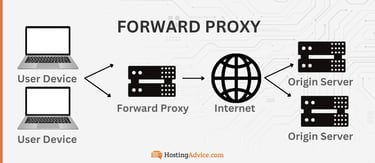
I use a proxy server to watch shows from the Philippines, Saudi Arabia, and India that aren’t available in the U.S. Without a proxy, I’d either miss out or have to pay for expensive subscriptions. A proxy lets me access these shows as if I’m in those countries.
I can also use this proxy to block or filter certain sites. That’s what some employers use to keep employees from accessing social media while at work.
Reverse Proxy
A reverse proxy sits right in front of a web server. Its primary job description is to manage traffic going into that server.

This proxy works best for websites that get a lot of visitors. For example, eCommerce websites like Amazon.com or Walmart.com usually use reverse proxies to balance the load across different servers. If one server gets overloaded, the reverse proxy routes some requests to a less busy server.
This type of proxy also protects servers from potential attacks by hiding the IP addresses of the target servers.
Transparent Proxy
This type of proxy doesn’t sneak around. Rather, it’s completely visible to both you and the websites you visit. Yes, it’s still a proxy, but it doesn’t modify your request or mask anything. Unfortunately, it’s easily detectable, but it also has some benefits.
For example, a transparent proxy may not protect your IP, but it helps websites load faster by caching content.
You can also use it to filter content. It sits there, filtering which requests should go into the target server and which shouldn’t. And because of this particular trait, some schools use it to prevent kids from accessing sites like Netflix, Instagram, Facebook, or even YouTube while in school.
Anonymous Proxy
An anonymous proxy hides my IP address. The website I’m browsing can’t see exactly where I’m coming from, but it knows that I’m using a proxy server.
I might use an anonymous proxy when I want to hide my IP address, but I’m not too concerned if others know I’m using one. It’s just about adding a layer of privacy when browsing on public networks such as the airport or library Wi-Fi.
High Anonymity Proxy (Elite Proxy)
As the name implies, this is the most undercover type of proxy you’ll find. It’ll hide both your IP address and the fact that you’re even using it. That means maximum anonymity.
You’ll need this proxy when you don’t want to leave any trace online. It kind of reminds me of that one scene in the 2010 movie “Inception” when Cobb stealthily shoots a guard and then catches the bullet shell before it hits the ground.
If you haven’t watched it, go check it out. It’ll be worth your time.
Key Benefits of Using a Proxy Server
You’ve probably picked up several benefits of proxy servers throughout this article. Let’s now narrow them down to the specifics.
- Privacy and Anonymity: You’ve seen that proxy servers are like masks for your IP address. When you use one, the websites you visit only see the proxy’s IP. They don’t see you, and that makes it even harder for them to track you or pinpoint your exact location.
- Security Enhancements: Proxy servers can filter out potentially harmful content or block access to malicious websites. They act like a security guard that stops suspicious traffic.
- Bypassing Geo-Blocks: A proxy server helps me access content that’s restricted in my area. It routes my connection through a server in another region, making it look like I’m browsing from there. This way, I can unlock shows and websites that wouldn’t normally be available to me.
- Network Performance and Caching: Proxy servers store copies of frequently accessed data. Instead of sending a request all the way to the original server every time it’s needed, it just loads it directly from its cache. That way, it makes websites and applications load faster and perform even better.
- Controlling Employee or User Access: Some companies use proxy servers to block access to restricted sites, like social media, during work hours. When someone tries to access a blocked site, the proxy server reviews the request. If it’s not allowed, the server stops it right there instead of forwarding it to the original site.
If you’re planning to use a proxy server to improve security, you’re in luck. Next, I’ll take a deep dive into how proxy servers help protect your network and information.
How Proxy Servers Improve Security
Proxy servers are for more than hiding your identity. They play a unique role in the security of your network. Here’s what they’re capable of:
Content Filtering
We’ve seen that proxy servers can filter out harmful content and block access to malicious websites. This alone defends you from potential online threats. It’s like having a bouncer at your party checking every person (or piece of content) before letting them in. If a malicious person tries to access the party, the bouncer (proxy server) won’t let them in.
Malware Prevention
Some advanced proxy servers go beyond just blocking access. Instead, they also scan incoming data for malware or suspicious activity. If they detect anything harmful, the proxy stops it right there. That swift reaction keeps your system safe.
Encrypting Requests
Some proxies can encrypt traffic. The goal here is to keep personal data or browsing activity safe from prying eyes. When your request goes through such a proxy, it encrypts the data on its way to the original server. That way, a hacker can’t steal information they can’t decrypt.
Hiding Internal IPs
Computers and networks have IP addresses that work the same way as Social Security numbers do. A skilled hacker can use these addresses to commit cybercrimes. But what would happen if computers and networks hid their IP addresses? Attackers would likely lose their minds. Instead of seeing the real IP, anyone looking in from the outside would only see the proxy’s address.
Risks and Drawbacks of Proxy Servers
Proxy servers also come with risks and drawbacks. That’s just how tech, and basically almost everything in life, works. Let’s take a look.
- Lack of Encryption: Not all proxies can encrypt traffic. In fact, not all proxies have encryption. Some, like the transparent one I discussed earlier, only care about improving performance. This leaves data vulnerable to interception. You’ll have to bring your own security, such as a VPN, for instance. The risk is even higher when you’re connected to unsecured networks like the WiFi at the airport or a public library.
- Performance Impact: When too much traffic passes through a proxy server, it can slow things down. In real life, that’s what happens when there are heavy security checks at a crowded event. I experienced that at Afro Nation in Detroit last summer. The key point here is that a busy proxy server can take longer to process requests. That leads to slower website loading times.
- Security Vulnerabilities: Again, not all proxies are completely secure. Whatever you do, please try to avoid the free ones in particular. Some may log user data, while others lack proper security features to protect you from hackers.
- Limited Functionality: Some proxies may not work well with advanced or security-intensive websites. For instance, banks may block access if they detect a proxy. That’s just an example of the many compatibility and functionality issues I’m talking about.
Ultimately, I think the benefits outweigh the disadvantages. However, it’s up to you to decide for yourself.
Proxy Servers vs. VPNs: What’s the Difference?
It’s easy to confuse proxies with VPNs. After all, both options can hide your online presence. However, the primary difference between these two is in how they work.
For starters, VPN means Virtual Private Network. It encrypts all your internet traffic and routes it through a secure server.

Proxies, on the other hand, simply forward requests through an intermediary server. They don’t necessarily encrypt your data (unless you get one that’s specifically designed to do this).
Key Differences:
- Encryption: VPNs can make your entire internet activity private. Proxies don’t necessarily do this.
- Cost: Proxies are cheaper. Some are even free. On the other hand, you’ll need to pay a fee for a good VPN.
- Scope: VPNs protect all internet traffic on your device. Most proxies only work with applications or web browsers you’ve selected.
The fact that these two can protect your data doesn’t mean that they’ll all work for you. You need to know when to choose one over the other.
When to use a proxy vs. a VPN:
- Proxies: These are best for light tasks. Among other reasons, you can use them to bypass geo-blocks on streaming sites or add a quick layer of privacy for a short time.
- VPNs: Use this if you want full anonymity on the internet. It can also protect your information and keep malicious third parties at bay.
If you’re having trouble deciding, here’s a quick hack: a VPN is more like full-body armor, while a proxy is more like a mask.
Common Use Cases for Proxy Servers
Proxy servers serve different purposes. It all depends on where you use them. Check out these examples for perspective:
Accessing Restricted Content
There are some types of online content that are only available in certain regions. A good example here would be Netflix shows that are only available in other countries.
A proxy allows you to route your connection through a server in a different region. And as we’ve learned, it makes it look like you’re in that specific location where the content isn’t restricted, not where you actually are.
Businesses and Schools
Some businesses may use a proxy to filter out distracting or inappropriate websites. They do this to make sure employees stay focused on their jobs.
In some schools, you’ll find that students can only access content that’s focused on learning. Sites like YouTube, Facebook, Instagram, and X (formerly Twitter) are usually blocked from such institutions.
Market Research
As a small business owner, I sometimes use a proxy to check competitor prices without getting flagged. Competitor visits often follow patterns, such as frequent, regular visits focused on specific information.
Websites can easily spot this “bot-like” behavior, but a proxy helps mask it. The masking makes my activity look like regular customer traffic. That way, I can harvest the information I need from my competitor without getting flagged.
Cybersecurity
I explained that an IP address is like a Social Security number for a device. Attackers use these numbers to locate and access computers.
But when you use a proxy, it hides the computer’s IP. Without the IP, an attacker will find it difficult to access the computer.
How to Set Up and Use a Proxy Server
The process of setting up a proxy server depends on what device or browser you’re using. Here’s how to go about it.
Setting Up a Proxy in Your Browser
On Google Chrome:
- Click on the three dotted lines at the top right corner of the browser to access the browser’s settings.

- Scroll down and click on “Settings.”
- On the left side of the page, click “System.”

- Click “Open your computer’s proxy settings.”

- On the new page, enter the IP address and port number for your proxy.
Firefox has a similar setup. You’ll find it at “Options” and then “Network Settings.”
On Microsoft Edge, you’ll find that under “System and Performance.”
Using Proxy Settings on Your Operating System
You can also set everything on your computer to go through a proxy. How you go about it will depend on the specific device you’re using.
On Windows:
- Go to “Settings.”
- Select “Network & Internet.”

- Click on “Proxy” and then enter your proxy details.
For macOS:
- Go to “System Preferences.”
- Select “Network.”
- Select your active connection and configure the proxy under “Advanced Settings.”
Testing Proxy Servers
Once your proxy is set up, you’ll need to test it. There are many different ways to do this, but looking up your IP address is the easiest.
Here’s what I usually do:
First, I write down my IP. If you’re not sure what your IP address is, simply search “what is my IP address” on Google.
Now, write down the IP address somewhere. Then, connect to a proxy server using the steps I explained above.
Once you’ve established the connection, now Google “what is my IP” again. If you’ve done everything correctly, you should see a new IP address in the search results.
Free vs. Paid Proxy Servers
When looking for proxy servers, you can choose the free or paid versions. But make sure you’re aware of the pros and cons.
Free Proxies
Here’s why you may consider using the free versions:
- Costs nothing to use
- Great for casual browsing or one-off needs.
- Easy to find
On the downside, free proxies:
- have limited speeds;
- tend to display ads;
- may log your data; and
- typically lack strong security features.
I’ll leave the table below for you to decide what you’d rather go with.
| Benefits | Drawbacks |
|---|---|
| Free | Limited speed |
| Easy to find | Lack of security |
| Convenient | Logging issues and ads |
You get to call the shots here. If you’re okay with risking your privacy and having to deal with bad performance, then free proxies may make sense to you.
Paid Proxies
With paid proxies, you’re getting value for your money. Here’s why:
- Offer better speeds
- Have stronger security
- Have dedicated customer support
- Are less likely to log your data or display ads.
The biggest disadvantage of paid proxies is the cost involved. However, for many people, the benefits justify the investment.
How to Choose the Right Proxy Service
Not every type of proxy you find out there is good for you. That also applies to the paid versions.
What works for you depends on your unique needs. Ask yourself what you’re trying to achieve. Once you’ve answered that question, you should have an easier time choosing the right proxy.
For example, I care a lot about performance and security. That means I wouldn’t go for a free proxy.
Other people just want to access region-specific content. They don’t really care how fast it takes to load; the proxy server’s location is more important in this case.
For instance, if you want to access UK-based content, you don’t want to settle for a proxy server in South Africa. Instead, I want one located in the UK or its surroundings, at the very least.
A Smarter and Safer Way to Surf the Internet
I hope you now understand what a proxy server is all about. The word itself may sound a little technical, but it’s nothing too complicated.
A proxy server is meant to make your internet surfing experience better in one way or another. From protecting your device to making web pages load faster, a proxy server is a smarter and safer way to browse the internet.
It might not be as secure as a VPN, but it’s easily a great option if you need a quick, affordable, and reliable fix to some of your privacy problems.