Key Takeaways
We compared today’s top VPS providers to help you find the best balance of speed, control, and easy VPN setup for your needs.
According to a Surfshark report, over 1.75 billion people worldwide use virtual private networks (VPNs). This figure represents about one-third of the five billion internet users globally. A VPN is an encrypted tunnel connecting your device to the World Wide Web. Using a VPN service allows you to surf the web anonymously, offering peace of mind.
From teenagers trying to bypass parental controls to employees accessing work servers, VPNs are used by all age groups and hold a strong position in both consumer and business markets. The global VPN market is currently valued at $66 billion in 2025 and is expected to grow beyond $78 billion by 2026, according to the same report.
A VPN can be crucial to your online safety, and we recommend using one. While there are several fantastic VPN providers on the market, a self-hosted VPN on a virtual private server (VPS) offers considerable advantages. We will explore these advantages in our list of the best VPS services for VPN.
One big choice you’ll see repeatedly presented on this list is “managed” versus “unmanaged” (or self-hosted) VPS. Even though “Managed VPS” may be more convenient, it may block access to the root server, necessary for VPN setup, since you’re handing over server control to the host. For a self-hosted VPN specifically, unmanaged is usually the better fit.
1. Hostinger ($5.84/mo): AI-Managed, Beginner Friendly
Hostinger’s KVM VPS hosting plans deliver more efficient virtualization and hosting capabilities than a standalone VPS. Hostinger offers four unmanaged KVM VPS hosting plans.
Hostinger’s KVM VPS plans are budget-friendly and offer several impressive features. This means that you will have to establish a VPN connection on your Hostinger VPS by yourself, or use Hostinger’s “Ubuntu 24.04 with WireGuard” VPS template with wg-easy pre-installed. This is a web-based interface for creating VPN clients, downloading configs, and generating mobile QR codes
The Ubuntu 24.04 with WireGuard VPN is manageable from hPanel without ever needing to touch SSH. It’s a purpose-built VPN deployment option. So, thanks to Hostinger, you may not be totally on your own to host for VPN setup.


- Best overall value: The most complete AI-managed KVM VPS at this price
- AMD EPYC processors, NVMe SSD, and 1 Gbps network
- Kodee AI manages your server — no command line needed
- One-click deployment of 100+ apps including Docker and n8n
- Free weekly backups, DDoS protection, and full root access
- Get started on Hostinger now.


Sead Fadilpasic


Hostinger’s laser focus on providing affordable hosting solutions shines brightest with the company’s VPS packages. The company provides four different virtual server plans, including one that costs less than $6.
Go to full review »| Disk Space | CPU | RAM | Setup Time |
| 50 GB NVMe – 400 GB NVMe | 1 – 8 cores | 4 GB – 32 GB | 6 minutes |
The features of these cheap VPS hosting plans include up to 8 CPU cores, ample RAM, and NVMe disk space. Customers also get free automatic weekly backups, one manual snapshot so that you can restore a previous system version with ease, firewall and DDoS protection, one-click installation of popular software, and an AI assistant.
Top Hostinger Features:
- Full root access, every plan (permits VPN)
- Pre-built “Ubuntu 24.04 with WireGuard” template, wg-easy included
- Kodee AI server assistant, no command line required
- Fiber-connected infrastructure, 1 Gbps network speed on DELL and HPE hardware
- 100+ one-click apps, including Docker and n8n
- Robust performance with AMD EPYC processors
- 99.9% service uptime guarantee
- Free weekly backups and DDoS protection
The AI assistant makes VPS management straightforward. The assistant can guide you through configuring firewall rules and installing WordPress. And if you like having options, Hostinger supports five Linux-based operating systems: Ubuntu, Debian, Rocky Linux, CentOS, and AlmaLinux. The hosting provider is undoubtedly one of the best VPS services for VPNs.
This is built for someone who’s never touched a terminal or written code, but still wants the benefits of root access. Kodee AI genuinely eliminates the intimidation factor, and Hostinger goes a step further with the pre-built “Ubuntu 24.04 with WireGuard” template. It comes with wg-easy already installed, so you can create VPN clients and connect a phone without opening a terminal ever.
Managed vs. Unmanaged VPS at Hostinger:
There’s no managed tier here to fall back on, but there’s also no compatibility concern: every plan ships with full root access. A self-hosted VPN works regardless of which of the four KVM tiers you pick, and the WireGuard template means you don’t even need to install it manually. Every plan ships self-managed by default: root access, an OS template, and Hostinger’s own hPanel.
What an AI assistant adds (instead of managed):
Instead of a human-run managed tier, Hostinger went a different direction. They built an AI assistant (Hostinger Agent, or Kodee) directly into the control panel all included for free. It works well to write commands and troubleshoot in plain language, exactly when you need it.
Read the full Hostinger Review >>
2. Kamatera ($4.00/mo): Auto-Scaling Cloud Power
Kamatera offers a cloud-based VPS, called virtual private cloud (VPC). With Kamatera, you can easily set up an isolated, secure, and highly customizable private cloud environment.
Kamatera’s VPC is ideal for industries that handle sensitive data, such as healthcare facilities, law firms, financial institutions, government agencies, and businesses of all sizes.

- Best for developers: Fully customizable cloud VPS — choose your exact CPU, RAM, and storage
- Intel Xeon Platinum/Cascade Lake CPUs & NVMe SSD
- 20+ global data centers across 4 continents, with 99.95% uptime
- Hourly or monthly billing, only pay for what you use
- 30-day free trial with $100 credit — no commitment needed
- Get started on Kamatera now.


Surajdeep Singh


Backed by cutting-edge cloud computing technology, Kamatera adds instant and limitless scalability to the VPS hosting marketplace. Each cloud or virtual server is equipped with blazing-fast SSD storage and Intel’s latest Xeon Platinum/Cascade Lake, 2.7GHz+ CPUs.
Go to full review »| Disk Space | CPU | RAM | Setup Time |
| 20 GB NVMe – 4 TB NVMe | 1 – 32 cores | 1 GB – 128 GB | 5 minutes |
Kamatera is known for flexible and affordable VPS hosting plans starting at $4.00/mo. You can configure your virtual private cloud server using the hosting company’s management portal, allowing you to adjust your server capacity in just minutes. Their global data centers safeguard your confidential data, software, applications, and virtual machines, no matter where you choose to host.
This is built for developers. Kamatera’s VPC plans are fairly priced and include features like Intel’s latest Xeon Platinum CPUs, more than 50 operating system (OS) versions to choose from, OS add-ons such as cPanel and Plesk (you can only choose one), and a marketplace of pre-configured applications and services.
Top Kamatera Features:
- Root access retained on managed tier
- True elastic scaling: add CPU/RAM/storage without a rebuild
- 100+ OS images, including Windows and Linux
- Marketplace of pre-configured apps for one-click deployment
- A 99.95% uptime guarantee.
- Round-the-clock 24/7 phone, email, and live chat customer support.
- Hourly billing; suited to dev/test workloads and agencies
- Pick your own data center location
Kamatera virtually eliminates the stress around a launch day, a viral post, a Black Friday spike, and those situations where you would otherwise manually upgrade resources at the worst possible time. The elastic scaling genuinely works the way it’s advertised, and hourly billing means testing a VPN setup before you commit costs next to nothing.
Managed vs. Unmanaged VPS at Kamatera:
Kamatera doesn’t split into two separate products like most others on this list. Managed is a checkbox feature, instead of a different plan. You can pick your server size, then check “Fully managed service” (and optionally “Extended daily backup”) under Advanced Configuration. That typically adds about $50/mo for managed.
What managed adds: Kamatera handles your server’s OS and system configuration. On the smallest server, that raises the price from $4.00/mo to roughly $54.00/mo, with Kamatera’s extended daily backups included. Root access holds up either way.
Read the full Kamatera Review >>
3. IONOS ($4.00/mo): Personal Consultant, Premium Hardware
IONOS is famous for its low-cost hosting plans. Few web hosting companies beat its price-to-value proposition. The resources, features, and support customers get with a VPS from IONOS make this host shine.
Plus, its plans are backed by NVMe SSD drives, offering you up to 20x faster speeds than traditional HDDs. Who doesn’t like more speed for less money?

- Lowest entry price for VPS: no hidden fees, unlimited traffic, from $4.00/mo
- NVMe SSD storage, 1 Gbps connection, and 99.99% uptime
- Full root access with Linux or Windows — deploy in minutes
- Personal consultant assigned to every account after signup
- 30-day money-back guarantee and award-winning support
- Get started on IONOS now.

Christina Lewis


For an all-star player in the game of web hosting flexibility, look no further than the low-cost options from IONOS. The company’s vServers are a powerful VPS option that includes dedicated resources and unlimited traffic.
Go to full review »| Disk Space | CPU | RAM | Setup Time |
| 120 GB – 720 GB NVMe | 2 – 12 cores | 4 GB – 24 GB | 6 minutes |
IONOS gives you full root access on Linux or Windows, which is what OpenVPN or WireGuard need to install. On Windows, expect an added licensing cost for the OS itself; Linux keeps things free end to end. It includes a wildcard SSL certificate for your domain name and all subdomains.
Top IONOS Features:
- 1-click app installs: OpenClaw, n8n, Hermes, and more
- IPv4 & IPv6 dual stack + Block and object storage available on demand
- 31 data centers across North America and Europe
- Dedicated IP, active DDoS protection, customizable firewall
- Personal consultant assigned (small businesses new to VPS)
- Unlimited traffic w/Dell enterprise hardware
- VM cloning for safe testing
- 30-day money-back guarantee
To get started, log into the IONOS Cloud Panel, install the OpenVPN software on your local PC, and follow these steps to connect to your virtual private server. Important to note is the new $10 setup fee. IONOS pairs enterprise hardware with a little hand-holding for the average user. That means solid support, even at a budget price!
Managed vs. Unmanaged VPS at IONOS:
IONOS skips a managed VPS tier entirely. Every account gets a personal consultant and optional support add-ons, but nobody at IONOS handles your OS patching the way Kamatera or HostGator do. You’re self-managed here, with a human on call if you get stuck.
Read the full IONOS Hosting Review >>
4. Hosting.com ($8.99/mo): Turbo Speed, Heavy Workloads
Hosting.com offers managed and unmanaged VPS hosting plans at 20x faster page load speeds than its competitors, thanks to its Turbo Servers.
If you are comfortable configuring your virtual private server and setting up a VPN, stick to hosting.com’s cheaper, unmanaged VPS hosting plan tier. The managed plans trade root access for hands-off support instead, which means a self-hosted VPN isn’t actually possible there, and the Guru Crew support team is on hand 24/7 in multiple languages if anything else trips you up.

- AMD EPYC processors and NVMe SSD storage on all plans
- Full root access — install tools, containers, and custom stacks
- Choice of Ubuntu, Debian, or AlmaLinux with optional cPanel
- 10 global data centers with free CDN and 99.9% uptime SLA
- 24/7/365 in-house support — no outsourcing, no bots
- Get started on hosting.com now.
Christina Lewis
While hosting.com’s turbocharged shared hosting platform gives site owners ample room to grow, the company’s tech prowess is on full display with its portfolio of VPS options. Ranging from unmanaged, bare-metal environments to stress-free, fully managed space, hosting.com is sure to have the perfect option for your expanding online presence.
Go to full review »| Disk Space | CPU | RAM | Setup Time |
| 80 GB – 640 GB NVMe | 2 – 16 cores | 4 GB – 32 GB | 7 minutes |
Hosting.com offers tiered VPS hosting plans with optional cPanel. The most affordable managed plan, Managed Server 8GB, includes 4 CPU cores, 8GB RAM, and 150GB NVMe storage, plus cPanel Solo built in. Customers also get page-level caching with Turbo Boost and Turbo Cache, object caching, four server location options, and Cloudflare CDN compatibility.
Top Hosting.com Features:
- Orbi AI Assistance for instant support and fixes
- Daily off-server backups, kept for 30 days
- VPN Full Root Access (No root access on managed tier)
- Turbo Servers, 40% faster AMD EPYC performance
- 10 global data centers with free CDN
- One-click installs: WordPress, Drupal, Node.js, MongoDB
- Guru Crew 24/7 multilingual support
- Managed or unmanaged on Linux or Windows
- Choice of Ubuntu 22.04 LTS, Debian 12, AlmaLinux 9
- Ultra-reliable 99.9% uptime SLA
This is built for site owners who want speed without babysitting a server. Hosting.com’s Turbo Servers push meaningfully faster read/write speeds than most VPS competitors, and you can pick whichever support level matches how comfortable you are in a terminal.
Managed vs. Unmanaged VPS at Hosting.com:
Unmanaged runs $8.99/mo. Managed runs $45.00/mo for a 1-year term (50% off), for 4 CPU cores, 8GB RAM, 150GB NVMe, and cPanel Solo included. You also get one-click installs: WordPress, Drupal, nginx, Node.js, MongoDB, and Joomla!
What managed adds:
Full OS patching, CloudLinux isolation, Monarx malware protection, and self-service daily backups. Root access isn’t provided on Hosting.com’s managed plan, so a self-hosted VPN isn’t possible on this tier.
Read the full Hosting.com Review >>
5. Liquid Web ($5.00/mo): Self-Managed Savings, Managed Muscle
Liquid Web provides next-gen, lightning-fast, fully managed VPS hosting services. It offers VPS web hosting solutions categorized into numerous general, memory-optimized, and CPU-optimized plans.
General VPS web hosting plans are best for multiple websites on one server and eCommerce websites. Memory-optimized VPS hosting plans serve database and memory caching needs. CPU-optimized VPS plans are ideal for batch processing and high-traffic sites. The plan you choose will depend on the needs of your application.

- Third-party tested faster than Rackspace, DigitalOcean, and Amazon
- Choice of managed or self-managed VPS with full root access
- cPanel, Plesk, or InterWorx control panel included
- DDoS protection, dedicated IP, and 100% uptime guarantee
- Trusted by 600,000+ customers including FedEx and Red Bull
- Get started on Liquid Web now.
Christina Lewis
It’s no secret by now that Liquid Web is known for best-in-class technology and reliability that exceeds expectations. The company’s cloud VPS environments embody that reputation to its fullest — including managed WordPress and WooCommerce products.
Go to full review »| Disk Space | CPU | RAM | Setup Time |
| 30 GB SSD – 440 GB SSD | 1 – 6 cores | 1 GB – 16 GB | 7 minutes |
We recommend exploring Liquid Web’s general VPS plans, as they are sufficient to host your VPN. These plans offer your choice of an AlmaLinux or CentOS operating system, an InterWorx control panel, DDoS protection, and 50 GB of Acronis Cyber Protect backups. Liquid Web also offers six fully managed Windows VPS hosting plans.
Liquid Web’s Windows VPS hosting plans use popular Microsoft technology and are quite different from the web hosting company’s Linux plans. Additionally, the cheapest Windows VPS plan is nearly three times more expensive than the most affordable Linux VPS hosting plan.
Top Liquid Web Features:
- Root access retained on fully managed tier (permits VPN even when managed)
- An unprecedented 100% uptime guarantee
- ServerSecure protection, Acronis-backed backups
- Daily backups standard, no upcharge
- Choice of self-managed or fully managed
- Windows available on every tier
- Trusted by 600,000+ customers, including FedEx and Red Bull
- Security protection: ServerSecure, Real-time monitoring, with integrated firewalls.
This is built for businesses that want room to grow from self-managed into full support without switching hosts. The entry-level price only covers the cheapest of three distinct support tiers Liquid Web actually sells.
Managed vs. Unmanaged VPS at Liquid Web:
Liquid Web’s root access stays intact even on the fully managed tier, within reasonable usage limits. VPN self-hosting goes hand in hand with Liquid Web VPS. Self-Managed runs $5.00/mo for 1 vCPU, 1GB RAM, 30GB SSD. Fully Managed runs $36.00/mo for 2 vCPU, 4GB RAM, 80GB SSD.
What managed adds:
Full technical management, troubleshooting, and OS patching. Root access holds on the fully managed tier too, within reasonable usage limits, so it’s not entirely unrestricted, but it’s there.
Read the full Liquid Web Review >>
6. Hostwinds ($4.99/mo): Managed or Unmanaged, Your Call
Hostwinds is a long-time HostingAdvice favorite for its fast, powerful, and secure VPS plans. And it offers something for everyone, no matter your preferred management level or operating system.
If you’re not afraid to roll your sleeves up, you can save up to 50% by choosing a self-managed plan. Otherwise, select a managed plan from one of 10 Windows or Linux operating systems.

- Managed or unmanaged, in Windows or Linux
- Cloud hosting with hourly or monthly billing
- Instant upgrades without downtime
- FREE around-the-clock monitoring
- Automatic nightly backups available
- Get started on Hostwinds now.

Jack Wallen


Does any hosting provider have more virtual private server packages than Hostwinds? The company offers 10 configurations — and that’s just for managed Linux server partitions.
Go to full review »| Disk Space | CPU | RAM | Setup Time |
| 30 GB SSD – 750 GB SSD | 1 – 16 cores | 1 – 96 GB | 6 minutes |
The VPS provider’s managed Linux VPS plans are cheaper than its managed Windows VPS plans. Hostwinds’s managed virtual Windows server plans include up to 16 of the latest Intel CPUs, almost 100 GB RAM, and ample SSD storage. Customers also get an enterprise firewall, nightly backups, server monitoring, instant scalability, and a friendliness guarantee.
Top Hostwinds Features:
- Root access retained, managed and unmanaged (permits VPN on either tier)
- 99.9999% uptime guarantee
- Guaranteed 1 Gbps port
- Nightly automated backups
- Real-time monitoring with automatic ticket creation
- Save up to 50% going self-managed
Hostwinds backs its service with a team of Windows specialists, so you can confidently reach out if you run into any technical problems. This is built for anyone who wants the option to grow into managed support later. Start unmanaged to save money, then move to managed once server upkeep stops being worth your time.
Managed vs. Unmanaged VPS at Hostwinds:
Unmanaged runs $4.99/mo for 1 CPU, 1GB RAM, 30GB SSD, with plenty of room to scale up. Managed runs $7.14/mo for the same specs, a bit more.
What managed adds:
Full server management: OS updates, virus scans, troubleshooting, help with hardware failures. Hostwinds’ own FAQ confirms root access on both tiers. This is unusual for managed hosting and a genuine advantage for your VPN setup. Root access stays intact either way, so switching tiers later doesn’t mean giving up on the VPN itself. Hat’s off to Hostwinds, compared to most on this list.
Read the full Hostwinds Review >>
7. InterServer ($3.00/mo): Price-Locked Slices, No Surprises
InterServer offers specialized, cloud-based Windows VPS, Linux VPS, storage-optimized VPS, and WordPress VPS plans, rationing cloud and VPS resources through slices.
These cloud VPS plans are economical and balanced between storage, memory, and processor cores. InterServer’s storage-optimized VPS plans are particularly interesting, as they use enterprise hard disk drives to increase the storage allocation per slice to up to four TB SATA.

- $0.01 for the first month using code HOSTINGADV
- Price locked for life, no renewal increases, ever
- Scale instantly by adding slices — each adds 1 CPU, 2 GB RAM, 40 GB SSD
- Linux or Windows with full root access, choice of data center
- 24/7 in-house support from an independently owned provider since 1999
- Get started on InterServer now.
Sead Fadilpasic
InterServer’s on-site datacenter and hands-on involvement with configuring and provisioning virtual private servers give customers a level of flexibility not seen with many other hosting providers. InterServer rations VPS and cloud resources through slices.
Go to full review »| Disk Space | CPU | RAM | Setup Time |
| 40 GB SSD – 1280 GB SSD | 1 – 16 CPUs | 2 – 64 GB | 6 minutes |
InterServer’s Windows VPS hosting plans are powered by the Microsoft native Hyper-v platform. If you enjoy choice and customization, the web host offers a total of 64 VPS hosting plans. InterServer also encourages setting up your own WireGuard VPN Server! It is one of our more commonly recommended budget picks specifically for this use case, alongside Kamatera.
Top InterServer Features:
- Root access at any slice count (permits VPN regardless of slice count)
- Price locked for life, no renewal hikes
- 450+ one-click apps via Webuzo
- Ruby, Python, Perl, and MySQL pre-installed
- Managed support included automatically at 8+ slices
- Choice of NYC, Dallas, or LA data centers
The cheapest plan includes enough resources for a small to midsize application, a powerful Plesk control panel, enhanced security, and resource customization flexibility. This is built for budget-conscious developers who want predictable pricing for years, not just the first term. Slices scale in small increments instead of forcing you into an oversized tier.
Managed vs. Unmanaged VPS at InterServer:
Below 8 slices, you’re self-managed and on your own for setup, which means you’ll need to set up a WireGuard VPN on your own. However, if you need assistance, InterServer’s expert team is there to guide you through the process. At 8 slices or more, managed support kicks in automatically at the same per-slice price.
What managed adds:
Server administration, troubleshooting, and control panel help, folded into the same per-slice pricing rather than a separate SKU.
Read the full InterServer review >>
8. Bluehost ($4.69/mo): Pick Your Distro, Full Control
Bluehost offers three VPS hosting plans, empowering system administrators, developers, and designers to build limitlessly. These plans include fully dedicated hosting server resources, full root access, and impressive raw computing power.
Bluehost now lets you choose Ubuntu, Debian, or AlmaLinux at setup, and switch later if a project needs it. Two separate VPS products exist here: a self-managed line with root access and no cPanel, and a separate managed line with cPanel and WHM included. You’ll still set up a VPN on your own either way.
Bluehost has recently published a helpful guide for OpenVPN and WireGuard, to get you going in this process.

- Seamless migration from any Bluehost shared hosting plan
- Root access and easy multi-server management
- Ample RAID-1 storage and tons of bandwidth
- Each plan gets at least 2 dedicated IP addresses
- cPanel and WHM with root access
- Get started on Bluehost now.
Sead Fadilpasic
We love recommending Bluehost for its lifetime customer growth potential, meaning you can start with shared hosting and seamlessly scale to VPS hosting plans and beyond. The price versus performance is pretty unbeatable in the virtual hosting space, and Bluehost’s engineering team will kick off the customer relationship by instantly provisioning your server.
Go to full review »| Disk Space | CPU | RAM | Setup Time |
| 50 GB – 450 GB NVMe | 1 – 8 cores | 2 GB – 16 GB DDR5 | 6 minutes |
The cheapest plan offers double what other entry-level plans have, unlimited bandwidth, and a free cPanel license. If you face any technical issues, you can use Bluehost’s 24/7 VPS hosting assistance service. Self-Managed VPS includes 1 dedicated IP, with more available for a fee; Managed VPS also starts at 1, with a second available on request through support at no extra cost.
Top Bluehost Features:
- Root access on both self-managed and managed tiers (permits VPN on either tier)
- Choice of three Linux distros, switchable anytime
- Claude Code pre-installed on every plan
- Unmetered bandwidth & Multi-server management (single account)
- 1 dedicated IP included, additional available on request
- AMD EPYC processors, DDR5 RAM, NVMe storage
- Clean upgrade path from Bluehost shared hosting
- Official guide published for OpenVPN and WireGuard setup
Bluehost’s access control feature is worth mentioning. With this feature, you can create passwords for specific access, including server administration and ownership information. Alternatively, you can create a master password for everything.
This is built for developers and agencies who’ve outgrown Bluehost’s shared hosting and want a clean upgrade path. You can now choose Ubuntu, Debian, or AlmaLinux at setup, and switch later if a project needs it.
Managed vs. Unmanaged VPS at Bluehost:
Two distinct “Bluehost VPS” services: a cheap self-managed line for root access and solid features, and a pricier managed line with cPanel and WHM included. Self-Managed runs $4.69/mo for 1 vCPU, 2GB RAM, and 50GB NVMe. Managed runs $49.99/mo for 2 vCPU, 4GB RAM, 100GB NVMe, with the control panel.
What managed adds:
OS patching and monitoring handled for you, plus a second dedicated IP available through support at no extra cost. Root access holds on the managed tier too, with “Root WHM” access as part of the managed package.
Read the full Bluehost Review >>
9. InMotion Hosting ($13.99/mo): eCommerce Power, 90-Day Guarantee
InMotion Hosting offers high-performance, ultra-reliable VPS hosting plans for growing businesses and developers. These hosting plans are Linux-based, and Debian, CentOS, and Ubuntu are the available options for your OS.
InMotion Hosting’s VPS hosting plans are managed and built on the UltraStack caching system for high performance. The premium VPS hosting provider offers seven managed virtual server plans.
Note: InMotion Hosting only offers Managed VPS Hosting, so we’ve included that below. Not to be confused with other hosts’ unmanaged VPS options.

- Fully managed VPS built on UltraStack with NVMe SSD
- Free Launch Assist — expert migrations, config & optimization
- Monarx security, DDoS protection, and automated backups
- PCI-compliant with 99.99% uptime and triple redundancy
- 90-day money-back guarantee and 24/7 human support
- Get started on InMotion Hosting now.


Dave McQuilling


InMotion Hosting is a web leader in managed services, whether you’re shopping for a VPS or a dedicated server. Starting with the custom server configurations and complimentary setup by their experts, you won’t be disappointed.
Go to full review »| Disk Space | CPU | RAM | Setup Time |
| 160 GB – 460 GB NVMe | 4–16 vCPU cores | 8 GB – 32 GB | 6 minutes |
These plans might not be the cheapest, but they do come with a wealth of features. The most budget-friendly VPS plan offers two dedicated IP addresses, DDoS protection, the ability to select your control panel and datacenter location (covering options in both the United States and the European Union), and live chat support.
Top InMotion Hosting Features:
- Root access included on managed tier (permits VPN despite being managed-only)
- 90-day money-back guarantee (longest on this list)
- 99.99% uptime guarantee, UltraStack caching, SmartRouting uptime tech
- Free Launch Assist: expert migration and setup
- PCI-compliant with triple redundancy
- Up to 10 free dedicated IPs on higher tiers
- 24/7 monitoring network with SSH and DDoS protection
- Monarx security and automated backups
This is built for eCommerce and business-critical sites where a 90-day money-back guarantee reduces risk. The host is built to scale. All higher-priced plans offer NVMe storage for increased server performance. We recommend looking at the VPS 8 GB RAM plan.
Managed vs. Unmanaged VPS at InMotion Hosting:
InMotion’s current VPS lineup is managed only, with no separate unmanaged product listed on the page. Unlike Hosting.com though, InMotion’s managed plan page lists “Full Root Access Included” as a headline feature, so a self-hosted VPN isn’t ruled out here.
What managed only adds:
Free migration handled by InMotion’s team, 24/7 human support, and proactive monitoring, with root access still included, unlike some managed competitors.
Read the full InMotion Hosting Review >>
10. HostGator ($2.64/mo): Configurable Root Access
HostGator is a modern VPS hosting provider that offers three Linux-based VPS hosting plans.
HostGator now splits into two separate products: a Self-Managed line starting at $2.64/mo with root access and no cPanel, and a Managed line (branded Snappy) starting at $49.99/mo with cPanel and WHM included. We recommend the Managed/Snappy line for fully managed support.

- Full root access with fully or semi-managed options
- Redundant network with multiple layers of security
- FREE website, domain, MySQL, and script transfer
- RAID-10 storage for data protection
- Get up to 75% off when you sign up
- Get started on HostGator now.

Lynn Cadet


HostGator has built a great reputation in the industry for its shared web hosting options. The company’s VPS hosting solution, with optional cPanel support, provide a nice and easy introduction to those who are new to VPS hosting and know their needs require more than a typical shared plan.
Go to full review »| Disk Space | CPU | RAM | Setup Time |
| 50 GB – 450 GB NVMe | 1 – 8 cores | 2 – 16 GB | 7 minutes |
Customers can choose from US-based datacenters and also get a fully redundant network, server monitoring and remediation, and premium customer support. HostGator’s knowledge base is detailed and worth exploring if you have any questions related to its products. They also have multiple bandwidth providers in NTT, Level (3), Global Crossing, Comcast, AT&T, and AboveNet.
Top HostGator Features:
- Root access on both tiers, cPanel included on managed (permits VPN on either tier)
- Two-tier lineup: pick panel-included or root-only
- Claude Code pre-installed on self-managed tier
- NVMe storage, upgraded from the previous SSD standard
- Multiple bandwidth carriers, including AT&T and Comcast
- 30-day money-back guarantee
- Tier 3 data center reliability
The lowest-priced managed plan, Snappy 2000, offers NVMe storage, unmetered bandwidth, an AlmaLinux operating system, centralized DDoS protection, and weekly offsite backups.
Managed vs. Unmanaged VPS at HostGator:
This is built for two very different buyers. Managed with cPanel suits smaller teams that want the panel handled for them. The Self-Managed tier VPS is ready for a development team, stripped down to root control essentials. It’s suited perfectly to developers building their own stack. Both have root access, even with cPanel/WHM installed on the managed side.
Self-Managed runs $2.64/mo for 1 vCPU, 2GB RAM, 50GB NVMe, with root access and no cPanel. Managed/Snappy runs $49.99/mo for 2 cores, 4GB RAM, 100GB NVMe, with cPanel and WHM included.
What managed adds:
Guided setup, 24/7 support, and server monitoring, with cPanel and WHM installed and root access still included.
Read the full HostGator Review >>
11. Cloudways ($6.60/mo): Five Clouds, One Dashboard
Cloudways is a simple, reliable managed cloud hosting provider trusted by more than 90,000 businesses, agencies, and developers. Cloudways operates as part of DigitalOcean LLC.
Cloudways earns its spot on this list for a different reason than the other ten hosts: it’s the counterexample that shows what you’re trading away when a provider prioritizes managed security over root-level control. They solve adjacent but distinct problems.
If your priority is “keep my hosting account and data secure” rather than “route my own traffic through an encrypted tunnel,” Cloudways’ baked-in protections meet that real, related need. Every server ships with an Imunify360 firewall, Fail2Ban brute-force protection, DDoS mitigation, and free SSL, all patched automatically. It’s not a VPN substitute, but it does protect the server data.
Cloudways is built for agencies juggling more than one client site. They bundle five cloud providers behind one dashboard, so you’re not stuck learning AWS or Google Cloud’s console just to spin up a server. You have the choice of AWS, GCP, DigitalOcean, Vultr, and Linode. A cloud server is essentially a virtual private server that uses the cloud instead of a single virtualized physical machine.
The $6.60/mo price reflects Cloudways’ Standard DigitalOcean tier; a Premium tier is also available at the same specs for a higher rate. Offsite backup storage runs an additional $0.033/GB per server.
Important: Not to throw a wrench in your VPN plans, but Cloudways’ own community forum states plainly that Cloudways “doesn’t offer native VPN integration,” and that reaching a VPN at all requires SSH into the server and a third-party VPN client, such as OpenVPN, which may conflict with their automated firewall and system updates (given the lack of root access).

- Customizable alternative to traditional VPS hosting
- Choice of 5 popular cloud providers
- Scale server resources up and down as needed
- 24/7 monitoring and auto-healing servers
- Get 40% OFF first 4 months with promo code HOSTINGADVICE
- Get started on Cloudways now.
Jack Wallen
Choosing a virtual private server (VPS) typically means purchasing a slice of a dedicated server. VPS customers enjoy more customization options than shared hosting users without incurring the price tag of a dedicated machine.
Go to full review »| Disk Space | CPU | RAM | Setup Time |
| 25 GB SSD – 3840 GB SSD | 1 – 32 cores | 1 GB – 192 GB | 8 minutes |
When it comes to choice, Cloudways takes the cake. The web host offers more than 50 cloud hosting plans. You can opt for a DigitalOcean, AWS, or Google Cloud data center. We recommend opting for a DigitalOcean Premium hosting plan. DigitalOcean Premium plans include all the RAM, storage, and bandwidth you need to power your applications.
Top Cloudways Features:
- Team Management, useful for agencies with multiple users
- SSH and SFTP access on every plan
- Free Object Cache Pro (2GB plans and above)
- New Cloudflare add-on
- No root access on any tier (generally rules out self-hosted VPN)
- Choice of 5 cloud providers (AWS, GCP, DigitalOcean, Vultr, Linode)
- 99.99% uptime guarantee
- Free SSL, dedicated firewall, automated backups
- Auto-healing servers, 24/7 monitoring
- Staging environments included, no extra cost
- WooCommerce and Magento hosting support
- Go Live in under 15 minutes
All Cloudways plans include dedicated firewalls, automated backups, and regular security patching. Cloudways is easily one of the best VPS services for VPNs.
Managed vs. Unmanaged VPS at Cloudways:
There’s no unmanaged tier here. Managed is the entire product, and every server ships with monitoring, backups, and staging environments included. Cloudways explains the root-access tradeoff directly in its own support library: their platform interconnects thousands of servers under central management, and giving up root-level control is the price of that scale & security.
Read the full Cloudways Review >>
Managed vs. Unmanaged VPS: Which Is Better for a Self-Hosted VPN?
Most providers on this list offer both managed and unmanaged (self-hosted) VPS services, though a few specialize in just one. The right pick depends on whether you’d rather hand server upkeep to someone else or keep full control in your own hands. For a self-hosted VPN specifically, that choice matters more than usual, since OpenVPN and WireGuard both need root-level access that some managed plans don’t allow.

Unmanaged VPS: Cheap, and you get full root access, plus full control to build from the ground up. The trade-off? This comes with more development team responsibility and backend coding know-how, especially for security.
For a VPN specifically, not every managed plan gives you what you need in terms of root control. For the higher cost, you often get more tailored support from the hosting service. The good news is this can offset the cost of hiring a backend developer to manage things yourself.
Managed VPS: More expensive, but less strain on you. The host handles OS updates, security patching, and often throws in a control panel like cPanel. You often get more tailored support from the hosting service as well.
What managed VPS adds over unmanaged for a higher price:
- Server patching & maintenance taken care of by host
- Built-in security monitoring and updates
- Control panel included for easier configuration
- Support team on call if the VPN setup breaks
- Faster recovery from misconfigurations or outages
Comparison Table: Best VPS Providers
We did the work to compile the best hosts for you! Here’s the quick-scan version of everything below. VPN Integration is the column that actually decides whether a host works for this use case: price and features don’t matter if root access isn’t there.
Top Hosts for VPN on VPS:
| Host | Starting Price (Unmanaged | Managed) | VPN Integration | Top Features | Best For |
|---|---|---|---|---|
| Hostinger | $5.84/mo | no managed tier | Pre-built WireGuard template (wg-easy), no SSH needed | Kodee AI assistant, 100+ one-click apps, 1 Gbps network | First-time VPS buyers wanting root access without the learning curve |
| Kamatera | $4.00/mo | $54.00/mo | Root access retained on managed tier | Elastic CPU/RAM/storage scaling, hourly billing, 20+ global data centers | Developers and agencies needing burst capacity |
| IONOS | $4.00/mo | no managed tier | Full root access on Linux or Windows | Personal consultant, Dell enterprise hardware, wildcard SSL included | Small businesses new to VPS wanting hands-on support |
| Hosting.com | $8.99/mo | $45.00/mo | No root access on managed tier; unmanaged only for VPN | Turbo Servers (40% faster AMD EPYC), one-click installs, Guru Crew support, Orbi AI Assistance | Site owners wanting speed without server upkeep |
| Liquid Web | $5.00/mo | $36.00/mo | Root access retained even on fully managed tier | 100% uptime guarantee, ServerSecure protection, daily backups standard | Businesses wanting room to grow into full support |
| Hostwinds | $4.99/mo | $7.14/mo | Root access retained on both tiers | 99.9999% uptime, guaranteed 1 Gbps port, nightly backups | Anyone wanting to grow from unmanaged into managed later |
| InterServer | $3.00/mo | same rate, 8+ slices | Root access at any slice count; commonly recommended for WireGuard | Price locked for life, slice-based scaling, 450+ one-click apps | Budget-conscious developers wanting predictable long-term pricing |
| Bluehost | $4.69/mo | $49.99/mo | Root access on both tiers; official OpenVPN/WireGuard guide published | Choice of 3 Linux distros, Claude Code pre-installed, clean upgrade from shared hosting | Developers and agencies outgrowing shared hosting |
| InMotion | no unmanaged tier | $13.99/mo | Root access included despite being managed-only | 90-day money-back guarantee, UltraStack caching, free Launch Assist | eCommerce and business-critical sites |
| HostGator | $2.64/mo | $49.99/mo | Root access on both tiers, even with cPanel/WHM installed | Two-tier lineup, Claude Code pre-installed, NVMe storage | Users choosing between cPanel simplicity or full root control |
| Cloudways | no unmanaged tier | $6.60/mo | No root access on any tier; makes self-hosted VPN difficult | 5 cloud providers, auto-healing servers, staging environments | Agencies managing multiple client sites (not VPN-compatible) |
Price and VPN compatibility don’t always line up. Cloudways looks reasonable on paper until root access enters the picture, and a $2.64/mo HostGator plan can outperform a $50/mo one that can’t run OpenVPN at all. Match the VPN Integration column to what you’re actually building before the price tag decides for you.
VPS for VPN Hosting FAQ
Still have questions about hosting your own VPN? Here’s everything else worth knowing, grouped by what you’re actually trying to figure out.
The Basics
- What Is a VPN? >>
- What’s the Difference Between a VPS and a VPN? >>
- What Is a Virtual Private Server (VPS)? >>
Picking & Setting Up Your Host
- Which VPS Host Provider Is Best for My Needs? >>
- Can I Use a VPS for a VPN? >>
- Do I Need a Managed or Unmanaged VPS to Self-Host a VPN? >>
- Which Is the Fastest VPS? >>
VPN Protocols & Tools
- Which VPN Protocol Should I Use: OpenVPN or WireGuard? >>
- What Is wg-easy, and Why Does It Matter for VPS Hosting? >>
- What Are the Pros and Cons of Using a VPS for VPN? >>
Cost, General Legality & Getting Started
Jump straight to whichever group fits, or start from the basics below and work down.
The Basics
Before comparing hosts, it helps to know what you’re actually comparing. These three questions cover the core vocabulary: what a VPN does, how it differs from the server you’d run it on, and what a VPS actually is under the hood.

What Is a VPN?
A VPN adds an extra layer of privacy by encrypting your network traffic. In most cases, you’ll want a VPN for one of two reasons:
- For personal use to hide your online activity and information.
- For work to allow you to access your company’s intranet remotely.
Nearly 93% of organizations and institutions use a VPN as a business tool. However, the main draw of a VPN is as a personal privacy enabler. VPN technology is cheap and reliable, allowing users to maintain their anonymity on the web while safeguarding their data.
Many people use VPN services to access content that’s blocked by location. Say a Netflix show is exclusive to the United Kingdom—VPN users can connect to a UK server to watch it. Also, VPNs are super handy when you’re on public wifi, which is less secure than your home network.
What’s the Difference Between a VPS and a VPN?
You can use a VPS to run your own VPN, but they’re not the same thing. One’s a server you rent; the other’s a privacy tool you can install on it.
- A VPS (virtual private server) is a hosting product: a slice of a physical server with dedicated resources, root access, and your choice of operating system.
- A VPN (virtual private network) is a technology: an encrypted tunnel that hides your traffic from your internet provider and anyone else watching.
What Is a Virtual Private Server (VPS)?
The key phrase here is “virtual private.” This means the server lives in a virtual environment that’s also private.
Virtual private server hosting (VPS) is a private, scalable slice of a larger server. You get dedicated resources without paying for the whole machine. A VPS is shared with multiple users and owned and operated by a web or cloud hosting service provider.
A VPS simulates a dedicated server hosting environment and is often called a virtual dedicated server (VDS). The hosting company uses virtualization technology, such as VMware’s vSphere, to partition these servers into mini servers to suit your hardware requirements.
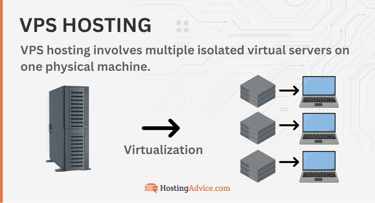
One simple way to grasp virtual private server hosting is by picturing a pizza. Instead of buying the entire pie, you can get just a slice. This lets you enjoy a personal meal without others nibbling on your food—and you save some cash too.
That’s how a VPS works. Rather than offering the entire server to you, the host slices it up into smaller portions. Now, that doesn’t mean you’re limited to just one slice. You might choose to have two slices instead. This is a common choice for larger organizations needing more resources.
VPS hosting takes more technical know-how to manage than shared hosting. The trade-off is that you get greater control, more resources, and added flexibility for your server environment without a huge jump in price. That’s why a VPS is highly scalable, which is just a fancy way of saying you can have more than one slice.

The private aspect of a VPS comes in the sense that you own that slice of pizza. You won’t share it with anyone else as you would in a shared hosting environment. That flexibility is exactly what a self-hosted VPN needs: a static IP, root-level configuration, and a server location you pick yourself.
Picking & Setting Up Your Host
Once the basics click, the next question is which host fits your situation and whether you can actually get a VPN running on it. This group covers matching a host to your priorities, confirming a VPS can do the job. It also answers one more setup decision (managed vs. unmanaged) that determines whether it works at all.

Which VPS Host Provider Is Best for My Needs?
The comparison table we covered above has every host’s specs side by side, but sometimes the fastest way to decide is starting from what actually matters to you. Match your top priority below to the host built around it.
My Needs & Top Priority:
| Top Priority | Best VPS Host | Why |
|---|---|---|
| Never touched a terminal or have no coding experience | Hostinger | Pre-built WireGuard template, no SSH needed |
| Absolute cheapest entry point | HostGator | Root access retained even at $2.64/mo |
| Root access even on a managed plan | Hostwinds, Bluehost, Liquid Web, InMotion, HostGator, Kamatera | Only hosts that don’t strip root access when you go managed |
| Price stability that won’t move for years | InterServer | Price locked for life, no renewal hikes, ever |
| Business-critical uptime commitment | InMotion | 90-day money-back guarantee, longest on this list |
| Auto-scaling for unpredictable traffic | Kamatera | Elastic CPU/RAM/storage scaling, hourly billing |
| Fastest raw performance | Hosting.com | Turbo Servers, 40% faster AMD EPYC |
| Managing multiple client sites with VPN as a low priority | Cloudways | 5 cloud providers, one dashboard (not VPN-compatible) |
If your priority isn’t listed above, the comparison table has the full spec range for every host on this list. But if you already know what matters most, this is the fastest path straight to the right pick.
Can I Use a VPS for a VPN?
A VPS already lives in a different physical location than you do, which is exactly one of the benefits of a VPN. Combined with everything above, that makes a VPS a solid base for hosting your own.
Running your own VPN on a VPS can mean faster speeds and lower latency than a typical VPN service, since you’re not sharing bandwidth with thousands of other users. You’re in complete control of your data, and you will not have to worry about potential third-party provider’s hardware failures.
You control your connection. Some self-hosted setups can even get past sites that block VPN traffic outright, since standard detection tools aren’t built to catch a private server and self-hosted VPN.

Setting up a VPN on a VPS might seem like a time-consuming task, especially if you choose an unmanaged plan, since you’ll be responsible for all maintenance. You’re the one keeping the server patched and running, with no support ticket to file when something breaks. But here’s the upside: the benefits far outweigh the challenges.
Two hosts on this list, Hosting.com’s managed tier and Cloudways entirely, don’t give you the root access this setup needs, but there may be work arounds.
Do I Need a Managed or Unmanaged VPS to Self-Host a VPN?
Unmanaged, in almost every case.
Installing OpenVPN or WireGuard requires root-level access, which some managed plans restrict or remove entirely; Hosting.com and Cloudways, notably, don’t allow it at all.
Note: Hosting.com‘s managed tier explicitly does not include root access. You can’t install OpenVPN or WireGuard on it. Cloudways doesn’t offer root access on any tier (a platform-wide policy).
IONOS and Hostinger have no managed tier. Hostwinds, InMotion (no unmanaged tier), Bluehost, Liquid Web, HostGator, and Kamatera, by contrast, all keep root access available on their managed tiers.
Comparison table:
| Best Fit | Managed VPS | Unmanaged VPS |
|---|---|---|
| Who handles updates & patching | The host | You and/or your “dev team” |
| Root/SSH access | Sometimes limited | Full access and control |
| Control panel (cPanel, Plesk) | Usually included | Rare, or will be an upsell cost |
| Best for a self-hosted VPN | Workable, if you’re okay with filing support tickets | Yes, full control & no restrictions |
| Typical starting price | Higher | Lower |
| Best for | Beginners, hands-off site owners | Developers, sysadmins, DIYers |
Which Is the Fastest VPS?
Hosting.com is the clear winner.
The hosting company’s managed VPS plans include an assured uptime of 99.9%, performance-optimized Turbo Servers with 40% faster AMD EPYC CPU performance, nine times more traffic capacity, and three times quicker read and write speeds than its competitors. These plans also offer page-level and object caching.
But hosting.com isn’t the only lightning-fast VPS. Since Kamatera is cloud-based, it promises higher availability rates than most competitors, with an uptime guarantee of 99.95%.
Each Kamatera virtual private cloud server is equipped with at least one high-performance Intel Xeon Platinum CPU and rapid SSD storage. This makes Kamatera one of the fastest VPS hosts and a good business VPN option.
Cloudways is another speedy, cloud-based VPS. Its DigitalOcean Premium plans are powered by 2nd Gen Intel Xeon Scalable processors with Intel mesh architecture and built-in AI acceleration, delivering exceptional performance. It is no surprise that Cloudways provides a 99.99% uptime guarantee.
Honorable mentions: Hostinger and Liquid Web are worth mentioning as well. Hostinger’s VPS hosting plans are suitable for live streaming, gaming, and anything in between. With lightning-quick VPS hosting plans and a 100% uptime guarantee, Liquid Web is a worthy contender for the title of “fastest VPS.”
Speed matters more for a VPN than for an ordinary website, since every byte of your traffic routes through that server twice. A sluggish VPS turns into a slower load time for everything you do online.
VPN Protocols & Tools
With a host picked, the remaining choice is which VPN software to run and how much of the setup you want to do by hand. These three answers cover OpenVPN versus WireGuard, the wg-easy tool that removes the command line entirely, and the tradeoffs worth weighing either way.

Which VPN Protocol Should I Use: OpenVPN or WireGuard?
If you’re not sure, WireGuard is the safer default for a personal or small business VPN.
WireGuard is the newer, faster, and simpler option for most people: a leaner codebase, quicker connections, and easier configuration.
WireGuard earns its reputation for being lean, not just easy. Its entire codebase is a fraction the size of OpenVPN’s or IPsec’s. It’s small enough that a single security researcher can dig through it, versus others that would need a large team to comb through it. It also runs inside the Linux kernel itself, which is a big part of why it outperforms older VPN protocols.
WireGuard authenticates connections using public-key pairs the same way SSH does, so there’s no separate certificate authority or complicated handshake to manage. That combination, a smaller attack surface, kernel-level speed, and SSH-style key exchange, is why WireGuard has become the default recommendation for a self-hosted VPN, and exactly what wg-easy is built to make usable without ever touching the command line.
OpenVPN has been around longer and is more heavily tested, which some businesses prefer for compliance reasons, but it’s noticeably slower and more complex to set up, prioritizing a long security track record over raw speed.
OpenVPN’s reputation comes from two decades of scrutiny rather than a smaller footprint. Being open-source means its code has been picked apart by security researchers worldwide for years, and it defaults to AES-256 encryption, the same standard banks use to secure transactions, paired with perfect forward secrecy that rotates encryption keys regularly so a single compromised key never exposes much.
It can also run over TCP port 443, the same port normal HTTPS traffic uses, which lets it blend in and slip past firewalls that block VPN traffic outright, something WireGuard’s simpler design doesn’t do by default. That combination, battle-tested encryption, broad platform support, and the ability to disguise itself as ordinary web traffic, is why OpenVPN remains the default pick for most anyone.
What Is wg-easy, and Why Does It Matter for VPS Hosting?
WireGuard is the modern VPN protocol most of this list is built around. It’s a solid choice favored by many VPS providers, but actually installing it typically means SSH access, command-line configuration, and manually generating a key pair for every device that connects.

Since many people may not have the technical know-how, wg-easy is the answer to this process. It’s an open-source web interface that sits on top of WireGuard and handles all of that through a browser instead.
Hostinger is the one host on this list that ships wg-easy pre-installed, bundled into an “Ubuntu 24.04 with WireGuard” template available right at setup.
Once the server is running, the entire VPN lives in hPanel: creating a new client, downloading its config file, and generating a QR code to connect a phone all happen without opening a terminal once.
That’s a genuinely different experience from every other host here, where root access gets you the ability to install WireGuard, not WireGuard itself. InterServer shows up independently across several third-party WireGuard hosting roundups as a recommended budget pick, but that still means running the installation yourself. Hostinger’s template is the only true point-and-click path to a running VPN server on this entire list.
What Are the Pros and Cons of Using a VPS for VPN?
If you’re privacy-minded like me, VPNs are worth the modest cost. They’re cheap, quick to set up, and add a real layer of privacy against anyone trying to snoop on your traffic. Here’s where they help, and where they fall short.
Advantages and disadvantages of using a VPN:
Pros
- Privacy and security
- Access geo-restricted content
- Protects your data on public Wi-Fi
- Prevents ISP throttling
- Provides secure connections for remote employees
Cons
- Slower speeds
- You may have to pay for it
- Some countries or regions restrict VPN use
A VPS is one of the better ways to run your own VPN. You get a static IP, root-level access, and a server location you actually pick, plus faster speeds than most commercial VPN services since you’re not sharing bandwidth with other users.
The tradeoff is setup and maintenance: you’re responsible for installing OpenVPN or WireGuard yourself, and for keeping the server patched if you go with an unmanaged plan. Self-hosting doesn’t erase these tradeoffs. It just shifts who’s accountable for them. Speed and privacy become things you control directly, instead of taking your provider’s word for it.
Cost, General Legality & Getting Started
Last things we want to cover: what this actually costs, whether it’s legal, and how to get moving without technical experience. These questions wrap up anything still standing between you and a running VPN.

How Much Does It Cost to Run Your Own VPN on a VPS?
The VPS itself is the only real cost, and on this list that starts around $4.00 a month at Kamatera or $4.00 a month at IONOS. The VPN software itself, whether that’s OpenVPN or WireGuard, is free and open-source, so there’s no separate license fee stacked on top. Budget for the server, not the software.

Where the price climbs is resources and management level, not the VPN. A managed tier with a control panel included runs higher, like $49.99 a month at HostGator, and a bigger server with more CPU and RAM costs more regardless of whether you’re running a VPN or a website on it. For a personal or small business VPN, an entry-level unmanaged plan, root access included, is usually more than enough horsepower, and the Hostinger WireGuard template proves you don’t need to pay more just to skip the command line either.
Is It Legal to Set Up My Own VPN On a VPS?
Yes, in nearly every country. This is not legal advice, so see a lawyer if that’s what you need. But, running your own VPN server is no different, legally, than running any other software on a server you own or rent, since the VPS provider is just hosting infrastructure and has no say in what you install on it.

A handful of countries, including China, Russia, and the UAE, restrict or ban VPN use outright, so check local law first if you’re traveling, working remotely, or operating a business from one of those regions.
For everyone else, self-hosting a VPN is standard, unremarkable practice, and it’s exactly what providers like InterServer and Hostinger build root access and one-click VPN templates around in the first place.
Hosting your own VPN doesn’t put you in a legal gray area any more than hosting a personal blog would; the legality question is about where and how you use the VPN, not whether you’re allowed to build one.
Can I Get a Free VPS for VPN?
Technically yes, but it’s not a great idea. Free VPS trials exist (Kamatera and Cloudways both offer them), but they’re time-limited and meant for testing, not running a VPN long-term. Fully free, no-strings VPS hosts are usually underpowered, unreliable, or funded by something you won’t like once you read the fine print.
It boils down to this: when you see “Free,” it’s usually only for a limited time trial of a full hosting plan (e.g., 30 days), a free tier like Google Compute Engine that is limited by hours (with costs accruing after limits are reached), or it may be a competitive new hosting service — that you may not want to trust with your credit card details.
Maintaining a VPS costs a lot of money and requires tons of resources. That’s why good VPS providers such as Kamatera and Cloudways will give you a free trial rather than promise a completely free hosting environment. A cheap paid plan, starting around $3-5/mo on this list, is the more sensible route.

If you’re tempted by an unfamiliar offer promising 100% free hosting, you could run into a few unpleasant surprises.
Here are several reasons it’s smart to steer clear of free hosting services:
- Spammy ads and upsells
- Terrible and unreliable performance
- Weak or no security
- Unreliable uptime
- Limited customization and no managed hosting
- No privacy guarantee
This Reddit thread is a good example of why you shouldn’t trust any host that claims to offer free servers with no strings attached. There are well-documented cases of so-called free hosts randomly deleting servers without warning, which tells you there’s nothing private (exposed hosting servers) or reliable about such environments.
Alternatively, opt for a VPS with a money-back guarantee. Hostinger, for example, will give you a 30-day money-back guarantee. That means if you don’t like the service, you can request your money back within 30 days of signing up.
Another option is to find a VPS with ultra-low starting prices. IONOS and Kamatera are both worth comparing directly for the lowest entry price on this list.
How Do I Set Up a VPN on a VPS Without Technical Experience?
Pick a host that removes the command-line step. Hostinger, for example, offers a pre-built “Ubuntu with WireGuard” template with a web interface for creating VPN clients and scanning QR codes to connect a phone, no SSH required.
Failing that, most hosts publish a step-by-step guide (Bluehost has one covering both OpenVPN and WireGuard), and AI assistants like Hostinger’s Kodee can walk you through the terminal commands in plain language if you get stuck.

Once you’ve picked a host, the no-terminal path generally looks like this:
- Deploy the pre-built template, not a blank server. Choosing “Ubuntu 24.04 with WireGuard” at signup installs wg-easy alongside the OS, so there’s no separate install step later.
- Open the VPN dashboard from your hosting panel, not SSH. On Hostinger, that’s a single click from hPanel into wg-easy’s web interface.
- Create a client for each device, giving it a name like “Phone” or “Laptop” rather than leaving it generic, so you can tell them apart later if you need to revoke one.
- Connect via QR code on mobile. wg-easy generates one per client; scanning it with the WireGuard app finishes the setup without ever typing a config file by hand.
- Download the config file for desktop clients instead, and import it directly into the WireGuard app rather than copying keys manually.
- Ask the AI assistant before searching the web, if something doesn’t work. Kodee can read your server’s actual state and troubleshoot in plain language, which is usually faster than a generic search result.
- Fall back to the host’s published guide for anything the template or AI assistant doesn’t cover. Bluehost’s OpenVPN/WireGuard guide is a solid example of a host walking through the manual steps for readers who end up on a non-template server.
The whole process, template to connected device, usually takes under fifteen minutes on a host built for it, versus the hour-plus of manual configuration a bare unmanaged server would require.
Choosing the Best VPS Service for a VPN
Whether for personal or business use, a virtual private network should be integral to your tech stack. If you are not tech-savvy, you should avoid purchasing an unmanaged VPS service for a VPN (for personal use). A managed VPS hosting plan or a premium VPN provider is a better option for you.
If your organization does not use a VPN, urge your system administrator to explore business VPN hosting plans immediately.
When you’re choosing a VPS service for a VPN, it’s essential to consider your personal or business needs. IONOS stands out as a fantastic choice for anyone seeking an affordable, Linux-based VPS hosting plan to set up a VPN.
If you are looking for a high-speed, robust business VPN tool, look no further than Kamatera, as it is the best VPS hosting provider for business VPN. Some other standout options are Cloudways, Hostwinds, and Hostinger.
Cybercrime is on the rise, and its global cost is projected to reach $12.2 trillion annually by 2031. You must do your part to protect your privacy. Purchasing a VPN is one of the first steps you should take. Whichever host you choose, confirm root access before you buy, not after. It’s the one requirement that separates a VPS that can run your VPN from one that can’t.
Be sure to follow us on social media, check out our how-to guides, and use our HostHelper™ Tool to answer any of your questions. Happy shopping!
HostingAdvice.com is a free online resource that offers valuable content and comparison services to users. To keep this resource 100% free, we receive compensation from many of the offers listed on the site. Along with key review factors, this compensation may impact how and where products appear across the site (including, for example, the order in which they appear). HostingAdvice.com does not include the entire universe of available offers. Editorial opinions expressed on the site are strictly our own and are not provided, endorsed, or approved by advertisers.
Our site is committed to publishing independent, accurate content guided by strict editorial guidelines. Before articles and reviews are published on our site, they undergo a thorough review process performed by a team of independent editors and subject-matter experts to ensure the content’s accuracy, timeliness, and impartiality. Our editorial team is separate and independent of our site’s advertisers, and the opinions they express on our site are their own. To read more about our team members and their editorial backgrounds, please visit our site’s About page.