


Great things often happen when brilliant minds come together. That’s what happened in 1998 when Diane Greene, Mendel Rosenblum, Scott Devine, Ellen Wang, and Edouard Bugnion collaborated to create VMware. More than two decades later, the company, headquartered in the heart of Silicon Valley, is now an industry leader.
Research shows that VMware vSphere dominates the virtualization industry, followed closely by its rival, Microsoft’s Hyper-V. At the end of 2023, VMware reported a revenue of more than $13 billion.
If you’re on the hunt for the best VMware hosting providers, we’ve got two paths to consider. The first is finding a host where you can install the software manually. The second option? Choose a host that comes with built-in virtualization, so you don’t have to handle installations yourself.
- Navigate This Article:
Best Servers to Install VMware
We’ll start with web hosts that provide VMware-compatible servers. You’ll need to roll up your sleeves and handle some technical stuff. If you’re not so tech-savvy, don’t sweat it; you can always contact the web host’s customer support team for guidance if you hit a dead end.


- Customizable alternative to traditional VPS hosting
- Choice of 5 popular cloud providers
- Scale server resources up and down as needed
- 24/7 monitoring and auto-healing servers
- Get 40% OFF first 4 months with promo code HOSTINGADVICE
- Get started on Cloudways now.


Jack Wallen


Choosing a virtual private server (VPS) typically means purchasing a slice of a dedicated server. VPS customers enjoy more customization options than shared hosting users without incurring the price tag of a dedicated machine.
Go to full review »| Disk Space | CPU | RAM | Setup Time |
| 20 GB SSD – 4 TB SSD | 1 – 96 cores | 1 GB – 384 GB | 8 minutes |
Cloudways harnesses its power from some of the top cloud hosting providers, including Amazon Web Services, Google Cloud Platform, and Digital Ocean. When prompted to choose your cloud hosting provider at Cloudways, you should opt for AWS.
The cloud hosting giant allows you to install VMware on its hardware and use it to achieve your virtualization goals. Amazon’s powerful cloud infrastructure, estimated to be worth billions of dollars, assures redundancy, stability, scalability, and high performance.
2. Liquid Web
 | ★★★★★ /5.0 |

- No per-VM fees
- Easily migrate existing VMware workloads
- Available in dedicated and multi-tenant configurations in US Central and West data centers
- Fully redundant enterprise-grade hardware with automatic failover
- Fast 10Gb networking and high-performance NetApp SAN storage
- Get started on Liquid Web now »
| Starting Price/Mo. | $375.00 |
Liquid Web’s private cloud is a great candidate if you need more privacy, better control, and a highly secure cloud hosting environment to install VMware. This is the VPS hosting service I would opt for if dealing with mission-critical workloads and datasets that had performance and security at the core.
Its horizontal web scaling technology is powered by load balancers and keeps your VPS server elastic, accommodating every instance of growth. Whether you run a SaaS company, have an enterprise client, or you’re a software developer looking to build the next revolutionary project (like VMware), Liquid Web is the host you need to propel your project to new heights.
3. Rackspace
 | ★★★★★ /5.0 |
- Engineered using VMware Cloud Director on Dell EMC VxRail®
- Available on AWS, Azure VMware Solution (AVS), and Google Cloud VMware Engine (GCVE)
- CloudHealth by VMware Cloud™ management platform
- Rackspace Elastic Engineering for seamless management and support
- Get started on Rackspace now »
| Starting Price/Mo. | $23.00 |
Rackspace won’t just hand you a platform to plug in VMware and start taking care of your business. Rather, it offers an environment that works seamlessly with VMware and also brings some extras.
I’m talking about eCommerce security to protect sensitive customer data, disaster recovery technologies, and knowledgeable support. Once you install VMware on the hosting provider’s hardware, Rackspace will manage vSphere and the underlying infrastructure so you can focus on running or developing your projects.
4. Azure
 | ★★★★★ /5.0 |
- Leverage existing VMware investments, skills, and tools (vSphere, vSAN, vCenter)
- Access Azure compute, monitor, backup, database, IoT, and AI services
- Ideal for Microsoft Windows and SQL Server workloads
- More than 3,500 security experts are on call
- Get started on Azure now »
| Starting Price/Mo. | $0.00 |
Azure is the second most popular cloud hosting provider by market share, alongside Amazon Web Services and Google Cloud Platform. That tells you everything you need to know about its hosting infrastructure.
Its customers get the best of both worlds: Azure’s powerful cloud environments and the power of VMware virtualization. I would recommend this option if you’re working on a project with OS-specific requirements, particularly those running on Microsoft’s technologies such as MySQL databases, ASP.NET Core, or Azure Functions.
Plus, you can also start for free (for up to 12 months) and then pay as you go for what you actually need.
Best Virtual Machine Alternatives
Most hosts won’t let you manually install VMware. Instead, they often have built-in hypervisor technology (the technology behind virtualization), allowing you to create multiple virtual machines to operate on a single server.
That means you can head straight into managing your project without worrying about installing VMware or any other compatible virtualization system. Below are some of the best hosts that offer virtualization.

- Best overall value: The most complete AI-managed KVM VPS at this price
- AMD EPYC processors, NVMe SSD, and 1 Gbps network
- Kodee AI manages your server — no command line needed
- One-click deployment of 100+ apps including Docker and n8n
- Free weekly backups, DDoS protection, and full root access
- Get started on Hostinger now.


Sead Fadilpasic


Hostinger’s laser focus on providing affordable hosting solutions shines brightest with the company’s VPS packages. The company provides four different virtual server plans, including one that costs less than $6.
Go to full review »| Disk Space | CPU | RAM | Setup Time |
| 50 GB NVMe – 400 GB NVMe | 1 – 8 cores | 4 GB – 32 GB | 6 minutes |
Hostinger uses kernel-based virtualization technology that allows each virtual private server to act independently. With this system, you’ll have more server resources and customization.
Whatever you choose to do with your virtualized server is entirely up to you. Some choose to install VPNs to add an extra layer of protection or enable application containers such as Kubernetes and Docker for efficient deployment.
In addition, Hostinger boasts powerful hosting infrastructure and resources, including AMD EPYC processors, NVMe SSD storage, and DPE and DELL hardware for maximum performance.
6. Kamatera.com

- Best for developers: Fully customizable cloud VPS — choose your exact CPU, RAM, and storage
- Intel Xeon Platinum/Cascade Lake CPUs & NVMe SSD
- 24 global data centers across 4 continents, with 99.95% uptime
- Hourly or monthly billing, only pay for what you use
- 30-day free trial with $100 credit — no commitment needed
- Get started on Kamatera now.

Surajdeep Singh


Backed by cutting-edge cloud computing technology, Kamatera adds instant and limitless scalability to the VPS hosting marketplace. Each cloud or virtual server is equipped with blazing-fast SSD storage and Intel’s latest Xeon Platinum/Cascade Lake, 2.7GHz+ CPUs.
Go to full review »| Disk Space | CPU | RAM | Setup Time |
| 20 GB NVMe – 4 TB NVMe | 1 – 32 cores | 1 GB – 128 GB | 5 minutes |
I think of Kamatera as a plug-and-play host. Its hosting environment offers multiple virtual private cloud servers, where you can simply plug in your website or application and not think about virtualization.
My second favorite thing about Kamatera is the level of control it offers. While some hosts come with pre-packaged plans with everything included (even features you don’t necessarily want or need), Kamatera is similar to a buffet that allows you to move around and select your hardware resources. These include the number of CPU cores, amount of storage space and memory, data center location, and operating system, among others.
7. IONOS.com

- Lowest entry price for VPS: no hidden fees, unlimited traffic, from $2/mo
- NVMe SSD storage, 1 Gbps connection, and 99.99% uptime
- Full root access with Linux or Windows — deploy in minutes
- Personal consultant assigned to every account after signup
- 30-day money-back guarantee and award-winning support
- Get started on IONOS now.

Christina Lewis


For an all-star player in the game of web hosting flexibility, look no further than the low-cost options from IONOS. The company’s vServers are a powerful VPS option that includes dedicated resources and unlimited traffic.
Go to full review »| Disk Space | CPU | RAM | Setup Time |
| 10 GB NVMe – 720 GB NVMe | 1 – 12 cores | 1 GB – 24 GB | 6 minutes |
IONOS is a great option for those who need a highly secure, redundant, and affordable host. Its cloud VPS plans, in particular, provide top-notch security, full root access, and come equipped with fast NVMe SSD storage.
The tight security standards observed at IONOS make it a great host for a project that handles sensitive data. For example, if customers input their credit card information directly into your business website or application, this PCI-compliant host can protect sensitive consumer data during those online transactions.
Besides security, affordability, and redundancy, IONOS supports both Windows and Linux operating systems and distributions such as Ubuntu, Centos, Debian, and AlmaLinux, ideal for running an OS-specific project.

- $0.01 for the first month using code HOSTINGADV
- Price locked for life, no renewal increases, ever
- Scale instantly by adding slices — each adds 1 CPU, 2 GB RAM, 30 GB SSD
- Linux or Windows with full root access, choice of data center
- 24/7 in-house support from an independently owned provider since 1999
- Get started on InterServer now.
Sead Fadilpasic
InterServer’s on-site datacenter and hands-on involvement with configuring and provisioning virtual private servers give customers a level of flexibility not seen with many other hosting providers. InterServer rations VPS and cloud resources through slices.
Go to full review »| Disk Space | CPU | RAM | Setup Time |
| 30 GB SSD – 480 GB SSD | 1 – 16 CPUs | 2 – 32 GB | 6 minutes |
InterServer is another excellent option if you have an operating system in mind. Besides offering Windows and Linux operating systems, the host also has storage VPS plans, perfect for handling large amounts of project data.
InterServer is also reasonably priced and supports hundreds of scripts and pre-configured applications, all under one platform. Whether you want to install WordPress, Moodle, Drupal, Joomla, or an online gallery to handle your massive photo albums, you’ll find these and so much more at InterServer.

- Full root access with fully or semi-managed options
- Redundant network with multiple layers of security
- FREE website, domain, MySQL, and script transfer
- RAID-10 storage for data protection
- Get up to 75% off when you sign up
- Get started on HostGator now.

Lynn Cadet


HostGator has built a great reputation in the industry for its shared web hosting options. The company’s VPS hosting solution, with optional cPanel support, provide a nice and easy introduction to those who are new to VPS hosting and know their needs require more than a typical shared plan.
Go to full review »| Disk Space | CPU | RAM | Setup Time |
| 120 GB SSD – 240 GB SSD | 2 – 4 cores | 2 – 8 GB | 7 minutes |
Each VPS hosting plan at HostGator is designed to include top-notch features. Take the dedicated IP address attached to every VPS plan as an example. This is possible because virtualization isolates virtual machines, allowing each to operate independently.
HostGator also includes manual backups, a fully redundant network, multiple CPU cores, and unlimited email accounts, among other features. All of these are common characteristics of a high-quality virtualized server.
10. Bluehost.com

- Seamless migration from any Bluehost shared hosting plan
- Root access and easy multi-server management
- Ample RAID-1 storage and tons of bandwidth
- Each plan gets at least 2 dedicated IP addresses
- cPanel and WHM with root access
- Get started on Bluehost now.
Sead Fadilpasic
We love recommending Bluehost for its lifetime customer growth potential, meaning you can start with shared hosting and seamlessly scale to VPS hosting plans and beyond. The price versus performance is pretty unbeatable in the virtual hosting space, and Bluehost’s engineering team will kick off the customer relationship by instantly provisioning your server.
Go to full review »| Disk Space | CPU | RAM | Setup Time |
| 120 GB SSD – 240 GB SSD | 2 – 4 cores | 2 GB – 8 GB | 6 minutes |
Bluehost isn’t technically a cloud host, but its virtualization technology gives it a well-deserved spot on this list. Scalability is the most common reason people, including myself, choose cloud hosting. Bluehost achieves the same through its failover technology.
This VM hosting service creates a second instance of your website or application and stores it in a remote server. When one server fails, possibly due to hardware issues, the server with the working copy of your website takes over while it repairs the faulty one.
That, coupled with the virtualization system, means you’ll always have a fully redundant host that’s also scalable.

- HostingAdvice readers get 74% off the first term
- FREE site migrations and 2 hours of Launch Assist
- 2 – 3 dedicated IP address options
- SSH and DDoS protection included
- Highly available servers with real-time redundancy
- Get started on InMotion now.

Dave McQuilling


Boasting market-leading VPS hardware, slick management software, and free SSD drives and backups, InMotion Hosting competes to win when it comes to managed VPS hosting packages. The host initiates its VPS customer relationship with free website migrations and up to two hours of launch assistance from an experienced sysadmin.
Go to full review »| Disk Space | CPU | RAM | Setup Time |
| 30 GB – 540 GB SSD (or NVMe) | 2 – 16 cores | 1 GB – 32 GB | 6 minutes |
InMotion is perhaps the perfect example of the impact of virtualization on web hosting. This technology creates a win-win situation in which the web host benefits by signing up more clients while you, the client, receive more resource availability, among other benefits.
For example, the base VPS hosting plan at InMotion comes with four vCPU cores. The “v” represents “virtual” or “virtualized,” meaning InMotion uses a hypervisor to divide the CPU’s processing power and allocate it to this plan. The same applies to the four gigabytes of memory and 90 gigabytes of storage. Once upon a time, these were all part of one big computer until virtualization technology came along.

- Third-party tested faster than Rackspace, DigitalOcean, and Amazon
- Choice of managed or self-managed VPS with full root access
- cPanel, Plesk, or InterWorx control panel included
- DDoS protection, dedicated IP, and 100% uptime guarantee
- Trusted by 600,000+ customers including FedEx and Red Bull
- Get started on Liquid Web now.
Christina Lewis
It’s no secret by now that Liquid Web is known for best-in-class technology and reliability that exceeds expectations. The company’s cloud VPS environments embody that reputation to its fullest — including managed WordPress and WooCommerce products.
Go to full review »| Disk Space | CPU | RAM | Setup Time |
| 30 GB SSD – 440 GB SSD | 1 – 6 cores | 1 GB – 16 GB | 7 minutes |
Liquid Web’s VPS plans take us to a different chapter but within the same story. The key difference here is that you can either choose to install VMware manually (I covered this option in the first section) or pick a cloud VPS plan that comes with the virtualization already done.
You simply need to choose the ideal cloud VPS hosting plan for your project or build one from scratch. Each plan also comes with flexible billing options, so you can either choose the monthly system or an hourly billing cycle.
What Is VMware?
Many people think VMware is just software, but VMware is actually a company. It’s the mastermind behind well-known virtualization tools like vSphere, VMware ESXi, VMware vCenter Server, and VMware NSX, among others.
Virtualization allows you to run multiple virtual machines on a single physical machine. Think of it as creating multiple computers within your computer. It helps consolidate your IT resources and improve efficiency and flexibility by running multiple operating systems and applications on a single server.
What Is VMware Hosting?
VMware hosting involves using VMware’s virtualization technology to provide virtualized environments to run websites, applications, or entire IT infrastructures. In a VMware hosting environment, multiple virtual machines can coexist on the same physical server, but each machine has its own isolated operating system, resources, and applications.
The whole point of this type of hosting is to provide a scalable and flexible environment where you can easily deploy and manage virtual servers according to their specific requirements. Since each virtual machine operates independently, VMware hosting also leads to reliability and better performance.
What Is VPS Hosting?
The infrastructure of a virtual private server is similar to cutting a pie into individual slices and serving them to guests at a party. The pie (server) is whole until someone creates slices with a knife (virtualization technology) and separates pieces of the pie. Party guests get their own slices without having to share them with others.
Just as party guests can customize their toppings after getting a slice, VPS users can control their server’s operating system, add-ons, and other features.
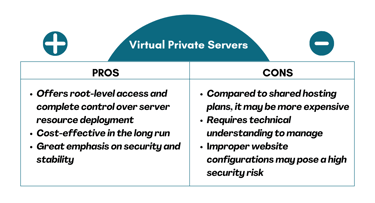
Each virtual server operates independently with its own operating system, resources, and software applications. VPS hosting is typically the next level when you upgrade from shared hosting.
Think of VPS hosting as a balance between shared hosting, which is cheaper but offers less control, and dedicated server hosting, which gives you exclusive resources but at a higher cost.
Which Company Offers the Best VPS Hosting?
I would choose Kamatera mainly because it combines the power of virtualization with cloud hosting to provide virtual private clouds at affordable rates. Most hosts can do that, but I find Kamatera much easier to navigate and customize.
Searching for the right VPS hosting plan at Kamatera almost feels like grocery shopping. You get to pick your own cart and decide what goes in it, including hardware, operating system, data center locations, and number of public IP addresses, among other options.
- Best for developers: Fully customizable cloud VPS — choose your exact CPU, RAM, and storage
- Intel Xeon Platinum/Cascade Lake CPUs & NVMe SSD
- 24 global data centers across 4 continents, with 99.95% uptime
- Hourly or monthly billing, only pay for what you use
- 30-day free trial with $100 credit — no commitment needed
- Get started on Kamatera now.
Surajdeep Singh
Backed by cutting-edge cloud computing technology, Kamatera adds instant and limitless scalability to the VPS hosting marketplace. Each cloud or virtual server is equipped with blazing-fast SSD storage and Intel’s latest Xeon Platinum/Cascade Lake, 2.7GHz+ CPUs.
Go to full review »| Disk Space | CPU | RAM | Setup Time |
| 20 GB NVMe – 4 TB NVMe | 1 – 32 cores | 1 GB – 128 GB | 5 minutes |
It’s also worth noting that the best VPS hosting provider is the one that satisfies your project’s needs. To offer some perspective, while Kamatera is my favorite, certain aspects might not work for you. For example, this hosting service provider doesn’t offer domain registration, so you need to purchase a domain elsewhere — perhaps at GoDaddy, the world’s largest domain registrar, before attaching it to your cloud VPS plan at Kamatera.
Most other VPS hosts offer domain registration (sometimes for free for the first year) and hosting all under one roof. The bottom line is that, to find the best VPS host, you’ll need to first consider your unique needs. If you’re unsure about where to start, any of the VPS hosts I’ve shared in this guide shouldn’t be too far off from what you’re looking for.
Where Can I Host a Virtual Machine?
Let’s start right under your nose with your own physical hardware. It may be dusty, but it’s not rusty. With a few tweaks, you could have a powerful virtual machine just an arm’s length away.
But don’t get too excited; I wouldn’t recommend this option for everyone since managing your own physical server can get expensive and stressful in the long run. Picture this: one moment, you’re enjoying peak stability while working on your project, sipping a cup of coffee, and the next thing you know, you’re stressing about buying a new machine after an accidental coffee spill that ruined the whole setup.

Hosting a virtual machine in a cloud infrastructure provided by hosting companies or cloud service providers like those I’ve covered above is another option. This is actually my preferred choice because you don’t need to stress about maintaining the hosting infrastructure.
Note that if you want to host a virtual machine on your own hardware, whether at a physical location or on a cloud server, you can use virtualization software such as VMware Workstation, VirtualBox, or VMware ESXi to create and manage VM instances.
Which Is the Best Cloud Server Hosting Provider for VMware?
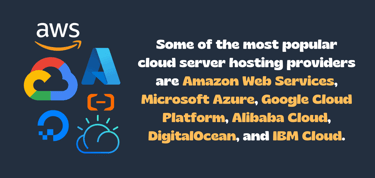
Amazon Web Services, Microsoft Azure, Google Cloud Platform, Alibaba Cloud, DigitalOcean, and IBM Cloud are the leading cloud server hosting providers by market share. While these hosts offer scalability, reliability, and powerful performance, they are not the cheapest around.
That explains why most of their clients are established companies. Some AWS clients, including Netflix, Adobe, Twitch, Pfizer, and Walt Disney, are in the Fortune 500 bracket.
Don’t let that discourage you, though; you can still get the best of the industry’s cloud hosting providers without breaking the bank. Companies such as Cloudways and AccuWebHosting have partnered with these industry titans to provide affordable cloud hosting packages to common users.
Others, such as Kamatera, Hostinger, IONOS, and Hostwinds are affordable right out of the box, even without top cloud hosting partners. Ultimately, what’s best for you doesn’t come down to pricing; it’s a question of whether the host has the resources your project needs to achieve its goal in terms of storage, compliance, and security.
Which Is the Best OS for Virtual Servers?
Linux-based operating systems have historically won the OS battle. That’s partly because Linux is an open-source OS, while Windows requires a license.
This explains why Linux-based hosting providers, including Bluehost, Hostinger, IONOS, and HostGator, have cheaper plans than their Windows counterparts, such as InterServer, GoDaddy, AccuWebHosting, and ResellerClub.
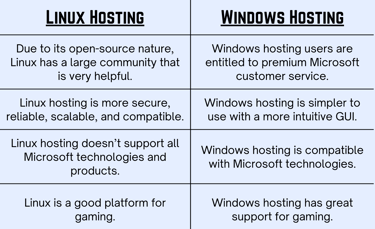
The Linux-based OS brings the triple combo of stability, high performance, and security. Windows VPS servers, sitting on the other side of the ring, perform best in environments that require compatibility with Microsoft technologies and applications. Think of ASP.Net and Microsoft SQL servers as examples.
The bottom line is that a Linux VPS server should be a great pick if you’re looking for a cheap VPS host. If your hosting project can only work with Microsoft technologies, then a Windows server is the better option. Price aside, Linux still offers more benefits and is more widely used than Windows.
Liberate Your Server from Physical Constraints
Public cloud or private cloud, Linux or Windows, cheap or expensive, on-premise or remote, does any of that really matter in the face of VMware’s virtualization technology? The answer is no. This technology has no favorites, and it splits through servers like a hot knife running through butter, giving each instance of the server a sense of freedom and independence.
You can also learn so much more about VMware and how it compares with other server virtualization technologies. Fortunately, we have quite a decent collection of resources worth checking out, starting with this guide.
And cheers to the new life of privacy, security, and freedom virtualization offers.
HostingAdvice.com is a free online resource that offers valuable content and comparison services to users. To keep this resource 100% free, we receive compensation from many of the offers listed on the site. Along with key review factors, this compensation may impact how and where products appear across the site (including, for example, the order in which they appear). HostingAdvice.com does not include the entire universe of available offers. Editorial opinions expressed on the site are strictly our own and are not provided, endorsed, or approved by advertisers.
Our site is committed to publishing independent, accurate content guided by strict editorial guidelines. Before articles and reviews are published on our site, they undergo a thorough review process performed by a team of independent editors and subject-matter experts to ensure the content’s accuracy, timeliness, and impartiality. Our editorial team is separate and independent of our site’s advertisers, and the opinions they express on our site are their own. To read more about our team members and their editorial backgrounds, please visit our site’s About page.