


If you’ve used Salesforce, Shopify, Dropbox, or Google Apps, you have experience with a product that uses SaaS hosting. I’ve worked with them all, and I’m constantly amazed at the reliability and stability of apps like Shopify and Google Apps. They support millions of users as they work on browsers, while they access software on a cloud, VPS, or dedicated server. To replicate this smooth, reliable experience, SaaS app developers need to start with a hosting plan from the best SaaS hosting providers.
Whether you’re building a productivity suite, B2B software, or a communication app, users expect to log into their accounts via a browser. All they need is an internet connection — no local software that can bog down their computers. Hosting a SaaS product, however, requires hosting without the potential for downtime, slowdowns, or security issues.
The best SaaS hosting providers cater specifically to SaaS developers whose resource requirements are constantly increasing. They can upgrade their RAM when necessary, handle spikes in traffic, and lock out the bad guys in the process. I’ve tested and reviewed the best SaaS hosting providers — both cloud and VPS hosts — for you to understand the perfect options to support your SaaS app or website.
- Navigate This Article:
Best VPS Hosting for SaaS Applications
VPS hosting serves as an excellent solution for hosting SaaS applications because of its affordability, dedicated virtual environment, and greater control over files on your server. SaaS apps often require unique server specifications and greater scalability. VPS hosting offers both, so I’ll outline the best SaaS hosting providers with virtual private servers.
1. Kamatera.com


- Best for developers: Fully customizable cloud VPS — choose your exact CPU, RAM, and storage
- Intel Xeon Platinum/Cascade Lake CPUs & NVMe SSD
- 20+ global data centers across 4 continents, with 99.95% uptime
- Hourly or monthly billing, only pay for what you use
- 30-day free trial with $100 credit — no commitment needed
- Get started on Kamatera now.


Surajdeep Singh


Backed by cutting-edge cloud computing technology, Kamatera adds instant and limitless scalability to the VPS hosting marketplace. Each cloud or virtual server is equipped with blazing-fast SSD storage and Intel’s latest Xeon Platinum/Cascade Lake, 2.7GHz+ CPUs.
Go to full review »| Disk Space | CPU | RAM | Setup Time |
| 20 GB NVMe – 4 TB NVMe | 1 – 32 cores | 1 GB – 128 GB | 5 minutes |
Kamatera specializes in VPS cloud hosting, making it one of the best SaaS hosting providers. Its servers feature unlimited scaling, flexible pricing, and data centers all around the globe. Users have control over the data center location, and they can choose everything from the RAM, processing power, and SSD storage, allowing for the utmost control for SaaS applications.
The SaaS hosting from Kamatera also provides customizations for your operating system; choose from options like Ubuntu, Windows, and Debian. Opt for add-ons like extended daily backups, custom dashboard add-ons (like Plesk or cPanel), or a managed service to control every aspect of the server. With block storage, a cloud firewall, and load balancers, you really can’t go wrong with Kamatera as your SaaS hosting provider.
2. IONOS.com

- Lowest entry price for VPS: no hidden fees, unlimited traffic, from $4.00/mo
- NVMe SSD storage, 1 Gbps connection, and 99.99% uptime
- Full root access with Linux or Windows — deploy in minutes
- Personal consultant assigned to every account after signup
- 30-day money-back guarantee and award-winning support
- Get started on IONOS now.

Christina Lewis


For an all-star player in the game of web hosting flexibility, look no further than the low-cost options from IONOS. The company’s vServers are a powerful VPS option that includes dedicated resources and unlimited traffic.
Go to full review »| Disk Space | CPU | RAM | Setup Time |
| 120 GB – 720 GB NVMe | 2 – 12 cores | 4 GB – 24 GB | 6 minutes |
IONOS sells fully virtualized servers with root access and cloud VPS and Windows VPS offerings. With perhaps some of the cheapest hosting for SaaS projects, IONOS still provides support for unlimited traffic and fast SSD NVMe storage.
The control of your VPS server from IONOS starts with choosing a data center location. After that, you select an operating system, control panel, and custom levels of RAM, CPU (vCores), and NVMe storage. I consider IONOS one of the best SaaS hosting providers, because of its affordability and control, but also due to its security with a wildcard SSL certificate, firewall, cloud backups, and DDoS protection.
3. Hosting.com

- AMD EPYC processors and NVMe SSD storage on all plans
- Full root access — install tools, containers, and custom stacks
- Choice of Ubuntu, Debian, or AlmaLinux with optional cPanel
- 10 global data centers with free CDN and 99.9% uptime SLA
- 24/7/365 in-house support — no outsourcing, no bots
- Get started on hosting.com now.
Christina Lewis
While hosting.com’s turbocharged shared hosting platform gives site owners ample room to grow, the company’s tech prowess is on full display with its portfolio of VPS options. Ranging from unmanaged, bare-metal environments to stress-free, fully managed space, hosting.com is sure to have the perfect option for your expanding online presence.
Go to full review »| Disk Space | CPU | RAM | Setup Time |
| 80 GB – 640 GB NVMe | 2 – 16 cores | 4 GB – 32 GB | 7 minutes |
Hosting.com’s managed and unmanaged VPS hosting options let SaaS app developers decide on their level of control. If you go the unmanaged route, hosting.com provides root access, your choice of operating system, and command line management. The managed VPS makes sense for many SaaS projects thanks to its intuitive cPanel dashboard and managed server security.
Hosting.com offers pre-configured VPS hosting plans. This gives you less granular control over specific features like RAM and storage, but the host has enough plans to make it a scalable experience. Each VPS hosting plan for SaaS users comes with a free SSL certificate, at least eight cores, and impressive amounts of SSD storage and RAM.

- $0.01 for the first month using code HOSTINGADV
- Price locked for life, no renewal increases, ever
- Scale instantly by adding slices — each adds 1 CPU, 2 GB RAM, 40 GB SSD
- Linux or Windows with full root access, choice of data center
- 24/7 in-house support from an independently owned provider since 1999
- Get started on InterServer now.


Sead Fadilpasic


InterServer’s on-site datacenter and hands-on involvement with configuring and provisioning virtual private servers give customers a level of flexibility not seen with many other hosting providers. InterServer rations VPS and cloud resources through slices.
Go to full review »| Disk Space | CPU | RAM | Setup Time |
| 40 GB SSD – 1280 GB SSD | 1 – 16 CPUs | 2 – 64 GB | 6 minutes |
InterServer offers cloud VPS hosting on Linux and Windows operating systems. You may also consider the InterServer storage VPS if your SaaS apps require enterprise hard disk storage. The InterServer hosting company sells VPS packages that start with one core and enough memory and storage to support a small SaaS project. After that, the plans increase to up to 16 cores.
As a developer-friendly host, InterServer provides one-click installation tools for integrations with programs like Joomla, WordPress, and Laravel. Essentially, you can build your SaaS product on any CRM (customer relationship management tool), framework, forum software, or even an eCommerce platform.
5. Bluehost.com

- Seamless migration from any Bluehost shared hosting plan
- Root access and easy multi-server management
- Ample RAID-1 storage and tons of bandwidth
- Each plan gets at least 2 dedicated IP addresses
- cPanel and WHM with root access
- Get started on Bluehost now.
Sead Fadilpasic
We love recommending Bluehost for its lifetime customer growth potential, meaning you can start with shared hosting and seamlessly scale to VPS hosting plans and beyond. The price versus performance is pretty unbeatable in the virtual hosting space, and Bluehost’s engineering team will kick off the customer relationship by instantly provisioning your server.
Go to full review »| Disk Space | CPU | RAM | Setup Time |
| 50 GB – 450 GB NVMe | 1 – 8 cores | 2 GB – 16 GB DDR5 | 6 minutes |
For an affordable and reliable SaaS hosting experience, Bluehost sells multiple VPS hosting plans with increasing RAM, CPU power, and SSD storage. The packages include unmetered bandwidth and a cPanel license to control your server environment with ease.
Bluehost offers multi-server management for handling multiple SaaS servers on one account, and you have root access to the VPS server through FTP (file transfer protocol). Although it has fewer customization options than other providers on the list, Bluehost enables SaaS developers to minimize costs while maintaining significant control and dedicated power.

- Best overall value: The most complete AI-managed KVM VPS at this price
- AMD EPYC processors, NVMe SSD, and 1 Gbps network
- Kodee AI manages your server — no command line needed
- One-click deployment of 100+ apps including Docker and n8n
- Free weekly backups, DDoS protection, and full root access
- Get started on Hostinger now.
Sead Fadilpasic
Hostinger’s laser focus on providing affordable hosting solutions shines brightest with the company’s VPS packages. The company provides four different virtual server plans, including one that costs less than $6.
Go to full review »| Disk Space | CPU | RAM | Setup Time |
| 50 GB NVMe – 400 GB NVMe | 1 – 8 cores | 4 GB – 32 GB | 6 minutes |
The VPS hosting from Hostinger features root access and an artificial intelligence assistant to manage everything from automatic backups to a real-time snapshot of your server. The cheap hosting comes in many plans depending on how many cores you need, and for you to decide on levels of bandwidth, NVMe storage, and RAM.
The VPS plans from Hostinger also provide a malware scanner to protect your server (and the SaaS apps on it). You can expect a dedicated IP address, too, for greater security when compared to a shared IP address.

- HostingAdvice readers get 74% off the first term
- FREE site migrations and 2 hours of Launch Assist
- 2 – 3 dedicated IP address options
- SSH and DDoS protection included
- Highly available servers with real-time redundancy
- Get started on InMotion now.

Dave McQuilling


Boasting market-leading VPS hardware, slick management software, and free SSD drives and backups, InMotion Hosting competes to win when it comes to managed VPS hosting packages. The host initiates its VPS customer relationship with free website migrations and up to two hours of launch assistance from an experienced sysadmin.
Go to full review »| Disk Space | CPU | RAM | Setup Time |
| 30 GB – 540 GB SSD (or NVMe) | 2 – 16 cores | 1 GB – 32 GB | 6 minutes |
InMotion Hosting caters to SaaS development and hosting with its speedy, performance-oriented VPS plans. The host has a large collection of VPS plans to choose from, all of which provide built-in redundancy (to avoid disruptions) and an eCommerce-optimized server for protection of payment and personal data.
Choose from multiple data center locations when you opt for a VPS from InMotion Hosting. You also get features like DDoS protection, your choice of control panel, and a free SSL certificate. Top it off with multiple dedicated IP addresses to make InMotion Hosting one of the best SaaS hosting providers on the market.
Best Cloud Hosting for SaaS Applications
Some hosts offer a combination of cloud and VPS hosting. Others have specific cloud hosting with features and scalability measures perfect for SaaS projects. I’ve compiled the best SaaS hosting providers with cloud plans below.
8. Kamatera.com
- Best for developers and devops teams needing full control
- Deploy in 60 seconds across 20 global data centers
- Fully customizable: 1–32 cores, 1–128 GB RAM, NVMe SSD
- Hourly or monthly billing — scale up or down anytime
- 99.95% uptime with built-in firewall and load balancing
- 30-day free trial, no charge if canceled
- Get started on Kamatera now.


Surajdeep Singh
Starting with more than 60 operating system images to choose from, Kamatera is a strong option for developers who know exactly what environment works best for their project. Customize your cloud server as needed and deploy in less than a minute.
Go to full review »| Disk Space | CPU | RAM | Setup Time |
| 20 GB NVMe – 4 TB NVMe | 1 – 32 cores | 1 GB – 128 GB | 5 minutes |
Along with its VPS hosting packages, Kamatera elevates the SaaS hosting game with cloud servers built with unlimited scaling and reliable speeds. You can expect 99.95% uptimes and fast loading for your SaaS apps. It’s all because of the Ice Lake processors and NVMe SSDs.
Kamatera’s virtualized plans utilize cloud technology. You can opt for a straightforward plan with Kamatera’s preset packages, or if your organization needs more, you can fully customize the cloud server. The customized plans let you decide everything from RAM and vCPU to the number of public IPs and data center location.
9. IONOS.com
- Start with $200 in credit for your first month
- Intel Xeon processors, Linux or Windows, full root access
- Scale instances up or down with no downtime
- By-the-minute billing — only pay for what you use
- 99.99% uptime, ISO 27001-certified data centers
- Get started on IONOS now.

Christina Lewis
Boasting 99.998% platform availability, the popular cloud hosting services from IONOS deploy more than 2,500 virtual machines each week. Customers flock to the host for its cutting-edge hardware, georedundant network, and always-there support.
Go to full review »| Disk Space | CPU | RAM | Setup Time |
| 120 GB – 720 GB NVMe | 1 – 24 cores | 512 MB – 48 GB | 6 minutes |
With IONOS, users have the option to host their SaaS products on Windows or Linux cloud servers. Each server uses virtualization software to improve performance and make it easy for users to gain root access from any location.
You can choose specific levels of CPU, RAM, and SSD, and even consider a pay-as-you-go plan for greater budget flexibility. Kamatera’s cloud hosting simplifies managing multiple SaaS servers. You can also pick the data center location and use features like block storage, load balancers, and VMware.
10. Cloudways.com

- Choose from AWS, Google Cloud, DigitalOcean, Vultr, or Linode
- Auto-healing servers with automated backups and free SSL
- 60+ global data center locations
- Pay-as-you-go — no contracts, cancel anytime
- 3-day free trial, no credit card required
- Get started on Cloudways now.

Jack Wallen


If you can’t beat the cloud provider behemoths, offer their infrastructure as a service. Cloudways gives customers their choice of cloud platform: AWS, Google, Linode, Digital Ocean, or Vultr.
Go to full review »| Disk Space | CPU | RAM | Setup Time |
| 25 GB SSD – 3840 GB SSD | 1 – 32 cores | 1 GB – 192 GB | 8 minutes |
Cloudways, a specialty cloud hosting platform, functions as a user-friendly hosting control panel to tap into some of the fastest, most reliable cloud hosting systems worldwide. SaaS developers choose between DigitalOcean, AWS, and Google Cloud. Those providers typically require advanced server management skills, but Cloudways puts them into a managed hosting experience.
These plans give you complete control over data center location, RAM, processor, storage, and bandwidth. Cloudways not only offers competitive pricing but also provides a wide variety of plans that make scaling easy, no matter the size of your SaaS project.
11. Hostwinds.com

- 99.9999% uptime guarantee with redundant network
- Hourly billing — deploy and scale in seconds
- Full root access, custom OS or 1-click app installs
- Nightly backups, snapshots, and enterprise firewall included
- 24/7/365 support with free website migration
- Get started on Hostwinds now.
Jack Wallen
Hostwinds provides supremely scalable and customizable options for the savvy developer or site owner. Customers can customize their cloud environment or choose pre-built configurations optimized to run apps like WordPress, Drupal, and others.
Go to full review »| Disk Space | CPU | RAM | Setup Time |
| 30 GB SSD – 750 GB SSD | 1 – 16 cores | 1 – 96 GB | 6 minutes |
Hostwinds prices out its cloud hosting service per hour. This way, you control your budget and understand the effects of higher levels of RAM and storage on your wallet. This type of configuration eases pressure to maintain the proper amount of scaling, and it ensures that all SaaS apps and websites remain functional during peak hours.
Hostwinds uses solid-state drives and gigabit ports for impressive speeds. You can also choose from multiple data centers and look at daily snapshots to understand the status of your server and how your SaaS app performs.
12. Hostinger.com
- Managed cloud with 20x more resources than shared hosting
- LiteSpeed servers, NVMe SSD, and built-in CDN
- Daily backups, DDoS protection, and free SSL
- Free website migration — usually done in 20 minutes
- Priority 24/7 support via live chat
- Get started on Hostinger now.
Sead Fadilpasic
Hostinger offers something for everyone. From two cloud hosting plans that leverage the company’s global datacenter presence to a premium service powered by Google Cloud Platform, you’re sure to find what you need.
Go to full review »| Disk Space | CPU | RAM | Setup Time |
| 50 GB NVMe – 400 GB NVMe | 4 – 12 cores | 4 – 12 GB | 6 minutes |
Hostinger sells a cloud hosting service that offers increased speeds and a highly optimized server to handle hundreds of SaaS apps and websites. You can opt for a managed WordPress hosting experience or use the no-code website builder with hundreds of website templates.
Security matters when hosting a SaaS product. Hostinger protects your SaaS apps with an onslaught of security measures. Those include enhanced DDoS protection, Cloudflare-protected nameservers, and a secure access manager. You also get a malware scanner and domain WHOIS privacy protection. All of this makes Hostinger one of the best SaaS hosting providers around.
13. InterServer.net
- Price-lock guarantee — your rate never increases at renewal
- Linux or Windows, with cPanel, DirectAdmin, or custom panel
- Self-healing cloud infrastructure with SSD storage
- Free SSL, DDoS protection, and 24/7 support included
- Pay $.01 the first month with HOSTINGADV coupon
- Get started on InterServer now.
Sead Fadilpasic
InterServer’s on-site datacenter and hands-on involvement with configuring and provisioning cloud servers give customers a level of flexibility not seen with many other hosting providers. InterServer rations its VPS and cloud resources through slices….
Go to full review »| Disk Space | CPU | RAM | Setup Time |
| 40 GB SSD – 1280 GB SSD | 1 – 16 CPUs | 2 – 64 GB | 6 minutes |
InterServer manages multiple cloud servers in its data centers, and you can choose specific use cases for your SaaS application. For instance, you may want to consider the cloud-based managed WordPress hosting from InterServer. Alternatively, InterServer has Windows, Webuzo, and storage hosting from the cloud.
InterServer cloud hosting enables you to tap into hundreds of one-click installations for software like Bootstrap, HTML Purifier, and FuelPHP. InterServer also provides access to your servers at any time, allowing you to manage files, folders, and databases from any device and any location.
What Is SaaS Hosting?
SaaS (software-as-a-service) hosting can mean two things: a web host that offers a browser-based cloud dashboard to access its server or a hosting company with servers and resources dedicated to developers selling their own browser-based software (SaaS software).
Since the vast majority of web hosting companies provide browser-based interfaces, it’s generally accepted that SaaS hosting refers to hosting companies that cater to SaaS developers who need to put their project files on a server.
While you can host a SaaS application on any server, opting for a VPS or cloud-based hosting is often the better choice. Dedicated servers can work, but they tend to be costlier and demand more time and resources for management.
Therefore, SaaS hosting usually provides scalability and flexibility in the form of VPS or cloud hosting. These options provide customization for the RAM, SSD storage, and server location, along with scalability for when the SaaS app requires more power. Along with affordable yet powerful hardware, SaaS hosting typically offers full access to the server and cloud control.
Which Type of Server Is Best for SaaS?
If you’re looking to host a SaaS website or app, explore options like cloud-based, VPS, or dedicated servers. Many VPS hosting accounts include cloud servers, so it’s wise to check if your preferred host provides this setup.
The goal of hosting a SaaS app is to maximize scalability and flexibility. SaaS products run entirely on the cloud — with users accessing the software through a browser — leading to significant fluctuations in server demands. Your server must handle spikes in usage.
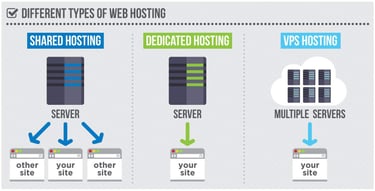
A cloud-based server also provides powerful security for data protection, which comes into play when hosting SaaS products that accept payments online, or when you collect user profile information. In addition, cloud servers have the advantage of remaining more affordable than alternatives like dedicated servers. Having said that, any type of hosting technically works to host a SaaS product.
Many shared hosting accounts offer the scalability and resource levels needed for smaller SaaS products. You can host a SaaS app on virtual private servers for an affordable, isolated server environment. Many VPS hosts use cloud servers, too.
Dedicated servers work as a wonderful choice for the right amount of security, control, and scalability often necessary to run a SaaS program. But dedicated servers are expensive, and they require someone in your company to configure and maintain the server.
Which Is the Best Cloud Server Host?
The best cloud server host offers a high level of scalability, allowing brands to increase their server resources as a SaaS product grows. You should also look for a cloud host with advanced security measures, easy access to the cloud dashboard, and integrations with programs required to operate your SaaS product efficiently. Finally, cloud server hosts vary in pricing, so you should compare them to understand which fits into your overall budget.
When you’re considering price, security, scalability, and overall features, cloud hosting providers like Kamatera, IONOS, Cloudways, Hostwinds, Hostinger, and InterServer offer some of the best value around.
- Best for developers and devops teams needing full control
- Deploy in 60 seconds across 20 global data centers
- Fully customizable: 1–32 cores, 1–128 GB RAM, NVMe SSD
- Hourly or monthly billing — scale up or down anytime
- 99.95% uptime with built-in firewall and load balancing
- 30-day free trial, no charge if canceled
- Get started on Kamatera now.
Surajdeep Singh
Starting with more than 60 operating system images to choose from, Kamatera is a strong option for developers who know exactly what environment works best for their project. Customize your cloud server as needed and deploy in less than a minute.
Go to full review »| Disk Space | CPU | RAM | Setup Time |
| 20 GB NVMe – 4 TB NVMe | 1 – 32 cores | 1 GB – 128 GB | 5 minutes |
Kamatera, for instance, offers instant upgrades for any rapidly growing SaaS project. It also grants customization options for server settings like CPU, RAM, and SSD storage. The best approach is to check the websites for each host, then mark down which fall into your budget and provide the features necessary to help your SaaS app grow without limits.
How Much Does It Cost to Host a SaaS Application?
The cost to host a SaaS application depends on the hosting provider, but pricing can start below $5 per month and go above $100 per month. The pricing changes based on a myriad of factors, including CPU usage, data transfer speeds, storage requirements, and the features that come with your server.
For larger SaaS applications, and for those with higher levels of traffic, look for one of the best SaaS hosting providers to maintain increased levels of scalability, security, and control. The higher your app’s demands, the higher the cost becomes. Some large-scale SaaS applications may need to pay thousands of dollars per month for hosting services.
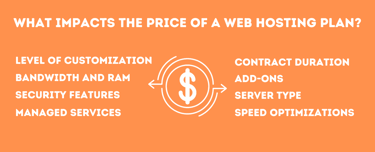
Additional costs come into play, too. Not every SaaS application needs these extra features, but it’s wise to consider products and services for advanced security, data backups, and software integrations in the overall price.
Some of the best SaaS hosting providers offer set pricing plans that allow you to pick a monthly price and receive whatever features are included with the plan. Other SaaS hosts have customized plans for the utmost control over your server.
How Do I Choose a SaaS Host?
Choosing a SaaS host doesn’t have to be hard. Follow these steps to figure out which plan is right for you.
Step 1: The first area to consider when choosing a SaaS host involves scalability. SaaS apps demand flexibility due to traffic spikes and changes in usage; your hosting provider must have upgradable servers to accommodate those changes.
Step 2: Next up, look into server speed, reliability, and overall performance of the host. You can typically understand what a SaaS host offers based on its server hardware and software. Look for NVMe SSD storage, ever-increasing RAM levels, and data centers near your customers.
Step 3: Security is yet another factor to keep in mind when choosing a SaaS host. Make sure the potential SaaS host has a wide range of security features implemented on your server. Essentials include consistent app, website, and data backups, along with firewalls, DDoS protection, and data encryption.
Step 4: Finally, take cost and customer support into consideration. Though features should always come before price when choosing a SaaS host, skip the hosts that fall way outside of your budget. Look into the host’s customer support resources as well. Does it provide significant online documentation for you to solve server problems on your own? Are the customer support reps available through phone, email, and live chat?
If you’re still unsure about how to choose the right host, purchase a plan from a provider that offers a money-back guarantee. This lets you try the web host at no risk.
My Final Thoughts on the Best SaaS Hosting Providers
There’s no doubt that to host a SaaS app you need scalability and reliability. Although shared hosting can support tiny SaaS projects, the ideal SaaS server environment lives on a VPS or cloud server.
During my research, I found VPS and cloud hosting options like hosting.com and InMotion suitable for affordable hosting without the need to customize much. Hosting services like IONOS, Cloudways, and Kamatera, however, let you select every detail about your VPS or cloud server.
No matter what you’re looking for, I invite you to check out all the options I’ve suggested for hosting your SaaS app confidently into the future.
HostingAdvice.com is a free online resource that offers valuable content and comparison services to users. To keep this resource 100% free, we receive compensation from many of the offers listed on the site. Along with key review factors, this compensation may impact how and where products appear across the site (including, for example, the order in which they appear). HostingAdvice.com does not include the entire universe of available offers. Editorial opinions expressed on the site are strictly our own and are not provided, endorsed, or approved by advertisers.
Our site is committed to publishing independent, accurate content guided by strict editorial guidelines. Before articles and reviews are published on our site, they undergo a thorough review process performed by a team of independent editors and subject-matter experts to ensure the content’s accuracy, timeliness, and impartiality. Our editorial team is separate and independent of our site’s advertisers, and the opinions they express on our site are their own. To read more about our team members and their editorial backgrounds, please visit our site’s About page.