




The host at your favorite restaurant plays an essential role in your dining experience on a busy Saturday night. They direct guests to the appropriate place and ensure everything flows smoothly and no single server gets overloaded with diners. A load balancer works similarly, directing requests to the right place to avoid too much traffic at the same time and place.
The best load balancer hosting plans are used for cloud network management in elastic cluster server frameworks and content delivery networks (CDNs). Like a host manages a seating arrangement, a load balancer inspects traffic requests and routes them to the hardware with the most processing resources available.
This guide rates the best VPS and cloud hosting plans with load-balancing software pre-installed. Most web hosting companies include load-balancing software for free on managed service platforms, with more advanced options available through a CDN service. If you need load-balancing solutions, read on.
- Navigate This Article:
Best VPS Hosting Plans With Load Balancers
Your hardware needs to operate at top speeds to run a load balancer at the front of all cloud server requests. As most load balancer hosting plans run under virtualization, you can configure them with scalable amounts of RAM or vCPUs.
The hosting plans listed below give cloud network administrators the most options for the configuration of multi-node cluster servers, edge server networks, and multiple datacenters.
1. Kamatera.com


- Best for developers: Fully customizable cloud VPS — choose your exact CPU, RAM, and storage
- Intel Xeon Platinum/Cascade Lake CPUs & NVMe SSD
- 24 global data centers across 4 continents, with 99.95% uptime
- Hourly or monthly billing, only pay for what you use
- 30-day free trial with $100 credit — no commitment needed
- Get started on Kamatera now.


Surajdeep Singh


Backed by cutting-edge cloud computing technology, Kamatera adds instant and limitless scalability to the VPS hosting marketplace. Each cloud or virtual server is equipped with blazing-fast SSD storage and Intel’s latest Xeon Platinum/Cascade Lake, 2.7GHz+ CPUs.
Go to full review »| Disk Space | CPU | RAM | Setup Time |
| 20 GB NVMe – 4 TB NVMe | 1 – 32 cores | 1 GB – 128 GB | 5 minutes |
Kamatera has the most advanced autonomous load balancer plans based on VMs with various vCPUs and RAM. The load balancer allows administrators to add multicloud resources across multiple datacenters and service providers.
Kamatera also lets you choose which load-balancing algorithm to use. The default is “Round Robin” and operates via IP address. By signing up with Kamatera’s VPS hosting plan, you get 30 days of free hosting to test the platform’s load balancer.
2. IONOS.com

- Lowest entry price for VPS: no hidden fees, unlimited traffic, from $2/mo
- NVMe SSD storage, 1 Gbps connection, and 99.99% uptime
- Full root access with Linux or Windows — deploy in minutes
- Personal consultant assigned to every account after signup
- 30-day money-back guarantee and award-winning support
- Get started on IONOS now.

Christina Lewis


For an all-star player in the game of web hosting flexibility, look no further than the low-cost options from IONOS. The company’s vServers are a powerful VPS option that includes dedicated resources and unlimited traffic.
Go to full review »| Disk Space | CPU | RAM | Setup Time |
| 10 GB NVMe – 720 GB NVMe | 1 – 12 cores | 1 GB – 24 GB | 6 minutes |
The IONOS load balancer is not a plan itself but can be installed on a VM to manage a multi-cluster server on hardware in a single datacenter.
The service operates on the basis of IP address assignments and applies the principles of SDN to IONOS hardware for high-traffic websites and mobile apps. The included options are for Round Robin and Least Connection algorithms.

- Windows Server 2019, 2022 & 2025 — fully licensed on all plans
- SSD storage, guaranteed resources, and 1 Gbps port included
- Free daily backups and RDP access on every plan
- 16+ global locations — deploy close to your users
- 24/7/365 live support and 99.9% uptime guarantee
- Get started on AccuWebHosting.

Jack Wallen


The signature service of AccuWebHosting, the company’s VPS plans come in all shapes, sizes, and operating systems. Blending quality and affordability, AccuWebHosting plans start at less than $7 per month — roughly half of what you’ll find elsewhere.
Go to full review »| Disk Space | CPU | RAM | Setup Time |
| 40 GB – 200 GB SSD | 1 – 4 cores | 1 GB – 16 GB | 6 minutes |
AccuWebHosting’s servers can be configured with load balancing as an add-on for its managed hosting. The AccuWebHosting load balancer plan distributes fault tolerance across multiple web servers in a single facility using the Round Robin algorithm for routing by default.
AccuWebHosting’s VPS plans pack a punch with free add-ons like daily backups and a secure firewall. Plans with load balancing start at $30 monthly but will not support integration with multiple datacenters or cloud service providers.
4. Vultr
Vultr offers a load balancer add-on that’s compatible with all its hosting products, although the servers must be located in the same region. The Vultr Load Balancer is designed for building multi-cluster servers that scale to web traffic with a specific capacity of nodes.

Vultr uses HAProxy for load balancing and will support up to 15,000 simultaneous connections per node. Plus, it’s easy to add load balancers to your existing plan. Vutlr instantly activates your service after purchase.
5. OVHcloud
OVHcloud offers a load balancer add-on for its VPS hosting that will support multiple datacenters for high-availability applications with demanding uptime guarantees. The plan is currently priced at $22.99 per month.
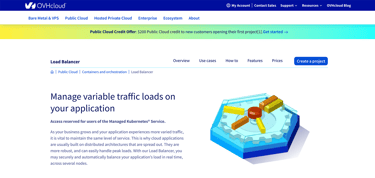
The limit for VPS cluster servers in a network is 16 additional IP addresses. OVHcloud load balancing is built for high-traffic web mobile apps, such as heavy SaaS applications and eCommerce sites.
Best Cloud Hosting Plans With Load Balancers
If a virtual private server doesn’t suit you, you may prefer the cloud instead. Cloud environments maximize scalability and performance and offer a convenient pay-as-you-go pricing model.
Managed cloud hosting platforms include advanced load-balancing engineering across multiple datacenters for uptime requirements, RAID backup support, and network performance optimization. Load balancers also integrate with anti-virus scanning and anti-DDoS protection.
The managed cloud hosting plans listed below include advanced load-balancing options as part of the datacenter architecture. Some of the plans include load-balancing options for multicloud hardware support. Check them out to see if one of these cloud hosts is a good fit for your next application.
6. Kamatera.com
- Best for developers and devops teams needing full control
- Deploy in 60 seconds across 20 global data centers
- Fully customizable: 1–32 cores, 1–128 GB RAM, NVMe SSD
- Hourly or monthly billing — scale up or down anytime
- 99.95% uptime with built-in firewall and load balancing
- 30-day free trial, no charge if canceled
- Get started on Kamatera now.


Surajdeep Singh
Starting with more than 60 operating system images to choose from, Kamatera is a strong option for developers who know exactly what environment works best for their project. Customize your cloud server as needed and deploy in less than a minute.
Go to full review »| Disk Space | CPU | RAM | Setup Time |
| 20 GB NVMe – 4 TB NVMe | 1 – 32 cores | 1 GB – 128 GB | 5 minutes |
The Kamatera Load Balancer plan is an autonomous VM installed with the control panel for adding servers via IP address. The Kamatera service supports streaming data across datacenters by implementing the HTTP, HTTPS, TCP, and UDP protocols.
You can also use SSL offloading to process data at faster rates for microservice apps, storage, and machine learning.
7. IONOS.com
- Start with $200 in credit for your first month
- Intel Xeon processors, Linux or Windows, full root access
- Scale instances up or down with no downtime
- By-the-minute billing — only pay for what you use
- 99.99% uptime, ISO 27001-certified data centers
- Get started on IONOS now.

Christina Lewis
Boasting 99.998% platform availability, the popular cloud hosting services from IONOS deploy more than 2,500 virtual machines each week. Customers flock to the host for its cutting-edge hardware, georedundant network, and always-there support.
Go to full review »| Disk Space | CPU | RAM | Setup Time |
| 10 GB NVMe – 720 GB NVMe | 1 – 24 cores | 512 MB – 48 GB | 6 minutes |
IONOS cloud load balancing allows admins to interlink VMs into a single multi-cluster server supporting multi-domain publishing. The IONOS Cloud Managed Network Load Balancer has configuration options for Round Robin, Least Connection, Source IP, or Random web traffic routing.
IONOS is a trusted provider in the hosting industry, so it’s no surprise the company continues its tradition of quality with its load-balancing options.

- Choose from AWS, Google Cloud, DigitalOcean, Vultr, or Linode
- Auto-healing servers with automated backups and free SSL
- 60+ global data center locations
- Pay-as-you-go — no contracts, cancel anytime
- 3-day free trial, no credit card required
- Get started on Cloudways now.

Jack Wallen
If you can’t beat the cloud provider behemoths, offer their infrastructure as a service. Cloudways gives customers their choice of cloud platform: AWS, Google, Linode, Digital Ocean, or Vultr.
Go to full review »| Disk Space | CPU | RAM | Setup Time |
| 20 GB SSD – 4 TB SSD | 1 – 96 cores | 1 GB – 384 GB | 8 minutes |
With Cloudways you can run your root server with Cloudflare CDN integration for anti-virus and anti-DDoS protection. This add-on comes with all hosting packages and includes load balancing for edge server networks.
The Cloudflare CDN has caching locations in more than 100 countries worldwide. The software routes your website’s traffic to the closest local cache for enhanced page speeds, helping improve performance and search engine ranking.

- 99.9999% uptime guarantee with redundant network
- Hourly billing — deploy and scale in seconds
- Full root access, custom OS or 1-click app installs
- Nightly backups, snapshots, and enterprise firewall included
- 24/7/365 support with free website migration
- Get started on Hostwinds now.
Jack Wallen
Hostwinds provides supremely scalable and customizable options for the savvy developer or site owner. Customers can customize their cloud environment or choose pre-built configurations optimized to run apps like WordPress, Drupal, and others.
Go to full review »| Disk Space | CPU | RAM | Setup Time |
| 30 GB SSD – 750 GB SSD | 1 – 16 cores | 1 – 96 GB | 6 minutes |
Hostwinds has a load balancer add-on for cloud hosting that includes continual health monitoring on your virtual machines. Its proxy protocol support enables multicloud hardware networking through dedicated IP addresses and HAProxy.
Hostwinds load balancing operates on VM configurations that can scale with your web traffic requirements, making it a smart choice for applications of any size. Pricing for the add-on starts at $10 per month.
10. LiquidWeb.com

- Best for businesses that can’t afford downtime
- 100% uptime SLA — network and power guaranteed
- AMD EPYC processors with Cloudflare CDN included
- Acronis backups and DDoS protection built in
- 24/7 Heroic Support® via phone, chat, and email
- Get started on Liquid Web now.
Christina Lewis
Liquid Web balances managed services and hardware power with cloud flexibility — a brilliant solution in cloud hosting. The company’s packages include instant provisioning, CloudFlare CDN, built-in backups, and, of course, the reliability of the Heroic…
Go to full review »| Disk Space | CPU | RAM | Setup Time |
| 30 GB SSD – 440 GB SSD | 1 – 6 cores | 1 GB – 16 GB | 7 minutes |
Liquid Web’s cloud-based dedicated servers come with load balancers and an option to deploy as a VMware private cloud. These configurations will support the world’s most demanding SaaS and eCommerce applications.
Free Cloudflare CDN integration is another standard option on all Liquid Web dedicated server plans for even faster speeds. With Liquid Web, your site can handle heavy traffic without slowdowns or uptime disruptions.
11. Hetzner
Hetzner offers a load balancer add-on that is designed to work with its Cloud Networks platform. The service includes server health checks, high availability, proxy protocol support, and TLS termination for resource conservation.
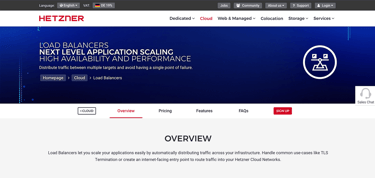
Hetzner’s load balancing services run with Round Robin and Least connections as the main algorithms for configuration options. If you choose Hetzner, you can expect supreme performance and high availability.
What Is Load Balancing?
Load balancing involves monitoring network traffic requests to datacenter hardware to optimize performance or decrease the risk of crashes by overloading servers.
In our previous analogy, we compared a restaurant host to a load balancer. Each plays a role in directing traffic to an available resource (whether it be diners to a table or packets to a cloud server).
A load balancer routes network traffic requests to the hardware units with the highest available processing capacity. Distribution of traffic requests allows multi-cluster nodes to function. The load balancer also supports hardware across multiple datacenter locations.
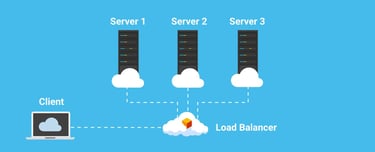
Benefits of Load Balancing:
- Elastic Automation: Multicloud Network Hardware
- Web Traffic Monitoring: Anti-Virus & Anti-DDoS Protection
- Web Server Hardware: Performance Optimization
- HTTP Caching: Including TLS Certificate Acceleration
- Scheduling Algorithms: Priority Queues & Firewalls
Most web hosting users can rely on load balancing provided by their web host with the purchase of a plan. However, you can also use multicloud networking from different vendors with load balancing to guarantee uptime.
Which Load Balancing Algorithm Is Best?
Hosting providers use algorithmic routing with machine learning to apply load balancing in the most advanced systems. Security companies use massive data sets from datacenter monitoring to train systems. These systems then detect bad actors and malicious requests.
This method is beneficial in anti-virus and anti-DDoS systems. AI-based systems are best for optimizing load-balancing algorithms for security.
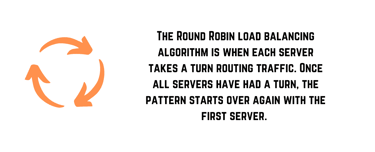
Load Balancing for Web/Mobile Applications:
- Traditional approaches to load balancing have involved Round Robin scheduling, where requests are routed to web server hardware like a card dealer.
- Static distribution algorithms calculate the time each request will take to complete on the hardware or route to the optimal web server based on the least connections.
- Service mesh systems include monitoring of the available RAM, CPU, and bandwidth resources of a web server with the load balancer routing to servers with the most idle capacity. Traefik and Prometheus use service mesh functionality for better metrics.
Other algorithms used in load balancing implement randomization with resource usage assessment calculated in real time. The hardware used for load balancers needs to be as fast as possible with backup options if the resources of the load balancer become overloaded by traffic requests. A crash of a load balancer system defeats the purpose of creating fault tolerance in multicloud networks.
Which Load Balancer Is Best for Microservices?
With microservice applications, using DNS routing with load balancing allows for more complex network configurations for software development requirements. The “best” load balancer really depends on what software you are using for multicloud orchestration and the web server framework.
Generally speaking, some of the best load balancer solutions on the market today are:
- AWS Elastic Load Balancing: Used with EC2 & container systems.
- Azure Traffic Manager: Recommended for multi-datacenter support.
- HAProxy: Advanced proxy options for TCP & HTTP-based applications.
- Traefik: An open-source Kubernetes-native API management solution.
- NGINX: Reverse-proxy load balancing on web server requests.
- Varnish: Cache web pages, files, and downloads with reverse proxy.
Reverse proxy caching improves the functioning of CMS websites and other scripts by limiting the need to repeat common requests on a web server. HAProxy is the most robust solution for the SDN requirements of microservice development.
For best practices, we recommend using edge server networks with NGINX, webpage caching with Varnish, and Traefik for Kubernetes node servers. But you should know that Varnish Cache requires OpenTSDB as a dependency for web server monitoring.
How Do I Choose the Right Hosting Plan With Load Balancers?
If you need an application load balancer for a website or mobile application with high traffic that scales past what a single server will support, Google Cloud, Amazon Web Services (AWS), and Cloudflare load balancing are the best public cloud options for enterprise organizations.
You can use Microsoft Azure for hybrid cloud requirements to access OpenAI and other machine learning platforms. All of these hyper-scale service providers will include a hardware load balancer in the datacenter with the option to add a gateway load balancer for cluster servers.
Server load balancing will depend on the total level of application traffic with the goals of high availability and total uptime. A load balancing solution on a multi-cluster server network or virtual private cloud will need to match the global load of web traffic requests with an application delivery controller for the backend server requirements. You can do this with VM or VPS configuration.

Cloud load balancing will outperform a dedicated server, even with reverse proxy caching enabled, and is usually not required for WordPress website hosting with CDN integration.
A software load balancer is best suited to support multiple servers in cloud computing driven by virtualization. The elasticity allows your hardware to scale up and down automatically with traffic, meaning your application will perform well no matter how many visitors you have.
Building Individualized Load Balancing Solutions
With the range of load-balancing solutions on the market, customers have plenty of options for WordPress sites and enterprise applications alike.
Google Cloud, Amazon Web Services (AWS), and Azure Load Balancer solutions are world-class and are used for some of the most demanding enterprise workloads in the industry. If you need to load balance high levels of web traffic in a multi-cluster server network, the best load balancing software may be an independent solution like HAProxy or LoadMaster Load Balancer.
For alternatives to public cloud prices, Kamatera, IONOS, and InterServer are the top options. They deliver reliable load balancer services for running software with high availability on multi-cluster servers in their datacenters.
No matter your application requirements, one of the above providers has a load-balancing solution that can meet your needs.
HostingAdvice.com is a free online resource that offers valuable content and comparison services to users. To keep this resource 100% free, we receive compensation from many of the offers listed on the site. Along with key review factors, this compensation may impact how and where products appear across the site (including, for example, the order in which they appear). HostingAdvice.com does not include the entire universe of available offers. Editorial opinions expressed on the site are strictly our own and are not provided, endorsed, or approved by advertisers.
Our site is committed to publishing independent, accurate content guided by strict editorial guidelines. Before articles and reviews are published on our site, they undergo a thorough review process performed by a team of independent editors and subject-matter experts to ensure the content’s accuracy, timeliness, and impartiality. Our editorial team is separate and independent of our site’s advertisers, and the opinions they express on our site are their own. To read more about our team members and their editorial backgrounds, please visit our site’s About page.